> ## Documentation Index
> Fetch the complete documentation index at: https://docs.restate.dev/llms.txt
> Use this file to discover all available pages before exploring further.
# Langfuse
> Trace and monitor your Restate AI agents with Langfuse. Get full visibility into LLM calls, tool executions, and workflow steps.
export const GitHubLink = ({url}) => ;
Combine Restate and [Langfuse](https://langfuse.com/) to get full observability into your agent executions.
Langfuse traces every LLM call, tool invocation, token usage, and cost.
Restate traces every durable step, so you see agentic steps alongside regular workflow steps in a single trace.
You don't need to change your agent code. You only add the Langfuse instrumentation to your entry point.
Learn more about Langfuse's observability, prompt management, and evaluation features.
## Instrumentation setup
Select your Agent SDK:
Initialize the Langfuse client and wrap the OpenTelemetry tracer with `RestateTracer` to correlate AI spans with Restate's execution journal:
```python __main__.py {"CODE_LOAD::https://raw.githubusercontent.com/restatedev/ai-examples/refs/heads/main/openai-agents/examples/langfuse/__main__.py#here"} theme={null}
from langfuse import get_client
from opentelemetry import trace as trace_api
from openinference.instrumentation import OITracer, TraceConfig
from openinference.instrumentation.openai_agents._processor import (
OpenInferenceTracingProcessor,
)
from agents import set_trace_processors
from restate.ext.tracing import RestateTracer
# Initialize Langfuse (sets up the global OTEL tracer provider + exporter)
langfuse = get_client()
tracer = OITracer(
RestateTracer(trace_api.get_tracer("openinference.openai_agents")),
config=TraceConfig(),
)
set_trace_processors([OpenInferenceTracingProcessor(tracer)])
```
**Prerequisites**: [Langfuse account and API key](https://langfuse.com/), [OpenAI API key](https://platform.openai.com/api-keys), [Restate installed](/installation).
Get the example:
```bash theme={null}
restate example python-openai-agents-examples && cd python-openai-agents-examples/langfuse
```
Add your API keys to an `.env` file:
```bash theme={null}
echo 'LANGFUSE_PUBLIC_KEY=pk-lf-...' > .env
echo 'LANGFUSE_SECRET_KEY=sk-lf-...' >> .env
echo 'LANGFUSE_BASE_URL=https://cloud.langfuse.com' >> .env
echo 'OPENAI_API_KEY=sk-proj-...' >> .env
```
Start the agent service:
```bash theme={null}
uv run --env-file .env .
```
Start Restate with Langfuse tracing:
```bash theme={null}
source .env
export RESTATE_TRACING_HEADERS__AUTHORIZATION="Basic $(echo -n "${LANGFUSE_PUBLIC_KEY}:${LANGFUSE_SECRET_KEY}" | base64)"
restate-server --tracing-endpoint otlp+https://cloud.langfuse.com/api/public/otel/v1/traces
```
Go to the Restate UI at `http://localhost:9070`, register the service at `http://localhost:9080`, click on the handler to go to the playground, and send the default request.
Initialize the Langfuse client and instrument Google ADK with `RestateTracerProvider` to correlate AI spans with Restate's execution journal:
```python __main__.py {"CODE_LOAD::https://raw.githubusercontent.com/restatedev/ai-examples/refs/heads/main/google-adk/examples/langfuse/__main__.py#here"} theme={null}
from langfuse import get_client
from opentelemetry import trace as trace_api
from openinference.instrumentation.google_adk import GoogleADKInstrumentor
from restate.ext.tracing import RestateTracerProvider
# Initialize Langfuse (sets up the global OTEL tracer provider + exporter)
langfuse = get_client()
# Instrument Google ADK with Restate-aware tracing
GoogleADKInstrumentor().instrument(
tracer_provider=RestateTracerProvider(trace_api.get_tracer_provider())
)
```
**Prerequisites**: [Langfuse account and API key](https://langfuse.com/), [Google API key](https://aistudio.google.com/app/apikey), [Restate installed](/installation).
Get the example:
```bash theme={null}
restate example python-google-adk-examples && cd python-google-adk-examples/langfuse
```
Add your API keys to an `.env` file:
```bash theme={null}
echo 'LANGFUSE_PUBLIC_KEY=pk-lf-...' > .env
echo 'LANGFUSE_SECRET_KEY=sk-lf-...' >> .env
echo 'LANGFUSE_BASE_URL=https://cloud.langfuse.com' >> .env
echo 'GOOGLE_API_KEY=your-api-key' >> .env
```
Start the agent service:
```bash theme={null}
uv run --env-file .env .
```
Start Restate with Langfuse tracing:
```bash theme={null}
source .env
export RESTATE_TRACING_HEADERS__AUTHORIZATION="Basic $(echo -n "${LANGFUSE_PUBLIC_KEY}:${LANGFUSE_SECRET_KEY}" | base64)"
restate-server --tracing-endpoint otlp+https://cloud.langfuse.com/api/public/otel/v1/traces
```
Go to the Restate UI at `http://localhost:9070`, register the service at `http://localhost:9080`, click on the handler to go to the playground, and send the default request.
Initialize the Langfuse client and instrument Pydantic AI with `RestateTracerProvider` to correlate AI spans with Restate's execution journal:
```python __main__.py {"CODE_LOAD::https://raw.githubusercontent.com/restatedev/ai-examples/refs/heads/main/pydantic-ai/examples/langfuse/__main__.py#here"} theme={null}
from langfuse import get_client
from opentelemetry import trace as trace_api
from pydantic_ai import Agent
from pydantic_ai.models.instrumented import InstrumentationSettings
from restate.ext.tracing import RestateTracerProvider
# Initialize Langfuse (sets up the global OTEL tracer provider + exporter)
langfuse = get_client()
# Instrument Pydantic AI with Restate-aware tracing
Agent.instrument_all(
InstrumentationSettings(
tracer_provider=RestateTracerProvider(trace_api.get_tracer_provider())
)
)
```
**Prerequisites**: [Langfuse account and API key](https://langfuse.com/), [OpenAI API key](https://platform.openai.com/api-keys), [Restate installed](/installation).
Get the example:
```bash theme={null}
restate example python-pydantic-ai-examples && cd python-pydantic-ai-examples/langfuse
```
Add your API keys to an `.env` file:
```bash theme={null}
echo 'LANGFUSE_PUBLIC_KEY=pk-lf-...' > .env
echo 'LANGFUSE_SECRET_KEY=sk-lf-...' >> .env
echo 'LANGFUSE_BASE_URL=https://cloud.langfuse.com' >> .env
echo 'OPENAI_API_KEY=sk-proj-...' >> .env
```
Start the agent service:
```bash theme={null}
uv run --env-file .env .
```
Start Restate with Langfuse tracing:
```bash theme={null}
source .env
export RESTATE_TRACING_HEADERS__AUTHORIZATION="Basic $(echo -n "${LANGFUSE_PUBLIC_KEY}:${LANGFUSE_SECRET_KEY}" | base64)"
restate-server --tracing-endpoint otlp+https://cloud.langfuse.com/api/public/otel/v1/traces
```
Go to the Restate UI at `http://localhost:9070`, register the service at `http://localhost:9080`, click on the handler to go to the playground, and send the default request.
Initialize the Langfuse client and configure LiteLLM with `RestateTracerProvider` to correlate AI spans with Restate's execution journal:
```python __main__.py {"CODE_LOAD::https://raw.githubusercontent.com/restatedev/ai-examples/refs/heads/main/python-restate-only/examples/langfuse/__main__.py#here"} theme={null}
import litellm
from langfuse import get_client
from opentelemetry import trace as trace_api
from restate.ext.tracing import RestateTracerProvider
from litellm.integrations.langfuse.langfuse_otel import LangfuseOtelLogger
# Initialize Langfuse (sets up the global OTEL tracer provider + exporter)
langfuse = get_client()
# Create Restate-aware Langfuse OTEL logger for LiteLLM
litellm.callbacks = [
LangfuseOtelLogger(
tracer_provider=RestateTracerProvider(trace_api.get_tracer_provider())
)
]
```
**Prerequisites**: [Langfuse account and API key](https://langfuse.com/), [OpenAI API key](https://platform.openai.com/api-keys), [Restate installed](/installation).
Get the example:
```bash theme={null}
restate example python-restate-agent-examples && cd python-restate-agent-examples/langfuse
```
Add your API keys to an `.env` file:
```bash theme={null}
echo 'LANGFUSE_PUBLIC_KEY=pk-lf-...' > .env
echo 'LANGFUSE_SECRET_KEY=sk-lf-...' >> .env
echo 'LANGFUSE_OTEL_HOST=https://cloud.langfuse.com' >> .env
echo 'OPENAI_API_KEY=sk-proj-...' >> .env
```
Start the agent service:
```bash theme={null}
uv run --env-file .env .
```
Start Restate with Langfuse tracing:
```bash theme={null}
source .env
export RESTATE_TRACING_HEADERS__AUTHORIZATION="Basic $(echo -n "${LANGFUSE_PUBLIC_KEY}:${LANGFUSE_SECRET_KEY}" | base64)"
restate-server --tracing-endpoint otlp+https://cloud.langfuse.com/api/public/otel/v1/traces
```
Go to the Restate UI at `http://localhost:9070`, register the service at `http://localhost:9080`, click on the handler to go to the playground, and send the default request.
## What you see in Langfuse
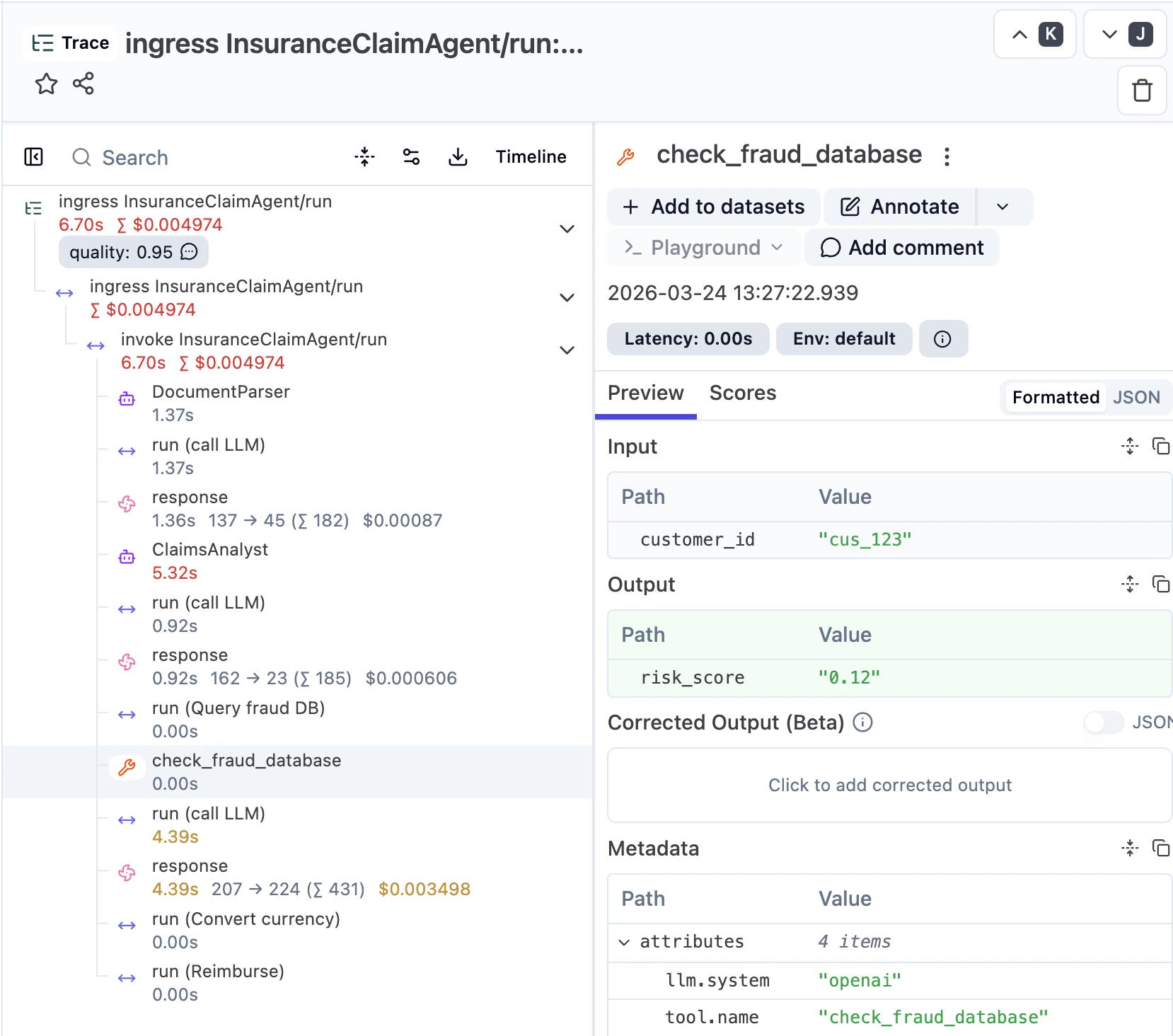
Once you send a request, you can inspect the trace in Langfuse. You see the agentic steps (LLM calls, tool invocations) alongside regular workflow steps (e.g. currency conversion, reimbursement), with inputs, outputs, model configuration, and token usage for each LLM call.
Restate manages the execution, starts the parent span, and exports the full journal as OpenTelemetry traces. The Langfuse SDK attaches AI-specific spans and metadata under Restate's parent span.
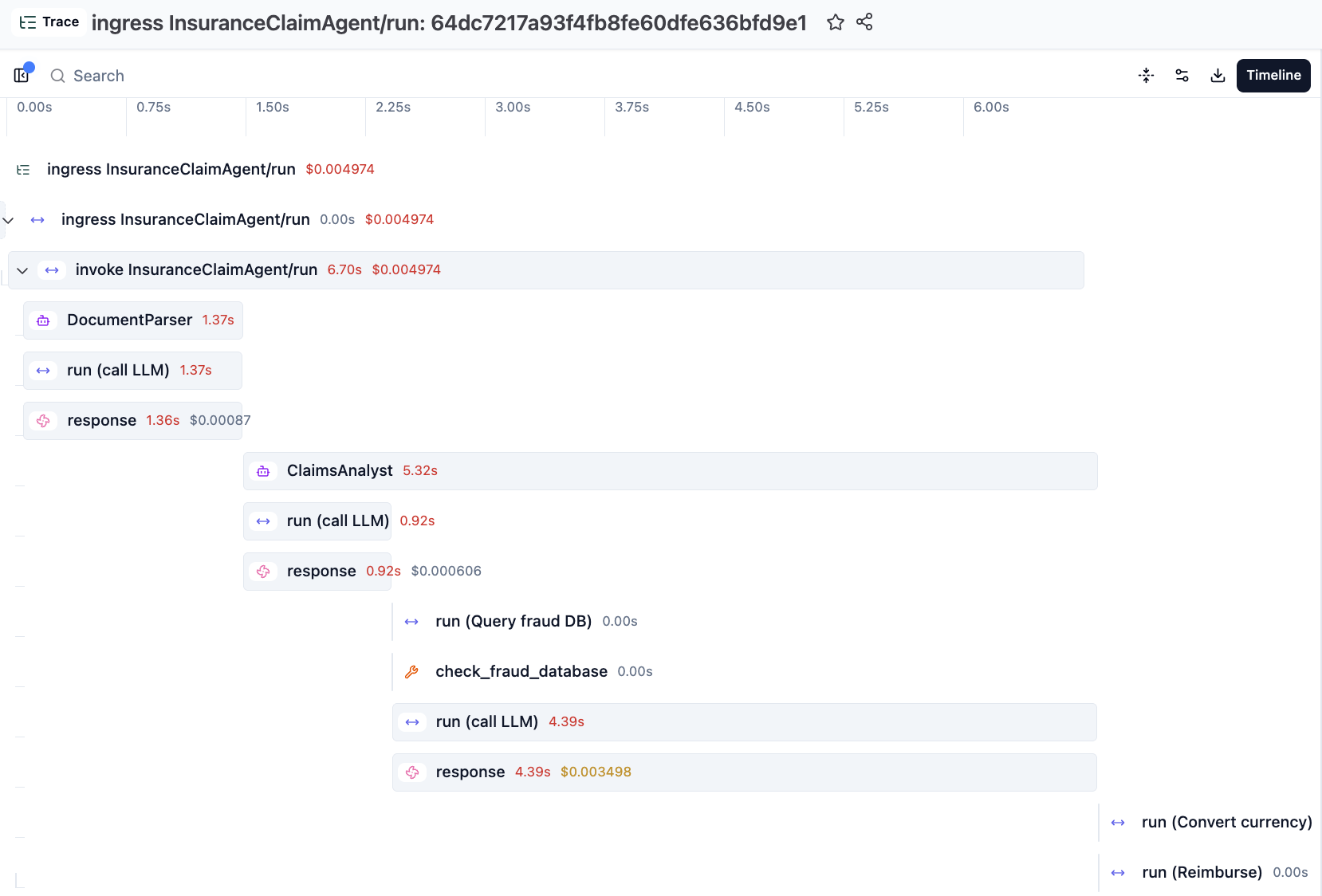 Restate's Tracer Provider flattens the Langfuse spans to make them appear consistently structured with the Restate spans in the UI.
We are working on a next iteration of the integration which will respect the Langfuse span nesting and puts the Restate spans at the right depths inside them.
## Going further
Langfuse and Restate complement each other beyond basic tracing:
### Versioning
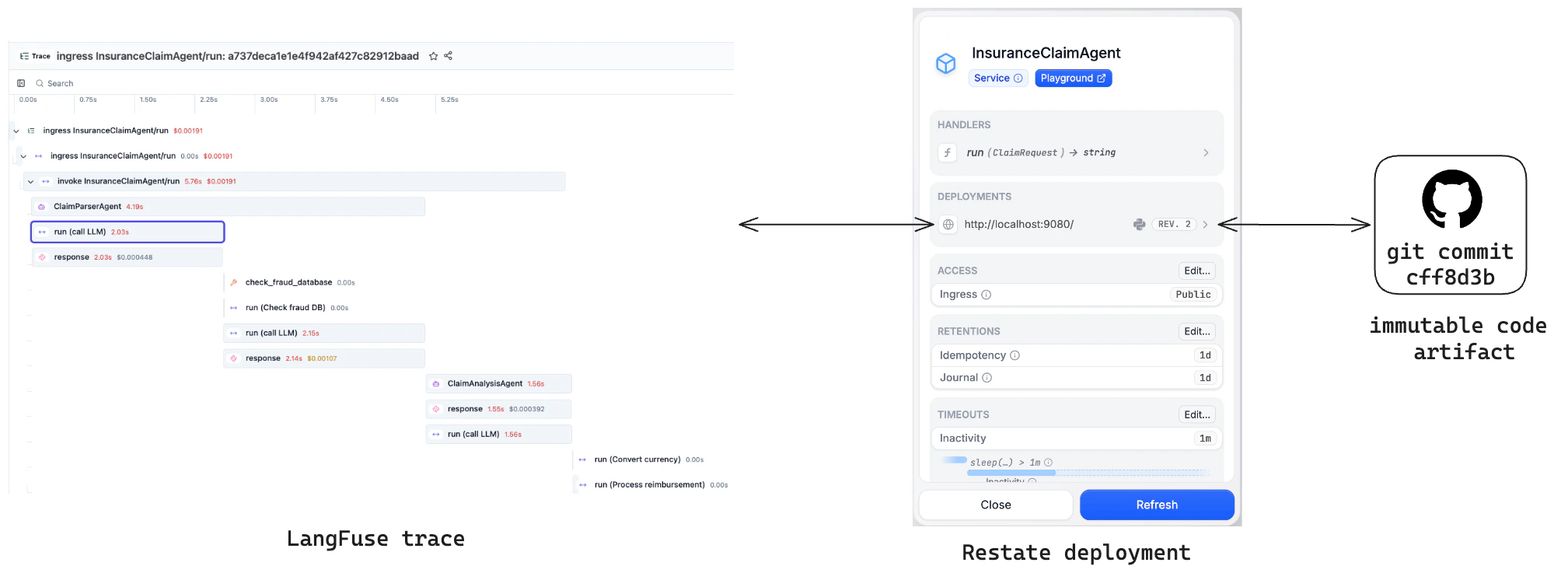
Restate's [versioning model](/services/versioning) ensures each trace is linked to a single immutable code version. Compare quality across versions in Langfuse and spot regressions.
Restate's Tracer Provider flattens the Langfuse spans to make them appear consistently structured with the Restate spans in the UI.
We are working on a next iteration of the integration which will respect the Langfuse span nesting and puts the Restate spans at the right depths inside them.
## Going further
Langfuse and Restate complement each other beyond basic tracing:
### Versioning
Restate's [versioning model](/services/versioning) ensures each trace is linked to a single immutable code version. Compare quality across versions in Langfuse and spot regressions.
 ### Prompt management
Fetch [version-controlled prompts from Langfuse](https://langfuse.com/docs/prompts) as a durable step with `ctx.run`. Retries reuse the same prompt; new executions pick up the latest version.
### Async evals example
Run [LLM-as-a-Judge evaluations](https://langfuse.com/docs/evaluation/evaluation-methods/llm-as-a-judge) as async Restate workflows that don't block agent execution. Restate acts as both the queue and the orchestrator. See the example below.
You can submit an evaluation from the agent via a [one-way call](/develop/python/service-communication#sending-messages), so it runs asynchronously without blocking the main agent.
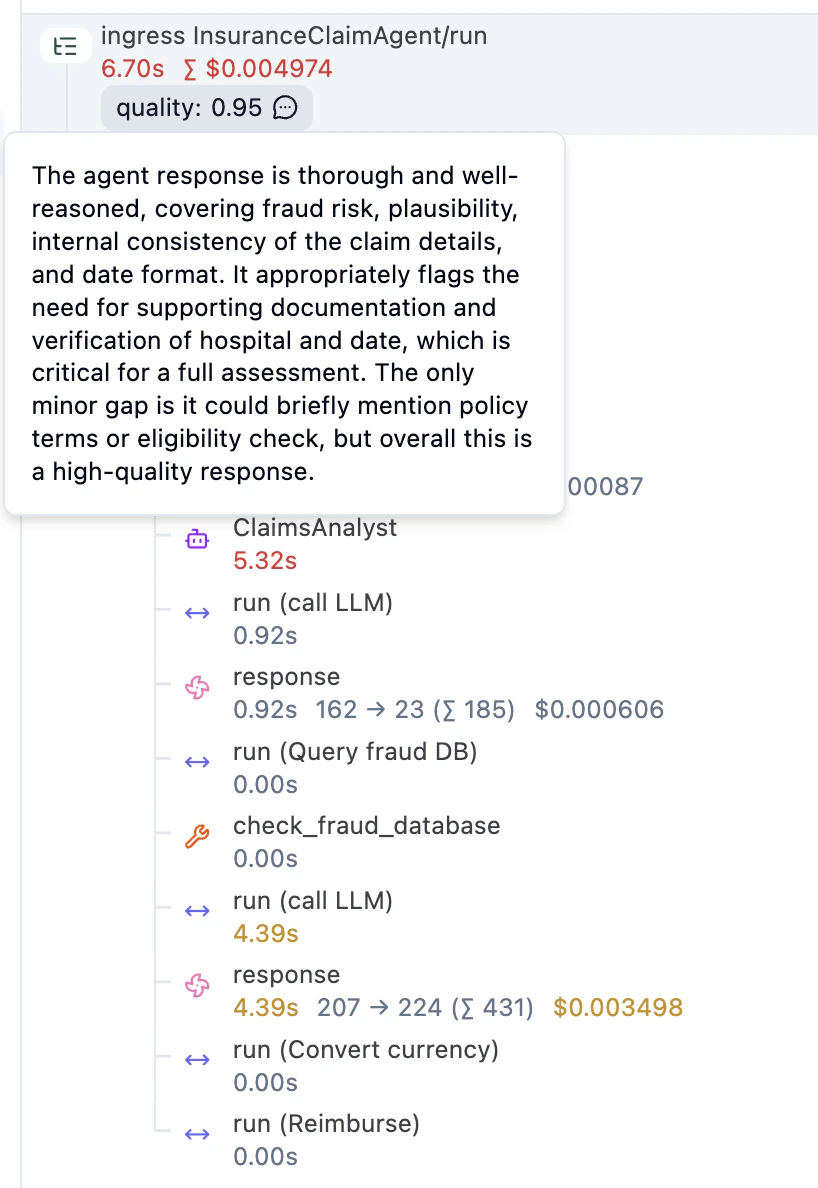
The eval workflow runs an LLM judge and writes the score back to the original trace in Langfuse:
```python evaluation.py {"CODE_LOAD::https://raw.githubusercontent.com/restatedev/ai-examples/refs/heads/main/openai-agents/examples/langfuse/evaluation.py#here"} theme={null}
langfuse = get_client()
judge_agent = Agent(
name="ClaimEvaluationJudge",
instructions=(
"You are an expert evaluator of insurance claim processing. "
"Rate the overall quality of the claim agent's response as a score "
"between 0.0 and 1.0, and provide a brief reason for your rating."
),
output_type=EvaluationScore,
)
evaluation_service = restate.Service("LLMJudgeEvaluation")
@evaluation_service.handler()
async def evaluate(ctx: restate.Context, req: EvaluationRequest) -> None:
# Step 1: Run the LLM judge (durable — retried on failure)
result = await DurableRunner.run(
judge_agent,
f"Evaluate this insurance claim processing:\n\n"
f"**Claim Input:**\n{req.input}\n\n"
f"**Agent Output:**\n{req.output}",
)
evaluation: EvaluationScore = result.final_output
# Step 2: Write the score to Langfuse on the original claim trace
async def score_trace() -> None:
langfuse.create_score(
trace_id=req.trace_id(),
name="quality",
value=evaluation.score,
data_type="NUMERIC",
comment=evaluation.reason,
)
langfuse.flush()
await ctx.run_typed("Score trace in Langfuse", score_trace)
```
If you run the OpenAI Agents example above, then you will see the evaluation score in Langfuse:
### Prompt management
Fetch [version-controlled prompts from Langfuse](https://langfuse.com/docs/prompts) as a durable step with `ctx.run`. Retries reuse the same prompt; new executions pick up the latest version.
### Async evals example
Run [LLM-as-a-Judge evaluations](https://langfuse.com/docs/evaluation/evaluation-methods/llm-as-a-judge) as async Restate workflows that don't block agent execution. Restate acts as both the queue and the orchestrator. See the example below.
You can submit an evaluation from the agent via a [one-way call](/develop/python/service-communication#sending-messages), so it runs asynchronously without blocking the main agent.
The eval workflow runs an LLM judge and writes the score back to the original trace in Langfuse:
```python evaluation.py {"CODE_LOAD::https://raw.githubusercontent.com/restatedev/ai-examples/refs/heads/main/openai-agents/examples/langfuse/evaluation.py#here"} theme={null}
langfuse = get_client()
judge_agent = Agent(
name="ClaimEvaluationJudge",
instructions=(
"You are an expert evaluator of insurance claim processing. "
"Rate the overall quality of the claim agent's response as a score "
"between 0.0 and 1.0, and provide a brief reason for your rating."
),
output_type=EvaluationScore,
)
evaluation_service = restate.Service("LLMJudgeEvaluation")
@evaluation_service.handler()
async def evaluate(ctx: restate.Context, req: EvaluationRequest) -> None:
# Step 1: Run the LLM judge (durable — retried on failure)
result = await DurableRunner.run(
judge_agent,
f"Evaluate this insurance claim processing:\n\n"
f"**Claim Input:**\n{req.input}\n\n"
f"**Agent Output:**\n{req.output}",
)
evaluation: EvaluationScore = result.final_output
# Step 2: Write the score to Langfuse on the original claim trace
async def score_trace() -> None:
langfuse.create_score(
trace_id=req.trace_id(),
name="quality",
value=evaluation.score,
data_type="NUMERIC",
comment=evaluation.reason,
)
langfuse.flush()
await ctx.run_typed("Score trace in Langfuse", score_trace)
```
If you run the OpenAI Agents example above, then you will see the evaluation score in Langfuse:
 For a full walkthrough of these features, see the [Restate + Langfuse blog post](https://restate.dev/blog/reliable-ai-agents-with-restate-and-langfuse/).