> ## Documentation Index
> Fetch the complete documentation index at: https://docs.restate.dev/llms.txt
> Use this file to discover all available pages before exploring further.
# Pydantic Logfire
> Trace and monitor your Restate Pydantic AI agents with Logfire. Get full visibility into LLM calls, tool executions, and workflow steps.
export const GitHubLink = ({url}) => ;
Combine Restate and [Pydantic Logfire](https://pydantic.dev/logfire) to get full observability into your Pydantic AI agent executions.
Logfire traces every LLM call, tool invocation, token usage, and cost.
Restate traces every durable step, so you see agentic steps alongside regular workflow steps in a single trace.
You don't need to change your agent code. You only add the Logfire instrumentation to your entry point.
Learn more about Logfire's observability and Pydantic AI integration.
## Instrumentation setup
Initialize Logfire and instrument Pydantic AI with `RestateTracerProvider` to correlate AI spans with Restate's execution journal:
```python __main__.py {"CODE_LOAD::https://raw.githubusercontent.com/restatedev/ai-examples/refs/heads/main/pydantic-ai/examples/logfire/__main__.py#here"} theme={null}
import logfire
from opentelemetry import trace as trace_api
from pydantic_ai.models.instrumented import InstrumentationSettings
from pydantic_ai import Agent
from restate.ext.tracing import RestateTracerProvider
from agent import claim_service
logfire.configure(service_name=claim_service.name)
logfire.instrument_pydantic_ai()
# Instrument Pydantic AI with Restate-aware tracing
Agent.instrument_all(
InstrumentationSettings(
tracer_provider=RestateTracerProvider(trace_api.get_tracer_provider())
)
)
```
**Prerequisites**: [Logfire account and token](https://logfire.pydantic.dev/), [OpenAI API key](https://platform.openai.com/api-keys), [Restate installed](/installation).
Get the example:
```bash theme={null}
restate example python-pydantic-ai-examples && cd python-pydantic-ai-examples/logfire
```
Add your API keys to an `.env` file:
```bash theme={null}
echo 'LOGFIRE_WRITE_TOKEN=your-logfire-token' > .env
echo 'OPENAI_API_KEY=sk-proj-...' >> .env
```
Start the agent service:
```bash theme={null}
uv run --env-file .env .
```
Start Restate:
```bash theme={null}
# Export LogFire write token (=! API key)
source .env
export RESTATE_TRACING_HEADERS__AUTHORIZATION="Bearer $LOGFIRE_WRITE_TOKEN"
restate-server --tracing-endpoint otlp+https://logfire-eu.pydantic.dev/v1/traces
```
Or the US equivalent tracing endpoint.
Go to the Restate UI at `http://localhost:9070`, register the service at `http://localhost:9080`, click on the handler to go to the playground, and send the default request.
## What you see in Logfire
Once you send a request, you can inspect the trace in Logfire. You see the agentic steps (LLM calls, tool invocations) alongside regular workflow steps (e.g. currency conversion, reimbursement), with inputs, outputs, model configuration, and token usage for each LLM call.
Restate manages the execution, starts the parent span, and exports the full journal as OpenTelemetry traces. Pydantic AI attaches AI-specific spans and metadata under Restate's parent span.
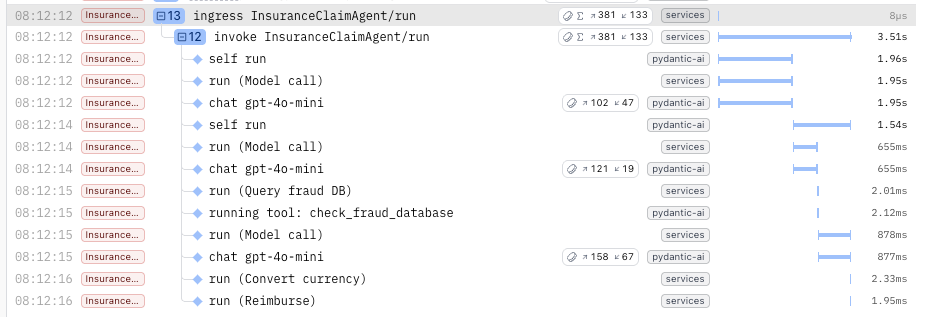 Restate's Tracer Provider flattens the Logfire spans to make them appear consistently structured with the Restate spans in the UI.
We are working on a next iteration of the integration which will respect the Logfire span nesting and puts the Restate spans at the right depths inside them.
Restate's Tracer Provider flattens the Logfire spans to make them appear consistently structured with the Restate spans in the UI.
We are working on a next iteration of the integration which will respect the Logfire span nesting and puts the Restate spans at the right depths inside them.