> ## Documentation Index
> Fetch the complete documentation index at: https://docs.restate.dev/llms.txt
> Use this file to discover all available pages before exploring further.
# Parseable
> Trace durable OpenAI agent workflows with Restate and Parseable.
Send Restate and OpenAI Agents SDK traces to [Parseable](https://www.parseable.com/) to inspect each durable agent run.
You can follow agent turns, model and tool calls, token usage, and errors alongside Restate invocation, retry, and journal spans.
Run the weather agent example or troubleshoot the integration.
## Instrumentation setup
Configure an OpenTelemetry provider to export agent spans to Parseable. Pass a `RestateTracerProvider` to OpenInference to attach its spans to the active Restate invocation:
```python telemetry.py {"CODE_LOAD::python/src/ai/parseable_telemetry.py"} theme={null}
import os
from openinference.instrumentation.openai_agents import OpenAIAgentsInstrumentor
from opentelemetry import trace as trace_api
from opentelemetry.exporter.otlp.proto.http.trace_exporter import OTLPSpanExporter
from opentelemetry.sdk.resources import Resource
from opentelemetry.sdk.trace import TracerProvider
from opentelemetry.sdk.trace.export import BatchSpanProcessor
from restate.ext.tracing import RestateTracerProvider
parseable_url = os.environ["PARSEABLE_URL"].rstrip("/")
provider = TracerProvider(
resource=Resource.create({"service.name": "restate-openai-agent"})
)
provider.add_span_processor(
BatchSpanProcessor(
OTLPSpanExporter(
endpoint=f"{parseable_url}/v1/traces",
headers={
"Authorization": f"Bearer {os.environ['PARSEABLE_API_KEY']}",
"X-P-Stream": os.getenv(
"PARSEABLE_STREAM", ""
),
},
)
)
)
trace_api.set_tracer_provider(provider)
OpenAIAgentsInstrumentor().instrument(
tracer_provider=RestateTracerProvider(provider)
)
```
Import `telemetry` before you create the Restate application. Call `provider.shutdown()` when the process exits to flush queued spans.
**Prerequisites**: Python 3.12 or later, [uv](https://docs.astral.sh/uv/getting-started/installation/), [Parseable instance and API key](https://www.parseable.com/docs/get-started), [OpenAI API key](https://platform.openai.com/api-keys), and [Restate installed](/installation).
Get the weather agent template from the [OpenAI Agents quickstart](/ai-quickstart#openai-agents):
```bash theme={null}
restate example python-openai-agents-template && cd python-openai-agents-template
```
Install the OpenInference instrumentation and OpenTelemetry exporter:
```bash theme={null}
uv add openinference-instrumentation-openai-agents opentelemetry-sdk opentelemetry-exporter-otlp-proto-http
```
Create `telemetry.py` with the instrumentation setup above. Import `telemetry` in `__main__.py` before Restate creates the application.
Configure your environment:
```bash theme={null}
export PARSEABLE_URL="https://"
export PARSEABLE_API_KEY=""
export PARSEABLE_STREAM=""
export OPENAI_API_KEY=""
```
Start the agent service:
```bash theme={null}
uv run .
```
Send Restate Server spans to the same Parseable dataset as the agent spans:
```bash theme={null}
export RESTATE_TRACING_HEADERS__AUTHORIZATION="Bearer ${PARSEABLE_API_KEY}"
export RESTATE_TRACING_HEADERS__X_P_STREAM="${PARSEABLE_STREAM}"
restate-server \
--tracing-endpoint "otlp+${PARSEABLE_URL%/}/v1/traces" \
--tracing-filter "restate=info"
```
Register the agent service:
```bash theme={null}
restate deployments register --yes http://localhost:9080
```
Invoke the agent through Restate:
```bash theme={null}
curl --fail-with-body \
http://localhost:8080/restate/call/agent/run \
--json '{"message": "What is the weather in Bengaluru?"}'
```
Export the agent service and Restate Server spans to the same Parseable dataset. Parseable cannot display a single trace hierarchy across separate datasets.
## Inspect traces in Parseable
After the first invocation, add the `agent-observability` tag to `` in the Parseable dataset settings. Parseable only lists tagged datasets in the **Agents** view.
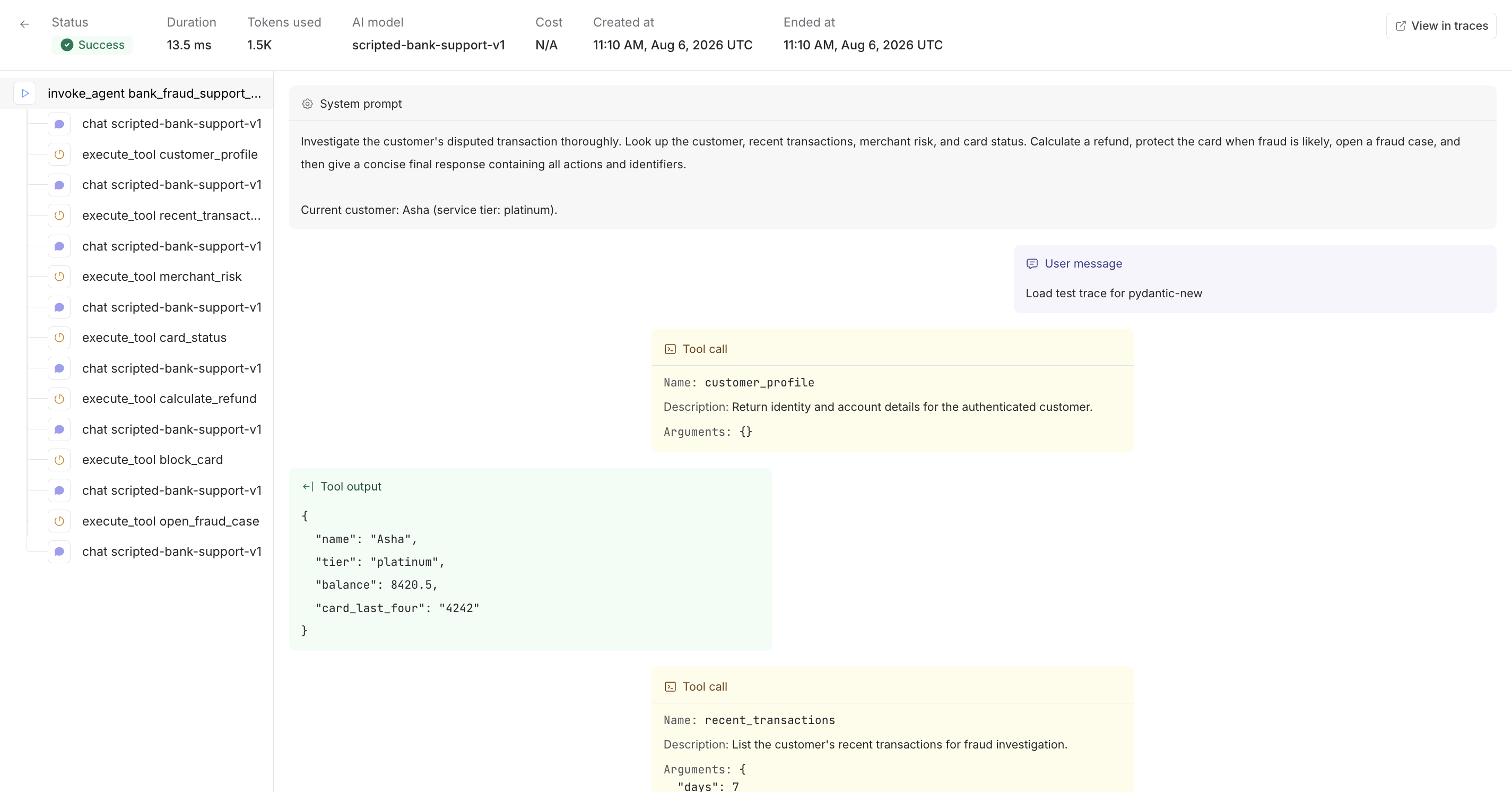
Open the dataset in the **Agents** view, then select a run to inspect its Restate invocation and recovery lifecycle, OpenAI agent turns, generations, tool calls, inputs, outputs, and token usage.
 In production, route both exporters through an OpenTelemetry Collector with a sending queue and retry policy. Remove prompt and response attributes in the Collector if they contain sensitive data.