> ## Documentation Index
> Fetch the complete documentation index at: https://docs.restate.dev/llms.txt
> Use this file to discover all available pages before exploring further.
# Durable Agents
> Build AI agents that survive crashes and recover automatically. Every LLM call, tool execution, and routing decision is durably persisted.
export const GitHubLink = ({url}) => ;
A Restate AI application has two main components:
* **Restate Server**: Sits in front of your agents and takes care of orchestration and resiliency
* **Agent Services**: Your agent logic using the Restate SDK for durability
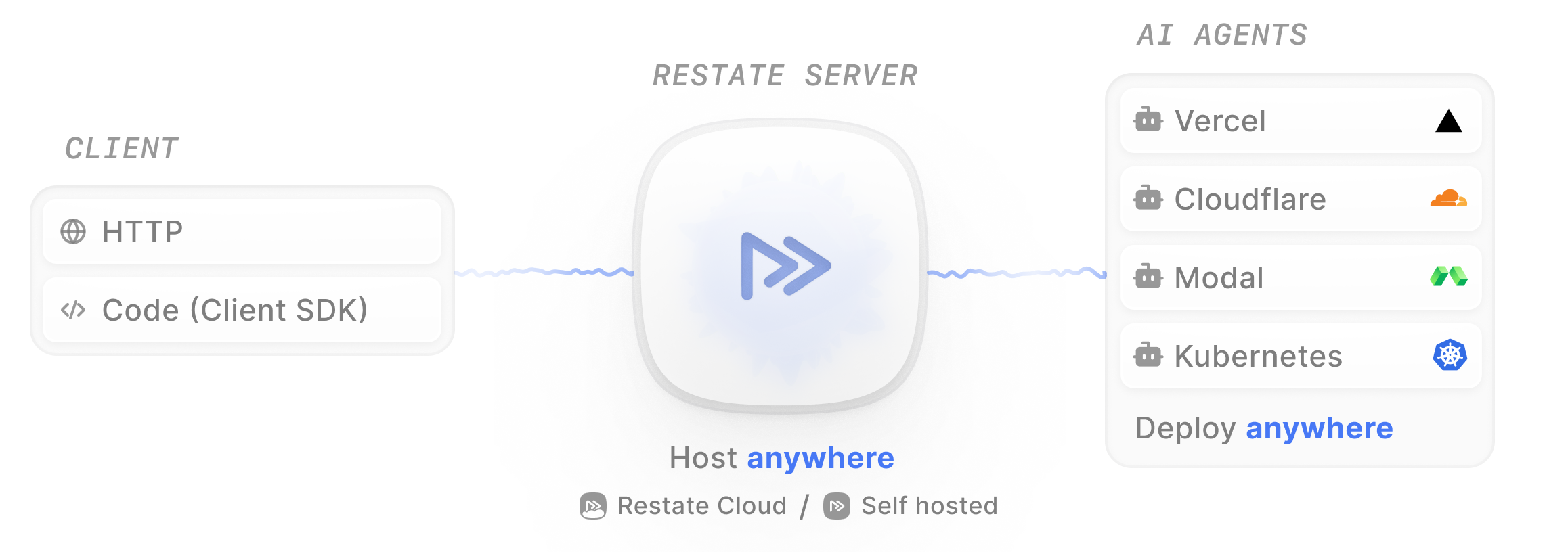 Your agent is a regular function, a handler, that makes LLM calls, executes tools, and coordinates work. Restate wraps this handler in **durable execution**: every step is recorded in a journal, so if the process crashes, the agent picks up exactly where it left off.
You can use the Restate SDK alone or in combination with an Agent SDK.
## Creating a durable agent
Follow the [Agent Quickstart](/ai-quickstart) to run a durable agent end-to-end.
A Restate agent has three building blocks:
1. **The handler**: An HTTP handler containing your agent logic, exposed in a Restate service
2. **LLM calls**: Persisted so responses are not re-fetched on recovery
3. **Tool executions**: Wrapped in durable steps so side effects are not duplicated
To implement a durable agent, you use the Restate SDK in combination with the [Vercel AI](https://ai-sdk.dev/).
Here's a weather agent that looks up the weather for a city:
```typescript agent.ts {"CODE_LOAD::https://raw.githubusercontent.com/restatedev/ai-examples/refs/heads/main/vercel-ai/template/src/app.ts#here"} theme={null}
import * as restate from "@restatedev/restate-sdk";
import { durableCalls } from "@restatedev/vercel-ai-middleware";
import { openai } from "@ai-sdk/openai";
import { generateText, stepCountIs, tool, wrapLanguageModel } from "ai";
import { z } from "zod";
// TOOL
async function getWeather(ctx: restate.Context, city: string) {
// Do durable steps using the Restate context
return ctx.run(`get weather ${city}`, () => {
// Simulate calling the weather API
return {temperature: 23, description: `Sunny and warm.`}
})
}
// AGENT
const run = async (ctx: restate.Context, { prompt }: { prompt: string }) => {
const model = wrapLanguageModel({
model: openai("gpt-5.4"),
// Persist LLM responses
middleware: durableCalls(ctx, { maxRetryAttempts: 3 }),
});
const { text } = await generateText({
model,
system: "You are a helpful agent that provides weather updates.",
prompt,
tools: {
getWeather: tool({
description: "Get the current weather for a given city.",
inputSchema: z.object({ city: z.string() }),
execute: async ({ city }) => getWeather(ctx, city),
}),
},
stopWhen: [stepCountIs(5)],
providerOptions: { openai: { parallelToolCalls: false } },
});
return text;
};
// AGENT SERVICE
const agent = restate.service({
name: "agent",
handlers: {
run: restate.createServiceHandler({
input: restate.serde.schema(z.object({
prompt: z.string().default("What's the weather in San Francisco?"),
})),
}, run),
},
});
restate.serve({ services: [agent] });
```
The agent logic lives in a handler of a Restate service (here the `run` handler).
The main difference compared to a standard Vercel AI agent is the use of the **Restate Context** at key points:
1. **Restate service handler**: The agent runs inside a Restate service handler, giving it a durable execution context. Restate exposes the handler as an HTTP endpoint you can call via `curl`, the Restate UI, or any HTTP client.
2. **Persisting LLM responses**: Wrap the model with `durableCalls(ctx)` middleware so every LLM response is saved in the Restate Server and replayed during recovery. The middleware is provided via [`@restatedev/vercel-ai-middleware`](https://github.com/restatedev/vercel-ai-middleware).
3. **Resilient tool execution**: Tools use `ctx.run()` to make steps durable. The result is persisted and retried until it succeeds.
To implement a durable agent, you use the Restate SDK in combination with the [OpenAI Agents](https://openai.github.io/openai-agents-python/).
Here's a weather agent that looks up the weather for a city:
```python agent.py {"CODE_LOAD::https://raw.githubusercontent.com/restatedev/ai-examples/refs/heads/main/openai-agents/template/agent.py#here"} theme={null}
import restate
from agents import Agent
from pydantic import BaseModel
from restate.ext.openai import restate_context, DurableRunner, durable_function_tool
class WeatherPrompt(BaseModel):
message: str = "What is the weather in San Francisco?"
# TOOL
@durable_function_tool
async def get_weather(city: str) -> dict:
"""Get the current weather for a given city."""
# Do durable steps using the Restate context
async def call_weather_api(city: str) -> dict:
return {"temperature": 23, "description": "Sunny and warm."}
return await restate_context().run_typed(
f"Get weather {city}", call_weather_api, city=city
)
# AGENT
weather_agent = Agent(
name="WeatherAgent",
instructions="You are a helpful agent that provides weather updates.",
tools=[get_weather],
)
# AGENT SERVICE
agent_service = restate.Service("agent")
@agent_service.handler()
async def run(_ctx: restate.Context, req: WeatherPrompt) -> str:
# Runner that persists the agent execution for recoverability
result = await DurableRunner.run(weather_agent, req.message)
return result.final_output
```
You define your agent and tools as you normally would with the OpenAI Agents.
The main difference is the use of the **Restate Context** at key points:
1. **Restate service handler**: The agent runs inside a Restate service handler, giving it a durable execution context. Restate exposes the handler as an HTTP endpoint you can call via `curl`, the Restate UI, or any HTTP client.
2. **Persisting LLM responses**: Use `DurableRunner` so every LLM response is saved in the Restate Server and replayed during recovery. The `DurableRunner` is provided via the OpenAI extensions in the Restate SDK.
3. **Resilient tool execution**: Annotate tools with `@durable_function_tool` and use `restate_context().run_typed()` to make steps durable. The result is persisted and retried until it succeeds.
To implement a durable agent, you use the Restate SDK in combination with the [Google Agent Development Kit (ADK)](https://google.github.io/adk-docs/).
Here's a weather agent that looks up the weather for a city:
```python agent.py {"CODE_LOAD::https://raw.githubusercontent.com/restatedev/ai-examples/refs/heads/main/google-adk/template/agent.py#here"} theme={null}
import restate
from restate.ext.adk import RestatePlugin, restate_context
from google.adk import Runner
from google.adk.apps import App
from google.adk.sessions import InMemorySessionService
from google.genai.types import Content, Part
from google.adk.agents.llm_agent import Agent
from pydantic import BaseModel
class WeatherPrompt(BaseModel):
user_id: str = "user-123"
message: str = "What is the weather like in San Francisco?"
# TOOL
async def get_weather(city: str) -> dict:
"""Get the current weather for a given city."""
# Do durable steps using the Restate context
async def call_weather_api(city: str) -> dict:
return {"temperature": 23, "description": "Sunny and warm."}
return await restate_context().run_typed(
f"Get weather {city}", call_weather_api, city=city
)
# AGENT
# Specify your agent in the default ADK way
agent = Agent(
model="gemini-2.5-flash",
name="weather_agent",
instruction="You are a helpful agent that provides weather updates.",
tools=[get_weather],
)
APP_NAME = "agents"
app = App(name=APP_NAME, root_agent=agent, plugins=[RestatePlugin()])
session_service = InMemorySessionService()
# AGENT SERVICE + HANDLER
agent_service = restate.Service("agent")
@agent_service.handler()
async def run(ctx: restate.Context, req: WeatherPrompt) -> str | None:
# Start new session
session_id = str(ctx.uuid())
session = await session_service.get_session(
app_name=APP_NAME, user_id=req.user_id, session_id=session_id
)
if not session:
await session_service.create_session(
app_name=APP_NAME, user_id=req.user_id, session_id=session_id
)
# Run the durable agent
runner = Runner(app=app, session_service=session_service)
events = runner.run_async(
user_id=req.user_id,
session_id=session_id,
new_message=Content(role="user", parts=[Part.from_text(text=req.message)]),
)
final_response = None
async for event in events:
if event.is_final_response() and event.content and event.content.parts:
if event.content.parts[0].text:
final_response = event.content.parts[0].text
return final_response
```
You define your agent and tools as you normally would with the Google ADK.
To make the agent durable, you add:
1. **Restate service handler**: The agent runs inside a Restate service handler, giving it a durable execution context. Restate exposes the handler as an HTTP endpoint you can call via `curl`, the Restate UI, or any HTTP client.
2. **Restate Plugin**: Add `RestatePlugin()` to your Google ADK `App`. This enables durability for model calls and tool executions.
3. **Resilient tool execution**: Wrap tool logic in durable steps using `restate_context().run_typed()`. The result is persisted and retried until it succeeds.
To implement a durable agent, you use the Restate SDK in combination with [Pydantic AI](https://ai.pydantic.dev/).
Here's a weather agent that looks up the weather for a city:
```python agent.py {"CODE_LOAD::https://raw.githubusercontent.com/restatedev/ai-examples/refs/heads/main/pydantic-ai/template/agent.py"} theme={null}
import restate
from pydantic import BaseModel
from pydantic_ai import Agent, RunContext
from restate.ext.pydantic import RestateAgent, restate_context
class WeatherPrompt(BaseModel):
message: str = "What is the weather in San Francisco?"
# AGENT
weather_agent = Agent(
"openai:gpt-5.4",
system_prompt="You are a helpful agent that provides weather updates.",
)
@weather_agent.tool()
async def get_weather(_run_ctx: RunContext[None], city: str) -> dict:
"""Get the current weather for a given city."""
# Do durable steps using the Restate context
async def call_weather_api(city: str) -> dict:
return {"temperature": 23, "description": "Sunny and warm."}
return await restate_context().run_typed(
f"Get weather {city}", call_weather_api, city=city
)
# AGENT SERVICE
restate_agent = RestateAgent(weather_agent)
agent_service = restate.Service("agent")
@agent_service.handler()
async def run(_ctx: restate.Context, req: WeatherPrompt) -> str:
result = await restate_agent.run(req.message)
return result.output
```
You define your agent and tools as you normally would with Pydantic AI.
The main difference is the use of the **Restate Context** at key points:
1. **Restate service handler**: The agent runs inside a Restate service handler, giving it a durable execution context. Restate exposes the handler as an HTTP endpoint you can call via `curl`, the Restate UI, or any HTTP client.
2. **Persisting LLM responses**: Wrap your agent with `RestateAgent` so every LLM response is saved in the Restate Server and replayed during recovery. The `RestateAgent` is provided via the Pydantic AI extensions in the Restate SDK.
3. **Resilient tool execution**: Use `restate_context().run_typed()` inside tools to make steps durable. The result is persisted and retried until it succeeds.
To implement a durable agent, you use the Restate SDK in combination with [LangChain](https://www.langchain.com/).
Here's a weather agent that looks up the weather for a city:
```python agent.py {"CODE_LOAD::https://raw.githubusercontent.com/restatedev/ai-examples/refs/heads/main/langchain-python/template/agent.py"} theme={null}
import restate
from langchain.agents import create_agent
from langchain_core.messages import AnyMessage
from langchain_core.tools import tool
from langchain.chat_models import init_chat_model
from pydantic import BaseModel
from restate.ext.langchain import RestateMiddleware, restate_context
class WeatherPrompt(BaseModel):
message: str = "What is the weather in San Francisco?"
# TOOL
@tool
async def get_weather(city: str) -> dict:
"""Get the current weather for a given city."""
async def call_weather_api() -> dict:
return {"temperature": 23, "description": "Sunny and warm."}
# Durable step: results are journaled, so on retry we replay the value
# rather than re-hitting the API.
return await restate_context().run_typed(f"Get weather {city}", call_weather_api)
# AGENT
weather_agent = create_agent(
model=init_chat_model("openai:gpt-5.4"),
tools=[get_weather],
system_prompt="You are a helpful agent that provides weather updates.",
middleware=[RestateMiddleware()],
)
# AGENT SERVICE
agent_service = restate.Service("agent")
@agent_service.handler()
async def run(_ctx: restate.Context, req: WeatherPrompt) -> str:
result = await weather_agent.ainvoke(
{"messages": [{"role": "user", "content": req.message}]}
)
return result["messages"][-1].content
```
You define your agent and tools as you normally would with LangChain.
The main difference is the use of the **Restate Context** at key points:
1. **Restate service handler**: The agent runs inside a Restate service handler, giving it a durable execution context. Restate exposes the handler as an HTTP endpoint you can call via `curl`, the Restate UI, or any HTTP client.
2. **Persisting LLM responses**: Attach `RestateMiddleware()` to your agent so every LLM call is journaled and replayed during recovery. The middleware is provided via the LangChain extensions in the Restate SDK.
3. **Resilient tool execution**: Wrap durable side effects in tools with `restate_context().run_typed()`. The middleware does not auto-journal tool calls — you choose which steps are durable.
You can use the Restate SDK directly with any LLM client library. You manage the agentic loop yourself: call the LLM, check for tool calls, execute them, and loop until the LLM returns a final answer. Every LLM call and tool execution is wrapped in `ctx.run()` for durability.
Here's a weather agent using the Restate SDK with any LLM client:
```typescript agent.ts {"CODE_LOAD::https://raw.githubusercontent.com/restatedev/ai-examples/refs/heads/main/typescript-restate-only/template/src/agent.ts#here"} theme={null}
import * as restate from "@restatedev/restate-sdk";
import { tool } from "ai";
import { ModelMessage } from "ai";
import { callLLM, InputMessage, toolResult } from "./utils/utils";
import { z } from "zod";
const schema = restate.serde.schema;
// TOOL DEFINITIONS
const tools = {
getWeather: tool({
description: "Get current weather for a city",
inputSchema: z.object({
city: z.string().describe("The city to get weather for"),
}),
}),
// add more tools here
};
// TOOL IMPLEMENTATION
async function getWeather(ctx: restate.Context, city: string) {
return ctx.run(`get weather ${city}`, () => {
// Simulate calling a remote API
return { temperature: 23, description: "Sunny" };
});
}
// AGENT
const run = async (ctx: restate.Context, { message }: { message: string }) => {
const messages: ModelMessage[] = [
{ role: "system", content: "You are a helpful weather assistant." },
{ role: "user", content: message },
];
// Durable agent loop - Restate journals each step and recovers on failure
while (true) {
// 1. LLM call - journaled so it won't re-execute on recovery
// Use your preferred LLM SDK here
const result = await ctx.run(
"LLM call",
async () => await callLLM(messages, tools),
{ maxRetryAttempts: 3 },
);
messages.push(...result.messages);
// If the LLM returned a final answer, we're done
if (result.finishReason !== "tool-calls") return result.text;
// 2. Execute each tool call durably
for (const { toolName, toolCallId, input } of result.toolCalls) {
let output;
switch (toolName) {
case "getWeather":
output = await getWeather(ctx, (input as { city: string }).city);
break;
// add more tool calls here
default:
output = `Tool not found: ${toolName}`;
}
messages.push(toolResult(toolCallId, toolName, output));
}
}
};
// AGENT SERVICE
const agentService = restate.service({
name: "agent",
handlers: {
run: restate.createServiceHandler({ input: schema(InputMessage) }, run),
},
});
restate.serve({ services: [agentService], port: 9080 });
```
The key parts:
1. **Restate service handler**: The agent runs inside a Restate service handler, giving it a durable execution context. Restate exposes the handler as an HTTP endpoint you can call via `curl`, the Restate UI, or any HTTP client.
2. **LLM calls in `ctx.run()`**: Every LLM response is persisted. On recovery, the result is replayed from the journal.
3. **Tool executions in `ctx.run()`**: Side effects are executed exactly once. On recovery, the result is replayed.
4. **The agentic loop**: You control the loop. Call the LLM, process tool calls, repeat until done.
This approach works with any LLM client (OpenAI, Anthropic, local models, etc.) and gives you full control over the agent behavior.
You can use the Restate SDK directly with any LLM client library. You manage the agentic loop yourself: call the LLM, check for tool calls, execute them, and loop until the LLM returns a final answer. Every LLM call and tool execution is wrapped in `ctx.run()` for durability.
Here's a weather agent using the Restate SDK with any LLM client:
```python agent {"CODE_LOAD::https://raw.githubusercontent.com/restatedev/ai-examples/refs/heads/main/python-restate-only/template/agent.py#here"} theme={null}
import json
import restate
from pydantic import BaseModel
from litellm import acompletion
from litellm.types.utils import Message
class WeatherPrompt(BaseModel):
message: str = "What is the weather in San Francisco?"
# TOOL IMPLEMENTATION
async def get_weather(city: str) -> str:
return json.dumps({"temperature": 23, "condition": "Sunny"})
# TOOL DEFINITIONS
TOOLS = [
{
"type": "function",
"function": {
"name": "get_weather",
"description": "Get the current weather for a city",
"parameters": {
"type": "object",
"properties": {
"city": {"type": "string", "description": "The city name"}
},
"required": ["city"],
},
},
}
]
# AGENT SERVICE
agent_service = restate.Service("agent")
@agent_service.handler()
async def run(ctx: restate.Context, message: WeatherPrompt) -> str | None:
"""Handle a user message, calling tools until a final answer is ready."""
messages = [
{"role": "system", "content": "You are a helpful weather assistant."},
{"role": "user", "content": message.message},
]
while True:
# Call the LLM
async def call_llm() -> Message:
resp = await acompletion(
model="gpt-5.4", messages=messages, tools=TOOLS
)
return resp.choices[0].message
response = await ctx.run("LLM call", call_llm)
messages.append(response.model_dump())
if not response.tool_calls:
return response.content
for tool_call in response.tool_calls:
city = json.loads(tool_call.function.arguments).get("city", "")
result = await ctx.run_typed(f"get_weather {city}", get_weather, city=city)
messages.append(
{"role": "tool", "tool_call_id": tool_call.id, "content": result}
)
```
The key pattern:
1. **Restate service handler**: The agent runs inside a Restate service handler, giving it a durable execution context. Restate exposes the handler as an HTTP endpoint you can call via `curl`, the Restate UI, or any HTTP client.
2. **LLM calls in `ctx.run()`**: Every LLM response is persisted. On recovery, the result is replayed from the journal.
3. **Tool executions in `ctx.run()`**: Side effects are executed exactly once. On recovery, the result is replayed.
4. **The agentic loop**: You control the loop. Call the LLM, process tool calls, repeat until done.
This approach works with any LLM client (OpenAI, Anthropic, Cohere, local models, etc.) and gives you full control over the agent behavior.
## Observing your agent
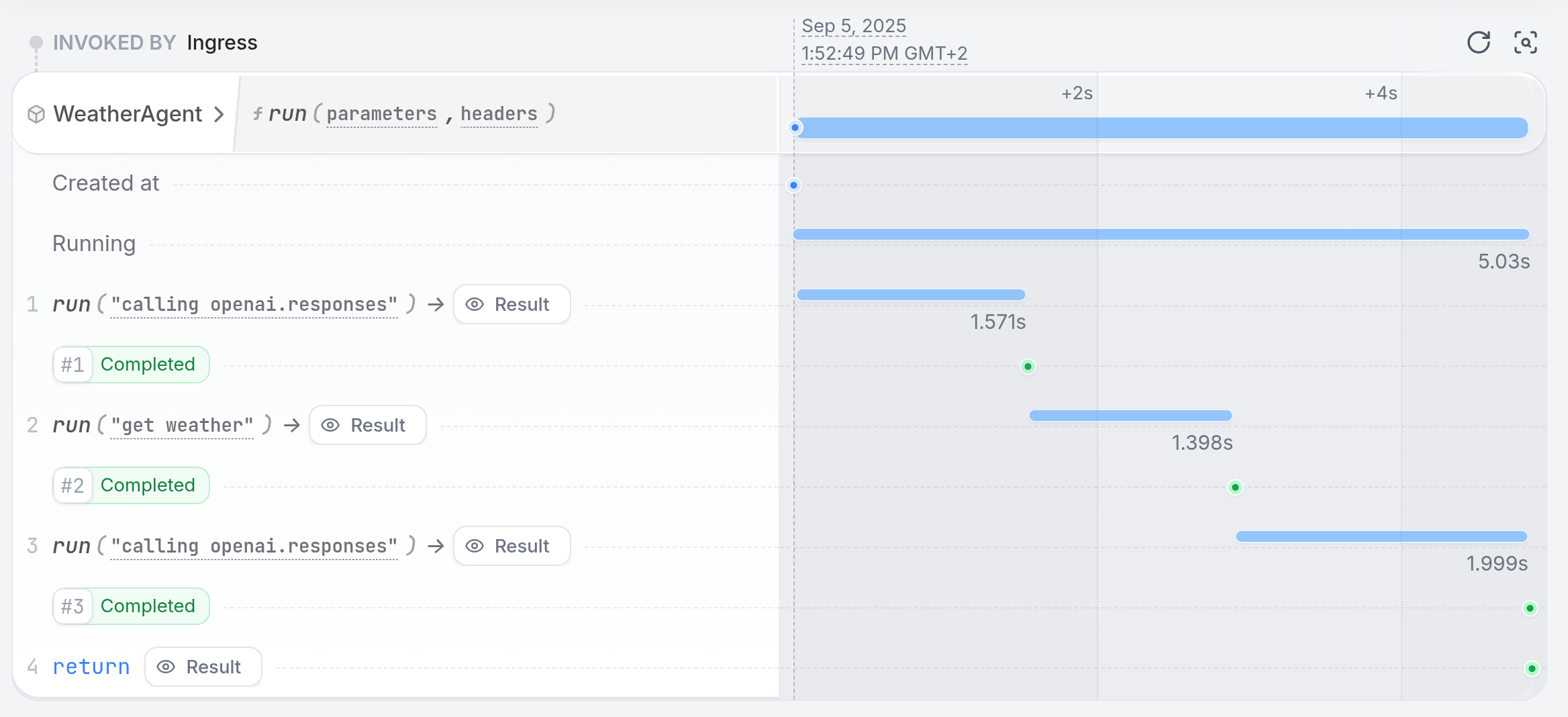
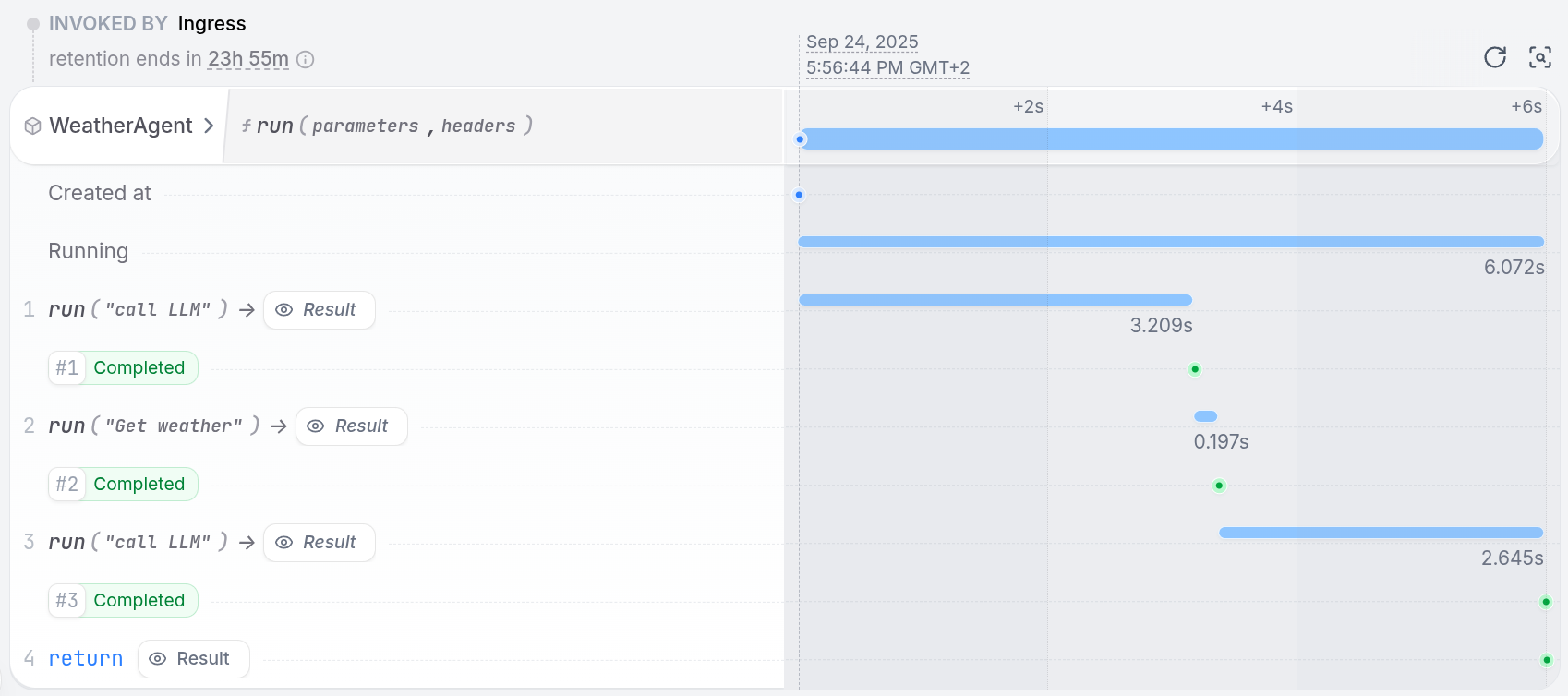
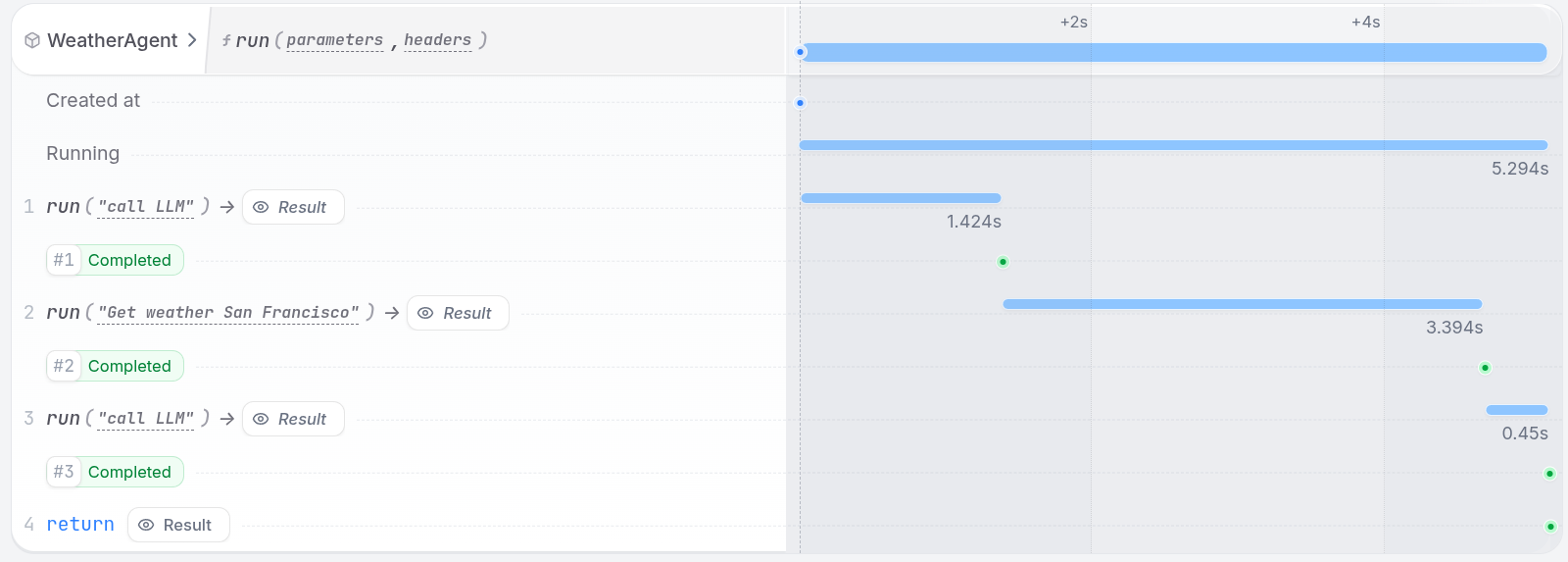
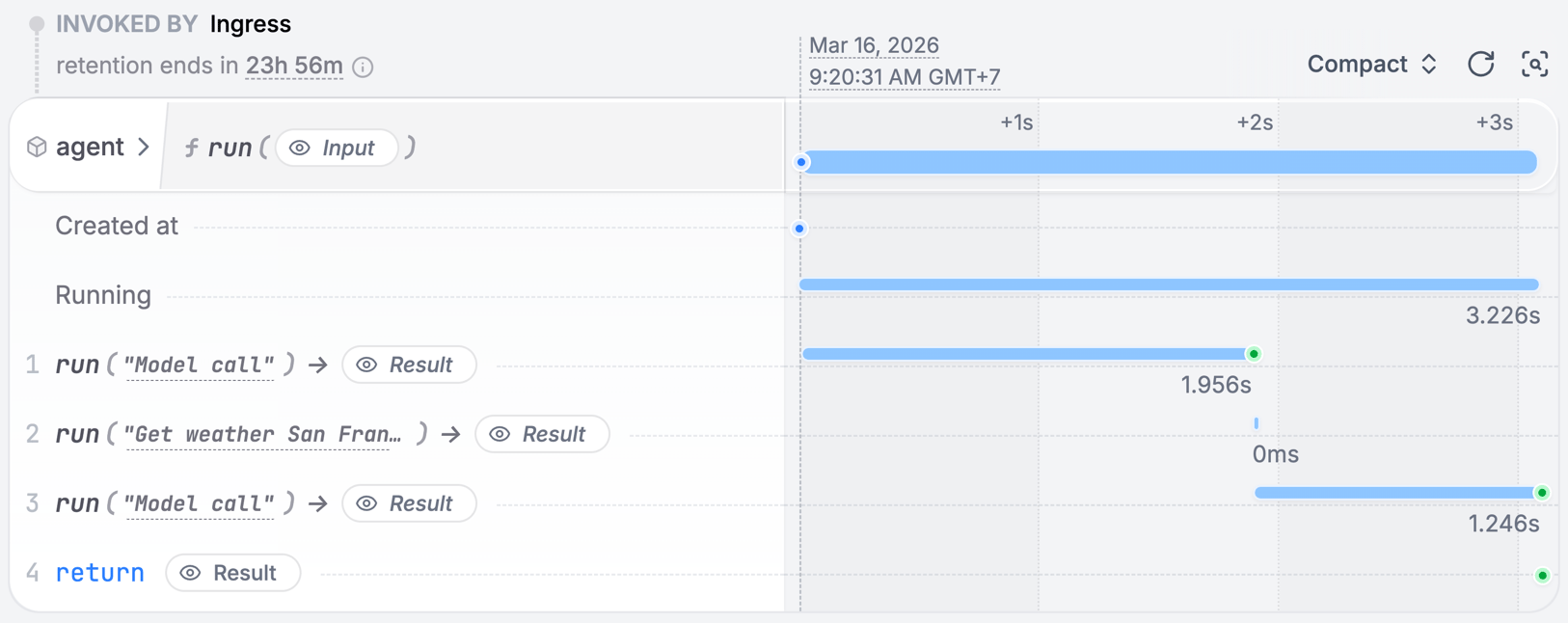
The Restate UI (`http://localhost:9070`) shows the step-by-step execution trace of your agent, with detailed traces of every LLM call, tool execution, and state change:
[Learn more.](/ai/patterns/observability-control)
## How durable execution works
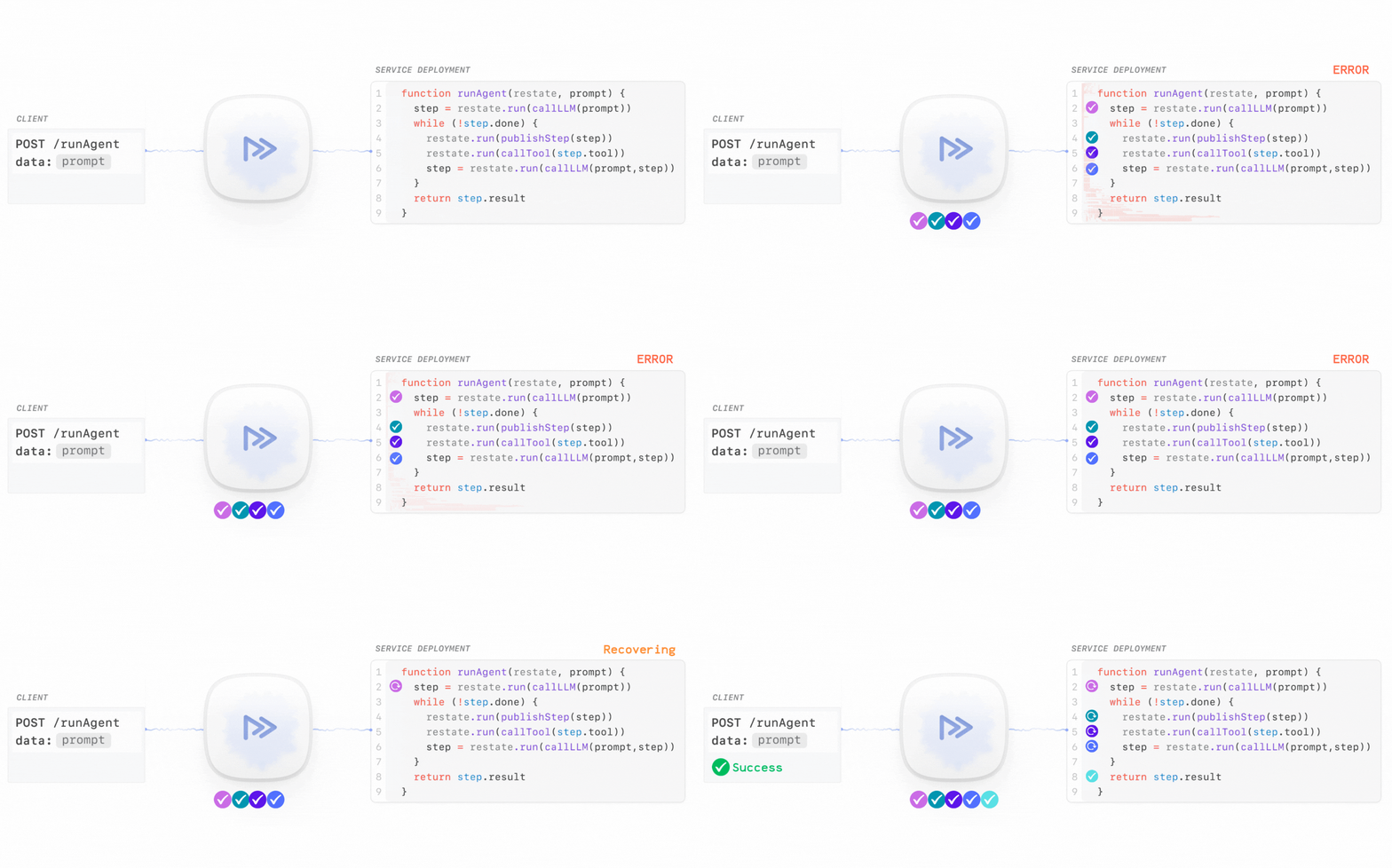
When your agent runs, Restate records each step's result in a **journal**. If the process crashes mid-execution:
1. Restate detects the failure and restarts the handler
2. Completed steps are replayed from the journal (no re-execution)
3. Execution resumes from the first incomplete step
This means:
* LLM calls are not repeated (saving cost and time)
* Tool side effects are not duplicated (no double bookings, no duplicate emails)
* Multi-step workflows recover their full progress automatically
Your agent is a regular function, a handler, that makes LLM calls, executes tools, and coordinates work. Restate wraps this handler in **durable execution**: every step is recorded in a journal, so if the process crashes, the agent picks up exactly where it left off.
You can use the Restate SDK alone or in combination with an Agent SDK.
## Creating a durable agent
Follow the [Agent Quickstart](/ai-quickstart) to run a durable agent end-to-end.
A Restate agent has three building blocks:
1. **The handler**: An HTTP handler containing your agent logic, exposed in a Restate service
2. **LLM calls**: Persisted so responses are not re-fetched on recovery
3. **Tool executions**: Wrapped in durable steps so side effects are not duplicated
To implement a durable agent, you use the Restate SDK in combination with the [Vercel AI](https://ai-sdk.dev/).
Here's a weather agent that looks up the weather for a city:
```typescript agent.ts {"CODE_LOAD::https://raw.githubusercontent.com/restatedev/ai-examples/refs/heads/main/vercel-ai/template/src/app.ts#here"} theme={null}
import * as restate from "@restatedev/restate-sdk";
import { durableCalls } from "@restatedev/vercel-ai-middleware";
import { openai } from "@ai-sdk/openai";
import { generateText, stepCountIs, tool, wrapLanguageModel } from "ai";
import { z } from "zod";
// TOOL
async function getWeather(ctx: restate.Context, city: string) {
// Do durable steps using the Restate context
return ctx.run(`get weather ${city}`, () => {
// Simulate calling the weather API
return {temperature: 23, description: `Sunny and warm.`}
})
}
// AGENT
const run = async (ctx: restate.Context, { prompt }: { prompt: string }) => {
const model = wrapLanguageModel({
model: openai("gpt-5.4"),
// Persist LLM responses
middleware: durableCalls(ctx, { maxRetryAttempts: 3 }),
});
const { text } = await generateText({
model,
system: "You are a helpful agent that provides weather updates.",
prompt,
tools: {
getWeather: tool({
description: "Get the current weather for a given city.",
inputSchema: z.object({ city: z.string() }),
execute: async ({ city }) => getWeather(ctx, city),
}),
},
stopWhen: [stepCountIs(5)],
providerOptions: { openai: { parallelToolCalls: false } },
});
return text;
};
// AGENT SERVICE
const agent = restate.service({
name: "agent",
handlers: {
run: restate.createServiceHandler({
input: restate.serde.schema(z.object({
prompt: z.string().default("What's the weather in San Francisco?"),
})),
}, run),
},
});
restate.serve({ services: [agent] });
```
The agent logic lives in a handler of a Restate service (here the `run` handler).
The main difference compared to a standard Vercel AI agent is the use of the **Restate Context** at key points:
1. **Restate service handler**: The agent runs inside a Restate service handler, giving it a durable execution context. Restate exposes the handler as an HTTP endpoint you can call via `curl`, the Restate UI, or any HTTP client.
2. **Persisting LLM responses**: Wrap the model with `durableCalls(ctx)` middleware so every LLM response is saved in the Restate Server and replayed during recovery. The middleware is provided via [`@restatedev/vercel-ai-middleware`](https://github.com/restatedev/vercel-ai-middleware).
3. **Resilient tool execution**: Tools use `ctx.run()` to make steps durable. The result is persisted and retried until it succeeds.
To implement a durable agent, you use the Restate SDK in combination with the [OpenAI Agents](https://openai.github.io/openai-agents-python/).
Here's a weather agent that looks up the weather for a city:
```python agent.py {"CODE_LOAD::https://raw.githubusercontent.com/restatedev/ai-examples/refs/heads/main/openai-agents/template/agent.py#here"} theme={null}
import restate
from agents import Agent
from pydantic import BaseModel
from restate.ext.openai import restate_context, DurableRunner, durable_function_tool
class WeatherPrompt(BaseModel):
message: str = "What is the weather in San Francisco?"
# TOOL
@durable_function_tool
async def get_weather(city: str) -> dict:
"""Get the current weather for a given city."""
# Do durable steps using the Restate context
async def call_weather_api(city: str) -> dict:
return {"temperature": 23, "description": "Sunny and warm."}
return await restate_context().run_typed(
f"Get weather {city}", call_weather_api, city=city
)
# AGENT
weather_agent = Agent(
name="WeatherAgent",
instructions="You are a helpful agent that provides weather updates.",
tools=[get_weather],
)
# AGENT SERVICE
agent_service = restate.Service("agent")
@agent_service.handler()
async def run(_ctx: restate.Context, req: WeatherPrompt) -> str:
# Runner that persists the agent execution for recoverability
result = await DurableRunner.run(weather_agent, req.message)
return result.final_output
```
You define your agent and tools as you normally would with the OpenAI Agents.
The main difference is the use of the **Restate Context** at key points:
1. **Restate service handler**: The agent runs inside a Restate service handler, giving it a durable execution context. Restate exposes the handler as an HTTP endpoint you can call via `curl`, the Restate UI, or any HTTP client.
2. **Persisting LLM responses**: Use `DurableRunner` so every LLM response is saved in the Restate Server and replayed during recovery. The `DurableRunner` is provided via the OpenAI extensions in the Restate SDK.
3. **Resilient tool execution**: Annotate tools with `@durable_function_tool` and use `restate_context().run_typed()` to make steps durable. The result is persisted and retried until it succeeds.
To implement a durable agent, you use the Restate SDK in combination with the [Google Agent Development Kit (ADK)](https://google.github.io/adk-docs/).
Here's a weather agent that looks up the weather for a city:
```python agent.py {"CODE_LOAD::https://raw.githubusercontent.com/restatedev/ai-examples/refs/heads/main/google-adk/template/agent.py#here"} theme={null}
import restate
from restate.ext.adk import RestatePlugin, restate_context
from google.adk import Runner
from google.adk.apps import App
from google.adk.sessions import InMemorySessionService
from google.genai.types import Content, Part
from google.adk.agents.llm_agent import Agent
from pydantic import BaseModel
class WeatherPrompt(BaseModel):
user_id: str = "user-123"
message: str = "What is the weather like in San Francisco?"
# TOOL
async def get_weather(city: str) -> dict:
"""Get the current weather for a given city."""
# Do durable steps using the Restate context
async def call_weather_api(city: str) -> dict:
return {"temperature": 23, "description": "Sunny and warm."}
return await restate_context().run_typed(
f"Get weather {city}", call_weather_api, city=city
)
# AGENT
# Specify your agent in the default ADK way
agent = Agent(
model="gemini-2.5-flash",
name="weather_agent",
instruction="You are a helpful agent that provides weather updates.",
tools=[get_weather],
)
APP_NAME = "agents"
app = App(name=APP_NAME, root_agent=agent, plugins=[RestatePlugin()])
session_service = InMemorySessionService()
# AGENT SERVICE + HANDLER
agent_service = restate.Service("agent")
@agent_service.handler()
async def run(ctx: restate.Context, req: WeatherPrompt) -> str | None:
# Start new session
session_id = str(ctx.uuid())
session = await session_service.get_session(
app_name=APP_NAME, user_id=req.user_id, session_id=session_id
)
if not session:
await session_service.create_session(
app_name=APP_NAME, user_id=req.user_id, session_id=session_id
)
# Run the durable agent
runner = Runner(app=app, session_service=session_service)
events = runner.run_async(
user_id=req.user_id,
session_id=session_id,
new_message=Content(role="user", parts=[Part.from_text(text=req.message)]),
)
final_response = None
async for event in events:
if event.is_final_response() and event.content and event.content.parts:
if event.content.parts[0].text:
final_response = event.content.parts[0].text
return final_response
```
You define your agent and tools as you normally would with the Google ADK.
To make the agent durable, you add:
1. **Restate service handler**: The agent runs inside a Restate service handler, giving it a durable execution context. Restate exposes the handler as an HTTP endpoint you can call via `curl`, the Restate UI, or any HTTP client.
2. **Restate Plugin**: Add `RestatePlugin()` to your Google ADK `App`. This enables durability for model calls and tool executions.
3. **Resilient tool execution**: Wrap tool logic in durable steps using `restate_context().run_typed()`. The result is persisted and retried until it succeeds.
To implement a durable agent, you use the Restate SDK in combination with [Pydantic AI](https://ai.pydantic.dev/).
Here's a weather agent that looks up the weather for a city:
```python agent.py {"CODE_LOAD::https://raw.githubusercontent.com/restatedev/ai-examples/refs/heads/main/pydantic-ai/template/agent.py"} theme={null}
import restate
from pydantic import BaseModel
from pydantic_ai import Agent, RunContext
from restate.ext.pydantic import RestateAgent, restate_context
class WeatherPrompt(BaseModel):
message: str = "What is the weather in San Francisco?"
# AGENT
weather_agent = Agent(
"openai:gpt-5.4",
system_prompt="You are a helpful agent that provides weather updates.",
)
@weather_agent.tool()
async def get_weather(_run_ctx: RunContext[None], city: str) -> dict:
"""Get the current weather for a given city."""
# Do durable steps using the Restate context
async def call_weather_api(city: str) -> dict:
return {"temperature": 23, "description": "Sunny and warm."}
return await restate_context().run_typed(
f"Get weather {city}", call_weather_api, city=city
)
# AGENT SERVICE
restate_agent = RestateAgent(weather_agent)
agent_service = restate.Service("agent")
@agent_service.handler()
async def run(_ctx: restate.Context, req: WeatherPrompt) -> str:
result = await restate_agent.run(req.message)
return result.output
```
You define your agent and tools as you normally would with Pydantic AI.
The main difference is the use of the **Restate Context** at key points:
1. **Restate service handler**: The agent runs inside a Restate service handler, giving it a durable execution context. Restate exposes the handler as an HTTP endpoint you can call via `curl`, the Restate UI, or any HTTP client.
2. **Persisting LLM responses**: Wrap your agent with `RestateAgent` so every LLM response is saved in the Restate Server and replayed during recovery. The `RestateAgent` is provided via the Pydantic AI extensions in the Restate SDK.
3. **Resilient tool execution**: Use `restate_context().run_typed()` inside tools to make steps durable. The result is persisted and retried until it succeeds.
To implement a durable agent, you use the Restate SDK in combination with [LangChain](https://www.langchain.com/).
Here's a weather agent that looks up the weather for a city:
```python agent.py {"CODE_LOAD::https://raw.githubusercontent.com/restatedev/ai-examples/refs/heads/main/langchain-python/template/agent.py"} theme={null}
import restate
from langchain.agents import create_agent
from langchain_core.messages import AnyMessage
from langchain_core.tools import tool
from langchain.chat_models import init_chat_model
from pydantic import BaseModel
from restate.ext.langchain import RestateMiddleware, restate_context
class WeatherPrompt(BaseModel):
message: str = "What is the weather in San Francisco?"
# TOOL
@tool
async def get_weather(city: str) -> dict:
"""Get the current weather for a given city."""
async def call_weather_api() -> dict:
return {"temperature": 23, "description": "Sunny and warm."}
# Durable step: results are journaled, so on retry we replay the value
# rather than re-hitting the API.
return await restate_context().run_typed(f"Get weather {city}", call_weather_api)
# AGENT
weather_agent = create_agent(
model=init_chat_model("openai:gpt-5.4"),
tools=[get_weather],
system_prompt="You are a helpful agent that provides weather updates.",
middleware=[RestateMiddleware()],
)
# AGENT SERVICE
agent_service = restate.Service("agent")
@agent_service.handler()
async def run(_ctx: restate.Context, req: WeatherPrompt) -> str:
result = await weather_agent.ainvoke(
{"messages": [{"role": "user", "content": req.message}]}
)
return result["messages"][-1].content
```
You define your agent and tools as you normally would with LangChain.
The main difference is the use of the **Restate Context** at key points:
1. **Restate service handler**: The agent runs inside a Restate service handler, giving it a durable execution context. Restate exposes the handler as an HTTP endpoint you can call via `curl`, the Restate UI, or any HTTP client.
2. **Persisting LLM responses**: Attach `RestateMiddleware()` to your agent so every LLM call is journaled and replayed during recovery. The middleware is provided via the LangChain extensions in the Restate SDK.
3. **Resilient tool execution**: Wrap durable side effects in tools with `restate_context().run_typed()`. The middleware does not auto-journal tool calls — you choose which steps are durable.
You can use the Restate SDK directly with any LLM client library. You manage the agentic loop yourself: call the LLM, check for tool calls, execute them, and loop until the LLM returns a final answer. Every LLM call and tool execution is wrapped in `ctx.run()` for durability.
Here's a weather agent using the Restate SDK with any LLM client:
```typescript agent.ts {"CODE_LOAD::https://raw.githubusercontent.com/restatedev/ai-examples/refs/heads/main/typescript-restate-only/template/src/agent.ts#here"} theme={null}
import * as restate from "@restatedev/restate-sdk";
import { tool } from "ai";
import { ModelMessage } from "ai";
import { callLLM, InputMessage, toolResult } from "./utils/utils";
import { z } from "zod";
const schema = restate.serde.schema;
// TOOL DEFINITIONS
const tools = {
getWeather: tool({
description: "Get current weather for a city",
inputSchema: z.object({
city: z.string().describe("The city to get weather for"),
}),
}),
// add more tools here
};
// TOOL IMPLEMENTATION
async function getWeather(ctx: restate.Context, city: string) {
return ctx.run(`get weather ${city}`, () => {
// Simulate calling a remote API
return { temperature: 23, description: "Sunny" };
});
}
// AGENT
const run = async (ctx: restate.Context, { message }: { message: string }) => {
const messages: ModelMessage[] = [
{ role: "system", content: "You are a helpful weather assistant." },
{ role: "user", content: message },
];
// Durable agent loop - Restate journals each step and recovers on failure
while (true) {
// 1. LLM call - journaled so it won't re-execute on recovery
// Use your preferred LLM SDK here
const result = await ctx.run(
"LLM call",
async () => await callLLM(messages, tools),
{ maxRetryAttempts: 3 },
);
messages.push(...result.messages);
// If the LLM returned a final answer, we're done
if (result.finishReason !== "tool-calls") return result.text;
// 2. Execute each tool call durably
for (const { toolName, toolCallId, input } of result.toolCalls) {
let output;
switch (toolName) {
case "getWeather":
output = await getWeather(ctx, (input as { city: string }).city);
break;
// add more tool calls here
default:
output = `Tool not found: ${toolName}`;
}
messages.push(toolResult(toolCallId, toolName, output));
}
}
};
// AGENT SERVICE
const agentService = restate.service({
name: "agent",
handlers: {
run: restate.createServiceHandler({ input: schema(InputMessage) }, run),
},
});
restate.serve({ services: [agentService], port: 9080 });
```
The key parts:
1. **Restate service handler**: The agent runs inside a Restate service handler, giving it a durable execution context. Restate exposes the handler as an HTTP endpoint you can call via `curl`, the Restate UI, or any HTTP client.
2. **LLM calls in `ctx.run()`**: Every LLM response is persisted. On recovery, the result is replayed from the journal.
3. **Tool executions in `ctx.run()`**: Side effects are executed exactly once. On recovery, the result is replayed.
4. **The agentic loop**: You control the loop. Call the LLM, process tool calls, repeat until done.
This approach works with any LLM client (OpenAI, Anthropic, local models, etc.) and gives you full control over the agent behavior.
You can use the Restate SDK directly with any LLM client library. You manage the agentic loop yourself: call the LLM, check for tool calls, execute them, and loop until the LLM returns a final answer. Every LLM call and tool execution is wrapped in `ctx.run()` for durability.
Here's a weather agent using the Restate SDK with any LLM client:
```python agent {"CODE_LOAD::https://raw.githubusercontent.com/restatedev/ai-examples/refs/heads/main/python-restate-only/template/agent.py#here"} theme={null}
import json
import restate
from pydantic import BaseModel
from litellm import acompletion
from litellm.types.utils import Message
class WeatherPrompt(BaseModel):
message: str = "What is the weather in San Francisco?"
# TOOL IMPLEMENTATION
async def get_weather(city: str) -> str:
return json.dumps({"temperature": 23, "condition": "Sunny"})
# TOOL DEFINITIONS
TOOLS = [
{
"type": "function",
"function": {
"name": "get_weather",
"description": "Get the current weather for a city",
"parameters": {
"type": "object",
"properties": {
"city": {"type": "string", "description": "The city name"}
},
"required": ["city"],
},
},
}
]
# AGENT SERVICE
agent_service = restate.Service("agent")
@agent_service.handler()
async def run(ctx: restate.Context, message: WeatherPrompt) -> str | None:
"""Handle a user message, calling tools until a final answer is ready."""
messages = [
{"role": "system", "content": "You are a helpful weather assistant."},
{"role": "user", "content": message.message},
]
while True:
# Call the LLM
async def call_llm() -> Message:
resp = await acompletion(
model="gpt-5.4", messages=messages, tools=TOOLS
)
return resp.choices[0].message
response = await ctx.run("LLM call", call_llm)
messages.append(response.model_dump())
if not response.tool_calls:
return response.content
for tool_call in response.tool_calls:
city = json.loads(tool_call.function.arguments).get("city", "")
result = await ctx.run_typed(f"get_weather {city}", get_weather, city=city)
messages.append(
{"role": "tool", "tool_call_id": tool_call.id, "content": result}
)
```
The key pattern:
1. **Restate service handler**: The agent runs inside a Restate service handler, giving it a durable execution context. Restate exposes the handler as an HTTP endpoint you can call via `curl`, the Restate UI, or any HTTP client.
2. **LLM calls in `ctx.run()`**: Every LLM response is persisted. On recovery, the result is replayed from the journal.
3. **Tool executions in `ctx.run()`**: Side effects are executed exactly once. On recovery, the result is replayed.
4. **The agentic loop**: You control the loop. Call the LLM, process tool calls, repeat until done.
This approach works with any LLM client (OpenAI, Anthropic, Cohere, local models, etc.) and gives you full control over the agent behavior.
## Observing your agent
The Restate UI (`http://localhost:9070`) shows the step-by-step execution trace of your agent, with detailed traces of every LLM call, tool execution, and state change:
[Learn more.](/ai/patterns/observability-control)
## How durable execution works
When your agent runs, Restate records each step's result in a **journal**. If the process crashes mid-execution:
1. Restate detects the failure and restarts the handler
2. Completed steps are replayed from the journal (no re-execution)
3. Execution resumes from the first incomplete step
This means:
* LLM calls are not repeated (saving cost and time)
* Tool side effects are not duplicated (no double bookings, no duplicate emails)
* Multi-step workflows recover their full progress automatically
 Try it yourself: follow the [Agent Quickstart](/ai-quickstart) to run a durable agent and see how it recovers from a failure.