> ## Documentation Index
> Fetch the complete documentation index at: https://docs.restate.dev/llms.txt
> Use this file to discover all available pages before exploring further.
# Multi-Agent Orchestration
> Route tasks between specialized agents with durable decisions. Coordinate agents within the same process using handoffs and tools.
export const GitHubLink = ({url}) => ;
Many agent systems need a **router** that decides which specialist agent should handle a request. Restate makes these routing decisions durable: if the process crashes after the LLM picks an agent but before that agent responds, recovery skips the routing step and resumes the agent call.
## How it works
1. A router agent receives the request
2. An LLM decides which specialist to delegate to (persisted as a durable step)
3. The specialist agent processes the request
4. The router returns the result
Routing decisions, agent calls, and results are all recorded in the journal.
## Example: routing to specialist agents
Define specialist agents within the same process. The LLM picks the right one, and Restate ensures the decision sticks.
With the Vercel AI, specialist agents are exposed as tools. The LLM decides which tool to call, and Restate durably persists the routing decision.
```typescript multi-agent.ts {"CODE_LOAD::https://raw.githubusercontent.com/restatedev/ai-examples/refs/heads/main/vercel-ai/tour-of-agents/src/multi-agent.ts#here"} theme={null}
async function runEligibilityAgent(model: LanguageModel, claim: InsuranceClaim){
const { text } = await generateText({
model,
system:
"Decide whether the following claim is eligible for reimbursement." +
"Respond with eligible if it's a medical claim, and not eligible otherwise.",
prompt: JSON.stringify(claim),
});
return text;
}
async function runFraudAgent(model: LanguageModel, claim: InsuranceClaim){
const { text } = await generateText({
model,
system:
"Decide whether the claim is fraudulent." +
"Always respond with low risk, medium risk, or high risk.",
prompt: JSON.stringify(claim),
});
return text;
}
const run = async (ctx: restate.Context, claim: ClaimInput) => {
const model = wrapLanguageModel({
model: openai("gpt-5.4"),
middleware: durableCalls(ctx, { maxRetryAttempts: 3 }),
});
const { text } = await generateText({
model,
prompt: `Claim: ${JSON.stringify(claim)}`,
system:
"Analyze the insurance claim and use your tools to decide whether to approve.",
tools: {
analyzeEligibility: tool({
description: "Analyze claim eligibility.",
inputSchema: InsuranceClaimSchema,
execute: async (claim: InsuranceClaim) => runEligibilityAgent(model, claim),
}),
analyzeFraud: tool({
description: "Analyze probability of fraud.",
inputSchema: InsuranceClaimSchema,
execute: async (claim: InsuranceClaim) => runFraudAgent(model, claim),
}),
},
stopWhen: [stepCountIs(10)],
providerOptions: { openai: { parallelToolCalls: false } },
});
return text;
};
```
[Install Restate](/installation) and launch it:
```bash theme={null}
npm install --global @restatedev/restate-server@latest @restatedev/restate@latest
restate-server
```
Get the example:
```bash theme={null}
restate example typescript-vercel-ai-tour-of-agents && cd typescript-vercel-ai-tour-of-agents
npm install
```
Export your [OpenAI API key](https://platform.openai.com/api-keys) and run the agent:
```bash theme={null}
export OPENAI_API_KEY=sk-...
```
```bash theme={null}
npx tsx ./src/multi-agent.ts
```
Register the agents with Restate:
```bash theme={null}
restate deployments register http://localhost:9080 --force --yes # dev only: overrides previous registrations
```
Start a request for a claim that needs to be analyzed by multiple agents:
```bash theme={null}
curl localhost:8080/restate/call/MultiAgentClaimApproval/run --json '{
"date":"2024-10-01",
"category":"orthopedic",
"reason":"hospital bill for a broken leg",
"amount":3000,
"placeOfService":"General Hospital"
}'
```
In the UI, in the LLM responses, you can see that the agent called the sub-agents via tools.
With the OpenAI Agents, you use `handoffs` for in-process agent delegation with automatic context sharing. The intake agent routes to the right specialist based on the claim type.
You can use Virtual Object state to remember the last agent that handled a request, so the user can reconnect seamlessly on the next interaction.
```python multi_agent.py {"CODE_LOAD::https://raw.githubusercontent.com/restatedev/ai-examples/refs/heads/main/openai-agents/tour-of-agents/app/multi_agent.py#here"} theme={null}
medical_agent = Agent(
name="MedicalSpecialist",
handoff_description="I handle medical insurance claims from intake to final decision.",
instructions="Review medical claims for coverage and necessity. Approve/deny up to $50,000.",
)
car_agent = Agent(
name="CarSpecialist",
handoff_description="I handle car insurance claims from intake to final decision.",
instructions="Assess car claims for liability and damage. Approve/deny up to $25,000.",
)
intake_agent = Agent(
name="IntakeAgent",
instructions="Route insurance claims to the appropriate specialist",
handoffs=[medical_agent, car_agent],
)
agent_dict = {
"IntakeAgent": intake_agent,
"MedicalSpecialist": medical_agent,
"CarSpecialist": car_agent,
}
agent_service = restate.VirtualObject("MultiAgentClaimApproval")
@agent_service.handler()
async def run(ctx: restate.ObjectContext, claim: InsuranceClaim) -> str:
# Store context in Restate's key-value store
last_agent_name = await ctx.get("last_agent_name", type_hint=str) or "IntakeAgent"
last_agent = agent_dict.get(last_agent_name, intake_agent)
result = await DurableRunner.run(
last_agent, f"Claim: {claim.model_dump_json()}", session=RestateSession()
)
ctx.set("last_agent_name", result.last_agent.name)
return result.final_output
```
[Install Restate](/installation) and launch it:
```bash theme={null}
restate-server
```
Get the example:
```bash theme={null}
restate example python-openai-agents-tour-of-agents && cd python-openai-agents-tour-of-agents
```
Export your [OpenAI API key](https://platform.openai.com/api-keys) and run the agent:
```bash theme={null}
export OPENAI_API_KEY=sk-...
```
```bash theme={null}
uv run app/multi_agent.py
```
Register the agents with Restate:
```bash theme={null}
restate deployments register http://localhost:9080 --force --yes # dev only: overrides previous registrations
```
Start a request for a claim that needs to be analyzed by multiple agents:
```bash theme={null}
curl localhost:8080/restate/call/MultiAgentClaimApproval/session123/run --json '{
"date":"2024-10-01",
"category":"orthopedic",
"reason":"hospital bill for a broken leg",
"amount":3000,
"placeOfService":"General Hospital"
}'
```
In the UI, you can see that the agent called the sub-agents and is waiting for their responses.
Once all sub-agents return, the main agent continues and makes a decision.
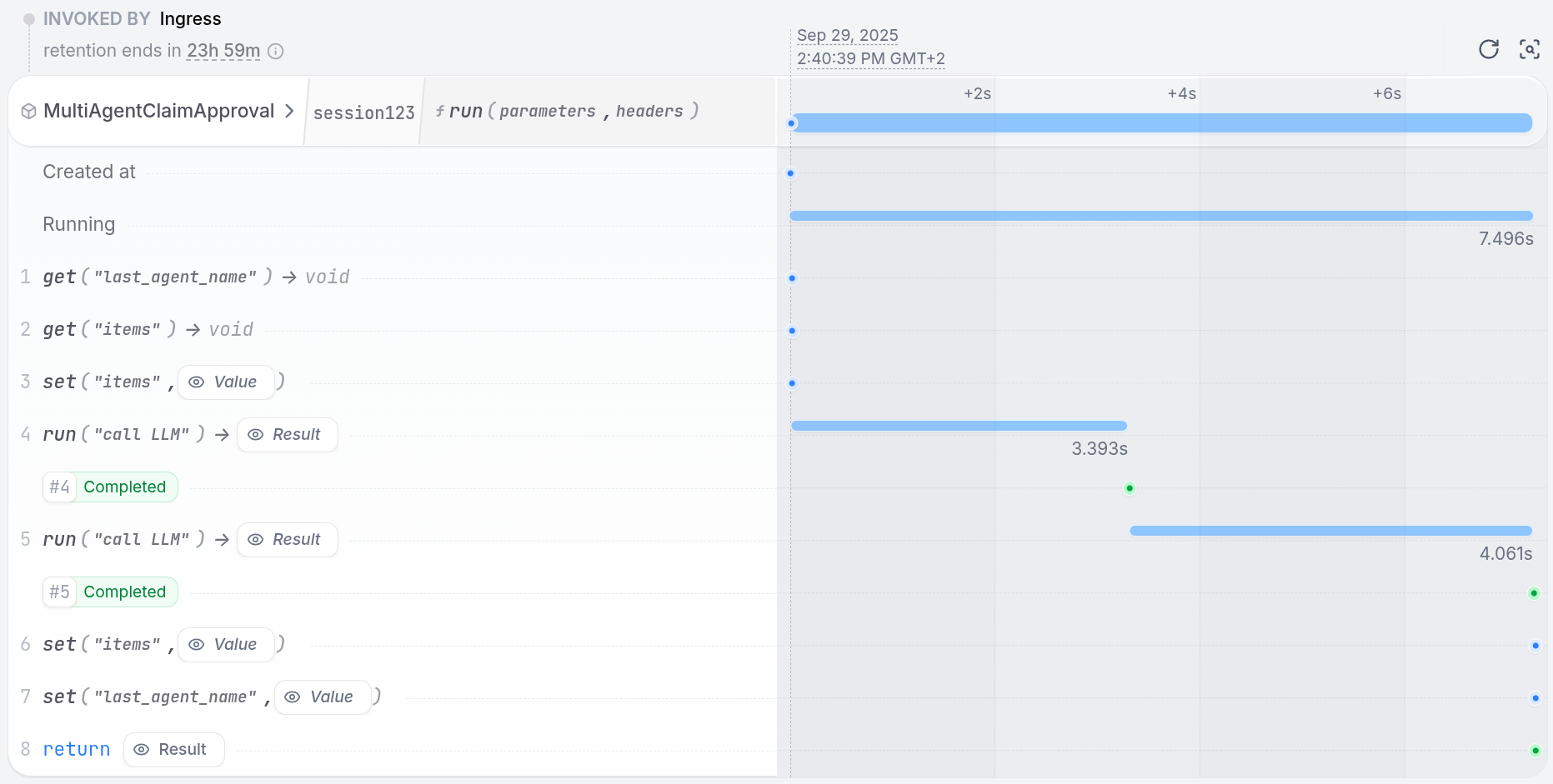 The state now contains the last agent that was called, so you can continue the conversation directly with the same agent:
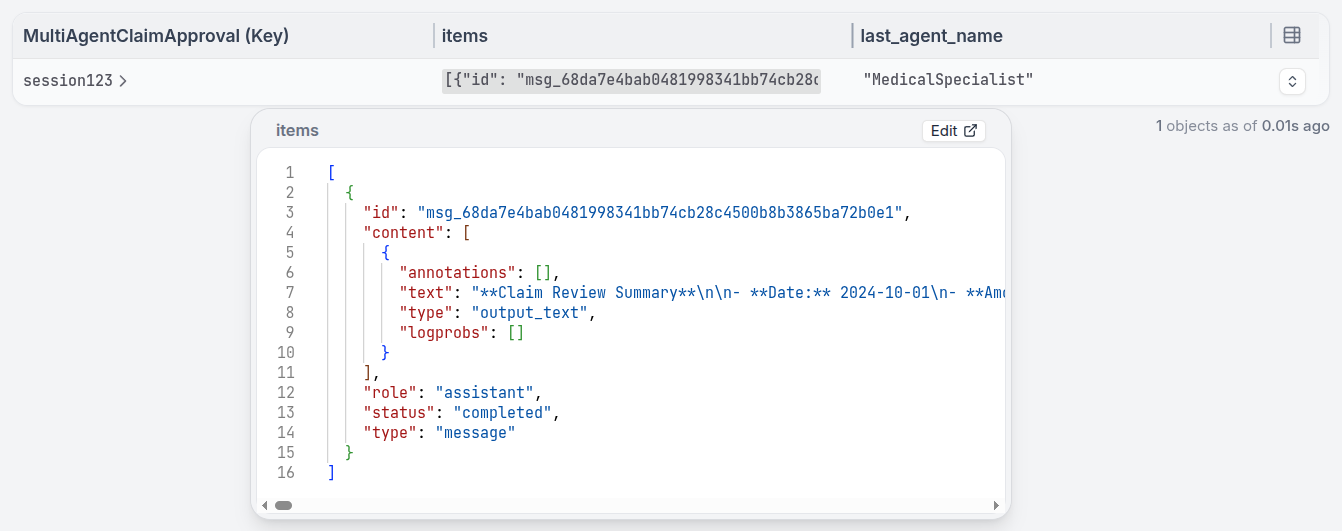 With the Google ADK, you use `sub_agents` for agent routing within the same app. The intake agent delegates to the right specialist based on the claim type.
```python multi_agent.py {"CODE_LOAD::https://raw.githubusercontent.com/restatedev/ai-examples/refs/heads/main/google-adk/tour-of-agents/app/multi_agent.py#here"} theme={null}
# AGENTS
# Determine which specialist to use based on claim type
medical_agent = Agent(
model="gemini-2.5-flash",
name="medical_specialist",
description="Reviews medical insurance claims for coverage and necessity.",
instruction="Review medical claims for coverage and necessity. Approve/deny up to $50,000.",
)
car_agent = Agent(
model="gemini-2.5-flash",
name="car_specialist",
description="Assesses car insurance claims for liability and damage.",
instruction="Assess car claims for liability and damage. Approve/deny up to $25,000.",
)
agent = Agent(
model="gemini-2.5-flash",
name="intake_agent",
instruction="Route insurance claims to the appropriate specialist",
sub_agents=[car_agent, medical_agent],
)
# Enables retries and recovery for model calls and tool executions
app = App(name=APP_NAME, root_agent=agent, plugins=[RestatePlugin()])
runner = Runner(app=app, session_service=RestateSessionService())
agent_service = restate.VirtualObject("MultiAgentClaimApproval")
@agent_service.handler()
async def run(ctx: restate.ObjectContext, claim: InsuranceClaim) -> str | None:
events = runner.run_async(
user_id=ctx.key(),
session_id=claim.session_id,
new_message=Content(
role="user",
parts=[Part.from_text(text=f"Claim: {claim.model_dump_json()}")],
),
)
return await parse_agent_response(events)
```
[Install Restate](/installation) and launch it:
```bash theme={null}
restate-server
```
Get the example:
```bash theme={null}
restate example python-google-adk-tour-of-agents && cd python-google-adk-tour-of-agents
```
Export your [Google API key](https://aistudio.google.com/app/apikey) and run the agent:
```bash theme={null}
export GOOGLE_API_KEY=your-api-key
```
```bash theme={null}
uv run app/multi_agent.py
```
Register the agents with Restate:
```bash theme={null}
restate deployments register http://localhost:9080 --force --yes # dev only: overrides previous registrations
```
Start a request for a claim that needs to be analyzed by multiple agents:
```bash theme={null}
curl localhost:8080/restate/call/MultiAgentClaimApproval/user123/run --json '{
"amount": 3000,
"category": "orthopedic",
"date": "2024-10-01",
"placeOfService": "General Hospital",
"reason": "hospital bill for a broken leg",
"sessionId": "session-123"
}'
```
In the UI, you can see that the agent called the sub-agents and is waiting for their responses.
Once all sub-agents return, the main agent continues and makes a decision.
With the Google ADK, you use `sub_agents` for agent routing within the same app. The intake agent delegates to the right specialist based on the claim type.
```python multi_agent.py {"CODE_LOAD::https://raw.githubusercontent.com/restatedev/ai-examples/refs/heads/main/google-adk/tour-of-agents/app/multi_agent.py#here"} theme={null}
# AGENTS
# Determine which specialist to use based on claim type
medical_agent = Agent(
model="gemini-2.5-flash",
name="medical_specialist",
description="Reviews medical insurance claims for coverage and necessity.",
instruction="Review medical claims for coverage and necessity. Approve/deny up to $50,000.",
)
car_agent = Agent(
model="gemini-2.5-flash",
name="car_specialist",
description="Assesses car insurance claims for liability and damage.",
instruction="Assess car claims for liability and damage. Approve/deny up to $25,000.",
)
agent = Agent(
model="gemini-2.5-flash",
name="intake_agent",
instruction="Route insurance claims to the appropriate specialist",
sub_agents=[car_agent, medical_agent],
)
# Enables retries and recovery for model calls and tool executions
app = App(name=APP_NAME, root_agent=agent, plugins=[RestatePlugin()])
runner = Runner(app=app, session_service=RestateSessionService())
agent_service = restate.VirtualObject("MultiAgentClaimApproval")
@agent_service.handler()
async def run(ctx: restate.ObjectContext, claim: InsuranceClaim) -> str | None:
events = runner.run_async(
user_id=ctx.key(),
session_id=claim.session_id,
new_message=Content(
role="user",
parts=[Part.from_text(text=f"Claim: {claim.model_dump_json()}")],
),
)
return await parse_agent_response(events)
```
[Install Restate](/installation) and launch it:
```bash theme={null}
restate-server
```
Get the example:
```bash theme={null}
restate example python-google-adk-tour-of-agents && cd python-google-adk-tour-of-agents
```
Export your [Google API key](https://aistudio.google.com/app/apikey) and run the agent:
```bash theme={null}
export GOOGLE_API_KEY=your-api-key
```
```bash theme={null}
uv run app/multi_agent.py
```
Register the agents with Restate:
```bash theme={null}
restate deployments register http://localhost:9080 --force --yes # dev only: overrides previous registrations
```
Start a request for a claim that needs to be analyzed by multiple agents:
```bash theme={null}
curl localhost:8080/restate/call/MultiAgentClaimApproval/user123/run --json '{
"amount": 3000,
"category": "orthopedic",
"date": "2024-10-01",
"placeOfService": "General Hospital",
"reason": "hospital bill for a broken leg",
"sessionId": "session-123"
}'
```
In the UI, you can see that the agent called the sub-agents and is waiting for their responses.
Once all sub-agents return, the main agent continues and makes a decision.
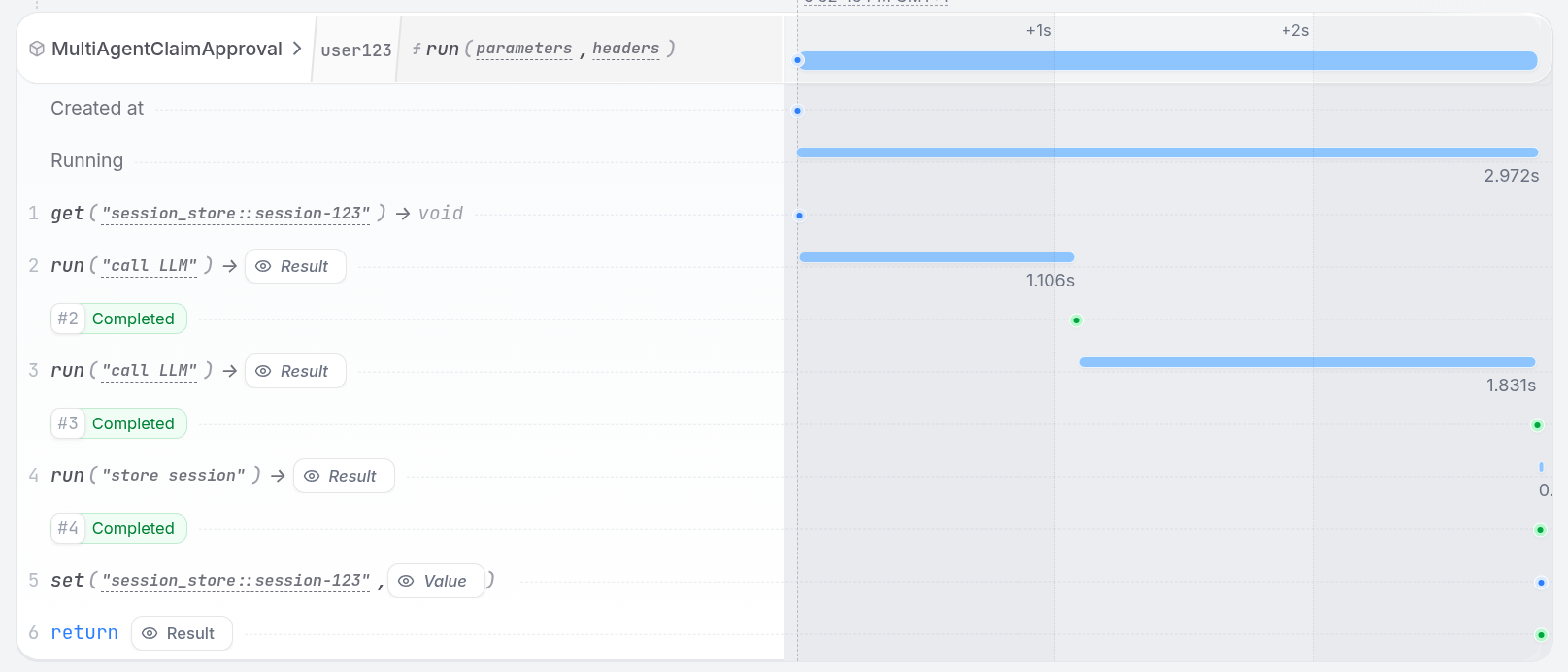 With Pydantic AI, specialist agents are wrapped in `RestateAgent` and exposed as tools on the intake agent. The intake agent uses tool calls to route to the right specialist based on the claim type, and Restate durably persists the routing decision.
```python multi_agent.py {"CODE_LOAD::https://raw.githubusercontent.com/restatedev/ai-examples/refs/heads/main/pydantic-ai/tour-of-agents/app/multi_agent.py#here"} theme={null}
medical_agent = Agent(
"openai:gpt-5.4",
system_prompt="Review medical claims for coverage and necessity. Approve/deny up to $50,000.",
)
restate_medical_agent = RestateAgent(medical_agent)
car_agent = Agent(
"openai:gpt-5.4",
system_prompt="Assess car claims for liability and damage. Approve/deny up to $25,000.",
)
restate_car_agent = RestateAgent(car_agent)
intake_agent = Agent(
"openai:gpt-5.4",
system_prompt="Route insurance claims to the appropriate specialist using the available tools.",
)
@intake_agent.tool
async def consult_medical_specialist(
_run_ctx: RunContext[None], claim: InsuranceClaim
) -> str:
"""Route to the medical specialist for medical insurance claims."""
result = await restate_medical_agent.run(claim.model_dump_json())
return result.output
@intake_agent.tool
async def consult_car_specialist(
_run_ctx: RunContext[None], claim: InsuranceClaim
) -> str:
"""Route to the car specialist for car insurance claims."""
result = await restate_car_agent.run(claim.model_dump_json())
return result.output
restate_intake_agent = RestateAgent(intake_agent)
agent_service = restate.Service("MultiAgentClaimApproval")
@agent_service.handler()
async def run(_ctx: restate.ObjectContext, claim: InsuranceClaim) -> str:
result = await restate_intake_agent.run(f"Claim: {claim.model_dump_json()}")
return result.output
```
[Install Restate](/installation) and launch it:
```bash theme={null}
restate-server
```
Get the example:
```bash theme={null}
restate example python-pydantic-ai-tour-of-agents && cd python-pydantic-ai-tour-of-agents
```
Export your [OpenAI API key](https://platform.openai.com/api-keys) and run the agent:
```bash theme={null}
export OPENAI_API_KEY=sk-...
```
```bash theme={null}
uv run app/multi_agent.py
```
Register the agents with Restate:
```bash theme={null}
restate deployments register http://localhost:9080 --force --yes # dev only: overrides previous registrations
```
Start a request for a claim that needs to be analyzed by multiple agents:
```bash theme={null}
curl localhost:8080/restate/call/MultiAgentClaimApproval/run --json '{
"date":"2024-10-01",
"category":"orthopedic",
"reason":"hospital bill for a broken leg",
"amount":3000,
"placeOfService":"General Hospital"
}'
```
In the UI, you can see that the agent called the sub-agents and is waiting for their responses.
Once all sub-agents return, the main agent continues and makes a decision.
LangChain's `create_agent` doesn't ship a first-class handoff primitive, but the pattern is expressed cleanly by exposing each specialist as a tool on the intake agent. The intake agent picks which specialist to invoke; each specialist call is a normal LangChain agent run, fully durable through Restate's middleware.
Conversation history (and which specialist most recently handled a claim) is stored in a Virtual Object so subsequent calls with the same key remember prior context.
```python multi_agent.py {"CODE_LOAD::https://raw.githubusercontent.com/restatedev/ai-examples/refs/heads/main/langchain-python/tour-of-agents/app/multi_agent.py#here"} theme={null}
medical_agent = create_agent(
model=init_chat_model("openai:gpt-5.4"),
system_prompt=(
"You are a medical insurance specialist. Review medical claims for "
"coverage and necessity. Approve/deny up to $50,000."
),
middleware=[RestateMiddleware()],
)
car_agent = create_agent(
model=init_chat_model("openai:gpt-5.4"),
system_prompt=(
"You are a car insurance specialist. Assess car claims for liability "
"and damage. Approve/deny up to $25,000."
),
middleware=[RestateMiddleware()],
)
@tool
async def to_medical_specialist(claim_json: str) -> str:
"""Hand the claim to the medical specialist for evaluation."""
result = await medical_agent.ainvoke({"messages": claim_json})
return result["messages"][-1].content
@tool
async def to_car_specialist(claim_json: str) -> str:
"""Hand the claim to the car specialist for evaluation."""
result = await car_agent.ainvoke({"messages": claim_json})
return result["messages"][-1].content
intake_agent = create_agent(
model=init_chat_model("openai:gpt-5.4"),
tools=[to_medical_specialist, to_car_specialist],
system_prompt=(
"You are an intake agent. Route insurance claims to the appropriate "
"specialist. Always call exactly one specialist tool, then summarize "
"their decision."
),
middleware=[RestateMiddleware()],
)
agent_service = restate.VirtualObject("MultiAgentClaimApproval")
@agent_service.handler()
async def run(ctx: restate.ObjectContext, claim: InsuranceClaim) -> str:
history = await ctx.get("messages", type_hint=ChatHistory) or ChatHistory()
history.messages.append(HumanMessage(content=f"Claim: {claim.model_dump_json()}"))
result = await intake_agent.ainvoke({"messages": history.messages})
ctx.set("messages", ChatHistory(messages=result["messages"]))
return result["messages"][-1].content
```
[Install Restate](/installation) and launch it:
```bash theme={null}
restate-server
```
Get the example:
```bash theme={null}
restate example python-langchain-tour-of-agents && cd python-langchain-tour-of-agents
```
Export your [OpenAI API key](https://platform.openai.com/api-keys) and run the agent:
```bash theme={null}
export OPENAI_API_KEY=sk-...
```
```bash theme={null}
uv run app/multi_agent.py
```
Register the agents with Restate:
```bash theme={null}
restate deployments register http://localhost:9080 --force --yes # dev only: overrides previous registrations
```
Start a request for a claim that needs to be analyzed by multiple agents:
```bash theme={null}
curl localhost:8080/restate/call/MultiAgentClaimApproval/session123/run --json '{
"date":"2024-10-01",
"category":"orthopedic",
"reason":"hospital bill for a broken leg",
"amount":3000,
"placeOfService":"General Hospital"
}'
```
In the UI, you can see that the intake agent called a specialist tool and is waiting for the response.
Once the specialist returns, the intake agent continues and summarizes the decision.
With the Restate SDK, you implement routing by having the LLM pick a specialist (exposed as tools), then calling the LLM again with the specialist's prompt. Both the routing decision and the specialist call are durable steps.
```typescript multi-agent.ts {"CODE_LOAD::https://raw.githubusercontent.com/restatedev/ai-examples/refs/heads/main/typescript-restate-only/tour-of-agents/src/multi-agent.ts#here"} theme={null}
const SPECIALISTS = {
billingAgent: {
description: "Expert in payments, charges, and refunds",
prompt:
"You are a billing support agent specializing in payments, charges, and refunds.",
},
accountAgent: {
description: "Expert in login issues and security",
prompt:
"You are an account support agent specializing in login issues and security.",
},
productAgent: {
description: "Expert in features and how-to guides",
prompt:
"You are a product support agent specializing in features and how-to guides.",
},
} as const;
type Specialist = keyof typeof SPECIALISTS;
async function answer(ctx: Context, { message }: { message: string }) {
// 1. First, decide if a specialist is needed
const routingDecision = await ctx.run(
"Pick specialist",
// Use your preferred LLM SDK here - specify agents as tools
async () => llmCall(message, createTools(SPECIALISTS)),
{ maxRetryAttempts: 3 },
);
// 2. No specialist needed? Give a general answer
if (!routingDecision.toolCalls || routingDecision.toolCalls.length === 0) {
return routingDecision.text;
}
// 3. Get the specialist's name
const specialist = routingDecision.toolCalls[0].toolName as Specialist;
// 4. Ask the specialist to answer
const { text } = await ctx.run(
`Ask ${specialist}`,
async () =>
llmCall([
{ role: "user", content: message },
{ role: "system", content: SPECIALISTS[specialist].prompt },
]),
{ maxRetryAttempts: 3 },
);
return text;
}
```
[Install Restate](/installation) and launch it:
```bash theme={null}
restate-server
```
Get the example:
```bash theme={null}
restate example typescript-restate-tour-of-agents && cd typescript-restate-tour-of-agents
npm install
```
Export your API key:
```bash theme={null}
export OPENAI_API_KEY=sk-...
```
```bash theme={null}
npx tsx ./src/multi-agent.ts
```
Register the services with Restate:
```bash theme={null}
restate deployments register http://localhost:9080 --force --yes # dev only: overrides previous registrations
```
Send a request:
```bash theme={null}
curl localhost:8080/restate/call/AgentRouter/answer \
--json '{"message": "I was charged twice for my subscription last month"}'
```
With the Restate SDK, you implement routing by having the LLM pick a specialist (exposed as tools), then calling the LLM again with the specialist's prompt. Both the routing decision and the specialist call are durable steps.
```python multi_agent.py {"CODE_LOAD::https://raw.githubusercontent.com/restatedev/ai-examples/refs/heads/main/python-restate-only/tour-of-agents/app/multi_agent.py#here"} theme={null}
# Create the routing service
router = restate.Service("AgentRouter")
# Our team of AI specialists
SPECIALISTS = {
"BillingAgent": "Expert in payments, charges, and refunds",
"AccountAgent": "Expert in login issues and security",
"ProductAgent": "Expert in features and how-to guides",
}
@router.handler()
async def answer(ctx: restate.Context, question: Question) -> str | None:
"""Classify request and route to appropriate specialized agent."""
# 1. First, decide if a specialist is needed
routing_decision = await ctx.run_typed(
"Pick specialist",
llm_call, # Use your preferred LLM SDK here
RunOptions(max_attempts=3),
messages=f"""You are a customer service routing system.
Choose the appropriate specialist, or respond directly if no specialist is needed.
{question.message}""",
tools=[tool(name=name, description=desc) for name, desc in SPECIALISTS.items()],
)
# 2. No specialist needed? Give a general answer
if not routing_decision.tool_calls:
return routing_decision.content
# 3. Get the specialist's name
specialist = routing_decision.tool_calls[0].function.name or "ProductAgent"
# 4. Ask the specialist to answer
response = await ctx.run_typed(
f"Ask {specialist}",
llm_call,
RunOptions(max_attempts=3),
messages=f"""You are a {SPECIALISTS.get(specialist)} specialist."
Answer the question: {question.message}""",
)
return response.content
```
[Install Restate](/installation) and launch it:
```bash theme={null}
restate-server
```
Get the example:
```bash theme={null}
restate example python-restate-tour-of-agents && cd python-restate-tour-of-agents
```
Export your API key:
```bash theme={null}
export OPENAI_API_KEY=sk-...
```
```bash theme={null}
uv run app/multi_agent.py
```
Register the services with Restate:
```bash theme={null}
restate deployments register http://localhost:9080 --force --yes # dev only: overrides previous registrations
```
Send a request:
```bash theme={null}
curl localhost:8080/restate/call/AgentRouter/answer \
--json '{"message": "I was charged twice for my subscription last month"}'
```
## Handing off to remote agents
When agents need to scale independently, run on different platforms, or be developed by different teams, you can deploy them as separate Restate services. Restate makes cross-service calls look like local function calls while providing end-to-end durability and failure recovery.
See the [guide on calling remote agents](/ai/patterns/remote-agents) implementation guide for full examples of remote agent routing.
With Pydantic AI, specialist agents are wrapped in `RestateAgent` and exposed as tools on the intake agent. The intake agent uses tool calls to route to the right specialist based on the claim type, and Restate durably persists the routing decision.
```python multi_agent.py {"CODE_LOAD::https://raw.githubusercontent.com/restatedev/ai-examples/refs/heads/main/pydantic-ai/tour-of-agents/app/multi_agent.py#here"} theme={null}
medical_agent = Agent(
"openai:gpt-5.4",
system_prompt="Review medical claims for coverage and necessity. Approve/deny up to $50,000.",
)
restate_medical_agent = RestateAgent(medical_agent)
car_agent = Agent(
"openai:gpt-5.4",
system_prompt="Assess car claims for liability and damage. Approve/deny up to $25,000.",
)
restate_car_agent = RestateAgent(car_agent)
intake_agent = Agent(
"openai:gpt-5.4",
system_prompt="Route insurance claims to the appropriate specialist using the available tools.",
)
@intake_agent.tool
async def consult_medical_specialist(
_run_ctx: RunContext[None], claim: InsuranceClaim
) -> str:
"""Route to the medical specialist for medical insurance claims."""
result = await restate_medical_agent.run(claim.model_dump_json())
return result.output
@intake_agent.tool
async def consult_car_specialist(
_run_ctx: RunContext[None], claim: InsuranceClaim
) -> str:
"""Route to the car specialist for car insurance claims."""
result = await restate_car_agent.run(claim.model_dump_json())
return result.output
restate_intake_agent = RestateAgent(intake_agent)
agent_service = restate.Service("MultiAgentClaimApproval")
@agent_service.handler()
async def run(_ctx: restate.ObjectContext, claim: InsuranceClaim) -> str:
result = await restate_intake_agent.run(f"Claim: {claim.model_dump_json()}")
return result.output
```
[Install Restate](/installation) and launch it:
```bash theme={null}
restate-server
```
Get the example:
```bash theme={null}
restate example python-pydantic-ai-tour-of-agents && cd python-pydantic-ai-tour-of-agents
```
Export your [OpenAI API key](https://platform.openai.com/api-keys) and run the agent:
```bash theme={null}
export OPENAI_API_KEY=sk-...
```
```bash theme={null}
uv run app/multi_agent.py
```
Register the agents with Restate:
```bash theme={null}
restate deployments register http://localhost:9080 --force --yes # dev only: overrides previous registrations
```
Start a request for a claim that needs to be analyzed by multiple agents:
```bash theme={null}
curl localhost:8080/restate/call/MultiAgentClaimApproval/run --json '{
"date":"2024-10-01",
"category":"orthopedic",
"reason":"hospital bill for a broken leg",
"amount":3000,
"placeOfService":"General Hospital"
}'
```
In the UI, you can see that the agent called the sub-agents and is waiting for their responses.
Once all sub-agents return, the main agent continues and makes a decision.
LangChain's `create_agent` doesn't ship a first-class handoff primitive, but the pattern is expressed cleanly by exposing each specialist as a tool on the intake agent. The intake agent picks which specialist to invoke; each specialist call is a normal LangChain agent run, fully durable through Restate's middleware.
Conversation history (and which specialist most recently handled a claim) is stored in a Virtual Object so subsequent calls with the same key remember prior context.
```python multi_agent.py {"CODE_LOAD::https://raw.githubusercontent.com/restatedev/ai-examples/refs/heads/main/langchain-python/tour-of-agents/app/multi_agent.py#here"} theme={null}
medical_agent = create_agent(
model=init_chat_model("openai:gpt-5.4"),
system_prompt=(
"You are a medical insurance specialist. Review medical claims for "
"coverage and necessity. Approve/deny up to $50,000."
),
middleware=[RestateMiddleware()],
)
car_agent = create_agent(
model=init_chat_model("openai:gpt-5.4"),
system_prompt=(
"You are a car insurance specialist. Assess car claims for liability "
"and damage. Approve/deny up to $25,000."
),
middleware=[RestateMiddleware()],
)
@tool
async def to_medical_specialist(claim_json: str) -> str:
"""Hand the claim to the medical specialist for evaluation."""
result = await medical_agent.ainvoke({"messages": claim_json})
return result["messages"][-1].content
@tool
async def to_car_specialist(claim_json: str) -> str:
"""Hand the claim to the car specialist for evaluation."""
result = await car_agent.ainvoke({"messages": claim_json})
return result["messages"][-1].content
intake_agent = create_agent(
model=init_chat_model("openai:gpt-5.4"),
tools=[to_medical_specialist, to_car_specialist],
system_prompt=(
"You are an intake agent. Route insurance claims to the appropriate "
"specialist. Always call exactly one specialist tool, then summarize "
"their decision."
),
middleware=[RestateMiddleware()],
)
agent_service = restate.VirtualObject("MultiAgentClaimApproval")
@agent_service.handler()
async def run(ctx: restate.ObjectContext, claim: InsuranceClaim) -> str:
history = await ctx.get("messages", type_hint=ChatHistory) or ChatHistory()
history.messages.append(HumanMessage(content=f"Claim: {claim.model_dump_json()}"))
result = await intake_agent.ainvoke({"messages": history.messages})
ctx.set("messages", ChatHistory(messages=result["messages"]))
return result["messages"][-1].content
```
[Install Restate](/installation) and launch it:
```bash theme={null}
restate-server
```
Get the example:
```bash theme={null}
restate example python-langchain-tour-of-agents && cd python-langchain-tour-of-agents
```
Export your [OpenAI API key](https://platform.openai.com/api-keys) and run the agent:
```bash theme={null}
export OPENAI_API_KEY=sk-...
```
```bash theme={null}
uv run app/multi_agent.py
```
Register the agents with Restate:
```bash theme={null}
restate deployments register http://localhost:9080 --force --yes # dev only: overrides previous registrations
```
Start a request for a claim that needs to be analyzed by multiple agents:
```bash theme={null}
curl localhost:8080/restate/call/MultiAgentClaimApproval/session123/run --json '{
"date":"2024-10-01",
"category":"orthopedic",
"reason":"hospital bill for a broken leg",
"amount":3000,
"placeOfService":"General Hospital"
}'
```
In the UI, you can see that the intake agent called a specialist tool and is waiting for the response.
Once the specialist returns, the intake agent continues and summarizes the decision.
With the Restate SDK, you implement routing by having the LLM pick a specialist (exposed as tools), then calling the LLM again with the specialist's prompt. Both the routing decision and the specialist call are durable steps.
```typescript multi-agent.ts {"CODE_LOAD::https://raw.githubusercontent.com/restatedev/ai-examples/refs/heads/main/typescript-restate-only/tour-of-agents/src/multi-agent.ts#here"} theme={null}
const SPECIALISTS = {
billingAgent: {
description: "Expert in payments, charges, and refunds",
prompt:
"You are a billing support agent specializing in payments, charges, and refunds.",
},
accountAgent: {
description: "Expert in login issues and security",
prompt:
"You are an account support agent specializing in login issues and security.",
},
productAgent: {
description: "Expert in features and how-to guides",
prompt:
"You are a product support agent specializing in features and how-to guides.",
},
} as const;
type Specialist = keyof typeof SPECIALISTS;
async function answer(ctx: Context, { message }: { message: string }) {
// 1. First, decide if a specialist is needed
const routingDecision = await ctx.run(
"Pick specialist",
// Use your preferred LLM SDK here - specify agents as tools
async () => llmCall(message, createTools(SPECIALISTS)),
{ maxRetryAttempts: 3 },
);
// 2. No specialist needed? Give a general answer
if (!routingDecision.toolCalls || routingDecision.toolCalls.length === 0) {
return routingDecision.text;
}
// 3. Get the specialist's name
const specialist = routingDecision.toolCalls[0].toolName as Specialist;
// 4. Ask the specialist to answer
const { text } = await ctx.run(
`Ask ${specialist}`,
async () =>
llmCall([
{ role: "user", content: message },
{ role: "system", content: SPECIALISTS[specialist].prompt },
]),
{ maxRetryAttempts: 3 },
);
return text;
}
```
[Install Restate](/installation) and launch it:
```bash theme={null}
restate-server
```
Get the example:
```bash theme={null}
restate example typescript-restate-tour-of-agents && cd typescript-restate-tour-of-agents
npm install
```
Export your API key:
```bash theme={null}
export OPENAI_API_KEY=sk-...
```
```bash theme={null}
npx tsx ./src/multi-agent.ts
```
Register the services with Restate:
```bash theme={null}
restate deployments register http://localhost:9080 --force --yes # dev only: overrides previous registrations
```
Send a request:
```bash theme={null}
curl localhost:8080/restate/call/AgentRouter/answer \
--json '{"message": "I was charged twice for my subscription last month"}'
```
With the Restate SDK, you implement routing by having the LLM pick a specialist (exposed as tools), then calling the LLM again with the specialist's prompt. Both the routing decision and the specialist call are durable steps.
```python multi_agent.py {"CODE_LOAD::https://raw.githubusercontent.com/restatedev/ai-examples/refs/heads/main/python-restate-only/tour-of-agents/app/multi_agent.py#here"} theme={null}
# Create the routing service
router = restate.Service("AgentRouter")
# Our team of AI specialists
SPECIALISTS = {
"BillingAgent": "Expert in payments, charges, and refunds",
"AccountAgent": "Expert in login issues and security",
"ProductAgent": "Expert in features and how-to guides",
}
@router.handler()
async def answer(ctx: restate.Context, question: Question) -> str | None:
"""Classify request and route to appropriate specialized agent."""
# 1. First, decide if a specialist is needed
routing_decision = await ctx.run_typed(
"Pick specialist",
llm_call, # Use your preferred LLM SDK here
RunOptions(max_attempts=3),
messages=f"""You are a customer service routing system.
Choose the appropriate specialist, or respond directly if no specialist is needed.
{question.message}""",
tools=[tool(name=name, description=desc) for name, desc in SPECIALISTS.items()],
)
# 2. No specialist needed? Give a general answer
if not routing_decision.tool_calls:
return routing_decision.content
# 3. Get the specialist's name
specialist = routing_decision.tool_calls[0].function.name or "ProductAgent"
# 4. Ask the specialist to answer
response = await ctx.run_typed(
f"Ask {specialist}",
llm_call,
RunOptions(max_attempts=3),
messages=f"""You are a {SPECIALISTS.get(specialist)} specialist."
Answer the question: {question.message}""",
)
return response.content
```
[Install Restate](/installation) and launch it:
```bash theme={null}
restate-server
```
Get the example:
```bash theme={null}
restate example python-restate-tour-of-agents && cd python-restate-tour-of-agents
```
Export your API key:
```bash theme={null}
export OPENAI_API_KEY=sk-...
```
```bash theme={null}
uv run app/multi_agent.py
```
Register the services with Restate:
```bash theme={null}
restate deployments register http://localhost:9080 --force --yes # dev only: overrides previous registrations
```
Send a request:
```bash theme={null}
curl localhost:8080/restate/call/AgentRouter/answer \
--json '{"message": "I was charged twice for my subscription last month"}'
```
## Handing off to remote agents
When agents need to scale independently, run on different platforms, or be developed by different teams, you can deploy them as separate Restate services. Restate makes cross-service calls look like local function calls while providing end-to-end durability and failure recovery.
See the [guide on calling remote agents](/ai/patterns/remote-agents) implementation guide for full examples of remote agent routing.