> ## Documentation Index
> Fetch the complete documentation index at: https://docs.restate.dev/llms.txt
> Use this file to discover all available pages before exploring further.
# Notify when ready
> Build async notification systems for your agents with just a few lines of code.
export const GitHubLink = ({url}) => ;
Let users subscribe to notifications for long-running agent tasks instead of waiting.
With Restate's durable promises, you can coordinate between agent execution and notification handlers, no extra infrastructure needed.
## How does Restate help?
Building this yourself requires message queues, databases, and polling workers. Restate replaces all that with a few lines of code:
* **Durable promises**: Create promises that survive failures and restarts
* **Zero infrastructure**: No queues, databases, or polling workers needed
* **No race conditions**: Late subscribers immediately receive already-resolved results
* **Serverless-friendly**: Handlers suspend while waiting - pay only for active compute
* Works with **any LLM SDK** and **any language** supported by Restate
## Example
The pattern works in two steps:
**Step 1:** The agent handler processes the request and resolves a durable promise with the result.
**Step 2:** The notification handler awaits that promise and sends the notification when it resolves.
```python agent.py {"CODE_LOAD::https://raw.githubusercontent.com/restatedev/ai-examples/refs/heads/main/openai-agents/examples/notify_when_ready/agent.py#here"} theme={null}
import restate
from agents import Agent
from restate.ext.openai import DurableRunner
# Let users request to be alerted when long-running agent tasks complete.
# For example, when a user click on a "Notify" button in the UI, the agent
# response is send via an email when it's ready.
agent_service = restate.Workflow("AsyncNotificationsAgent")
agent = Agent(
name="Assistant",
instructions="You are a helpful assistant.",
)
@agent_service.main()
async def run(ctx: restate.WorkflowContext, user_query: str):
# Process the user's query with the AI agent
response = await DurableRunner.run(agent, user_query)
# Notify other handlers of the response
await ctx.promise("agent_response").resolve(response.final_output)
# Return synchronous response
return response.final_output
@agent_service.handler()
async def on_notify(ctx: restate.WorkflowContext, email: str):
# Wait for the agent's response
response = await ctx.promise("agent_response", type_hint=str).value()
# Send the email
async def send_email(email: str, body: str) -> None:
print(f"Agent done. Sending email to {email}: {body}")
await ctx.run_typed("Email", send_email, email=email, body=response)
```
Check out the SDK documentation for more details on the durable promises API ([TS](/develop/ts/external-events) / [Python](/develop/python/external-events)).
This pattern is implementable with any of our SDKs and any AI SDK.
If you need help with a specific SDK, please reach out to us via [Discord](https://discord.restate.dev) or [Slack](https://slack.restate.dev).
* AI SDK of your choice (e.g., OpenAI, LangChain, Pydantic AI, LiteLLM, etc.) to make LLM calls.
* API key for your model provider.
```shell Python theme={null}
git clone https://github.com/restatedev/ai-examples.git &&
cd ai-examples/openai-agents/examples/notify_when_ready
```
```shell theme={null}
restate-server
```
Export the API key of your model provider as an environment variable and then start the agent. For example, for OpenAI:
```shell Python theme={null}
export OPENAI_API_KEY=your_openai_api_key
uv run .
```
 ```shell theme={null}
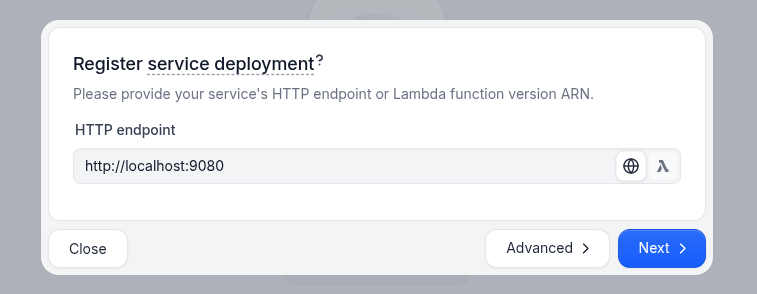
restate deployments register http://localhost:9080 --force --yes # dev only: overrides previous registrations
```
In the UI (`http://localhost:9070`), click on the `run` handler of the `AsyncNotificationsAgent` to open the playground and send a request to the `run` handler and then the `on_notify` handler.
Or send requests via the terminal.
First, start the agent asynchronously by using the `send` verb:
```shell theme={null}
curl localhost:8080/restate/send/AsyncNotificationsAgent/msg-123/run \
--json '"Write a 1000-word description of Durable Execution"'
```
Then, asynchronously call the `on_notify` handler to send the agent response via email once it's ready:
```shell theme={null}
curl localhost:8080/restate/send/AsyncNotificationsAgent/msg-123/on_notify \
--json '"me@mail.com"'
```
Notice that the key `msg-123` is identical for both requests, to send them to the same workflow instance.
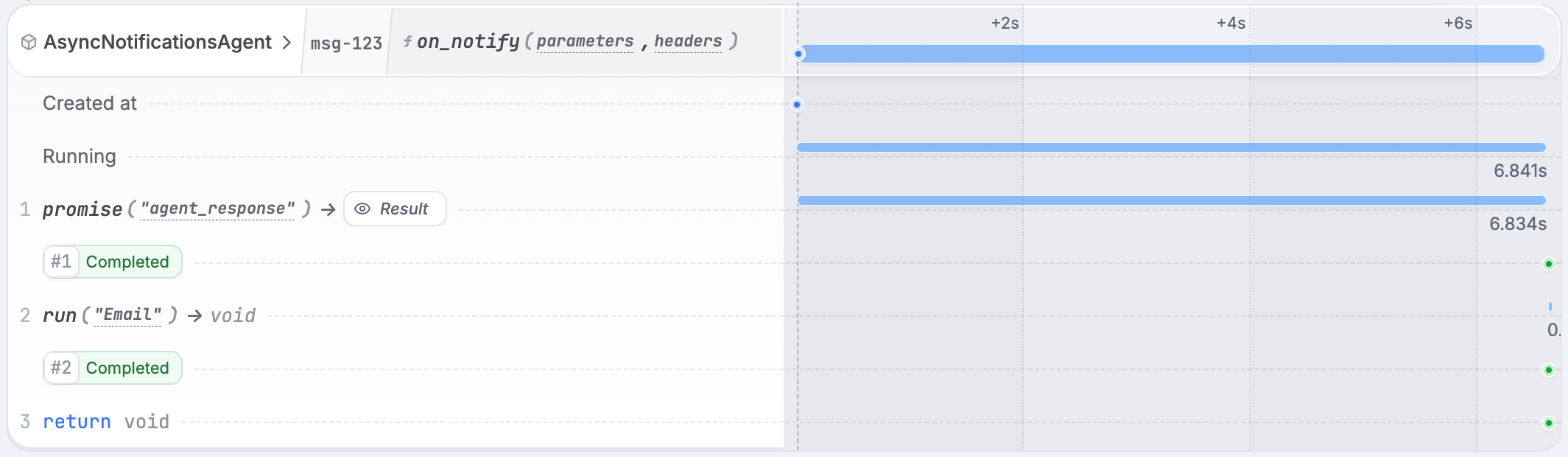
In the Restate UI, you see how the notify handler waited on the agent response and then sent the email.
```shell theme={null}
restate deployments register http://localhost:9080 --force --yes # dev only: overrides previous registrations
```
In the UI (`http://localhost:9070`), click on the `run` handler of the `AsyncNotificationsAgent` to open the playground and send a request to the `run` handler and then the `on_notify` handler.
Or send requests via the terminal.
First, start the agent asynchronously by using the `send` verb:
```shell theme={null}
curl localhost:8080/restate/send/AsyncNotificationsAgent/msg-123/run \
--json '"Write a 1000-word description of Durable Execution"'
```
Then, asynchronously call the `on_notify` handler to send the agent response via email once it's ready:
```shell theme={null}
curl localhost:8080/restate/send/AsyncNotificationsAgent/msg-123/on_notify \
--json '"me@mail.com"'
```
Notice that the key `msg-123` is identical for both requests, to send them to the same workflow instance.
In the Restate UI, you see how the notify handler waited on the agent response and then sent the email.