> ## Documentation Index
> Fetch the complete documentation index at: https://docs.restate.dev/llms.txt
> Use this file to discover all available pages before exploring further.
# Parallel Tool Calls
> Execute multiple tool calls in parallel with automatic recovery and coordination.
export const GitHubLink = ({url}) => ;
When an LLM decides to call multiple tools, executing them in parallel instead of sequentially can significantly reduce latency.
## Use Restate's parallelization primitives
Agent SDKs natively support parallel tool calls, but this is disabled when integrating with Restate.
Parallel tool calls that use the Restate Context can execute in a different order during replays, breaking Restate's deterministic execution guarantees.
Instead, you use Restate's durable execution primitives (`RestatePromise.all()` in TypeScript, `restate.gather()` in Python) to parallelize work. There are two patterns for this:
1. **With Agent SDK: use orchestrator tool**: Create a single tool that internally fans out multiple steps in parallel using Restate. The agent SDK sees one tool call, but that tool runs work concurrently.
2. **With only Restate: Custom agent loop**: Manage the agentic loop yourself with the Restate SDK directly. You control the tool execution step and can run all tool calls in parallel.
## With Agent SDK: Use orchestrator tool
**⚠️To ensure deterministic replay when using the Vercel AI with Restate, you need to set `providerOptions: { openai: { parallelToolCalls: false } }` for all your AI SDK Agents.**
To use parallel tool calls with the Vercel AI SDK, create a tool that runs multiple analyses in parallel. The LLM calls one tool, and that tool fans out work internally using durable execution primitives.
Restate makes sure that all parallel tasks are retried and recovered until they succeed. If one step fails, only that step is retried while the successful results are preserved.
```typescript parallel-tools-agent.ts {"CODE_LOAD::https://raw.githubusercontent.com/restatedev/ai-examples/refs/heads/main/vercel-ai/tour-of-agents/src/parallel-tools-agent.ts#here"} theme={null}
const run = async (ctx: restate.Context, claim: ClaimInput) => {
const model = wrapLanguageModel({
model: openai("gpt-5.4"),
middleware: durableCalls(ctx, { maxRetryAttempts: 3 }),
});
const { text } = await generateText({
model,
prompt: `Analyze the claim ${JSON.stringify(claim)}.
Use your tools to calculate key metrics and decide whether to approve.`,
tools: {
calculateMetrics: tool({
description: "Calculate claim metrics.",
inputSchema: InsuranceClaimSchema,
execute: async (claim: InsuranceClaim) => {
// Execute each calculation as a parallel durable step
return RestatePromise.all([
ctx.run("eligibility", () => checkEligibility(claim)),
ctx.run("cost", () => compareToStandardRates(claim)),
ctx.run("fraud", () => checkFraud(claim)),
]);
},
}),
},
stopWhen: [stepCountIs(10)],
providerOptions: { openai: { parallelToolCalls: false } },
});
return text;
};
```
[Install Restate](/installation) and launch it:
```bash theme={null}
npm install --global @restatedev/restate-server@latest @restatedev/restate@latest
restate-server
```
Get the example:
```bash theme={null}
restate example typescript-vercel-ai-tour-of-agents && cd typescript-vercel-ai-tour-of-agents
npm install
```
Export your [OpenAI API key](https://platform.openai.com/api-keys) and run the agent:
```bash theme={null}
export OPENAI_API_KEY=sk-...
```
```bash theme={null}
npx tsx ./src/parallel-tools-agent.ts
```
Register the agents with Restate:
```bash theme={null}
restate deployments register http://localhost:9080 --force --yes # dev only: overrides previous registrations
```
Start a request:
```bash theme={null}
curl localhost:8080/restate/call/ParallelToolClaimAgent/run --json '{
"date":"2024-10-01",
"category":"orthopedic",
"reason":"hospital bill for a broken leg",
"amount":3000,
"placeOfService":"General Hospital"
}'
```
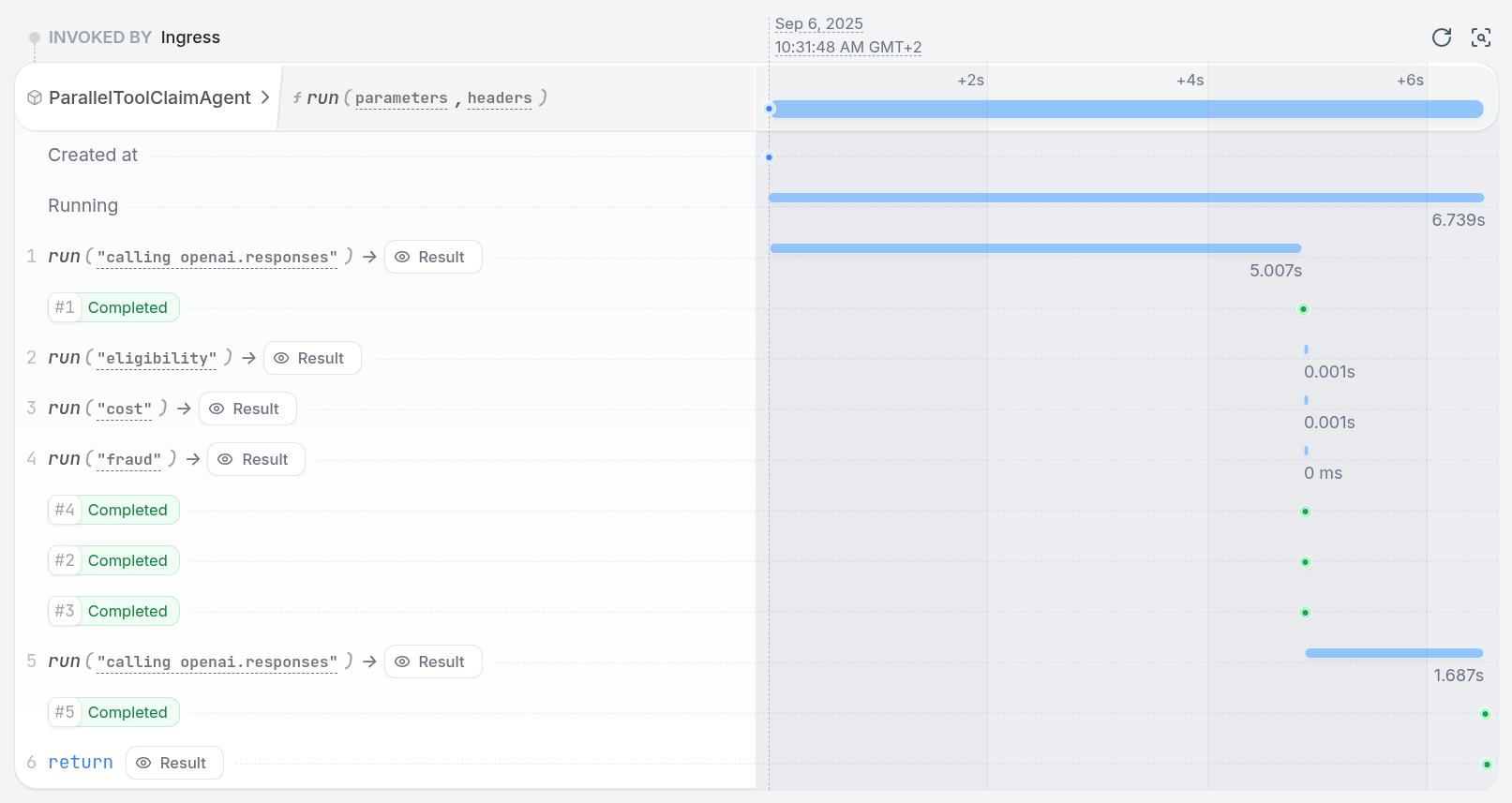
In the UI, you can see the tool steps running in parallel:
 **⚠️ Executing tool calls in parallel can lead to non-deterministic replays of journaled events on retries. To prevent this, when the LLM requests multiple tools in a single turn, the integration runs them one after the other instead of in parallel. The LLM still issues a single batch of tool calls (no extra LLM round-trips), but the tool executions themselves are serialized.**
To use parallel tool calls with the OpenAI Agent SDK, create a tool that runs multiple analyses in parallel. The LLM calls one tool, and that tool fans out work internally using durable execution primitives.
Restate makes sure that all parallel tasks are retried and recovered until they succeed. If one step fails, only that step is retried while the successful results are preserved.
```python parallel_tools_agent.py {"CODE_LOAD::https://raw.githubusercontent.com/restatedev/ai-examples/refs/heads/main/openai-agents/tour-of-agents/app/parallel_tools_agent.py#here"} theme={null}
@durable_function_tool
async def calculate_metrics(claim: InsuranceClaim) -> list[str]:
"""Calculate claim metrics."""
ctx = restate_context()
# Run tools/steps in parallel with durable execution
results_done = await restate.gather(
ctx.run_typed("eligibility", check_eligibility, claim=claim),
ctx.run_typed("cost", compare_to_standard_rates, claim=claim),
ctx.run_typed("fraud", check_fraud, claim=claim),
)
return [await result for result in results_done]
```
[Install Restate](/installation) and launch it:
```bash theme={null}
restate-server
```
Get the example:
```bash theme={null}
restate example python-openai-agents-tour-of-agents && cd python-openai-agents-tour-of-agents
```
Export your [OpenAI API key](https://platform.openai.com/api-keys) and run the agent:
```bash theme={null}
export OPENAI_API_KEY=sk-...
```
```bash theme={null}
uv run app/parallel_tools_agent.py
```
Register the agents with Restate:
```bash theme={null}
restate deployments register http://localhost:9080 --force --yes # dev only: overrides previous registrations
```
Start a request:
```bash theme={null}
curl localhost:8080/restate/call/ParallelToolClaimAgent/run --json '{
"date":"2024-10-01",
"category":"orthopedic",
"reason":"hospital bill for a broken leg",
"amount":3000,
"placeOfService":"General Hospital"
}'
```
In the UI, you can see the tool steps running in parallel:
**⚠️ Executing tool calls in parallel can lead to non-deterministic replays of journaled events on retries. To prevent this, when the LLM requests multiple tools in a single turn, the integration runs them one after the other instead of in parallel. The LLM still issues a single batch of tool calls (no extra LLM round-trips), but the tool executions themselves are serialized.**
To use parallel tool calls with the OpenAI Agent SDK, create a tool that runs multiple analyses in parallel. The LLM calls one tool, and that tool fans out work internally using durable execution primitives.
Restate makes sure that all parallel tasks are retried and recovered until they succeed. If one step fails, only that step is retried while the successful results are preserved.
```python parallel_tools_agent.py {"CODE_LOAD::https://raw.githubusercontent.com/restatedev/ai-examples/refs/heads/main/openai-agents/tour-of-agents/app/parallel_tools_agent.py#here"} theme={null}
@durable_function_tool
async def calculate_metrics(claim: InsuranceClaim) -> list[str]:
"""Calculate claim metrics."""
ctx = restate_context()
# Run tools/steps in parallel with durable execution
results_done = await restate.gather(
ctx.run_typed("eligibility", check_eligibility, claim=claim),
ctx.run_typed("cost", compare_to_standard_rates, claim=claim),
ctx.run_typed("fraud", check_fraud, claim=claim),
)
return [await result for result in results_done]
```
[Install Restate](/installation) and launch it:
```bash theme={null}
restate-server
```
Get the example:
```bash theme={null}
restate example python-openai-agents-tour-of-agents && cd python-openai-agents-tour-of-agents
```
Export your [OpenAI API key](https://platform.openai.com/api-keys) and run the agent:
```bash theme={null}
export OPENAI_API_KEY=sk-...
```
```bash theme={null}
uv run app/parallel_tools_agent.py
```
Register the agents with Restate:
```bash theme={null}
restate deployments register http://localhost:9080 --force --yes # dev only: overrides previous registrations
```
Start a request:
```bash theme={null}
curl localhost:8080/restate/call/ParallelToolClaimAgent/run --json '{
"date":"2024-10-01",
"category":"orthopedic",
"reason":"hospital bill for a broken leg",
"amount":3000,
"placeOfService":"General Hospital"
}'
```
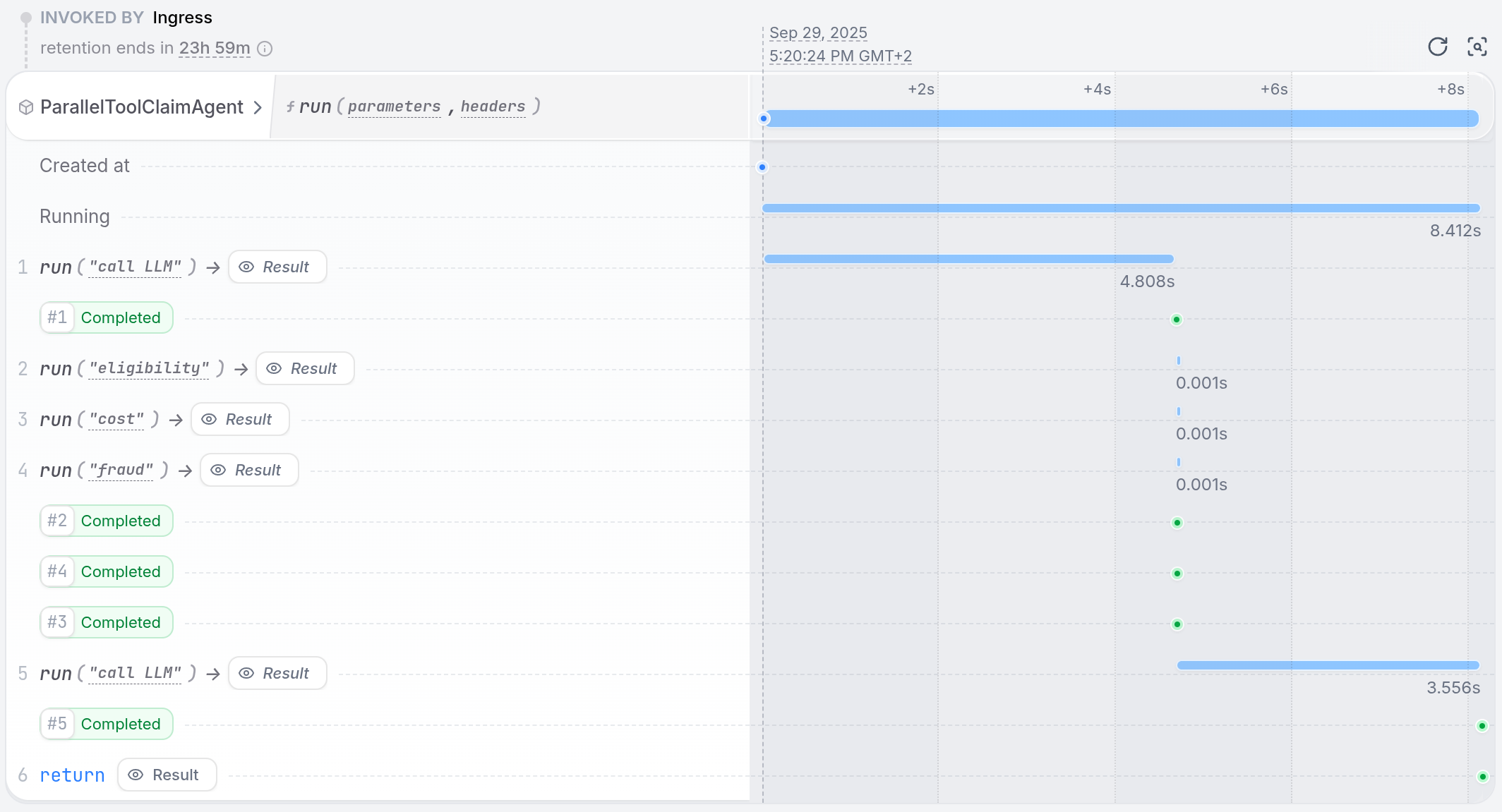
In the UI, you can see the tool steps running in parallel:
 **⚠️ Executing tool calls in parallel can lead to non-deterministic replays of journaled events on retries. To prevent this, when the LLM requests multiple tools in a single turn, the integration runs them one after the other instead of in parallel. The LLM still issues a single batch of tool calls (no extra LLM round-trips), but the tool executions themselves are serialized.**
To use parallel tool calls with the Google ADK, create a tool that runs multiple analyses in parallel. The LLM calls one tool, and that tool fans out work internally using durable execution primitives.
Restate makes sure that all parallel tasks are retried and recovered until they succeed. If one step fails, only that step is retried while the successful results are preserved.
```python parallel_tools_agent.py {"CODE_LOAD::https://raw.githubusercontent.com/restatedev/ai-examples/refs/heads/main/google-adk/tour-of-agents/app/parallel_tools_agent.py#here"} theme={null}
async def calculate_metrics(claim: InsuranceClaim) -> List[str]:
"""Calculate claim metrics using parallel execution."""
ctx = restate_object_context()
# Run tools/steps in parallel with durable execution
results_done = await restate.gather(
ctx.run_typed("eligibility", check_eligibility, claim=claim),
ctx.run_typed("cost", compare_to_standard_rates, claim=claim),
ctx.run_typed("fraud", check_fraud, claim=claim),
)
return [await result for result in results_done]
```
[Install Restate](/installation) and launch it:
```bash theme={null}
restate-server
```
Get the example:
```bash theme={null}
restate example python-google-adk-tour-of-agents && cd python-google-adk-tour-of-agents
```
Export your [Google API key](https://aistudio.google.com/app/apikey) and run the agent:
```bash theme={null}
export GOOGLE_API_KEY=your-api-key
```
```bash theme={null}
uv run app/parallel_tools_agent.py
```
Register the agents with Restate:
```bash theme={null}
restate deployments register http://localhost:9080 --force --yes # dev only: overrides previous registrations
```
Start a request:
```bash theme={null}
curl localhost:8080/restate/call/ParallelToolClaimAgent/user123/run --json '{
"amount": 3000,
"category": "orthopedic",
"date": "2024-10-01",
"placeOfService": "General Hospital",
"reason": "hospital bill for a broken leg",
"sessionId": "session-123"
}'
```
In the UI, you can see the tool steps running in parallel:
**⚠️ Executing tool calls in parallel can lead to non-deterministic replays of journaled events on retries. To prevent this, when the LLM requests multiple tools in a single turn, the integration runs them one after the other instead of in parallel. The LLM still issues a single batch of tool calls (no extra LLM round-trips), but the tool executions themselves are serialized.**
To use parallel tool calls with the Google ADK, create a tool that runs multiple analyses in parallel. The LLM calls one tool, and that tool fans out work internally using durable execution primitives.
Restate makes sure that all parallel tasks are retried and recovered until they succeed. If one step fails, only that step is retried while the successful results are preserved.
```python parallel_tools_agent.py {"CODE_LOAD::https://raw.githubusercontent.com/restatedev/ai-examples/refs/heads/main/google-adk/tour-of-agents/app/parallel_tools_agent.py#here"} theme={null}
async def calculate_metrics(claim: InsuranceClaim) -> List[str]:
"""Calculate claim metrics using parallel execution."""
ctx = restate_object_context()
# Run tools/steps in parallel with durable execution
results_done = await restate.gather(
ctx.run_typed("eligibility", check_eligibility, claim=claim),
ctx.run_typed("cost", compare_to_standard_rates, claim=claim),
ctx.run_typed("fraud", check_fraud, claim=claim),
)
return [await result for result in results_done]
```
[Install Restate](/installation) and launch it:
```bash theme={null}
restate-server
```
Get the example:
```bash theme={null}
restate example python-google-adk-tour-of-agents && cd python-google-adk-tour-of-agents
```
Export your [Google API key](https://aistudio.google.com/app/apikey) and run the agent:
```bash theme={null}
export GOOGLE_API_KEY=your-api-key
```
```bash theme={null}
uv run app/parallel_tools_agent.py
```
Register the agents with Restate:
```bash theme={null}
restate deployments register http://localhost:9080 --force --yes # dev only: overrides previous registrations
```
Start a request:
```bash theme={null}
curl localhost:8080/restate/call/ParallelToolClaimAgent/user123/run --json '{
"amount": 3000,
"category": "orthopedic",
"date": "2024-10-01",
"placeOfService": "General Hospital",
"reason": "hospital bill for a broken leg",
"sessionId": "session-123"
}'
```
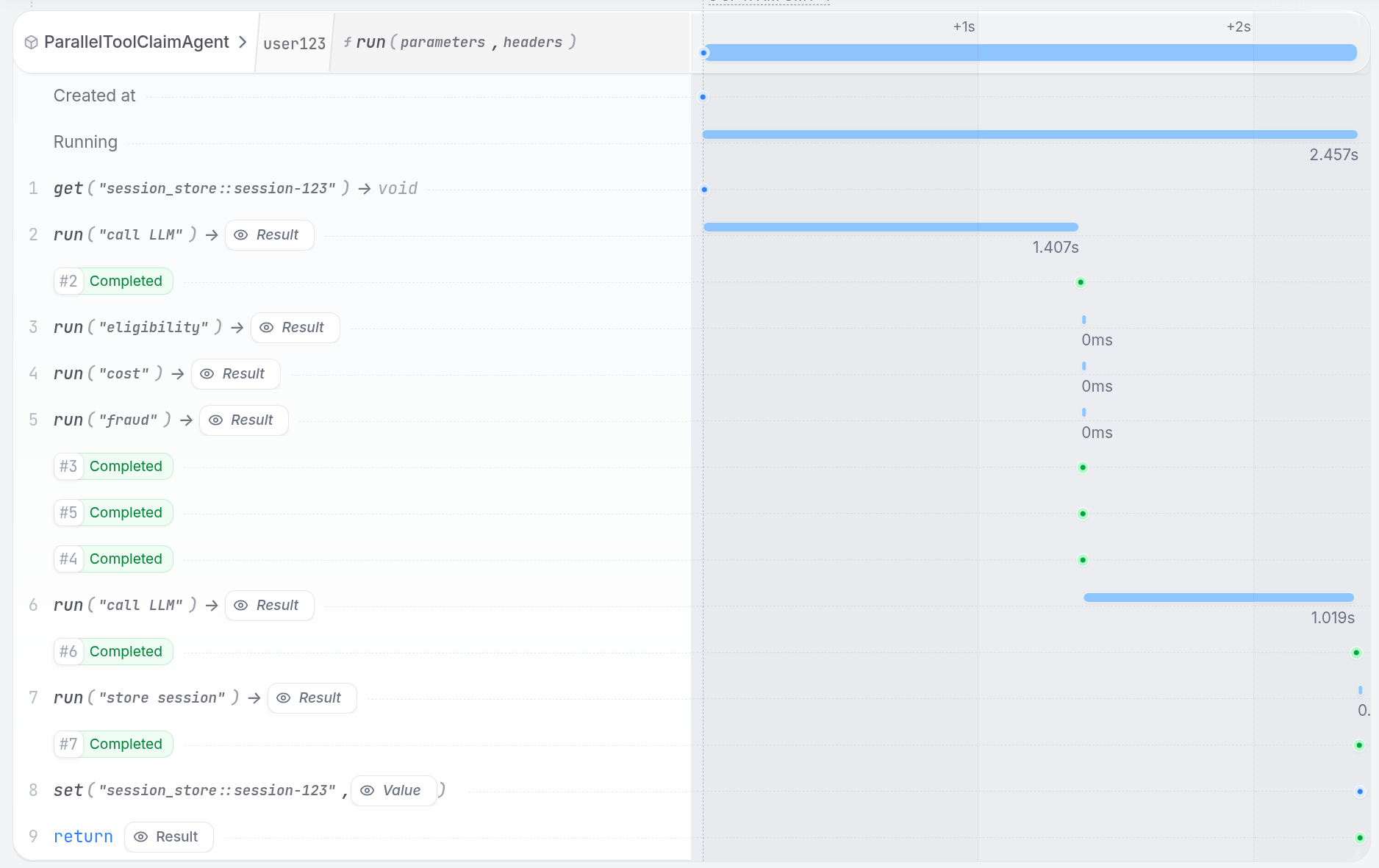
In the UI, you can see the tool steps running in parallel:
 **⚠️ Executing tool calls in parallel can lead to non-deterministic replays of journaled events on retries. To prevent this, when the LLM requests multiple tools in a single turn, the integration runs them one after the other instead of in parallel. The LLM still issues a single batch of tool calls (no extra LLM round-trips), but the tool executions themselves are serialized.**
To use parallel tool calls with Pydantic AI, create a tool that runs multiple analyses in parallel. The LLM calls one tool, and that tool fans out work internally using `restate.gather()` to run durable execution steps concurrently.
Restate makes sure that all parallel tasks are retried and recovered until they succeed. If one step fails, only that step is retried while the successful results are preserved.
```python parallel_tools_agent.py {"CODE_LOAD::https://raw.githubusercontent.com/restatedev/ai-examples/refs/heads/main/pydantic-ai/tour-of-agents/app/parallel_tools_agent.py#here"} theme={null}
@agent.tool
async def calculate_metrics(
_run_ctx: RunContext[None], claim: InsuranceClaim
) -> list[str]:
"""Calculate claim metrics."""
ctx = restate_context()
# Run tools/steps in parallel with durable execution
results_done = await restate.gather(
ctx.run_typed("eligibility", check_eligibility, claim=claim),
ctx.run_typed("cost", compare_to_standard_rates, claim=claim),
ctx.run_typed("fraud", check_fraud, claim=claim),
)
return [await result for result in results_done]
```
[Install Restate](/installation) and launch it:
```bash theme={null}
restate-server
```
Get the example:
```bash theme={null}
restate example python-pydantic-ai-tour-of-agents && cd python-pydantic-ai-tour-of-agents
```
Export your [OpenAI API key](https://platform.openai.com/api-keys) and run the agent:
```bash theme={null}
export OPENAI_API_KEY=sk-...
```
```bash theme={null}
uv run app/parallel_tools_agent.py
```
Register the agents with Restate:
```bash theme={null}
restate deployments register http://localhost:9080 --force --yes # dev only: overrides previous registrations
```
Start a request:
```bash theme={null}
curl localhost:8080/restate/call/ParallelToolClaimAgent/run --json '{
"date":"2024-10-01",
"category":"orthopedic",
"reason":"hospital bill for a broken leg",
"amount":3000,
"placeOfService":"General Hospital"
}'
```
In the UI, you can see the tool steps running in parallel:
**⚠️ Executing tool calls in parallel can lead to non-deterministic replays of journaled events on retries. To prevent this, when the LLM requests multiple tools in a single turn, the integration runs them one after the other instead of in parallel. The LLM still issues a single batch of tool calls (no extra LLM round-trips), but the tool executions themselves are serialized.**
To use parallel tool calls with Pydantic AI, create a tool that runs multiple analyses in parallel. The LLM calls one tool, and that tool fans out work internally using `restate.gather()` to run durable execution steps concurrently.
Restate makes sure that all parallel tasks are retried and recovered until they succeed. If one step fails, only that step is retried while the successful results are preserved.
```python parallel_tools_agent.py {"CODE_LOAD::https://raw.githubusercontent.com/restatedev/ai-examples/refs/heads/main/pydantic-ai/tour-of-agents/app/parallel_tools_agent.py#here"} theme={null}
@agent.tool
async def calculate_metrics(
_run_ctx: RunContext[None], claim: InsuranceClaim
) -> list[str]:
"""Calculate claim metrics."""
ctx = restate_context()
# Run tools/steps in parallel with durable execution
results_done = await restate.gather(
ctx.run_typed("eligibility", check_eligibility, claim=claim),
ctx.run_typed("cost", compare_to_standard_rates, claim=claim),
ctx.run_typed("fraud", check_fraud, claim=claim),
)
return [await result for result in results_done]
```
[Install Restate](/installation) and launch it:
```bash theme={null}
restate-server
```
Get the example:
```bash theme={null}
restate example python-pydantic-ai-tour-of-agents && cd python-pydantic-ai-tour-of-agents
```
Export your [OpenAI API key](https://platform.openai.com/api-keys) and run the agent:
```bash theme={null}
export OPENAI_API_KEY=sk-...
```
```bash theme={null}
uv run app/parallel_tools_agent.py
```
Register the agents with Restate:
```bash theme={null}
restate deployments register http://localhost:9080 --force --yes # dev only: overrides previous registrations
```
Start a request:
```bash theme={null}
curl localhost:8080/restate/call/ParallelToolClaimAgent/run --json '{
"date":"2024-10-01",
"category":"orthopedic",
"reason":"hospital bill for a broken leg",
"amount":3000,
"placeOfService":"General Hospital"
}'
```
In the UI, you can see the tool steps running in parallel:
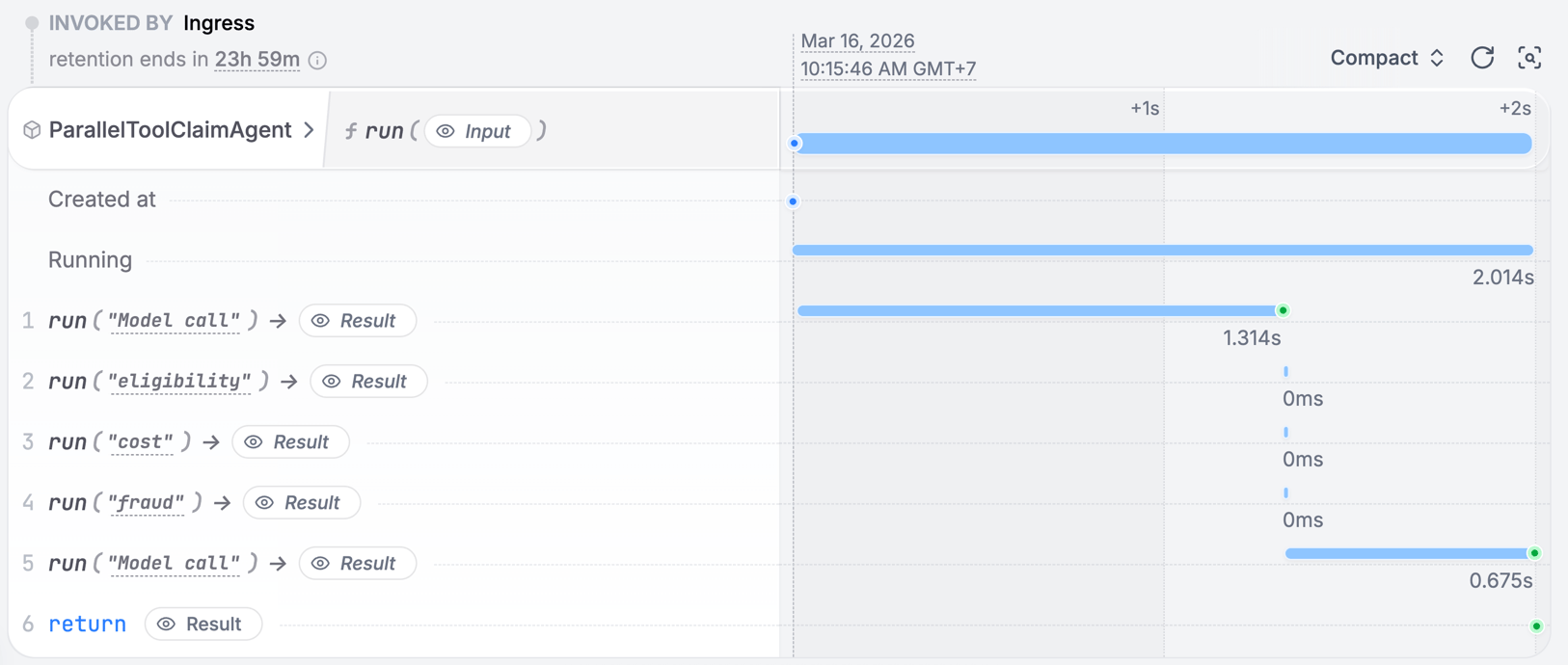 **⚠️ Executing tool calls in parallel can lead to non-deterministic replays of journaled events on retries. To prevent this, when the LLM requests multiple tools in a single turn, the integration runs them one after the other instead of in parallel. The LLM still issues a single batch of tool calls (no extra LLM round-trips), but the tool executions themselves are serialized.**
To use parallel tool calls with LangChain, create a tool that runs multiple analyses in parallel. The LLM calls one tool, and that tool fans out work internally using `restate.gather()` to run durable execution steps concurrently.
Restate makes sure that all parallel tasks are retried and recovered until they succeed. If one step fails, only that step is retried while the successful results are preserved.
```python parallel_tools_agent.py {"CODE_LOAD::https://raw.githubusercontent.com/restatedev/ai-examples/refs/heads/main/langchain-python/tour-of-agents/app/parallel_tools_agent.py#here"} theme={null}
@tool
async def calculate_metrics(claim: InsuranceClaim) -> list[str]:
"""Calculate claim metrics: eligibility, cost, and fraud risk."""
ctx = restate_context()
# Run the sub-steps in parallel with durable execution.
eligibility, cost, fraud = await restate.gather(
ctx.run_typed("eligibility", check_eligibility, claim=claim),
ctx.run_typed("cost", compare_to_standard_rates, claim=claim),
ctx.run_typed("fraud", check_fraud, claim=claim),
)
return [await eligibility, await cost, await fraud]
```
[Install Restate](/installation) and launch it:
```bash theme={null}
restate-server
```
Get the example:
```bash theme={null}
restate example python-langchain-tour-of-agents && cd python-langchain-tour-of-agents
```
Export your [OpenAI API key](https://platform.openai.com/api-keys) and run the agent:
```bash theme={null}
export OPENAI_API_KEY=sk-...
```
```bash theme={null}
uv run app/parallel_tools_agent.py
```
Register the agents with Restate:
```bash theme={null}
restate deployments register http://localhost:9080 --force --yes # dev only: overrides previous registrations
```
Start a request:
```bash theme={null}
curl localhost:8080/restate/call/ParallelToolClaimAgent/run --json '{
"date":"2024-10-01",
"category":"orthopedic",
"reason":"hospital bill for a broken leg",
"amount":3000,
"placeOfService":"General Hospital"
}'
```
In the UI, you can see the tool steps running in parallel.
## Only Restate: custom agent loop with parallel tool calls
When you manage the agentic loop yourself with the Restate SDK, you have full control over tool execution. After the LLM returns multiple tool calls, you start all of them concurrently and wait for all to complete before feeding results back to the LLM.
**⚠️ Executing tool calls in parallel can lead to non-deterministic replays of journaled events on retries. To prevent this, when the LLM requests multiple tools in a single turn, the integration runs them one after the other instead of in parallel. The LLM still issues a single batch of tool calls (no extra LLM round-trips), but the tool executions themselves are serialized.**
To use parallel tool calls with LangChain, create a tool that runs multiple analyses in parallel. The LLM calls one tool, and that tool fans out work internally using `restate.gather()` to run durable execution steps concurrently.
Restate makes sure that all parallel tasks are retried and recovered until they succeed. If one step fails, only that step is retried while the successful results are preserved.
```python parallel_tools_agent.py {"CODE_LOAD::https://raw.githubusercontent.com/restatedev/ai-examples/refs/heads/main/langchain-python/tour-of-agents/app/parallel_tools_agent.py#here"} theme={null}
@tool
async def calculate_metrics(claim: InsuranceClaim) -> list[str]:
"""Calculate claim metrics: eligibility, cost, and fraud risk."""
ctx = restate_context()
# Run the sub-steps in parallel with durable execution.
eligibility, cost, fraud = await restate.gather(
ctx.run_typed("eligibility", check_eligibility, claim=claim),
ctx.run_typed("cost", compare_to_standard_rates, claim=claim),
ctx.run_typed("fraud", check_fraud, claim=claim),
)
return [await eligibility, await cost, await fraud]
```
[Install Restate](/installation) and launch it:
```bash theme={null}
restate-server
```
Get the example:
```bash theme={null}
restate example python-langchain-tour-of-agents && cd python-langchain-tour-of-agents
```
Export your [OpenAI API key](https://platform.openai.com/api-keys) and run the agent:
```bash theme={null}
export OPENAI_API_KEY=sk-...
```
```bash theme={null}
uv run app/parallel_tools_agent.py
```
Register the agents with Restate:
```bash theme={null}
restate deployments register http://localhost:9080 --force --yes # dev only: overrides previous registrations
```
Start a request:
```bash theme={null}
curl localhost:8080/restate/call/ParallelToolClaimAgent/run --json '{
"date":"2024-10-01",
"category":"orthopedic",
"reason":"hospital bill for a broken leg",
"amount":3000,
"placeOfService":"General Hospital"
}'
```
In the UI, you can see the tool steps running in parallel.
## Only Restate: custom agent loop with parallel tool calls
When you manage the agentic loop yourself with the Restate SDK, you have full control over tool execution. After the LLM returns multiple tool calls, you start all of them concurrently and wait for all to complete before feeding results back to the LLM.
```typescript parallel-tools-agent.ts {"CODE_LOAD::https://raw.githubusercontent.com/restatedev/ai-examples/refs/heads/main/typescript-restate-only/tour-of-agents/src/parallel-tools-agent.ts#here"} theme={null}
// Define your tools as your AI SDK requires (here Vercel AI SDK)
const tools = {
get_weather: tool({
description: "Get the current weather for a location",
inputSchema: z.object({ city: z.string() }),
}),
};
async function run(ctx: Context, { message }: { message: string }) {
const history: ModelMessage[] = [{ role: "user", content: message }];
while (true) {
// Use your preferred LLM SDK here
let { text, toolCalls, messages } = await ctx.run(
"LLM call",
async () => llmCall(history, tools),
{ maxRetryAttempts: 3 },
);
history.push(...messages);
if (!toolCalls || toolCalls.length === 0) {
return text;
}
// Run all tool calls in parallel
let toolPromises = [];
for (let { toolCallId, toolName, input } of toolCalls) {
const { city } = input as { city: string };
const promise = ctx.run(`Get weather ${city}`, () => fetchWeather(city));
toolPromises.push({ toolCallId, toolName, promise });
}
// Wait for all tools to complete in parallel
await RestatePromise.all(toolPromises.map(({ promise }) => promise));
// Append all results to messages
for (const { toolCallId, toolName, promise } of toolPromises) {
history.push(toolResult(toolCallId, toolName, await promise));
}
}
}
```
[Install Restate](/installation) and launch it:
```bash theme={null}
restate-server
```
Get the example:
```bash theme={null}
restate example typescript-restate-tour-of-agents && cd typescript-restate-tour-of-agents
npm install
```
Export your API key:
```bash theme={null}
export OPENAI_API_KEY=sk-...
```
```bash theme={null}
npx tsx ./src/parallel-tools-agent.ts
```
Register the services with Restate:
```bash theme={null}
restate deployments register http://localhost:9080 --force --yes # dev only: overrides previous registrations
```
Send a request:
```bash theme={null}
curl localhost:8080/restate/call/ParallelToolAgent/run \
--json '{"message": "What is the weather in San Francisco and New York?"}'
```
```python parallel_tools_agent.py {"CODE_LOAD::https://raw.githubusercontent.com/restatedev/ai-examples/refs/heads/main/python-restate-only/tour-of-agents/app/parallel_tools_agent.py#here"} theme={null}
parallel_tools_agent = restate.Service("ParallelToolAgent")
@parallel_tools_agent.handler()
async def run(ctx: Context, prompt: WeatherPrompt) -> str | None:
"""Main agent loop with tool calling"""
messages: list = [{"role": "user", "content": prompt.message}]
while True:
# Call LLM with durable execution
response = await ctx.run_typed(
"LLM call",
llm_call, # Use your preferred LLM SDK here
RunOptions(max_attempts=3),
messages=messages,
tools=[
tool(
name="get_weather",
description="Get the current weather for a location",
parameters=WeatherRequest.model_json_schema(),
)
],
)
messages.append(response)
if not response.tool_calls:
return response.content
# Run all tool calls in parallel
tool_promises = {}
for tool_call in response.tool_calls:
if tool_call.function.name == "get_weather":
req = WeatherRequest.model_validate_json(tool_call.function.arguments)
tool_promises[tool_call.id] = ctx.run_typed(
f"Get weather {req.city}",
get_weather,
req=req,
)
# Wait for all tools to complete and append results
await restate.gather(*tool_promises.values())
for tool_id, promise in tool_promises.items():
output = await promise
messages.append(tool_result(tool_id, "get_weather", str(output)))
```
[Install Restate](/installation) and launch it:
```bash theme={null}
restate-server
```
Get the example:
```bash theme={null}
restate example python-restate-tour-of-agents && cd python-restate-tour-of-agents
```
Export your API key:
```bash theme={null}
export OPENAI_API_KEY=sk-...
```
```bash theme={null}
uv run app/parallel_tools_agent.py
```
Register the services with Restate:
```bash theme={null}
restate deployments register http://localhost:9080 --force --yes # dev only: overrides previous registrations
```
Send a request:
```bash theme={null}
curl localhost:8080/restate/call/ParallelToolAgent/run \
--json '{"message": "What is the weather in San Francisco and New York?"}'
```
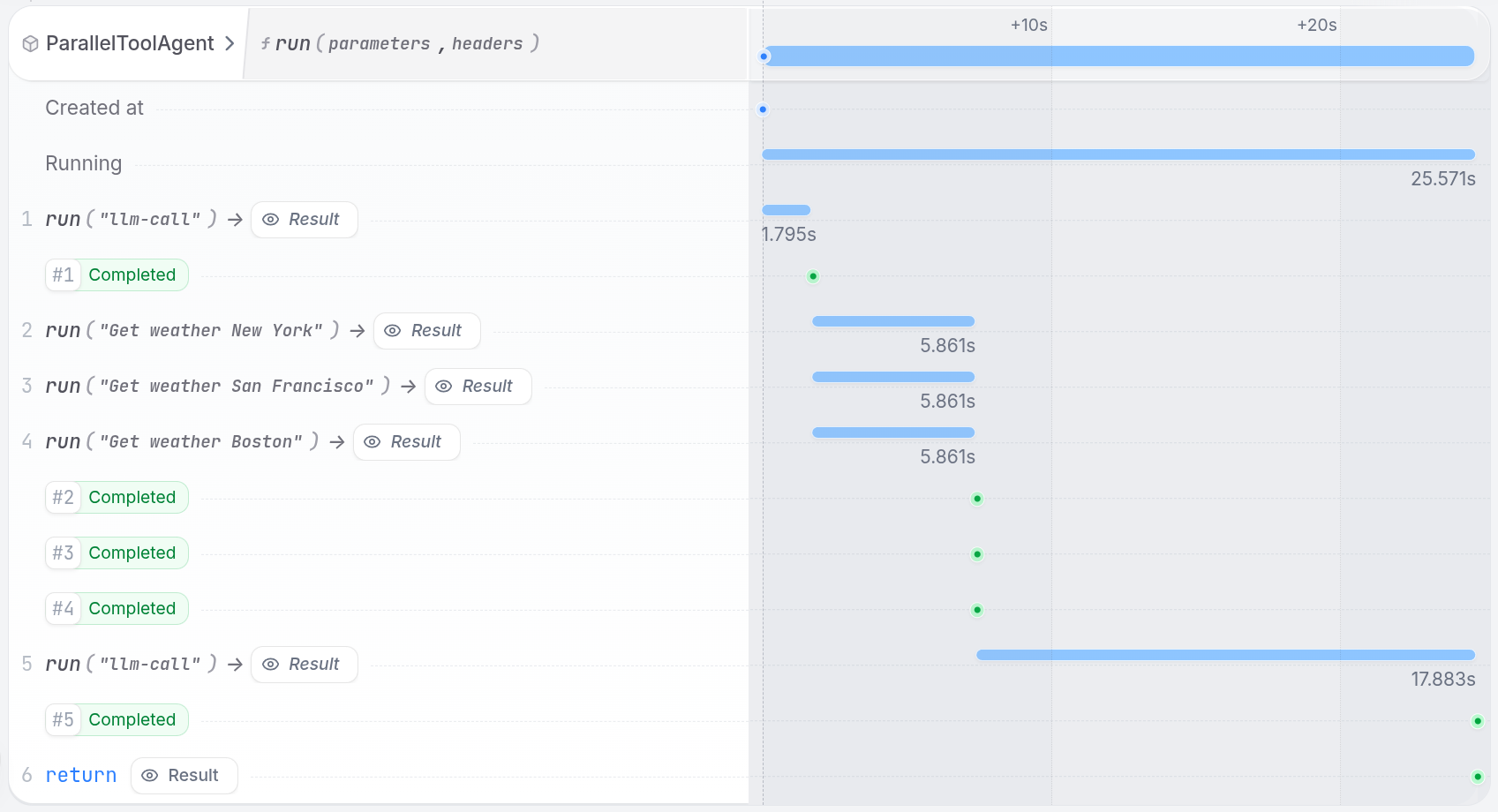
The Restate UI shows how multiple tool calls execute concurrently, with all operations completing in parallel: