> ## Documentation Index
> Fetch the complete documentation index at: https://docs.restate.dev/llms.txt
> Use this file to discover all available pages before exploring further.
# Remote Agents
> Route tasks between remote agents over HTTP with durable RPC calls.
export const GitHubLink = ({url}) => ;
When agents need to scale independently, run on different infrastructure, or be developed by different teams, you can deploy them as separate Restate services and route requests between them. Restate makes cross-service calls look like local function calls while providing end-to-end durability, failure recovery, and automatic retries.
## Local vs remote agents
There are two ways to coordinate specialist agents:
| | Local agents | Remote agents |
| --------------------- | ------------------------------------------------------------------ | ---------------------------------------------------------- |
| **Where they run** | Same process as the router | Separate services, potentially on different infrastructure |
| **Best for** | Simple specialization with shared context | Independent scaling, isolation, different languages |
| **How routing works** | Handoffs, sub-agents, or tool calls within one handler | Durable RPC calls between Restate services |
| **Example** | LLM picks a specialist prompt, calls LLM again in the same handler | LLM picks a specialist service, router calls it over HTTP |
Agent SDKs like OpenAI and Google ADK have built-in mechanisms for local routing (handoffs, sub-agents).
For remote routing, or when using the Restate SDK directly, you deploy each specialist as its own Restate service and call it via Restate's service clients.
You can either use typed service clients or call a remote service by string name (generic calls). Learn more about calling services in the [TS](/develop/ts/service-communication)/[Py SDK](/develop/python/service-communication) documentation.
## Example: routing to specialist agents
With the Vercel AI, specialist agents are exposed as tools. The LLM decides which tool to call, and Restate durably persists the routing decision and the agent call via `ctx.serviceClient()`.
```typescript remote-agents.ts {"CODE_LOAD::https://raw.githubusercontent.com/restatedev/ai-examples/refs/heads/main/vercel-ai/tour-of-agents/src/remote-agents.ts#here"} theme={null}
const run = async (ctx: restate.Context, claim: ClaimInput) => {
const model = wrapLanguageModel({
model: openai("gpt-5.4"),
middleware: durableCalls(ctx, { maxRetryAttempts: 3 }),
});
const { text } = await generateText({
model,
prompt: `Claim: ${JSON.stringify(claim)}`,
system:
"You are a claim approval engine. Analyze the claim and use your tools to decide whether to approve.",
tools: {
analyzeEligibility: tool({
description: "Analyze claim eligibility.",
inputSchema: InsuranceClaimSchema,
execute: async (claim: InsuranceClaim) =>
ctx.serviceClient(eligibilityAgent).run(claim),
}),
analyzeFraud: tool({
description: "Analyze probability of fraud.",
inputSchema: InsuranceClaimSchema,
execute: async (claim: InsuranceClaim) =>
ctx.serviceClient(fraudCheckAgent).run(claim),
}),
},
stopWhen: [stepCountIs(10)],
providerOptions: { openai: { parallelToolCalls: false } },
});
return text;
};
```
Each specialist agent runs as its own Restate service:
```typescript eligibility-agent.ts {"CODE_LOAD::https://raw.githubusercontent.com/restatedev/ai-examples/refs/heads/main/vercel-ai/tour-of-agents/src/utils/utils.ts#eligibility"} theme={null}
export const eligibilityAgent = restate.service({
name: "EligibilityAgent",
handlers: {
run: async (ctx: restate.Context, claim: InsuranceClaim) => {
const model = wrapLanguageModel({
model: openai("gpt-5.4"),
middleware: durableCalls(ctx, { maxRetryAttempts: 3 }),
});
const { text } = await generateText({
model,
system:
"Decide whether the following claim is eligible for reimbursement." +
"Respond with eligible if it's a medical claim, and not eligible otherwise.",
prompt: JSON.stringify(claim),
});
return text;
},
},
});
```
[Install Restate](/installation) and launch it:
```bash theme={null}
npm install --global @restatedev/restate-server@latest @restatedev/restate@latest
restate-server
```
Get the example:
```bash theme={null}
restate example typescript-vercel-ai-tour-of-agents && cd typescript-vercel-ai-tour-of-agents
npm install
```
Export your [OpenAI API key](https://platform.openai.com/api-keys) and run the agent:
```bash theme={null}
export OPENAI_API_KEY=sk-...
```
```bash theme={null}
npx tsx ./src/remote-agents.ts
```
Register the agents with Restate:
```bash theme={null}
restate deployments register http://localhost:9080 --force --yes # dev only: overrides previous registrations
```
Start a request for a claim that needs to be analyzed by multiple agents:
```bash theme={null}
curl localhost:8080/restate/call/MultiAgentClaimApproval/run --json '{
"date":"2024-10-01",
"category":"orthopedic",
"reason":"hospital bill for a broken leg",
"amount":3000,
"placeOfService":"General Hospital"
}'
```
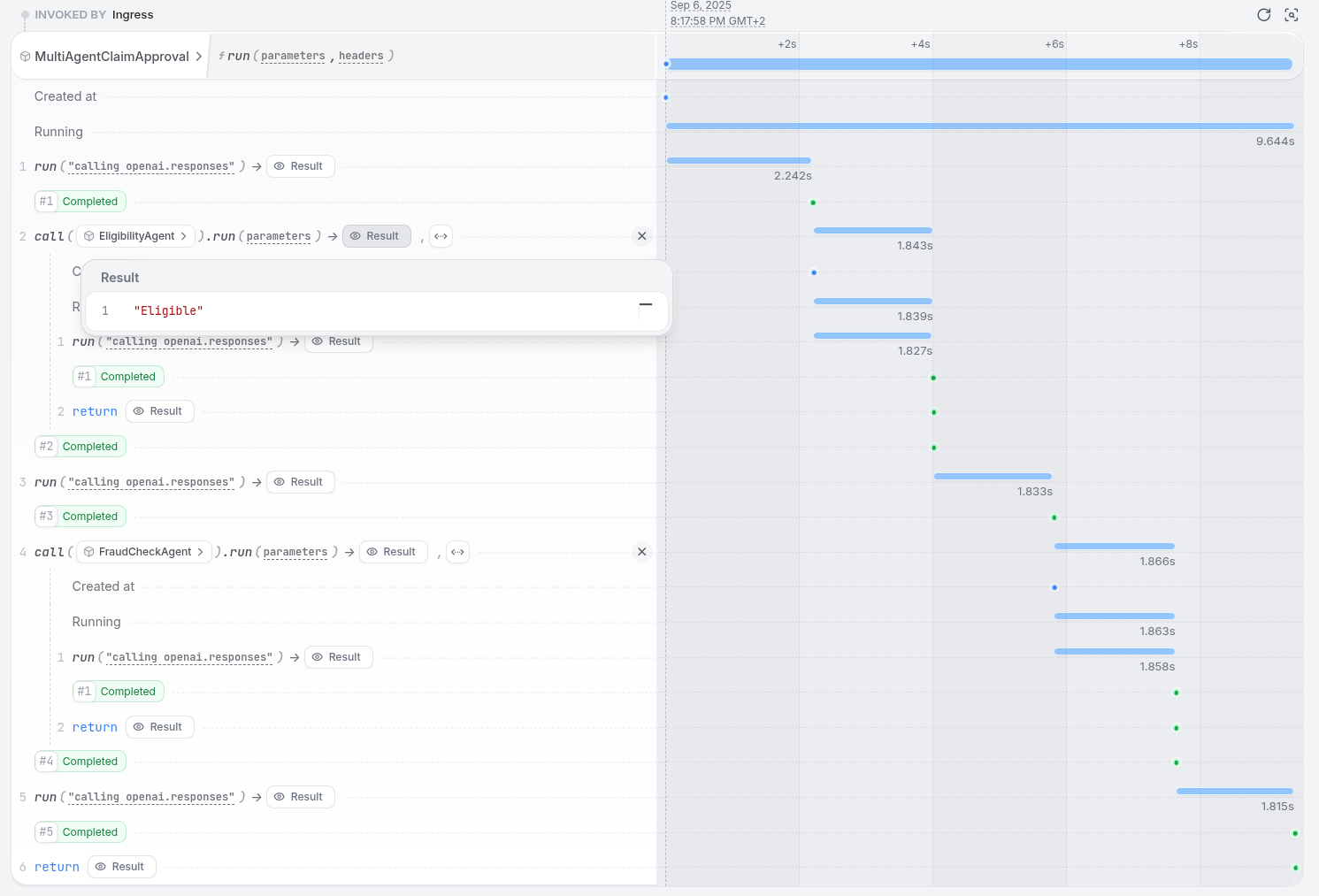
In the UI, you can see that the agent called the sub-agents and is waiting for their responses.
You can see the trace of the sub-agents in the timeline.
Once all sub-agents return, the main agent continues and makes a decision.
 With the OpenAI Agents, you expose each specialist as a separate Restate service and call it via `restate_context().service_call()`. The LLM response that picks the specialist is durably persisted, so on recovery the routing decision is replayed without re-calling the LLM.
```python remote_agents.py {"CODE_LOAD::https://raw.githubusercontent.com/restatedev/ai-examples/refs/heads/main/openai-agents/tour-of-agents/app/remote_agents.py#here"} theme={null}
# Durable service call to the fraud agent; persisted and retried by Restate
@durable_function_tool
async def check_fraud(claim: InsuranceClaim) -> str:
"""Analyze the probability of fraud."""
return await restate_context().service_call(run_fraud_agent, claim)
agent = Agent(
name="ClaimApprovalCoordinator",
instructions="You are a claim approval engine. Analyze the claim and use your tools to decide whether to approve it.",
tools=[check_eligibility, check_fraud],
)
agent_service = restate.Service("MultiAgentClaimApproval")
@agent_service.handler()
async def run(_ctx: restate.Context, claim: InsuranceClaim) -> str:
result = await DurableRunner.run(agent, f"Claim: {claim.model_dump_json()}")
return result.final_output
```
Each specialist agent runs as its own Restate service:
```python eligibility_agent.py {"CODE_LOAD::https://raw.githubusercontent.com/restatedev/ai-examples/refs/heads/main/openai-agents/tour-of-agents/app/utils/utils.py#eligibility"} theme={null}
eligibility_agent_service = restate.Service("EligibilityAgent")
@eligibility_agent_service.handler()
async def run_eligibility_agent(_ctx: restate.Context, claim: InsuranceClaim) -> str:
result = await DurableRunner.run(
Agent(
name="EligibilityAgent",
instructions="Decide whether the following claim is eligible for reimbursement."
"Respond with eligible if it's a medical claim, and not eligible otherwise.",
),
input=claim.model_dump_json(),
)
return result.final_output
```
[Install Restate](/installation) and launch it:
```bash theme={null}
restate-server
```
Get the example:
```bash theme={null}
restate example python-openai-agents-tour-of-agents && cd python-openai-agents-tour-of-agents
```
Export your [OpenAI API key](https://platform.openai.com/api-keys) and run the agent:
```bash theme={null}
export OPENAI_API_KEY=sk-...
```
```bash theme={null}
uv run app/remote_agents.py
```
Register the agents with Restate:
```bash theme={null}
restate deployments register http://localhost:9080 --force --yes # dev only: overrides previous registrations
```
Start a request for a claim that needs to be analyzed by multiple agents:
```bash theme={null}
curl localhost:8080/restate/call/MultiAgentClaimApproval/session123/run --json '{
"date":"2024-10-01",
"category":"orthopedic",
"reason":"hospital bill for a broken leg",
"amount":3000,
"placeOfService":"General Hospital"
}'
```
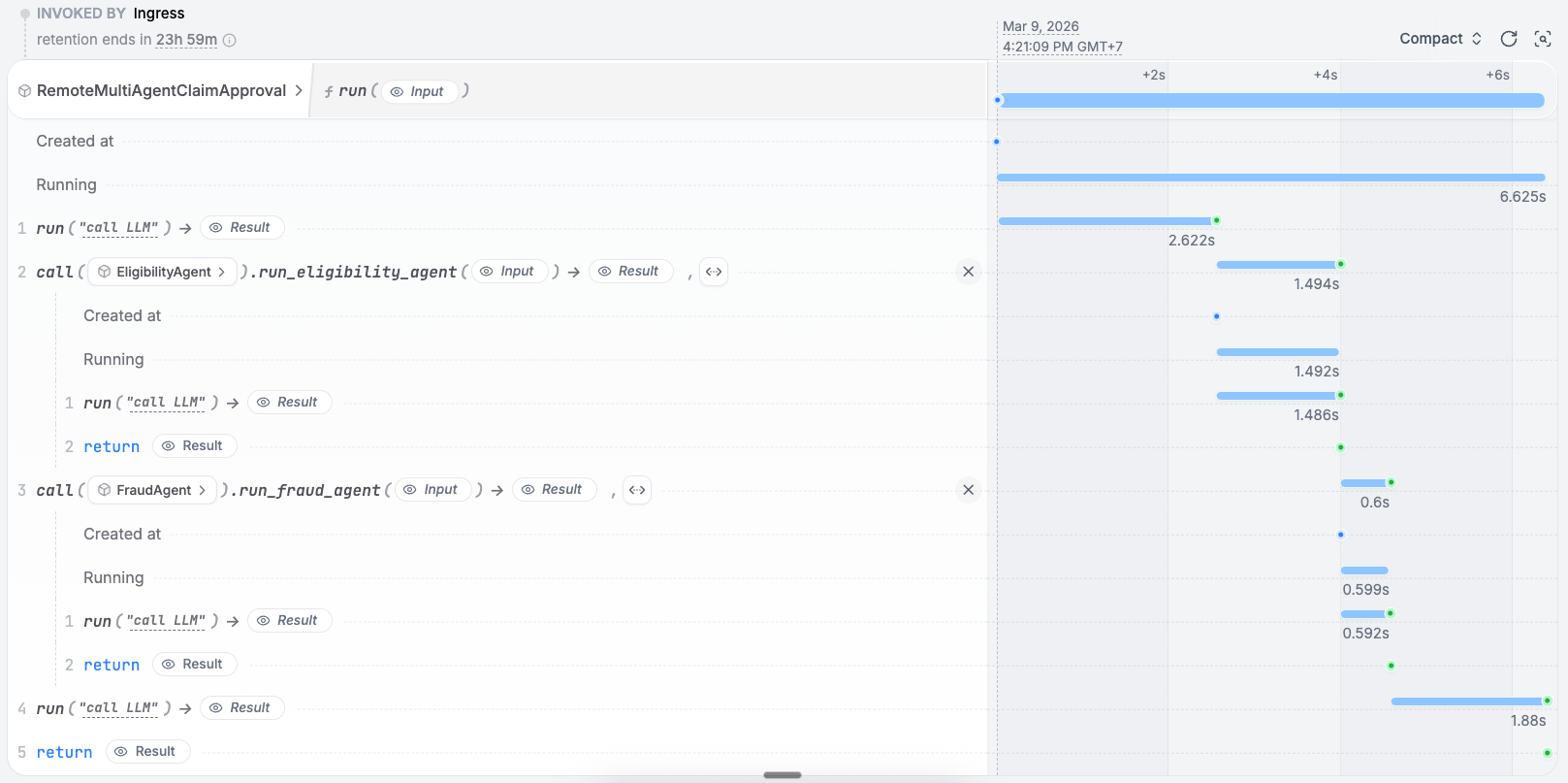
In the UI, you can see that the agent called the sub-agents and is waiting for their responses.
Once all sub-agents return, the main agent continues and makes a decision.
With the OpenAI Agents, you expose each specialist as a separate Restate service and call it via `restate_context().service_call()`. The LLM response that picks the specialist is durably persisted, so on recovery the routing decision is replayed without re-calling the LLM.
```python remote_agents.py {"CODE_LOAD::https://raw.githubusercontent.com/restatedev/ai-examples/refs/heads/main/openai-agents/tour-of-agents/app/remote_agents.py#here"} theme={null}
# Durable service call to the fraud agent; persisted and retried by Restate
@durable_function_tool
async def check_fraud(claim: InsuranceClaim) -> str:
"""Analyze the probability of fraud."""
return await restate_context().service_call(run_fraud_agent, claim)
agent = Agent(
name="ClaimApprovalCoordinator",
instructions="You are a claim approval engine. Analyze the claim and use your tools to decide whether to approve it.",
tools=[check_eligibility, check_fraud],
)
agent_service = restate.Service("MultiAgentClaimApproval")
@agent_service.handler()
async def run(_ctx: restate.Context, claim: InsuranceClaim) -> str:
result = await DurableRunner.run(agent, f"Claim: {claim.model_dump_json()}")
return result.final_output
```
Each specialist agent runs as its own Restate service:
```python eligibility_agent.py {"CODE_LOAD::https://raw.githubusercontent.com/restatedev/ai-examples/refs/heads/main/openai-agents/tour-of-agents/app/utils/utils.py#eligibility"} theme={null}
eligibility_agent_service = restate.Service("EligibilityAgent")
@eligibility_agent_service.handler()
async def run_eligibility_agent(_ctx: restate.Context, claim: InsuranceClaim) -> str:
result = await DurableRunner.run(
Agent(
name="EligibilityAgent",
instructions="Decide whether the following claim is eligible for reimbursement."
"Respond with eligible if it's a medical claim, and not eligible otherwise.",
),
input=claim.model_dump_json(),
)
return result.final_output
```
[Install Restate](/installation) and launch it:
```bash theme={null}
restate-server
```
Get the example:
```bash theme={null}
restate example python-openai-agents-tour-of-agents && cd python-openai-agents-tour-of-agents
```
Export your [OpenAI API key](https://platform.openai.com/api-keys) and run the agent:
```bash theme={null}
export OPENAI_API_KEY=sk-...
```
```bash theme={null}
uv run app/remote_agents.py
```
Register the agents with Restate:
```bash theme={null}
restate deployments register http://localhost:9080 --force --yes # dev only: overrides previous registrations
```
Start a request for a claim that needs to be analyzed by multiple agents:
```bash theme={null}
curl localhost:8080/restate/call/MultiAgentClaimApproval/session123/run --json '{
"date":"2024-10-01",
"category":"orthopedic",
"reason":"hospital bill for a broken leg",
"amount":3000,
"placeOfService":"General Hospital"
}'
```
In the UI, you can see that the agent called the sub-agents and is waiting for their responses.
Once all sub-agents return, the main agent continues and makes a decision.
 With the Google ADK, you expose each specialist as a separate Restate service and call it via `restate_context().service_call()`. The LLM response that picks the specialist is durably persisted, so on recovery the routing decision is replayed without re-calling the LLM.
```python remote_agents.py {"CODE_LOAD::https://raw.githubusercontent.com/restatedev/ai-examples/refs/heads/main/google-adk/tour-of-agents/app/remote_agents.py#here"} theme={null}
# Durable service call to the fraud agent; persisted and retried by Restate
async def check_fraud(claim: InsuranceClaim) -> str:
"""Analyze the probability of fraud."""
return await restate_context().service_call(run_fraud_agent, claim)
agent = Agent(
model="gemini-2.5-flash",
name="ClaimApprovalCoordinator",
instruction="You are a claim approval engine. Analyze the claim and use your tools to decide whether to approve it.",
tools=[check_fraud, check_eligibility],
)
app = App(name=APP_NAME, root_agent=agent, plugins=[RestatePlugin()])
runner = Runner(app=app, session_service=RestateSessionService())
agent_service = restate.VirtualObject("MultiAgentClaimApproval")
@agent_service.handler()
async def run(ctx: restate.ObjectContext, claim: InsuranceClaim) -> str | None:
events = runner.run_async(
user_id=ctx.key(),
session_id=claim.session_id,
new_message=Content(
role="user",
parts=[Part.from_text(text=f"Claim: {claim.model_dump_json()}")],
),
)
return await parse_agent_response(events)
```
Each specialist agent runs as its own Restate service:
```python eligibility_agent.py {"CODE_LOAD::https://raw.githubusercontent.com/restatedev/ai-examples/refs/heads/main/google-adk/tour-of-agents/app/utils/utils.py#eligibility"} theme={null}
eligibility_agent_service = restate.VirtualObject("EligibilityAgent")
@eligibility_agent_service.handler()
async def run_eligibility_agent(
ctx: restate.ObjectContext, claim: InsuranceClaim
) -> str:
prompt = f"Claim: {claim.model_dump_json()}"
events = eligibility_runner.run_async(
user_id=ctx.key(),
session_id=claim.session_id,
new_message=Content(role="user", parts=[Part.from_text(text=prompt)]),
)
return await parse_agent_response(events)
```
[Install Restate](/installation) and launch it:
```bash theme={null}
restate-server
```
Get the example:
```bash theme={null}
restate example python-google-adk-tour-of-agents && cd python-google-adk-tour-of-agents
```
Export your [Google API key](https://aistudio.google.com/app/apikey) and run the agent:
```bash theme={null}
export GOOGLE_API_KEY=your-api-key
```
```bash theme={null}
uv run app/remote_agents.py
```
Register the agents with Restate:
```bash theme={null}
restate deployments register http://localhost:9080 --force --yes # dev only: overrides previous registrations
```
Start a request for a claim that needs to be analyzed by multiple agents:
```bash theme={null}
curl localhost:8080/restate/call/MultiAgentClaimApproval/user123/run --json '{
"amount": 3000,
"category": "orthopedic",
"date": "2024-10-01",
"placeOfService": "General Hospital",
"reason": "hospital bill for a broken leg",
"sessionId": "session-123"
}'
```
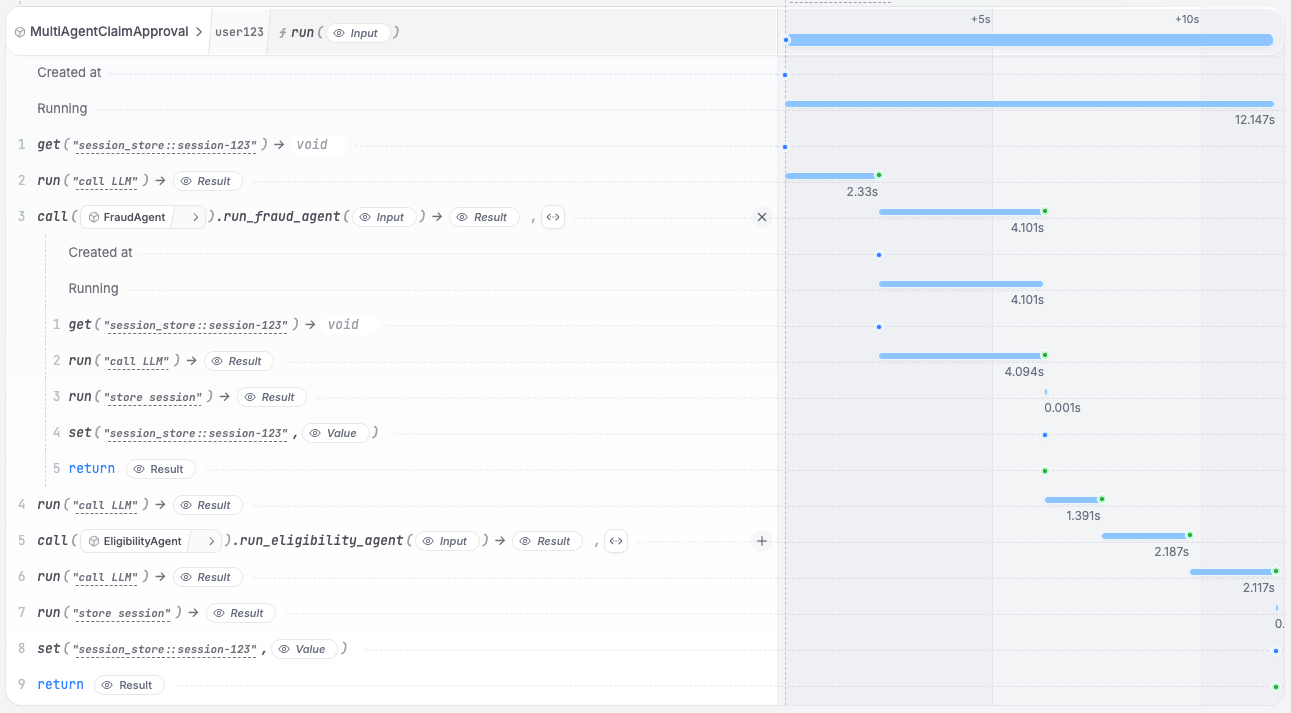
In the UI, you can see that the agent called the sub-agents and is waiting for their responses.
Once all sub-agents return, the main agent continues and makes a decision.
With the Google ADK, you expose each specialist as a separate Restate service and call it via `restate_context().service_call()`. The LLM response that picks the specialist is durably persisted, so on recovery the routing decision is replayed without re-calling the LLM.
```python remote_agents.py {"CODE_LOAD::https://raw.githubusercontent.com/restatedev/ai-examples/refs/heads/main/google-adk/tour-of-agents/app/remote_agents.py#here"} theme={null}
# Durable service call to the fraud agent; persisted and retried by Restate
async def check_fraud(claim: InsuranceClaim) -> str:
"""Analyze the probability of fraud."""
return await restate_context().service_call(run_fraud_agent, claim)
agent = Agent(
model="gemini-2.5-flash",
name="ClaimApprovalCoordinator",
instruction="You are a claim approval engine. Analyze the claim and use your tools to decide whether to approve it.",
tools=[check_fraud, check_eligibility],
)
app = App(name=APP_NAME, root_agent=agent, plugins=[RestatePlugin()])
runner = Runner(app=app, session_service=RestateSessionService())
agent_service = restate.VirtualObject("MultiAgentClaimApproval")
@agent_service.handler()
async def run(ctx: restate.ObjectContext, claim: InsuranceClaim) -> str | None:
events = runner.run_async(
user_id=ctx.key(),
session_id=claim.session_id,
new_message=Content(
role="user",
parts=[Part.from_text(text=f"Claim: {claim.model_dump_json()}")],
),
)
return await parse_agent_response(events)
```
Each specialist agent runs as its own Restate service:
```python eligibility_agent.py {"CODE_LOAD::https://raw.githubusercontent.com/restatedev/ai-examples/refs/heads/main/google-adk/tour-of-agents/app/utils/utils.py#eligibility"} theme={null}
eligibility_agent_service = restate.VirtualObject("EligibilityAgent")
@eligibility_agent_service.handler()
async def run_eligibility_agent(
ctx: restate.ObjectContext, claim: InsuranceClaim
) -> str:
prompt = f"Claim: {claim.model_dump_json()}"
events = eligibility_runner.run_async(
user_id=ctx.key(),
session_id=claim.session_id,
new_message=Content(role="user", parts=[Part.from_text(text=prompt)]),
)
return await parse_agent_response(events)
```
[Install Restate](/installation) and launch it:
```bash theme={null}
restate-server
```
Get the example:
```bash theme={null}
restate example python-google-adk-tour-of-agents && cd python-google-adk-tour-of-agents
```
Export your [Google API key](https://aistudio.google.com/app/apikey) and run the agent:
```bash theme={null}
export GOOGLE_API_KEY=your-api-key
```
```bash theme={null}
uv run app/remote_agents.py
```
Register the agents with Restate:
```bash theme={null}
restate deployments register http://localhost:9080 --force --yes # dev only: overrides previous registrations
```
Start a request for a claim that needs to be analyzed by multiple agents:
```bash theme={null}
curl localhost:8080/restate/call/MultiAgentClaimApproval/user123/run --json '{
"amount": 3000,
"category": "orthopedic",
"date": "2024-10-01",
"placeOfService": "General Hospital",
"reason": "hospital bill for a broken leg",
"sessionId": "session-123"
}'
```
In the UI, you can see that the agent called the sub-agents and is waiting for their responses.
Once all sub-agents return, the main agent continues and makes a decision.
 With Pydantic AI, you expose each specialist as a separate Restate service and call it via `restate_context().service_call()`. The LLM response that picks the specialist is durably persisted, so on recovery the routing decision is replayed without re-calling the LLM.
```python remote_agents.py {"CODE_LOAD::https://raw.githubusercontent.com/restatedev/ai-examples/refs/heads/main/pydantic-ai/tour-of-agents/app/remote_agents.py#here"} theme={null}
# Durable service call to the fraud agent; persisted and retried by Restate
@agent.tool
async def check_fraud(_run_ctx: RunContext[None], claim: InsuranceClaim) -> str:
"""Analyze the probability of fraud."""
return await restate_context().service_call(run_fraud_agent, claim)
restate_agent = RestateAgent(agent)
agent_service = restate.Service("MultiAgentClaimApproval")
@agent_service.handler()
async def run(_ctx: restate.Context, claim: InsuranceClaim) -> str:
result = await restate_agent.run(f"Claim: {claim.model_dump_json()}")
return result.output
```
Each specialist agent runs as its own Restate service:
```python eligibility_agent.py {"CODE_LOAD::https://raw.githubusercontent.com/restatedev/ai-examples/refs/heads/main/pydantic-ai/tour-of-agents/app/utils/utils.py#eligibility"} theme={null}
eligibility_agent = Agent(
"openai:gpt-5.4",
system_prompt="Decide whether the following claim is eligible for reimbursement."
"Respond with eligible if it's a medical claim, and not eligible otherwise.",
)
restate_eligibility_agent = RestateAgent(eligibility_agent)
eligibility_agent_service = restate.Service("EligibilityAgent")
@eligibility_agent_service.handler()
async def run_eligibility_agent(_ctx: restate.Context, claim: InsuranceClaim) -> str:
result = await restate_eligibility_agent.run(claim.model_dump_json())
return result.output
```
[Install Restate](/installation) and launch it:
```bash theme={null}
restate-server
```
Get the example:
```bash theme={null}
restate example python-pydantic-ai-tour-of-agents && cd python-pydantic-ai-tour-of-agents
```
Export your [OpenAI API key](https://platform.openai.com/api-keys) and run the agent:
```bash theme={null}
export OPENAI_API_KEY=sk-...
```
```bash theme={null}
uv run app/remote_agents.py
```
Register the agents with Restate:
```bash theme={null}
restate deployments register http://localhost:9080 --force --yes # dev only: overrides previous registrations
```
Start a request for a claim that needs to be analyzed by multiple agents:
```bash theme={null}
curl localhost:8080/restate/call/MultiAgentClaimApproval/run --json '{
"date":"2024-10-01",
"category":"orthopedic",
"reason":"hospital bill for a broken leg",
"amount":3000,
"placeOfService":"General Hospital"
}'
```
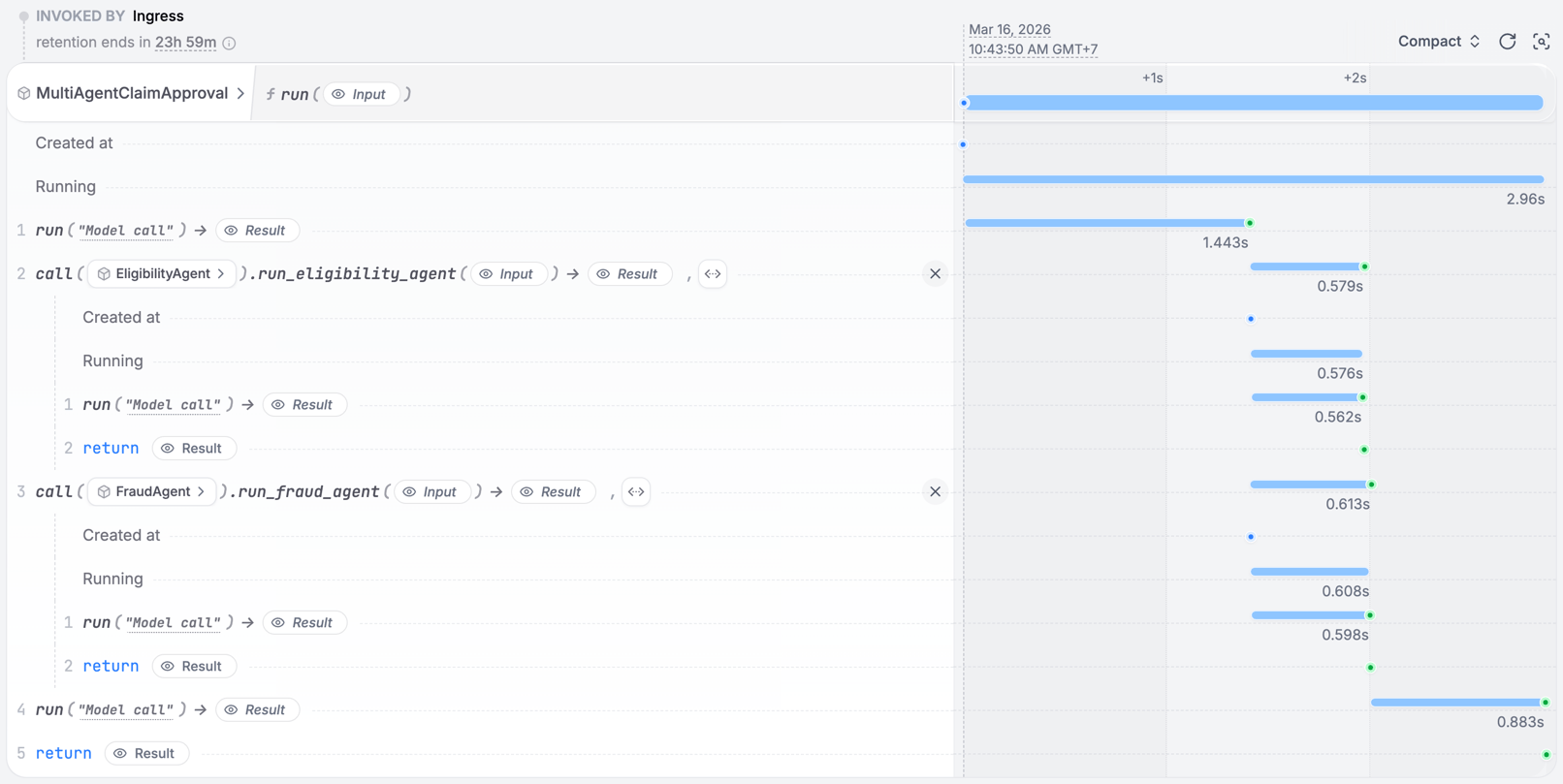
In the UI, you can see that the agent called the sub-agents and is waiting for their responses.
Once all sub-agents return, the main agent continues and makes a decision.
With Pydantic AI, you expose each specialist as a separate Restate service and call it via `restate_context().service_call()`. The LLM response that picks the specialist is durably persisted, so on recovery the routing decision is replayed without re-calling the LLM.
```python remote_agents.py {"CODE_LOAD::https://raw.githubusercontent.com/restatedev/ai-examples/refs/heads/main/pydantic-ai/tour-of-agents/app/remote_agents.py#here"} theme={null}
# Durable service call to the fraud agent; persisted and retried by Restate
@agent.tool
async def check_fraud(_run_ctx: RunContext[None], claim: InsuranceClaim) -> str:
"""Analyze the probability of fraud."""
return await restate_context().service_call(run_fraud_agent, claim)
restate_agent = RestateAgent(agent)
agent_service = restate.Service("MultiAgentClaimApproval")
@agent_service.handler()
async def run(_ctx: restate.Context, claim: InsuranceClaim) -> str:
result = await restate_agent.run(f"Claim: {claim.model_dump_json()}")
return result.output
```
Each specialist agent runs as its own Restate service:
```python eligibility_agent.py {"CODE_LOAD::https://raw.githubusercontent.com/restatedev/ai-examples/refs/heads/main/pydantic-ai/tour-of-agents/app/utils/utils.py#eligibility"} theme={null}
eligibility_agent = Agent(
"openai:gpt-5.4",
system_prompt="Decide whether the following claim is eligible for reimbursement."
"Respond with eligible if it's a medical claim, and not eligible otherwise.",
)
restate_eligibility_agent = RestateAgent(eligibility_agent)
eligibility_agent_service = restate.Service("EligibilityAgent")
@eligibility_agent_service.handler()
async def run_eligibility_agent(_ctx: restate.Context, claim: InsuranceClaim) -> str:
result = await restate_eligibility_agent.run(claim.model_dump_json())
return result.output
```
[Install Restate](/installation) and launch it:
```bash theme={null}
restate-server
```
Get the example:
```bash theme={null}
restate example python-pydantic-ai-tour-of-agents && cd python-pydantic-ai-tour-of-agents
```
Export your [OpenAI API key](https://platform.openai.com/api-keys) and run the agent:
```bash theme={null}
export OPENAI_API_KEY=sk-...
```
```bash theme={null}
uv run app/remote_agents.py
```
Register the agents with Restate:
```bash theme={null}
restate deployments register http://localhost:9080 --force --yes # dev only: overrides previous registrations
```
Start a request for a claim that needs to be analyzed by multiple agents:
```bash theme={null}
curl localhost:8080/restate/call/MultiAgentClaimApproval/run --json '{
"date":"2024-10-01",
"category":"orthopedic",
"reason":"hospital bill for a broken leg",
"amount":3000,
"placeOfService":"General Hospital"
}'
```
In the UI, you can see that the agent called the sub-agents and is waiting for their responses.
Once all sub-agents return, the main agent continues and makes a decision.
 With LangChain, you expose each specialist as a separate Restate service and call it via `restate_context().service_call()`. The LLM response that picks the specialist is durably persisted, so on recovery the routing decision is replayed without re-calling the LLM.
```python remote_agents.py {"CODE_LOAD::https://raw.githubusercontent.com/restatedev/ai-examples/refs/heads/main/langchain-python/tour-of-agents/app/remote_agents.py#here"} theme={null}
# Durable service call to the fraud agent; persisted and retried by Restate.
@tool
async def check_fraud(claim: InsuranceClaim) -> str:
"""Analyze the probability of fraud."""
return await restate_context().service_call(run_fraud_agent, claim)
agent = create_agent(
model=init_chat_model("openai:gpt-5.4"),
tools=[check_eligibility, check_fraud],
system_prompt=(
"You are a claim approval engine. Analyze the claim and use your "
"tools to decide whether to approve it."
),
middleware=[RestateMiddleware()],
)
agent_service = restate.Service("MultiAgentClaimApproval")
@agent_service.handler()
async def run(_ctx: restate.Context, claim: InsuranceClaim) -> str:
result = await agent.ainvoke({"messages": f"Claim: {claim.model_dump_json()}"})
return result["messages"][-1].content
```
Each specialist agent runs as its own Restate service. The eligibility and fraud agents are defined as standalone LangChain agents in their own Restate services, called via `restate_context().service_call()`.
[Install Restate](/installation) and launch it:
```bash theme={null}
restate-server
```
Get the example:
```bash theme={null}
restate example python-langchain-tour-of-agents && cd python-langchain-tour-of-agents
```
Export your [OpenAI API key](https://platform.openai.com/api-keys) and run the agent:
```bash theme={null}
export OPENAI_API_KEY=sk-...
```
```bash theme={null}
uv run app/remote_agents.py
```
Register the agents with Restate:
```bash theme={null}
restate deployments register http://localhost:9080 --force --yes # dev only: overrides previous registrations
```
Start a request for a claim that needs to be analyzed by multiple agents:
```bash theme={null}
curl localhost:8080/restate/call/MultiAgentClaimApproval/run --json '{
"date":"2024-10-01",
"category":"orthopedic",
"reason":"hospital bill for a broken leg",
"amount":3000,
"placeOfService":"General Hospital"
}'
```
In the UI, you can see that the agent called the sub-agents and is waiting for their responses.
Once all sub-agents return, the main agent continues and makes a decision.
Deploy each specialist as its own service and use [`ctx.genericCall()` or typed clients](https://docs.restate.dev/develop/ts/service-communication) for dynamic routing. The LLM picks the specialist (exposed as tools), and the router calls the selected service over HTTP. Restate durably persists both the routing decision and the remote call.
```typescript remote-agents.ts {"CODE_LOAD::https://raw.githubusercontent.com/restatedev/ai-examples/refs/heads/main/typescript-restate-only/tour-of-agents/src/remote-agents.ts#here"} theme={null}
// Define your agents as tools as your AI SDK requires (here Vercel AI SDK)
const SPECIALISTS = {
BillingAgent: { description: "Expert in payments, charges, and refunds" },
AccountAgent: { description: "Expert in login issues and security" },
ProductAgent: { description: "Expert in features and how-to guides" },
} as const;
type Specialist = keyof typeof SPECIALISTS;
async function answer(ctx: Context, { message }: { message: string }) {
// 1. First, decide if a specialist is needed
const messages: ModelMessage[] = [
{
role: "system",
content:
"You are a routing agent. Route the question to a specialist or respond directly if no specialist is needed.",
},
{ role: "user", content: message },
];
const routingDecision = await ctx.run(
"Pick specialist",
// Use your preferred LLM SDK here - specify agents as tools
async () => llmCall(messages, createTools(SPECIALISTS)),
{ maxRetryAttempts: 3 },
);
// 2. No specialist needed? Give a general answer
if (!routingDecision.toolCalls || routingDecision.toolCalls.length === 0) {
return routingDecision.text;
}
// 3. Get the specialist's name
const specialist = routingDecision.toolCalls[0].toolName as Specialist;
// 4. Call the specialist over HTTP
return ctx.genericCall({
service: specialist,
method: "run",
parameter: message,
inputSerde: restate.serde.json,
outputSerde: restate.serde.json,
});
}
```
Each specialist agent runs as its own Restate service with a `run` handler:
```typescript billing-agent.ts {"CODE_LOAD::https://raw.githubusercontent.com/restatedev/ai-examples/refs/heads/main/typescript-restate-only/tour-of-agents/src/utils/utils.ts#here"} theme={null}
export const billingAgent = restate.service({
name: "BillingAgent",
handlers: {
run: async (ctx: Context, question: string): Promise => {
const { text } = await ctx.run(
"LLM call",
async () =>
llmCall(`You are a billing support specialist.
Acknowledge the billing issue, explain charges clearly, provide next steps with timeline.
${question}`),
{ maxRetryAttempts: 3 },
);
return text;
},
},
});
```
[Install Restate](/installation) and launch it:
```bash theme={null}
restate-server
```
Get the example:
```bash theme={null}
restate example typescript-restate-tour-of-agents && cd typescript-restate-tour-of-agents
npm install
```
Export your API key:
```bash theme={null}
export OPENAI_API_KEY=sk-...
```
```bash theme={null}
npx tsx ./src/remote-agents.ts
```
Register the services with Restate:
```bash theme={null}
restate deployments register http://localhost:9080 --force --yes # dev only: overrides previous registrations
```
Send a request:
```bash theme={null}
curl localhost:8080/restate/call/RemoteAgentRouter/answer \
--json '{"message": "I was charged twice for my subscription last month"}'
```
Deploy each specialist as its own service and use `ctx.generic_call()` or typed clients. The LLM picks the specialist (exposed as tools), and the router calls the selected service over HTTP. Restate durably persists both the routing decision and the remote call.
```python remote_agents.py {"CODE_LOAD::https://raw.githubusercontent.com/restatedev/ai-examples/refs/heads/main/python-restate-only/tour-of-agents/app/remote_agents.py#here"} theme={null}
remote_agent_router = restate.Service("RemoteAgentRouter")
# Classify the request
SPECIALISTS = {
"BillingAgent": "Expert in payments, charges, and refunds",
"AccountAgent": "Expert in login issues and security",
"ProductAgent": "Expert in features and how-to guides",
}
@remote_agent_router.handler()
async def answer(ctx: restate.Context, question: Question) -> str | None:
"""Classify request and route to appropriate specialized agent."""
# 1. First, decide if a specialist is needed
routing_decision = await ctx.run_typed(
"Pick specialist",
llm_call, # Use your preferred AI SDK here
RunOptions(max_attempts=3),
messages=question.message,
tools=[tool(name=name, description=desc) for name, desc in SPECIALISTS.items()],
)
# 2. No specialist needed? Give a general answer
if not routing_decision.tool_calls:
return routing_decision.content
# 3. Get the specialist's name
specialist = routing_decision.tool_calls[0].function.name
if not specialist:
return "Unable to determine specialist"
# 4. Call the specialist over HTTP
response = await ctx.generic_call(
specialist,
"run",
arg=question.model_dump_json().encode(),
)
return response.decode("utf-8")
```
Each specialist agent runs as its own Restate service:
```python billing_agent.py {"CODE_LOAD::https://raw.githubusercontent.com/restatedev/ai-examples/refs/heads/main/python-restate-only/tour-of-agents/app/util/util.py#here"} theme={null}
billing_agent_svc = restate.Service("BillingAgent")
@billing_agent_svc.handler("run")
async def get_billing_support(ctx: restate.Context, question: Question) -> str | None:
result = await ctx.run_typed(
"LLM call",
llm_call,
RunOptions(max_attempts=3),
messages=f"""You are a billing support specialist.
Acknowledge the billing issue, explain charges clearly, provide next steps with timeline.
{question.message}""",
)
return result.content
```
[Install Restate](/installation) and launch it:
```bash theme={null}
restate-server
```
Get the example:
```bash theme={null}
restate example python-restate-tour-of-agents && cd python-restate-tour-of-agents
```
Export your API key:
```bash theme={null}
export OPENAI_API_KEY=sk-...
```
```bash theme={null}
uv run app/remote_agents.py
```
Register the services with Restate:
```bash theme={null}
restate deployments register http://localhost:9080 --force --yes # dev only: overrides previous registrations
```
Send a request:
```bash theme={null}
curl localhost:8080/restate/call/RemoteAgentRouter/answer \
--json '{"message": "I was charged twice for my subscription last month"}'
```
For more details on resilient service-to-service calls, see the SDK documentation: [TypeScript](/develop/ts/service-communication) / [Python](/develop/python/service-communication).
With LangChain, you expose each specialist as a separate Restate service and call it via `restate_context().service_call()`. The LLM response that picks the specialist is durably persisted, so on recovery the routing decision is replayed without re-calling the LLM.
```python remote_agents.py {"CODE_LOAD::https://raw.githubusercontent.com/restatedev/ai-examples/refs/heads/main/langchain-python/tour-of-agents/app/remote_agents.py#here"} theme={null}
# Durable service call to the fraud agent; persisted and retried by Restate.
@tool
async def check_fraud(claim: InsuranceClaim) -> str:
"""Analyze the probability of fraud."""
return await restate_context().service_call(run_fraud_agent, claim)
agent = create_agent(
model=init_chat_model("openai:gpt-5.4"),
tools=[check_eligibility, check_fraud],
system_prompt=(
"You are a claim approval engine. Analyze the claim and use your "
"tools to decide whether to approve it."
),
middleware=[RestateMiddleware()],
)
agent_service = restate.Service("MultiAgentClaimApproval")
@agent_service.handler()
async def run(_ctx: restate.Context, claim: InsuranceClaim) -> str:
result = await agent.ainvoke({"messages": f"Claim: {claim.model_dump_json()}"})
return result["messages"][-1].content
```
Each specialist agent runs as its own Restate service. The eligibility and fraud agents are defined as standalone LangChain agents in their own Restate services, called via `restate_context().service_call()`.
[Install Restate](/installation) and launch it:
```bash theme={null}
restate-server
```
Get the example:
```bash theme={null}
restate example python-langchain-tour-of-agents && cd python-langchain-tour-of-agents
```
Export your [OpenAI API key](https://platform.openai.com/api-keys) and run the agent:
```bash theme={null}
export OPENAI_API_KEY=sk-...
```
```bash theme={null}
uv run app/remote_agents.py
```
Register the agents with Restate:
```bash theme={null}
restate deployments register http://localhost:9080 --force --yes # dev only: overrides previous registrations
```
Start a request for a claim that needs to be analyzed by multiple agents:
```bash theme={null}
curl localhost:8080/restate/call/MultiAgentClaimApproval/run --json '{
"date":"2024-10-01",
"category":"orthopedic",
"reason":"hospital bill for a broken leg",
"amount":3000,
"placeOfService":"General Hospital"
}'
```
In the UI, you can see that the agent called the sub-agents and is waiting for their responses.
Once all sub-agents return, the main agent continues and makes a decision.
Deploy each specialist as its own service and use [`ctx.genericCall()` or typed clients](https://docs.restate.dev/develop/ts/service-communication) for dynamic routing. The LLM picks the specialist (exposed as tools), and the router calls the selected service over HTTP. Restate durably persists both the routing decision and the remote call.
```typescript remote-agents.ts {"CODE_LOAD::https://raw.githubusercontent.com/restatedev/ai-examples/refs/heads/main/typescript-restate-only/tour-of-agents/src/remote-agents.ts#here"} theme={null}
// Define your agents as tools as your AI SDK requires (here Vercel AI SDK)
const SPECIALISTS = {
BillingAgent: { description: "Expert in payments, charges, and refunds" },
AccountAgent: { description: "Expert in login issues and security" },
ProductAgent: { description: "Expert in features and how-to guides" },
} as const;
type Specialist = keyof typeof SPECIALISTS;
async function answer(ctx: Context, { message }: { message: string }) {
// 1. First, decide if a specialist is needed
const messages: ModelMessage[] = [
{
role: "system",
content:
"You are a routing agent. Route the question to a specialist or respond directly if no specialist is needed.",
},
{ role: "user", content: message },
];
const routingDecision = await ctx.run(
"Pick specialist",
// Use your preferred LLM SDK here - specify agents as tools
async () => llmCall(messages, createTools(SPECIALISTS)),
{ maxRetryAttempts: 3 },
);
// 2. No specialist needed? Give a general answer
if (!routingDecision.toolCalls || routingDecision.toolCalls.length === 0) {
return routingDecision.text;
}
// 3. Get the specialist's name
const specialist = routingDecision.toolCalls[0].toolName as Specialist;
// 4. Call the specialist over HTTP
return ctx.genericCall({
service: specialist,
method: "run",
parameter: message,
inputSerde: restate.serde.json,
outputSerde: restate.serde.json,
});
}
```
Each specialist agent runs as its own Restate service with a `run` handler:
```typescript billing-agent.ts {"CODE_LOAD::https://raw.githubusercontent.com/restatedev/ai-examples/refs/heads/main/typescript-restate-only/tour-of-agents/src/utils/utils.ts#here"} theme={null}
export const billingAgent = restate.service({
name: "BillingAgent",
handlers: {
run: async (ctx: Context, question: string): Promise => {
const { text } = await ctx.run(
"LLM call",
async () =>
llmCall(`You are a billing support specialist.
Acknowledge the billing issue, explain charges clearly, provide next steps with timeline.
${question}`),
{ maxRetryAttempts: 3 },
);
return text;
},
},
});
```
[Install Restate](/installation) and launch it:
```bash theme={null}
restate-server
```
Get the example:
```bash theme={null}
restate example typescript-restate-tour-of-agents && cd typescript-restate-tour-of-agents
npm install
```
Export your API key:
```bash theme={null}
export OPENAI_API_KEY=sk-...
```
```bash theme={null}
npx tsx ./src/remote-agents.ts
```
Register the services with Restate:
```bash theme={null}
restate deployments register http://localhost:9080 --force --yes # dev only: overrides previous registrations
```
Send a request:
```bash theme={null}
curl localhost:8080/restate/call/RemoteAgentRouter/answer \
--json '{"message": "I was charged twice for my subscription last month"}'
```
Deploy each specialist as its own service and use `ctx.generic_call()` or typed clients. The LLM picks the specialist (exposed as tools), and the router calls the selected service over HTTP. Restate durably persists both the routing decision and the remote call.
```python remote_agents.py {"CODE_LOAD::https://raw.githubusercontent.com/restatedev/ai-examples/refs/heads/main/python-restate-only/tour-of-agents/app/remote_agents.py#here"} theme={null}
remote_agent_router = restate.Service("RemoteAgentRouter")
# Classify the request
SPECIALISTS = {
"BillingAgent": "Expert in payments, charges, and refunds",
"AccountAgent": "Expert in login issues and security",
"ProductAgent": "Expert in features and how-to guides",
}
@remote_agent_router.handler()
async def answer(ctx: restate.Context, question: Question) -> str | None:
"""Classify request and route to appropriate specialized agent."""
# 1. First, decide if a specialist is needed
routing_decision = await ctx.run_typed(
"Pick specialist",
llm_call, # Use your preferred AI SDK here
RunOptions(max_attempts=3),
messages=question.message,
tools=[tool(name=name, description=desc) for name, desc in SPECIALISTS.items()],
)
# 2. No specialist needed? Give a general answer
if not routing_decision.tool_calls:
return routing_decision.content
# 3. Get the specialist's name
specialist = routing_decision.tool_calls[0].function.name
if not specialist:
return "Unable to determine specialist"
# 4. Call the specialist over HTTP
response = await ctx.generic_call(
specialist,
"run",
arg=question.model_dump_json().encode(),
)
return response.decode("utf-8")
```
Each specialist agent runs as its own Restate service:
```python billing_agent.py {"CODE_LOAD::https://raw.githubusercontent.com/restatedev/ai-examples/refs/heads/main/python-restate-only/tour-of-agents/app/util/util.py#here"} theme={null}
billing_agent_svc = restate.Service("BillingAgent")
@billing_agent_svc.handler("run")
async def get_billing_support(ctx: restate.Context, question: Question) -> str | None:
result = await ctx.run_typed(
"LLM call",
llm_call,
RunOptions(max_attempts=3),
messages=f"""You are a billing support specialist.
Acknowledge the billing issue, explain charges clearly, provide next steps with timeline.
{question.message}""",
)
return result.content
```
[Install Restate](/installation) and launch it:
```bash theme={null}
restate-server
```
Get the example:
```bash theme={null}
restate example python-restate-tour-of-agents && cd python-restate-tour-of-agents
```
Export your API key:
```bash theme={null}
export OPENAI_API_KEY=sk-...
```
```bash theme={null}
uv run app/remote_agents.py
```
Register the services with Restate:
```bash theme={null}
restate deployments register http://localhost:9080 --force --yes # dev only: overrides previous registrations
```
Send a request:
```bash theme={null}
curl localhost:8080/restate/call/RemoteAgentRouter/answer \
--json '{"message": "I was charged twice for my subscription last month"}'
```
For more details on resilient service-to-service calls, see the SDK documentation: [TypeScript](/develop/ts/service-communication) / [Python](/develop/python/service-communication).