> ## Documentation Index
> Fetch the complete documentation index at: https://docs.restate.dev/llms.txt
> Use this file to discover all available pages before exploring further.
# Durable Sessions
> Persistent, isolated agent sessions keyed by ID. Conversation state survives crashes and restarts with built-in concurrency control.
export const GitHubLink = ({url}) => ;
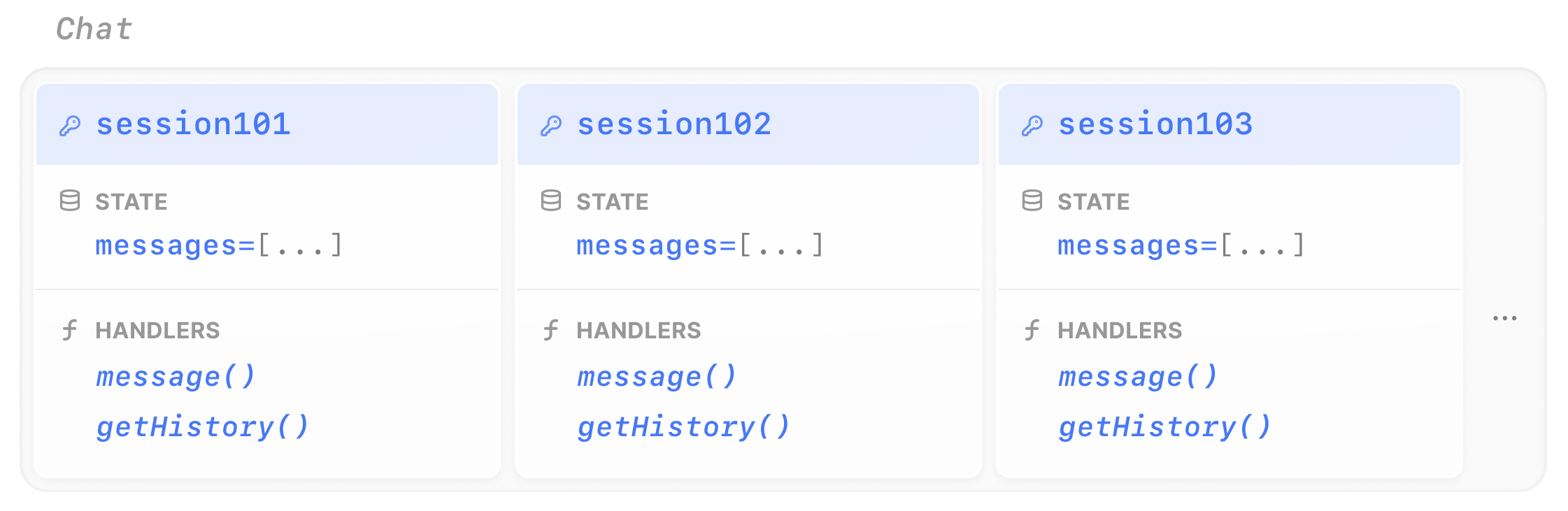
Restate **Virtual Objects** give your agents persistent, isolated sessions. Each session is identified by a unique key (like a user ID or conversation ID), maintains its own state, and has built-in concurrency control, so concurrent requests to the same session are automatically queued.
## How it works
A Virtual Object is a Restate service type where each instance is identified by a key. State stored in a Virtual Object:
* **Survives crashes and restarts**: No external database needed
* **Is isolated per key**: Each session has its own state
* **Has concurrency control**: Only one write handler runs at a time per key, preventing race conditions
 ## Example: a chat session
To turn your agent into a stateful session, you need two changes compared to a regular [durable agent](/ai/patterns/durable-agents):
1. **Define a Virtual Object**: use `restate.object()` instead of `restate.service()`. This gives each session key its own isolated state.
2. **Manage conversation history** using the object's K/V store: use `ctx.get()` and `ctx.set()` to read and write the message history.
```typescript chat-agent.ts {"CODE_LOAD::https://raw.githubusercontent.com/restatedev/ai-examples/refs/heads/main/vercel-ai/tour-of-agents/src/chat-agent.ts#here"} theme={null}
const chatAgent = restate.object({
name: "Chat",
handlers: {
message: restate.createObjectHandler(
{ input: schema(ChatMessageSchema) },
async (ctx: restate.ObjectContext, { message }: { message: string }) => {
const model = wrapLanguageModel({
model: openai("gpt-5.4"),
middleware: durableCalls(ctx, { maxRetryAttempts: 3 }),
});
// Retrieve the state
const messages =
(await ctx.get("messages", superJson)) ?? [];
messages.push({ role: "user", content: message });
const res = await generateText({
model,
system: "You are a helpful assistant.",
messages,
});
// Update the state
ctx.set("messages", [...messages, ...res.response.messages], superJson);
return { answer: res.text };
},
),
// Shared handler to retrieve the history
getHistory: shared(async (ctx: restate.ObjectSharedContext) =>
ctx.get("messages", superJson),
),
},
});
```
[Install Restate](/installation) and launch it:
```bash theme={null}
npm install --global @restatedev/restate-server@latest @restatedev/restate@latest
restate-server
```
Get the example:
```bash theme={null}
restate example typescript-vercel-ai-tour-of-agents && cd typescript-vercel-ai-tour-of-agents
npm install
```
Export your [OpenAI API key](https://platform.openai.com/api-keys) and run the agent:
```bash theme={null}
export OPENAI_API_KEY=sk-...
```
```bash theme={null}
npx tsx ./src/chat-agent.ts
```
Register the agents with Restate:
```bash theme={null}
restate deployments register http://localhost:9080 --force --yes # dev only: overrides previous registrations
```
Ask the agent to do some task. Specify the Virtual Object ID in the URL, for example for `session123`:
```bash theme={null}
curl localhost:8080/restate/call/Chat/session123/message \
--json '{"message": "make a poem about durable execution"}'
```
Continue the conversation with the same session ID. The agent remembers previous context:
```bash theme={null}
curl localhost:8080/restate/call/Chat/session123/message \
--json '{"message": "shorten it to 2 lines"}'
```
Send a message to a different session. It starts a completely separate conversation:
```bash theme={null}
curl localhost:8080/restate/call/Chat/session456/message \
--json '{"message": "what are the benefits of durable execution?"}'
```
To turn your agent into a stateful session, you need two changes compared to a regular [durable agent](/ai/patterns/durable-agents):
1. **Define a Virtual Object**: use `restate.VirtualObject()` instead of `restate.Service()`. This gives each session key its own isolated state.
2. **Enable `use_restate_session`** on `DurableRunner.run()`: set `use_restate_session=True` so the conversation history is automatically persisted in Restate's K/V store.
```python chat_agent.py {"CODE_LOAD::https://raw.githubusercontent.com/restatedev/ai-examples/refs/heads/main/openai-agents/tour-of-agents/app/chat_agent.py#here"} theme={null}
chat = VirtualObject("Chat")
@chat.handler()
async def message(_ctx: ObjectContext, req: ChatMessage) -> dict:
# Set use_restate_session=True to store the session in Restate's key-value store
# Make sure you use a VirtualObject to enable this feature
result = await DurableRunner.run(
Agent(name="Assistant", instructions="You are a helpful assistant."),
req.message,
use_restate_session=True,
)
return result.final_output
@chat.handler(kind="shared")
async def get_history(ctx: restate.ObjectSharedContext):
return await ctx.get("messages", type_hint=list[dict]) or []
```
[Install Restate](/installation) and launch it:
```bash theme={null}
restate-server
```
Get the example:
```bash theme={null}
restate example python-openai-agents-tour-of-agents && cd python-openai-agents-tour-of-agents
```
Export your [OpenAI API key](https://platform.openai.com/api-keys) and run the agent:
```bash theme={null}
export OPENAI_API_KEY=sk-...
```
```bash theme={null}
uv run app/chat_agent.py
```
Register the agents with Restate:
```bash theme={null}
restate deployments register http://localhost:9080 --force --yes # dev only: overrides previous registrations
```
Ask the agent to do some task. Specify the Virtual Object ID in the URL, for example for `session123`:
```bash theme={null}
curl localhost:8080/restate/call/Chat/session123/message \
--json '{"message": "Make a poem about durable execution."}'
```
Continue the conversation with the same session ID. The agent remembers previous context:
```bash theme={null}
curl localhost:8080/restate/call/Chat/session123/message \
--json '{"message": "Shorten it to 2 lines."}'
```
Go to the state tab of the UI to view the conversation history.
Send a message to a different session. It starts a completely separate conversation:
```bash theme={null}
curl localhost:8080/restate/call/Chat/session456/message \
--json '{"message": "What are the benefits of durable execution?"}'
```
To turn your agent into a stateful session, you need two changes compared to a regular [durable agent](/ai/patterns/durable-agents):
1. **Define a Virtual Object**: use `restate.VirtualObject()` instead of `restate.Service()`. This gives each session key its own isolated state.
2. **Use `RestateSessionService`** as the session service for the Runner: this stores the ADK session data (conversation history, agent state) in Restate's K/V store. The object key (via `ctx.key()`) is used as the user identifier.
```python chat_agent.py {"CODE_LOAD::https://raw.githubusercontent.com/restatedev/ai-examples/refs/heads/main/google-adk/tour-of-agents/app/chat_agent.py#here"} theme={null}
agent = Agent(
model="gemini-2.5-flash",
name="assistant",
instruction="You are a helpful assistant. Be concise and helpful.",
)
app = App(name=APP_NAME, root_agent=agent, plugins=[RestatePlugin()])
runner = Runner(app=app, session_service=RestateSessionService())
chat = restate.VirtualObject("Chat")
@chat.handler()
async def message(ctx: restate.ObjectContext, req: ChatMessage) -> str | None:
events = runner.run_async(
user_id=ctx.key(),
session_id=req.session_id,
new_message=Content(role="user", parts=[Part.from_text(text=req.message)]),
)
return await parse_agent_response(events)
@chat.handler(kind="shared")
async def get_history(ctx: restate.ObjectSharedContext, session_id: str):
return await ctx.get(f"session_store::{session_id}", type_hint=list[dict]) or []
```
[Install Restate](/installation) and launch it:
```bash theme={null}
restate-server
```
Get the example:
```bash theme={null}
restate example python-google-adk-tour-of-agents && cd python-google-adk-tour-of-agents
```
Export your [Google API key](https://aistudio.google.com/app/apikey) and run the agent:
```bash theme={null}
export GOOGLE_API_KEY=your-api-key
```
```bash theme={null}
uv run app/chat_agent.py
```
Register the agents with Restate:
```bash theme={null}
restate deployments register http://localhost:9080 --force --yes # dev only: overrides previous registrations
```
Ask the agent to do some task. Specify the Virtual Object ID in the URL, for example for `session123`:
```bash theme={null}
curl localhost:8080/restate/call/Chat/user123/message \
--json '{"message": "Make a poem about durable execution.", "session_id": "session-123"}'
```
Continue the conversation with the same user and session ID. The agent remembers previous context:
```bash theme={null}
curl localhost:8080/restate/call/Chat/user123/message \
--json '{"message": "Shorten it to 2 lines.", "session_id": "session-123"}'
```
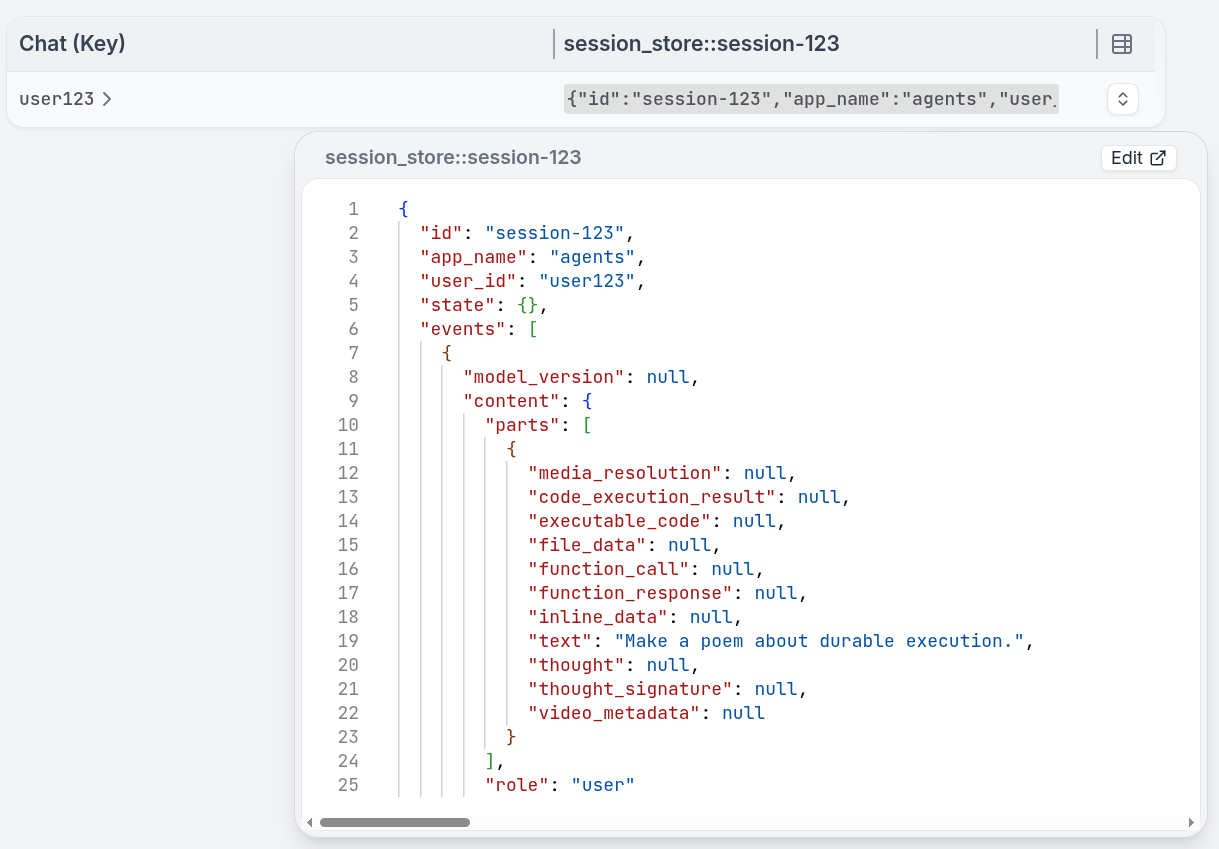
Go to the state tab of the UI to view the conversation history.
Send a message to a different user. It starts a completely separate conversation:
```bash theme={null}
curl localhost:8080/restate/call/Chat/user456/message \
--json '{"message": "What are the benefits of durable execution?", "session_id": "session-567"}'
```
To turn your agent into a stateful session, you need two changes compared to a regular [durable agent](/ai/patterns/durable-agents):
1. **Define a Virtual Object**: use `restate.VirtualObject()` instead of `restate.Service()`. This gives each session key its own isolated state.
2. **Manage conversation history** using the object's K/V store: use `ctx.get()` and `ctx.set()` to read and write the message history.
```python chat_agent.py {"CODE_LOAD::https://raw.githubusercontent.com/restatedev/ai-examples/refs/heads/main/pydantic-ai/tour-of-agents/app/chat_agent.py#here"} theme={null}
agent = Agent(
"openai:gpt-5.4",
system_prompt="You are a helpful assistant.",
)
restate_agent = RestateAgent(agent)
chat = VirtualObject("Chat")
@chat.handler()
async def message(ctx: ObjectContext, req: ChatMessage) -> str:
# Load message history from Restate's durable key-value store
history = await ctx.get("messages", serde=MessageSerde())
result = await restate_agent.run(req.message, message_history=history)
# Store updated history back in Restate state
ctx.set("messages", result.all_messages(), serde=MessageSerde())
return result.output
@chat.handler(kind="shared")
async def get_history(ctx: restate.ObjectSharedContext) -> dict:
return await ctx.get("messages", type_hint=dict) or {}
```
[Install Restate](/installation) and launch it:
```bash theme={null}
restate-server
```
Get the example:
```bash theme={null}
restate example python-pydantic-ai-tour-of-agents && cd python-pydantic-ai-tour-of-agents
```
Export your [OpenAI API key](https://platform.openai.com/api-keys) and run the agent:
```bash theme={null}
export OPENAI_API_KEY=sk-...
```
```bash theme={null}
uv run app/chat_agent.py
```
Register the agents with Restate:
```bash theme={null}
restate deployments register http://localhost:9080 --force --yes # dev only: overrides previous registrations
```
Ask the agent to do some task. Specify the Virtual Object ID in the URL, for example for `session123`:
```bash theme={null}
curl localhost:8080/restate/call/Chat/session123/message \
--json '{"message": "Make a poem about durable execution."}'
```
Continue the conversation with the same session ID. The agent remembers previous context:
```bash theme={null}
curl localhost:8080/restate/call/Chat/session123/message \
--json '{"message": "Shorten it to 2 lines."}'
```
Go to the state tab of the UI to view the conversation history.
Send a message to a different session. It starts a completely separate conversation:
```bash theme={null}
curl localhost:8080/restate/call/Chat/session456/message \
--json '{"message": "What are the benefits of durable execution?"}'
```
To turn your agent into a stateful session, you need two changes compared to a regular [durable agent](/ai/patterns/durable-agents):
1. **Define a Virtual Object**: use `restate.VirtualObject()` instead of `restate.Service()`. This gives each session key its own isolated state.
2. **Manage conversation history** using the object's K/V store: use `ctx.get()` and `ctx.set()` to read and write the message history.
```python chat_agent.py {"CODE_LOAD::https://raw.githubusercontent.com/restatedev/ai-examples/refs/heads/main/langchain-python/tour-of-agents/app/chat_agent.py#here"} theme={null}
chat = restate.VirtualObject("Chat")
agent = create_agent(
model=init_chat_model("openai:gpt-5.4"),
system_prompt="You are a helpful assistant.",
middleware=[RestateMiddleware()],
)
@chat.handler()
async def message(ctx: restate.ObjectContext, req: ChatMessage) -> str:
history = await ctx.get("messages", type_hint=ChatHistory) or ChatHistory()
history.messages.append(HumanMessage(content=req.message))
result = await agent.ainvoke({"messages": history.messages})
ctx.set("messages", ChatHistory(messages=result["messages"]))
return result["messages"][-1].content
@chat.handler(kind="shared")
async def get_history(ctx: restate.ObjectSharedContext) -> ChatHistory:
return await ctx.get("messages", type_hint=ChatHistory) or ChatHistory()
```
[Install Restate](/installation) and launch it:
```bash theme={null}
restate-server
```
Get the example:
```bash theme={null}
restate example python-langchain-tour-of-agents && cd python-langchain-tour-of-agents
```
Export your [OpenAI API key](https://platform.openai.com/api-keys) and run the agent:
```bash theme={null}
export OPENAI_API_KEY=sk-...
```
```bash theme={null}
uv run app/chat_agent.py
```
Register the agents with Restate:
```bash theme={null}
restate deployments register http://localhost:9080 --force --yes # dev only: overrides previous registrations
```
Ask the agent to do some task. Specify the Virtual Object ID in the URL, for example for `session123`:
```bash theme={null}
curl localhost:8080/restate/call/Chat/session123/message \
--json '{"message": "Make a poem about durable execution."}'
```
Continue the conversation with the same session ID. The agent remembers previous context:
```bash theme={null}
curl localhost:8080/restate/call/Chat/session123/message \
--json '{"message": "Shorten it to 2 lines."}'
```
Go to the state tab of the UI to view the conversation history.
Send a message to a different session. It starts a completely separate conversation:
```bash theme={null}
curl localhost:8080/restate/call/Chat/session456/message \
--json '{"message": "What are the benefits of durable execution?"}'
```
To turn your agent into a stateful session, you need two changes compared to a regular [durable agent](/ai/patterns/durable-agents):
1. **Define a Virtual Object**: use `restate.object()` instead of `restate.service()`. This gives each session key its own isolated state.
2. **Manage conversation history** using the object's K/V store: use `ctx.get()` and `ctx.set()` to read and write the message history.
```typescript chat-agent.ts {"CODE_LOAD::https://raw.githubusercontent.com/restatedev/ai-examples/refs/heads/main/typescript-restate-only/tour-of-agents/src/chat-agent.ts#here"} theme={null}
/**
* Long-lived, Stateful Chat Sessions
*
* Maintains conversation state across multiple requests using Restate's persistent memory.
* Sessions survive failures and can be resumed at any time.
*/
import * as restate from "@restatedev/restate-sdk";
import { ObjectContext } from "@restatedev/restate-sdk";
import llmCall from "./utils/llm";
import { zodPrompt } from "./utils/utils";
import { ModelMessage } from "@ai-sdk/provider-utils";
const chatAgent = restate.object({
name: "Chat",
handlers: {
message: restate.createObjectHandler(
{ input: zodPrompt("Write a poem about Durable Execution") },
async (ctx: ObjectContext, { message }: { message: string }) => {
const messages = (await ctx.get>("memory")) ?? [];
messages.push({ role: "user", content: message });
// Use your preferred LLM SDK here
const result = await ctx.run("LLM call", async () => llmCall(messages));
messages.push({ role: "assistant", content: result.text });
ctx.set("memory", messages);
return result.text;
},
),
getHistory: restate.createObjectSharedHandler(
async (ctx: restate.ObjectSharedContext) =>
ctx.get>("memory"),
),
},
});
restate.serve({ services: [chatAgent], port: 9080 });
```
[Install Restate](/installation) and launch it:
```bash theme={null}
restate-server
```
Get the example:
```bash theme={null}
restate example typescript-restate-tour-of-agents && cd typescript-restate-tour-of-agents
npm install
```
Export your API key:
```bash theme={null}
export OPENAI_API_KEY=sk-...
```
```bash theme={null}
npx tsx ./src/chat-agent.ts
```
Register the services with Restate:
```bash theme={null}
restate deployments register http://localhost:9080 --force --yes # dev only: overrides previous registrations
```
Ask the agent to do some task. Specify the Virtual Object ID in the URL, for example for `session123`:
```bash theme={null}
curl localhost:8080/restate/call/Chat/session123/message \
--json '{"message": "make a poem about durable execution"}'
```
Continue the conversation with the same session ID. The agent remembers previous context:
```bash theme={null}
curl localhost:8080/restate/call/Chat/session123/message \
--json '{"message": "shorten it to 2 lines"}'
```
Send a message to a different session. It starts a completely separate conversation:
```bash theme={null}
curl localhost:8080/restate/call/Chat/session456/message \
--json '{"message": "what are the benefits of durable execution?"}'
```
To turn your agent into a stateful session, you need two changes compared to a regular [durable agent](/ai/patterns/durable-agents):
1. **Define a Virtual Object**: use `restate.VirtualObject()` instead of `restate.Service()`. This gives each session key its own isolated state.
2. **Manage conversation history** using the object's K/V store: use `ctx.get()` and `ctx.set()` to read and write the message history.
```python chat_agent.py {"CODE_LOAD::https://raw.githubusercontent.com/restatedev/ai-examples/refs/heads/main/python-restate-only/tour-of-agents/app/chat_agent.py#here"} theme={null}
chat = restate.VirtualObject("Chat")
@chat.handler()
async def message(ctx: restate.ObjectContext, msg: ChatMessage) -> str | None:
"""A long-lived stateful chat session that allows for ongoing conversation."""
# Retrieve conversation memory from Restate
messages = await ctx.get("memory", type_hint=list[dict]) or []
messages.append({"role": "user", "content": msg.message})
result = await ctx.run_typed(
"LLM call",
llm_call, # Use your preferred LLM SDK here
RunOptions(max_attempts=3),
messages=messages,
)
# Update conversation memory in Restate
messages.append({"role": "assistant", "content": result.content})
ctx.set("memory", messages)
return result.content
@chat.handler(kind="shared")
async def get_history(ctx: restate.ObjectSharedContext):
return await ctx.get("memory", type_hint=list[dict]) or []
```
[Install Restate](/installation) and launch it:
```bash theme={null}
restate-server
```
Get the example:
```bash theme={null}
restate example python-restate-tour-of-agents && cd python-restate-tour-of-agents
```
Export your API key:
```bash theme={null}
export OPENAI_API_KEY=sk-...
```
```bash theme={null}
uv run app/chat_agent.py
```
Register the services with Restate:
```bash theme={null}
restate deployments register http://localhost:9080 --force --yes # dev only: overrides previous registrations
```
Ask the agent to do some task. Specify the Virtual Object ID in the URL, for example for `session123`:
```bash theme={null}
curl localhost:8080/restate/call/Chat/session123/message \
--json '{"message": "make a poem about durable execution"}'
```
Continue the conversation with the same session ID. The agent remembers previous context:
```bash theme={null}
curl localhost:8080/restate/call/Chat/session123/message \
--json '{"message": "shorten it to 2 lines"}'
```
Send a message to a different session. It starts a completely separate conversation:
```bash theme={null}
curl localhost:8080/restate/call/Chat/session456/message \
--json '{"message": "what are the benefits of durable execution?"}'
```
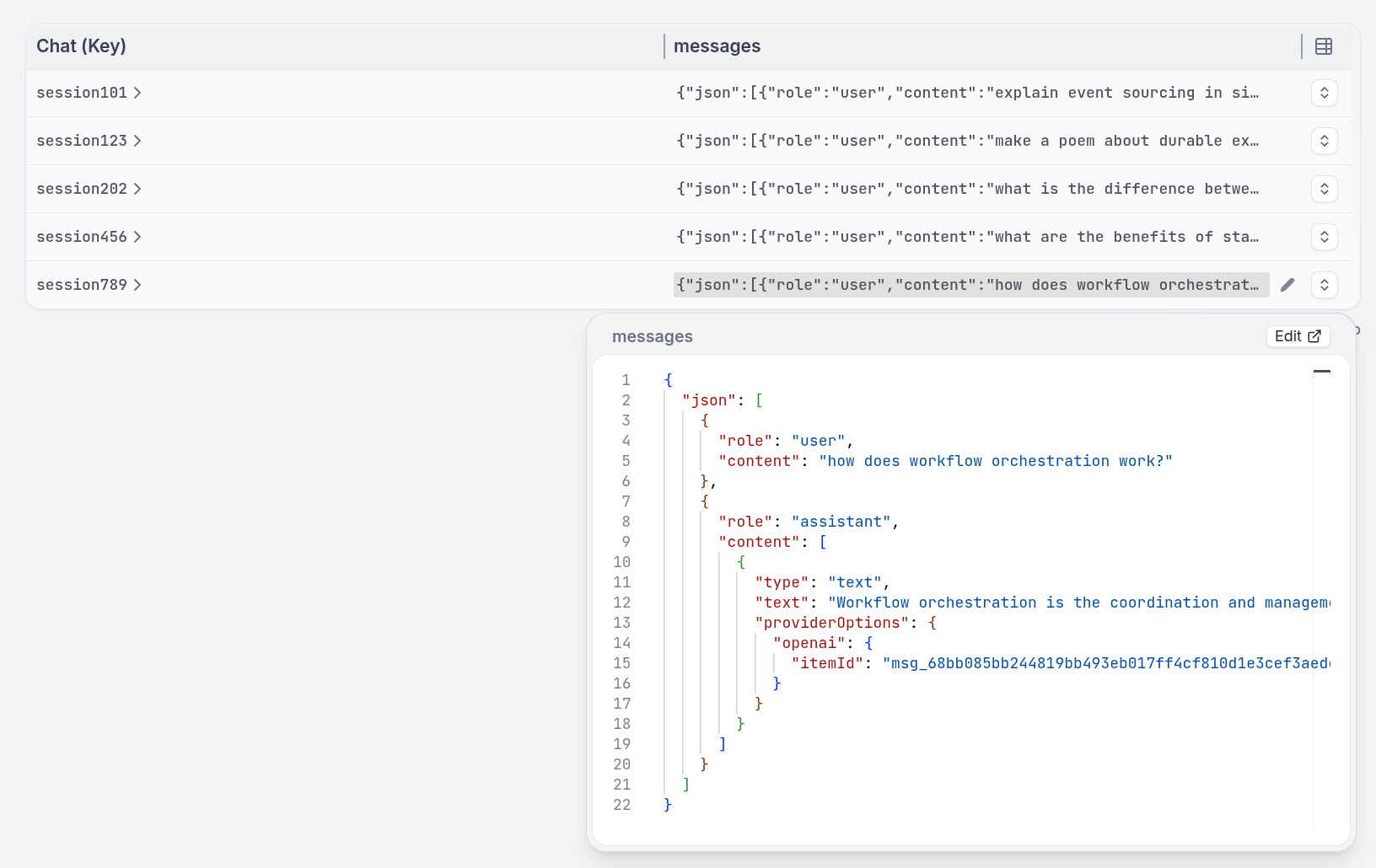
The state tab of the Restate UI lets you query the state of each session:
This pattern is complementary to AI memory solutions like mem0 or graffiti. You can use Virtual Objects to enforce session concurrency and queueing while storing the agent's memory in specialized memory systems.
This pattern is implementable with any of our SDKs and any AI SDK.
If you need help with a specific SDK, please reach out to us via [Discord](https://discord.restate.dev) or [Slack](https://slack.restate.dev).
## Built-in concurrency control
Restate queues concurrent requests to the same session key. They are processed sequentially, preventing race conditions on shared state. This works similar to a task queue per session, but without needing to set up any external queue infrastructure.
## Example: a chat session
To turn your agent into a stateful session, you need two changes compared to a regular [durable agent](/ai/patterns/durable-agents):
1. **Define a Virtual Object**: use `restate.object()` instead of `restate.service()`. This gives each session key its own isolated state.
2. **Manage conversation history** using the object's K/V store: use `ctx.get()` and `ctx.set()` to read and write the message history.
```typescript chat-agent.ts {"CODE_LOAD::https://raw.githubusercontent.com/restatedev/ai-examples/refs/heads/main/vercel-ai/tour-of-agents/src/chat-agent.ts#here"} theme={null}
const chatAgent = restate.object({
name: "Chat",
handlers: {
message: restate.createObjectHandler(
{ input: schema(ChatMessageSchema) },
async (ctx: restate.ObjectContext, { message }: { message: string }) => {
const model = wrapLanguageModel({
model: openai("gpt-5.4"),
middleware: durableCalls(ctx, { maxRetryAttempts: 3 }),
});
// Retrieve the state
const messages =
(await ctx.get("messages", superJson)) ?? [];
messages.push({ role: "user", content: message });
const res = await generateText({
model,
system: "You are a helpful assistant.",
messages,
});
// Update the state
ctx.set("messages", [...messages, ...res.response.messages], superJson);
return { answer: res.text };
},
),
// Shared handler to retrieve the history
getHistory: shared(async (ctx: restate.ObjectSharedContext) =>
ctx.get("messages", superJson),
),
},
});
```
[Install Restate](/installation) and launch it:
```bash theme={null}
npm install --global @restatedev/restate-server@latest @restatedev/restate@latest
restate-server
```
Get the example:
```bash theme={null}
restate example typescript-vercel-ai-tour-of-agents && cd typescript-vercel-ai-tour-of-agents
npm install
```
Export your [OpenAI API key](https://platform.openai.com/api-keys) and run the agent:
```bash theme={null}
export OPENAI_API_KEY=sk-...
```
```bash theme={null}
npx tsx ./src/chat-agent.ts
```
Register the agents with Restate:
```bash theme={null}
restate deployments register http://localhost:9080 --force --yes # dev only: overrides previous registrations
```
Ask the agent to do some task. Specify the Virtual Object ID in the URL, for example for `session123`:
```bash theme={null}
curl localhost:8080/restate/call/Chat/session123/message \
--json '{"message": "make a poem about durable execution"}'
```
Continue the conversation with the same session ID. The agent remembers previous context:
```bash theme={null}
curl localhost:8080/restate/call/Chat/session123/message \
--json '{"message": "shorten it to 2 lines"}'
```
Send a message to a different session. It starts a completely separate conversation:
```bash theme={null}
curl localhost:8080/restate/call/Chat/session456/message \
--json '{"message": "what are the benefits of durable execution?"}'
```
To turn your agent into a stateful session, you need two changes compared to a regular [durable agent](/ai/patterns/durable-agents):
1. **Define a Virtual Object**: use `restate.VirtualObject()` instead of `restate.Service()`. This gives each session key its own isolated state.
2. **Enable `use_restate_session`** on `DurableRunner.run()`: set `use_restate_session=True` so the conversation history is automatically persisted in Restate's K/V store.
```python chat_agent.py {"CODE_LOAD::https://raw.githubusercontent.com/restatedev/ai-examples/refs/heads/main/openai-agents/tour-of-agents/app/chat_agent.py#here"} theme={null}
chat = VirtualObject("Chat")
@chat.handler()
async def message(_ctx: ObjectContext, req: ChatMessage) -> dict:
# Set use_restate_session=True to store the session in Restate's key-value store
# Make sure you use a VirtualObject to enable this feature
result = await DurableRunner.run(
Agent(name="Assistant", instructions="You are a helpful assistant."),
req.message,
use_restate_session=True,
)
return result.final_output
@chat.handler(kind="shared")
async def get_history(ctx: restate.ObjectSharedContext):
return await ctx.get("messages", type_hint=list[dict]) or []
```
[Install Restate](/installation) and launch it:
```bash theme={null}
restate-server
```
Get the example:
```bash theme={null}
restate example python-openai-agents-tour-of-agents && cd python-openai-agents-tour-of-agents
```
Export your [OpenAI API key](https://platform.openai.com/api-keys) and run the agent:
```bash theme={null}
export OPENAI_API_KEY=sk-...
```
```bash theme={null}
uv run app/chat_agent.py
```
Register the agents with Restate:
```bash theme={null}
restate deployments register http://localhost:9080 --force --yes # dev only: overrides previous registrations
```
Ask the agent to do some task. Specify the Virtual Object ID in the URL, for example for `session123`:
```bash theme={null}
curl localhost:8080/restate/call/Chat/session123/message \
--json '{"message": "Make a poem about durable execution."}'
```
Continue the conversation with the same session ID. The agent remembers previous context:
```bash theme={null}
curl localhost:8080/restate/call/Chat/session123/message \
--json '{"message": "Shorten it to 2 lines."}'
```
Go to the state tab of the UI to view the conversation history.
Send a message to a different session. It starts a completely separate conversation:
```bash theme={null}
curl localhost:8080/restate/call/Chat/session456/message \
--json '{"message": "What are the benefits of durable execution?"}'
```
To turn your agent into a stateful session, you need two changes compared to a regular [durable agent](/ai/patterns/durable-agents):
1. **Define a Virtual Object**: use `restate.VirtualObject()` instead of `restate.Service()`. This gives each session key its own isolated state.
2. **Use `RestateSessionService`** as the session service for the Runner: this stores the ADK session data (conversation history, agent state) in Restate's K/V store. The object key (via `ctx.key()`) is used as the user identifier.
```python chat_agent.py {"CODE_LOAD::https://raw.githubusercontent.com/restatedev/ai-examples/refs/heads/main/google-adk/tour-of-agents/app/chat_agent.py#here"} theme={null}
agent = Agent(
model="gemini-2.5-flash",
name="assistant",
instruction="You are a helpful assistant. Be concise and helpful.",
)
app = App(name=APP_NAME, root_agent=agent, plugins=[RestatePlugin()])
runner = Runner(app=app, session_service=RestateSessionService())
chat = restate.VirtualObject("Chat")
@chat.handler()
async def message(ctx: restate.ObjectContext, req: ChatMessage) -> str | None:
events = runner.run_async(
user_id=ctx.key(),
session_id=req.session_id,
new_message=Content(role="user", parts=[Part.from_text(text=req.message)]),
)
return await parse_agent_response(events)
@chat.handler(kind="shared")
async def get_history(ctx: restate.ObjectSharedContext, session_id: str):
return await ctx.get(f"session_store::{session_id}", type_hint=list[dict]) or []
```
[Install Restate](/installation) and launch it:
```bash theme={null}
restate-server
```
Get the example:
```bash theme={null}
restate example python-google-adk-tour-of-agents && cd python-google-adk-tour-of-agents
```
Export your [Google API key](https://aistudio.google.com/app/apikey) and run the agent:
```bash theme={null}
export GOOGLE_API_KEY=your-api-key
```
```bash theme={null}
uv run app/chat_agent.py
```
Register the agents with Restate:
```bash theme={null}
restate deployments register http://localhost:9080 --force --yes # dev only: overrides previous registrations
```
Ask the agent to do some task. Specify the Virtual Object ID in the URL, for example for `session123`:
```bash theme={null}
curl localhost:8080/restate/call/Chat/user123/message \
--json '{"message": "Make a poem about durable execution.", "session_id": "session-123"}'
```
Continue the conversation with the same user and session ID. The agent remembers previous context:
```bash theme={null}
curl localhost:8080/restate/call/Chat/user123/message \
--json '{"message": "Shorten it to 2 lines.", "session_id": "session-123"}'
```
Go to the state tab of the UI to view the conversation history.
Send a message to a different user. It starts a completely separate conversation:
```bash theme={null}
curl localhost:8080/restate/call/Chat/user456/message \
--json '{"message": "What are the benefits of durable execution?", "session_id": "session-567"}'
```
To turn your agent into a stateful session, you need two changes compared to a regular [durable agent](/ai/patterns/durable-agents):
1. **Define a Virtual Object**: use `restate.VirtualObject()` instead of `restate.Service()`. This gives each session key its own isolated state.
2. **Manage conversation history** using the object's K/V store: use `ctx.get()` and `ctx.set()` to read and write the message history.
```python chat_agent.py {"CODE_LOAD::https://raw.githubusercontent.com/restatedev/ai-examples/refs/heads/main/pydantic-ai/tour-of-agents/app/chat_agent.py#here"} theme={null}
agent = Agent(
"openai:gpt-5.4",
system_prompt="You are a helpful assistant.",
)
restate_agent = RestateAgent(agent)
chat = VirtualObject("Chat")
@chat.handler()
async def message(ctx: ObjectContext, req: ChatMessage) -> str:
# Load message history from Restate's durable key-value store
history = await ctx.get("messages", serde=MessageSerde())
result = await restate_agent.run(req.message, message_history=history)
# Store updated history back in Restate state
ctx.set("messages", result.all_messages(), serde=MessageSerde())
return result.output
@chat.handler(kind="shared")
async def get_history(ctx: restate.ObjectSharedContext) -> dict:
return await ctx.get("messages", type_hint=dict) or {}
```
[Install Restate](/installation) and launch it:
```bash theme={null}
restate-server
```
Get the example:
```bash theme={null}
restate example python-pydantic-ai-tour-of-agents && cd python-pydantic-ai-tour-of-agents
```
Export your [OpenAI API key](https://platform.openai.com/api-keys) and run the agent:
```bash theme={null}
export OPENAI_API_KEY=sk-...
```
```bash theme={null}
uv run app/chat_agent.py
```
Register the agents with Restate:
```bash theme={null}
restate deployments register http://localhost:9080 --force --yes # dev only: overrides previous registrations
```
Ask the agent to do some task. Specify the Virtual Object ID in the URL, for example for `session123`:
```bash theme={null}
curl localhost:8080/restate/call/Chat/session123/message \
--json '{"message": "Make a poem about durable execution."}'
```
Continue the conversation with the same session ID. The agent remembers previous context:
```bash theme={null}
curl localhost:8080/restate/call/Chat/session123/message \
--json '{"message": "Shorten it to 2 lines."}'
```
Go to the state tab of the UI to view the conversation history.
Send a message to a different session. It starts a completely separate conversation:
```bash theme={null}
curl localhost:8080/restate/call/Chat/session456/message \
--json '{"message": "What are the benefits of durable execution?"}'
```
To turn your agent into a stateful session, you need two changes compared to a regular [durable agent](/ai/patterns/durable-agents):
1. **Define a Virtual Object**: use `restate.VirtualObject()` instead of `restate.Service()`. This gives each session key its own isolated state.
2. **Manage conversation history** using the object's K/V store: use `ctx.get()` and `ctx.set()` to read and write the message history.
```python chat_agent.py {"CODE_LOAD::https://raw.githubusercontent.com/restatedev/ai-examples/refs/heads/main/langchain-python/tour-of-agents/app/chat_agent.py#here"} theme={null}
chat = restate.VirtualObject("Chat")
agent = create_agent(
model=init_chat_model("openai:gpt-5.4"),
system_prompt="You are a helpful assistant.",
middleware=[RestateMiddleware()],
)
@chat.handler()
async def message(ctx: restate.ObjectContext, req: ChatMessage) -> str:
history = await ctx.get("messages", type_hint=ChatHistory) or ChatHistory()
history.messages.append(HumanMessage(content=req.message))
result = await agent.ainvoke({"messages": history.messages})
ctx.set("messages", ChatHistory(messages=result["messages"]))
return result["messages"][-1].content
@chat.handler(kind="shared")
async def get_history(ctx: restate.ObjectSharedContext) -> ChatHistory:
return await ctx.get("messages", type_hint=ChatHistory) or ChatHistory()
```
[Install Restate](/installation) and launch it:
```bash theme={null}
restate-server
```
Get the example:
```bash theme={null}
restate example python-langchain-tour-of-agents && cd python-langchain-tour-of-agents
```
Export your [OpenAI API key](https://platform.openai.com/api-keys) and run the agent:
```bash theme={null}
export OPENAI_API_KEY=sk-...
```
```bash theme={null}
uv run app/chat_agent.py
```
Register the agents with Restate:
```bash theme={null}
restate deployments register http://localhost:9080 --force --yes # dev only: overrides previous registrations
```
Ask the agent to do some task. Specify the Virtual Object ID in the URL, for example for `session123`:
```bash theme={null}
curl localhost:8080/restate/call/Chat/session123/message \
--json '{"message": "Make a poem about durable execution."}'
```
Continue the conversation with the same session ID. The agent remembers previous context:
```bash theme={null}
curl localhost:8080/restate/call/Chat/session123/message \
--json '{"message": "Shorten it to 2 lines."}'
```
Go to the state tab of the UI to view the conversation history.
Send a message to a different session. It starts a completely separate conversation:
```bash theme={null}
curl localhost:8080/restate/call/Chat/session456/message \
--json '{"message": "What are the benefits of durable execution?"}'
```
To turn your agent into a stateful session, you need two changes compared to a regular [durable agent](/ai/patterns/durable-agents):
1. **Define a Virtual Object**: use `restate.object()` instead of `restate.service()`. This gives each session key its own isolated state.
2. **Manage conversation history** using the object's K/V store: use `ctx.get()` and `ctx.set()` to read and write the message history.
```typescript chat-agent.ts {"CODE_LOAD::https://raw.githubusercontent.com/restatedev/ai-examples/refs/heads/main/typescript-restate-only/tour-of-agents/src/chat-agent.ts#here"} theme={null}
/**
* Long-lived, Stateful Chat Sessions
*
* Maintains conversation state across multiple requests using Restate's persistent memory.
* Sessions survive failures and can be resumed at any time.
*/
import * as restate from "@restatedev/restate-sdk";
import { ObjectContext } from "@restatedev/restate-sdk";
import llmCall from "./utils/llm";
import { zodPrompt } from "./utils/utils";
import { ModelMessage } from "@ai-sdk/provider-utils";
const chatAgent = restate.object({
name: "Chat",
handlers: {
message: restate.createObjectHandler(
{ input: zodPrompt("Write a poem about Durable Execution") },
async (ctx: ObjectContext, { message }: { message: string }) => {
const messages = (await ctx.get>("memory")) ?? [];
messages.push({ role: "user", content: message });
// Use your preferred LLM SDK here
const result = await ctx.run("LLM call", async () => llmCall(messages));
messages.push({ role: "assistant", content: result.text });
ctx.set("memory", messages);
return result.text;
},
),
getHistory: restate.createObjectSharedHandler(
async (ctx: restate.ObjectSharedContext) =>
ctx.get>("memory"),
),
},
});
restate.serve({ services: [chatAgent], port: 9080 });
```
[Install Restate](/installation) and launch it:
```bash theme={null}
restate-server
```
Get the example:
```bash theme={null}
restate example typescript-restate-tour-of-agents && cd typescript-restate-tour-of-agents
npm install
```
Export your API key:
```bash theme={null}
export OPENAI_API_KEY=sk-...
```
```bash theme={null}
npx tsx ./src/chat-agent.ts
```
Register the services with Restate:
```bash theme={null}
restate deployments register http://localhost:9080 --force --yes # dev only: overrides previous registrations
```
Ask the agent to do some task. Specify the Virtual Object ID in the URL, for example for `session123`:
```bash theme={null}
curl localhost:8080/restate/call/Chat/session123/message \
--json '{"message": "make a poem about durable execution"}'
```
Continue the conversation with the same session ID. The agent remembers previous context:
```bash theme={null}
curl localhost:8080/restate/call/Chat/session123/message \
--json '{"message": "shorten it to 2 lines"}'
```
Send a message to a different session. It starts a completely separate conversation:
```bash theme={null}
curl localhost:8080/restate/call/Chat/session456/message \
--json '{"message": "what are the benefits of durable execution?"}'
```
To turn your agent into a stateful session, you need two changes compared to a regular [durable agent](/ai/patterns/durable-agents):
1. **Define a Virtual Object**: use `restate.VirtualObject()` instead of `restate.Service()`. This gives each session key its own isolated state.
2. **Manage conversation history** using the object's K/V store: use `ctx.get()` and `ctx.set()` to read and write the message history.
```python chat_agent.py {"CODE_LOAD::https://raw.githubusercontent.com/restatedev/ai-examples/refs/heads/main/python-restate-only/tour-of-agents/app/chat_agent.py#here"} theme={null}
chat = restate.VirtualObject("Chat")
@chat.handler()
async def message(ctx: restate.ObjectContext, msg: ChatMessage) -> str | None:
"""A long-lived stateful chat session that allows for ongoing conversation."""
# Retrieve conversation memory from Restate
messages = await ctx.get("memory", type_hint=list[dict]) or []
messages.append({"role": "user", "content": msg.message})
result = await ctx.run_typed(
"LLM call",
llm_call, # Use your preferred LLM SDK here
RunOptions(max_attempts=3),
messages=messages,
)
# Update conversation memory in Restate
messages.append({"role": "assistant", "content": result.content})
ctx.set("memory", messages)
return result.content
@chat.handler(kind="shared")
async def get_history(ctx: restate.ObjectSharedContext):
return await ctx.get("memory", type_hint=list[dict]) or []
```
[Install Restate](/installation) and launch it:
```bash theme={null}
restate-server
```
Get the example:
```bash theme={null}
restate example python-restate-tour-of-agents && cd python-restate-tour-of-agents
```
Export your API key:
```bash theme={null}
export OPENAI_API_KEY=sk-...
```
```bash theme={null}
uv run app/chat_agent.py
```
Register the services with Restate:
```bash theme={null}
restate deployments register http://localhost:9080 --force --yes # dev only: overrides previous registrations
```
Ask the agent to do some task. Specify the Virtual Object ID in the URL, for example for `session123`:
```bash theme={null}
curl localhost:8080/restate/call/Chat/session123/message \
--json '{"message": "make a poem about durable execution"}'
```
Continue the conversation with the same session ID. The agent remembers previous context:
```bash theme={null}
curl localhost:8080/restate/call/Chat/session123/message \
--json '{"message": "shorten it to 2 lines"}'
```
Send a message to a different session. It starts a completely separate conversation:
```bash theme={null}
curl localhost:8080/restate/call/Chat/session456/message \
--json '{"message": "what are the benefits of durable execution?"}'
```
The state tab of the Restate UI lets you query the state of each session:
This pattern is complementary to AI memory solutions like mem0 or graffiti. You can use Virtual Objects to enforce session concurrency and queueing while storing the agent's memory in specialized memory systems.
This pattern is implementable with any of our SDKs and any AI SDK.
If you need help with a specific SDK, please reach out to us via [Discord](https://discord.restate.dev) or [Slack](https://slack.restate.dev).
## Built-in concurrency control
Restate queues concurrent requests to the same session key. They are processed sequentially, preventing race conditions on shared state. This works similar to a task queue per session, but without needing to set up any external queue infrastructure.
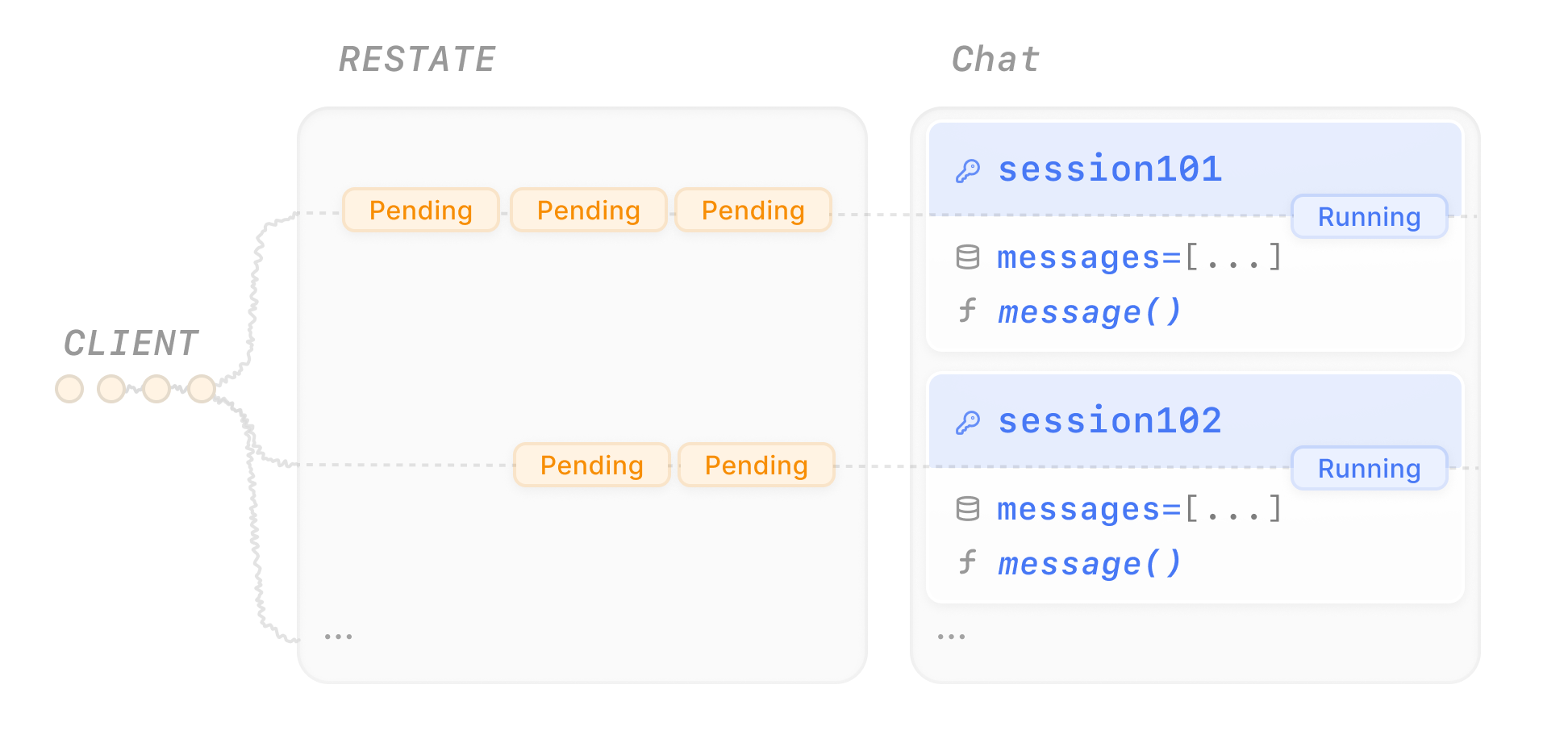 Different session keys run in parallel with no interference.
Send several messages concurrently to different chat sessions:
```bash theme={null}
curl localhost:8080/restate/send/Chat/session123/message --json '{"message": "make a poem about durable execution"}' &
curl localhost:8080/restate/send/Chat/session456/message --json '{"message": "what are the benefits of durable execution?"}' &
curl localhost:8080/restate/send/Chat/session789/message --json '{"message": "how does workflow orchestration work?"}' &
curl localhost:8080/restate/send/Chat/session123/message --json '{"message": "can you make it rhyme better?"}' &
curl localhost:8080/restate/send/Chat/session456/message --json '{"message": "what about fault tolerance in distributed systems?"}' &
curl localhost:8080/restate/send/Chat/session789/message --json '{"message": "give me a practical example"}' &
curl localhost:8080/restate/send/Chat/session101/message --json '{"message": "explain event sourcing in simple terms"}' &
curl localhost:8080/restate/send/Chat/session202/message --json '{"message": "what is the difference between async and sync processing?"}'
```
The UI shows how Restate queues the requests per session to ensure consistency:
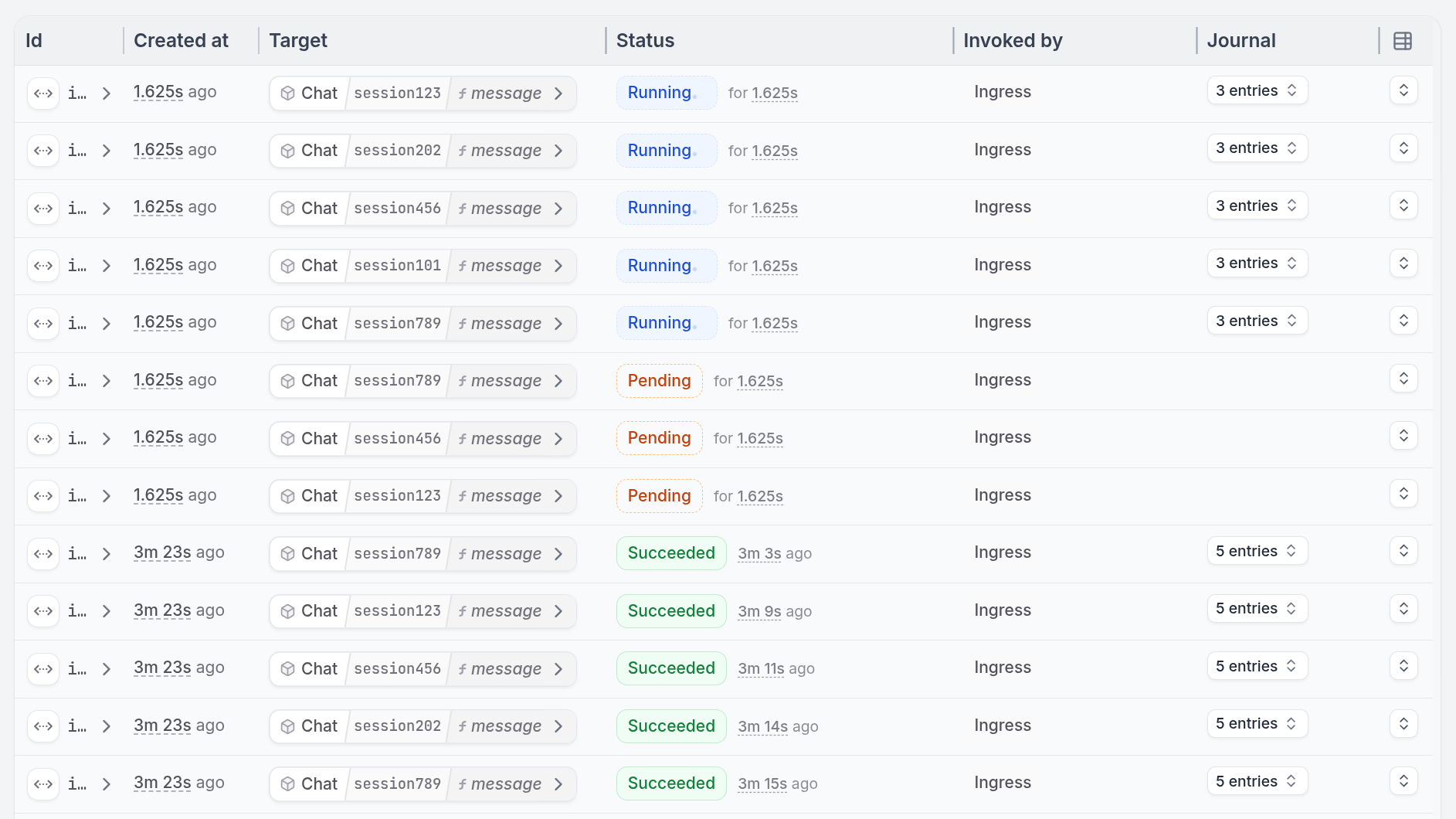 Send several messages concurrently to different chat sessions:
```bash theme={null}
curl localhost:8080/restate/send/Chat/session123/message --json '{"message": "make a poem about durable execution"}' &
curl localhost:8080/restate/send/Chat/session456/message --json '{"message": "what are the benefits of durable execution?"}' &
curl localhost:8080/restate/send/Chat/session789/message --json '{"message": "how does workflow orchestration work?"}' &
curl localhost:8080/restate/send/Chat/session123/message --json '{"message": "can you make it rhyme better?"}' &
curl localhost:8080/restate/send/Chat/session456/message --json '{"message": "what about fault tolerance in distributed systems?"}' &
curl localhost:8080/restate/send/Chat/session789/message --json '{"message": "give me a practical example"}' &
curl localhost:8080/restate/send/Chat/session101/message --json '{"message": "explain event sourcing in simple terms"}' &
curl localhost:8080/restate/send/Chat/session202/message --json '{"message": "what is the difference between async and sync processing?"}'
```
The UI shows how Restate queues the requests per session to ensure consistency:
Send several messages concurrently to different chat sessions:
```bash theme={null}
curl localhost:8080/restate/send/Chat/session123/message --json '{"message": "make a poem about durable execution"}' &
curl localhost:8080/restate/send/Chat/session456/message --json '{"message": "what are the benefits of durable execution?"}' &
curl localhost:8080/restate/send/Chat/session789/message --json '{"message": "how does workflow orchestration work?"}' &
curl localhost:8080/restate/send/Chat/session123/message --json '{"message": "can you make it rhyme better?"}' &
curl localhost:8080/restate/send/Chat/session456/message --json '{"message": "what about fault tolerance in distributed systems?"}' &
curl localhost:8080/restate/send/Chat/session789/message --json '{"message": "give me a practical example"}' &
curl localhost:8080/restate/send/Chat/session101/message --json '{"message": "explain event sourcing in simple terms"}' &
curl localhost:8080/restate/send/Chat/session202/message --json '{"message": "what is the difference between async and sync processing?"}'
```
The UI shows how Restate queues the requests per session to ensure consistency:
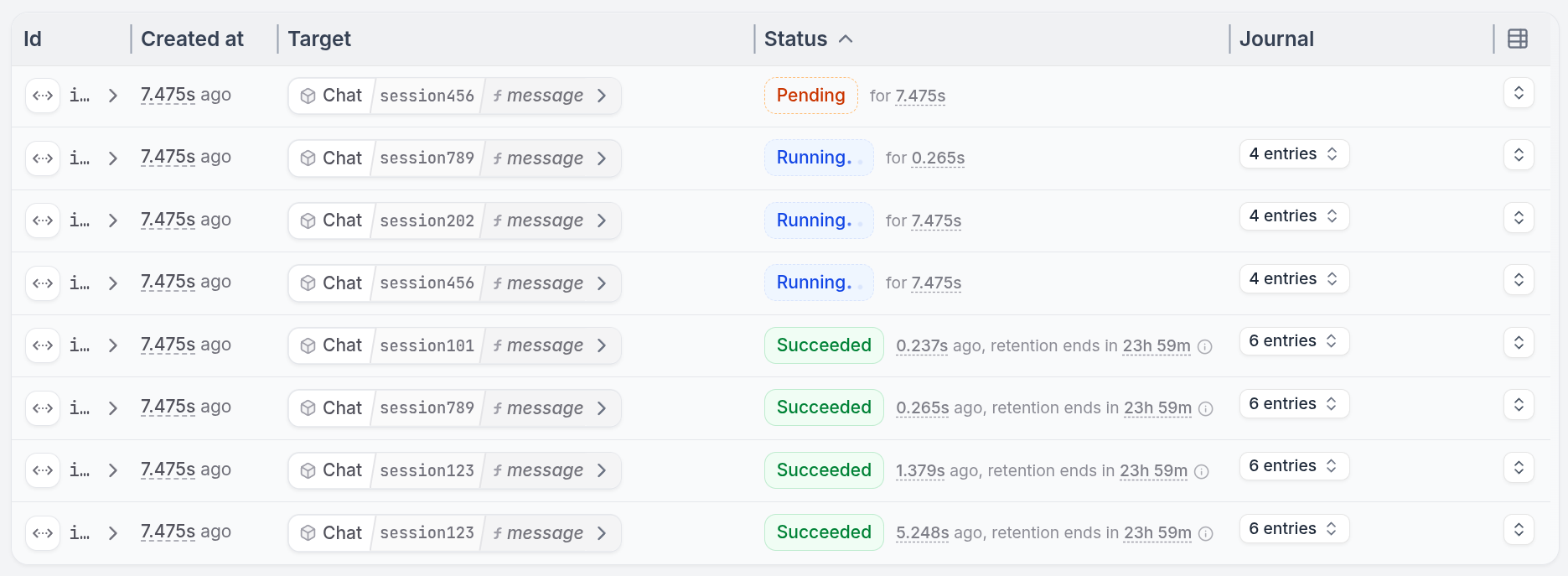 Send several messages concurrently to different users:
```bash theme={null}
curl localhost:8080/restate/send/Chat/user123/message --json '{"message": "make a poem about durable execution", "session_id": "session-123"}' &
curl localhost:8080/restate/send/Chat/user456/message --json '{"message": "what are the benefits of durable execution?", "session_id": "session-567"}' &
curl localhost:8080/restate/send/Chat/user789/message --json '{"message": "how does workflow orchestration work?", "session_id": "session-999"}' &
curl localhost:8080/restate/send/Chat/user123/message --json '{"message": "can you make it rhyme better?", "session_id": "session-123"}' &
curl localhost:8080/restate/send/Chat/user456/message --json '{"message": "what about fault tolerance in distributed systems?", "session_id": "session-567"}' &
curl localhost:8080/restate/send/Chat/user789/message --json '{"message": "give me a practical example", "session_id": "session-999"}' &
curl localhost:8080/restate/send/Chat/user101/message --json '{"message": "explain event sourcing in simple terms", "session_id": "session-123"}' &
curl localhost:8080/restate/send/Chat/user202/message --json '{"message": "what is the difference between async and sync processing?", "session_id": "session-123"}'
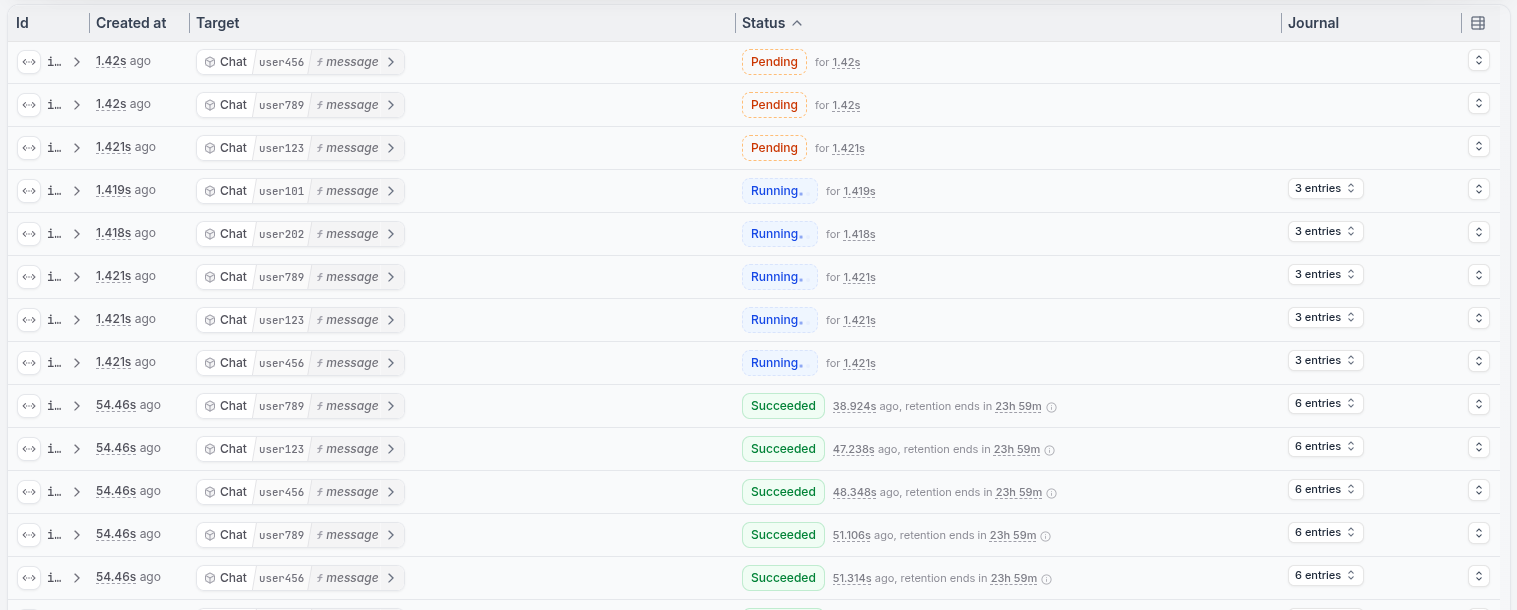
```
The UI shows how Restate queues the requests per session to ensure consistency:
Send several messages concurrently to different users:
```bash theme={null}
curl localhost:8080/restate/send/Chat/user123/message --json '{"message": "make a poem about durable execution", "session_id": "session-123"}' &
curl localhost:8080/restate/send/Chat/user456/message --json '{"message": "what are the benefits of durable execution?", "session_id": "session-567"}' &
curl localhost:8080/restate/send/Chat/user789/message --json '{"message": "how does workflow orchestration work?", "session_id": "session-999"}' &
curl localhost:8080/restate/send/Chat/user123/message --json '{"message": "can you make it rhyme better?", "session_id": "session-123"}' &
curl localhost:8080/restate/send/Chat/user456/message --json '{"message": "what about fault tolerance in distributed systems?", "session_id": "session-567"}' &
curl localhost:8080/restate/send/Chat/user789/message --json '{"message": "give me a practical example", "session_id": "session-999"}' &
curl localhost:8080/restate/send/Chat/user101/message --json '{"message": "explain event sourcing in simple terms", "session_id": "session-123"}' &
curl localhost:8080/restate/send/Chat/user202/message --json '{"message": "what is the difference between async and sync processing?", "session_id": "session-123"}'
```
The UI shows how Restate queues the requests per session to ensure consistency:
 Send several messages concurrently to different chat sessions:
```bash theme={null}
curl localhost:8080/restate/send/Chat/session123/message --json '{"message": "make a poem about durable execution"}' &
curl localhost:8080/restate/send/Chat/session456/message --json '{"message": "what are the benefits of durable execution?"}' &
curl localhost:8080/restate/send/Chat/session789/message --json '{"message": "how does workflow orchestration work?"}' &
curl localhost:8080/restate/send/Chat/session123/message --json '{"message": "can you make it rhyme better?"}' &
curl localhost:8080/restate/send/Chat/session456/message --json '{"message": "what about fault tolerance in distributed systems?"}' &
curl localhost:8080/restate/send/Chat/session789/message --json '{"message": "give me a practical example"}' &
curl localhost:8080/restate/send/Chat/session101/message --json '{"message": "explain event sourcing in simple terms"}' &
curl localhost:8080/restate/send/Chat/session202/message --json '{"message": "what is the difference between async and sync processing?"}'
```
The UI shows how Restate queues the requests per session to ensure consistency:
Send several messages concurrently to different chat sessions:
```bash theme={null}
curl localhost:8080/restate/send/Chat/session123/message --json '{"message": "make a poem about durable execution"}' &
curl localhost:8080/restate/send/Chat/session456/message --json '{"message": "what are the benefits of durable execution?"}' &
curl localhost:8080/restate/send/Chat/session789/message --json '{"message": "how does workflow orchestration work?"}' &
curl localhost:8080/restate/send/Chat/session123/message --json '{"message": "can you make it rhyme better?"}' &
curl localhost:8080/restate/send/Chat/session456/message --json '{"message": "what about fault tolerance in distributed systems?"}' &
curl localhost:8080/restate/send/Chat/session789/message --json '{"message": "give me a practical example"}' &
curl localhost:8080/restate/send/Chat/session101/message --json '{"message": "explain event sourcing in simple terms"}' &
curl localhost:8080/restate/send/Chat/session202/message --json '{"message": "what is the difference between async and sync processing?"}'
```
The UI shows how Restate queues the requests per session to ensure consistency:
Send several messages concurrently to different chat sessions:
```bash theme={null}
curl localhost:8080/restate/send/Chat/session123/message --json '{"message": "make a poem about durable execution"}' &
curl localhost:8080/restate/send/Chat/session456/message --json '{"message": "what are the benefits of durable execution?"}' &
curl localhost:8080/restate/send/Chat/session789/message --json '{"message": "how does workflow orchestration work?"}' &
curl localhost:8080/restate/send/Chat/session123/message --json '{"message": "can you make it rhyme better?"}' &
curl localhost:8080/restate/send/Chat/session456/message --json '{"message": "what about fault tolerance in distributed systems?"}' &
curl localhost:8080/restate/send/Chat/session789/message --json '{"message": "give me a practical example"}' &
curl localhost:8080/restate/send/Chat/session101/message --json '{"message": "explain event sourcing in simple terms"}' &
curl localhost:8080/restate/send/Chat/session202/message --json '{"message": "what is the difference between async and sync processing?"}'
```
The UI shows how Restate queues the requests per session to ensure consistency:
Send several messages concurrently to different chat sessions:
```bash theme={null}
curl localhost:8080/restate/send/Chat/session123/message --json '{"message": "make a poem about durable execution"}' &
curl localhost:8080/restate/send/Chat/session456/message --json '{"message": "what are the benefits of durable execution?"}' &
curl localhost:8080/restate/send/Chat/session789/message --json '{"message": "how does workflow orchestration work?"}' &
curl localhost:8080/restate/send/Chat/session123/message --json '{"message": "can you make it rhyme better?"}' &
curl localhost:8080/restate/send/Chat/session456/message --json '{"message": "what about fault tolerance in distributed systems?"}' &
curl localhost:8080/restate/send/Chat/session789/message --json '{"message": "give me a practical example"}' &
curl localhost:8080/restate/send/Chat/session101/message --json '{"message": "explain event sourcing in simple terms"}' &
curl localhost:8080/restate/send/Chat/session202/message --json '{"message": "what is the difference between async and sync processing?"}'
```
The UI shows how Restate queues the requests per session to ensure consistency:
Send several messages concurrently to different chat sessions:
```bash theme={null}
curl localhost:8080/restate/send/Chat/session123/message --json '{"message": "make a poem about durable execution"}' &
curl localhost:8080/restate/send/Chat/session456/message --json '{"message": "what are the benefits of durable execution?"}' &
curl localhost:8080/restate/send/Chat/session789/message --json '{"message": "how does workflow orchestration work?"}' &
curl localhost:8080/restate/send/Chat/session123/message --json '{"message": "can you make it rhyme better?"}' &
curl localhost:8080/restate/send/Chat/session456/message --json '{"message": "what about fault tolerance in distributed systems?"}' &
curl localhost:8080/restate/send/Chat/session789/message --json '{"message": "give me a practical example"}' &
curl localhost:8080/restate/send/Chat/session101/message --json '{"message": "explain event sourcing in simple terms"}' &
curl localhost:8080/restate/send/Chat/session202/message --json '{"message": "what is the difference between async and sync processing?"}'
```
The UI shows how Restate queues the requests per session to ensure consistency:
Send several messages concurrently to different chat sessions:
```bash theme={null}
curl localhost:8080/restate/send/Chat/session123/message --json '{"message": "make a poem about durable execution"}' &
curl localhost:8080/restate/send/Chat/session456/message --json '{"message": "what are the benefits of durable execution?"}' &
curl localhost:8080/restate/send/Chat/session789/message --json '{"message": "how does workflow orchestration work?"}' &
curl localhost:8080/restate/send/Chat/session123/message --json '{"message": "can you make it rhyme better?"}' &
curl localhost:8080/restate/send/Chat/session456/message --json '{"message": "what about fault tolerance in distributed systems?"}' &
curl localhost:8080/restate/send/Chat/session789/message --json '{"message": "give me a practical example"}' &
curl localhost:8080/restate/send/Chat/session101/message --json '{"message": "explain event sourcing in simple terms"}' &
curl localhost:8080/restate/send/Chat/session202/message --json '{"message": "what is the difference between async and sync processing?"}'
```
The UI shows how Restate queues the requests per session to ensure consistency:
Send several messages concurrently to different chat sessions:
```bash theme={null}
curl localhost:8080/restate/send/Chat/session123/message --json '{"message": "make a poem about durable execution"}' &
curl localhost:8080/restate/send/Chat/session456/message --json '{"message": "what are the benefits of durable execution?"}' &
curl localhost:8080/restate/send/Chat/session789/message --json '{"message": "how does workflow orchestration work?"}' &
curl localhost:8080/restate/send/Chat/session123/message --json '{"message": "can you make it rhyme better?"}' &
curl localhost:8080/restate/send/Chat/session456/message --json '{"message": "what about fault tolerance in distributed systems?"}' &
curl localhost:8080/restate/send/Chat/session789/message --json '{"message": "give me a practical example"}' &
curl localhost:8080/restate/send/Chat/session101/message --json '{"message": "explain event sourcing in simple terms"}' &
curl localhost:8080/restate/send/Chat/session202/message --json '{"message": "what is the difference between async and sync processing?"}'
```
The UI shows how Restate queues the requests per session to ensure consistency:
Send several messages concurrently to different chat sessions:
```bash theme={null}
curl localhost:8080/restate/send/Chat/session123/message --json '{"message": "make a poem about durable execution"}' &
curl localhost:8080/restate/send/Chat/session456/message --json '{"message": "what are the benefits of durable execution?"}' &
curl localhost:8080/restate/send/Chat/session789/message --json '{"message": "how does workflow orchestration work?"}' &
curl localhost:8080/restate/send/Chat/session123/message --json '{"message": "can you make it rhyme better?"}' &
curl localhost:8080/restate/send/Chat/session456/message --json '{"message": "what about fault tolerance in distributed systems?"}' &
curl localhost:8080/restate/send/Chat/session789/message --json '{"message": "give me a practical example"}' &
curl localhost:8080/restate/send/Chat/session101/message --json '{"message": "explain event sourcing in simple terms"}' &
curl localhost:8080/restate/send/Chat/session202/message --json '{"message": "what is the difference between async and sync processing?"}'
```
The UI shows how Restate queues the requests per session to ensure consistency:
## Concurrently retrieving state
The state you store in Virtual Objects lives forever. To resume a session, simply send a new message to the same Virtual Object key.
To retrieve state, view the UI's state tab or add a handler that reads it. Have a look at the `getHistory` handler in the example above.
Call the handler to get the conversation history:
```bash theme={null}
curl localhost:8080/restate/call/Chat/session123/getHistory
```
To retrieve state, view the UI's state tab or add a handler that reads it. Have a look at the `get_history` handler in the example above.
Call the handler to get the conversation history:
```bash theme={null}
curl localhost:8080/restate/call/Chat/session123/get_history
```
To retrieve state, view the UI's state tab or add a handler that reads it. Have a look at the `get_history` handler in the example above.
Call the handler to get the conversation history:
```bash theme={null}
curl localhost:8080/restate/call/Chat/user123/get_history --json '"session-123"'
```
To retrieve state, view the UI's state tab or add a handler that reads it. Have a look at the `get_history` handler in the example above.
Call the handler to get the conversation history:
```bash theme={null}
curl localhost:8080/restate/call/Chat/session123/get_history
```
To retrieve state, view the UI's state tab or add a handler that reads it. Have a look at the `get_history` handler in the example above.
Call the handler to get the conversation history:
```bash theme={null}
curl localhost:8080/restate/call/Chat/session123/get_history
```
To retrieve state, view the UI's state tab or add a handler that reads it. Have a look at the `getHistory` handler in the example above.
Call the handler to get the conversation history:
```bash theme={null}
curl localhost:8080/restate/call/Chat/session123/getHistory
```
To retrieve state, view the UI's state tab or add as handler that reads it. Have a look at the `get_history` handler in the example above.
Call the handler to get the conversation history:
```bash theme={null}
curl localhost:8080/restate/call/Chat/session123/get_history
```
This is a [shared handler](/foundations/handlers#handler-behavior), meaning it can only read state (not write). This allows it to run concurrently with the `message` handler.