> ## Documentation Index
> Fetch the complete documentation index at: https://docs.restate.dev/llms.txt
> Use this file to discover all available pages before exploring further.
# Workflows as Tools
> Deploy complex tool logic as separate durable services. Scale tools independently, use any language, and get end-to-end durability.
export const GitHubLink = ({url}) => ;
Agent tools come in two flavors: **local tools** that run inside the agent handler, and **workflows exposed as tools** that run as separate services. This page focuses on deploying workflows as agent tools.
For local tools (wrapping tool logic in `ctx.run()` within the agent handler), see [Durable Agents](/ai/patterns/durable-agents).
## Why expose workflows as tools?
As your agent tools grow more complex, you can extract them into separate Restate services and expose them as tools:
* **Scale independently**: Tools can run on different infrastructure, scale separately from the agent
* **Any language**: Write tools in a different language than the agent (e.g., Python tool called from TypeScript agent)
* **Long-running and async**: Remote workflows can be started asynchronously without blocking the agent execution and can take minutes or hours (human approval, external processing)
All calls between the agent and its tool services are proxied via Restate, which persists the call and handles retries and recovery.
## Example: human approval workflow as a tool
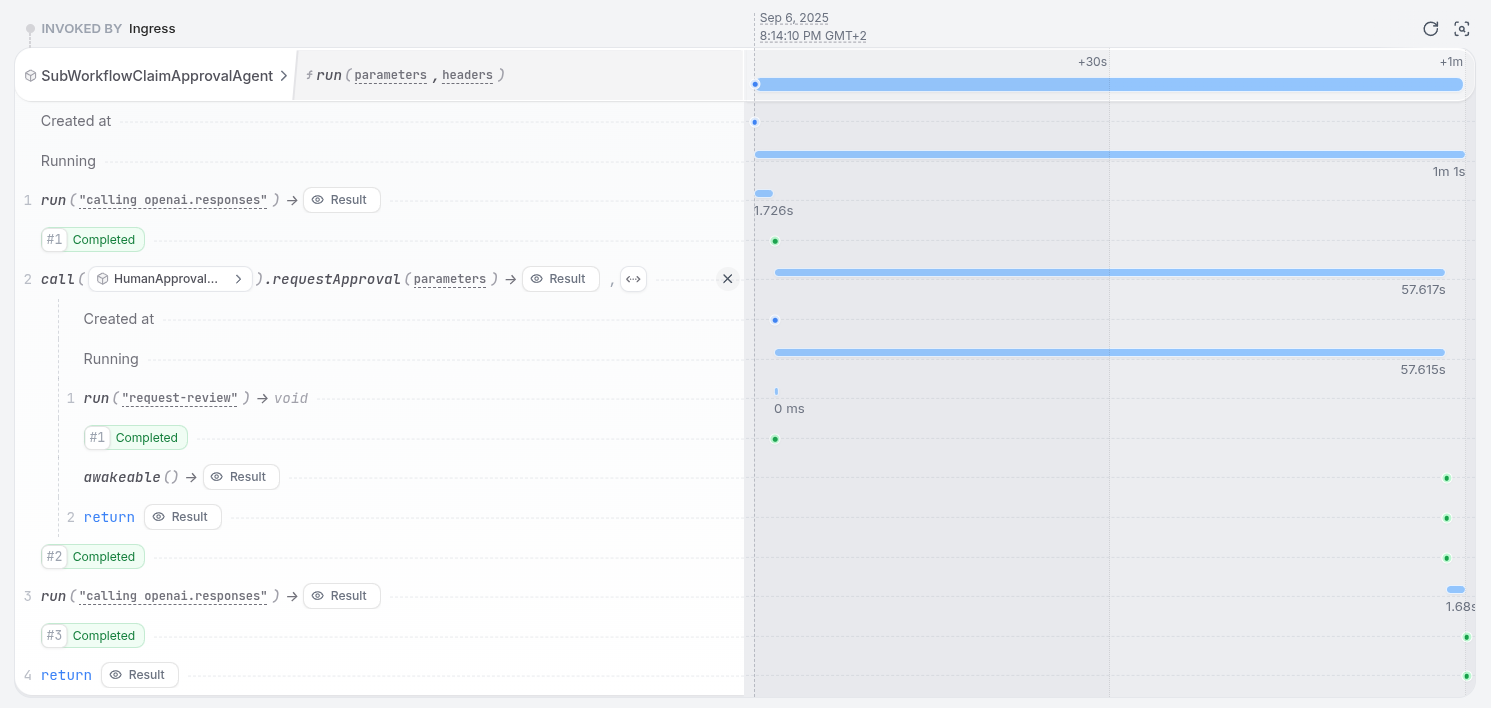
This example shows a human approval workflow exposed as an agent tool. The workflow creates an awakeable, sends a review request, and suspends until a human responds. The agent treats this like any other tool call.
### 1. Define the sub-workflow
Extract the tool logic into a separate Restate service:
```typescript sub-workflow-agent.ts {"CODE_LOAD::https://raw.githubusercontent.com/restatedev/ai-examples/refs/heads/main/vercel-ai/tour-of-agents/src/sub-workflow-agent.ts#wf"} theme={null}
export const humanApprovalWorkflow = restate.service({
name: "HumanApprovalWorkflow",
handlers: {
requestApproval: async (ctx: restate.Context, claim: InsuranceClaim) => {
const approval = ctx.awakeable();
await ctx.run("request-review", () =>
requestHumanReview(claim, approval.id),
);
return approval.promise;
},
},
});
```
```python sub_workflow_agent.py {"CODE_LOAD::https://raw.githubusercontent.com/restatedev/ai-examples/refs/heads/main/openai-agents/tour-of-agents/app/sub_workflow_agent.py#wf"} theme={null}
# Sub-workflow service for human approval
human_approval_workflow = restate.Service("HumanApprovalWorkflow")
@human_approval_workflow.handler()
async def review(ctx: restate.Context, claim: InsuranceClaim) -> str:
"""Request human approval for a claim and wait for response."""
# Create an awakeable that can be resolved via HTTP
approval_id, approval_promise = ctx.awakeable(type_hint=str)
# Request human review
await ctx.run_typed(
"Request review", request_human_review, claim=claim, awakeable_id=approval_id
)
# Wait for human approval
return await approval_promise
```
```python sub_workflow_agent.py {"CODE_LOAD::https://raw.githubusercontent.com/restatedev/ai-examples/refs/heads/main/google-adk/tour-of-agents/app/sub_workflow_agent.py#wf"} theme={null}
# Sub-workflow service for human approval
human_approval_workflow = restate.VirtualObject("HumanApprovalWorkflow")
@human_approval_workflow.handler()
async def review(ctx: restate.ObjectContext, claim: InsuranceClaim) -> str:
"""Request human approval for a claim and wait for response."""
# Create an awakeable that can be resolved via HTTP
approval_id, approval_promise = ctx.awakeable(type_hint=str)
# Request human review
await ctx.run_typed(
"Request review", request_review, claim=claim, awakeable_id=approval_id
)
# Wait for human approval
return await approval_promise
```
```python sub_workflow_agent.py {"CODE_LOAD::https://raw.githubusercontent.com/restatedev/ai-examples/refs/heads/main/pydantic-ai/tour-of-agents/app/sub_workflow_agent.py#wf"} theme={null}
# Sub-workflow service for human approval
human_approval_workflow = restate.Service("HumanApprovalWorkflow")
@human_approval_workflow.handler()
async def review(ctx: restate.Context, claim: InsuranceClaim) -> str:
"""Request human approval for a claim and wait for response."""
# Create an awakeable that can be resolved via HTTP
approval_id, approval_promise = ctx.awakeable(type_hint=str)
# Request human review
await ctx.run_typed(
"Request review", request_human_review, claim=claim, awakeable_id=approval_id
)
# Wait for human approval
return await approval_promise
```
```python sub_workflow_agent.py {"CODE_LOAD::https://raw.githubusercontent.com/restatedev/ai-examples/refs/heads/main/langchain-python/tour-of-agents/app/sub_workflow_agent.py#wf"} theme={null}
# Sub-workflow service for human approval.
human_approval_workflow = restate.Service("HumanApprovalWorkflow")
@human_approval_workflow.handler()
async def review(ctx: restate.Context, claim: InsuranceClaim) -> str:
"""Request human approval for a claim and wait for response."""
approval_id, approval_promise = ctx.awakeable(type_hint=str)
await ctx.run_typed(
"Request review", request_human_review, claim=claim, awakeable_id=approval_id
)
return await approval_promise
```
The sub-workflow uses `ctx.awakeable()` to create a durable promise that can be resolved externally via HTTP. The agent suspends while waiting, freeing compute resources.
### 2. Call it from the agent
The agent exposes the sub-workflow as a tool. When the LLM picks it, the agent calls the remote service via Restate's service client:
```typescript sub-workflow-agent.ts {"CODE_LOAD::https://raw.githubusercontent.com/restatedev/ai-examples/refs/heads/main/vercel-ai/tour-of-agents/src/sub-workflow-agent.ts#here"} theme={null}
humanApproval: tool({
description: "Ask for human approval for high-value claims.",
inputSchema: InsuranceClaimSchema,
execute: async (claim: InsuranceClaim) =>
ctx.serviceClient(humanApprovalWorkflow).requestApproval(claim),
}),
```
[Install Restate](/installation) and launch it:
```bash theme={null}
npm install --global @restatedev/restate-server@latest @restatedev/restate@latest
restate-server
```
Get the example:
```bash theme={null}
restate example typescript-vercel-ai-tour-of-agents && cd typescript-vercel-ai-tour-of-agents
npm install
```
Export your [OpenAI API key](https://platform.openai.com/api-keys) and run the agent:
```bash theme={null}
export OPENAI_API_KEY=sk-...
```
```bash theme={null}
npx tsx ./src/sub-workflow-agent.ts
```
Register the agents with Restate:
```bash theme={null}
restate deployments register http://localhost:9080 --force --yes # dev only: overrides previous registrations
```
Start a request that triggers the human approval sub-workflow:
```bash theme={null}
curl localhost:8080/restate/send/SubWorkflowClaimAgent/run \
--json '{"prompt": "Process my hospital bill of 3000USD for a broken leg."}'
```
In the UI, you can see the agent calling the sub-workflow and suspending while waiting for approval:
 Resolve the approval by executing the **curl request printed in the service logs**, similar to:
```bash theme={null}
curl localhost:8080/restate/awakeables/sign_1M28aqY6ZfuwBmRnmyP/resolve --json 'true'
```
```python sub_workflow_agent.py {"CODE_LOAD::https://raw.githubusercontent.com/restatedev/ai-examples/refs/heads/main/openai-agents/tour-of-agents/app/sub_workflow_agent.py#here"} theme={null}
@durable_function_tool
async def human_approval(claim: InsuranceClaim) -> str:
"""Ask for human approval for high-value claims."""
return await restate_context().service_call(review, claim)
```
[Install Restate](/installation) and launch it:
```bash theme={null}
restate-server
```
Get the example:
```bash theme={null}
restate example python-openai-agents-tour-of-agents && cd python-openai-agents-tour-of-agents
```
Export your [OpenAI API key](https://platform.openai.com/api-keys) and run the agent:
```bash theme={null}
export OPENAI_API_KEY=sk-...
```
```bash theme={null}
uv run app/sub_workflow_agent.py
```
Register the agents with Restate:
```bash theme={null}
restate deployments register http://localhost:9080 --force --yes # dev only: overrides previous registrations
```
Start a request that triggers the human approval sub-workflow:
```bash theme={null}
curl localhost:8080/restate/send/SubWorkflowClaimAgent/run \
--json '{"message": "Process my hospital bill of 3000USD for a broken leg."}'
```
In the UI, you can see the agent calling the sub-workflow and suspending while waiting for approval.
Resolve the approval by executing the **curl request printed in the service logs**, similar to:
```bash theme={null}
curl localhost:8080/restate/awakeables/sign_1M28aqY6ZfuwBmRnmyP/resolve --json 'true'
```
```python sub_workflow_agent.py {"CODE_LOAD::https://raw.githubusercontent.com/restatedev/ai-examples/refs/heads/main/google-adk/tour-of-agents/app/sub_workflow_agent.py#here"} theme={null}
async def human_approval(claim: InsuranceClaim) -> str:
"""Ask for human approval for high-value claims."""
return await restate_context().service_call(review, claim)
```
[Install Restate](/installation) and launch it:
```bash theme={null}
restate-server
```
Get the example:
```bash theme={null}
restate example python-google-adk-tour-of-agents && cd python-google-adk-tour-of-agents
```
Export your [Google API key](https://aistudio.google.com/app/apikey) and run the agent:
```bash theme={null}
export GOOGLE_API_KEY=your-api-key
```
```bash theme={null}
uv run app/sub_workflow_agent.py
```
Register the agents with Restate:
```bash theme={null}
restate deployments register http://localhost:9080 --force --yes # dev only: overrides previous registrations
```
Start a request that triggers the human approval sub-workflow:
```bash theme={null}
curl localhost:8080/restate/send/SubWorkflowClaimAgent/user-123/run \
--json '{"message": "Process my hospital bill of 3000USD for a broken leg.", "session_id": "session-123"}'
```
In the UI, you can see the agent calling the sub-workflow and suspending while waiting for approval.
Resolve the approval by executing the **curl request printed in the service logs**, similar to:
```bash theme={null}
curl localhost:8080/restate/awakeables/sign_1M28aqY6ZfuwBmRnmyP/resolve --json 'true'
```
```python sub_workflow_agent.py {"CODE_LOAD::https://raw.githubusercontent.com/restatedev/ai-examples/refs/heads/main/pydantic-ai/tour-of-agents/app/sub_workflow_agent.py#here"} theme={null}
@agent.tool
async def human_approval(_run_ctx: RunContext[None], claim: InsuranceClaim) -> str:
"""Ask for human approval for high-value claims."""
return await restate_context().service_call(review, claim)
```
[Install Restate](/installation) and launch it:
```bash theme={null}
restate-server
```
Get the example:
```bash theme={null}
restate example python-pydantic-ai-tour-of-agents && cd python-pydantic-ai-tour-of-agents
```
Export your [OpenAI API key](https://platform.openai.com/api-keys) and run the agent:
```bash theme={null}
export OPENAI_API_KEY=sk-...
```
```bash theme={null}
uv run app/sub_workflow_agent.py
```
Register the agents with Restate:
```bash theme={null}
restate deployments register http://localhost:9080 --force --yes # dev only: overrides previous registrations
```
Start a request that triggers the human approval sub-workflow:
```bash theme={null}
curl localhost:8080/restate/send/SubWorkflowClaimAgent/run \
--json '{"message": "Process my hospital bill of 3000USD for a broken leg."}'
```
In the UI, you can see the agent calling the sub-workflow and suspending while waiting for approval.
Resolve the approval by executing the **curl request printed in the service logs**, similar to:
```bash theme={null}
curl localhost:8080/restate/awakeables/sign_1M28aqY6ZfuwBmRnmyP/resolve --json 'true'
```
```python sub_workflow_agent.py {"CODE_LOAD::https://raw.githubusercontent.com/restatedev/ai-examples/refs/heads/main/langchain-python/tour-of-agents/app/sub_workflow_agent.py#here"} theme={null}
@tool
async def human_approval(claim: InsuranceClaim) -> str:
"""Ask for human approval for high-value claims."""
return await restate_context().service_call(review, claim)
```
[Install Restate](/installation) and launch it:
```bash theme={null}
restate-server
```
Get the example:
```bash theme={null}
restate example python-langchain-tour-of-agents && cd python-langchain-tour-of-agents
```
Export your [OpenAI API key](https://platform.openai.com/api-keys) and run the agent:
```bash theme={null}
export OPENAI_API_KEY=sk-...
```
```bash theme={null}
uv run app/sub_workflow_agent.py
```
Register the agents with Restate:
```bash theme={null}
restate deployments register http://localhost:9080 --force --yes # dev only: overrides previous registrations
```
Start a request that triggers the human approval sub-workflow:
```bash theme={null}
curl localhost:8080/restate/send/SubWorkflowClaimAgent/run \
--json '{"message": "Process my hospital bill of 3000USD for a broken leg."}'
```
In the UI, you can see the agent calling the sub-workflow and suspending while waiting for approval.
Resolve the approval by executing the **curl request printed in the service logs**, similar to:
```bash theme={null}
curl localhost:8080/restate/awakeables/sign_1M28aqY6ZfuwBmRnmyP/resolve --json 'true'
```
Resolve the approval by executing the **curl request printed in the service logs**, similar to:
```bash theme={null}
curl localhost:8080/restate/awakeables/sign_1M28aqY6ZfuwBmRnmyP/resolve --json 'true'
```
```python sub_workflow_agent.py {"CODE_LOAD::https://raw.githubusercontent.com/restatedev/ai-examples/refs/heads/main/openai-agents/tour-of-agents/app/sub_workflow_agent.py#here"} theme={null}
@durable_function_tool
async def human_approval(claim: InsuranceClaim) -> str:
"""Ask for human approval for high-value claims."""
return await restate_context().service_call(review, claim)
```
[Install Restate](/installation) and launch it:
```bash theme={null}
restate-server
```
Get the example:
```bash theme={null}
restate example python-openai-agents-tour-of-agents && cd python-openai-agents-tour-of-agents
```
Export your [OpenAI API key](https://platform.openai.com/api-keys) and run the agent:
```bash theme={null}
export OPENAI_API_KEY=sk-...
```
```bash theme={null}
uv run app/sub_workflow_agent.py
```
Register the agents with Restate:
```bash theme={null}
restate deployments register http://localhost:9080 --force --yes # dev only: overrides previous registrations
```
Start a request that triggers the human approval sub-workflow:
```bash theme={null}
curl localhost:8080/restate/send/SubWorkflowClaimAgent/run \
--json '{"message": "Process my hospital bill of 3000USD for a broken leg."}'
```
In the UI, you can see the agent calling the sub-workflow and suspending while waiting for approval.
Resolve the approval by executing the **curl request printed in the service logs**, similar to:
```bash theme={null}
curl localhost:8080/restate/awakeables/sign_1M28aqY6ZfuwBmRnmyP/resolve --json 'true'
```
```python sub_workflow_agent.py {"CODE_LOAD::https://raw.githubusercontent.com/restatedev/ai-examples/refs/heads/main/google-adk/tour-of-agents/app/sub_workflow_agent.py#here"} theme={null}
async def human_approval(claim: InsuranceClaim) -> str:
"""Ask for human approval for high-value claims."""
return await restate_context().service_call(review, claim)
```
[Install Restate](/installation) and launch it:
```bash theme={null}
restate-server
```
Get the example:
```bash theme={null}
restate example python-google-adk-tour-of-agents && cd python-google-adk-tour-of-agents
```
Export your [Google API key](https://aistudio.google.com/app/apikey) and run the agent:
```bash theme={null}
export GOOGLE_API_KEY=your-api-key
```
```bash theme={null}
uv run app/sub_workflow_agent.py
```
Register the agents with Restate:
```bash theme={null}
restate deployments register http://localhost:9080 --force --yes # dev only: overrides previous registrations
```
Start a request that triggers the human approval sub-workflow:
```bash theme={null}
curl localhost:8080/restate/send/SubWorkflowClaimAgent/user-123/run \
--json '{"message": "Process my hospital bill of 3000USD for a broken leg.", "session_id": "session-123"}'
```
In the UI, you can see the agent calling the sub-workflow and suspending while waiting for approval.
Resolve the approval by executing the **curl request printed in the service logs**, similar to:
```bash theme={null}
curl localhost:8080/restate/awakeables/sign_1M28aqY6ZfuwBmRnmyP/resolve --json 'true'
```
```python sub_workflow_agent.py {"CODE_LOAD::https://raw.githubusercontent.com/restatedev/ai-examples/refs/heads/main/pydantic-ai/tour-of-agents/app/sub_workflow_agent.py#here"} theme={null}
@agent.tool
async def human_approval(_run_ctx: RunContext[None], claim: InsuranceClaim) -> str:
"""Ask for human approval for high-value claims."""
return await restate_context().service_call(review, claim)
```
[Install Restate](/installation) and launch it:
```bash theme={null}
restate-server
```
Get the example:
```bash theme={null}
restate example python-pydantic-ai-tour-of-agents && cd python-pydantic-ai-tour-of-agents
```
Export your [OpenAI API key](https://platform.openai.com/api-keys) and run the agent:
```bash theme={null}
export OPENAI_API_KEY=sk-...
```
```bash theme={null}
uv run app/sub_workflow_agent.py
```
Register the agents with Restate:
```bash theme={null}
restate deployments register http://localhost:9080 --force --yes # dev only: overrides previous registrations
```
Start a request that triggers the human approval sub-workflow:
```bash theme={null}
curl localhost:8080/restate/send/SubWorkflowClaimAgent/run \
--json '{"message": "Process my hospital bill of 3000USD for a broken leg."}'
```
In the UI, you can see the agent calling the sub-workflow and suspending while waiting for approval.
Resolve the approval by executing the **curl request printed in the service logs**, similar to:
```bash theme={null}
curl localhost:8080/restate/awakeables/sign_1M28aqY6ZfuwBmRnmyP/resolve --json 'true'
```
```python sub_workflow_agent.py {"CODE_LOAD::https://raw.githubusercontent.com/restatedev/ai-examples/refs/heads/main/langchain-python/tour-of-agents/app/sub_workflow_agent.py#here"} theme={null}
@tool
async def human_approval(claim: InsuranceClaim) -> str:
"""Ask for human approval for high-value claims."""
return await restate_context().service_call(review, claim)
```
[Install Restate](/installation) and launch it:
```bash theme={null}
restate-server
```
Get the example:
```bash theme={null}
restate example python-langchain-tour-of-agents && cd python-langchain-tour-of-agents
```
Export your [OpenAI API key](https://platform.openai.com/api-keys) and run the agent:
```bash theme={null}
export OPENAI_API_KEY=sk-...
```
```bash theme={null}
uv run app/sub_workflow_agent.py
```
Register the agents with Restate:
```bash theme={null}
restate deployments register http://localhost:9080 --force --yes # dev only: overrides previous registrations
```
Start a request that triggers the human approval sub-workflow:
```bash theme={null}
curl localhost:8080/restate/send/SubWorkflowClaimAgent/run \
--json '{"message": "Process my hospital bill of 3000USD for a broken leg."}'
```
In the UI, you can see the agent calling the sub-workflow and suspending while waiting for approval.
Resolve the approval by executing the **curl request printed in the service logs**, similar to:
```bash theme={null}
curl localhost:8080/restate/awakeables/sign_1M28aqY6ZfuwBmRnmyP/resolve --json 'true'
```