> ## Documentation Index
> Fetch the complete documentation index at: https://docs.restate.dev/llms.txt
> Use this file to discover all available pages before exploring further.
# AI-Assisted Development
> Developing Restate apps with AI coding agents.
The Restate documentation and templates integrate with AI coding agents like Claude Code, Codex, and Cursor so you can get expert help while building Restate apps.
## Restate Coding Agent Plugin and Skills
The [Restate plugin](https://github.com/restatedev/skills) teaches your coding agent how to build Restate apps: Durable Execution, service types, SDK APIs, common pitfalls, and AI agent integration patterns across TypeScript, Python, Java, and Go.
It bundles:
* **Restate skills** that activates automatically when Restate concepts come up and detects your SDK from your project files.
* The **`restate-docs` MCP server** that gives your agent access to the full Restate documentation for testing, deployment, and server configuration.
Every [Restate template](https://github.com/restatedev/examples) already ships with the plugin configured.
### Install in an existing project
If you aren't using a template, add the plugin to your project yourself:
```shell theme={null}
/plugin marketplace add restatedev/skills
/plugin install restatedev@restatedev-plugin
```
```shell theme={null}
codex plugin marketplace add restatedev/skills
```
Then launch `codex`, run `/plugins`, find Restate in the marketplace, select **Install**, and restart Codex.
Check the [`restatedev/skills`](https://github.com/restatedev/skills) repository for the latest approach.
```shell theme={null}
npx skills add restatedev/skills
```
You will need to configure the `restate-docs` MCP server manually. See [MCP server setup](#restate-docs-as-mcp-server) below.
We are continuously improving the plugin. Let us know if you have feedback via [Discord](https://discord.restate.dev) or [Slack](https://slack.restate.dev).
## Restate Docs as MCP server
The Restate documentation is available as an MCP server at `https://docs.restate.dev/mcp`.
The plugin already configures the Restate docs MCP server for you. If you want to add it manually to an agent that doesn't use the plugin:
1. Navigate to the `Connectors` page in the Claude settings.
2. Select `Add custom connector`.
3. Add the MCP server name and URL: `restate-docs`, `https://docs.restate.dev/mcp`.
4. Select `Add`.
5. When using Claude, select the attachments button (the plus icon).
6. Select your MCP server.
To add the Restate documentation MCP server to Claude Code, run the following command in your terminal:
```shell theme={null}
claude mcp add --transport http restate-docs https://docs.restate.dev/mcp
```
1. Use `Command` + `Shift` + `P` (`Ctrl` + `Shift` + `P` on Windows) to open the command palette.
2. Search for `"Open MCP settings"`.
3. Select `Add custom MCP`. This will open the `mcp.json` file.
4. In `mcp.json`, configure your server:
```json theme={null}
{
"mcpServers": {
"restate-docs": {
"url": "https://docs.restate.dev/mcp"
}
}
}
```
1. Create a `.vscode/mcp.json` file.
2. In `mcp.json`, configure your server:
```json theme={null}
{
"servers": {
"restate-docs": {
"type": "http",
"url": "https://docs.restate.dev/mcp"
}
}
}
```
More information in the [Mintlify documentation](https://www.mintlify.com/docs/ai/model-context-protocol#using-your-mcp-server).
## llms.txt and llms-full.txt
The Restate documentation is available in markdown, for easy ingestion by LLMs.
Add `.md` to any page's URL to view a Markdown version.
The documentation also includes [`llms.txt`](https://docs.restate.dev/llms.txt) (navigation structure) and [`llms-full.txt`](https://docs.restate.dev/llms-full.txt) (full documentation) files.
## Contextual menu
Each page of the Restate documentation has a contextual menu in the top right corner that provides quick access to AI resources:
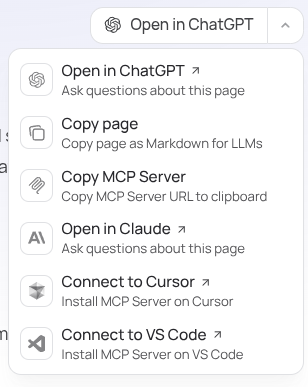 Use this to hydrate your AI chat with the content of the current page, or to add the Restate docs MCP server to Cursor or VS Code.