> ## Documentation Index
> Fetch the complete documentation index at: https://docs.restate.dev/llms.txt
> Use this file to discover all available pages before exploring further.
# Error Handling
> Learn how to handle transient and terminal errors in your applications.
Restate handles retries for failed invocations. By default, Restate retries all errors with an exponential backoff strategy.
This guide helps you fine-tune the retry behavior for your use cases.
## Infrastructure errors (transient) vs. application errors (terminal)
In Restate, we distinguish between two types of errors: transient errors and terminal errors.
* **Transient errors** are temporary and can be retried. They are typically caused by infrastructure issues (network problems, service overload, API unavailability,...).
* **Terminal errors** are permanent and should not be retried. They are typically caused by application logic (invalid input, business rule violation, ...).
## Handling transient errors via retries
Restate assumes by default that all errors are transient errors and therefore retryable.
If you do not want an error to be retried, you need to specifically label it as a terminal error ([see below](#application-errors-terminal)).
Restate lets you configure the retry strategy at different levels: for the invocation and at the run-block-level.
### At Invocation level
Restate retries executing invocations that can't make any progress according to a retry policy.
This policy controls the retry intervals, the maximum number of attempts and whether to **pause** or **kill** the invocation when the attempts are exhausted.
To see the current retry policy for your services, click on your service in the overview page of the UI:
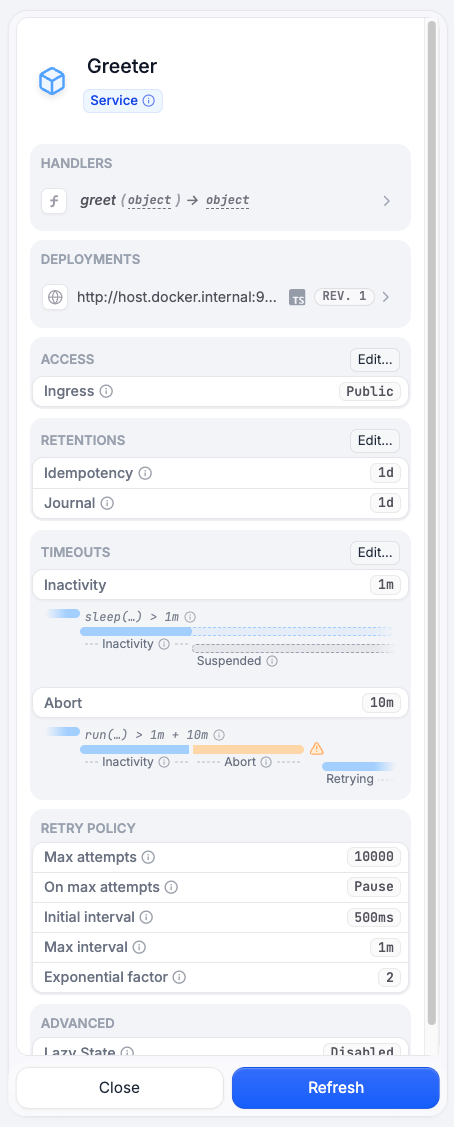 The retry policy can be set on each individual handler, or for all the handlers of a service, or globally in the Restate configuration directly.
To configure the retry policy on a service/handler level, check [retry service configuration](/services/configuration#retries).
The default retry policy will retry the invocation a limited number of times, after which the invocation will be paused if no progress can be made. To resume a paused invocation, check the [resume documentation](/services/invocation/managing-invocations#resume).
Check the [configuration reference](/references/server-config) for the `default-retry-policy`.
You can change the default behavior via the [`restate-server` configuration file](/server/configuration):
```toml restate.toml theme={null}
[invocation.default-retry-policy]
initial-interval = "50ms"
exponentiation-factor = 2.0
max-attempts = 70
max-interval = "60s"
on-max-attempts = "pause" # Use "pause" (default) or "kill"
```
Then run the Restate Server with:
```shell theme={null}
restate-server --config-file restate.toml
```
Or you can set these options via env variables:
```dotenv theme={null}
RESTATE_DEFAULT_RETRY_POLICY__INITIAL_INTERVAL="10s"
RESTATE_DEFAULT_RETRY_POLICY__MAX_ATTEMPTS=100
RESTATE_DEFAULT_RETRY_POLICY__MAX_INTERVAL="10s"
```
You can also retry forever, without ever pausing or killing the invocation:
```dotenv theme={null}
RESTATE_DEFAULT_RETRY_POLICY__MAX_ATTEMPTS=unlimited
```
When a retry policy is unset, Restate by default will retry undefinitely, alike setting `max-attempts = "unlimited"`.
### At the Run-Block-Level
Handlers use run blocks to execute non-deterministic actions, often involving other systems and services (API call, DB write, ...).
These run blocks are especially prone to transient failures, and you might want to configure a specific retry policy for them.
```ts TypeScript {"CODE_LOAD::ts/src/guides/retries.ts#here"} theme={null}
const myRunRetryPolicy = {
initialRetryInterval: { milliseconds: 500 },
retryIntervalFactor: 2,
maxRetryInterval: { seconds: 1 },
maxRetryAttempts: 5,
maxRetryDuration: { seconds: 1 },
};
await ctx.run("write", () => writeToOtherSystem(), myRunRetryPolicy);
```
```python Python {"CODE_LOAD::python/src/guides/retries.py#here"} theme={null}
await ctx.run_typed(
"write",
write_to_other_system,
restate.RunOptions(
# Max number of retry attempts to complete the action.
max_attempts=3,
# Max duration for retrying, across all retries.
max_retry_duration=timedelta(seconds=10),
),
)
```
```java Java {"CODE_LOAD::java/src/main/java/guides/RetryRunService.java#here"} theme={null}
RetryPolicy myRunRetryPolicy =
RetryPolicy.exponential(Duration.ofMillis(500), 2)
.setMaxDelay(Duration.ofSeconds(10))
.setMaxAttempts(10)
.setMaxDuration(Duration.ofMinutes(5));
ctx.run("my-run", myRunRetryPolicy, () -> writeToOtherSystem());
```
```kotlin Kotlin {"CODE_LOAD::kotlin/src/main/kotlin/guides/RetryRunService.kt#here"} theme={null}
val myRunRetryPolicy = retryPolicy {
initialDelay = 5.seconds
exponentiationFactor = 2.0f
maxDelay = 60.seconds
maxAttempts = 10
maxDuration = 5.minutes
}
ctx.runBlock("write", myRunRetryPolicy) { writeToOtherSystem() }
```
```go Go {"CODE_LOAD::go/guides/retries.go#here"} theme={null}
result, err := restate.Run(ctx,
func(ctx restate.RunContext) (string, error) {
return writeToOtherSystem()
},
// After 10 seconds, give up retrying
restate.WithMaxRetryDuration(time.Second*10),
// On the first retry, wait 100 milliseconds before next attempt
restate.WithInitialRetryInterval(time.Millisecond*100),
// Grow retry interval with factor 2
restate.WithRetryIntervalFactor(2.0),
)
if err != nil {
return err
}
```
Note that these retries are coordinated and initiated by the Restate Server.
So the handler goes through the regular retry cycle of suspension and re-invocation.
If you set a maximum number of attempts, then the run block will fail with a TerminalException once the retries are exhausted.
### Retryable errors with custom delay
Sometimes you need to control the retry timing dynamically, for example when an external API returns a `Retry-After` header. You can use `RetryableError` to tell Restate exactly when to retry.
This is primarily useful inside `ctx.run` blocks:
```ts TypeScript {"CODE_LOAD::ts/src/guides/retries.ts#retryable"} theme={null}
await ctx.run("call API", async () => {
const res = await fetch("https://api.example.com/data");
if (!res.ok) {
const retryAfter = res.headers.get("Retry-After");
// Tell Restate to retry after the specified delay
throw new restate.RetryableError("Rate limited", {
retryAfter: { seconds: Number(retryAfter ?? 30) },
});
}
return res.json();
}, { maxRetryAttempts: 10 });
```
```python Python {"CODE_LOAD::python/src/guides/retries.py#retryable"} theme={null}
from datetime import timedelta
from restate.exceptions import RetryableError
async def call_external_api():
response = await make_request()
if response.status == 429:
retry_after = int(response.headers.get("Retry-After", "30"))
# Tell Restate to retry after the specified delay
raise RetryableError(
"Rate limited",
retry_after=timedelta(seconds=retry_after),
)
return response.data
result = await ctx.run_typed(
"call API",
call_external_api,
restate.RunOptions(max_attempts=5),
)
```
Unlike `TerminalError` which stops retries permanently, `RetryableError` tells Restate to retry after the specified delay. You can combine it with run retry options like `maxRetryAttempts` and `maxRetryDuration` to bound the total number of retries.
You can also throw `RetryableError` directly in handler code (outside of `ctx.run`), in which case the entire handler invocation will be retried after the specified delay.
## Application errors (terminal)
By default, Restate retries all errors.
In some cases, you might not want to retry an error (e.g. because of business logic, because the issue is not transient, ...).
For these cases you can throw a terminal error. Terminal errors are permanent and are not retried by Restate.
You can throw a terminal error as follows:
```ts TypeScript {"CODE_LOAD::ts/src/develop/error_handling.ts#terminal"} theme={null}
throw new TerminalError("Something went wrong.", { errorCode: 500 });
```
```python Python {"CODE_LOAD::python/src/develop/error_handling.py#terminal"} theme={null}
from restate.exceptions import TerminalError
raise TerminalError("Something went wrong.")
```
```java Java {"CODE_LOAD::java/src/main/java/develop/ErrorHandling.java#here"} theme={null}
throw new TerminalException(500, "Something went wrong");
```
```kotlin Kotlin {"CODE_LOAD::kotlin/src/main/kotlin/develop/ErrorHandling.kt#here"} theme={null}
throw TerminalException(500, "Something went wrong")
```
```go Go {"CODE_LOAD::go/develop/errorhandling.go#here"} theme={null}
return restate.ToTerminalError(fmt.Errorf("Something went wrong."), restate.WithErrorCode(500))
```
```rust Rust {"CODE_LOAD::rust/src/guides/retries.rs#terminal_error"} theme={null}
Err(TerminalError::new("This is a terminal error"))
```
You can throw terminal errors from any place in your handler, including run blocks.
Unless catched, terminal errors stop the execution and are propagated back to the caller.
If the caller is another Restate service, the terminal error will propagate across RPCs, and will get thrown at the line where the RPC was made.
If this is not caught, it will propagate further up the call stack until it reaches the original caller.
You can catch terminal errors just like any other error, and build control flow around this.
For example, the catch block can run undo actions for the actions you did earlier in your handler, to bring it to a consistent state before rethrowing the terminal error.
For example, to catch a terminal error of a run block:
```ts TypeScript {"CODE_LOAD::ts/src/guides/retries.ts#catch"} theme={null}
try {
// Fails with a terminal error after 3 attempts or if the function throws one
await ctx.run("write", () => writeToOtherSystem(), {
maxRetryAttempts: 3,
});
} catch (e) {
if (e instanceof restate.TerminalError) {
// Handle the terminal error: undo previous actions and
// propagate the error back to the caller
}
throw e;
}
```
```python Python {"CODE_LOAD::python/src/guides/retries.py#catch"} theme={null}
try:
# Fails with a terminal error after 3 attempts or if the function throws one
await ctx.run_typed(
"write", write_to_other_system, restate.RunOptions(max_attempts=3)
)
except TerminalError as err:
# Handle the terminal error: undo previous actions and
# propagate the error back to the caller
raise err
```
```java Java {"CODE_LOAD::java/src/main/java/guides/RetryRunService.java#catch"} theme={null}
try {
// Fails with a terminal error after 3 attempts or if the function throws one
ctx.run("my-run", RetryPolicy.defaultPolicy().setMaxAttempts(3), () -> writeToOtherSystem());
} catch (TerminalException e) {
// Handle the terminal error: undo previous actions and
// propagate the error back to the caller
throw e;
}
```
```kotlin Kotlin {"CODE_LOAD::kotlin/src/main/kotlin/guides/RetryRunService.kt#catch"} theme={null}
try {
// Fails with a terminal error after 3 attempts or if the function throws one
ctx.runBlock(
"write",
RetryPolicy(
initialDelay = 500.milliseconds, maxAttempts = 3, exponentiationFactor = 2.0f)) {
writeToOtherSystem()
}
} catch (e: TerminalException) {
// Handle the terminal error: undo previous actions and
// propagate the error back to the caller
throw e
}
```
```go Go {"CODE_LOAD::go/guides/retries.go#catch"} theme={null}
result, err := restate.Run(ctx, func(ctx restate.RunContext) (string, error) {
return writeToOtherSystem()
})
if err != nil {
if restate.IsTerminalError(err) {
// Handle the terminal error: undo previous actions and
// propagate the error back to the caller
}
return err
}
```
```rust Rust {"CODE_LOAD::rust/src/guides/retries.rs#catch"} theme={null}
// Fails with a terminal error after 3 attempts or if the function throws one
if let Err(e) = ctx
.run(|| write_to_other_system())
.retry_policy(RunRetryPolicy::default().max_attempts(3))
.await
{
// Handle the terminal error: undo previous actions and
// propagate the error back to the caller
return Err(e);
}
```
When you throw a terminal error, you might need to undo the actions you did earlier in your handler to make sure that your system remains in a consistent state.
Have a look at our [sagas guide](/guides/sagas) to learn more.
## Cancellations are Terminal Errors
You can cancel invocations via the [CLI](/services/invocation/managing-invocations#cancel), UI and programmatically.
When you cancel an invocation, it throws a terminal error in the handler processing the invocation the next time it awaits a Promise or Future of a Restate Context action (e.g. run block, RPC, sleep,...; `RestatePromise` in TypeScript, `DurableFuture` in Java).
Unless caught, This terminal error will propagate up the call stack until it reaches the original caller.
Here again, the handler needs to have [compensation logic](/guides/sagas) in place to make sure the system remains in a consistent state, when you cancel an invocation.
## Timeouts between Restate and the service
There are two types of timeouts describing the behavior between Restate and the service.
### Inactivity timeout
When the Restate Server does not receive a next journal entry from a running handler within the inactivity timeout, it will ask the handler to suspend.
This timer guards against stalled service/handler invocations. Once it expires, Restate triggers a graceful termination by asking the service invocation to suspend (which preserves intermediate progress).
By default, the inactivity timeout is set to one minute.
You can increase the inactivity timeout if you have long-running `ctx.run` blocks, that lead to long pauses between journal entries. Otherwise, this timeout might kill the ongoing execution.
### Abort timeout
This timer guards against stalled service/handler invocations that are supposed to terminate.
The abort timeout is started after the 'inactivity timeout' has expired and the service/handler invocation has been asked to gracefully terminate.
Once the timer expires, it will abort the service/handler invocation.
By default, the abort timeout is set to ten minutes.
This timer potentially interrupts user code.
If the user code needs longer to gracefully terminate, then this value needs to be set accordingly.
If you have long-running `ctx.run` blocks, you need to increase both timeouts to prevent the handler from terminating prematurely.
### Configuring the timeouts
As with the retry policy, you can configure these timeouts on specific handlers, on all the handlers of a service, or globally in the Restate configuration directly.
To configure these timeouts on a service/handler level, use the UI or check [timeouts service configuration](/services/configuration#timeouts).
Via the [`restate-server` configuration file](/server/configuration):
```toml restate.toml theme={null}
[worker.invoker]
inactivity-timeout = "1m"
abort-timeout = "1m"
```
```shell theme={null}
restate-server --config-file restate.toml
```
Both timeouts follow the [jiff](https://docs.rs/jiff/latest/jiff/struct.Span.html) format.
Or set it [via environment variables](/server/configuration#environment-variables), for example:
```shell theme={null}
RESTATE_WORKER__INVOKER__INACTIVITY_TIMEOUT=5m \
RESTATE_WORKER__INVOKER__ABORT_TIMEOUT=5m \
restate-server
```
## Common patterns
These are some common patterns for handling errors in Restate:
### Sagas
Have a look at the [sagas guide](/guides/sagas) to learn how to revert your system back to a consistent state after a terminal error.
Keep track of compensating actions throughout your business logic and apply them in the catch block after a terminal error.
### Dead-letter queue
A [dead-letter queue (DLQ)](https://aws.amazon.com/what-is/dead-letter-queue/) is a queue where you can send messages that could not be processed due to errors.
You can implement this in Restate by wrapping your handler in a try-catch block. In the catch block you can forward the failed invocation to a DLQ Kafka topic or a catch-all handler which for example reports them or backs them up.
Some errors might happen before the handler code gets invoked/starts running (e.g. service does not exist, request decoding errors in SDK HTTP server, ...).
By default, Restate fails these requests with `400`.
Handle these as follows:
* In case the caller waited for the response of the failed call, the caller can handle the propagation to the DLQ.
* If the caller did not wait for the response (one-way send), you would lose these messages.
* Decoding errors can be caught by doing the decoding inside the handler.
The called handler then takes raw input and does the decoding and validation itself.
In this case, it would be included in the try-catch block which would do the dispatching:
```ts TypeScript {"CODE_LOAD::ts/src/guides/retries.ts#raw"} theme={null}
myHandler: async (ctx: restate.Context) => {
try {
const rawRequest = ctx.request().body;
const decodedRequest = decodeRequest(rawRequest);
// ... rest of your business logic ...
} catch (e) {
if (e instanceof restate.TerminalError) {
// Propagate to DLQ/catch-all handler
}
throw e;
}
},
```
```python Python {"CODE_LOAD::python/src/guides/retries.py#raw"} theme={null}
@my_service.handler()
async def my_handler(ctx: Context):
try:
raw_request = ctx.request().body
decoded_request = decode_request(raw_request)
# ... rest of your business logic ...
except TerminalError as err:
# Propagate to DLQ/catch-all handler
raise err
```
```java Java {"CODE_LOAD::java/src/main/java/guides/RetryRunService.java#raw"} theme={null}
@Handler
public void myHandler(Context ctx, @Accept("*/*") @Raw byte[] request) {
try {
var decodedRequest = decodeRequest(request);
// ... rest of your business logic ...
} catch (TerminalException e) {
// Propagate to DLQ/catch-all handler
}
}
```
```kotlin Kotlin {"CODE_LOAD::kotlin/src/main/kotlin/guides/RetryRunService.kt#raw"} theme={null}
@Handler
suspend fun myHandler(ctx: Context, @Accept("*/*") @Raw request: ByteArray) {
try {
val decodedRequest = decodeRequest(request)
// ... rest of your business logic ...
} catch (e: TerminalException) {
// Propagate to DLQ/catch-all handler
throw e
}
}
```
```go Go {"CODE_LOAD::go/guides/retries.go#raw"} theme={null}
func (MyService) myHandler(ctx restate.Context) (string, error) {
rawRequest := ctx.Request().Body
decodedRequest, err := decodeRequest(rawRequest)
if err != nil {
if restate.IsTerminalError(err) {
// Propagate to DLQ/catch-all handler
}
return "", err
}
// ... rest of your business logic ...
return decodedRequest, nil
}
```
```rust Rust {"CODE_LOAD::rust/src/guides/retries.rs#raw"} theme={null}
// Use Vec to represent a binary request
async fn my_handler(&self, ctx: Context<'_>, request: Vec) -> Result<(), HandlerError> {
let decoded_request = decode_request(&request)?;
// ... rest of you business logic ...
Ok(())
}
```
The other errors mainly occur due to misconfiguration of your setup (e.g. wrong service name, wrong handler name, forgot service registration...).
You cannot handle those.
### Timeouts for context actions
You can set timeouts for context actions like calls, awakeables, etc. to bound the time they take:
```ts TypeScript {"CODE_LOAD::ts/src/guides/retries.ts#timeout"} theme={null}
try {
// If the timeout hits first, it throws a `TimeoutError`.
// If you do not catch it, it will lead to a retry.
await ctx
.serviceClient(myService)
.myHandler("hello")
.orTimeout({ seconds: 5 });
const { id, promise } = ctx.awakeable();
// do something that will trigger the awakeable
await promise.orTimeout({ seconds: 5 });
} catch (e) {
if (e instanceof restate.TimeoutError) {
// Handle the timeout error
}
throw e;
}
```
```python Python {"CODE_LOAD::python/src/guides/retries.py#timeout"} theme={null}
match await restate.select(
greeting=ctx.service_call(my_service_handler, "value"),
timeout=ctx.sleep(timedelta(seconds=5)),
):
case ["greeting", greeting]:
print("Greeting:", greeting)
case ["timeout", _]:
print("Timeout occurred")
```
```java Java {"CODE_LOAD::java/src/main/java/guides/RetryRunService.java#timeout"} theme={null}
try {
// If the timeout hits first, it throws a `TimeoutError`.
// If you do not catch it, it will lead to a retry.
MyServiceClient.fromContext(ctx).myHandler("Hello").await(Duration.ofSeconds(5));
var awakeable = ctx.awakeable(Boolean.class);
// ...Do something that will trigger the awakeable
awakeable.await(Duration.ofSeconds(5));
} catch (TimeoutException e) {
// Handle the timeout error
}
```
```kotlin Kotlin {"CODE_LOAD::kotlin/src/main/kotlin/guides/RetryRunService.kt#timeout"} theme={null}
try {
ctx.awakeable().withTimeout(5.seconds).await()
} catch (e: TimeoutException) {
// Handle the timeout
}
```
```go Go {"CODE_LOAD::go/guides/retries.go#timeout"} theme={null}
awakeable := restate.Awakeable[string](ctx)
timeout := restate.After(ctx, 5*time.Second)
fut, err := restate.WaitFirst(ctx, awakeable, timeout)
if err != nil {
return err
}
switch fut {
case awakeable:
result, err := awakeable.Result()
if err != nil {
return err
}
slog.Info("Awakeable resolved first with: " + result)
case timeout:
if err := timeout.Done(); err != nil {
return err
}
slog.Info("Timeout hit first")
}
```
The retry policy can be set on each individual handler, or for all the handlers of a service, or globally in the Restate configuration directly.
To configure the retry policy on a service/handler level, check [retry service configuration](/services/configuration#retries).
The default retry policy will retry the invocation a limited number of times, after which the invocation will be paused if no progress can be made. To resume a paused invocation, check the [resume documentation](/services/invocation/managing-invocations#resume).
Check the [configuration reference](/references/server-config) for the `default-retry-policy`.
You can change the default behavior via the [`restate-server` configuration file](/server/configuration):
```toml restate.toml theme={null}
[invocation.default-retry-policy]
initial-interval = "50ms"
exponentiation-factor = 2.0
max-attempts = 70
max-interval = "60s"
on-max-attempts = "pause" # Use "pause" (default) or "kill"
```
Then run the Restate Server with:
```shell theme={null}
restate-server --config-file restate.toml
```
Or you can set these options via env variables:
```dotenv theme={null}
RESTATE_DEFAULT_RETRY_POLICY__INITIAL_INTERVAL="10s"
RESTATE_DEFAULT_RETRY_POLICY__MAX_ATTEMPTS=100
RESTATE_DEFAULT_RETRY_POLICY__MAX_INTERVAL="10s"
```
You can also retry forever, without ever pausing or killing the invocation:
```dotenv theme={null}
RESTATE_DEFAULT_RETRY_POLICY__MAX_ATTEMPTS=unlimited
```
When a retry policy is unset, Restate by default will retry undefinitely, alike setting `max-attempts = "unlimited"`.
### At the Run-Block-Level
Handlers use run blocks to execute non-deterministic actions, often involving other systems and services (API call, DB write, ...).
These run blocks are especially prone to transient failures, and you might want to configure a specific retry policy for them.
```ts TypeScript {"CODE_LOAD::ts/src/guides/retries.ts#here"} theme={null}
const myRunRetryPolicy = {
initialRetryInterval: { milliseconds: 500 },
retryIntervalFactor: 2,
maxRetryInterval: { seconds: 1 },
maxRetryAttempts: 5,
maxRetryDuration: { seconds: 1 },
};
await ctx.run("write", () => writeToOtherSystem(), myRunRetryPolicy);
```
```python Python {"CODE_LOAD::python/src/guides/retries.py#here"} theme={null}
await ctx.run_typed(
"write",
write_to_other_system,
restate.RunOptions(
# Max number of retry attempts to complete the action.
max_attempts=3,
# Max duration for retrying, across all retries.
max_retry_duration=timedelta(seconds=10),
),
)
```
```java Java {"CODE_LOAD::java/src/main/java/guides/RetryRunService.java#here"} theme={null}
RetryPolicy myRunRetryPolicy =
RetryPolicy.exponential(Duration.ofMillis(500), 2)
.setMaxDelay(Duration.ofSeconds(10))
.setMaxAttempts(10)
.setMaxDuration(Duration.ofMinutes(5));
ctx.run("my-run", myRunRetryPolicy, () -> writeToOtherSystem());
```
```kotlin Kotlin {"CODE_LOAD::kotlin/src/main/kotlin/guides/RetryRunService.kt#here"} theme={null}
val myRunRetryPolicy = retryPolicy {
initialDelay = 5.seconds
exponentiationFactor = 2.0f
maxDelay = 60.seconds
maxAttempts = 10
maxDuration = 5.minutes
}
ctx.runBlock("write", myRunRetryPolicy) { writeToOtherSystem() }
```
```go Go {"CODE_LOAD::go/guides/retries.go#here"} theme={null}
result, err := restate.Run(ctx,
func(ctx restate.RunContext) (string, error) {
return writeToOtherSystem()
},
// After 10 seconds, give up retrying
restate.WithMaxRetryDuration(time.Second*10),
// On the first retry, wait 100 milliseconds before next attempt
restate.WithInitialRetryInterval(time.Millisecond*100),
// Grow retry interval with factor 2
restate.WithRetryIntervalFactor(2.0),
)
if err != nil {
return err
}
```
Note that these retries are coordinated and initiated by the Restate Server.
So the handler goes through the regular retry cycle of suspension and re-invocation.
If you set a maximum number of attempts, then the run block will fail with a TerminalException once the retries are exhausted.
### Retryable errors with custom delay
Sometimes you need to control the retry timing dynamically, for example when an external API returns a `Retry-After` header. You can use `RetryableError` to tell Restate exactly when to retry.
This is primarily useful inside `ctx.run` blocks:
```ts TypeScript {"CODE_LOAD::ts/src/guides/retries.ts#retryable"} theme={null}
await ctx.run("call API", async () => {
const res = await fetch("https://api.example.com/data");
if (!res.ok) {
const retryAfter = res.headers.get("Retry-After");
// Tell Restate to retry after the specified delay
throw new restate.RetryableError("Rate limited", {
retryAfter: { seconds: Number(retryAfter ?? 30) },
});
}
return res.json();
}, { maxRetryAttempts: 10 });
```
```python Python {"CODE_LOAD::python/src/guides/retries.py#retryable"} theme={null}
from datetime import timedelta
from restate.exceptions import RetryableError
async def call_external_api():
response = await make_request()
if response.status == 429:
retry_after = int(response.headers.get("Retry-After", "30"))
# Tell Restate to retry after the specified delay
raise RetryableError(
"Rate limited",
retry_after=timedelta(seconds=retry_after),
)
return response.data
result = await ctx.run_typed(
"call API",
call_external_api,
restate.RunOptions(max_attempts=5),
)
```
Unlike `TerminalError` which stops retries permanently, `RetryableError` tells Restate to retry after the specified delay. You can combine it with run retry options like `maxRetryAttempts` and `maxRetryDuration` to bound the total number of retries.
You can also throw `RetryableError` directly in handler code (outside of `ctx.run`), in which case the entire handler invocation will be retried after the specified delay.
## Application errors (terminal)
By default, Restate retries all errors.
In some cases, you might not want to retry an error (e.g. because of business logic, because the issue is not transient, ...).
For these cases you can throw a terminal error. Terminal errors are permanent and are not retried by Restate.
You can throw a terminal error as follows:
```ts TypeScript {"CODE_LOAD::ts/src/develop/error_handling.ts#terminal"} theme={null}
throw new TerminalError("Something went wrong.", { errorCode: 500 });
```
```python Python {"CODE_LOAD::python/src/develop/error_handling.py#terminal"} theme={null}
from restate.exceptions import TerminalError
raise TerminalError("Something went wrong.")
```
```java Java {"CODE_LOAD::java/src/main/java/develop/ErrorHandling.java#here"} theme={null}
throw new TerminalException(500, "Something went wrong");
```
```kotlin Kotlin {"CODE_LOAD::kotlin/src/main/kotlin/develop/ErrorHandling.kt#here"} theme={null}
throw TerminalException(500, "Something went wrong")
```
```go Go {"CODE_LOAD::go/develop/errorhandling.go#here"} theme={null}
return restate.ToTerminalError(fmt.Errorf("Something went wrong."), restate.WithErrorCode(500))
```
```rust Rust {"CODE_LOAD::rust/src/guides/retries.rs#terminal_error"} theme={null}
Err(TerminalError::new("This is a terminal error"))
```
You can throw terminal errors from any place in your handler, including run blocks.
Unless catched, terminal errors stop the execution and are propagated back to the caller.
If the caller is another Restate service, the terminal error will propagate across RPCs, and will get thrown at the line where the RPC was made.
If this is not caught, it will propagate further up the call stack until it reaches the original caller.
You can catch terminal errors just like any other error, and build control flow around this.
For example, the catch block can run undo actions for the actions you did earlier in your handler, to bring it to a consistent state before rethrowing the terminal error.
For example, to catch a terminal error of a run block:
```ts TypeScript {"CODE_LOAD::ts/src/guides/retries.ts#catch"} theme={null}
try {
// Fails with a terminal error after 3 attempts or if the function throws one
await ctx.run("write", () => writeToOtherSystem(), {
maxRetryAttempts: 3,
});
} catch (e) {
if (e instanceof restate.TerminalError) {
// Handle the terminal error: undo previous actions and
// propagate the error back to the caller
}
throw e;
}
```
```python Python {"CODE_LOAD::python/src/guides/retries.py#catch"} theme={null}
try:
# Fails with a terminal error after 3 attempts or if the function throws one
await ctx.run_typed(
"write", write_to_other_system, restate.RunOptions(max_attempts=3)
)
except TerminalError as err:
# Handle the terminal error: undo previous actions and
# propagate the error back to the caller
raise err
```
```java Java {"CODE_LOAD::java/src/main/java/guides/RetryRunService.java#catch"} theme={null}
try {
// Fails with a terminal error after 3 attempts or if the function throws one
ctx.run("my-run", RetryPolicy.defaultPolicy().setMaxAttempts(3), () -> writeToOtherSystem());
} catch (TerminalException e) {
// Handle the terminal error: undo previous actions and
// propagate the error back to the caller
throw e;
}
```
```kotlin Kotlin {"CODE_LOAD::kotlin/src/main/kotlin/guides/RetryRunService.kt#catch"} theme={null}
try {
// Fails with a terminal error after 3 attempts or if the function throws one
ctx.runBlock(
"write",
RetryPolicy(
initialDelay = 500.milliseconds, maxAttempts = 3, exponentiationFactor = 2.0f)) {
writeToOtherSystem()
}
} catch (e: TerminalException) {
// Handle the terminal error: undo previous actions and
// propagate the error back to the caller
throw e
}
```
```go Go {"CODE_LOAD::go/guides/retries.go#catch"} theme={null}
result, err := restate.Run(ctx, func(ctx restate.RunContext) (string, error) {
return writeToOtherSystem()
})
if err != nil {
if restate.IsTerminalError(err) {
// Handle the terminal error: undo previous actions and
// propagate the error back to the caller
}
return err
}
```
```rust Rust {"CODE_LOAD::rust/src/guides/retries.rs#catch"} theme={null}
// Fails with a terminal error after 3 attempts or if the function throws one
if let Err(e) = ctx
.run(|| write_to_other_system())
.retry_policy(RunRetryPolicy::default().max_attempts(3))
.await
{
// Handle the terminal error: undo previous actions and
// propagate the error back to the caller
return Err(e);
}
```
When you throw a terminal error, you might need to undo the actions you did earlier in your handler to make sure that your system remains in a consistent state.
Have a look at our [sagas guide](/guides/sagas) to learn more.
## Cancellations are Terminal Errors
You can cancel invocations via the [CLI](/services/invocation/managing-invocations#cancel), UI and programmatically.
When you cancel an invocation, it throws a terminal error in the handler processing the invocation the next time it awaits a Promise or Future of a Restate Context action (e.g. run block, RPC, sleep,...; `RestatePromise` in TypeScript, `DurableFuture` in Java).
Unless caught, This terminal error will propagate up the call stack until it reaches the original caller.
Here again, the handler needs to have [compensation logic](/guides/sagas) in place to make sure the system remains in a consistent state, when you cancel an invocation.
## Timeouts between Restate and the service
There are two types of timeouts describing the behavior between Restate and the service.
### Inactivity timeout
When the Restate Server does not receive a next journal entry from a running handler within the inactivity timeout, it will ask the handler to suspend.
This timer guards against stalled service/handler invocations. Once it expires, Restate triggers a graceful termination by asking the service invocation to suspend (which preserves intermediate progress).
By default, the inactivity timeout is set to one minute.
You can increase the inactivity timeout if you have long-running `ctx.run` blocks, that lead to long pauses between journal entries. Otherwise, this timeout might kill the ongoing execution.
### Abort timeout
This timer guards against stalled service/handler invocations that are supposed to terminate.
The abort timeout is started after the 'inactivity timeout' has expired and the service/handler invocation has been asked to gracefully terminate.
Once the timer expires, it will abort the service/handler invocation.
By default, the abort timeout is set to ten minutes.
This timer potentially interrupts user code.
If the user code needs longer to gracefully terminate, then this value needs to be set accordingly.
If you have long-running `ctx.run` blocks, you need to increase both timeouts to prevent the handler from terminating prematurely.
### Configuring the timeouts
As with the retry policy, you can configure these timeouts on specific handlers, on all the handlers of a service, or globally in the Restate configuration directly.
To configure these timeouts on a service/handler level, use the UI or check [timeouts service configuration](/services/configuration#timeouts).
Via the [`restate-server` configuration file](/server/configuration):
```toml restate.toml theme={null}
[worker.invoker]
inactivity-timeout = "1m"
abort-timeout = "1m"
```
```shell theme={null}
restate-server --config-file restate.toml
```
Both timeouts follow the [jiff](https://docs.rs/jiff/latest/jiff/struct.Span.html) format.
Or set it [via environment variables](/server/configuration#environment-variables), for example:
```shell theme={null}
RESTATE_WORKER__INVOKER__INACTIVITY_TIMEOUT=5m \
RESTATE_WORKER__INVOKER__ABORT_TIMEOUT=5m \
restate-server
```
## Common patterns
These are some common patterns for handling errors in Restate:
### Sagas
Have a look at the [sagas guide](/guides/sagas) to learn how to revert your system back to a consistent state after a terminal error.
Keep track of compensating actions throughout your business logic and apply them in the catch block after a terminal error.
### Dead-letter queue
A [dead-letter queue (DLQ)](https://aws.amazon.com/what-is/dead-letter-queue/) is a queue where you can send messages that could not be processed due to errors.
You can implement this in Restate by wrapping your handler in a try-catch block. In the catch block you can forward the failed invocation to a DLQ Kafka topic or a catch-all handler which for example reports them or backs them up.
Some errors might happen before the handler code gets invoked/starts running (e.g. service does not exist, request decoding errors in SDK HTTP server, ...).
By default, Restate fails these requests with `400`.
Handle these as follows:
* In case the caller waited for the response of the failed call, the caller can handle the propagation to the DLQ.
* If the caller did not wait for the response (one-way send), you would lose these messages.
* Decoding errors can be caught by doing the decoding inside the handler.
The called handler then takes raw input and does the decoding and validation itself.
In this case, it would be included in the try-catch block which would do the dispatching:
```ts TypeScript {"CODE_LOAD::ts/src/guides/retries.ts#raw"} theme={null}
myHandler: async (ctx: restate.Context) => {
try {
const rawRequest = ctx.request().body;
const decodedRequest = decodeRequest(rawRequest);
// ... rest of your business logic ...
} catch (e) {
if (e instanceof restate.TerminalError) {
// Propagate to DLQ/catch-all handler
}
throw e;
}
},
```
```python Python {"CODE_LOAD::python/src/guides/retries.py#raw"} theme={null}
@my_service.handler()
async def my_handler(ctx: Context):
try:
raw_request = ctx.request().body
decoded_request = decode_request(raw_request)
# ... rest of your business logic ...
except TerminalError as err:
# Propagate to DLQ/catch-all handler
raise err
```
```java Java {"CODE_LOAD::java/src/main/java/guides/RetryRunService.java#raw"} theme={null}
@Handler
public void myHandler(Context ctx, @Accept("*/*") @Raw byte[] request) {
try {
var decodedRequest = decodeRequest(request);
// ... rest of your business logic ...
} catch (TerminalException e) {
// Propagate to DLQ/catch-all handler
}
}
```
```kotlin Kotlin {"CODE_LOAD::kotlin/src/main/kotlin/guides/RetryRunService.kt#raw"} theme={null}
@Handler
suspend fun myHandler(ctx: Context, @Accept("*/*") @Raw request: ByteArray) {
try {
val decodedRequest = decodeRequest(request)
// ... rest of your business logic ...
} catch (e: TerminalException) {
// Propagate to DLQ/catch-all handler
throw e
}
}
```
```go Go {"CODE_LOAD::go/guides/retries.go#raw"} theme={null}
func (MyService) myHandler(ctx restate.Context) (string, error) {
rawRequest := ctx.Request().Body
decodedRequest, err := decodeRequest(rawRequest)
if err != nil {
if restate.IsTerminalError(err) {
// Propagate to DLQ/catch-all handler
}
return "", err
}
// ... rest of your business logic ...
return decodedRequest, nil
}
```
```rust Rust {"CODE_LOAD::rust/src/guides/retries.rs#raw"} theme={null}
// Use Vec to represent a binary request
async fn my_handler(&self, ctx: Context<'_>, request: Vec) -> Result<(), HandlerError> {
let decoded_request = decode_request(&request)?;
// ... rest of you business logic ...
Ok(())
}
```
The other errors mainly occur due to misconfiguration of your setup (e.g. wrong service name, wrong handler name, forgot service registration...).
You cannot handle those.
### Timeouts for context actions
You can set timeouts for context actions like calls, awakeables, etc. to bound the time they take:
```ts TypeScript {"CODE_LOAD::ts/src/guides/retries.ts#timeout"} theme={null}
try {
// If the timeout hits first, it throws a `TimeoutError`.
// If you do not catch it, it will lead to a retry.
await ctx
.serviceClient(myService)
.myHandler("hello")
.orTimeout({ seconds: 5 });
const { id, promise } = ctx.awakeable();
// do something that will trigger the awakeable
await promise.orTimeout({ seconds: 5 });
} catch (e) {
if (e instanceof restate.TimeoutError) {
// Handle the timeout error
}
throw e;
}
```
```python Python {"CODE_LOAD::python/src/guides/retries.py#timeout"} theme={null}
match await restate.select(
greeting=ctx.service_call(my_service_handler, "value"),
timeout=ctx.sleep(timedelta(seconds=5)),
):
case ["greeting", greeting]:
print("Greeting:", greeting)
case ["timeout", _]:
print("Timeout occurred")
```
```java Java {"CODE_LOAD::java/src/main/java/guides/RetryRunService.java#timeout"} theme={null}
try {
// If the timeout hits first, it throws a `TimeoutError`.
// If you do not catch it, it will lead to a retry.
MyServiceClient.fromContext(ctx).myHandler("Hello").await(Duration.ofSeconds(5));
var awakeable = ctx.awakeable(Boolean.class);
// ...Do something that will trigger the awakeable
awakeable.await(Duration.ofSeconds(5));
} catch (TimeoutException e) {
// Handle the timeout error
}
```
```kotlin Kotlin {"CODE_LOAD::kotlin/src/main/kotlin/guides/RetryRunService.kt#timeout"} theme={null}
try {
ctx.awakeable().withTimeout(5.seconds).await()
} catch (e: TimeoutException) {
// Handle the timeout
}
```
```go Go {"CODE_LOAD::go/guides/retries.go#timeout"} theme={null}
awakeable := restate.Awakeable[string](ctx)
timeout := restate.After(ctx, 5*time.Second)
fut, err := restate.WaitFirst(ctx, awakeable, timeout)
if err != nil {
return err
}
switch fut {
case awakeable:
result, err := awakeable.Result()
if err != nil {
return err
}
slog.Info("Awakeable resolved first with: " + result)
case timeout:
if err := timeout.Done(); err != nil {
return err
}
slog.Info("Timeout hit first")
}
```