> ## Documentation Index
> Fetch the complete documentation index at: https://docs.restate.dev/llms.txt
> Use this file to discover all available pages before exploring further.
# Choose how to run Restate
> Compare Restate Cloud, Restate BYOC, and self-hosted Restate.
Your Restate services run as applications on your preferred compute platform. Separately, you need a Restate environment to coordinate their execution.
You can use Restate Cloud, run a managed Restate region in your cloud account with Restate BYOC, or operate Restate yourself.
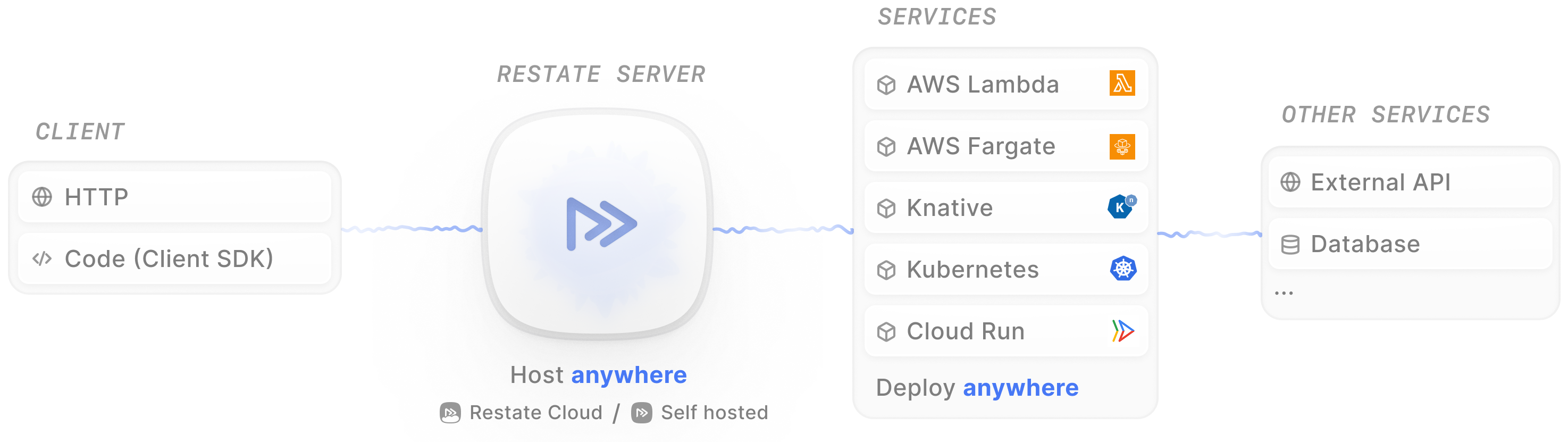 To run Restate locally for development, follow the [installation guide](/installation).
## Compare the options
| | Restate Cloud | Restate BYOC | Self-hosted Restate |
| :------------------------------------ | :-------------------------------------------------------------------------------- | :------------------------------------------------------------------------------------------ | :------------------------------------------------------------- |
| **Best for** | Getting started quickly with minimal infrastructure management | Keeping infrastructure and application data in your cloud account without operating Restate | Taking full control of deployment and operations |
| **Operated by** | Restate | Restate | You |
| **Runs in** | Restate managed cloud regions | Your cloud account and VPC | Infrastructure you choose |
| **Infrastructure owner** | Restate | You | You |
| **Data and network boundary** | Restate manages the environment, with secure options for connecting your services | Application data remains in your infrastructure, with private connectivity to your services | You define and manage the network, security, and data boundary |
| **Setup** | Self service | Set up with the Restate team | Install and configure Restate yourself |
| **Scaling, upgrades, and monitoring** | Managed by Restate | Managed by Restate | Managed by you |
| **Pricing** | [See pricing](https://restate.dev/pricing) | [See pricing](https://restate.dev/pricing) | Your infrastructure and operational costs |
| **Get started** | [Sign up for the free tier](/cloud/getting-started) | [Contact Restate](https://cal.com/team/restate/team) | [Read the self hosting guide](/server/overview) |
Need a multi region or multi cloud deployment? Contact us on [Discord](https://discord.restate.dev) or [Slack](https://slack.restate.dev) to discuss your requirements.
## Learn more about each option
Choose Restate Cloud when you want the fastest path to production and do not need the Restate environment to run in your cloud account.
Choose Restate BYOC when you need data sovereignty, private networking, dedicated capacity, or existing cloud commitments without operating Restate yourself.
Choose self-hosted Restate when you want to manage and operate the Restate environment yourself.
Your hosting choice does not change how you implement Restate services and handlers. It determines where the Restate environment runs and who operates it.
Need a multi-region or multi-cloud deployment? Contact us on [Discord](https://discord.restate.dev) or [Slack](https://slack.restate.dev) to discuss your requirements.
To run Restate locally for development, follow the [installation guide](/installation).
## Compare the options
| | Restate Cloud | Restate BYOC | Self-hosted Restate |
| :------------------------------------ | :-------------------------------------------------------------------------------- | :------------------------------------------------------------------------------------------ | :------------------------------------------------------------- |
| **Best for** | Getting started quickly with minimal infrastructure management | Keeping infrastructure and application data in your cloud account without operating Restate | Taking full control of deployment and operations |
| **Operated by** | Restate | Restate | You |
| **Runs in** | Restate managed cloud regions | Your cloud account and VPC | Infrastructure you choose |
| **Infrastructure owner** | Restate | You | You |
| **Data and network boundary** | Restate manages the environment, with secure options for connecting your services | Application data remains in your infrastructure, with private connectivity to your services | You define and manage the network, security, and data boundary |
| **Setup** | Self service | Set up with the Restate team | Install and configure Restate yourself |
| **Scaling, upgrades, and monitoring** | Managed by Restate | Managed by Restate | Managed by you |
| **Pricing** | [See pricing](https://restate.dev/pricing) | [See pricing](https://restate.dev/pricing) | Your infrastructure and operational costs |
| **Get started** | [Sign up for the free tier](/cloud/getting-started) | [Contact Restate](https://cal.com/team/restate/team) | [Read the self hosting guide](/server/overview) |
Need a multi region or multi cloud deployment? Contact us on [Discord](https://discord.restate.dev) or [Slack](https://slack.restate.dev) to discuss your requirements.
## Learn more about each option
Choose Restate Cloud when you want the fastest path to production and do not need the Restate environment to run in your cloud account.
Choose Restate BYOC when you need data sovereignty, private networking, dedicated capacity, or existing cloud commitments without operating Restate yourself.
Choose self-hosted Restate when you want to manage and operate the Restate environment yourself.
Your hosting choice does not change how you implement Restate services and handlers. It determines where the Restate environment runs and who operates it.
Need a multi-region or multi-cloud deployment? Contact us on [Discord](https://discord.restate.dev) or [Slack](https://slack.restate.dev) to discuss your requirements.