> ## Documentation Index
> Fetch the complete documentation index at: https://docs.restate.dev/llms.txt
> Use this file to discover all available pages before exploring further.
# Installation
> Learn how to set up your local Restate development environment.
Set up Restate locally in minutes.
## Install Restate Server & CLI
Restate is a single self-contained binary. No external dependencies needed.
```shell theme={null}
brew install restatedev/tap/restate-server restatedev/tap/restate
```
Start the server:
```shell theme={null}
restate-server
```
Find the CLI at:
```shell theme={null}
restate --help
```
Download prebuilt binaries from the [releases page](https://github.com/restatedev/restate/releases/latest):
```shell MacOS-x64 theme={null}
BIN=/usr/local/bin && RESTATE_PLATFORM=x86_64-apple-darwin && \
curl -L --remote-name-all https://restate.gateway.scarf.sh/latest/restate-{server,cli}-$RESTATE_PLATFORM.tar.xz && \
tar -xvf restate-server-$RESTATE_PLATFORM.tar.xz --strip-components=1 restate-server-$RESTATE_PLATFORM/restate-server && \
tar -xvf restate-cli-$RESTATE_PLATFORM.tar.xz --strip-components=1 restate-cli-$RESTATE_PLATFORM/restate && \
chmod +x restate restate-server && \
sudo mv restate $BIN && \
sudo mv restate-server $BIN
```
```shell MacOS-arm64 theme={null}
BIN=/usr/local/bin && RESTATE_PLATFORM=aarch64-apple-darwin && \
curl -L --remote-name-all https://restate.gateway.scarf.sh/latest/restate-{server,cli}-$RESTATE_PLATFORM.tar.xz && \
tar -xvf restate-server-$RESTATE_PLATFORM.tar.xz --strip-components=1 restate-server-$RESTATE_PLATFORM/restate-server && \
tar -xvf restate-cli-$RESTATE_PLATFORM.tar.xz --strip-components=1 restate-cli-$RESTATE_PLATFORM/restate && \
chmod +x restate restate-server && \
sudo mv restate $BIN && \
sudo mv restate-server $BIN
```
```shell Linux-x64 theme={null}
BIN=$HOME/.local/bin && RESTATE_PLATFORM=x86_64-unknown-linux-musl && \
curl -L --remote-name-all https://restate.gateway.scarf.sh/latest/restate-{server,cli}-$RESTATE_PLATFORM.tar.xz && \
tar -xvf restate-server-$RESTATE_PLATFORM.tar.xz --strip-components=1 restate-server-$RESTATE_PLATFORM/restate-server && \
tar -xvf restate-cli-$RESTATE_PLATFORM.tar.xz --strip-components=1 restate-cli-$RESTATE_PLATFORM/restate && \
chmod +x restate restate-server && \
mv restate $BIN && \
mv restate-server $BIN
```
```shell Linux-arm64 theme={null}
BIN=$HOME/.local/bin && RESTATE_PLATFORM=aarch64-unknown-linux-musl && \
curl -L --remote-name-all https://restate.gateway.scarf.sh/latest/restate-{server,cli}-$RESTATE_PLATFORM.tar.xz && \
tar -xvf restate-server-$RESTATE_PLATFORM.tar.xz --strip-components=1 restate-server-$RESTATE_PLATFORM/restate-server && \
tar -xvf restate-cli-$RESTATE_PLATFORM.tar.xz --strip-components=1 restate-cli-$RESTATE_PLATFORM/restate && \
chmod +x restate restate-server && \
mv restate $BIN && \
mv restate-server $BIN
```
Start the server:
```shell theme={null}
restate-server
```
Find the CLI at:
```shell theme={null}
restate --help
```
```shell theme={null}
npm install --global @restatedev/restate-server@latest @restatedev/restate@latest
```
Start the server:
```shell theme={null}
restate-server
```
Find the CLI at:
```shell theme={null}
restate --help
```
Run the Restate Server:
```shell theme={null}
docker run --name restate_dev --rm \
-p 8080:8080 -p 9070:9070 -p 9071:9071 \
--add-host=host.docker.internal:host-gateway \
docker.restate.dev/restatedev/restate:latest
```
Run CLI commands:
```shell theme={null}
docker run -it --network=host \
docker.restate.dev/restatedev/restate-cli:latest \
invocations ls
```
Replace `invocations ls` with any CLI subcommand.
You can find the Restate UI running on port 9070 (`http://localhost:9070`) after starting the Restate Server.
You can use `restate up` to start a lightweight, local dev server.
You can start `restate-server` binding to random ports via:
```shell theme={null}
restate-server --use-random-ports=true --no-logo
```
The chosen ports will be displayed in the first three standard output lines.
Also check out the [CLI](/references/cli-config) or [Server configuration options](/server/configuration).
Restate Server collects anonymized telemetry about versions and uptime via [Scarf](https://about.scarf.sh).\
We don't have access to your IP or any information about your cluster.
To disable, set `DO_NOT_TRACK=1`.
## Restate UI
The UI is bundled with the Restate Server and available at [http://localhost:9070](http://localhost:9070) when running locally. Use the UI to manage, debug, and configure your applications.
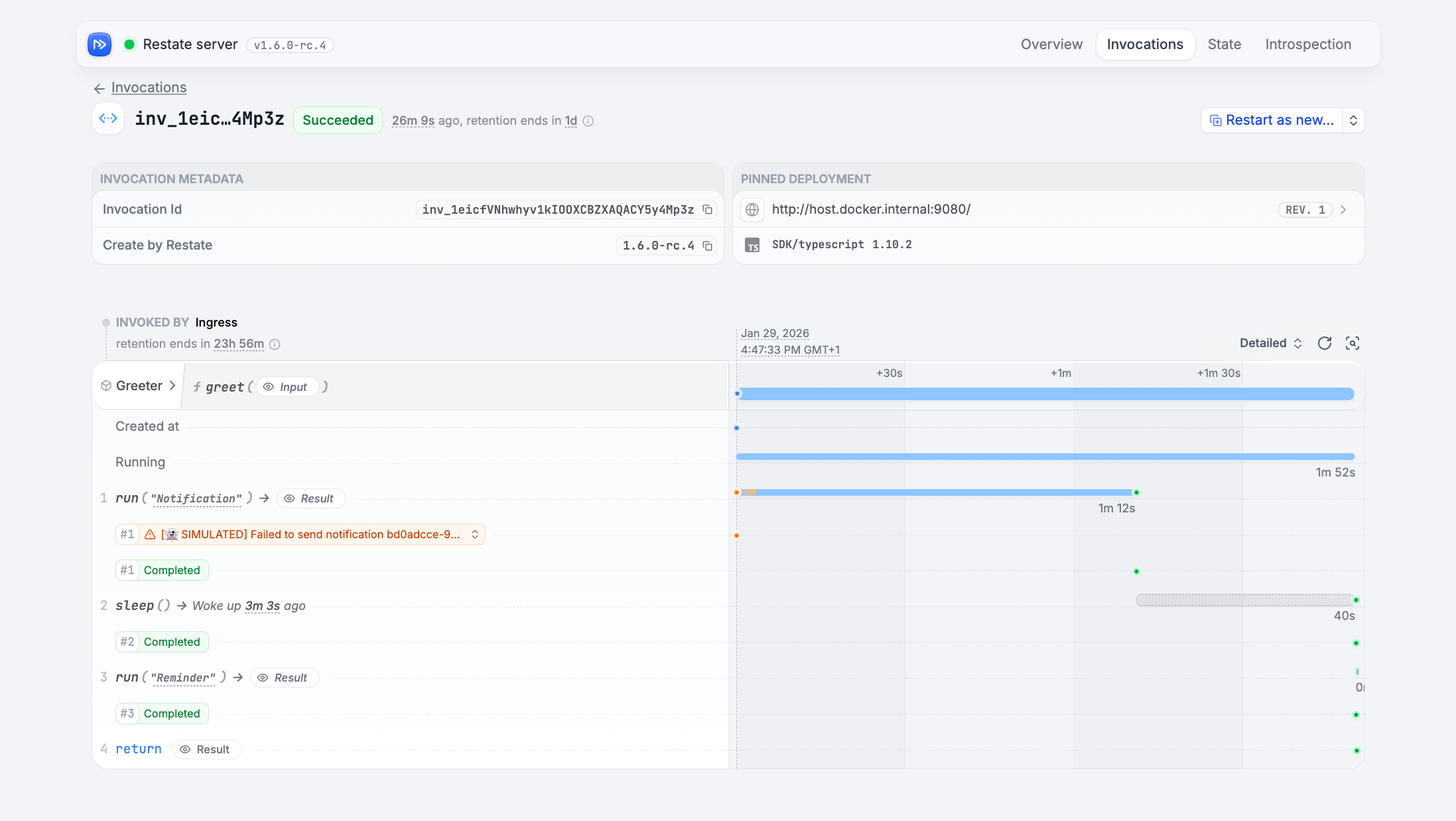 The UI gives you the best experience when working with Restate.
## Useful CLI Commands
With the CLI installed, try these commands:
```shell theme={null}
restate whoami
```
(If using Docker, use `http://host.docker.internal:9080`)
```shell theme={null}
restate deployments register localhost:9080
```
```shell theme={null}
restate deployments list
```
```shell theme={null}
restate invocation list
```
```shell theme={null}
# a single invocation
restate invocation cancel my_invocation_id
# cancel all invocations of a service, object, or handler
restate invocation cancel MyService
restate invocation cancel MyService/myHandler
restate invocation cancel MyObject/myObjectKey
restate invocation cancel MyObject/myObjectKey/myHandler
```
Use `restate invocation kill` to force kill.
```shell theme={null}
restate kv clear MyObject
restate kv clear MyObject/myObjectKey
```
Remove the `restate-data` directory to wipe all invocations, state, registered services, etc.
```shell theme={null}
rm -rf restate-data
```
See [SQL introspection docs](/services/introspection#inspecting-invocations) for examples.
Use `--json` for JSON output.
```shell theme={null}
restate sql "query"
```
```shell theme={null}
restate service config view
```
See also the [introspection page](/services/introspection) for more CLI debugging commands.
## Advanced: Installing `restatectl`
`restatectl` is a command-line tool for managing Restate clusters. It provides commands for cluster management, introspection, and debugging.
This tool is specifically designed for system operators to manage Restate servers and is particularly useful in a cluster environment.
Install with:
```shell theme={null}
brew install restatedev/tap/restatectl
```
Then run:
```shell theme={null}
restatectl --help
```
Install restatectl by downloading the binary with `curl` from the [releases page](https://github.com/restatedev/restate/releases/latest), and make them executable:
```shell Linux-x64 theme={null}
BIN=$HOME/.local/bin && RESTATE_PLATFORM=x86_64-unknown-linux-musl && \
curl -LO https://restate.gateway.scarf.sh/latest/restatectl-$RESTATE_PLATFORM.tar.xz && \
tar -xvf restatectl-$RESTATE_PLATFORM.tar.xz --strip-components=1 restatectl-$RESTATE_PLATFORM/restatectl && \
chmod +x restatectl && \
# Move the binary to a directory in your PATH, for example ~/.local/bin:
mv restatectl $BIN
```
```shell Linux-arm64 theme={null}
BIN=$HOME/.local/bin && RESTATE_PLATFORM=aarch64-unknown-linux-musl && \
curl -LO https://restate.gateway.scarf.sh/latest/restatectl-$RESTATE_PLATFORM.tar.xz && \
tar -xvf restatectl-$RESTATE_PLATFORM.tar.xz --strip-components=1 restatectl-$RESTATE_PLATFORM/restatectl && \
chmod +x restatectl && \
# Move the binary to a directory in your PATH, for example ~/.local/bin:
mv restatectl $BIN
```
```shell MacOS-x64 theme={null}
BIN=/usr/local/bin && RESTATE_PLATFORM=x86_64-apple-darwin && \
curl -LO https://restate.gateway.scarf.sh/latest/restatectl-$RESTATE_PLATFORM.tar.xz && \
tar -xvf restatectl-$RESTATE_PLATFORM.tar.xz --strip-components=1 restatectl-$RESTATE_PLATFORM/restatectl && \
chmod +x restatectl && \
# Move the binary to a directory in your PATH, for example /usr/local/bin (needs sudo):
sudo mv restatectl $BIN
```
```shell MacOS-arm64 theme={null}
BIN=/usr/local/bin && RESTATE_PLATFORM=aarch64-apple-darwin && \
curl -LO https://restate.gateway.scarf.sh/latest/restatectl-$RESTATE_PLATFORM.tar.xz && \
tar -xvf restatectl-$RESTATE_PLATFORM.tar.xz --strip-components=1 restatectl-$RESTATE_PLATFORM/restatectl && \
chmod +x restatectl && \
# Move the binary to a directory in your PATH, for example /usr/local/bin (needs sudo):
sudo mv restatectl $BIN
```
Then run:
```shell theme={null}
restatectl --help
```
Install with:
```shell theme={null}
npm install --global @restatedev/restatectl@latest
```
Then run:
```shell theme={null}
restatectl --help
```
The server image contains the `restatectl` tool. To run `restatectl`, use the following command:
```shell theme={null}
docker run -it --network=host --entrypoint restatectl docker.restate.dev/restatedev/restate:latest nodes ls
```
You can also execute `restatectl` in a running server container using the following command:
```shell theme={null}
docker exec restate_dev restatectl nodes ls
```
Replace `restate_dev` with the name of a running container, and `nodes ls` with the subcommand you want to run.
`restatectl` requires direct access to nodes via their advertised addresses (default port: 5122). Ensure that restatectl commands can reach these addresses.
The UI gives you the best experience when working with Restate.
## Useful CLI Commands
With the CLI installed, try these commands:
```shell theme={null}
restate whoami
```
(If using Docker, use `http://host.docker.internal:9080`)
```shell theme={null}
restate deployments register localhost:9080
```
```shell theme={null}
restate deployments list
```
```shell theme={null}
restate invocation list
```
```shell theme={null}
# a single invocation
restate invocation cancel my_invocation_id
# cancel all invocations of a service, object, or handler
restate invocation cancel MyService
restate invocation cancel MyService/myHandler
restate invocation cancel MyObject/myObjectKey
restate invocation cancel MyObject/myObjectKey/myHandler
```
Use `restate invocation kill` to force kill.
```shell theme={null}
restate kv clear MyObject
restate kv clear MyObject/myObjectKey
```
Remove the `restate-data` directory to wipe all invocations, state, registered services, etc.
```shell theme={null}
rm -rf restate-data
```
See [SQL introspection docs](/services/introspection#inspecting-invocations) for examples.
Use `--json` for JSON output.
```shell theme={null}
restate sql "query"
```
```shell theme={null}
restate service config view
```
See also the [introspection page](/services/introspection) for more CLI debugging commands.
## Advanced: Installing `restatectl`
`restatectl` is a command-line tool for managing Restate clusters. It provides commands for cluster management, introspection, and debugging.
This tool is specifically designed for system operators to manage Restate servers and is particularly useful in a cluster environment.
Install with:
```shell theme={null}
brew install restatedev/tap/restatectl
```
Then run:
```shell theme={null}
restatectl --help
```
Install restatectl by downloading the binary with `curl` from the [releases page](https://github.com/restatedev/restate/releases/latest), and make them executable:
```shell Linux-x64 theme={null}
BIN=$HOME/.local/bin && RESTATE_PLATFORM=x86_64-unknown-linux-musl && \
curl -LO https://restate.gateway.scarf.sh/latest/restatectl-$RESTATE_PLATFORM.tar.xz && \
tar -xvf restatectl-$RESTATE_PLATFORM.tar.xz --strip-components=1 restatectl-$RESTATE_PLATFORM/restatectl && \
chmod +x restatectl && \
# Move the binary to a directory in your PATH, for example ~/.local/bin:
mv restatectl $BIN
```
```shell Linux-arm64 theme={null}
BIN=$HOME/.local/bin && RESTATE_PLATFORM=aarch64-unknown-linux-musl && \
curl -LO https://restate.gateway.scarf.sh/latest/restatectl-$RESTATE_PLATFORM.tar.xz && \
tar -xvf restatectl-$RESTATE_PLATFORM.tar.xz --strip-components=1 restatectl-$RESTATE_PLATFORM/restatectl && \
chmod +x restatectl && \
# Move the binary to a directory in your PATH, for example ~/.local/bin:
mv restatectl $BIN
```
```shell MacOS-x64 theme={null}
BIN=/usr/local/bin && RESTATE_PLATFORM=x86_64-apple-darwin && \
curl -LO https://restate.gateway.scarf.sh/latest/restatectl-$RESTATE_PLATFORM.tar.xz && \
tar -xvf restatectl-$RESTATE_PLATFORM.tar.xz --strip-components=1 restatectl-$RESTATE_PLATFORM/restatectl && \
chmod +x restatectl && \
# Move the binary to a directory in your PATH, for example /usr/local/bin (needs sudo):
sudo mv restatectl $BIN
```
```shell MacOS-arm64 theme={null}
BIN=/usr/local/bin && RESTATE_PLATFORM=aarch64-apple-darwin && \
curl -LO https://restate.gateway.scarf.sh/latest/restatectl-$RESTATE_PLATFORM.tar.xz && \
tar -xvf restatectl-$RESTATE_PLATFORM.tar.xz --strip-components=1 restatectl-$RESTATE_PLATFORM/restatectl && \
chmod +x restatectl && \
# Move the binary to a directory in your PATH, for example /usr/local/bin (needs sudo):
sudo mv restatectl $BIN
```
Then run:
```shell theme={null}
restatectl --help
```
Install with:
```shell theme={null}
npm install --global @restatedev/restatectl@latest
```
Then run:
```shell theme={null}
restatectl --help
```
The server image contains the `restatectl` tool. To run `restatectl`, use the following command:
```shell theme={null}
docker run -it --network=host --entrypoint restatectl docker.restate.dev/restatedev/restate:latest nodes ls
```
You can also execute `restatectl` in a running server container using the following command:
```shell theme={null}
docker exec restate_dev restatectl nodes ls
```
Replace `restate_dev` with the name of a running container, and `nodes ls` with the subcommand you want to run.
`restatectl` requires direct access to nodes via their advertised addresses (default port: 5122). Ensure that restatectl commands can reach these addresses.