> ## Documentation Index
> Fetch the complete documentation index at: https://docs.restate.dev/llms.txt
> Use this file to discover all available pages before exploring further.
# Managing Invocations
> Understand the lifecycle of a Restate invocation and how to manage it.
An invocation is a request to execute a handler. Each invocation has its own unique ID and lifecycle.
 ## Invocation ID
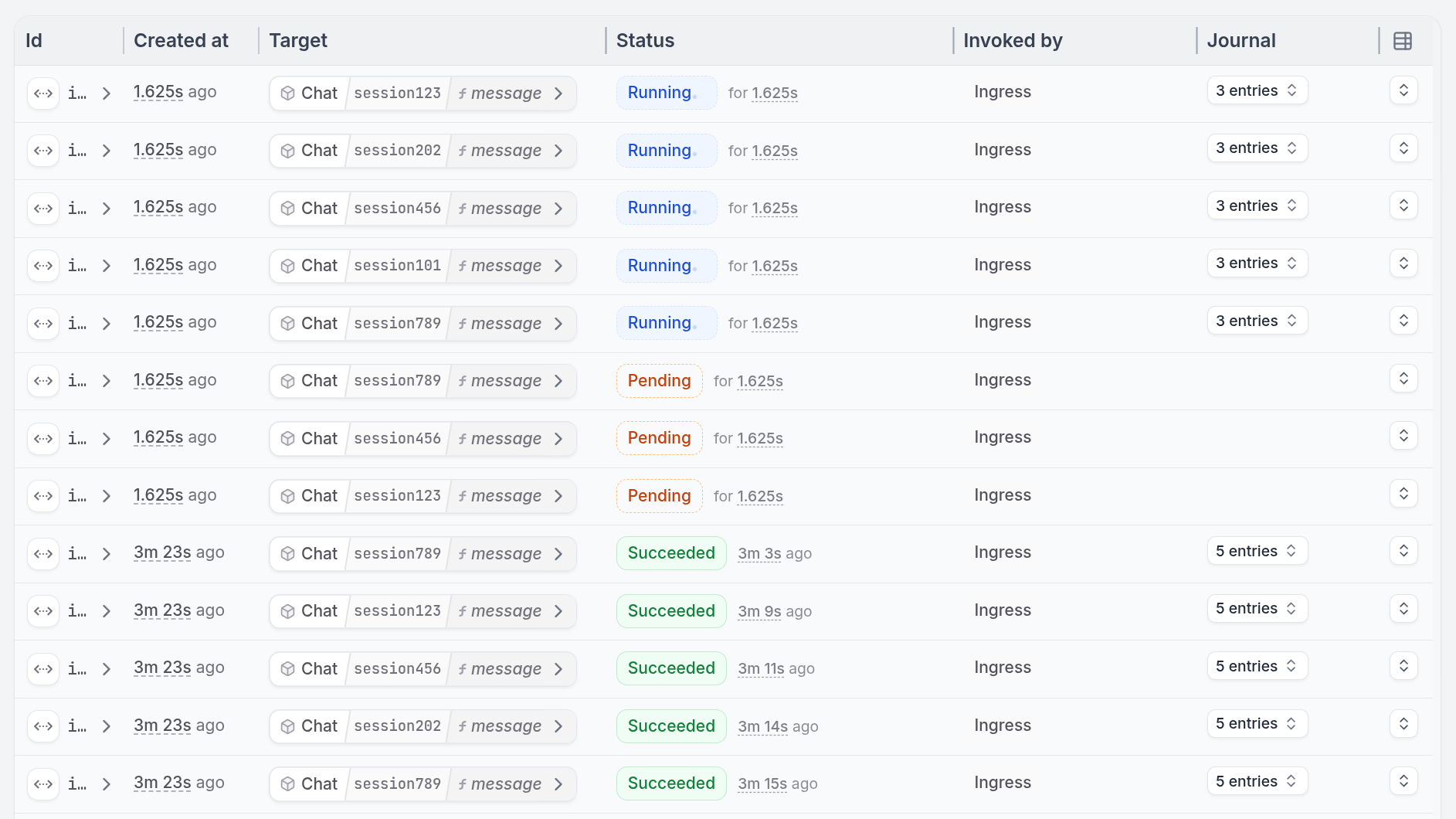
*Invocations* have a unique **Invocation ID** starting with `inv_`. You can find this ID in every place where an invocation is mentioned:
* The invocations page of the [Restate UI](/installation#restate-ui)
* Logs and traces (`restate.invocation.id`), both in Restate and SDKs
* In CLI commands such as `restate invocation ls`
## Lifecycle
Invocations follow a well-defined lifecycle:
## Invocation ID
*Invocations* have a unique **Invocation ID** starting with `inv_`. You can find this ID in every place where an invocation is mentioned:
* The invocations page of the [Restate UI](/installation#restate-ui)
* Logs and traces (`restate.invocation.id`), both in Restate and SDKs
* In CLI commands such as `restate invocation ls`
## Lifecycle
Invocations follow a well-defined lifecycle:
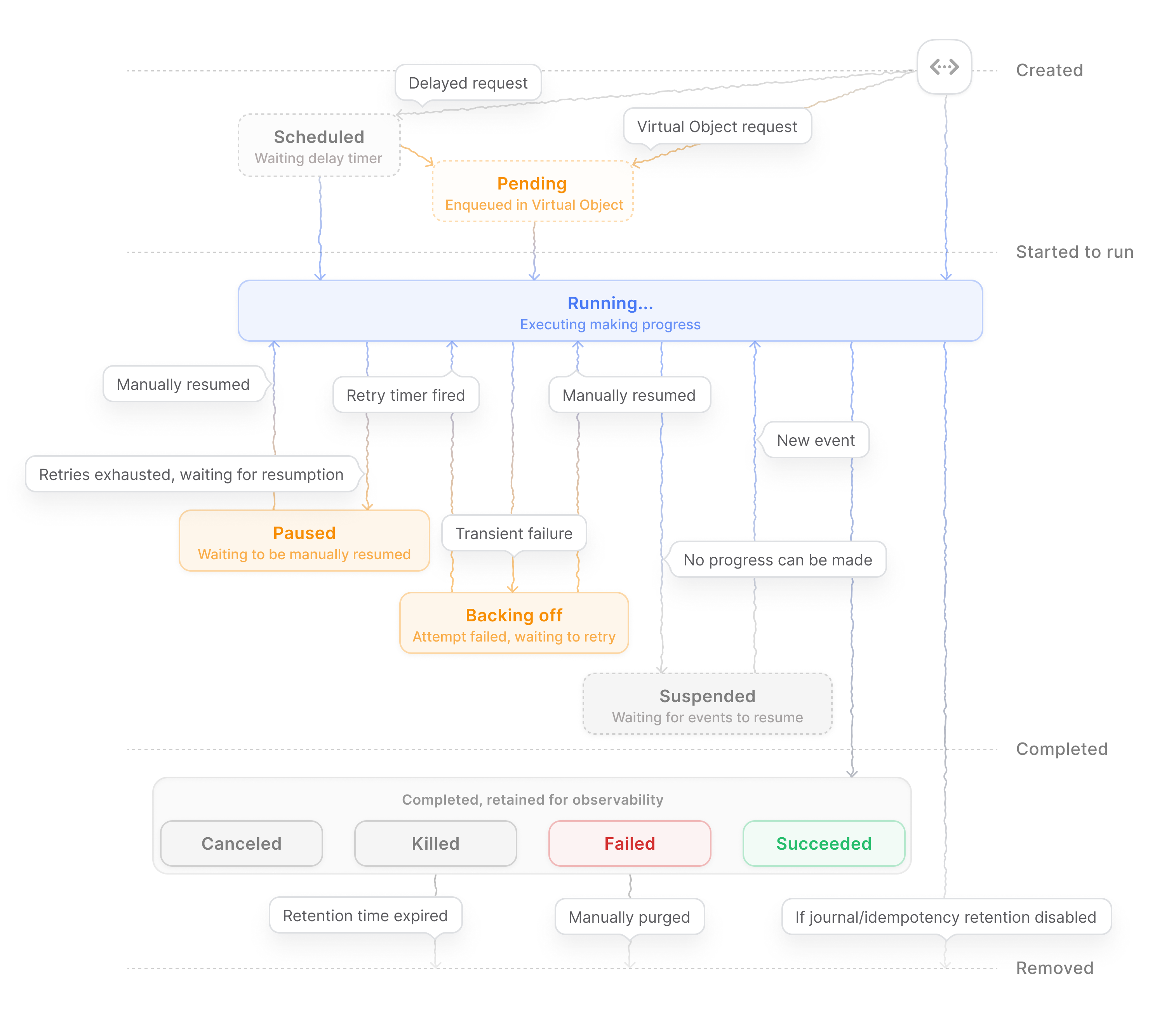 This page describes how to manage invocations in different states.
## Cancel
You can cancel an invocation at any point in its lifecycle.
Cancellation has the following characteristics:
* Frees held resources
* Cooperates with your handler code to roll back any changes made so far
* Allows proper cleanup
Via the UI:
This page describes how to manage invocations in different states.
## Cancel
You can cancel an invocation at any point in its lifecycle.
Cancellation has the following characteristics:
* Frees held resources
* Cooperates with your handler code to roll back any changes made so far
* Allows proper cleanup
Via the UI:
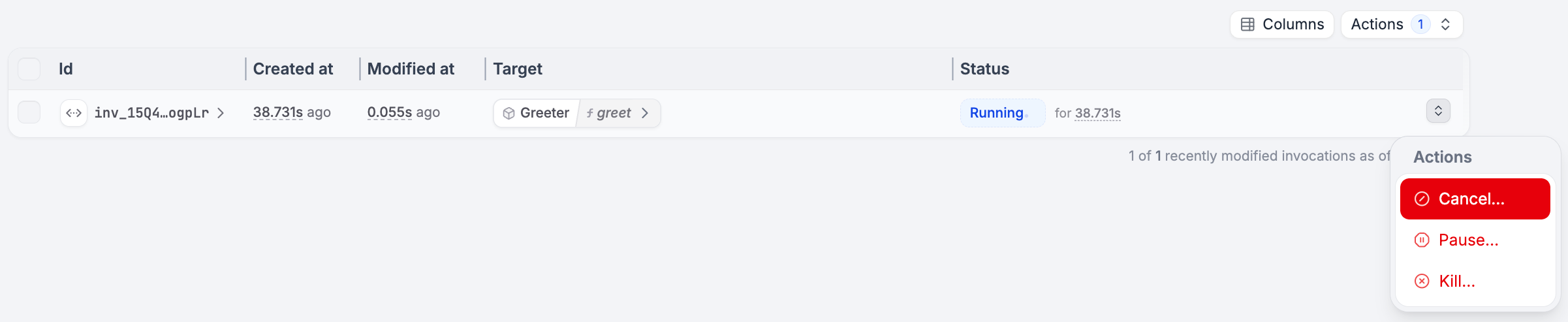 Via the command line:
```shell CLI theme={null}
restate invocations cancel inv_1gdJBtdVEcM942bjcDmb1c1khoaJe11Hbz
# Or bulk cancel, e.g. per service or handler
restate invocations cancel Greeter
restate invocations cancel Greeter/greet
restate invocations cancel CartObject/cart55/add
```
```shell curl theme={null}
curl -X PATCH http://localhost:9070/invocations/inv_1gdJBtdVEcM942bjcDmb1c1khoaJe11Hbz/cancel
```
Cancellation is non-blocking. The API call may return before cancellation completes. In rare cases, cancellation may not take effect - retry the operation if needed.
For proper rollback, handlers must include compensation logic to maintain service state consistency. Check the [sagas guide](/guides/sagas).
### Requirements
For cancellation to work, the invocation must reach the deployment (the service endpoint must be reachable).
If the deployment is not reachable, use [kill](#kill) instead.
### Cancellation Flow
When an invocation is canceled:
1. **User sends cancellation request** to the Restate runtime
2. **Runtime forwards cancellation** to the SDK eagerly
3. **SDK surfaces cancellation** at the next await point in your handler code
The cancellation exception (`TerminalError` in TypeScript/Python, `TerminalException` in Java/Kotlin) is thrown at the next **await point** - operations that wait for a result, such as `ctx.run()`, call responses, sleeps, awakeable results, etc.
One-way calls (`ctx.send()`) and delayed calls (`ctx.sendDelayed()`) are detached from the call tree. They will be scheduled and execute fully even if the originating invocation is cancelled.
### Example
```typescript TypeScript {"CODE_LOAD::ts/src/services/cancellation-example.ts#here"} theme={null}
async function processOrder(ctx: restate.ObjectContext, order: Order) {
// If cancellation happened before this line, this still executes
ctx.set("status", "processing");
// If cancellation happened before this line, this still executes
const paymentId = ctx.rand.uuidv4().toString();
try {
// If cancelled right before this line, ctx.run won't execute
// If cancelled during run block execution,
// then a terminal error gets thrown here once execution finishes
await ctx.run(() => processPayment(paymentId, order));
// If cancellation happened before this line, this still executes
ctx.serviceSendClient(notificationService).notify("Payment processed");
} catch (error) {
if (error instanceof restate.TerminalError) {
// Cancellation detected - run compensation
await ctx.run(() => refundPayment(paymentId, order));
throw error; // Re-throw to propagate cancellation
}
}
}
```
```go Go {"CODE_LOAD::go/services/cancellation-example.go#here"} theme={null}
func (OrderService) processOrder(ctx restate.ObjectContext, order Order) error {
// If cancellation happened right before this line, this still executes
restate.Set(ctx, "status", "processing")
// If cancellation happened right before this line, this still executes
paymentId := restate.UUID(ctx).String()
// If cancelled right before this line, Run won't execute
// If cancelled during run block execution,
// then a terminal error gets returned here once execution finishes
_, err := restate.Run(ctx, func(ctx restate.RunContext) (Payment, error) {
return processPayment(paymentId, order)
})
if err != nil {
if restate.IsTerminalError(err) {
// Cancellation detected - run compensation
_, _ = restate.Run(ctx, func(ctx restate.RunContext) (any, error) {
return nil, refundPayment(paymentId)
})
}
return err
}
// If cancellation happened right before this line, this still executes
restate.ServiceSend(ctx, "NotificationService", "Notify").
Send("Payment processed")
return nil
}
```
```java Java {"CODE_LOAD::java/src/main/java/services/CancellationExample.java#here"} theme={null}
@Handler
public void processOrder(ObjectContext ctx, Order order) {
// If cancellation happened before this line, this still executes
ctx.set(STATUS, "processing");
// If cancellation happened before this line, this still executes
String paymentId = ctx.random().nextUUID().toString();
try {
// If canceled right before this line, ctx.run won't execute
// If canceled during run block execution,
// then a terminal exception gets thrown here once execution finishes
ctx.run(() -> processPayment(paymentId, order));
// If cancellation happened right before this line, this still executes
NotificationServiceClient.fromContext(ctx).send().sendNotification("Your order is processed");
} catch (TerminalException e) {
// Cancellation detected - run compensation
ctx.run(() -> refundPayment(paymentId, order));
throw e; // Re-throw to propagate cancellation
}
}
```
```python Python {"CODE_LOAD::python/src/services/cancellation_example.py#here"} theme={null}
@order_service.handler()
async def process_order(ctx: restate.ObjectContext, order: Order):
# If cancellation happened before this line, this still executes
ctx.set("status", "processing")
# If cancellation happened before this line, this still executes
payment_id = str(ctx.uuid())
try:
# If cancelled before this await, ctx.run won't execute
# If cancelled during run block execution,
# then a terminal error gets raised here once execution finishes
await ctx.run_typed(
"process-payment", process_payment, id=payment_id, order=order
)
# If cancellation happened before this line, this still executes
ctx.service_send(notify, "Payment processed")
except TerminalError as e:
# Cancellation detected - run compensation
await ctx.run_typed("refund-payment", refund_payment, id=payment_id)
raise e # Re-throw to propagate cancellation
```
### Call Graph Propagation
Cancellation propagates recursively through the call graph:
1. **Propagate to leaves**: Cancellation first reaches the leaves of the call graph
2. **Throw at await points**: Each handler receives the cancellation exception at its next await point
3. **Run compensation**: Handlers execute their compensation logic (if defined)
4. **Propagate upward**: Cancellation flows back up the call graph (unless handled differently), allowing each parent to compensate
## Kill
Use kill when cancellation fails (e.g., when endpoints are permanently unavailable).
Killing immediately stops all calls in the invocation tree **without executing compensation logic**. This may leave your service in an inconsistent state. Only use as a last resort after trying other fixes.
Note that one-way calls and delayed calls are not killed because they're detached from the originating call tree.
Via the UI:
Via the command line:
```shell CLI theme={null}
restate invocations cancel inv_1gdJBtdVEcM942bjcDmb1c1khoaJe11Hbz
# Or bulk cancel, e.g. per service or handler
restate invocations cancel Greeter
restate invocations cancel Greeter/greet
restate invocations cancel CartObject/cart55/add
```
```shell curl theme={null}
curl -X PATCH http://localhost:9070/invocations/inv_1gdJBtdVEcM942bjcDmb1c1khoaJe11Hbz/cancel
```
Cancellation is non-blocking. The API call may return before cancellation completes. In rare cases, cancellation may not take effect - retry the operation if needed.
For proper rollback, handlers must include compensation logic to maintain service state consistency. Check the [sagas guide](/guides/sagas).
### Requirements
For cancellation to work, the invocation must reach the deployment (the service endpoint must be reachable).
If the deployment is not reachable, use [kill](#kill) instead.
### Cancellation Flow
When an invocation is canceled:
1. **User sends cancellation request** to the Restate runtime
2. **Runtime forwards cancellation** to the SDK eagerly
3. **SDK surfaces cancellation** at the next await point in your handler code
The cancellation exception (`TerminalError` in TypeScript/Python, `TerminalException` in Java/Kotlin) is thrown at the next **await point** - operations that wait for a result, such as `ctx.run()`, call responses, sleeps, awakeable results, etc.
One-way calls (`ctx.send()`) and delayed calls (`ctx.sendDelayed()`) are detached from the call tree. They will be scheduled and execute fully even if the originating invocation is cancelled.
### Example
```typescript TypeScript {"CODE_LOAD::ts/src/services/cancellation-example.ts#here"} theme={null}
async function processOrder(ctx: restate.ObjectContext, order: Order) {
// If cancellation happened before this line, this still executes
ctx.set("status", "processing");
// If cancellation happened before this line, this still executes
const paymentId = ctx.rand.uuidv4().toString();
try {
// If cancelled right before this line, ctx.run won't execute
// If cancelled during run block execution,
// then a terminal error gets thrown here once execution finishes
await ctx.run(() => processPayment(paymentId, order));
// If cancellation happened before this line, this still executes
ctx.serviceSendClient(notificationService).notify("Payment processed");
} catch (error) {
if (error instanceof restate.TerminalError) {
// Cancellation detected - run compensation
await ctx.run(() => refundPayment(paymentId, order));
throw error; // Re-throw to propagate cancellation
}
}
}
```
```go Go {"CODE_LOAD::go/services/cancellation-example.go#here"} theme={null}
func (OrderService) processOrder(ctx restate.ObjectContext, order Order) error {
// If cancellation happened right before this line, this still executes
restate.Set(ctx, "status", "processing")
// If cancellation happened right before this line, this still executes
paymentId := restate.UUID(ctx).String()
// If cancelled right before this line, Run won't execute
// If cancelled during run block execution,
// then a terminal error gets returned here once execution finishes
_, err := restate.Run(ctx, func(ctx restate.RunContext) (Payment, error) {
return processPayment(paymentId, order)
})
if err != nil {
if restate.IsTerminalError(err) {
// Cancellation detected - run compensation
_, _ = restate.Run(ctx, func(ctx restate.RunContext) (any, error) {
return nil, refundPayment(paymentId)
})
}
return err
}
// If cancellation happened right before this line, this still executes
restate.ServiceSend(ctx, "NotificationService", "Notify").
Send("Payment processed")
return nil
}
```
```java Java {"CODE_LOAD::java/src/main/java/services/CancellationExample.java#here"} theme={null}
@Handler
public void processOrder(ObjectContext ctx, Order order) {
// If cancellation happened before this line, this still executes
ctx.set(STATUS, "processing");
// If cancellation happened before this line, this still executes
String paymentId = ctx.random().nextUUID().toString();
try {
// If canceled right before this line, ctx.run won't execute
// If canceled during run block execution,
// then a terminal exception gets thrown here once execution finishes
ctx.run(() -> processPayment(paymentId, order));
// If cancellation happened right before this line, this still executes
NotificationServiceClient.fromContext(ctx).send().sendNotification("Your order is processed");
} catch (TerminalException e) {
// Cancellation detected - run compensation
ctx.run(() -> refundPayment(paymentId, order));
throw e; // Re-throw to propagate cancellation
}
}
```
```python Python {"CODE_LOAD::python/src/services/cancellation_example.py#here"} theme={null}
@order_service.handler()
async def process_order(ctx: restate.ObjectContext, order: Order):
# If cancellation happened before this line, this still executes
ctx.set("status", "processing")
# If cancellation happened before this line, this still executes
payment_id = str(ctx.uuid())
try:
# If cancelled before this await, ctx.run won't execute
# If cancelled during run block execution,
# then a terminal error gets raised here once execution finishes
await ctx.run_typed(
"process-payment", process_payment, id=payment_id, order=order
)
# If cancellation happened before this line, this still executes
ctx.service_send(notify, "Payment processed")
except TerminalError as e:
# Cancellation detected - run compensation
await ctx.run_typed("refund-payment", refund_payment, id=payment_id)
raise e # Re-throw to propagate cancellation
```
### Call Graph Propagation
Cancellation propagates recursively through the call graph:
1. **Propagate to leaves**: Cancellation first reaches the leaves of the call graph
2. **Throw at await points**: Each handler receives the cancellation exception at its next await point
3. **Run compensation**: Handlers execute their compensation logic (if defined)
4. **Propagate upward**: Cancellation flows back up the call graph (unless handled differently), allowing each parent to compensate
## Kill
Use kill when cancellation fails (e.g., when endpoints are permanently unavailable).
Killing immediately stops all calls in the invocation tree **without executing compensation logic**. This may leave your service in an inconsistent state. Only use as a last resort after trying other fixes.
Note that one-way calls and delayed calls are not killed because they're detached from the originating call tree.
Via the UI:
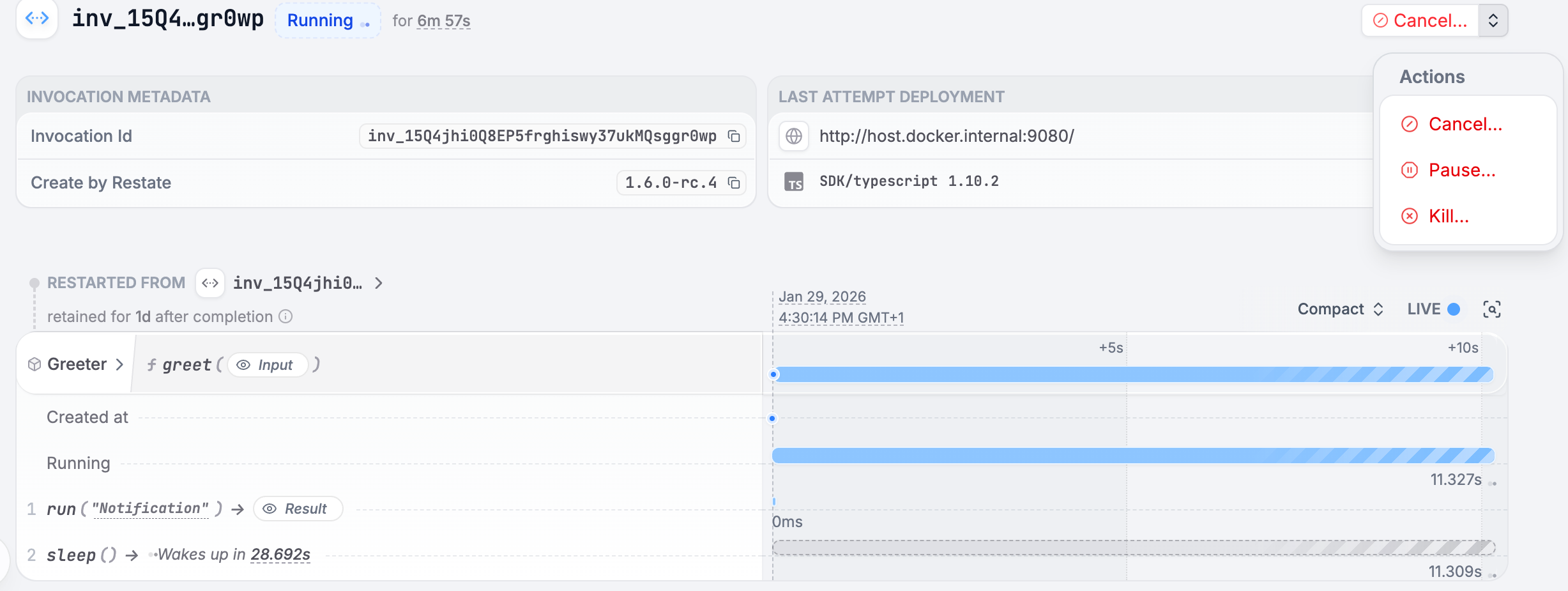 Or the command line:
```shell CLI theme={null}
restate invocations kill inv_1gdJBtdVEcM942bjcDmb1c1khoaJe11Hbz
# Or bulk kill, e.g. per service
restate invocations kill Greeter
restate invocations kill Greeter/greet
restate invocations kill CartObject/cart55/add
```
```shell curl theme={null}
curl -X PATCH http://localhost:9070/invocations/inv_1gdJBtdVEcM942bjcDmb1c1khoaJe11Hbz/kill
```
## Resume
If an invocation retries for too many times, Restate will pause it.
When an invocation is paused, you can resume it manually.
Via the UI:
Or the command line:
```shell CLI theme={null}
restate invocations kill inv_1gdJBtdVEcM942bjcDmb1c1khoaJe11Hbz
# Or bulk kill, e.g. per service
restate invocations kill Greeter
restate invocations kill Greeter/greet
restate invocations kill CartObject/cart55/add
```
```shell curl theme={null}
curl -X PATCH http://localhost:9070/invocations/inv_1gdJBtdVEcM942bjcDmb1c1khoaJe11Hbz/kill
```
## Resume
If an invocation retries for too many times, Restate will pause it.
When an invocation is paused, you can resume it manually.
Via the UI:
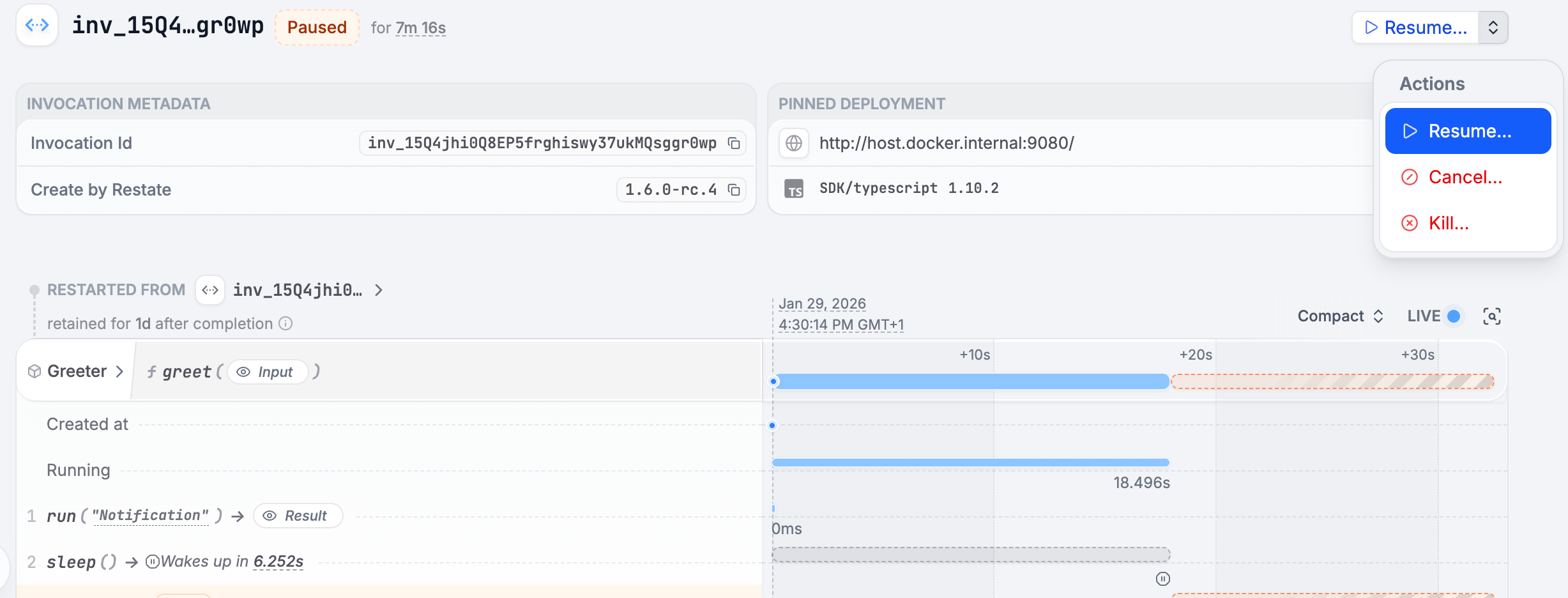 Via the command line:
```shell CLI theme={null}
restate invocations resume inv_1gdJBtdVEcM942bjcDmb1c1khoaJe11Hbz
# Or bulk resume, e.g. per service
restate invocations resume Greeter
```
```shell curl theme={null}
curl -X PATCH http://localhost:9070/invocations/inv_1gdJBtdVEcM942bjcDmb1c1khoaJe11Hbz/resume
```
Check out the [service configuration docs](/services/configuration#retries) to tune the invocation retry policy,
including the retry interval and how many attempts to perform before pausing.
You can also resume an invocation that is waiting on a retry timer, instructing Restate to retry immediately.
When resuming, the invocation will run on the same deployment where it started.
If the invocation failed due to some bug you fixed on a new/different deployment,
you can override on which deployment the invocation should be resumed:
```shell CLI theme={null}
# Resume on a different deployment
restate invocations resume --deployment latest
restate invocations resume --deployment
```
```shell curl theme={null}
curl -X PATCH http://localhost:9070/invocations/inv_1gdJBtdVEcM942bjcDmb1c1khoaJe11Hbz/resume\?deployment=dp_17sztQp4gnEC1L0OCFM9aEh
```
Be aware that if the business logic/flow between the old and the new deployment code differ, once resumed the invocation will start fail with **non-determinism errors**!
## Pause
You can manually pause an invocation too, for example, to resume it on a different endpoint as mentioned above.
```shell CLI theme={null}
restate invocations pause inv_1gdJBtdVEcM942bjcDmb1c1khoaJe11Hbz
# Or bulk pause, e.g. per service
restate invocations pause Greeter
```
```shell curl theme={null}
curl -X PATCH http://localhost:9070/invocations/inv_1gdJBtdVEcM942bjcDmb1c1khoaJe11Hbz/pause
```
## Purge
After an invocation completes, it will be retained by Restate for some time, in order to introspect it and, in case of idempotent requests, to perform deduplication.
When the `controlled-idempotent-sharding` cluster feature is enabled (the default for new clusters), the HTTP ingress auto-assigns an idempotency key to service and virtual object calls that don't provide one. These invocations are therefore retained according to the [idempotency retention](/services/configuration#retention-of-completed-invocations) as well, not the journal retention alone.
Check out the [service configuration docs](/services/configuration#retention-of-completed-invocations) to tune the retention time.
You can also manually purge completed invocations if you need to free up disk space:
```shell CLI theme={null}
restate invocations purge inv_1gdJBtdVEcM942bjcDmb1c1khoaJe11Hbz
# Or bulk purge, e.g. per service
restate invocations purge Greeter
```
```shell curl theme={null}
curl -X PATCH http://localhost:9070/invocations/inv_1gdJBtdVEcM942bjcDmb1c1khoaJe11Hbz/purge
```
## Restart as new
Invocations, once completed, can be **restarted as new invocations**.
Via the UI:
Via the command line:
```shell CLI theme={null}
restate invocations resume inv_1gdJBtdVEcM942bjcDmb1c1khoaJe11Hbz
# Or bulk resume, e.g. per service
restate invocations resume Greeter
```
```shell curl theme={null}
curl -X PATCH http://localhost:9070/invocations/inv_1gdJBtdVEcM942bjcDmb1c1khoaJe11Hbz/resume
```
Check out the [service configuration docs](/services/configuration#retries) to tune the invocation retry policy,
including the retry interval and how many attempts to perform before pausing.
You can also resume an invocation that is waiting on a retry timer, instructing Restate to retry immediately.
When resuming, the invocation will run on the same deployment where it started.
If the invocation failed due to some bug you fixed on a new/different deployment,
you can override on which deployment the invocation should be resumed:
```shell CLI theme={null}
# Resume on a different deployment
restate invocations resume --deployment latest
restate invocations resume --deployment
```
```shell curl theme={null}
curl -X PATCH http://localhost:9070/invocations/inv_1gdJBtdVEcM942bjcDmb1c1khoaJe11Hbz/resume\?deployment=dp_17sztQp4gnEC1L0OCFM9aEh
```
Be aware that if the business logic/flow between the old and the new deployment code differ, once resumed the invocation will start fail with **non-determinism errors**!
## Pause
You can manually pause an invocation too, for example, to resume it on a different endpoint as mentioned above.
```shell CLI theme={null}
restate invocations pause inv_1gdJBtdVEcM942bjcDmb1c1khoaJe11Hbz
# Or bulk pause, e.g. per service
restate invocations pause Greeter
```
```shell curl theme={null}
curl -X PATCH http://localhost:9070/invocations/inv_1gdJBtdVEcM942bjcDmb1c1khoaJe11Hbz/pause
```
## Purge
After an invocation completes, it will be retained by Restate for some time, in order to introspect it and, in case of idempotent requests, to perform deduplication.
When the `controlled-idempotent-sharding` cluster feature is enabled (the default for new clusters), the HTTP ingress auto-assigns an idempotency key to service and virtual object calls that don't provide one. These invocations are therefore retained according to the [idempotency retention](/services/configuration#retention-of-completed-invocations) as well, not the journal retention alone.
Check out the [service configuration docs](/services/configuration#retention-of-completed-invocations) to tune the retention time.
You can also manually purge completed invocations if you need to free up disk space:
```shell CLI theme={null}
restate invocations purge inv_1gdJBtdVEcM942bjcDmb1c1khoaJe11Hbz
# Or bulk purge, e.g. per service
restate invocations purge Greeter
```
```shell curl theme={null}
curl -X PATCH http://localhost:9070/invocations/inv_1gdJBtdVEcM942bjcDmb1c1khoaJe11Hbz/purge
```
## Restart as new
Invocations, once completed, can be **restarted as new invocations**.
Via the UI:
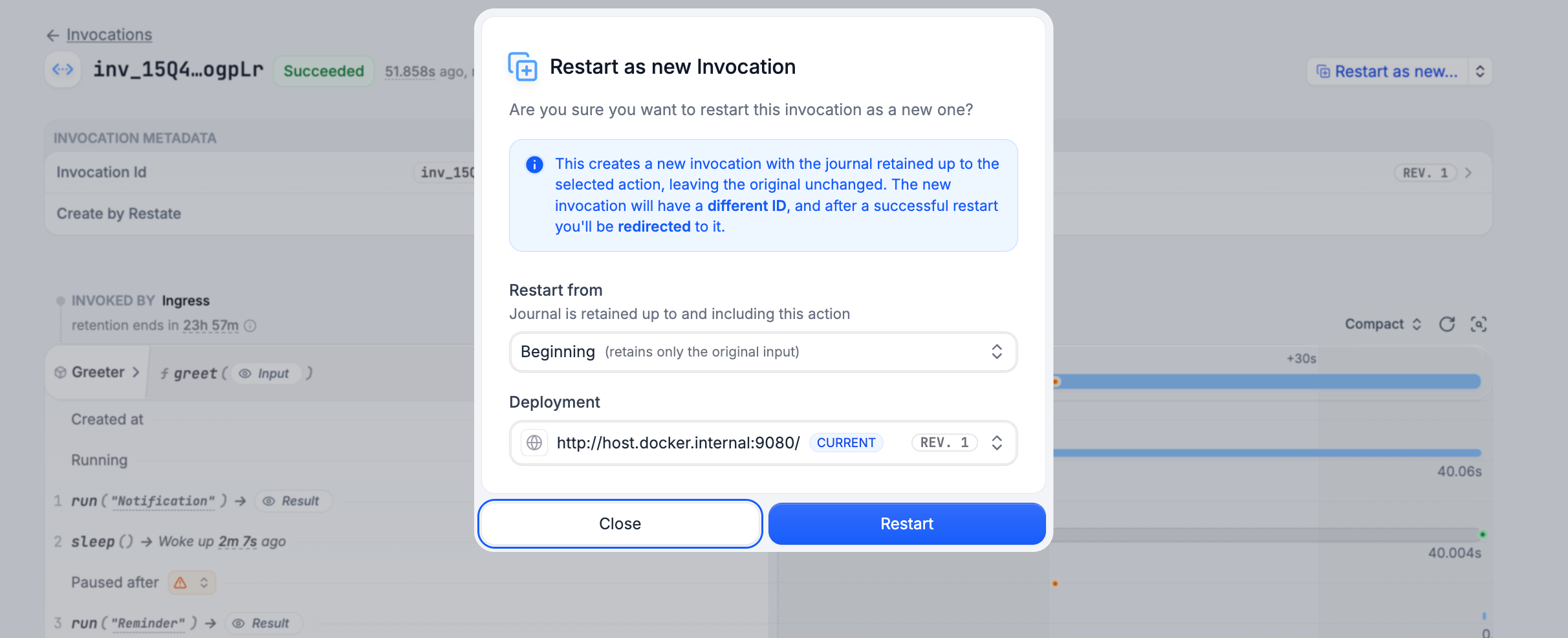 Via the command line:
```shell CLI theme={null}
restate invocations restart-as-new inv_1gdJBtdVEcM942bjcDmb1c1khoaJe11Hbz
# Or bulk restart as new, e.g. per service
restate invocations restart-as-new Greeter
```
```shell curl theme={null}
curl -X PATCH http://localhost:9070/invocations/inv_1gdJBtdVEcM942bjcDmb1c1khoaJe11Hbz/restart-as-new
```
The new invocation will have a different invocation ID, but the input and headers of the original request.
The old invocation will be left untouched.
Keep in mind that when restarting an invocation as new, no partial progress will be kept, meaning all the operations the service executed will be executed again.
For workflows, this feature is only available in the UI.
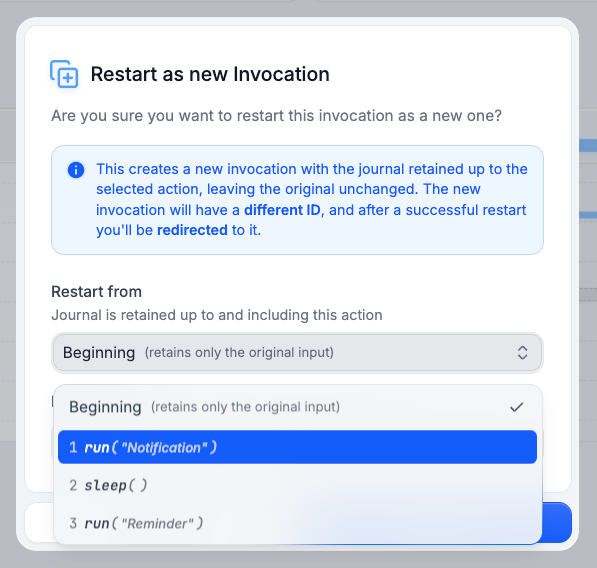
## Restart from Prefix
You can restart an invocation while retaining a part of the journal of the previous execution.
This creates a new invocation which replays the retained part of the journal and then continues the execution from there on.
Via the UI:
Via the command line:
```shell CLI theme={null}
restate invocations restart-as-new inv_1gdJBtdVEcM942bjcDmb1c1khoaJe11Hbz
# Or bulk restart as new, e.g. per service
restate invocations restart-as-new Greeter
```
```shell curl theme={null}
curl -X PATCH http://localhost:9070/invocations/inv_1gdJBtdVEcM942bjcDmb1c1khoaJe11Hbz/restart-as-new
```
The new invocation will have a different invocation ID, but the input and headers of the original request.
The old invocation will be left untouched.
Keep in mind that when restarting an invocation as new, no partial progress will be kept, meaning all the operations the service executed will be executed again.
For workflows, this feature is only available in the UI.
## Restart from Prefix
You can restart an invocation while retaining a part of the journal of the previous execution.
This creates a new invocation which replays the retained part of the journal and then continues the execution from there on.
Via the UI: