> ## Documentation Index
> Fetch the complete documentation index at: https://docs.restate.dev/llms.txt
> Use this file to discover all available pages before exploring further.
# Workflows
> Build resilient workflows with familiar programming patterns.
export const GitHubLink = ({url}) => ;
Workflows orchestrate complex business processes that span multiple steps, services, and time periods. Restate workflows are written as regular functions in your programming language, with automatic durability, state management, and event handling built in.
In this guide, you'll learn how to:
* Write workflows as regular functions with automatic durability
* Handle long-running processes with state and event patterns
* Deploy steps inline or services that can scale independently
* Build resilient, observable workflows without external dependencies
## Getting Started
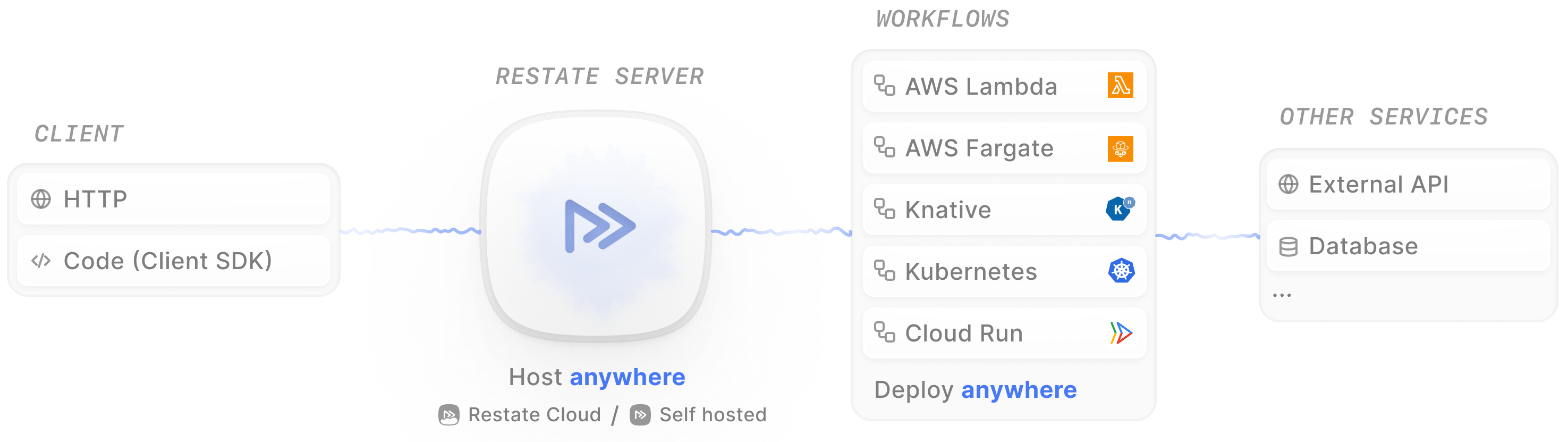
A Restate application is composed of two main components:
* **Restate Server**: The core engine that manages durable execution and orchestrates services. It acts as a message broker or reverse proxy in front of your services.
* **Your Services**: Your workflows and business logic, implemented as service handlers using the Restate SDK to perform durable operations.
 A basic signup workflow looks like this:
```typescript signup-workflow.ts {"CODE_LOAD::https://raw.githubusercontent.com/restatedev/examples/refs/heads/main/typescript/tutorials/tour-of-workflows-typescript/src/workflows/signup-workflow.ts?collapse_prequel"} theme={null}
export const signupWorkflow = restate.workflow({
name: "SignupWorkflow",
handlers: {
run: async (ctx: WorkflowContext, user: User) => {
const userId = ctx.key; // workflow ID = user ID
// Write to database
const success = await ctx.run("create", () => createUser(userId, user));
if (!success) return { success };
// Call APIs
await ctx.run("activate", () => activateUser(userId));
await ctx.run("welcome", () => sendWelcomeEmail(user));
return { success };
},
},
});
```
```java SignupWorkflow.java {"CODE_LOAD::https://raw.githubusercontent.com/restatedev/examples/refs/heads/main/java/tutorials/tour-of-workflows-java/src/main/java/my/example/workflows/SignupWorkflow.java?collapse_prequel"} theme={null}
@Workflow
public class SignupWorkflow {
@Workflow
public boolean run(WorkflowContext ctx, User user) {
String userId = ctx.key(); // workflow ID = user ID
// Write to database
boolean success = ctx.run("create", Boolean.class, () -> createUser(userId, user));
if (!success) {
return false;
}
// Call APIs
ctx.run("activate", () -> activateUser(userId));
ctx.run("welcome", () -> sendWelcomeEmail(user));
return true;
}
}
```
```go getstarted.go {"CODE_LOAD::https://raw.githubusercontent.com/restatedev/examples/refs/heads/main/go/tutorials/tour-of-workflows-go/examples/getstarted.go?collapse_prequel"} theme={null}
type SignupWorkflow struct{}
func (SignupWorkflow) Run(ctx restate.WorkflowContext, user User) (bool, error) {
userID := restate.Key(ctx) // workflow ID = user ID
// Write to database
success, err := restate.Run(ctx, func(ctx restate.RunContext) (bool, error) {
return CreateUser(userID, user)
}, restate.WithName("create"))
if err != nil || !success {
return false, err
}
// Call APIs
_, err = restate.Run(ctx, func(ctx restate.RunContext) (restate.Void, error) {
return ActivateUser(userID)
}, restate.WithName("activate"))
if err != nil {
return false, err
}
_, err = restate.Run(ctx, func(ctx restate.RunContext) (restate.Void, error) {
return SendWelcomeEmail(user)
}, restate.WithName("welcome"))
if err != nil {
return false, err
}
return true, nil
}
```
```python signup_workflow.py {"CODE_LOAD::https://raw.githubusercontent.com/restatedev/examples/refs/heads/main/python/tutorials/tour-of-workflows-python/app/workflows/signup_workflow.py?collapse_prequel"} theme={null}
signup_workflow = restate.Workflow("SignupWorkflow")
@signup_workflow.main()
async def run(ctx: WorkflowContext, user: User) -> bool:
user_id = ctx.key() # workflow ID = user ID
# Write to database
success = await ctx.run_typed("create", create_user, user_id=user_id, user=user)
if not success:
return False
# Call APIs
await ctx.run_typed("activate", activate_user, user_id=user_id)
await ctx.run_typed("welcome", send_welcome_email, user=user)
return True
```
A workflow has handlers that can be called over HTTP.
The `run` handler is the main entry point that executes the workflow logic.
An execution of the workflow is identified by a unique key (in this case, the user ID)
and uses Restate's `WorkflowContext` to make steps durable.
You don't need to run your services in any special way. Restate works with how you already deploy your code, whether that's in Docker, on Kubernetes, or via AWS Lambda.
A basic signup workflow looks like this:
```typescript signup-workflow.ts {"CODE_LOAD::https://raw.githubusercontent.com/restatedev/examples/refs/heads/main/typescript/tutorials/tour-of-workflows-typescript/src/workflows/signup-workflow.ts?collapse_prequel"} theme={null}
export const signupWorkflow = restate.workflow({
name: "SignupWorkflow",
handlers: {
run: async (ctx: WorkflowContext, user: User) => {
const userId = ctx.key; // workflow ID = user ID
// Write to database
const success = await ctx.run("create", () => createUser(userId, user));
if (!success) return { success };
// Call APIs
await ctx.run("activate", () => activateUser(userId));
await ctx.run("welcome", () => sendWelcomeEmail(user));
return { success };
},
},
});
```
```java SignupWorkflow.java {"CODE_LOAD::https://raw.githubusercontent.com/restatedev/examples/refs/heads/main/java/tutorials/tour-of-workflows-java/src/main/java/my/example/workflows/SignupWorkflow.java?collapse_prequel"} theme={null}
@Workflow
public class SignupWorkflow {
@Workflow
public boolean run(WorkflowContext ctx, User user) {
String userId = ctx.key(); // workflow ID = user ID
// Write to database
boolean success = ctx.run("create", Boolean.class, () -> createUser(userId, user));
if (!success) {
return false;
}
// Call APIs
ctx.run("activate", () -> activateUser(userId));
ctx.run("welcome", () -> sendWelcomeEmail(user));
return true;
}
}
```
```go getstarted.go {"CODE_LOAD::https://raw.githubusercontent.com/restatedev/examples/refs/heads/main/go/tutorials/tour-of-workflows-go/examples/getstarted.go?collapse_prequel"} theme={null}
type SignupWorkflow struct{}
func (SignupWorkflow) Run(ctx restate.WorkflowContext, user User) (bool, error) {
userID := restate.Key(ctx) // workflow ID = user ID
// Write to database
success, err := restate.Run(ctx, func(ctx restate.RunContext) (bool, error) {
return CreateUser(userID, user)
}, restate.WithName("create"))
if err != nil || !success {
return false, err
}
// Call APIs
_, err = restate.Run(ctx, func(ctx restate.RunContext) (restate.Void, error) {
return ActivateUser(userID)
}, restate.WithName("activate"))
if err != nil {
return false, err
}
_, err = restate.Run(ctx, func(ctx restate.RunContext) (restate.Void, error) {
return SendWelcomeEmail(user)
}, restate.WithName("welcome"))
if err != nil {
return false, err
}
return true, nil
}
```
```python signup_workflow.py {"CODE_LOAD::https://raw.githubusercontent.com/restatedev/examples/refs/heads/main/python/tutorials/tour-of-workflows-python/app/workflows/signup_workflow.py?collapse_prequel"} theme={null}
signup_workflow = restate.Workflow("SignupWorkflow")
@signup_workflow.main()
async def run(ctx: WorkflowContext, user: User) -> bool:
user_id = ctx.key() # workflow ID = user ID
# Write to database
success = await ctx.run_typed("create", create_user, user_id=user_id, user=user)
if not success:
return False
# Call APIs
await ctx.run_typed("activate", activate_user, user_id=user_id)
await ctx.run_typed("welcome", send_welcome_email, user=user)
return True
```
A workflow has handlers that can be called over HTTP.
The `run` handler is the main entry point that executes the workflow logic.
An execution of the workflow is identified by a unique key (in this case, the user ID)
and uses Restate's `WorkflowContext` to make steps durable.
You don't need to run your services in any special way. Restate works with how you already deploy your code, whether that's in Docker, on Kubernetes, or via AWS Lambda.
The endpoint that serves the workflows of this tour over HTTP is defined in `src/app.ts`.
The endpoint that serves the workflows of this tour over HTTP is defined in `AppMain.java`.
The endpoint that serves the workflows of this tour over HTTP is defined in `main.go`.
The endpoint that serves the workflows of this tour over HTTP is defined in `__main__.py`.
### Run the example
[Install Restate](/installation) and launch it:
```bash theme={null}
restate-server
```
Get the example:
```bash theme={null}
restate example typescript-tour-of-workflows && cd typescript-tour-of-workflows
npm install
```
Run the example:
```bash theme={null}
npm run dev
```
Then, tell Restate where your workflow is running via the UI (`http://localhost:9070`) or CLI:
```bash theme={null}
restate deployments register http://localhost:9080
```
Get the example:
```bash theme={null}
restate example java-tour-of-workflows && cd java-tour-of-workflows
```
Run the example:
```bash theme={null}
./gradlew run
```
Then, tell Restate where your services are running via the UI (`http://localhost:9070`) or CLI:
```bash theme={null}
restate deployments register http://localhost:9080
```
Get the example:
```bash theme={null}
restate example go-tour-of-workflows && cd go-tour-of-workflows
```
Run the example:
```bash theme={null}
go run .
```
Then, tell Restate where your services are running via the UI (`http://localhost:9070`) or CLI:
```bash theme={null}
restate deployments register http://localhost:9080
```
Get the example:
```bash theme={null}
restate example python-tour-of-workflows && cd python-tour-of-workflows
```
Run the example:
```bash theme={null}
uv run .
```
Then, tell Restate where your services are running via the UI (`http://localhost:9070`) or CLI:
```bash theme={null}
restate deployments register http://localhost:9080
```
This registers a set of workflows that we will be covering in this tutorial.
## Submitting Workflows
The workflow can be submitted over HTTP, Kafka, programmatically, or via the UI.
To submit the workflow via HTTP send the request to `restate-ingress/workflow-name/key/run`, in our case:
```bash theme={null}
curl localhost:8080/restate/call/SignupWorkflow/johndoe/run \
--json '{"name": "John Doe", "email": "john@mail.com"}'
```
```bash theme={null}
curl localhost:8080/restate/call/SignupWorkflow/johndoe/run \
--json '{"name": "John Doe", "email": "john@mail.com"}'
```
```bash theme={null}
curl localhost:8080/restate/call/SignupWorkflow/johndoe/Run \
--json '{"name": "John Doe", "email": "john@mail.com"}'
```
```bash theme={null}
curl localhost:8080/restate/call/SignupWorkflow/johndoe/run \
--json '{"name": "John Doe", "email": "john@mail.com"}'
```
Restate deduplicates workflow executions on the key, here `johndoe`.
Resubmission of the same workflow will fail with "Previously accepted". The invocation ID can be found in the request header `x-restate-id` (add `-v` to your request).
To try out a workflow multiple times during the tour, use a different key.
You can invoke a workflow programmatically with the Restate SDK:
```ts client.ts {"CODE_LOAD::https://raw.githubusercontent.com/restatedev/examples/refs/heads/main/typescript/tutorials/tour-of-workflows-typescript/src/client.ts#submit"} theme={null}
const restateClient = clients.connect({ url: "http://localhost:8080" });
const handle = await restateClient
.workflowClient(signupWorkflow, id)
.workflowSubmit({ name, email });
const result = await restateClient.result(handle);
```
The workflow gets submitted and afterwards you can retrieve the result by attaching to it.
Run the client script via:
```bash theme={null}
npm run client
```
You can invoke a workflow programmatically with the Restate SDK:
```java WorkflowSubmitter.java {"CODE_LOAD::https://raw.githubusercontent.com/restatedev/examples/refs/heads/main/java/tutorials/tour-of-workflows-java/src/main/java/my/example/WorkflowSubmitter.java#submit"} theme={null}
Client restateClient = Client.connect("http://localhost:8080");
boolean result =
SignupWorkflowClient.fromClient(restateClient, "user-123").submit(user).attach().response();
```
The workflow gets submitted and afterwards you can retrieve the result by attaching to it.
Run the client script via:
```bash theme={null}
./gradlew -PmainClass=my.example.WorkflowSubmitter run
```
You can invoke a workflow programmatically with the Restate SDK:
```go client.go {"CODE_LOAD::https://raw.githubusercontent.com/restatedev/examples/refs/heads/main/go/tutorials/tour-of-workflows-go/client/client.go#submit"} theme={null}
restateClient := restateingress.NewClient("http://localhost:8080")
result, err := restateingress.Workflow[utils.User, bool](
restateClient, "SignupWorkflow", "user-123", "Run").
Request(context.Background(), user)
```
The workflow gets submitted and afterwards you can retrieve the result by attaching to it.
Run the client script via:
```bash theme={null}
go run ./client
```
You can invoke a workflow programmatically by sending an HTTP request:
```python client.py {"CODE_LOAD::https://raw.githubusercontent.com/restatedev/examples/refs/heads/main/python/tutorials/tour-of-workflows-python/client.py#submit"} theme={null}
key = "user-123"
url = "http://127.0.0.1:8080/SignupWorkflow/" + key + "/run"
payload = {"name": "John Doe", "email": "john@mail.com"}
headers = {"Content-Type": "application/json", "Accept": "application/json"}
response = httpx.post(url, json=payload, headers=headers)
```
Run the client script via:
```bash theme={null}
uv run client.py
```
You can schedule a workflow to run at a later time by specifying a delay:
```bash theme={null}
curl "localhost:8080/restate/send/SignupWorkflow/petewhite/run?delay=5m" \
--json '{"name": "Pete White", "email": "pete@mail.com"}'
```
```bash theme={null}
curl "localhost:8080/restate/send/SignupWorkflow/petewhite/run?delay=5m" \
--json '{"name": "Pete White", "email": "pete@mail.com"}'
```
```bash theme={null}
curl "localhost:8080/restate/send/SignupWorkflow/petewhite/Run?delay=5m" \
--json '{"name": "Pete White", "email": "pete@mail.com"}'
```
```bash theme={null}
curl "localhost:8080/restate/send/SignupWorkflow/petewhite/run?delay=5m" \
--json '{"name": "Pete White", "email": "pete@mail.com"}'
```
There is no limit to how long you can delay a workflow (works for months, even years).
Have a look at the SDK docs to learn how to schedule workflows programmatically ([TS](/services/invocation/clients/typescript-sdk) / [Java](/services/invocation/clients/java-sdk) / [Go](/services/invocation/clients/go-sdk)).
If a workflow is already ongoing, you can also attach to it to get the result once it finishes:
```bash theme={null}
curl localhost:8080/restate/attach \
--json '{"target": "workflow", "workflowName": "SignupWorkflow", "workflowKey": "johndoe"}'
```
Have a look at the SDK docs to learn how to attach to workflows programmatically ([TS](/services/invocation/clients/typescript-sdk) / [Java](/services/invocation/clients/java-sdk) / [Go](/services/invocation/clients/go-sdk)).
## Durable Execution
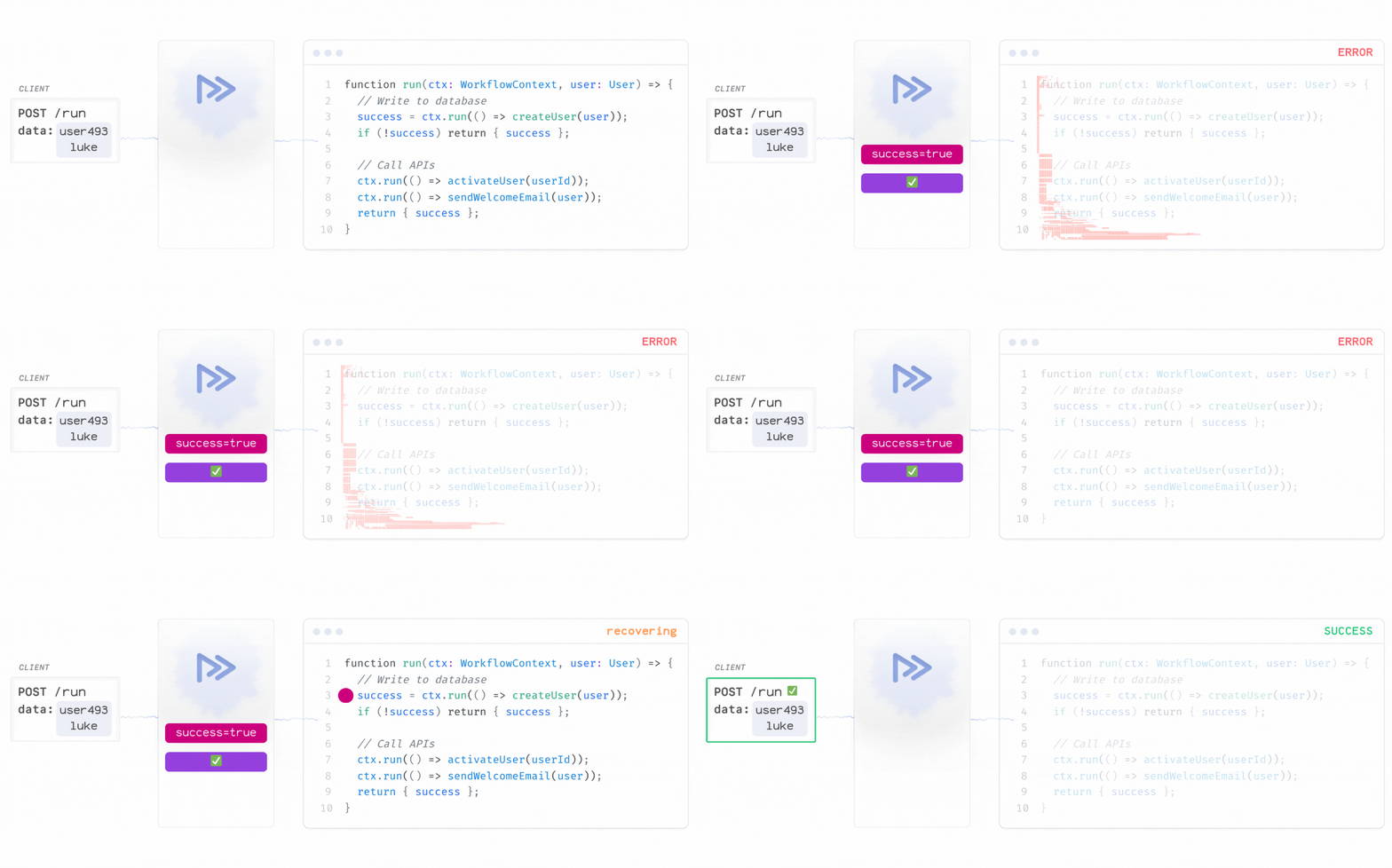
Restate uses Durable Execution to ensure your business logic survives any failure and resumes exactly where it left off. Unlike traditional workflow systems that require separate orchestrator infrastructure and worker management, Restate lets you deploy your workflows the same way you deploy your application code.
You write a workflow as a regular function. You use the Restate SDK to persist the steps your workflow completes in the Restate Server.
If your workflow crashes or restarts, the execution replays from the journal to restore state and continue processing:
 To persist a workflow step, you use the `WorkflowContext` actions:
* **Durable Steps**: Restate's run actions ensures non-deterministic operations like database writes or external API calls are persisted
* **Progress Recovery**: If the workflow crashes after user creation, it resumes at the email step
* **Observability**: Full execution traces for debugging and monitoring
Send a request for Alice:
To persist a workflow step, you use the `WorkflowContext` actions:
* **Durable Steps**: Restate's run actions ensures non-deterministic operations like database writes or external API calls are persisted
* **Progress Recovery**: If the workflow crashes after user creation, it resumes at the email step
* **Observability**: Full execution traces for debugging and monitoring
Send a request for Alice:
```bash theme={null}
curl localhost:8080/restate/call/SignupWorkflow/alicedoe/run \
--json '{"name": "Alice", "email": "alice@mail.com"}'
```
```bash theme={null}
curl localhost:8080/restate/call/SignupWorkflow/alicedoe/run \
--json '{"name": "Alice", "email": "alice@mail.com"}'
```
```bash theme={null}
curl localhost:8080/restate/call/SignupWorkflow/alicedoe/Run \
--json '{"name": "Alice", "email": "alice@mail.com"}'
```
```bash theme={null}
curl localhost:8080/restate/call/SignupWorkflow/alicedoe/run \
--json '{"name": "Alice", "email": "alice@mail.com"}'
```
Go to the UI at `http://localhost:9070`, on the invocations page, and click on the invocation ID of the retrying invocation:
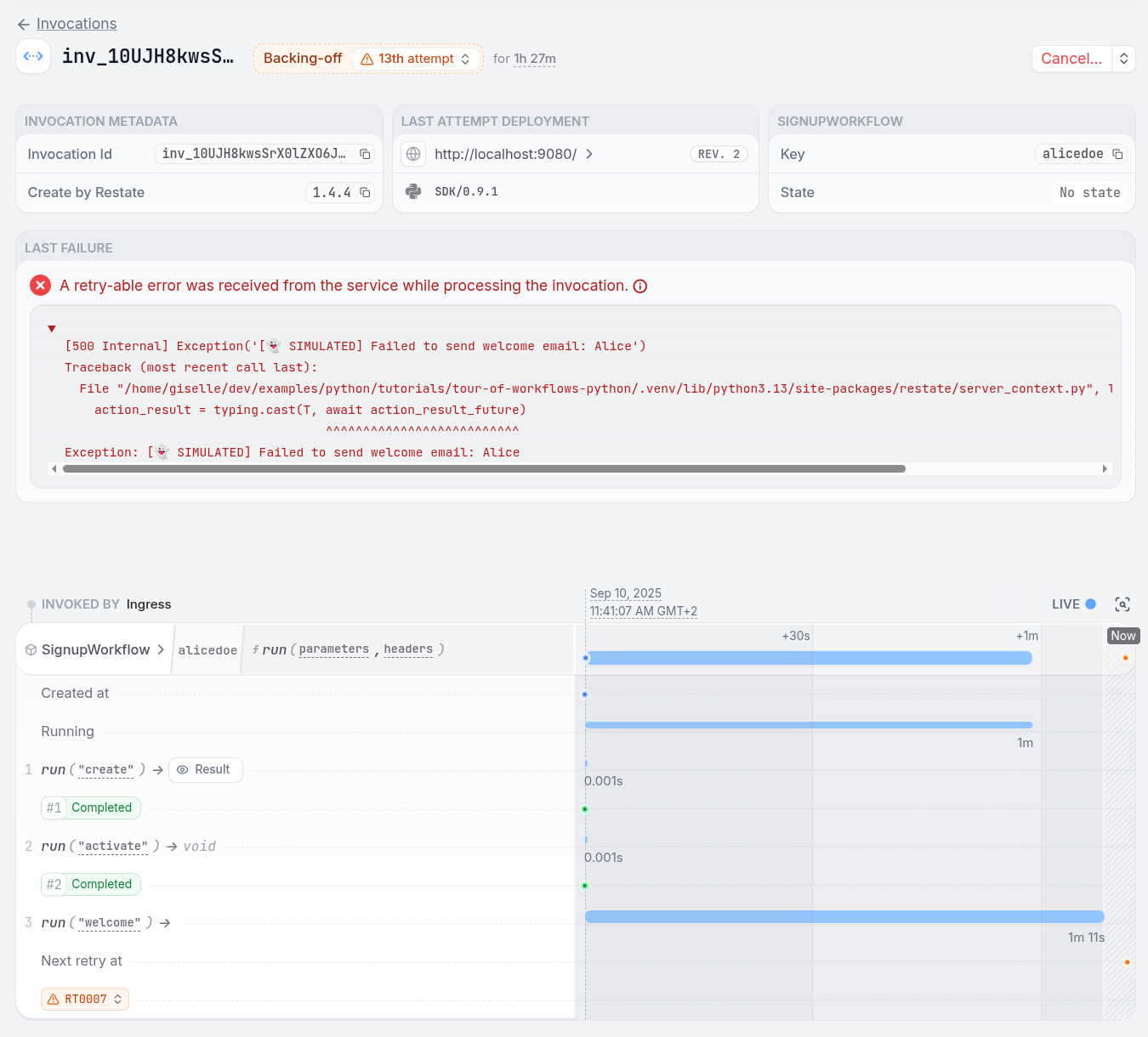 You see how the invocation went through the steps of the workflow, and how it is stuck on retrying to send the welcome email.
To fix the problem, remove the line `failOnAlice` from the `sendWelcomeEmail` function in the `utils.ts` file:
```ts utils.ts {"CODE_LOAD::https://raw.githubusercontent.com/restatedev/examples/refs/heads/main/typescript/tutorials/tour-of-workflows-typescript/src/utils.ts#here"} theme={null}
export function sendWelcomeEmail(user: User) {
failOnAlice(user.name, "send welcome email");
console.log(`Welcome email sent: ${user.email}`);
}
```
To fix the problem, remove the line `failOnAlice` from the `sendWelcomeEmail` function in the `Utils.java` file:
```java Utils.java {"CODE_LOAD::https://raw.githubusercontent.com/restatedev/examples/refs/heads/main/java/tutorials/tour-of-workflows-java/src/main/java/my/example/utils/Utils.java#here"} theme={null}
private static void terminalErrorOnAlice(String name, String action) {
if ("Alice".equals(name)) {
String message =
"[👻 SIMULATED] Failed to " + action + " for " + name + ": not available in this country";
System.err.println(message);
throw new TerminalException(message);
}
}
```
To fix the problem, remove the line `failOnAlice` from the `sendWelcomeEmail` function in the `utils.go` file:
```go utils.go {"CODE_LOAD::https://raw.githubusercontent.com/restatedev/examples/refs/heads/main/go/tutorials/tour-of-workflows-go/examples/utils.go#here"} theme={null}
func SendWelcomeEmail(user User) (restate.Void, error) {
if err := failOnAlice(user.Name, "send welcome email"); err != nil {
return restate.Void{}, err
}
fmt.Printf("Welcome email sent: %s\n", user.Email)
return restate.Void{}, nil
}
```
To fix the problem, remove the line `fail_on_alice` from the `send_welcome_email` function in the `utils.py` file:
```python utils.py {"CODE_LOAD::https://raw.githubusercontent.com/restatedev/examples/refs/heads/main/python/tutorials/tour-of-workflows-python/app/utils.py#here"} theme={null}
def send_welcome_email(user: User):
fail_on_alice(user.name, "send welcome email")
print(f"Welcome email sent: {user.email}")
```
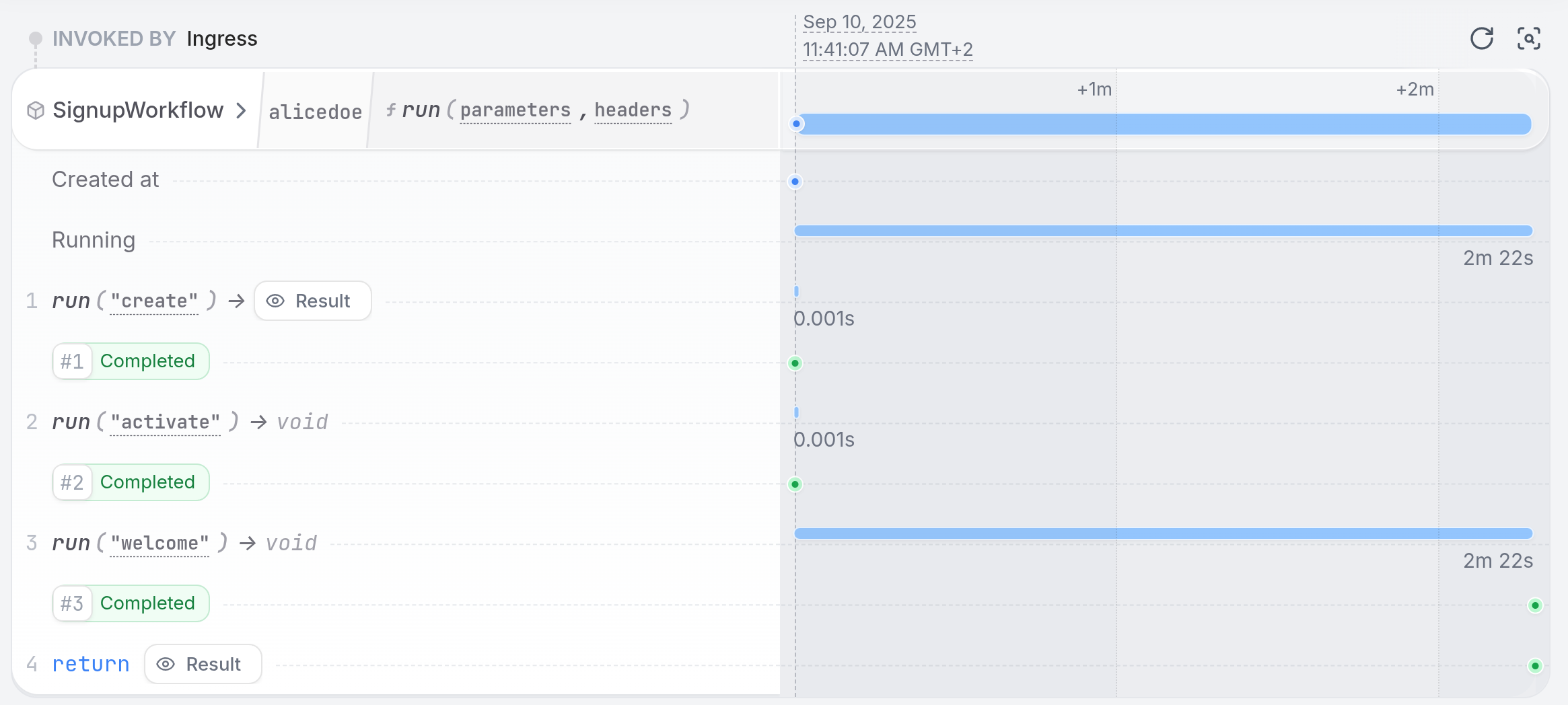
Once you restart the service, the workflow finishes successfully:
 ## In-line Steps vs. Separate Activities
Restate workflows can execute operations inline or delegate to separate services, giving you flexibility in how you structure your applications.
* **In-line Steps** - Execute directly in the workflow, for example a run block.
* **Separate Activities** - Call dedicated services for independent scaling, separation of concerns, or different concurrency requirements.
## In-line Steps vs. Separate Activities
Restate workflows can execute operations inline or delegate to separate services, giving you flexibility in how you structure your applications.
* **In-line Steps** - Execute directly in the workflow, for example a run block.
* **Separate Activities** - Call dedicated services for independent scaling, separation of concerns, or different concurrency requirements.
```ts signup-with-activities.ts {"CODE_LOAD::https://raw.githubusercontent.com/restatedev/examples/refs/heads/main/typescript/tutorials/tour-of-workflows-typescript/src/workflows/signup-with-activities.ts#activities"} theme={null}
// Move user DB interaction to dedicated service
const success = await ctx
.serviceClient(userService)
.createUser({ userId, user });
if (!success) return { success };
// Execute other steps inline
await ctx.run("activate", () => activateUser(userId));
await ctx.run("welcome", () => sendWelcomeEmail(user));
```
```java SignupWithActivitiesWorkflow.java {"CODE_LOAD::https://raw.githubusercontent.com/restatedev/examples/refs/heads/main/java/tutorials/tour-of-workflows-java/src/main/java/my/example/workflows/SignupWithActivitiesWorkflow.java#activities"} theme={null}
// Move user DB interaction to dedicated service
boolean success = true;
UserServiceClient.fromContext(ctx).createUser(new CreateUserRequest(userId, user)).await();
if (!success) {
return false;
}
// Execute other steps inline
ctx.run("activate", () -> activateUser(userId));
ctx.run("welcome", () -> sendWelcomeEmail(user));
```
```go activities.go {"CODE_LOAD::https://raw.githubusercontent.com/restatedev/examples/refs/heads/main/go/tutorials/tour-of-workflows-go/examples/activities.go#activities"} theme={null}
// Move user DB interaction to dedicated service
success, err := restate.Service[bool](ctx, "UserService", "CreateUser").
Request(CreateUserRequest{UserID: userID, User: user})
if err != nil || !success {
return false, err
}
// Execute other steps inline
_, err = restate.Run(ctx, func(ctx restate.RunContext) (restate.Void, error) {
return ActivateUser(userID)
}, restate.WithName("activate"))
if err != nil {
return false, err
}
_, err = restate.Run(ctx, func(ctx restate.RunContext) (restate.Void, error) {
return SendWelcomeEmail(user)
}, restate.WithName("welcome"))
if err != nil {
return false, err
}
```
```python signup_with_activities.py {"CODE_LOAD::https://raw.githubusercontent.com/restatedev/examples/refs/heads/main/python/tutorials/tour-of-workflows-python/app/workflows/signup_with_activities.py#activities"} theme={null}
# Move user DB interaction to dedicated service
success = await ctx.service_call(
create_user_handler, arg=CreateUserRequest(user_id=user_id, user=user)
)
if not success:
return False
# Execute other steps inline
await ctx.run_typed("activate", activate_user, user_id=user_id)
await ctx.run_typed("welcome", send_welcome_email, user=user)
```
You can also use this to nest workflows. The main workflow can call other workflows as activities.
Workflows are just one of the service types Restate supports. The other service types are:
* [Services](/foundations/services): collections of independent handlers which get executed with Durable Execution.
* [Virtual Objects](/foundations/services): stateful services that can be used to manage state and concurrency across multiple invocations.
To learn more, follow at the [Microservice Orchestration Tour](/tour/microservice-orchestration).
Submit the workflow:
```bash theme={null}
curl localhost:8080/restate/call/SignupWithActivitiesWorkflow/carl/run \
--json '{"name": "Carl", "email": "carl@mail.com"}'
```
```bash theme={null}
curl localhost:8080/restate/call/SignupWithActivitiesWorkflow/carl/run \
--json '{"name": "Carl", "email": "carl@mail.com"}'
```
```bash theme={null}
curl localhost:8080/restate/call/SignupWithActivitiesWorkflow/carl/Run \
--json '{"name": "Carl", "email": "carl@mail.com"}'
```
```bash theme={null}
curl localhost:8080/restate/call/SignupWithActivitiesWorkflow/carl/run \
--json '{"name": "Carl", "email": "carl@mail.com"}'
```
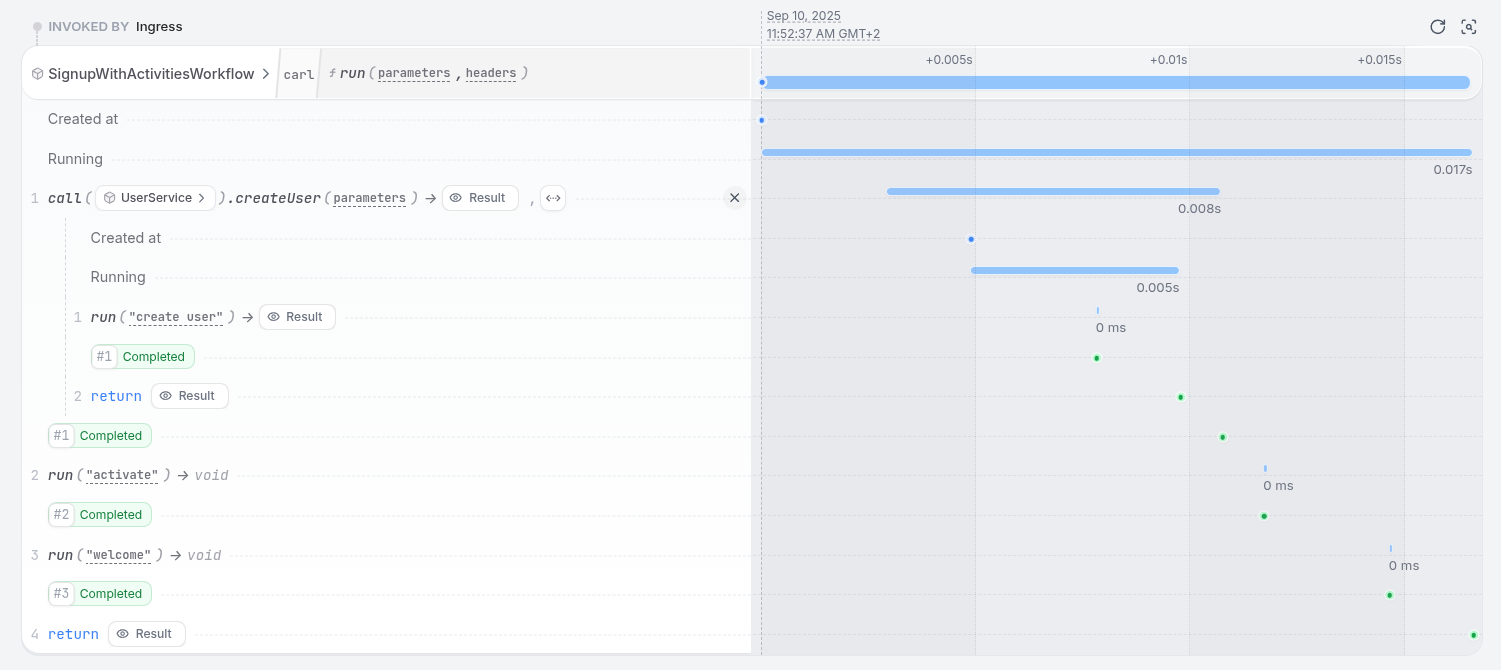
In the UI, you can see how the invocation called another service called user service:
 ## Workflow Patterns
Restate provides powerful patterns for building complex workflows using familiar programming constructs.
### Querying Workflow State
Workflows can store state in Restate, which can be queried later by other handlers:
## Workflow Patterns
Restate provides powerful patterns for building complex workflows using familiar programming constructs.
### Querying Workflow State
Workflows can store state in Restate, which can be queried later by other handlers:
```ts signup-with-queries.ts {"CODE_LOAD::https://raw.githubusercontent.com/restatedev/examples/refs/heads/main/typescript/tutorials/tour-of-workflows-typescript/src/workflows/signup-with-queries.ts?collapse_prequel"} theme={null}
export const signupWithQueries = restate.workflow({
name: "SignupWithQueriesWorkflow",
handlers: {
run: async (ctx: WorkflowContext, user: User) => {
const userId = ctx.key;
ctx.set("user", user);
const success = await ctx.run("create", () => createUser(userId, user));
if (!success) {
ctx.set("status", "failed");
return { success };
}
ctx.set("status", "created");
await ctx.run("activate", () => activateUser(userId));
await ctx.run("welcome", () => sendWelcomeEmail(user));
return { success };
},
getStatus: async (ctx: WorkflowSharedContext) => {
return {
status: await ctx.get("status"),
user: await ctx.get("user"),
};
},
},
});
```
```java SignupWithQueriesWorkflow.java {"CODE_LOAD::https://raw.githubusercontent.com/restatedev/examples/refs/heads/main/java/tutorials/tour-of-workflows-java/src/main/java/my/example/workflows/SignupWithQueriesWorkflow.java?collapse_prequel"} theme={null}
@Workflow
public class SignupWithQueriesWorkflow {
private static final StateKey USER = StateKey.of("user", User.class);
private static final StateKey STATUS = StateKey.of("status", String.class);
@Workflow
public boolean run(WorkflowContext ctx, User user) {
String userId = ctx.key();
ctx.set(USER, user);
boolean success = ctx.run("create", Boolean.class, () -> createUser(userId, user));
if (!success) {
ctx.set(STATUS, "failed");
return false;
}
ctx.set(STATUS, "created");
ctx.run("activate", () -> activateUser(userId));
ctx.run("welcome", () -> sendWelcomeEmail(user));
return true;
}
@Shared
public StatusResponse getStatus(SharedWorkflowContext ctx) {
String status = ctx.get(STATUS).orElse("unknown");
User user = ctx.get(USER).orElse(null);
return new StatusResponse(status, user);
}
}
```
```go queries.go {"CODE_LOAD::https://raw.githubusercontent.com/restatedev/examples/refs/heads/main/go/tutorials/tour-of-workflows-go/examples/queries.go?collapse_prequel"} theme={null}
type SignupWithQueriesWorkflow struct{}
func (SignupWithQueriesWorkflow) Run(ctx restate.WorkflowContext, user User) (bool, error) {
userID := restate.Key(ctx)
restate.Set(ctx, "user", user)
success, err := restate.Run(ctx, func(ctx restate.RunContext) (bool, error) {
return CreateUser(userID, user)
}, restate.WithName("create"))
if err != nil || !success {
restate.Set(ctx, "status", "failed")
return false, err
}
restate.Set(ctx, "status", "created")
_, err = restate.Run(ctx, func(ctx restate.RunContext) (restate.Void, error) {
return ActivateUser(userID)
}, restate.WithName("activate"))
if err != nil {
return false, err
}
_, err = restate.Run(ctx, func(ctx restate.RunContext) (restate.Void, error) {
return SendWelcomeEmail(user)
}, restate.WithName("welcome"))
if err != nil {
return false, err
}
return success, nil
}
func (SignupWithQueriesWorkflow) GetStatus(ctx restate.WorkflowSharedContext) (StatusResponse, error) {
status, err := restate.Get[string](ctx, "status")
if err != nil {
return StatusResponse{}, err
}
user, err := restate.Get[User](ctx, "user")
if err != nil {
return StatusResponse{}, err
}
return StatusResponse{Status: &status, User: &user}, nil
}
```
```python signup_with_queries.py {"CODE_LOAD::https://raw.githubusercontent.com/restatedev/examples/refs/heads/main/python/tutorials/tour-of-workflows-python/app/workflows/signup_with_queries.py?collapse_prequel"} theme={null}
signup_with_queries = restate.Workflow("SignupWithQueriesWorkflow")
@signup_with_queries.main()
async def run(ctx: WorkflowContext, user: User) -> bool:
user_id = ctx.key()
ctx.set("user", user.model_dump())
success = await ctx.run_typed("create", create_user, user_id=user_id, user=user)
if not success:
ctx.set("status", "failed")
return False
ctx.set("status", "created")
await ctx.run_typed("activate", activate_user, user_id=user_id)
await ctx.run_typed("welcome", send_welcome_email, user=user)
return True
@signup_with_queries.handler("getStatus")
async def get_status(ctx: WorkflowSharedContext) -> StatusResponse:
return StatusResponse(status=await ctx.get("status"), user=await ctx.get("user"))
```
Key characteristics:
* State is isolated per workflow execution.
* State lives up to the duration of the workflow retention ([default one day](/services/configuration)).
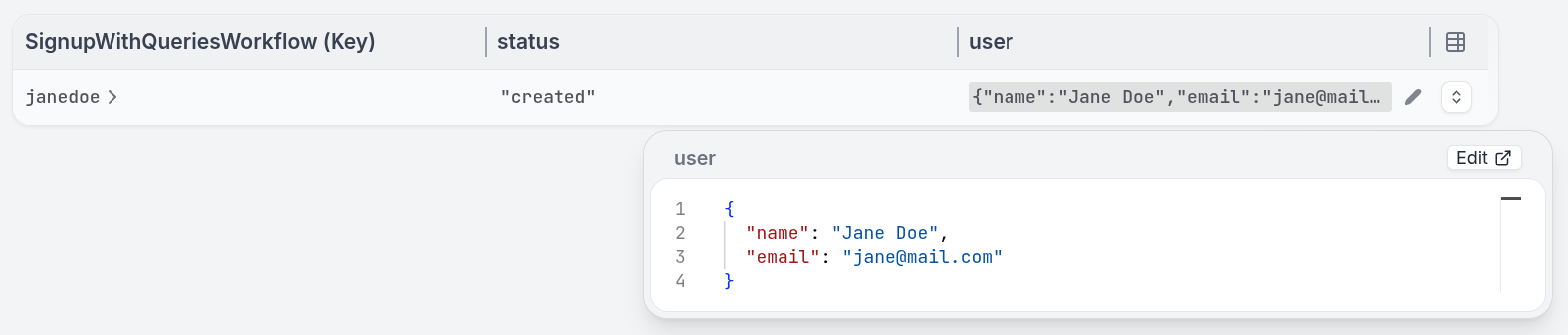
* State is queryable from other handlers or the Restate UI.
 Submit the workflow:
```bash theme={null}
curl localhost:8080/restate/call/SignupWithQueriesWorkflow/janedoe/run \
--json '{"name": "Jane Doe", "email": "jane@mail.com"}'
```
```bash theme={null}
curl localhost:8080/restate/call/SignupWithQueriesWorkflow/janedoe/run \
--json '{"name": "Jane Doe", "email": "jane@mail.com"}'
```
```bash theme={null}
curl localhost:8080/restate/call/SignupWithQueriesWorkflow/janedoe/Run \
--json '{"name": "Jane Doe", "email": "jane@mail.com"}'
```
```bash theme={null}
curl localhost:8080/restate/call/SignupWithQueriesWorkflow/janedoe/run \
--json '{"name": "Jane Doe", "email": "jane@mail.com"}'
```
In the UI, look at the state tab and filter on the `SignupWithQueriesWorkflow`.
### Signaling
Pause workflow execution waiting for external events using durable promises:
```ts signup-with-signals.ts {"CODE_LOAD::https://raw.githubusercontent.com/restatedev/examples/refs/heads/main/typescript/tutorials/tour-of-workflows-typescript/src/workflows/signup-with-signals.ts?collapse_prequel"} theme={null}
export const signupWithSignals = restate.workflow({
name: "SignupWithSignalsWorkflow",
handlers: {
run: async (ctx: WorkflowContext, user: User) => {
const userId = ctx.key;
// Generate verification secret and send email
const secret = ctx.rand.uuidv4();
await ctx.run("verify", () =>
sendVerificationEmail(userId, user, secret),
);
// Wait for user to click verification link
const clickedSecret = await ctx.promise("email-verified");
return { success: clickedSecret === secret };
},
verifyEmail: async (
ctx: WorkflowSharedContext,
req: { secret: string },
) => {
// Resolve the promise to continue the main workflow
await ctx.promise("email-verified").resolve(req.secret);
},
},
});
```
```java SignupWithSignalsWorkflow.java {"CODE_LOAD::https://raw.githubusercontent.com/restatedev/examples/refs/heads/main/java/tutorials/tour-of-workflows-java/src/main/java/my/example/workflows/SignupWithSignalsWorkflow.java?collapse_prequel"} theme={null}
@Workflow
public class SignupWithSignalsWorkflow {
private static final DurablePromiseKey EMAIL_VERIFIED_PROMISE =
DurablePromiseKey.of("email-verified", String.class);
@Workflow
public boolean run(WorkflowContext ctx, User user) {
String userId = ctx.key();
// Generate verification secret and send email
String secret = ctx.random().nextUUID().toString();
ctx.run("verify", () -> sendVerificationEmail(userId, user, secret));
// Wait for user to click verification link
String clickedSecret = ctx.promise(EMAIL_VERIFIED_PROMISE).future().await();
return secret.equals(clickedSecret);
}
@Shared
public void verifyEmail(SharedWorkflowContext ctx, VerifyEmailRequest req) {
ctx.promiseHandle(EMAIL_VERIFIED_PROMISE).resolve(req.secret());
}
}
```
```go signals.go {"CODE_LOAD::https://raw.githubusercontent.com/restatedev/examples/refs/heads/main/go/tutorials/tour-of-workflows-go/examples/signals.go?collapse_prequel"} theme={null}
type SignupWithSignalsWorkflow struct{}
func (SignupWithSignalsWorkflow) Run(ctx restate.WorkflowContext, user User) (bool, error) {
userID := restate.Key(ctx)
// Generate verification secret and send email
secret := restate.UUID(ctx).String()
_, err := restate.Run(ctx, func(ctx restate.RunContext) (restate.Void, error) {
return SendVerificationEmail(userID, user, secret)
}, restate.WithName("verify"))
if err != nil {
return false, err
}
// Wait for user to click verification link
clickedSecret, err := restate.Promise[string](ctx, "email-verified").Result()
if err != nil {
return false, err
}
return clickedSecret == secret, nil
}
func (SignupWithSignalsWorkflow) VerifyEmail(ctx restate.WorkflowSharedContext, req VerifyEmailRequest) error {
// Resolve the promise to continue the main workflow
return restate.Promise[string](ctx, "email-verified").Resolve(req.Secret)
}
```
```python signup_with_signals.py {"CODE_LOAD::https://raw.githubusercontent.com/restatedev/examples/refs/heads/main/python/tutorials/tour-of-workflows-python/app/workflows/signup_with_signals.py?collapse_prequel"} theme={null}
signup_with_signals = restate.Workflow("SignupWithSignalsWorkflow")
@signup_with_signals.main()
async def run(ctx: WorkflowContext, user: User) -> bool:
user_id = ctx.key()
# Generate verification secret and send email
secret = str(ctx.uuid())
await ctx.run_typed(
"verify",
send_verification_email,
user_id=user_id,
user=user,
verification_secret=secret,
)
# Wait for user to click verification link
clicked_secret = await ctx.promise("email-verified", type_hint=str).value()
return clicked_secret == secret
@signup_with_signals.handler("verifyEmail")
async def verify_email(ctx: WorkflowSharedContext, req: VerifyEmailRequest) -> None:
# Resolve the promise to continue the main workflow
await ctx.promise("email-verified", type_hint=str).resolve(req.secret)
```
The promise can survive restarts and crashes, and can be recovered on another process.
You can use Restate's Durable Promises to handle asynchronous events without complex message queues or external state management.
Promises can be resolved before the workflow waits for them, avoiding complex synchronization issues.
Submit the workflow asynchronously with the `send` verb:
```bash theme={null}
curl localhost:8080/restate/send/SignupWithSignalsWorkflow/johndoe/run \
--json '{"name": "John Doe", "email": "john@mail.com"}'
```
```bash theme={null}
curl localhost:8080/restate/send/SignupWithSignalsWorkflow/johndoe/run \
--json '{"name": "John Doe", "email": "john@mail.com"}'
```
```bash theme={null}
curl localhost:8080/restate/send/SignupWithSignalsWorkflow/johndoe/Run \
--json '{"name": "John Doe", "email": "john@mail.com"}'
```
```bash theme={null}
curl localhost:8080/restate/send/SignupWithSignalsWorkflow/johndoe/run \
--json '{"name": "John Doe", "email": "john@mail.com"}'
```
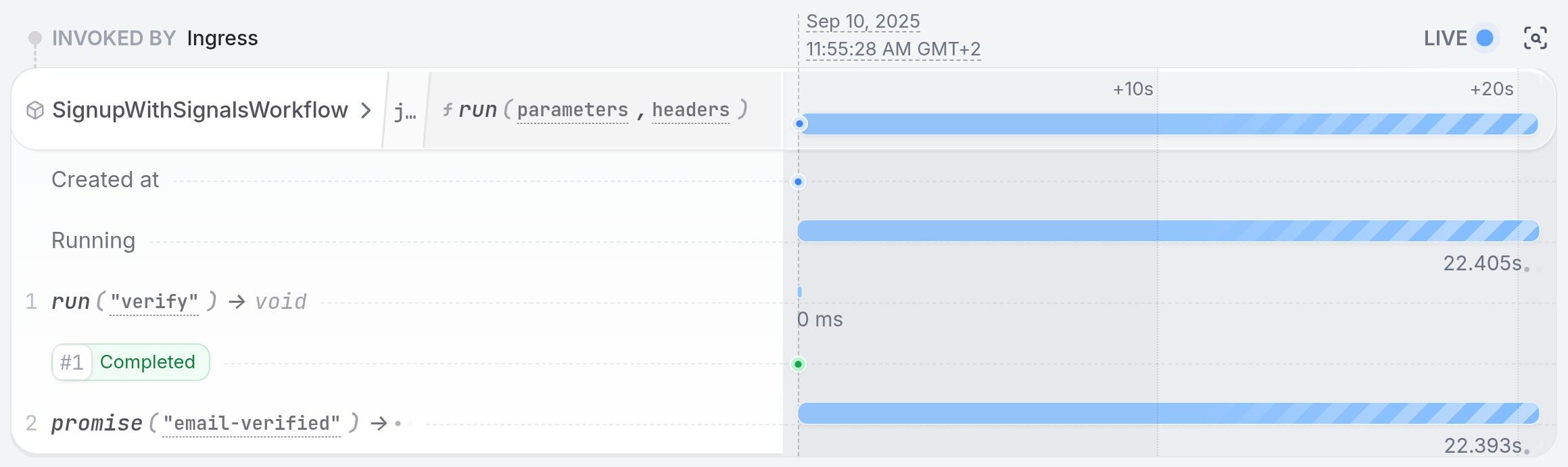
In the UI, you can see the workflow waiting for the `email-verified` promise to be resolved.
 Try killing the service and restarting it. The workflow will continue waiting for the promise to be resolved.
To resolve the promise, **copy over the curl request from the service logs**, which looks like this:
Try killing the service and restarting it. The workflow will continue waiting for the promise to be resolved.
To resolve the promise, **copy over the curl request from the service logs**, which looks like this:
```bash theme={null}
curl localhost:8080/restate/call/SignupWithSignalsWorkflow/johndoe/verifyEmail \
--json '{"secret": "the-secret-from-email"}'
```
```bash theme={null}
curl localhost:8080/restate/call/SignupWithSignalsWorkflow/johndoe/verifyEmail \
--json '{"secret": "the-secret-from-email"}'
```
```bash theme={null}
curl localhost:8080/restate/call/SignupWithSignalsWorkflow/johndoe/VerifyEmail \
--json '{"secret": "the-secret-from-email"}'
```
```bash theme={null}
curl localhost:8080/restate/call/SignupWithSignalsWorkflow/johndoe/verifyEmail \
--json '{"secret": "the-secret-from-email"}'
```
Now the UI will show the workflow completed successfully.
### Workflow Events
You can also use promises the other way around: to send events from the workflow and wait on them in one of the other handlers:
```ts signup-with-events.ts {"CODE_LOAD::https://raw.githubusercontent.com/restatedev/examples/refs/heads/main/typescript/tutorials/tour-of-workflows-typescript/src/workflows/signup-with-events.ts?collapse_prequel"} theme={null}
export const signupWithEvents = restate.workflow({
name: "SignupWithEventsWorkflow",
handlers: {
run: async (ctx: WorkflowContext, user: User) => {
const userId = ctx.key;
const success = await ctx.run("create", () => createUser(userId, user));
if (!success) {
await ctx.promise("user-created").reject("Creation failed.");
return { success };
}
await ctx.promise("user-created").resolve("User created.");
await ctx.run("activate", () => activateUser(userId));
await ctx.run("welcome", () => sendWelcomeEmail(user));
return { success };
},
waitForUserCreation: async (ctx: WorkflowSharedContext) => {
return ctx.promise("user-created");
},
},
});
```
```java SignupWithEventsWorkflow.java {"CODE_LOAD::https://raw.githubusercontent.com/restatedev/examples/refs/heads/main/java/tutorials/tour-of-workflows-java/src/main/java/my/example/workflows/SignupWithEventsWorkflow.java?collapse_prequel"} theme={null}
@Workflow
public class SignupWithEventsWorkflow {
private static final DurablePromiseKey USER_CREATED_PROMISE =
DurablePromiseKey.of("user-created", String.class);
@Workflow
public boolean run(WorkflowContext ctx, User user) {
String userId = ctx.key();
boolean success = ctx.run("create", Boolean.class, () -> createUser(userId, user));
if (!success) {
ctx.promiseHandle(USER_CREATED_PROMISE).reject("Creation failed.");
return false;
}
ctx.promiseHandle(USER_CREATED_PROMISE).resolve("User created.");
ctx.run("activate", () -> activateUser(userId));
ctx.run("welcome", () -> sendWelcomeEmail(user));
return true;
}
@Shared
public String waitForUserCreation(SharedWorkflowContext ctx) {
return ctx.promise(USER_CREATED_PROMISE).future().await();
}
}
```
```go events.go {"CODE_LOAD::https://raw.githubusercontent.com/restatedev/examples/refs/heads/main/go/tutorials/tour-of-workflows-go/examples/events.go?collapse_prequel"} theme={null}
type SignupWithEventsWorkflow struct{}
func (SignupWithEventsWorkflow) Run(ctx restate.WorkflowContext, user User) (bool, error) {
userID := restate.Key(ctx)
success, err := restate.Run(ctx, func(ctx restate.RunContext) (bool, error) {
return CreateUser(userID, user)
}, restate.WithName("create"))
if err != nil || !success {
err = restate.Promise[string](ctx, "user-created").Reject(fmt.Errorf("creation failed"))
return false, err
}
if err := restate.Promise[string](ctx, "user-created").Resolve("User created."); err != nil {
return false, err
}
_, err = restate.Run(ctx, func(ctx restate.RunContext) (restate.Void, error) {
return ActivateUser(userID)
}, restate.WithName("activate"))
if err != nil {
return false, err
}
_, err = restate.Run(ctx, func(ctx restate.RunContext) (restate.Void, error) {
return SendWelcomeEmail(user)
}, restate.WithName("welcome"))
if err != nil {
return false, err
}
return true, nil
}
func (SignupWithEventsWorkflow) WaitForUserCreation(ctx restate.WorkflowSharedContext) (string, error) {
return restate.Promise[string](ctx, "user-created").Result()
}
```
```python signup_with_events.py {"CODE_LOAD::https://raw.githubusercontent.com/restatedev/examples/refs/heads/main/python/tutorials/tour-of-workflows-python/app/workflows/signup_with_events.py?collapse_prequel"} theme={null}
signup_with_events = restate.Workflow("SignupWithEventsWorkflow")
@signup_with_events.main()
async def run(ctx: WorkflowContext, user: User) -> bool:
user_id = ctx.key()
success = await ctx.run_typed("create", create_user, user_id=user_id, user=user)
if not success:
await ctx.promise("user-created").reject("Creation failed.")
return False
await ctx.promise("user-created", type_hint=str).resolve("User created.")
await ctx.run_typed("activate", activate_user, user_id=user_id)
await ctx.run_typed("welcome", send_welcome_email, user=user)
return True
@signup_with_events.handler("waitForUserCreation")
async def wait_for_user_creation(ctx: WorkflowSharedContext) -> str:
return await ctx.promise("user-created").value()
```
Here, external clients can wait for the user to be created in the database.
These handlers can be called up to the workflow's retention period ([default one day](/services/configuration#workflow-retention).
Submit the workflow asynchronously with the `send` verb:
```bash theme={null}
curl localhost:8080/restate/send/SignupWithEventsWorkflow/johndoe/run \
--json '{"name": "John Doe", "email": "john@mail.com"}'
```
Then wait for the user creation event:
```bash theme={null}
curl localhost:8080/restate/call/SignupWithEventsWorkflow/johndoe/waitForUserCreation
```
```bash theme={null}
curl localhost:8080/restate/send/SignupWithEventsWorkflow/johndoe/run \
--json '{"name": "John Doe", "email": "john@mail.com"}'
```
Then wait for the user creation event:
```bash theme={null}
curl localhost:8080/restate/call/SignupWithEventsWorkflow/johndoe/waitForUserCreation
```
```bash theme={null}
curl localhost:8080/restate/send/SignupWithEventsWorkflow/johndoe/Run \
--json '{"name": "John Doe", "email": "john@mail.com"}'
```
Then wait for the user creation event:
```bash theme={null}
curl localhost:8080/restate/call/SignupWithEventsWorkflow/johndoe/WaitForUserCreation
```
```bash theme={null}
curl localhost:8080/restate/send/SignupWithEventsWorkflow/johndoe/run \
--json '{"name": "John Doe", "email": "john@mail.com"}'
```
Then wait for the user creation event:
```bash theme={null}
curl localhost:8080/restate/call/SignupWithEventsWorkflow/johndoe/waitForUserCreation
```
You will get a response like `"User created."`. If the promise hadn't been resolved yet, the request will wait until it is.
### Timers and Scheduling
Use durable timers for long-running workflows with timeouts and retries:
```ts signup-with-timers.ts expandable {"CODE_LOAD::https://raw.githubusercontent.com/restatedev/examples/refs/heads/main/typescript/tutorials/tour-of-workflows-typescript/src/workflows/signup-with-timers.ts?collapse_prequel"} theme={null}
export const signupWithTimers = restate.workflow({
name: "SignupWithTimersWorkflow",
handlers: {
run: async (ctx: WorkflowContext, user: User) => {
const userId = ctx.key;
const secret = ctx.rand.uuidv4();
await ctx.run("verify", () =>
sendVerificationEmail(userId, user, secret),
);
const clickedPromise = ctx.promise("email-verified").get();
const verificationTimeout = ctx.sleep({ days: 1 });
while (true) {
const reminderTimer = ctx.sleep({ seconds: 15 });
// Wait for email verification, reminder timer or timeout
const result = await RestatePromise.race([
clickedPromise.map(() => "verified"),
reminderTimer.map(() => "reminder"),
verificationTimeout.map(() => "timeout"),
]);
switch (result) {
case "verified":
const clickedSecret = await clickedPromise;
return { success: clickedSecret === secret };
case "reminder":
await ctx.run("send reminder", () =>
sendReminderEmail(userId, user, secret),
);
break;
case "timeout":
throw new TerminalError(
"Email verification timed out after 24 hours",
);
}
}
},
verifyEmail: async (
ctx: WorkflowSharedContext,
req: { secret: string },
) => {
await ctx.promise("email-verified").resolve(req.secret);
},
},
});
```
```java SignupWithTimersWorkflow.java {"CODE_LOAD::https://raw.githubusercontent.com/restatedev/examples/refs/heads/main/java/tutorials/tour-of-workflows-java/src/main/java/my/example/workflows/SignupWithTimersWorkflow.java?collapse_prequel"} theme={null}
@Workflow
public class SignupWithTimersWorkflow {
private static final DurablePromiseKey EMAIL_VERIFIED_PROMISE =
DurablePromiseKey.of("email-verified", String.class);
@Workflow
public boolean run(WorkflowContext ctx, User user) {
String userId = ctx.key();
var confirmationFuture = ctx.promise(EMAIL_VERIFIED_PROMISE).future();
var secret = ctx.random().nextUUID().toString();
ctx.run("verify", () -> sendVerificationEmail(userId, user, secret));
var verificationTimeout = ctx.timer(Duration.ofDays(1));
while (true) {
var reminderTimer = ctx.timer(Duration.ofSeconds(10));
var selected =
Select.select()
.when(confirmationFuture, res -> "verified")
.when(reminderTimer, unused -> "reminder")
.when(verificationTimeout, unused -> "timeout")
.await();
switch (selected) {
case "verified":
var clickedSecret = confirmationFuture.await();
return secret.equals(clickedSecret);
case "reminder":
ctx.run("send reminder", () -> sendReminderEmail(userId, user, secret));
break;
case "timeout":
throw new TerminalException("Verification timed out");
}
}
}
@Shared
public void verifyEmail(SharedWorkflowContext ctx, VerifyEmailRequest req) {
ctx.promiseHandle(EMAIL_VERIFIED_PROMISE).resolve(req.secret());
}
}
```
```go timers.go {"CODE_LOAD::https://raw.githubusercontent.com/restatedev/examples/refs/heads/main/go/tutorials/tour-of-workflows-go/examples/timers.go?collapse_prequel"} theme={null}
type SignupWithTimersWorkflow struct{}
func (SignupWithTimersWorkflow) Run(ctx restate.WorkflowContext, user User) (bool, error) {
userID := restate.Key(ctx)
secret := restate.UUID(ctx).String()
_, err := restate.Run(ctx, func(ctx restate.RunContext) (restate.Void, error) {
return SendVerificationEmail(userID, user, secret)
}, restate.WithName("verify"))
if err != nil {
return false, err
}
clickedPromise := restate.Promise[string](ctx, "email-verified")
verificationTimeoutFuture := restate.After(ctx, 24*time.Hour)
for {
reminderTimerFuture := restate.After(ctx, 15*time.Second)
// Create futures for racing
resFut, err := restate.WaitFirst(ctx,
clickedPromise,
reminderTimerFuture,
verificationTimeoutFuture,
)
if err != nil {
return false, err
}
switch resFut {
case clickedPromise:
clickedSecret, err := clickedPromise.Result()
if err != nil {
return false, err
}
return clickedSecret == secret, nil
case reminderTimerFuture:
_, err = restate.Run(ctx, func(ctx restate.RunContext) (restate.Void, error) {
return SendReminderEmail(userID, user, secret)
}, restate.WithName("send reminder"))
if err != nil {
return false, err
}
break // Break out the switch to continue the main loop
case verificationTimeoutFuture:
return false, restate.TerminalError(fmt.Errorf("email verification timed out after 24 hours"))
}
}
}
func (SignupWithTimersWorkflow) VerifyEmail(ctx restate.WorkflowSharedContext, req VerifyEmailRequest) error {
return restate.Promise[string](ctx, "email-verified").Resolve(req.Secret)
}
```
```python signup_with_timers.py {"CODE_LOAD::https://raw.githubusercontent.com/restatedev/examples/refs/heads/main/python/tutorials/tour-of-workflows-python/app/workflows/signup_with_timers.py?collapse_prequel"} theme={null}
signup_with_timers = restate.Workflow("SignupWithTimersWorkflow")
@signup_with_timers.main()
async def run(ctx: WorkflowContext, user: User) -> bool:
user_id = ctx.key()
secret = str(ctx.uuid())
await ctx.run_typed(
"verify",
send_verification_email,
user_id=user_id,
user=user,
verification_secret=secret,
)
clicked_promise = ctx.promise("email-verified", type_hint=str)
verification_timeout = ctx.sleep(timedelta(days=1))
while True:
reminder_timer = ctx.sleep(timedelta(seconds=15))
# Wait for email verification, reminder timer or timeout
result = await restate.select(
verification=clicked_promise.value(),
reminder=reminder_timer,
timeout=verification_timeout,
)
match result:
case ["verification", clicked_secret]:
return clicked_secret == secret
case ["reminder", _]:
await ctx.run_typed(
"remind",
send_reminder_email,
user_id=user_id,
user=user,
verification_secret=secret,
)
case ["timeout", _]:
raise TerminalError("Email verification timed out after 24 hours")
@signup_with_timers.handler("verifyEmail")
async def verify_email(ctx: WorkflowSharedContext, req: VerifyEmailRequest) -> None:
await ctx.promise("email-verified", type_hint=str).resolve(req.secret)
```
Because Restate lets you write workflows as regular functions, you can use your language's native constructs like `while`/`for` loops, `if` statements, and `switch` cases to control flow.
This makes it easy to implement complex logic with timers, loops, and conditional execution.
Submit the workflow asynchronously with the `send` verb:
```bash theme={null}
curl localhost:8080/restate/send/SignupWithTimersWorkflow/johndoe/run \
--json '{"name": "John Doe", "email": "john@mail.com"}'
```
```bash theme={null}
curl localhost:8080/restate/send/SignupWithTimersWorkflow/johndoe/run \
--json '{"name": "John Doe", "email": "john@mail.com"}'
```
```bash theme={null}
curl localhost:8080/restate/send/SignupWithTimersWorkflow/johndoe/Run \
--json '{"name": "John Doe", "email": "john@mail.com"}'
```
```bash theme={null}
curl localhost:8080/restate/send/SignupWithTimersWorkflow/johndoe/run \
--json '{"name": "John Doe", "email": "john@mail.com"}'
```
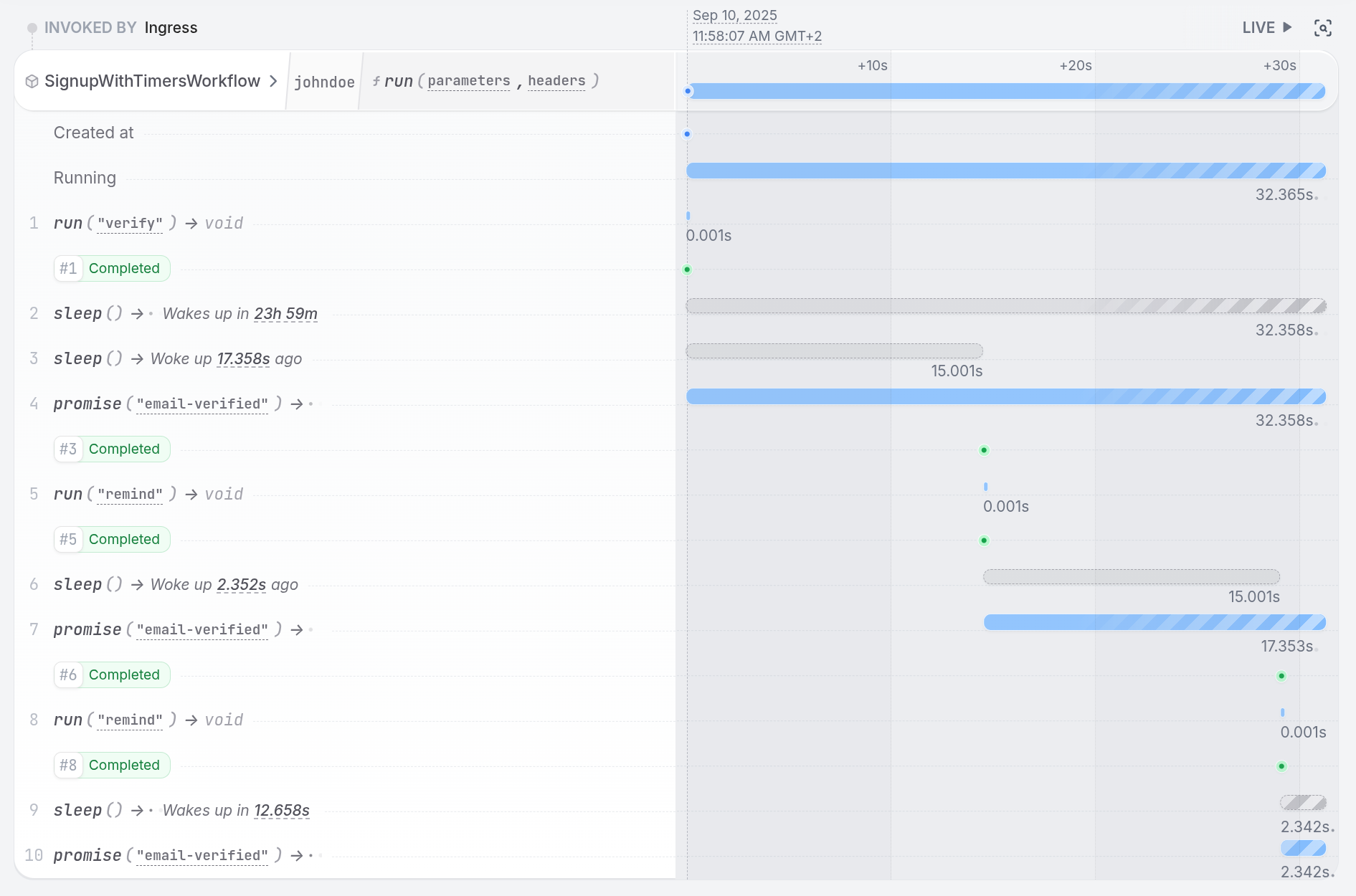
See in the UI how the workflow is waiting for the email verification to be resolved, and sends reminder emails every 15 seconds:
 Try killing the service and restarting it. The workflow will continue sending reminders as if it never stopped.
To resolve the promise, **copy over the curl request from the service logs**, which looks like this:
Try killing the service and restarting it. The workflow will continue sending reminders as if it never stopped.
To resolve the promise, **copy over the curl request from the service logs**, which looks like this:
```bash theme={null}
curl localhost:8080/restate/call/SignupWithTimersWorkflow/johndoe/verifyEmail \
--json '{"secret": "the-secret-from-email"}'
```
```bash theme={null}
curl localhost:8080/restate/call/SignupWithTimersWorkflow/johndoe/verifyEmail \
--json '{"secret": "the-secret-from-email"}'
```
```bash theme={null}
curl localhost:8080/restate/call/SignupWithTimersWorkflow/johndoe/verifyEmail \
--json '{"secret": "the-secret-from-email"}'
```
```bash theme={null}
curl localhost:8080/restate/call/SignupWithTimersWorkflow/johndoe/verifyEmail \
--json '{"secret": "the-secret-from-email"}'
```
Now the UI will show the workflow completed successfully.
### Parallel Execution
The timers example ran three operations in parallel: two timers and awaiting a promise.
Restate supports different ways of waiting for parallel operations to complete and takes care of retries and recovery for you.
Have a look at the Concurrent Tasks docs for your SDK to learn more ([TS](/develop/ts/concurrent-tasks) / [Java / Kotlin](/develop/java/concurrent-tasks) / [Python](/develop/python/concurrent-tasks) / [Go](/develop/go/concurrent-tasks)).
## Error Handling
By default, Restate retries failures infinitely with an exponential backoff strategy.
For some failures, you might not want to retry or only retry a limited number of times.
For these cases, Restate distinguishes between two types of errors: transient errors and terminal errors.
### Transient vs Terminal Errors
* **Transient errors**: These are temporary issues that can be retried, such as network timeouts or service unavailability. Restate automatically retries these errors.
* **Terminal errors**: These indicate a failure that will not be retried, such as invalid input or business logic violations. Restate stops execution and allows you to handle these errors gracefully.
Throw a terminal error in your handler to indicate a terminal failure:
```typescript {"CODE_LOAD::ts/src/tour/workflows/terminal_error.ts#terminal_error"} theme={null}
throw new TerminalError("Subscription plan not available");
```
```java {"CODE_LOAD::java/src/main/java/tour/workflows/WorkflowErrorHandler.java#here"} theme={null}
throw new TerminalException("Subscription plan not available");
```
```go {"CODE_LOAD::go/tour/workflows/errorhandling.go#here"} theme={null}
return restate.TerminalError(fmt.Errorf("subscription plan not available"))
```
```python {"CODE_LOAD::python/src/tour/workflows/terminal_error.py#here"} theme={null}
from restate.exceptions import TerminalError
raise TerminalError("Invalid credit card")
```
### Configuring Retry Behavior
You can limit the number of retries of a run block:
```ts signup-with-retries.ts {"CODE_LOAD::https://raw.githubusercontent.com/restatedev/examples/refs/heads/main/typescript/tutorials/tour-of-workflows-typescript/src/workflows/signup-with-retries.ts#retries"} theme={null}
try {
const retryPolicy = {
maxRetryAttempts: 3,
initialRetryInterval: { seconds: 1 },
};
await ctx.run("welcome", () => sendWelcomeEmail(user), retryPolicy);
} catch (error) {
// This gets hit on retry exhaustion with a terminal error
// Log and continue; without letting the workflow fail
console.error("Failed to send welcome email after retries:", error);
}
```
```java SignupWithRetriesWorkflow.java {"CODE_LOAD::https://raw.githubusercontent.com/restatedev/examples/refs/heads/main/java/tutorials/tour-of-workflows-java/src/main/java/my/example/workflows/SignupWithRetriesWorkflow.java#retries"} theme={null}
try {
RetryPolicy myRunRetryPolicy =
RetryPolicy.defaultPolicy()
.setInitialDelay(Duration.ofMillis(500))
.setExponentiationFactor(2)
.setMaxDelay(Duration.ofSeconds(10))
.setMaxAttempts(3)
.setMaxDuration(Duration.ofSeconds(30));
ctx.run("welcome", myRunRetryPolicy, () -> sendWelcomeEmail(user));
} catch (TerminalException error) {
// This gets hit on retry exhaustion with a terminal error
// Log and continue; without letting the workflow fail
System.err.println("Failed to send welcome email after retries: " + error.getMessage());
}
```
```go retries.go {"CODE_LOAD::https://raw.githubusercontent.com/restatedev/examples/refs/heads/main/go/tutorials/tour-of-workflows-go/examples/retries.go#retries"} theme={null}
_, err = restate.Run(ctx,
func(ctx restate.RunContext) (restate.Void, error) {
return SendWelcomeEmail(user)
},
restate.WithName("welcome"),
restate.WithMaxRetryAttempts(3),
restate.WithInitialRetryInterval(1000),
)
if err != nil {
// This gets hit on retry exhaustion with a terminal error
// Log and continue; without letting the workflow fail
fmt.Printf("Couldn't send the email due to terminal error %s", err)
}
```
```python signup_with_retries.py {"CODE_LOAD::https://raw.githubusercontent.com/restatedev/examples/refs/heads/main/python/tutorials/tour-of-workflows-python/app/workflows/signup_with_retries.py?collapse_prequel"} theme={null}
signup_with_retries = restate.Workflow("SignupWithRetriesWorkflow")
@signup_with_retries.main()
async def run(ctx: WorkflowContext, user: User) -> bool:
user_id = ctx.key()
success = await ctx.run_typed("create", create_user, user_id=user_id, user=user)
if not success:
return False
await ctx.run_typed("activate", activate_user, user_id=user_id)
# Configure retry policy
try:
await ctx.run_typed(
"welcome",
send_welcome_email,
restate.RunOptions(
max_attempts=3, max_retry_duration=timedelta(seconds=30)
),
user=user,
)
except TerminalError as error:
# This gets hit on retry exhaustion with a terminal error
# Log and continue; without letting the workflow fail
print(f"Failed to send welcome email after retries: {error}")
return True
```
When the retries are exhausted, the run block will throw a terminal error, that you can handle in your handler logic.
Submit the workflow for Alice:
```bash theme={null}
curl localhost:8080/restate/call/SignupWithRetriesWorkflow/alice/run \
--json '{"name": "Alice", "email": "alice@mail.com"}'
```
```bash theme={null}
curl localhost:8080/restate/call/SignupWithRetriesWorkflow/alice/run \
--json '{"name": "Alice", "email": "alice@mail.com"}'
```
```bash theme={null}
curl localhost:8080/restate/call/SignupWithRetriesWorkflow/alice/Run \
--json '{"name": "Alice", "email": "alice@mail.com"}'
```
```bash theme={null}
curl localhost:8080/restate/call/SignupWithRetriesWorkflow/alice/run \
--json '{"name": "Alice", "email": "alice@mail.com"}'
```
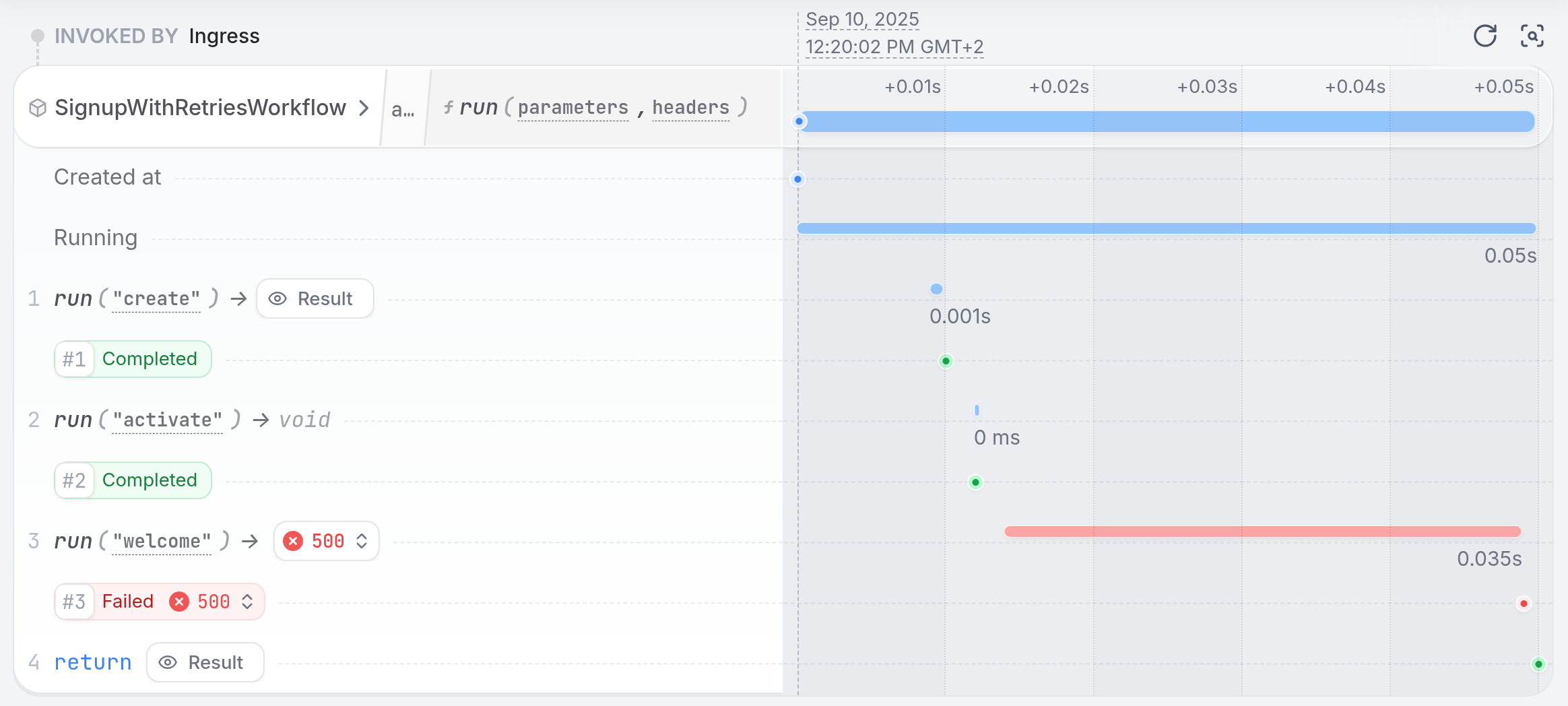
In the UI, you can see how the workflow is waiting for the `welcome` step to finish, and how it retries sending the welcome email up to 3 times across three seconds.
After three attempts, the workflow continues without failing:
 Learn more with the [Error Handling Guide](/guides/error-handling).
## Sagas and rollback
On a terminal failure, Restate stops the execution of the handler.
You might, however, want to roll back the changes made by the workflow to keep your system in a consistent state.
This is where Sagas come in.
Sagas are a pattern for rolling back changes made by a workflow when it fails.
In Restate, you can implement a saga by building a list of compensating actions for each step of the workflow.
On a terminal failure, you execute them in reverse order:
Learn more with the [Error Handling Guide](/guides/error-handling).
## Sagas and rollback
On a terminal failure, Restate stops the execution of the handler.
You might, however, want to roll back the changes made by the workflow to keep your system in a consistent state.
This is where Sagas come in.
Sagas are a pattern for rolling back changes made by a workflow when it fails.
In Restate, you can implement a saga by building a list of compensating actions for each step of the workflow.
On a terminal failure, you execute them in reverse order:
```ts signup-with-sagas.ts {"CODE_LOAD::https://raw.githubusercontent.com/restatedev/examples/refs/heads/main/typescript/tutorials/tour-of-workflows-typescript/src/workflows/signup-with-sagas.ts?collapse_prequel"} theme={null}
export const signupWithSagas = restate.workflow({
name: "SignupWithSagasWorkflow",
handlers: {
run: async (ctx: WorkflowContext, user: User) => {
const userId = ctx.key;
const compensations = [];
try {
compensations.push(() => ctx.run("delete", () => deleteUser(userId)));
await ctx.run("create", () => createUser(userId, user));
compensations.push(() =>
ctx.run("deactivate", () => deactivateUser(userId)),
);
await ctx
.run("activate", () => activateUser(userId))
.orTimeout({ minutes: 5 });
compensations.push(() =>
ctx.run("unsubscribe", () => cancelSubscription(user)),
);
await ctx.run("subscribe", () => subscribeToPaidPlan(user));
} catch (e) {
if (e instanceof restate.TerminalError) {
for (const compensation of compensations.reverse()) {
await compensation();
}
}
return { success: false };
}
return { success: true };
},
},
});
```
```java SignupWithSagasWorkflow.java {"CODE_LOAD::https://raw.githubusercontent.com/restatedev/examples/refs/heads/main/java/tutorials/tour-of-workflows-java/src/main/java/my/example/workflows/SignupWithSagasWorkflow.java?collapse_prequel"} theme={null}
@Workflow
public class SignupWithSagasWorkflow {
@Workflow
public boolean run(WorkflowContext ctx, User user) {
String userId = ctx.key();
List compensations = new ArrayList<>();
try {
compensations.add(() -> ctx.run("delete", () -> deleteUser(userId)));
ctx.run("create", () -> createUser(userId, user));
compensations.add(() -> ctx.run("deactivate", () -> deactivateUser(userId)));
ctx.run("activate", () -> activateUser(userId));
compensations.add(() -> ctx.run("unsubscribe", () -> cancelSubscription(user)));
ctx.run("subscribe", () -> subscribeToPaidPlan(user));
} catch (TerminalException e) {
// Run compensations in reverse order
Collections.reverse(compensations);
for (Runnable compensation : compensations) {
compensation.run();
}
return false;
}
return true;
}
}
```
```go sagas.go {"CODE_LOAD::https://raw.githubusercontent.com/restatedev/examples/refs/heads/main/go/tutorials/tour-of-workflows-go/examples/sagas.go?collapse_prequel"} theme={null}
type SagasWorkflow struct{}
func (SagasWorkflow) Run(ctx restate.WorkflowContext, user User) (res bool, err error) {
userID := restate.Key(ctx)
var compensations []func() error
defer func() {
// All errors that end up here are terminal errors, so run compensations
// (Retry-able errors got returned by the SDK without ending up here)
if err != nil {
for _, compensation := range slices.Backward(compensations) {
if compErr := compensation(); compErr != nil {
err = compErr
}
}
}
}()
// Add compensation for user creation
compensations = append(compensations, func() error {
_, err := restate.Run(ctx, func(ctx restate.RunContext) (restate.Void, error) {
return DeleteUser(userID)
})
return err
})
_, err = restate.Run(ctx, func(ctx restate.RunContext) (bool, error) {
return CreateUser(userID, user)
}, restate.WithName("create"))
if err != nil {
return false, err
}
// Add compensation for user activation
compensations = append(compensations, func() error {
_, err := restate.Run(ctx, func(ctx restate.RunContext) (restate.Void, error) {
return DeactivateUser(userID)
})
return err
})
_, err = restate.Run(ctx, func(ctx restate.RunContext) (restate.Void, error) {
return ActivateUser(userID)
})
if err != nil {
return false, err
}
// Add compensation for subscription
compensations = append(compensations, func() error {
_, err := restate.Run(ctx, func(ctx restate.RunContext) (restate.Void, error) {
return CancelSubscription(user)
})
return err
})
_, err = restate.Run(ctx, func(ctx restate.RunContext) (bool, error) {
return SubscribeToPaidPlan(user)
})
if err != nil {
return false, err
}
return true, nil
}
```
```python signup_with_sagas.py {"CODE_LOAD::https://raw.githubusercontent.com/restatedev/examples/refs/heads/main/python/tutorials/tour-of-workflows-python/app/workflows/signup_with_sagas.py?collapse_prequel"} theme={null}
signup_with_sagas = restate.Workflow("SignupWithSagasWorkflow")
@signup_with_sagas.main()
async def run(ctx: WorkflowContext, user: User) -> bool:
user_id = ctx.key()
compensations = []
try:
compensations.append(
lambda: ctx.run_typed("delete", delete_user, user_id=user_id)
)
await ctx.run_typed("create", create_user, user_id=user_id, user=user)
compensations.append(
lambda: ctx.run_typed("deactivate", deactivate_user, user_id=user_id)
)
await ctx.run_typed("activate", activate_user, user_id=user_id)
compensations.append(
lambda: ctx.run_typed("unsubscribe", cancel_subscription, user=user)
)
await ctx.run_typed("subscribe", subscribe_to_paid_plan, user=user)
except TerminalError:
# Run compensations in reverse order
for compensation in reversed(compensations):
await compensation()
return False
return True
```
**Benefits with Restate:**
* The list of compensations can be recovered after a crash, and Restate knows which compensations still need to be run.
* Sagas always run till completion (success or complete rollback)
* Full trace of all operations and compensations
* No complex state machines needed
Submit the workflow for Alice:
```bash theme={null}
curl localhost:8080/restate/call/SignupWithSagasWorkflow/alice/run \
--json '{"name": "Alice", "email": "alice@mail.com"}'
```
```bash theme={null}
curl localhost:8080/restate/call/SignupWithSagasWorkflow/alice/run \
--json '{"name": "Alice", "email": "alice@mail.com"}'
```
```bash theme={null}
curl localhost:8080/restate/call/SignupWithSagasWorkflow/alice/Run \
--json '{"name": "Alice", "email": "alice@mail.com"}'
```
```bash theme={null}
curl localhost:8080/restate/call/SignupWithSagasWorkflow/alice/run \
--json '{"name": "Alice", "email": "alice@mail.com"}'
```
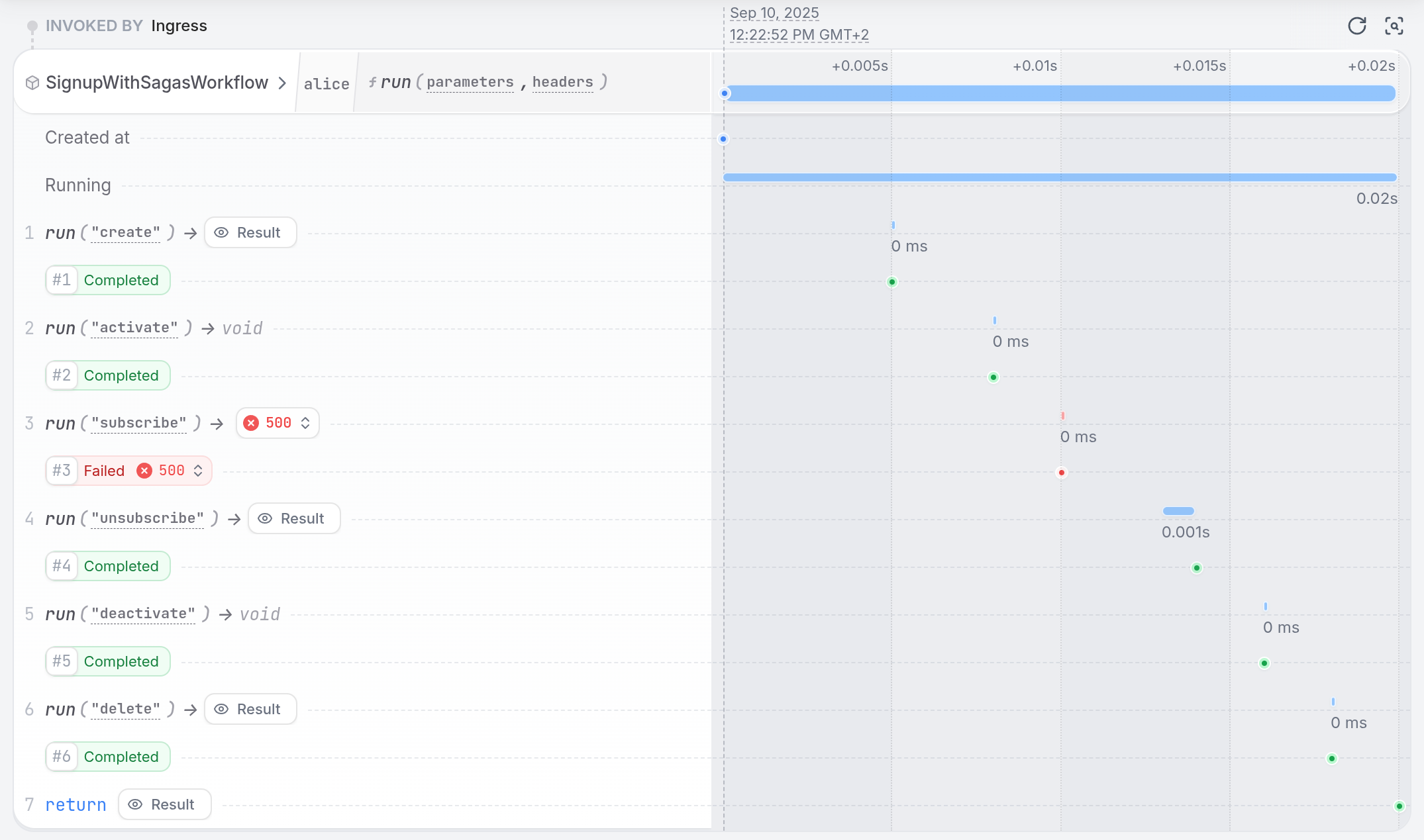
Alice is not able to get a subscription, so the workflow will fail and run compensations:
 Learn more with the [Sagas Guide](/guides/sagas).
## Cancellation
You can cancel user signup workflows via HTTP, CLI, UI, or programmatically from other services.
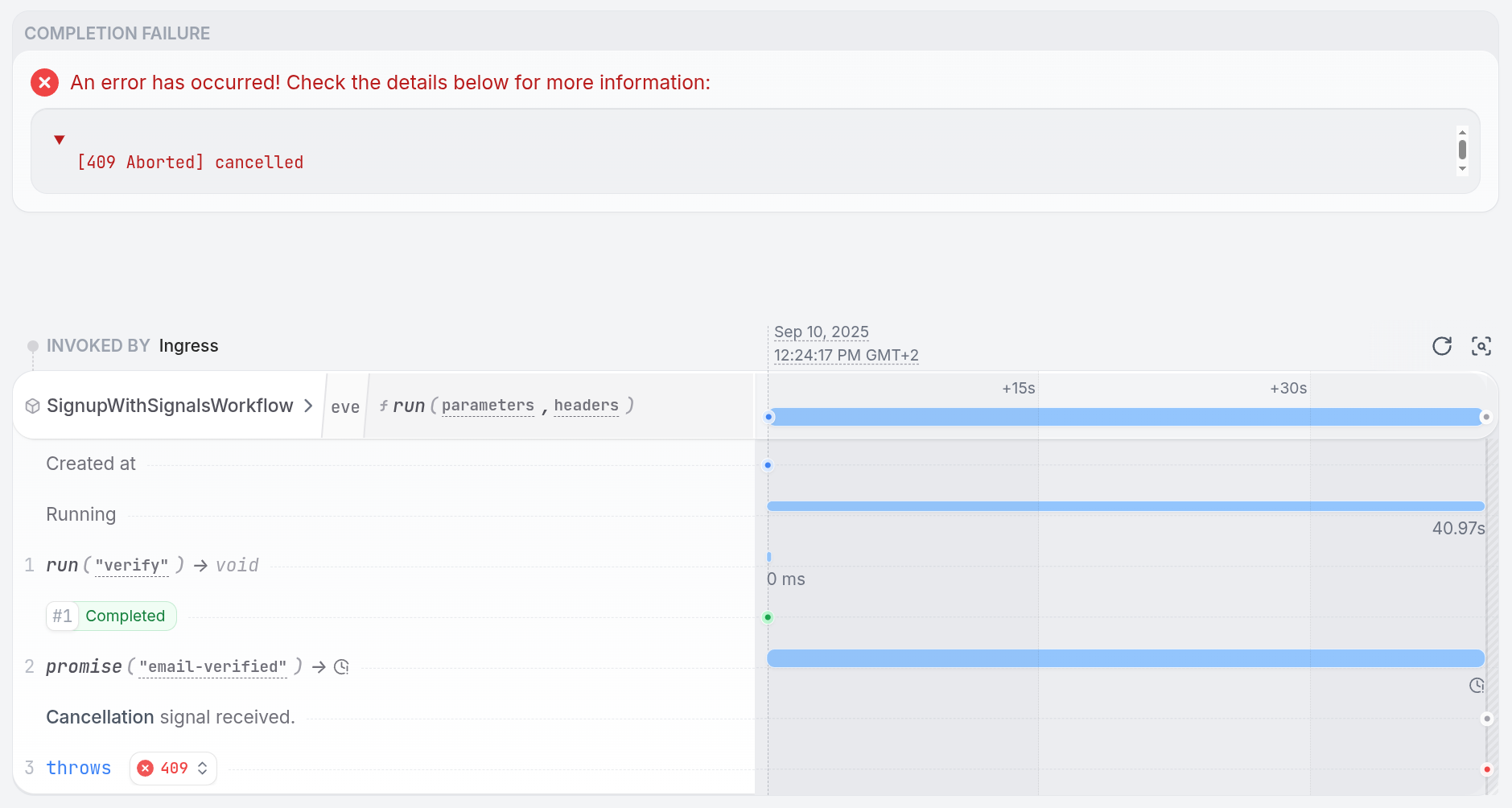
When you cancel a workflow, Restate stops the execution by throwing a Terminal Error.
This allows your handler to run compensating actions or clean up resources.
First, the cancellation gets propagated to the leaf nodes of the call tree (in case the workflow called other services or workflows).
Then, the cancellation propagates back up the tree, allowing each handler to run its compensations.
Start the workflow asynchronously with the `send` verb:
Learn more with the [Sagas Guide](/guides/sagas).
## Cancellation
You can cancel user signup workflows via HTTP, CLI, UI, or programmatically from other services.
When you cancel a workflow, Restate stops the execution by throwing a Terminal Error.
This allows your handler to run compensating actions or clean up resources.
First, the cancellation gets propagated to the leaf nodes of the call tree (in case the workflow called other services or workflows).
Then, the cancellation propagates back up the tree, allowing each handler to run its compensations.
Start the workflow asynchronously with the `send` verb:
```bash theme={null}
curl localhost:8080/restate/send/SignupWithSignalsWorkflow/eve/run \
--json '{"name": "Eve", "email": "eve@mail.com"}'
```
```bash theme={null}
curl localhost:8080/restate/send/SignupWithSignalsWorkflow/eve/run \
--json '{"name": "Eve", "email": "eve@mail.com"}'
```
```bash theme={null}
curl localhost:8080/restate/send/SignupWithSignalsWorkflow/eve/Run \
--json '{"name": "Eve", "email": "eve@mail.com"}'
```
```bash theme={null}
curl localhost:8080/restate/send/SignupWithSignalsWorkflow/eve/run \
--json '{"name": "Eve", "email": "eve@mail.com"}'
```
This returns the invocation ID, which you can use to cancel the workflow later via the UI, CLI or HTTP:
```bash CLI theme={null}
restate invocations cancel inv_1gdJBtdVEcM942bjcDmb1c1khoaJe11Hbz
```
```bash curl theme={null}
curl -X PATCH http://localhost:9070/invocations/inv_1gdJBtdVEcM942bjcDmb1c1khoaJe11Hbz/cancel
```
You can see the cancellation in the UI:
 Check out the SDK docs, to learn how to programmatically cancel a workflow from another service ([TS](/develop/ts/service-communication#cancel-an-invocation) / [Java / Kotlin](/develop/java/service-communication#cancel-an-invocation) / [Python](/develop/python/service-communication#cancel-an-invocation)/ [Go](/develop/go/service-communication#cancel-an-invocation)).
## Serverless Deployment
Restate lets you run your workflows and services on serverless platforms like AWS Lambda or Google Cloud Run.
Restate automatically suspends workflows when they are waiting for events or timers, and resumes them when the event occurs or the timer expires.
This means you can run long-running workflows on function-as-a-service platforms without paying for the wait time.
Turning your signup workflow into a serverless function is as simple as adapting the endpoint:
Check out the SDK docs, to learn how to programmatically cancel a workflow from another service ([TS](/develop/ts/service-communication#cancel-an-invocation) / [Java / Kotlin](/develop/java/service-communication#cancel-an-invocation) / [Python](/develop/python/service-communication#cancel-an-invocation)/ [Go](/develop/go/service-communication#cancel-an-invocation)).
## Serverless Deployment
Restate lets you run your workflows and services on serverless platforms like AWS Lambda or Google Cloud Run.
Restate automatically suspends workflows when they are waiting for events or timers, and resumes them when the event occurs or the timer expires.
This means you can run long-running workflows on function-as-a-service platforms without paying for the wait time.
Turning your signup workflow into a serverless function is as simple as adapting the endpoint:
```typescript {"CODE_LOAD::ts/src/tour/workflows/serving_lambda.ts#lambda"} theme={null}
import * as restate from "@restatedev/restate-sdk/lambda";
export const handler = restate.createEndpointHandler({
services: [signupWorkflow],
});
```
Learn more from the [serving docs](/develop/ts/serving).
```java {"CODE_LOAD::java/src/main/java/tour/workflows/WorkflowServingLambda.java#here"} theme={null}
import dev.restate.sdk.endpoint.Endpoint;
import dev.restate.sdk.lambda.BaseRestateLambdaHandler;
class MyLambdaHandler extends BaseRestateLambdaHandler {
@Override
public void register(Endpoint.Builder builder) {
builder.bind(new SignupWorkflow());
}
}
```
Learn more from the [serving docs](/develop/java/serving).
```go {"CODE_LOAD::go/tour/workflows/servinglambda.go#here"} theme={null}
handler, err := server.NewRestate().
Bind(restate.Reflect(SignupWorkflow{})).
Bidirectional(false).
LambdaHandler()
if err != nil {
log.Fatal(err)
}
lambda.Start(handler)
```
Learn more from the [serving docs](/develop/go/serving).
```python {"CODE_LOAD::python/src/tour/workflows/lambda_handler.py#here"} theme={null}
handler = restate.app(services=[signup_workflow])
```
Learn more from the [serving docs](/develop/python/serving).
## Summary
Restate workflows provide:
* **Natural Programming**: Write workflows as regular functions in your preferred language
* **Automatic Durability**: Built-in resilience without infrastructure complexity
* **Flexible Patterns**: State management, events, timers, and parallel execution
* **Modern Deployment**: Strong serverless support and simple single-binary deployment
With Restate, you can build complex, long-running workflows using familiar programming patterns while getting the durability you need.