

9080 and responds with You said hi to <name>! to a greet request.

Building with an AI coding agent?
- Migrating an existing application to Restate
- Building a new Restate service from scratch
 TypeScript
 Java
Java Kotlin
 Go
Go Python
 Rust
Rust
 Node.js
 Bun
Bun Deno
Deno Cloudflare Workers
 Next.js/Vercel
- NodeJS >= v22
Install Restate Server & CLI
- Homebrew
- Download binaries
- npm
- Docker
brew install restatedev/tap/restate-server restatedev/tap/restate
restate-server
BIN=/usr/local/bin && RESTATE_PLATFORM=x86_64-apple-darwin && \
curl -L --remote-name-all https://restate.gateway.scarf.sh/latest/restate-{server,cli}-$RESTATE_PLATFORM.tar.xz && \
tar -xvf restate-server-$RESTATE_PLATFORM.tar.xz --strip-components=1 restate-server-$RESTATE_PLATFORM/restate-server && \
tar -xvf restate-cli-$RESTATE_PLATFORM.tar.xz --strip-components=1 restate-cli-$RESTATE_PLATFORM/restate && \
chmod +x restate restate-server && \
sudo mv restate $BIN && \
sudo mv restate-server $BIN
BIN=/usr/local/bin && RESTATE_PLATFORM=aarch64-apple-darwin && \
curl -L --remote-name-all https://restate.gateway.scarf.sh/latest/restate-{server,cli}-$RESTATE_PLATFORM.tar.xz && \
tar -xvf restate-server-$RESTATE_PLATFORM.tar.xz --strip-components=1 restate-server-$RESTATE_PLATFORM/restate-server && \
tar -xvf restate-cli-$RESTATE_PLATFORM.tar.xz --strip-components=1 restate-cli-$RESTATE_PLATFORM/restate && \
chmod +x restate restate-server && \
sudo mv restate $BIN && \
sudo mv restate-server $BIN
BIN=$HOME/.local/bin && RESTATE_PLATFORM=x86_64-unknown-linux-musl && \
curl -L --remote-name-all https://restate.gateway.scarf.sh/latest/restate-{server,cli}-$RESTATE_PLATFORM.tar.xz && \
tar -xvf restate-server-$RESTATE_PLATFORM.tar.xz --strip-components=1 restate-server-$RESTATE_PLATFORM/restate-server && \
tar -xvf restate-cli-$RESTATE_PLATFORM.tar.xz --strip-components=1 restate-cli-$RESTATE_PLATFORM/restate && \
chmod +x restate restate-server && \
mv restate $BIN && \
mv restate-server $BIN
BIN=$HOME/.local/bin && RESTATE_PLATFORM=aarch64-unknown-linux-musl && \
curl -L --remote-name-all https://restate.gateway.scarf.sh/latest/restate-{server,cli}-$RESTATE_PLATFORM.tar.xz && \
tar -xvf restate-server-$RESTATE_PLATFORM.tar.xz --strip-components=1 restate-server-$RESTATE_PLATFORM/restate-server && \
tar -xvf restate-cli-$RESTATE_PLATFORM.tar.xz --strip-components=1 restate-cli-$RESTATE_PLATFORM/restate && \
chmod +x restate restate-server && \
mv restate $BIN && \
mv restate-server $BIN
restate-server
npm install --global @restatedev/restate-server@latest @restatedev/restate@latest
restate-server
docker run --name restate_dev --rm \
-p 8080:8080 -p 9070:9070 -p 9071:9071 \
--add-host=host.docker.internal:host-gateway \
docker.restate.dev/restatedev/restate:latest
docker run -it --network=host \
docker.restate.dev/restatedev/restate-cli:latest \
invocations ls
invocations ls with any CLI subcommand.http://localhost:9070) after starting the Restate Server.Get the Greeter service template
restate example typescript-hello-world &&
cd typescript-hello-world &&
npm install
npx -y @restatedev/create-app@latest && cd restate-node-template &&
npm install
Run the Greeter service
npm run dev
Register the service
http://localhost:9070) or via:restate deployments register http://localhost:9080
curl localhost:9070/deployments --json '{"uri": "http://localhost:9080"}'
Show Output
Show Output
❯ SERVICES THAT WILL BE ADDED:
- Greeter
Type: Service
HANDLER  INPUT                                     OUTPUT
greet    value of content-type 'application/json'  value of content-type 'application/json'


✔ Are you sure you want to apply those changes? · yes
✅ DEPLOYMENT:
SERVICE  REV
Greeter  1
{
    "id": "dp_17sztQp4gnEC1L0OCFM9aEh",
    "services": [
        {
            "name": "Greeter",
            "handlers": [
                {
                    "name": "greet",
                    "ty": "Shared",
                    "input_description": "one of [\"none\", \"value of content-type 'application/json'\"]",
                    "output_description": "value of content-type 'application/json'"
                }
            ],
            "ty": "Service",
            "deployment_id": "dp_17sztQp4gnEC1L0OCFM9aEh",
            "revision": 1,
            "public": true,
            "idempotency_retention": "1day"
        }
    ]
}
http://host.docker.internal:9080 instead of http://localhost:9080.Restate Cloud
Restate Cloud
Send a request to the Greeter service
http://localhost:9070, click on your service and then on playground.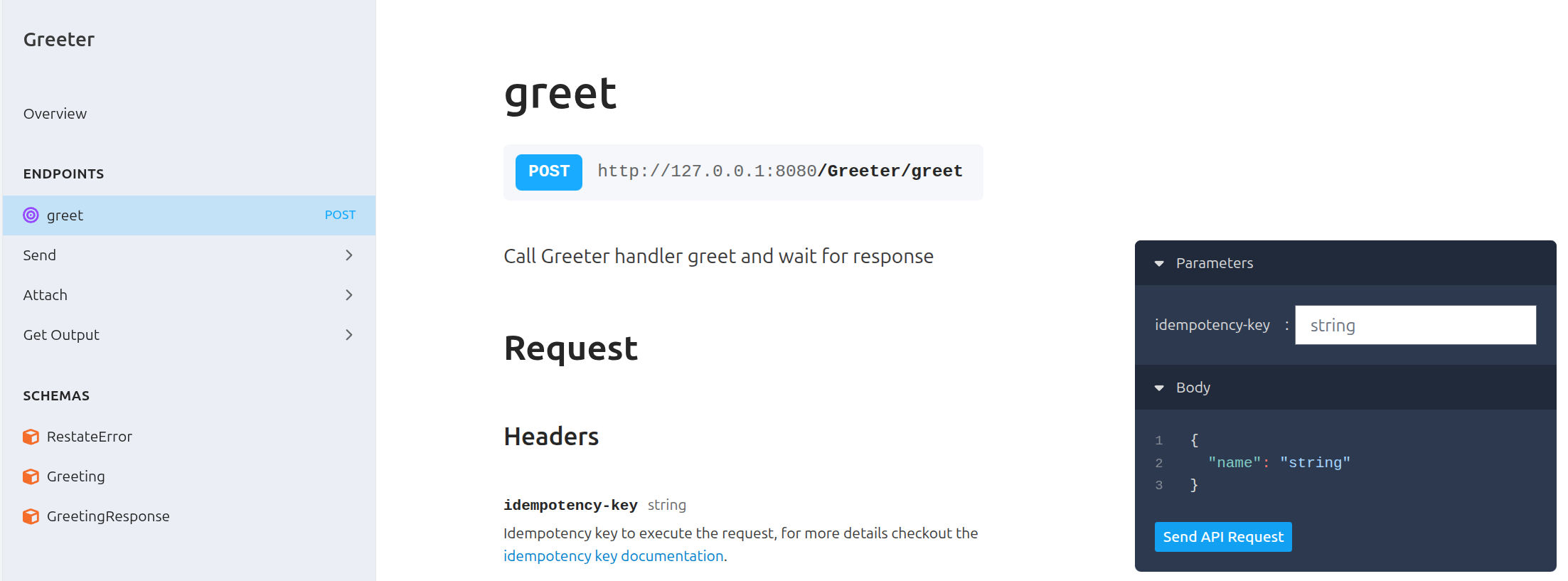 Or invoke via
 curl:curl localhost:8080/restate/call/Greeter/greet --json '{"name": "Sarah"}'
You said hi to Sarah!Congratulations, you just ran Durable Execution!
const greeter = restate.service({
  name: "Greeter",
  handlers: {
    greet: restate.createServiceHandler(
      { input: restate.serde.schema(Greeting), output: restate.serde.schema(GreetingResponse) },
      async (ctx: restate.Context, { name }) => {
        // Durably execute a set of steps; resilient against failures
        const greetingId = ctx.rand.uuidv4();
        await ctx.run("Notification", () => sendNotification(greetingId, name));
        await ctx.sleep({ seconds: 1 });
        await ctx.run("Reminder", () => sendReminder(greetingId, name));

        // Respond to caller
        return { result: `You said hi to ${name}!` };
      },
    ),
  },
});

restate.serve({
  services: [greeter],
  port: 9080,
});
See how a failing request is retried
See how a failing request is retried
Alice to see how the service behaves when it occasionally fails to send the reminder and notification:curl localhost:8080/restate/call/Greeter/greet --json '{"name": "Alice"}'
You said hi to Alice!
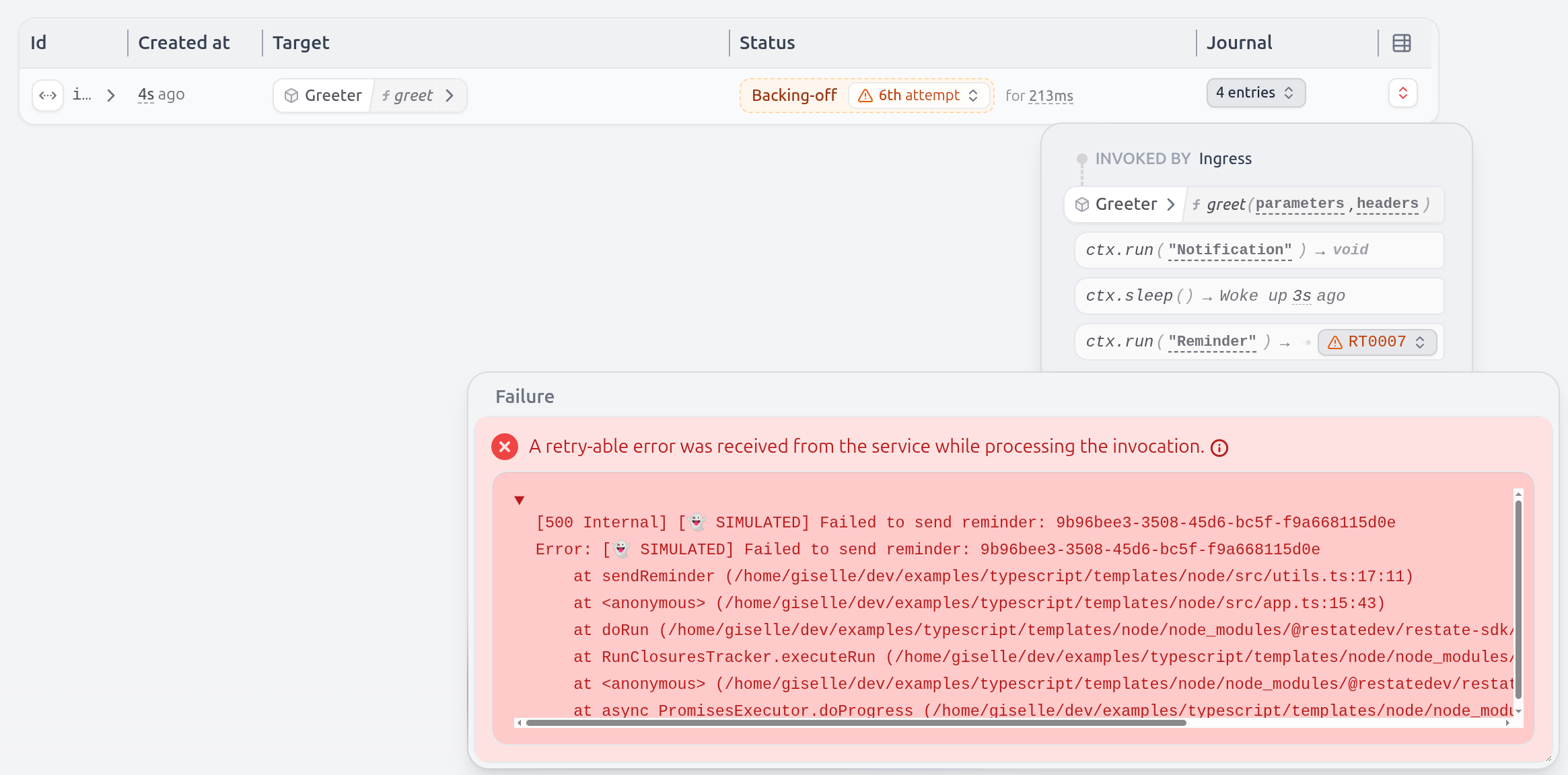 Even the sleep is durable and tracked by Restate.
If you kill/restart the service halfway through, the sleep will only last for what remained.
Even the sleep is durable and tracked by Restate.
If you kill/restart the service halfway through, the sleep will only last for what remained.Install Restate Server & CLI
- Homebrew
- Download binaries
- npm
- Docker
brew install restatedev/tap/restate-server restatedev/tap/restate
restate-server
BIN=/usr/local/bin && RESTATE_PLATFORM=x86_64-apple-darwin && \
curl -L --remote-name-all https://restate.gateway.scarf.sh/latest/restate-{server,cli}-$RESTATE_PLATFORM.tar.xz && \
tar -xvf restate-server-$RESTATE_PLATFORM.tar.xz --strip-components=1 restate-server-$RESTATE_PLATFORM/restate-server && \
tar -xvf restate-cli-$RESTATE_PLATFORM.tar.xz --strip-components=1 restate-cli-$RESTATE_PLATFORM/restate && \
chmod +x restate restate-server && \
sudo mv restate $BIN && \
sudo mv restate-server $BIN
BIN=/usr/local/bin && RESTATE_PLATFORM=aarch64-apple-darwin && \
curl -L --remote-name-all https://restate.gateway.scarf.sh/latest/restate-{server,cli}-$RESTATE_PLATFORM.tar.xz && \
tar -xvf restate-server-$RESTATE_PLATFORM.tar.xz --strip-components=1 restate-server-$RESTATE_PLATFORM/restate-server && \
tar -xvf restate-cli-$RESTATE_PLATFORM.tar.xz --strip-components=1 restate-cli-$RESTATE_PLATFORM/restate && \
chmod +x restate restate-server && \
sudo mv restate $BIN && \
sudo mv restate-server $BIN
BIN=$HOME/.local/bin && RESTATE_PLATFORM=x86_64-unknown-linux-musl && \
curl -L --remote-name-all https://restate.gateway.scarf.sh/latest/restate-{server,cli}-$RESTATE_PLATFORM.tar.xz && \
tar -xvf restate-server-$RESTATE_PLATFORM.tar.xz --strip-components=1 restate-server-$RESTATE_PLATFORM/restate-server && \
tar -xvf restate-cli-$RESTATE_PLATFORM.tar.xz --strip-components=1 restate-cli-$RESTATE_PLATFORM/restate && \
chmod +x restate restate-server && \
mv restate $BIN && \
mv restate-server $BIN
BIN=$HOME/.local/bin && RESTATE_PLATFORM=aarch64-unknown-linux-musl && \
curl -L --remote-name-all https://restate.gateway.scarf.sh/latest/restate-{server,cli}-$RESTATE_PLATFORM.tar.xz && \
tar -xvf restate-server-$RESTATE_PLATFORM.tar.xz --strip-components=1 restate-server-$RESTATE_PLATFORM/restate-server && \
tar -xvf restate-cli-$RESTATE_PLATFORM.tar.xz --strip-components=1 restate-cli-$RESTATE_PLATFORM/restate && \
chmod +x restate restate-server && \
mv restate $BIN && \
mv restate-server $BIN
restate-server
npm install --global @restatedev/restate-server@latest @restatedev/restate@latest
restate-server
docker run --name restate_dev --rm \
-p 8080:8080 -p 9070:9070 -p 9071:9071 \
--add-host=host.docker.internal:host-gateway \
docker.restate.dev/restatedev/restate:latest
docker run -it --network=host \
docker.restate.dev/restatedev/restate-cli:latest \
invocations ls
invocations ls with any CLI subcommand.http://localhost:9070) after starting the Restate Server.Get the Greeter service template
restate example typescript-hello-world-bun &&
cd typescript-hello-world-bun &&
npm install
Run the Greeter service
npm run dev
Register the service
http://localhost:9070) or via:restate deployments register http://localhost:9080
curl localhost:9070/deployments --json '{"uri": "http://localhost:9080"}'
Show Output
Show Output
❯ SERVICES THAT WILL BE ADDED:
- Greeter
Type: Service
HANDLER  INPUT                                     OUTPUT
greet    value of content-type 'application/json'  value of content-type 'application/json'


✔ Are you sure you want to apply those changes? · yes
✅ DEPLOYMENT:
SERVICE  REV
Greeter  1
{
    "id": "dp_17sztQp4gnEC1L0OCFM9aEh",
    "services": [
        {
            "name": "Greeter",
            "handlers": [
                {
                    "name": "greet",
                    "ty": "Shared",
                    "input_description": "one of [\"none\", \"value of content-type 'application/json'\"]",
                    "output_description": "value of content-type 'application/json'"
                }
            ],
            "ty": "Service",
            "deployment_id": "dp_17sztQp4gnEC1L0OCFM9aEh",
            "revision": 1,
            "public": true,
            "idempotency_retention": "1day"
        }
    ]
}
http://host.docker.internal:9080 instead of http://localhost:9080.Restate Cloud
Restate Cloud
Send a request to the Greeter service
http://localhost:9070, click on your service and then on playground.Or invoke via curl:curl localhost:8080/restate/call/Greeter/greet --json '{"name": "Sarah"}'
You said hi to Sarah!Congratulations, you just ran Durable Execution!
const greeter = restate.service({
  name: "Greeter",
  handlers: {
    greet: restate.createServiceHandler(
      { input: restate.serde.schema(Greeting), output: restate.serde.schema(GreetingResponse) },
      async (ctx: restate.Context, { name }) => {
        // Durably execute a set of steps; resilient against failures
        const greetingId = ctx.rand.uuidv4();
        await ctx.run("Notification", () => sendNotification(greetingId, name));
        await ctx.sleep({ seconds: 1 });
        await ctx.run("Reminder", () => sendReminder(greetingId, name));

        // Respond to caller
        return { result: `You said hi to ${name}!` };
      },
    ),
  },
});

restate.serve({
  services: [greeter],
  port: 9080,
});
Alice to see how the service behaves when it occasionally fails to send the reminder and notification:curl localhost:8080/restate/call/Greeter/greet --json '{"name": "Alice"}'
You said hi to Alice!
Install Restate Server & CLI
- Homebrew
- Download binaries
- npm
- Docker
brew install restatedev/tap/restate-server restatedev/tap/restate
restate-server
BIN=/usr/local/bin && RESTATE_PLATFORM=x86_64-apple-darwin && \
curl -L --remote-name-all https://restate.gateway.scarf.sh/latest/restate-{server,cli}-$RESTATE_PLATFORM.tar.xz && \
tar -xvf restate-server-$RESTATE_PLATFORM.tar.xz --strip-components=1 restate-server-$RESTATE_PLATFORM/restate-server && \
tar -xvf restate-cli-$RESTATE_PLATFORM.tar.xz --strip-components=1 restate-cli-$RESTATE_PLATFORM/restate && \
chmod +x restate restate-server && \
sudo mv restate $BIN && \
sudo mv restate-server $BIN
BIN=/usr/local/bin && RESTATE_PLATFORM=aarch64-apple-darwin && \
curl -L --remote-name-all https://restate.gateway.scarf.sh/latest/restate-{server,cli}-$RESTATE_PLATFORM.tar.xz && \
tar -xvf restate-server-$RESTATE_PLATFORM.tar.xz --strip-components=1 restate-server-$RESTATE_PLATFORM/restate-server && \
tar -xvf restate-cli-$RESTATE_PLATFORM.tar.xz --strip-components=1 restate-cli-$RESTATE_PLATFORM/restate && \
chmod +x restate restate-server && \
sudo mv restate $BIN && \
sudo mv restate-server $BIN
BIN=$HOME/.local/bin && RESTATE_PLATFORM=x86_64-unknown-linux-musl && \
curl -L --remote-name-all https://restate.gateway.scarf.sh/latest/restate-{server,cli}-$RESTATE_PLATFORM.tar.xz && \
tar -xvf restate-server-$RESTATE_PLATFORM.tar.xz --strip-components=1 restate-server-$RESTATE_PLATFORM/restate-server && \
tar -xvf restate-cli-$RESTATE_PLATFORM.tar.xz --strip-components=1 restate-cli-$RESTATE_PLATFORM/restate && \
chmod +x restate restate-server && \
mv restate $BIN && \
mv restate-server $BIN
BIN=$HOME/.local/bin && RESTATE_PLATFORM=aarch64-unknown-linux-musl && \
curl -L --remote-name-all https://restate.gateway.scarf.sh/latest/restate-{server,cli}-$RESTATE_PLATFORM.tar.xz && \
tar -xvf restate-server-$RESTATE_PLATFORM.tar.xz --strip-components=1 restate-server-$RESTATE_PLATFORM/restate-server && \
tar -xvf restate-cli-$RESTATE_PLATFORM.tar.xz --strip-components=1 restate-cli-$RESTATE_PLATFORM/restate && \
chmod +x restate restate-server && \
mv restate $BIN && \
mv restate-server $BIN
restate-server
npm install --global @restatedev/restate-server@latest @restatedev/restate@latest
restate-server
docker run --name restate_dev --rm \
-p 8080:8080 -p 9070:9070 -p 9071:9071 \
--add-host=host.docker.internal:host-gateway \
docker.restate.dev/restatedev/restate:latest
docker run -it --network=host \
docker.restate.dev/restatedev/restate-cli:latest \
invocations ls
invocations ls with any CLI subcommand.http://localhost:9070) after starting the Restate Server.Get the Greeter service template
restate example typescript-hello-world-deno &&
cd typescript-hello-world-deno
Run the Greeter service
deno task dev
Register the service
http://localhost:9070) or via:restate deployments register http://localhost:9080
curl localhost:9070/deployments --json '{"uri": "http://localhost:9080"}'
Show Output
Show Output
❯ SERVICES THAT WILL BE ADDED:
- Greeter
Type: Service
HANDLER  INPUT                                     OUTPUT
greet    value of content-type 'application/json'  value of content-type 'application/json'


✔ Are you sure you want to apply those changes? · yes
✅ DEPLOYMENT:
SERVICE  REV
Greeter  1
{
    "id": "dp_17sztQp4gnEC1L0OCFM9aEh",
    "services": [
        {
            "name": "Greeter",
            "handlers": [
                {
                    "name": "greet",
                    "ty": "Shared",
                    "input_description": "one of [\"none\", \"value of content-type 'application/json'\"]",
                    "output_description": "value of content-type 'application/json'"
                }
            ],
            "ty": "Service",
            "deployment_id": "dp_17sztQp4gnEC1L0OCFM9aEh",
            "revision": 1,
            "public": true,
            "idempotency_retention": "1day"
        }
    ]
}
http://host.docker.internal:9080 instead of http://localhost:9080.Restate Cloud
Restate Cloud
Send a request to the Greeter service
http://localhost:9070, click on your service and then on playground.Or invoke via curl:curl localhost:8080/restate/call/Greeter/greet --json '{"name": "Sarah"}'
You said hi to Sarah!Congratulations, you just ran Durable Execution!
export const greeter = restate.service({
  name: "Greeter",
  handlers: {
    greet: restate.createServiceHandler(
      { input: restate.serde.schema(Greeting), output: restate.serde.schema(GreetingResponse) },
      async (ctx: restate.Context, { name }) => {
        // Durably execute a set of steps; resilient against failures
        const greetingId = ctx.rand.uuidv4();
        await ctx.run("Notification", () => sendNotification(greetingId, name));
        await ctx.sleep({ seconds: 1 });
        await ctx.run("Reminder", () => sendReminder(greetingId, name));

        // Respond to caller
        return { result: `You said hi to ${name}!` };
      },
    ),
  },
});

const handler = restate.createEndpointHandler({
  services: [greeter],
  bidirectional: true,
});

Deno.serve({ port: 9080 }, handler);
Alice to see how the service behaves when it occasionally fails to send the reminder and notification:curl localhost:8080/restate/call/Greeter/greet --json '{"name": "Alice"}'
You said hi to Alice!
- NodeJS >= v22
Install Restate Server & CLI
- Homebrew
- Download binaries
- npm
- Docker
brew install restatedev/tap/restate-server restatedev/tap/restate
restate-server
BIN=/usr/local/bin && RESTATE_PLATFORM=x86_64-apple-darwin && \
curl -L --remote-name-all https://restate.gateway.scarf.sh/latest/restate-{server,cli}-$RESTATE_PLATFORM.tar.xz && \
tar -xvf restate-server-$RESTATE_PLATFORM.tar.xz --strip-components=1 restate-server-$RESTATE_PLATFORM/restate-server && \
tar -xvf restate-cli-$RESTATE_PLATFORM.tar.xz --strip-components=1 restate-cli-$RESTATE_PLATFORM/restate && \
chmod +x restate restate-server && \
sudo mv restate $BIN && \
sudo mv restate-server $BIN
BIN=/usr/local/bin && RESTATE_PLATFORM=aarch64-apple-darwin && \
curl -L --remote-name-all https://restate.gateway.scarf.sh/latest/restate-{server,cli}-$RESTATE_PLATFORM.tar.xz && \
tar -xvf restate-server-$RESTATE_PLATFORM.tar.xz --strip-components=1 restate-server-$RESTATE_PLATFORM/restate-server && \
tar -xvf restate-cli-$RESTATE_PLATFORM.tar.xz --strip-components=1 restate-cli-$RESTATE_PLATFORM/restate && \
chmod +x restate restate-server && \
sudo mv restate $BIN && \
sudo mv restate-server $BIN
BIN=$HOME/.local/bin && RESTATE_PLATFORM=x86_64-unknown-linux-musl && \
curl -L --remote-name-all https://restate.gateway.scarf.sh/latest/restate-{server,cli}-$RESTATE_PLATFORM.tar.xz && \
tar -xvf restate-server-$RESTATE_PLATFORM.tar.xz --strip-components=1 restate-server-$RESTATE_PLATFORM/restate-server && \
tar -xvf restate-cli-$RESTATE_PLATFORM.tar.xz --strip-components=1 restate-cli-$RESTATE_PLATFORM/restate && \
chmod +x restate restate-server && \
mv restate $BIN && \
mv restate-server $BIN
BIN=$HOME/.local/bin && RESTATE_PLATFORM=aarch64-unknown-linux-musl && \
curl -L --remote-name-all https://restate.gateway.scarf.sh/latest/restate-{server,cli}-$RESTATE_PLATFORM.tar.xz && \
tar -xvf restate-server-$RESTATE_PLATFORM.tar.xz --strip-components=1 restate-server-$RESTATE_PLATFORM/restate-server && \
tar -xvf restate-cli-$RESTATE_PLATFORM.tar.xz --strip-components=1 restate-cli-$RESTATE_PLATFORM/restate && \
chmod +x restate restate-server && \
mv restate $BIN && \
mv restate-server $BIN
restate-server
npm install --global @restatedev/restate-server@latest @restatedev/restate@latest
restate-server
docker run --name restate_dev --rm \
-p 8080:8080 -p 9070:9070 -p 9071:9071 \
--add-host=host.docker.internal:host-gateway \
docker.restate.dev/restatedev/restate:latest
docker run -it --network=host \
docker.restate.dev/restatedev/restate-cli:latest \
invocations ls
invocations ls with any CLI subcommand.http://localhost:9070) after starting the Restate Server.Get the Greeter service template
restate example typescript-hello-world-cloudflare-worker &&
cd typescript-hello-world-cloudflare-worker &&
npm install
Run the Greeter service
npm run dev
Register the service
http://localhost:9070) or via:restate deployments register http://localhost:9080 --use-http1.1
curl localhost:9070/deployments --json '{"uri": "http://localhost:9080", "use_http_11": true}'
❯ SERVICES THAT WILL BE ADDED:
- Greeter
Type: Service
HANDLER  INPUT                                     OUTPUT
greet    value of content-type 'application/json'  value of content-type 'application/json'


✔ Are you sure you want to apply those changes? · yes
✅ DEPLOYMENT:
SERVICE  REV
Greeter  1
{
"id": "dp_17sztQp4gnEC1L0OCFM9aEh",
    "services": [
        {
            "name": "Greeter",
            "handlers": [
                {
                    "name": "greet",
                    "ty": "Shared",
                    "input_description": "one of [\"none\", \"value of content-type 'application/json'\"]",
                    "output_description": "value of content-type 'application/json'"
                }
            ],
            "ty": "Service",
            "deployment_id": "dp_17sztQp4gnEC1L0OCFM9aEh",
            "revision": 1,
            "public": true,
            "idempotency_retention": "1day"
        }
    ]
}
http://host.docker.internal:9080 instead of http://localhost:9080.Send a request to the Greeter service
http://localhost:9070, click on your service and then on playground.Or invoke via curl:curl localhost:8080/restate/call/Greeter/greet --json '{"name": "Sarah"}'
You said hi to Sarah!Congratulations, you just ran Durable Execution!
const greeter = restate.service({
  name: "Greeter",
  handlers: {
    greet: restate.createServiceHandler(
      { input: restate.serde.schema(Greeting), output: restate.serde.schema(GreetingResponse) },
      async (ctx: restate.Context, { name }) => {
        // Durably execute a set of steps; resilient against failures
        const greetingId = ctx.rand.uuidv4();
        await ctx.run("Notification", () => sendNotification(greetingId, name));
        await ctx.sleep({ seconds: 1 });
        await ctx.run("Reminder", () => sendReminder(greetingId, name));

        // Respond to caller
        return { result: `You said hi to ${name}!` };
      },
    ),
  },
});

export default {
    fetch: restate.createEndpointHandler({ services: [greeter] })
};
Alice to see how the service behaves when it occasionally fails to send the reminder and notification:curl localhost:8080/restate/call/Greeter/greet --json '{"name": "Alice"}'
You said hi to Alice!
- NodeJS >= v22
Install Restate Server & CLI
- Homebrew
- Download binaries
- npm
- Docker
brew install restatedev/tap/restate-server restatedev/tap/restate
restate-server
BIN=/usr/local/bin && RESTATE_PLATFORM=x86_64-apple-darwin && \
curl -L --remote-name-all https://restate.gateway.scarf.sh/latest/restate-{server,cli}-$RESTATE_PLATFORM.tar.xz && \
tar -xvf restate-server-$RESTATE_PLATFORM.tar.xz --strip-components=1 restate-server-$RESTATE_PLATFORM/restate-server && \
tar -xvf restate-cli-$RESTATE_PLATFORM.tar.xz --strip-components=1 restate-cli-$RESTATE_PLATFORM/restate && \
chmod +x restate restate-server && \
sudo mv restate $BIN && \
sudo mv restate-server $BIN
BIN=/usr/local/bin && RESTATE_PLATFORM=aarch64-apple-darwin && \
curl -L --remote-name-all https://restate.gateway.scarf.sh/latest/restate-{server,cli}-$RESTATE_PLATFORM.tar.xz && \
tar -xvf restate-server-$RESTATE_PLATFORM.tar.xz --strip-components=1 restate-server-$RESTATE_PLATFORM/restate-server && \
tar -xvf restate-cli-$RESTATE_PLATFORM.tar.xz --strip-components=1 restate-cli-$RESTATE_PLATFORM/restate && \
chmod +x restate restate-server && \
sudo mv restate $BIN && \
sudo mv restate-server $BIN
BIN=$HOME/.local/bin && RESTATE_PLATFORM=x86_64-unknown-linux-musl && \
curl -L --remote-name-all https://restate.gateway.scarf.sh/latest/restate-{server,cli}-$RESTATE_PLATFORM.tar.xz && \
tar -xvf restate-server-$RESTATE_PLATFORM.tar.xz --strip-components=1 restate-server-$RESTATE_PLATFORM/restate-server && \
tar -xvf restate-cli-$RESTATE_PLATFORM.tar.xz --strip-components=1 restate-cli-$RESTATE_PLATFORM/restate && \
chmod +x restate restate-server && \
mv restate $BIN && \
mv restate-server $BIN
BIN=$HOME/.local/bin && RESTATE_PLATFORM=aarch64-unknown-linux-musl && \
curl -L --remote-name-all https://restate.gateway.scarf.sh/latest/restate-{server,cli}-$RESTATE_PLATFORM.tar.xz && \
tar -xvf restate-server-$RESTATE_PLATFORM.tar.xz --strip-components=1 restate-server-$RESTATE_PLATFORM/restate-server && \
tar -xvf restate-cli-$RESTATE_PLATFORM.tar.xz --strip-components=1 restate-cli-$RESTATE_PLATFORM/restate && \
chmod +x restate restate-server && \
mv restate $BIN && \
mv restate-server $BIN
restate-server
npm install --global @restatedev/restate-server@latest @restatedev/restate@latest
restate-server
docker run --name restate_dev --rm \
-p 8080:8080 -p 9070:9070 -p 9071:9071 \
--add-host=host.docker.internal:host-gateway \
docker.restate.dev/restatedev/restate:latest
docker run -it --network=host \
docker.restate.dev/restatedev/restate-cli:latest \
invocations ls
invocations ls with any CLI subcommand.http://localhost:9070) after starting the Restate Server.Get the Greeter service template
restate example typescript-hello-world-vercel &&
cd typescript-hello-world-vercel &&
npm install
Run the Greeter service
npm run dev
Register the service
restate deployments register http://localhost:3000/restate --use-http1.1
curl localhost:9070/deployments --json '{"uri": "http://localhost:3000/restate", "use_http_11": true}'
Show Output
Show Output
❯ SERVICES THAT WILL BE ADDED:
- Greeter
Type: Service
HANDLER  INPUT                                     OUTPUT
greet    value of content-type 'application/json'  value of content-type 'application/json'


✔ Are you sure you want to apply those changes? · yes
✅ DEPLOYMENT:
SERVICE  REV
Greeter  1
{
    "id": "dp_17sztQp4gnEC1L0OCFM9aEh",
    "services": [
        {
            "name": "Greeter",
            "handlers": [
        {
            "name": "greet",
            "ty": "Shared",
            "input_description": "one of [\"none\", \"value of content-type 'application/json'\"]",
            "output_description": "value of content-type 'application/json'"
        }
            ],
            "ty": "Service",
            "deployment_id": "dp_17sztQp4gnEC1L0OCFM9aEh",
            "revision": 1,
            "public": true,
            "idempotency_retention": "1day"
        }
    ]
}
http://host.docker.internal:3000/restate instead of http://localhost:3000/restate.Restate Cloud
Restate Cloud
Send a request to the Greeter service
http://localhost:9070, click on your service and then on playground.Or invoke via curl:curl localhost:8080/restate/call/Greeter/greet --json '{"name": "Sarah"}'
You said hi to Sarah!Congratulations, you just ran Durable Execution!
export const greeter = restate.service({
  name: "Greeter",
  handlers: {
    greet: restate.createServiceHandler(
      { input: restate.serde.schema(Greeting), output: restate.serde.schema(GreetingResponse) },
      async (ctx: restate.Context, { name }) => {
        // Durably execute a set of steps; resilient against failures
        const greetingId = ctx.rand.uuidv4();
        await ctx.run("Notification", () => sendNotification(greetingId, name));
        await ctx.sleep({ seconds: 1 });
        await ctx.run("Reminder", () => sendReminder(greetingId, name));

        // Respond to caller
        return { result: `You said hi to ${name}!` };
      },
    ),
  },
});

export type Greeter = typeof greeter;
Alice to see how the service behaves when it occasionally fails to send the reminder and notification:curl localhost:8080/restate/call/Greeter/greet --json '{"name": "Alice"}'
You said hi to Alice!
 Maven + Spring Boot
 Maven + Quarkus
 Maven
Maven Gradle
- JDK >= 17 (JDK >= 23 recommended, required for the latest Restate features)
Install Restate Server & CLI
- Homebrew
- Download binaries
- npm
- Docker
brew install restatedev/tap/restate-server restatedev/tap/restate
restate-server
BIN=/usr/local/bin && RESTATE_PLATFORM=x86_64-apple-darwin && \
curl -L --remote-name-all https://restate.gateway.scarf.sh/latest/restate-{server,cli}-$RESTATE_PLATFORM.tar.xz && \
tar -xvf restate-server-$RESTATE_PLATFORM.tar.xz --strip-components=1 restate-server-$RESTATE_PLATFORM/restate-server && \
tar -xvf restate-cli-$RESTATE_PLATFORM.tar.xz --strip-components=1 restate-cli-$RESTATE_PLATFORM/restate && \
chmod +x restate restate-server && \
sudo mv restate $BIN && \
sudo mv restate-server $BIN
BIN=/usr/local/bin && RESTATE_PLATFORM=aarch64-apple-darwin && \
curl -L --remote-name-all https://restate.gateway.scarf.sh/latest/restate-{server,cli}-$RESTATE_PLATFORM.tar.xz && \
tar -xvf restate-server-$RESTATE_PLATFORM.tar.xz --strip-components=1 restate-server-$RESTATE_PLATFORM/restate-server && \
tar -xvf restate-cli-$RESTATE_PLATFORM.tar.xz --strip-components=1 restate-cli-$RESTATE_PLATFORM/restate && \
chmod +x restate restate-server && \
sudo mv restate $BIN && \
sudo mv restate-server $BIN
BIN=$HOME/.local/bin && RESTATE_PLATFORM=x86_64-unknown-linux-musl && \
curl -L --remote-name-all https://restate.gateway.scarf.sh/latest/restate-{server,cli}-$RESTATE_PLATFORM.tar.xz && \
tar -xvf restate-server-$RESTATE_PLATFORM.tar.xz --strip-components=1 restate-server-$RESTATE_PLATFORM/restate-server && \
tar -xvf restate-cli-$RESTATE_PLATFORM.tar.xz --strip-components=1 restate-cli-$RESTATE_PLATFORM/restate && \
chmod +x restate restate-server && \
mv restate $BIN && \
mv restate-server $BIN
BIN=$HOME/.local/bin && RESTATE_PLATFORM=aarch64-unknown-linux-musl && \
curl -L --remote-name-all https://restate.gateway.scarf.sh/latest/restate-{server,cli}-$RESTATE_PLATFORM.tar.xz && \
tar -xvf restate-server-$RESTATE_PLATFORM.tar.xz --strip-components=1 restate-server-$RESTATE_PLATFORM/restate-server && \
tar -xvf restate-cli-$RESTATE_PLATFORM.tar.xz --strip-components=1 restate-cli-$RESTATE_PLATFORM/restate && \
chmod +x restate restate-server && \
mv restate $BIN && \
mv restate-server $BIN
restate-server
npm install --global @restatedev/restate-server@latest @restatedev/restate@latest
restate-server
docker run --name restate_dev --rm \
-p 8080:8080 -p 9070:9070 -p 9071:9071 \
--add-host=host.docker.internal:host-gateway \
docker.restate.dev/restatedev/restate:latest
docker run -it --network=host \
docker.restate.dev/restatedev/restate-cli:latest \
invocations ls
invocations ls with any CLI subcommand.http://localhost:9070) after starting the Restate Server.Get the Greeter service template
restate example java-hello-world-maven-spring-boot &&
cd java-hello-world-maven-spring-boot
wget https://github.com/restatedev/examples/releases/latest/download/java-hello-world-maven-spring-boot.zip &&
unzip java-hello-world-maven-spring-boot.zip -d java-hello-world-maven-spring-boot &&
rm java-hello-world-maven-spring-boot.zip && cd java-hello-world-maven-spring-boot
Run the Greeter service
9080 for requests:mvn compile spring-boot:run
Register the service
http://localhost:9070) or via:restate deployments register http://localhost:9080
curl localhost:9070/deployments --json '{"uri": "http://localhost:9080"}'
Show Output
Show Output
❯ SERVICES THAT WILL BE ADDED:
- Greeter
Type: Service
HANDLER  INPUT                                     OUTPUT
greet    value of content-type 'application/json'  value of content-type 'application/json'


✔ Are you sure you want to apply those changes? · yes
✅ DEPLOYMENT:
SERVICE  REV
Greeter  1
{
    "id": "dp_17sztQp4gnEC1L0OCFM9aEh",
    "services": [
        {
            "name": "Greeter",
            "handlers": [
                {
                    "name": "greet",
                    "ty": "Shared",
                    "input_description": "one of [\"none\", \"value of content-type 'application/json'\"]",
                    "output_description": "value of content-type 'application/json'"
                }
            ],
            "ty": "Service",
            "deployment_id": "dp_17sztQp4gnEC1L0OCFM9aEh",
            "revision": 1,
            "public": true,
            "idempotency_retention": "1day"
        }
    ]
}
http://host.docker.internal:9080 instead of http://localhost:9080.Restate Cloud
Restate Cloud
Send a request to the Greeter service
http://localhost:9070, click on your service and then on playground.Or invoke via curl:curl localhost:8080/restate/call/Greeter/greet --json '{"name": "Sarah"}'
You said hi to Sarah!Congratulations, you just ran Durable Execution!
@RestateComponent
@Service
public class Greeter {

  @Value("${greetingPrefix}")
  private String greetingPrefix;

  public record Greeting(String name) {}
  public record GreetingResponse(String message) {}

  @Handler
  public GreetingResponse greet(Greeting req) {
    // Durably execute a set of steps; resilient against failures
    String greetingId = Restate.random().nextUUID().toString();
    Restate.run("Notification", () -> sendNotification(greetingId, req.name));
    Restate.sleep(Duration.ofSeconds(1));
    Restate.run("Reminder", () -> sendReminder(greetingId, req.name));

    // Respond to caller
    return new GreetingResponse("You said " + greetingPrefix + " to " + req.name + "!");
  }
}
Alice to see how the service behaves when it occasionally fails to send the reminder and notification:curl localhost:8080/restate/call/Greeter/greet --json '{"name": "Alice"}'
You said hi to Alice!
- JDK >= 17
Install Restate Server & CLI
- Homebrew
- Download binaries
- npm
- Docker
brew install restatedev/tap/restate-server restatedev/tap/restate
restate-server
BIN=/usr/local/bin && RESTATE_PLATFORM=x86_64-apple-darwin && \
curl -L --remote-name-all https://restate.gateway.scarf.sh/latest/restate-{server,cli}-$RESTATE_PLATFORM.tar.xz && \
tar -xvf restate-server-$RESTATE_PLATFORM.tar.xz --strip-components=1 restate-server-$RESTATE_PLATFORM/restate-server && \
tar -xvf restate-cli-$RESTATE_PLATFORM.tar.xz --strip-components=1 restate-cli-$RESTATE_PLATFORM/restate && \
chmod +x restate restate-server && \
sudo mv restate $BIN && \
sudo mv restate-server $BIN
BIN=/usr/local/bin && RESTATE_PLATFORM=aarch64-apple-darwin && \
curl -L --remote-name-all https://restate.gateway.scarf.sh/latest/restate-{server,cli}-$RESTATE_PLATFORM.tar.xz && \
tar -xvf restate-server-$RESTATE_PLATFORM.tar.xz --strip-components=1 restate-server-$RESTATE_PLATFORM/restate-server && \
tar -xvf restate-cli-$RESTATE_PLATFORM.tar.xz --strip-components=1 restate-cli-$RESTATE_PLATFORM/restate && \
chmod +x restate restate-server && \
sudo mv restate $BIN && \
sudo mv restate-server $BIN
BIN=$HOME/.local/bin && RESTATE_PLATFORM=x86_64-unknown-linux-musl && \
curl -L --remote-name-all https://restate.gateway.scarf.sh/latest/restate-{server,cli}-$RESTATE_PLATFORM.tar.xz && \
tar -xvf restate-server-$RESTATE_PLATFORM.tar.xz --strip-components=1 restate-server-$RESTATE_PLATFORM/restate-server && \
tar -xvf restate-cli-$RESTATE_PLATFORM.tar.xz --strip-components=1 restate-cli-$RESTATE_PLATFORM/restate && \
chmod +x restate restate-server && \
mv restate $BIN && \
mv restate-server $BIN
BIN=$HOME/.local/bin && RESTATE_PLATFORM=aarch64-unknown-linux-musl && \
curl -L --remote-name-all https://restate.gateway.scarf.sh/latest/restate-{server,cli}-$RESTATE_PLATFORM.tar.xz && \
tar -xvf restate-server-$RESTATE_PLATFORM.tar.xz --strip-components=1 restate-server-$RESTATE_PLATFORM/restate-server && \
tar -xvf restate-cli-$RESTATE_PLATFORM.tar.xz --strip-components=1 restate-cli-$RESTATE_PLATFORM/restate && \
chmod +x restate restate-server && \
mv restate $BIN && \
mv restate-server $BIN
restate-server
npm install --global @restatedev/restate-server@latest @restatedev/restate@latest
restate-server
docker run --name restate_dev --rm \
-p 8080:8080 -p 9070:9070 -p 9071:9071 \
--add-host=host.docker.internal:host-gateway \
docker.restate.dev/restatedev/restate:latest
docker run -it --network=host \
docker.restate.dev/restatedev/restate-cli:latest \
invocations ls
invocations ls with any CLI subcommand.http://localhost:9070) after starting the Restate Server.Get the Greeter service template
restate example java-hello-world-maven-quarkus &&
cd java-hello-world-maven-quarkus
wget https://github.com/restatedev/examples/releases/latest/download/java-hello-world-maven-quarkus.zip &&
unzip java-hello-world-maven-quarkus.zip -d java-hello-world-maven-quarkus &&
rm java-hello-world-maven-quarkus.zip && cd java-hello-world-maven-quarkus
Run the Greeter service
9080 for requests:quarkus dev
Register the service
http://localhost:9070) or via:restate deployments register http://localhost:9080
curl localhost:9070/deployments --json '{"uri": "http://localhost:9080"}'
Show Output
Show Output
❯ SERVICES THAT WILL BE ADDED:
- Greeter
Type: Service
HANDLER  INPUT                                     OUTPUT
greet    value of content-type 'application/json'  value of content-type 'application/json'


✔ Are you sure you want to apply those changes? · yes
✅ DEPLOYMENT:
SERVICE  REV
Greeter  1
{
    "id": "dp_17sztQp4gnEC1L0OCFM9aEh",
    "services": [
        {
            "name": "Greeter",
            "handlers": [
                {
                    "name": "greet",
                    "ty": "Shared",
                    "input_description": "one of [\"none\", \"value of content-type 'application/json'\"]",
                    "output_description": "value of content-type 'application/json'"
                }
            ],
            "ty": "Service",
            "deployment_id": "dp_17sztQp4gnEC1L0OCFM9aEh",
            "revision": 1,
            "public": true,
            "idempotency_retention": "1day"
        }
    ]
}
http://host.docker.internal:9080 instead of http://localhost:9080.Restate Cloud
Restate Cloud
Send a request to the Greeter service
http://localhost:9070, click on your service and then on playground.Or invoke via curl:curl localhost:8080/restate/call/Greeter/greet --json '{"name": "Sarah"}'
You said hi to Sarah!Congratulations, you just ran Durable Execution!
@Service
public class Greeter {

  @ConfigProperty(name = "greetingPrefix") String greetingPrefix;

  public record Greeting(String name) {}
  public record GreetingResponse(String message) {}

  @Handler
  public GreetingResponse greet(Greeting req) {
    // Durably execute a set of steps; resilient against failures
    String greetingId = Restate.random().nextUUID().toString();
    Restate.run("Notification", () -> sendNotification(greetingId, req.name));
    Restate.sleep(Duration.ofSeconds(1));
    Restate.run("Reminder", () -> sendReminder(greetingId, req.name));

    // Respond to caller
    return new GreetingResponse("You said hi to " + req.name + "!");
  }
}
Alice to see how the service behaves when it occasionally fails to send the reminder and notification:curl localhost:8080/restate/call/Greeter/greet --json '{"name": "Alice"}'
You said hi to Alice!
- JDK >= 17
Install Restate Server & CLI
- Homebrew
- Download binaries
- npm
- Docker
brew install restatedev/tap/restate-server restatedev/tap/restate
restate-server
BIN=/usr/local/bin && RESTATE_PLATFORM=x86_64-apple-darwin && \
curl -L --remote-name-all https://restate.gateway.scarf.sh/latest/restate-{server,cli}-$RESTATE_PLATFORM.tar.xz && \
tar -xvf restate-server-$RESTATE_PLATFORM.tar.xz --strip-components=1 restate-server-$RESTATE_PLATFORM/restate-server && \
tar -xvf restate-cli-$RESTATE_PLATFORM.tar.xz --strip-components=1 restate-cli-$RESTATE_PLATFORM/restate && \
chmod +x restate restate-server && \
sudo mv restate $BIN && \
sudo mv restate-server $BIN
BIN=/usr/local/bin && RESTATE_PLATFORM=aarch64-apple-darwin && \
curl -L --remote-name-all https://restate.gateway.scarf.sh/latest/restate-{server,cli}-$RESTATE_PLATFORM.tar.xz && \
tar -xvf restate-server-$RESTATE_PLATFORM.tar.xz --strip-components=1 restate-server-$RESTATE_PLATFORM/restate-server && \
tar -xvf restate-cli-$RESTATE_PLATFORM.tar.xz --strip-components=1 restate-cli-$RESTATE_PLATFORM/restate && \
chmod +x restate restate-server && \
sudo mv restate $BIN && \
sudo mv restate-server $BIN
BIN=$HOME/.local/bin && RESTATE_PLATFORM=x86_64-unknown-linux-musl && \
curl -L --remote-name-all https://restate.gateway.scarf.sh/latest/restate-{server,cli}-$RESTATE_PLATFORM.tar.xz && \
tar -xvf restate-server-$RESTATE_PLATFORM.tar.xz --strip-components=1 restate-server-$RESTATE_PLATFORM/restate-server && \
tar -xvf restate-cli-$RESTATE_PLATFORM.tar.xz --strip-components=1 restate-cli-$RESTATE_PLATFORM/restate && \
chmod +x restate restate-server && \
mv restate $BIN && \
mv restate-server $BIN
BIN=$HOME/.local/bin && RESTATE_PLATFORM=aarch64-unknown-linux-musl && \
curl -L --remote-name-all https://restate.gateway.scarf.sh/latest/restate-{server,cli}-$RESTATE_PLATFORM.tar.xz && \
tar -xvf restate-server-$RESTATE_PLATFORM.tar.xz --strip-components=1 restate-server-$RESTATE_PLATFORM/restate-server && \
tar -xvf restate-cli-$RESTATE_PLATFORM.tar.xz --strip-components=1 restate-cli-$RESTATE_PLATFORM/restate && \
chmod +x restate restate-server && \
mv restate $BIN && \
mv restate-server $BIN
restate-server
npm install --global @restatedev/restate-server@latest @restatedev/restate@latest
restate-server
docker run --name restate_dev --rm \
-p 8080:8080 -p 9070:9070 -p 9071:9071 \
--add-host=host.docker.internal:host-gateway \
docker.restate.dev/restatedev/restate:latest
docker run -it --network=host \
docker.restate.dev/restatedev/restate-cli:latest \
invocations ls
invocations ls with any CLI subcommand.http://localhost:9070) after starting the Restate Server.Get the Greeter service template
restate example java-hello-world-maven &&
cd java-hello-world-maven
wget https://github.com/restatedev/examples/releases/latest/download/java-hello-world-maven.zip &&
unzip java-hello-world-maven.zip -d java-hello-world-maven &&
rm java-hello-world-maven.zip && cd java-hello-world-maven
Run the Greeter service
9080 for requests:mvn compile exec:java
Register the service
http://localhost:9070) or via:restate deployments register http://localhost:9080
curl localhost:9070/deployments --json '{"uri": "http://localhost:9080"}'
Show Output
Show Output
❯ SERVICES THAT WILL BE ADDED:
- Greeter
Type: Service
HANDLER  INPUT                                     OUTPUT
greet    value of content-type 'application/json'  value of content-type 'application/json'


✔ Are you sure you want to apply those changes? · yes
✅ DEPLOYMENT:
SERVICE  REV
Greeter  1
{
    "id": "dp_17sztQp4gnEC1L0OCFM9aEh",
    "services": [
        {
            "name": "Greeter",
            "handlers": [
                {
                    "name": "greet",
                    "ty": "Shared",
                    "input_description": "one of [\"none\", \"value of content-type 'application/json'\"]",
                    "output_description": "value of content-type 'application/json'"
                }
            ],
            "ty": "Service",
            "deployment_id": "dp_17sztQp4gnEC1L0OCFM9aEh",
            "revision": 1,
            "public": true,
            "idempotency_retention": "1day"
        }
    ]
}
http://host.docker.internal:9080 instead of http://localhost:9080.Restate Cloud
Restate Cloud
Send a request to the Greeter service
http://localhost:9070, click on your service and then on playground.Or invoke via curl:curl localhost:8080/restate/call/Greeter/greet --json '{"name": "Sarah"}'
You said hi to Sarah!Congratulations, you just ran Durable Execution!
@Service
public class Greeter {

  public record Greeting(String name) {}
  public record GreetingResponse(String message) {}

  @Handler
  public GreetingResponse greet(Greeting req) {
    // Durably execute a set of steps; resilient against failures
    String greetingId = Restate.random().nextUUID().toString();
    Restate.run("Notification", () -> sendNotification(greetingId, req.name));
    Restate.sleep(Duration.ofSeconds(1));
    Restate.run("Reminder", () -> sendReminder(greetingId, req.name));

    // Respond to caller
    return new GreetingResponse("You said hi to " + req.name + "!");
  }

  public static void main(String[] args) {
    RestateHttpServer.listen(Endpoint.bind(new Greeter()));
  }
}
Alice to see how the service behaves when it occasionally fails to send the reminder and notification:curl localhost:8080/restate/call/Greeter/greet --json '{"name": "Alice"}'
You said hi to Alice!
- JDK >= 17
Install Restate Server & CLI
- Homebrew
- Download binaries
- npm
- Docker
brew install restatedev/tap/restate-server restatedev/tap/restate
restate-server
BIN=/usr/local/bin && RESTATE_PLATFORM=x86_64-apple-darwin && \
curl -L --remote-name-all https://restate.gateway.scarf.sh/latest/restate-{server,cli}-$RESTATE_PLATFORM.tar.xz && \
tar -xvf restate-server-$RESTATE_PLATFORM.tar.xz --strip-components=1 restate-server-$RESTATE_PLATFORM/restate-server && \
tar -xvf restate-cli-$RESTATE_PLATFORM.tar.xz --strip-components=1 restate-cli-$RESTATE_PLATFORM/restate && \
chmod +x restate restate-server && \
sudo mv restate $BIN && \
sudo mv restate-server $BIN
BIN=/usr/local/bin && RESTATE_PLATFORM=aarch64-apple-darwin && \
curl -L --remote-name-all https://restate.gateway.scarf.sh/latest/restate-{server,cli}-$RESTATE_PLATFORM.tar.xz && \
tar -xvf restate-server-$RESTATE_PLATFORM.tar.xz --strip-components=1 restate-server-$RESTATE_PLATFORM/restate-server && \
tar -xvf restate-cli-$RESTATE_PLATFORM.tar.xz --strip-components=1 restate-cli-$RESTATE_PLATFORM/restate && \
chmod +x restate restate-server && \
sudo mv restate $BIN && \
sudo mv restate-server $BIN
BIN=$HOME/.local/bin && RESTATE_PLATFORM=x86_64-unknown-linux-musl && \
curl -L --remote-name-all https://restate.gateway.scarf.sh/latest/restate-{server,cli}-$RESTATE_PLATFORM.tar.xz && \
tar -xvf restate-server-$RESTATE_PLATFORM.tar.xz --strip-components=1 restate-server-$RESTATE_PLATFORM/restate-server && \
tar -xvf restate-cli-$RESTATE_PLATFORM.tar.xz --strip-components=1 restate-cli-$RESTATE_PLATFORM/restate && \
chmod +x restate restate-server && \
mv restate $BIN && \
mv restate-server $BIN
BIN=$HOME/.local/bin && RESTATE_PLATFORM=aarch64-unknown-linux-musl && \
curl -L --remote-name-all https://restate.gateway.scarf.sh/latest/restate-{server,cli}-$RESTATE_PLATFORM.tar.xz && \
tar -xvf restate-server-$RESTATE_PLATFORM.tar.xz --strip-components=1 restate-server-$RESTATE_PLATFORM/restate-server && \
tar -xvf restate-cli-$RESTATE_PLATFORM.tar.xz --strip-components=1 restate-cli-$RESTATE_PLATFORM/restate && \
chmod +x restate restate-server && \
mv restate $BIN && \
mv restate-server $BIN
restate-server
npm install --global @restatedev/restate-server@latest @restatedev/restate@latest
restate-server
docker run --name restate_dev --rm \
-p 8080:8080 -p 9070:9070 -p 9071:9071 \
--add-host=host.docker.internal:host-gateway \
docker.restate.dev/restatedev/restate:latest
docker run -it --network=host \
docker.restate.dev/restatedev/restate-cli:latest \
invocations ls
invocations ls with any CLI subcommand.http://localhost:9070) after starting the Restate Server.Get the Greeter service template
restate example java-hello-world-gradle &&
cd java-hello-world-gradle
wget https://github.com/restatedev/examples/releases/latest/download/java-hello-world-gradle.zip &&
unzip java-hello-world-gradle.zip -d java-hello-world-gradle &&
rm java-hello-world-gradle.zip && cd java-hello-world-gradle
Run the Greeter service
9080 for requests:./gradlew run
Register the service
http://localhost:9070) or via:restate deployments register http://localhost:9080
curl localhost:9070/deployments --json '{"uri": "http://localhost:9080"}'
Show Output
Show Output
❯ SERVICES THAT WILL BE ADDED:
- Greeter
Type: Service
HANDLER  INPUT                                     OUTPUT
greet    value of content-type 'application/json'  value of content-type 'application/json'


✔ Are you sure you want to apply those changes? · yes
✅ DEPLOYMENT:
SERVICE  REV
Greeter  1
{
    "id": "dp_17sztQp4gnEC1L0OCFM9aEh",
    "services": [
        {
            "name": "Greeter",
            "handlers": [
                {
                    "name": "greet",
                    "ty": "Shared",
                    "input_description": "one of [\"none\", \"value of content-type 'application/json'\"]",
                    "output_description": "value of content-type 'application/json'"
                }
            ],
            "ty": "Service",
            "deployment_id": "dp_17sztQp4gnEC1L0OCFM9aEh",
            "revision": 1,
            "public": true,
            "idempotency_retention": "1day"
        }
    ]
}
http://host.docker.internal:9080 instead of http://localhost:9080.Restate Cloud
Restate Cloud
Send a request to the Greeter service
http://localhost:9070, click on your service and then on playground.Or invoke via curl:curl localhost:8080/restate/call/Greeter/greet --json '{"name": "Sarah"}'
You said hi to Sarah!Congratulations, you just ran Durable Execution!
@Service
public class Greeter {

    public record Greeting(String name) {}
    public record GreetingResponse(String message) {}

    @Handler
    public GreetingResponse greet(Greeting req) {
        // Durably execute a set of steps; resilient against failures
        String greetingId = Restate.random().nextUUID().toString();
        Restate.run("Notification", () -> sendNotification(greetingId, req.name));
        Restate.sleep(Duration.ofSeconds(1));
        Restate.run("Reminder", () -> sendReminder(greetingId, req.name));

        // Respond to caller
        return new GreetingResponse("You said hi to " + req.name + "!");
    }

    public static void main(String[] args) {
        RestateHttpServer.listen(Endpoint.bind(new Greeter()));
    }
}
Alice to see how the service behaves when it occasionally fails to send the reminder and notification:curl localhost:8080/restate/call/Greeter/greet --json '{"name": "Alice"}'
You said hi to Alice!
- Gradle + Spring Boot
- Gradle
- JDK >= 17
Install Restate Server & CLI
- Homebrew
- Download binaries
- npm
- Docker
brew install restatedev/tap/restate-server restatedev/tap/restate
restate-server
BIN=/usr/local/bin && RESTATE_PLATFORM=x86_64-apple-darwin && \
curl -L --remote-name-all https://restate.gateway.scarf.sh/latest/restate-{server,cli}-$RESTATE_PLATFORM.tar.xz && \
tar -xvf restate-server-$RESTATE_PLATFORM.tar.xz --strip-components=1 restate-server-$RESTATE_PLATFORM/restate-server && \
tar -xvf restate-cli-$RESTATE_PLATFORM.tar.xz --strip-components=1 restate-cli-$RESTATE_PLATFORM/restate && \
chmod +x restate restate-server && \
sudo mv restate $BIN && \
sudo mv restate-server $BIN
BIN=/usr/local/bin && RESTATE_PLATFORM=aarch64-apple-darwin && \
curl -L --remote-name-all https://restate.gateway.scarf.sh/latest/restate-{server,cli}-$RESTATE_PLATFORM.tar.xz && \
tar -xvf restate-server-$RESTATE_PLATFORM.tar.xz --strip-components=1 restate-server-$RESTATE_PLATFORM/restate-server && \
tar -xvf restate-cli-$RESTATE_PLATFORM.tar.xz --strip-components=1 restate-cli-$RESTATE_PLATFORM/restate && \
chmod +x restate restate-server && \
sudo mv restate $BIN && \
sudo mv restate-server $BIN
BIN=$HOME/.local/bin && RESTATE_PLATFORM=x86_64-unknown-linux-musl && \
curl -L --remote-name-all https://restate.gateway.scarf.sh/latest/restate-{server,cli}-$RESTATE_PLATFORM.tar.xz && \
tar -xvf restate-server-$RESTATE_PLATFORM.tar.xz --strip-components=1 restate-server-$RESTATE_PLATFORM/restate-server && \
tar -xvf restate-cli-$RESTATE_PLATFORM.tar.xz --strip-components=1 restate-cli-$RESTATE_PLATFORM/restate && \
chmod +x restate restate-server && \
mv restate $BIN && \
mv restate-server $BIN
BIN=$HOME/.local/bin && RESTATE_PLATFORM=aarch64-unknown-linux-musl && \
curl -L --remote-name-all https://restate.gateway.scarf.sh/latest/restate-{server,cli}-$RESTATE_PLATFORM.tar.xz && \
tar -xvf restate-server-$RESTATE_PLATFORM.tar.xz --strip-components=1 restate-server-$RESTATE_PLATFORM/restate-server && \
tar -xvf restate-cli-$RESTATE_PLATFORM.tar.xz --strip-components=1 restate-cli-$RESTATE_PLATFORM/restate && \
chmod +x restate restate-server && \
mv restate $BIN && \
mv restate-server $BIN
restate-server
npm install --global @restatedev/restate-server@latest @restatedev/restate@latest
restate-server
docker run --name restate_dev --rm \
-p 8080:8080 -p 9070:9070 -p 9071:9071 \
--add-host=host.docker.internal:host-gateway \
docker.restate.dev/restatedev/restate:latest
docker run -it --network=host \
docker.restate.dev/restatedev/restate-cli:latest \
invocations ls
invocations ls with any CLI subcommand.http://localhost:9070) after starting the Restate Server.Get the Greeter service template
restate example kotlin-hello-world-gradle-spring-boot &&
cd kotlin-hello-world-gradle-spring-boot
wget https://github.com/restatedev/examples/releases/latest/download/kotlin-hello-world-gradle-spring-boot.zip &&
unzip kotlin-hello-world-gradle-spring-boot.zip -d kotlin-hello-world-gradle-spring-boot &&
rm kotlin-hello-world-gradle-spring-boot.zip && cd kotlin-hello-world-gradle-spring-boot
Run the Greeter service
9080 for requests:./gradlew bootRun
Register the service
http://localhost:9070) or via:restate deployments register http://localhost:9080
curl localhost:9070/deployments --json '{"uri": "http://localhost:9080"}'
Show Output
Show Output
❯ SERVICES THAT WILL BE ADDED:
- Greeter
Type: Service
HANDLER  INPUT                                     OUTPUT
greet    value of content-type 'application/json'  value of content-type 'application/json'


✔ Are you sure you want to apply those changes? · yes
✅ DEPLOYMENT:
SERVICE  REV
Greeter  1
{
    "id": "dp_17sztQp4gnEC1L0OCFM9aEh",
    "services": [
        {
            "name": "Greeter",
            "handlers": [
                {
                    "name": "greet",
                    "ty": "Shared",
                    "input_description": "one of [\"none\", \"value of content-type 'application/json'\"]",
                    "output_description": "value of content-type 'application/json'"
                }
            ],
            "ty": "Service",
            "deployment_id": "dp_17sztQp4gnEC1L0OCFM9aEh",
            "revision": 1,
            "public": true,
            "idempotency_retention": "1day"
        }
    ]
}
http://host.docker.internal:9080 instead of http://localhost:9080.Restate Cloud
Restate Cloud
Send a request to the Greeter service
http://localhost:9070, click on your service and then on playground.Or invoke via curl:curl localhost:8080/restate/call/Greeter/greet --json '{"name": "Sarah"}'
You said hi to Sarah!Congratulations, you just ran Durable Execution!
@RestateComponent
@Service
class Greeter {

  @Value("\${greetingPrefix}")
  lateinit var greetingPrefix: String

  @Serializable
  data class Greeting(val name: String)
  @Serializable
  data class GreetingResponse(val message: String)

  @Handler
  suspend fun greet(req: Greeting): GreetingResponse {
    // Durably execute a set of steps; resilient against failures
    val greetingId = random().nextUUID().toString()
    runBlock("Notification") { sendNotification(greetingId, req.name) }
    sleep(1.seconds)
    runBlock("Reminder") { sendReminder(greetingId, req.name) }

    // Respond to caller
    return GreetingResponse("You said $greetingPrefix to ${req.name}!")
  }
}
Alice to see how the service behaves when it occasionally fails to send the reminder and notification:curl localhost:8080/restate/call/Greeter/greet --json '{"name": "Alice"}'
You said hi to Alice!
- JDK >= 17
Install Restate Server & CLI
- Homebrew
- Download binaries
- npm
- Docker
brew install restatedev/tap/restate-server restatedev/tap/restate
restate-server
BIN=/usr/local/bin && RESTATE_PLATFORM=x86_64-apple-darwin && \
curl -L --remote-name-all https://restate.gateway.scarf.sh/latest/restate-{server,cli}-$RESTATE_PLATFORM.tar.xz && \
tar -xvf restate-server-$RESTATE_PLATFORM.tar.xz --strip-components=1 restate-server-$RESTATE_PLATFORM/restate-server && \
tar -xvf restate-cli-$RESTATE_PLATFORM.tar.xz --strip-components=1 restate-cli-$RESTATE_PLATFORM/restate && \
chmod +x restate restate-server && \
sudo mv restate $BIN && \
sudo mv restate-server $BIN
BIN=/usr/local/bin && RESTATE_PLATFORM=aarch64-apple-darwin && \
curl -L --remote-name-all https://restate.gateway.scarf.sh/latest/restate-{server,cli}-$RESTATE_PLATFORM.tar.xz && \
tar -xvf restate-server-$RESTATE_PLATFORM.tar.xz --strip-components=1 restate-server-$RESTATE_PLATFORM/restate-server && \
tar -xvf restate-cli-$RESTATE_PLATFORM.tar.xz --strip-components=1 restate-cli-$RESTATE_PLATFORM/restate && \
chmod +x restate restate-server && \
sudo mv restate $BIN && \
sudo mv restate-server $BIN
BIN=$HOME/.local/bin && RESTATE_PLATFORM=x86_64-unknown-linux-musl && \
curl -L --remote-name-all https://restate.gateway.scarf.sh/latest/restate-{server,cli}-$RESTATE_PLATFORM.tar.xz && \
tar -xvf restate-server-$RESTATE_PLATFORM.tar.xz --strip-components=1 restate-server-$RESTATE_PLATFORM/restate-server && \
tar -xvf restate-cli-$RESTATE_PLATFORM.tar.xz --strip-components=1 restate-cli-$RESTATE_PLATFORM/restate && \
chmod +x restate restate-server && \
mv restate $BIN && \
mv restate-server $BIN
BIN=$HOME/.local/bin && RESTATE_PLATFORM=aarch64-unknown-linux-musl && \
curl -L --remote-name-all https://restate.gateway.scarf.sh/latest/restate-{server,cli}-$RESTATE_PLATFORM.tar.xz && \
tar -xvf restate-server-$RESTATE_PLATFORM.tar.xz --strip-components=1 restate-server-$RESTATE_PLATFORM/restate-server && \
tar -xvf restate-cli-$RESTATE_PLATFORM.tar.xz --strip-components=1 restate-cli-$RESTATE_PLATFORM/restate && \
chmod +x restate restate-server && \
mv restate $BIN && \
mv restate-server $BIN
restate-server
npm install --global @restatedev/restate-server@latest @restatedev/restate@latest
restate-server
docker run --name restate_dev --rm \
-p 8080:8080 -p 9070:9070 -p 9071:9071 \
--add-host=host.docker.internal:host-gateway \
docker.restate.dev/restatedev/restate:latest
docker run -it --network=host \
docker.restate.dev/restatedev/restate-cli:latest \
invocations ls
invocations ls with any CLI subcommand.http://localhost:9070) after starting the Restate Server.Get the Greeter service template
restate example kotlin-hello-world-gradle &&
cd kotlin-hello-world-gradle
wget https://github.com/restatedev/examples/releases/latest/download/kotlin-hello-world-gradle.zip &&
unzip kotlin-hello-world-gradle.zip -d kotlin-hello-world-gradle &&
rm kotlin-hello-world-gradle.zip && cd kotlin-hello-world-gradle
Run the Greeter service
9080 for requests:./gradlew run
Register the service
http://localhost:9070) or via:restate deployments register http://localhost:9080
curl localhost:9070/deployments --json '{"uri": "http://localhost:9080"}'
Show Output
Show Output
❯ SERVICES THAT WILL BE ADDED:
- Greeter
Type: Service
HANDLER  INPUT                                     OUTPUT
greet    value of content-type 'application/json'  value of content-type 'application/json'


✔ Are you sure you want to apply those changes? · yes
✅ DEPLOYMENT:
SERVICE  REV
Greeter  1
{
    "id": "dp_17sztQp4gnEC1L0OCFM9aEh",
    "services": [
        {
            "name": "Greeter",
            "handlers": [
                {
                    "name": "greet",
                    "ty": "Shared",
                    "input_description": "one of [\"none\", \"value of content-type 'application/json'\"]",
                    "output_description": "value of content-type 'application/json'"
                }
            ],
            "ty": "Service",
            "deployment_id": "dp_17sztQp4gnEC1L0OCFM9aEh",
            "revision": 1,
            "public": true,
            "idempotency_retention": "1day"
        }
    ]
}
http://host.docker.internal:9080 instead of http://localhost:9080.Restate Cloud
Restate Cloud
Send a request to the Greeter service
http://localhost:9070, click on your service and then on playground.Or invoke via curl:curl localhost:8080/restate/call/Greeter/greet --json '{"name": "Sarah"}'
You said hi to Sarah!Congratulations, you just ran Durable Execution!
@Service
class Greeter {

  @Serializable
  data class Greeting(val name: String)
  @Serializable
  data class GreetingResponse(val message: String)

  @Handler
  suspend fun greet(req: Greeting): GreetingResponse {
    // Durably execute a set of steps; resilient against failures
    val greetingId = random().nextUUID().toString()
    runBlock("Notification") { sendNotification(greetingId, req.name) }
    sleep(1.seconds)
    runBlock("Reminder") { sendReminder(greetingId, req.name) }

    // Respond to caller
    return GreetingResponse("You said hi to ${req.name}!")
  }
}

fun main() {
  RestateHttpServer.listen(endpoint {
    bind(Greeter())
  })
}
Alice to see how the service behaves when it occasionally fails to send the reminder and notification:curl localhost:8080/restate/call/Greeter/greet --json '{"name": "Alice"}'
You said hi to Alice!
- Go: >= 1.25.0
Install Restate Server & CLI
- Homebrew
- Download binaries
- npm
- Docker
brew install restatedev/tap/restate-server restatedev/tap/restate
restate-server
BIN=/usr/local/bin && RESTATE_PLATFORM=x86_64-apple-darwin && \
curl -L --remote-name-all https://restate.gateway.scarf.sh/latest/restate-{server,cli}-$RESTATE_PLATFORM.tar.xz && \
tar -xvf restate-server-$RESTATE_PLATFORM.tar.xz --strip-components=1 restate-server-$RESTATE_PLATFORM/restate-server && \
tar -xvf restate-cli-$RESTATE_PLATFORM.tar.xz --strip-components=1 restate-cli-$RESTATE_PLATFORM/restate && \
chmod +x restate restate-server && \
sudo mv restate $BIN && \
sudo mv restate-server $BIN
BIN=/usr/local/bin && RESTATE_PLATFORM=aarch64-apple-darwin && \
curl -L --remote-name-all https://restate.gateway.scarf.sh/latest/restate-{server,cli}-$RESTATE_PLATFORM.tar.xz && \
tar -xvf restate-server-$RESTATE_PLATFORM.tar.xz --strip-components=1 restate-server-$RESTATE_PLATFORM/restate-server && \
tar -xvf restate-cli-$RESTATE_PLATFORM.tar.xz --strip-components=1 restate-cli-$RESTATE_PLATFORM/restate && \
chmod +x restate restate-server && \
sudo mv restate $BIN && \
sudo mv restate-server $BIN
BIN=$HOME/.local/bin && RESTATE_PLATFORM=x86_64-unknown-linux-musl && \
curl -L --remote-name-all https://restate.gateway.scarf.sh/latest/restate-{server,cli}-$RESTATE_PLATFORM.tar.xz && \
tar -xvf restate-server-$RESTATE_PLATFORM.tar.xz --strip-components=1 restate-server-$RESTATE_PLATFORM/restate-server && \
tar -xvf restate-cli-$RESTATE_PLATFORM.tar.xz --strip-components=1 restate-cli-$RESTATE_PLATFORM/restate && \
chmod +x restate restate-server && \
mv restate $BIN && \
mv restate-server $BIN
BIN=$HOME/.local/bin && RESTATE_PLATFORM=aarch64-unknown-linux-musl && \
curl -L --remote-name-all https://restate.gateway.scarf.sh/latest/restate-{server,cli}-$RESTATE_PLATFORM.tar.xz && \
tar -xvf restate-server-$RESTATE_PLATFORM.tar.xz --strip-components=1 restate-server-$RESTATE_PLATFORM/restate-server && \
tar -xvf restate-cli-$RESTATE_PLATFORM.tar.xz --strip-components=1 restate-cli-$RESTATE_PLATFORM/restate && \
chmod +x restate restate-server && \
mv restate $BIN && \
mv restate-server $BIN
restate-server
npm install --global @restatedev/restate-server@latest @restatedev/restate@latest
restate-server
docker run --name restate_dev --rm \
-p 8080:8080 -p 9070:9070 -p 9071:9071 \
--add-host=host.docker.internal:host-gateway \
docker.restate.dev/restatedev/restate:latest
docker run -it --network=host \
docker.restate.dev/restatedev/restate-cli:latest \
invocations ls
invocations ls with any CLI subcommand.http://localhost:9070) after starting the Restate Server.Get the Greeter service template
restate example go-hello-world &&
cd go-hello-world
wget https://github.com/restatedev/examples/releases/latest/download/go-hello-world.zip &&
unzip go-hello-world.zip -d go-hello-world &&
rm go-hello-world.zip && cd go-hello-world
Run the Greeter service
greeter.go. Run it with:go run .
Register the service
http://localhost:9070) or via:restate deployments register http://localhost:9080
curl localhost:9070/deployments --json '{"uri": "http://localhost:9080"}'
Show Output
Show Output
❯ SERVICES THAT WILL BE ADDED:
- Greeter
Type: Service
HANDLER  INPUT                                     OUTPUT
Greet    value of content-type 'application/json'  value of content-type 'application/json'


✔ Are you sure you want to apply those changes? · yes
✅ DEPLOYMENT:
SERVICE  REV
Greeter  1
{
    "id": "dp_17sztQp4gnEC1L0OCFM9aEh",
    "services": [
{
    "name": "Greeter",
    "handlers": [
{
    "name": "Greet",
    "ty": "Shared",
    "input_description": "one of [\"none\", \"value of content-type 'application/json'\"]",
    "output_description": "value of content-type 'application/json'"
}
    ],
    "ty": "Service",
    "deployment_id": "dp_17sztQp4gnEC1L0OCFM9aEh",
    "revision": 1,
    "public": true,
    "idempotency_retention": "1day"
}
    ]
}
http://host.docker.internal:9080 instead of http://localhost:9080.Send a request to the Greeter service
http://localhost:9070, click on your service and then on playground.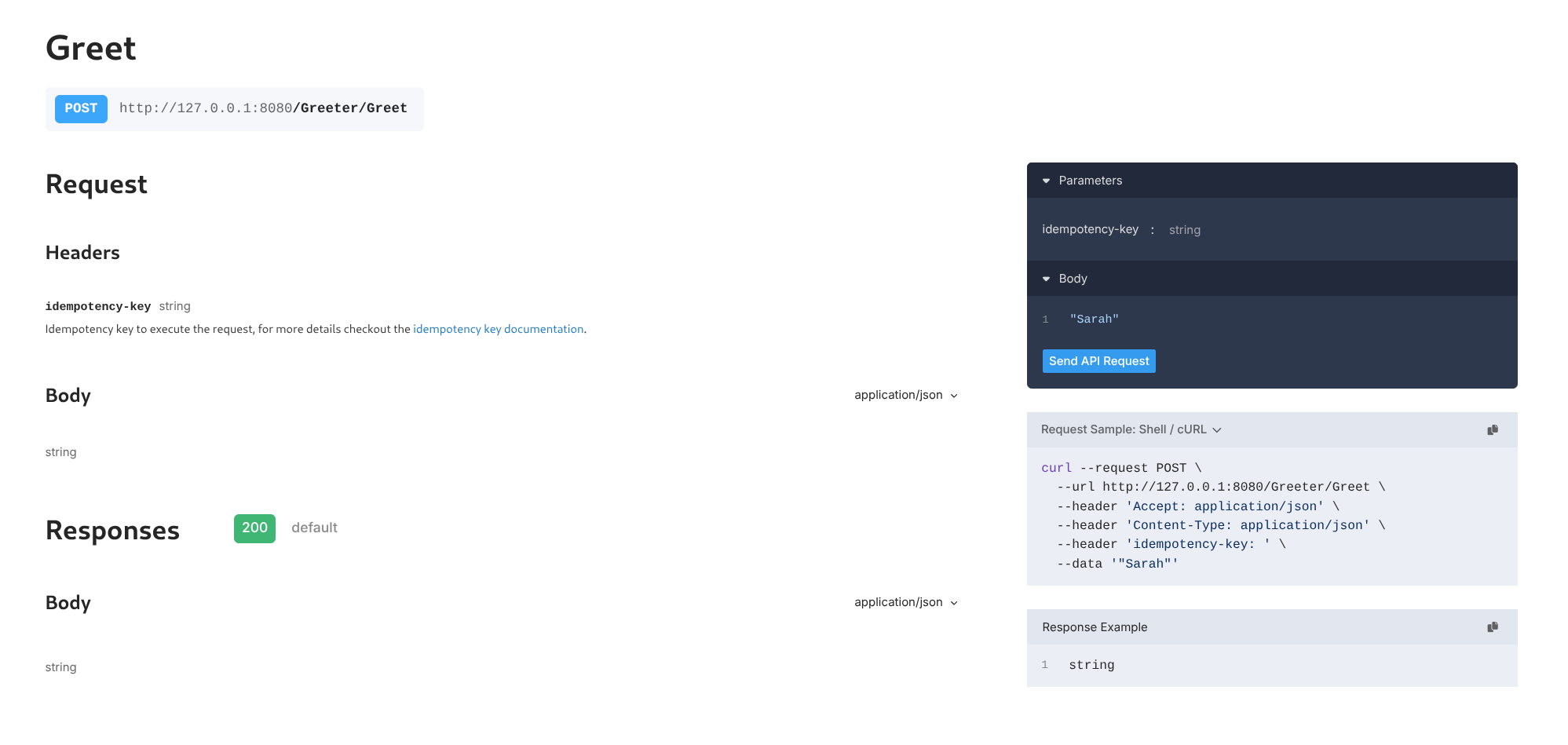 Or invoke via
 curl:curl localhost:8080/restate/call/Greeter/Greet --json '"Sarah"'
You said hi to Sarah!
Congratulations, you just ran Durable Execution!
type Greeter struct{}

func (Greeter) Greet(ctx restate.Context, name string) (string, error) {
  //  Durably execute a set of steps; resilient against failures
  greetingId := restate.UUID(ctx).String()

  if _, err := restate.Run(ctx,
    func(ctx restate.RunContext) (restate.Void, error) {
      return SendNotification(greetingId, name)
    },
    restate.WithName("Notification"),
  ); err != nil {
    return "", err
  }

  if err := restate.Sleep(ctx, 1*time.Second); err != nil {
    return "", err
  }

  if _, err := restate.Run(ctx,
    func(ctx restate.RunContext) (restate.Void, error) {
      return SendReminder(greetingId, name)
    },
    restate.WithName("Reminder"),
  ); err != nil {
    return "", err
  }

  // Respond to caller
  return "You said hi to " + name + "!", nil
}
Alice to see how the service behaves when it occasionally fails to send the reminder and notification:curl localhost:8080/restate/call/Greeter/Greet --json '"Alice"'
You said hi to Alice!
- Python >= v3.11
- uv
Install Restate Server & CLI
- Homebrew
- Download binaries
- npm
- Docker
brew install restatedev/tap/restate-server restatedev/tap/restate
restate-server
BIN=/usr/local/bin && RESTATE_PLATFORM=x86_64-apple-darwin && \
curl -L --remote-name-all https://restate.gateway.scarf.sh/latest/restate-{server,cli}-$RESTATE_PLATFORM.tar.xz && \
tar -xvf restate-server-$RESTATE_PLATFORM.tar.xz --strip-components=1 restate-server-$RESTATE_PLATFORM/restate-server && \
tar -xvf restate-cli-$RESTATE_PLATFORM.tar.xz --strip-components=1 restate-cli-$RESTATE_PLATFORM/restate && \
chmod +x restate restate-server && \
sudo mv restate $BIN && \
sudo mv restate-server $BIN
BIN=/usr/local/bin && RESTATE_PLATFORM=aarch64-apple-darwin && \
curl -L --remote-name-all https://restate.gateway.scarf.sh/latest/restate-{server,cli}-$RESTATE_PLATFORM.tar.xz && \
tar -xvf restate-server-$RESTATE_PLATFORM.tar.xz --strip-components=1 restate-server-$RESTATE_PLATFORM/restate-server && \
tar -xvf restate-cli-$RESTATE_PLATFORM.tar.xz --strip-components=1 restate-cli-$RESTATE_PLATFORM/restate && \
chmod +x restate restate-server && \
sudo mv restate $BIN && \
sudo mv restate-server $BIN
BIN=$HOME/.local/bin && RESTATE_PLATFORM=x86_64-unknown-linux-musl && \
curl -L --remote-name-all https://restate.gateway.scarf.sh/latest/restate-{server,cli}-$RESTATE_PLATFORM.tar.xz && \
tar -xvf restate-server-$RESTATE_PLATFORM.tar.xz --strip-components=1 restate-server-$RESTATE_PLATFORM/restate-server && \
tar -xvf restate-cli-$RESTATE_PLATFORM.tar.xz --strip-components=1 restate-cli-$RESTATE_PLATFORM/restate && \
chmod +x restate restate-server && \
mv restate $BIN && \
mv restate-server $BIN
BIN=$HOME/.local/bin && RESTATE_PLATFORM=aarch64-unknown-linux-musl && \
curl -L --remote-name-all https://restate.gateway.scarf.sh/latest/restate-{server,cli}-$RESTATE_PLATFORM.tar.xz && \
tar -xvf restate-server-$RESTATE_PLATFORM.tar.xz --strip-components=1 restate-server-$RESTATE_PLATFORM/restate-server && \
tar -xvf restate-cli-$RESTATE_PLATFORM.tar.xz --strip-components=1 restate-cli-$RESTATE_PLATFORM/restate && \
chmod +x restate restate-server && \
mv restate $BIN && \
mv restate-server $BIN
restate-server
npm install --global @restatedev/restate-server@latest @restatedev/restate@latest
restate-server
docker run --name restate_dev --rm \
-p 8080:8080 -p 9070:9070 -p 9071:9071 \
--add-host=host.docker.internal:host-gateway \
docker.restate.dev/restatedev/restate:latest
docker run -it --network=host \
docker.restate.dev/restatedev/restate-cli:latest \
invocations ls
invocations ls with any CLI subcommand.http://localhost:9070) after starting the Restate Server.Get the Greeter service template
restate example python-hello-world &&
cd python-hello-world
wget https://github.com/restatedev/examples/releases/latest/download/python-hello-world.zip &&
unzip python-hello-world.zip -d python-hello-world &&
rm python-hello-world.zip && cd python-hello-world
Run the Greeter service
uv run .
Register the service
http://localhost:9070) or via:restate deployments register http://localhost:9080
curl localhost:9070/deployments --json '{"uri": "http://localhost:9080"}'
Show Output
Show Output
❯ SERVICES THAT WILL BE ADDED:
- Greeter
Type: Service
HANDLER  INPUT                                     OUTPUT
greet    value of content-type 'application/json'  value of content-type 'application/json'


✔ Are you sure you want to apply those changes? · yes
✅ DEPLOYMENT:
SERVICE  REV
Greeter  1
{
    "id": "dp_17sztQp4gnEC1L0OCFM9aEh",
    "services": [
        {
            "name": "Greeter",
            "handlers": [
                {
                    "name": "greet",
                    "ty": "Shared",
                    "input_description": "one of [\"none\", \"value of content-type 'application/json'\"]",
                    "output_description": "value of content-type 'application/json'"
                }
            ],
            "ty": "Service",
            "deployment_id": "dp_17sztQp4gnEC1L0OCFM9aEh",
            "revision": 1,
            "public": true,
            "idempotency_retention": "1day"
        }
    ]
}
http://host.docker.internal:9080 instead of http://localhost:9080.Restate Cloud
Restate Cloud
Send a request to the Greeter service
http://localhost:9070, click on your service and then on playground.Or invoke via curl:curl localhost:8080/restate/call/Greeter/greet --json '{"name": "Sarah"}'
You said hi to Sarah!Congratulations, you just ran Durable Execution!
greeter = restate.Service("Greeter")


@greeter.handler()
async def greet(ctx: restate.Context, req: GreetingRequest) -> Greeting:
    # Durably execute a set of steps; resilient against failures
    greeting_id = str(ctx.uuid())
    await ctx.run_typed("notification", send_notification, greeting_id=greeting_id, name=req.name)
    await ctx.sleep(timedelta(seconds=1))
    await ctx.run_typed("reminder", send_reminder, greeting_id=greeting_id, name=req.name)

    # Respond to caller
    return Greeting(message=f"You said hi to {req.name}!")
Alice to see how the service behaves when it occasionally fails to send the reminder and notification:curl localhost:8080/restate/call/Greeter/greet --json '{"name": "Alice"}'
You said hi to Alice!
 Tokio
Tokio Shuttle
Install Restate Server & CLI
- Homebrew
- Download binaries
- npm
- Docker
brew install restatedev/tap/restate-server restatedev/tap/restate
restate-server
BIN=/usr/local/bin && RESTATE_PLATFORM=x86_64-apple-darwin && \
curl -L --remote-name-all https://restate.gateway.scarf.sh/latest/restate-{server,cli}-$RESTATE_PLATFORM.tar.xz && \
tar -xvf restate-server-$RESTATE_PLATFORM.tar.xz --strip-components=1 restate-server-$RESTATE_PLATFORM/restate-server && \
tar -xvf restate-cli-$RESTATE_PLATFORM.tar.xz --strip-components=1 restate-cli-$RESTATE_PLATFORM/restate && \
chmod +x restate restate-server && \
sudo mv restate $BIN && \
sudo mv restate-server $BIN
BIN=/usr/local/bin && RESTATE_PLATFORM=aarch64-apple-darwin && \
curl -L --remote-name-all https://restate.gateway.scarf.sh/latest/restate-{server,cli}-$RESTATE_PLATFORM.tar.xz && \
tar -xvf restate-server-$RESTATE_PLATFORM.tar.xz --strip-components=1 restate-server-$RESTATE_PLATFORM/restate-server && \
tar -xvf restate-cli-$RESTATE_PLATFORM.tar.xz --strip-components=1 restate-cli-$RESTATE_PLATFORM/restate && \
chmod +x restate restate-server && \
sudo mv restate $BIN && \
sudo mv restate-server $BIN
BIN=$HOME/.local/bin && RESTATE_PLATFORM=x86_64-unknown-linux-musl && \
curl -L --remote-name-all https://restate.gateway.scarf.sh/latest/restate-{server,cli}-$RESTATE_PLATFORM.tar.xz && \
tar -xvf restate-server-$RESTATE_PLATFORM.tar.xz --strip-components=1 restate-server-$RESTATE_PLATFORM/restate-server && \
tar -xvf restate-cli-$RESTATE_PLATFORM.tar.xz --strip-components=1 restate-cli-$RESTATE_PLATFORM/restate && \
chmod +x restate restate-server && \
mv restate $BIN && \
mv restate-server $BIN
BIN=$HOME/.local/bin && RESTATE_PLATFORM=aarch64-unknown-linux-musl && \
curl -L --remote-name-all https://restate.gateway.scarf.sh/latest/restate-{server,cli}-$RESTATE_PLATFORM.tar.xz && \
tar -xvf restate-server-$RESTATE_PLATFORM.tar.xz --strip-components=1 restate-server-$RESTATE_PLATFORM/restate-server && \
tar -xvf restate-cli-$RESTATE_PLATFORM.tar.xz --strip-components=1 restate-cli-$RESTATE_PLATFORM/restate && \
chmod +x restate restate-server && \
mv restate $BIN && \
mv restate-server $BIN
restate-server
npm install --global @restatedev/restate-server@latest @restatedev/restate@latest
restate-server
docker run --name restate_dev --rm \
-p 8080:8080 -p 9070:9070 -p 9071:9071 \
--add-host=host.docker.internal:host-gateway \
docker.restate.dev/restatedev/restate:latest
docker run -it --network=host \
docker.restate.dev/restatedev/restate-cli:latest \
invocations ls
invocations ls with any CLI subcommand.http://localhost:9070) after starting the Restate Server.Get the Greeter service template
restate example rust-hello-world &&
cd rust-hello-world
wget https://github.com/restatedev/examples/releases/latest/download/rust-hello-world.zip &&
unzip rust-hello-world.zip -d rust-hello-world &&
rm rust-hello-world.zip && cd rust-hello-world
Run the Greeter service
cargo run
Register the service
http://localhost:9070) or via:restate deployments register http://localhost:9080
curl localhost:9070/deployments --json '{"uri": "http://localhost:9080"}'
Show Output
Show Output
❯ SERVICES THAT WILL BE ADDED:
- Greeter
Type: Service
HANDLER  INPUT                                     OUTPUT
greet    value of content-type 'application/json'  value of content-type 'application/json'


✔ Are you sure you want to apply those changes? · yes
✅ DEPLOYMENT:
SERVICE  REV
Greeter  1
{
    "id": "dp_17sztQp4gnEC1L0OCFM9aEh",
    "services": [
        {
            "name": "Greeter",
            "handlers": [
                {
                    "name": "greet",
                    "ty": "Shared",
                    "input_description": "one of [\"none\", \"value of content-type 'application/json'\"]",
                    "output_description": "value of content-type 'application/json'"
                }
            ],
            "ty": "Service",
            "deployment_id": "dp_17sztQp4gnEC1L0OCFM9aEh",
            "revision": 1,
            "public": true,
            "idempotency_retention": "1day"
        }
    ]
}
http://host.docker.internal:9080 instead of http://localhost:9080.Restate Cloud
Restate Cloud
Send a request to the Greeter service
http://localhost:9070, click on your service and then on playground.Or invoke via curl:curl localhost:8080/restate/call/Greeter/greet --json '"Sarah"'
You said hi to Sarah!
Congratulations, you just ran Durable Execution!
#[restate_sdk::service]
impl Greeter {
    #[handler]
    async fn greet(&self, mut ctx: Context<'_>, name: String) -> Result<String, HandlerError> {
        // Durably execute a set of steps; resilient against failures
        let greeting_id = ctx.rand_uuid().to_string();
        ctx.run(|| send_notification(&greeting_id, &name))
            .name("notification")
            .await?;
        ctx.sleep(Duration::from_secs(1)).await?;
        ctx.run(|| send_reminder(&greeting_id, &name))
            .name("reminder")
            .await?;

        // Respond to caller
        Ok(format!("You said hi to {name}"))
    }
}

#[tokio::main]
async fn main() {
    // To enable logging
    tracing_subscriber::fmt::init();

    HttpServer::new(Endpoint::builder().bind(Greeter).build())
        .listen_and_serve("0.0.0.0:9080".parse().unwrap())
        .await;
}
Alice to see how the service behaves when it occasionally fails to send the reminder and notification:curl localhost:8080/restate/call/Greeter/greet --json '"Alice"'
You said hi to Alice!
Install Restate Server & CLI
- Homebrew
- Download binaries
- npm
- Docker
brew install restatedev/tap/restate-server restatedev/tap/restate
restate-server
BIN=/usr/local/bin && RESTATE_PLATFORM=x86_64-apple-darwin && \
curl -L --remote-name-all https://restate.gateway.scarf.sh/latest/restate-{server,cli}-$RESTATE_PLATFORM.tar.xz && \
tar -xvf restate-server-$RESTATE_PLATFORM.tar.xz --strip-components=1 restate-server-$RESTATE_PLATFORM/restate-server && \
tar -xvf restate-cli-$RESTATE_PLATFORM.tar.xz --strip-components=1 restate-cli-$RESTATE_PLATFORM/restate && \
chmod +x restate restate-server && \
sudo mv restate $BIN && \
sudo mv restate-server $BIN
BIN=/usr/local/bin && RESTATE_PLATFORM=aarch64-apple-darwin && \
curl -L --remote-name-all https://restate.gateway.scarf.sh/latest/restate-{server,cli}-$RESTATE_PLATFORM.tar.xz && \
tar -xvf restate-server-$RESTATE_PLATFORM.tar.xz --strip-components=1 restate-server-$RESTATE_PLATFORM/restate-server && \
tar -xvf restate-cli-$RESTATE_PLATFORM.tar.xz --strip-components=1 restate-cli-$RESTATE_PLATFORM/restate && \
chmod +x restate restate-server && \
sudo mv restate $BIN && \
sudo mv restate-server $BIN
BIN=$HOME/.local/bin && RESTATE_PLATFORM=x86_64-unknown-linux-musl && \
curl -L --remote-name-all https://restate.gateway.scarf.sh/latest/restate-{server,cli}-$RESTATE_PLATFORM.tar.xz && \
tar -xvf restate-server-$RESTATE_PLATFORM.tar.xz --strip-components=1 restate-server-$RESTATE_PLATFORM/restate-server && \
tar -xvf restate-cli-$RESTATE_PLATFORM.tar.xz --strip-components=1 restate-cli-$RESTATE_PLATFORM/restate && \
chmod +x restate restate-server && \
mv restate $BIN && \
mv restate-server $BIN
BIN=$HOME/.local/bin && RESTATE_PLATFORM=aarch64-unknown-linux-musl && \
curl -L --remote-name-all https://restate.gateway.scarf.sh/latest/restate-{server,cli}-$RESTATE_PLATFORM.tar.xz && \
tar -xvf restate-server-$RESTATE_PLATFORM.tar.xz --strip-components=1 restate-server-$RESTATE_PLATFORM/restate-server && \
tar -xvf restate-cli-$RESTATE_PLATFORM.tar.xz --strip-components=1 restate-cli-$RESTATE_PLATFORM/restate && \
chmod +x restate restate-server && \
mv restate $BIN && \
mv restate-server $BIN
restate-server
npm install --global @restatedev/restate-server@latest @restatedev/restate@latest
restate-server
docker run --name restate_dev --rm \
-p 8080:8080 -p 9070:9070 -p 9071:9071 \
--add-host=host.docker.internal:host-gateway \
docker.restate.dev/restatedev/restate:latest
docker run -it --network=host \
docker.restate.dev/restatedev/restate-cli:latest \
invocations ls
invocations ls with any CLI subcommand.http://localhost:9070) after starting the Restate Server.Get the Greeter service template
restate example rust-hello-world-shuttle &&
cd rust-hello-world-shuttle
wget https://github.com/restatedev/examples/releases/latest/download/rust-hello-world-shuttle.zip &&
unzip rust-hello-world-shuttle.zip -d rust-hello-world-shuttle &&
rm rust-hello-world-shuttle.zip && cd rust-hello-world-shuttle
Run the Greeter service
cargo shuttle run --port 9080
Register the service
http://localhost:9070) or via:restate deployments register http://localhost:9080 --use-http1.1
curl localhost:9070/deployments --json '{"uri": "http://localhost:9080", "use_http_11": true}'
❯ SERVICES THAT WILL BE ADDED:
- Greeter
Type: Service
HANDLER  INPUT                                     OUTPUT
greet    value of content-type 'application/json'  value of content-type 'application/json'


✔ Are you sure you want to apply those changes? · yes
✅ DEPLOYMENT:
SERVICE  REV
Greeter  1
{
"id": "dp_17sztQp4gnEC1L0OCFM9aEh",
    "services": [
        {
            "name": "Greeter",
            "handlers": [
                {
                    "name": "greet",
                    "ty": "Shared",
                    "input_description": "one of [\"none\", \"value of content-type 'application/json'\"]",
                    "output_description": "value of content-type 'application/json'"
                }
            ],
            "ty": "Service",
            "deployment_id": "dp_17sztQp4gnEC1L0OCFM9aEh",
            "revision": 1,
            "public": true,
            "idempotency_retention": "1day"
        }
    ]
}
http://host.docker.internal:9080 instead of http://localhost:9080.Send a request to the Greeter service
http://localhost:9070, click on your service and then on playground.Or invoke via curl:curl localhost:8080/restate/call/Greeter/greet --json '{"name": "Sarah"}'
You said hi to Sarah!Congratulations, you just ran Durable Execution!
#[restate_sdk::service]
impl Greeter {
    #[handler]
    async fn greet(&self, mut ctx: Context<'_>, name: String) -> Result<String, HandlerError> {
        // Durably execute a set of steps; resilient against failures
        let greeting_id = ctx.rand_uuid().to_string();
        ctx.run(|| send_notification(&greeting_id, &name))
            .name("notification")
            .await?;
        ctx.sleep(Duration::from_secs(1)).await?;
        ctx.run(|| send_reminder(&greeting_id, &name))
            .name("reminder")
            .await?;

        // Respond to caller
        Ok(format!("You said hi to {name}"))
    }
}

#[shuttle_runtime::main]
async fn main() -> Result<RestateShuttleEndpoint, shuttle_runtime::Error> {
    Ok(RestateShuttleEndpoint::new(
        Endpoint::builder().bind(Greeter).build(),
    ))
}
Alice to see how the service behaves when it occasionally fails to send the reminder and notification:curl localhost:8080/restate/call/Greeter/greet --json '"Alice"'
You said hi to Alice!