

How it works
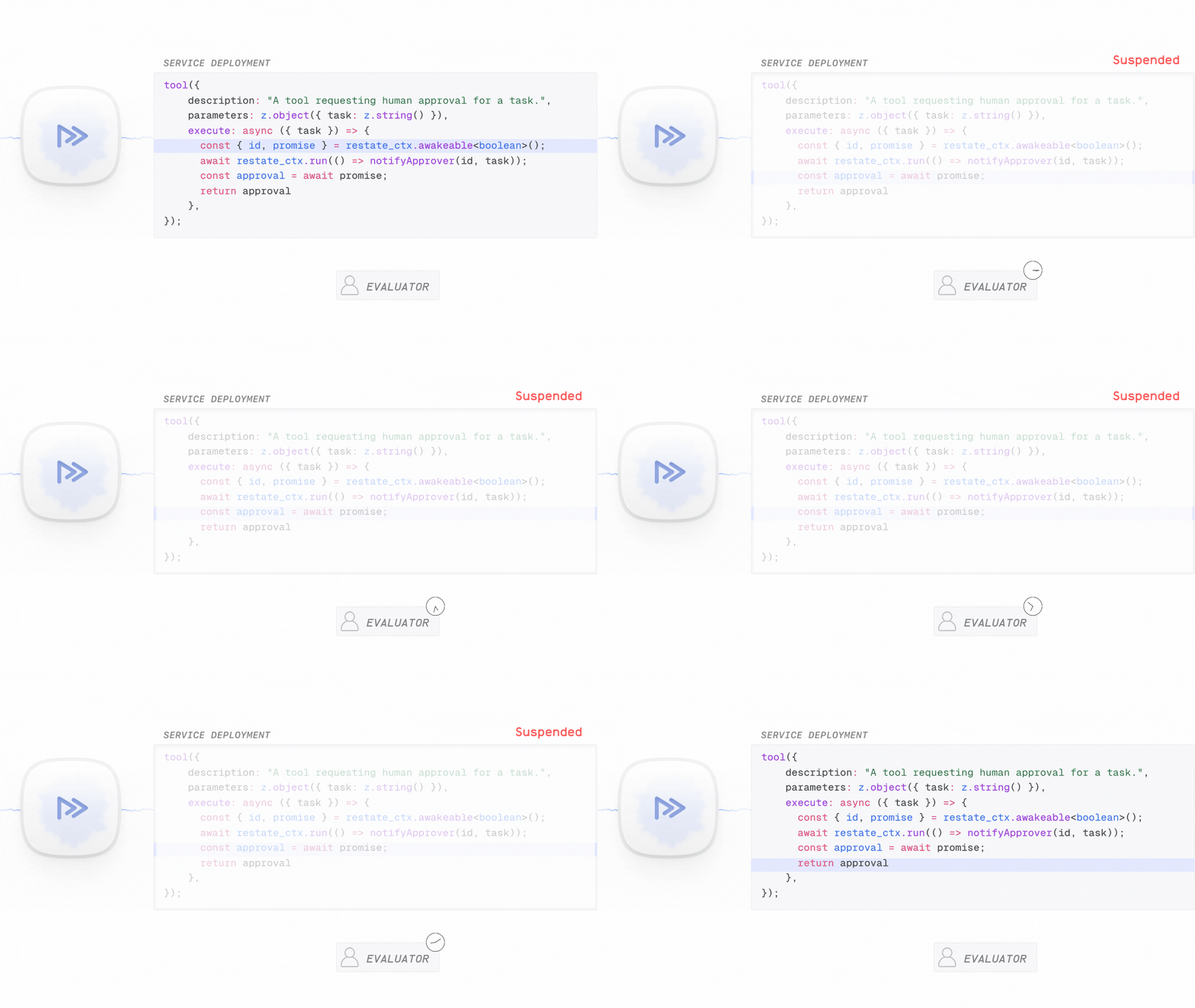
Restate provides durable promises that survive crashes and restarts. For this callback pattern, you create one with the awakeable API:- The agent creates a durable promise and gets a unique callback ID
- The agent sends this ID to whoever needs to approve (Slack, email, dashboard)
- The agent suspends, freeing compute resources (no idle billing on serverless)
- When the approver responds, they resolve the promise through Restate’s HTTP API
- The agent resumes from the exact point it paused
Example: approval tool for an agent
 Vercel AI
 OpenAI Agents
- Google ADK
- Pydantic AI
- LangChain
- Restate TS
- Restate Py
human-approval-agent.ts
const run = async (ctx: restate.Context, { prompt }: ClaimPrompt) => {
  const model = wrapLanguageModel({
    model: openai("gpt-5.4"),
    middleware: durableCalls(ctx, { maxRetryAttempts: 3 }),
  });

  const { text } = await generateText({
    model,
    system:
      "You are an insurance claim evaluation agent. Use these rules: " +
      "* if the amount is more than 1000, ask for human approval, " +
      "* if the amount is less than 1000, decide by yourself",
    prompt,
    tools: {
      humanApproval: tool({
        description: "Ask for human approval for high-value claims.",
        inputSchema: InsuranceClaimSchema,
        execute: async (claim: InsuranceClaim): Promise<boolean> => {
          const approval = ctx.awakeable<boolean>();
          await ctx.run("request-review", () =>
            requestHumanReview(claim, approval.id),
          );
          return approval.promise;
        },
      }),
    },
    stopWhen: [stepCountIs(5)],
    providerOptions: { openai: { parallelToolCalls: false } },
  });
  return text;
};
Try out human approval
Try out human approval
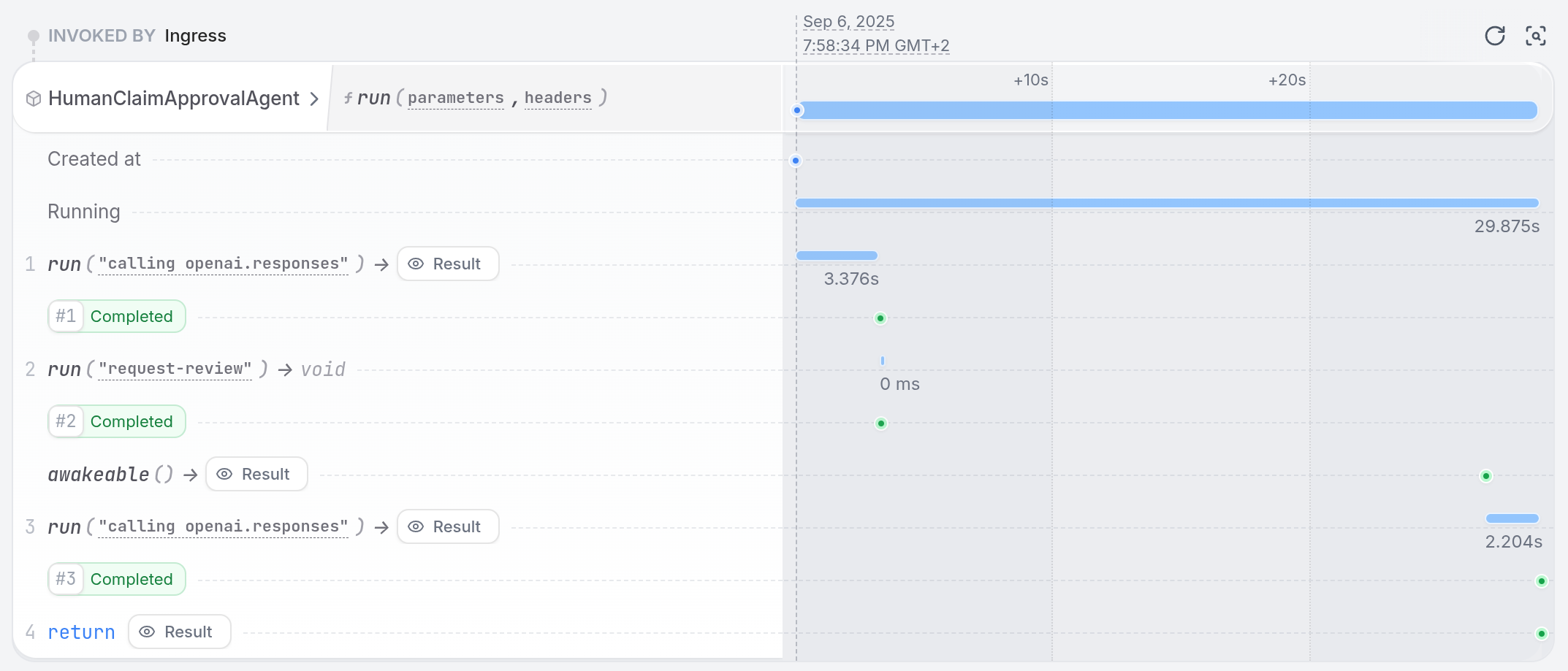
Install Restate and launch it:Get the example:Export your OpenAI API key and run the agent:Register the agents with Restate:Use You can restart the service to see how Restate continues waiting for the approval.If you wait for more than a minute, the invocation will get suspended.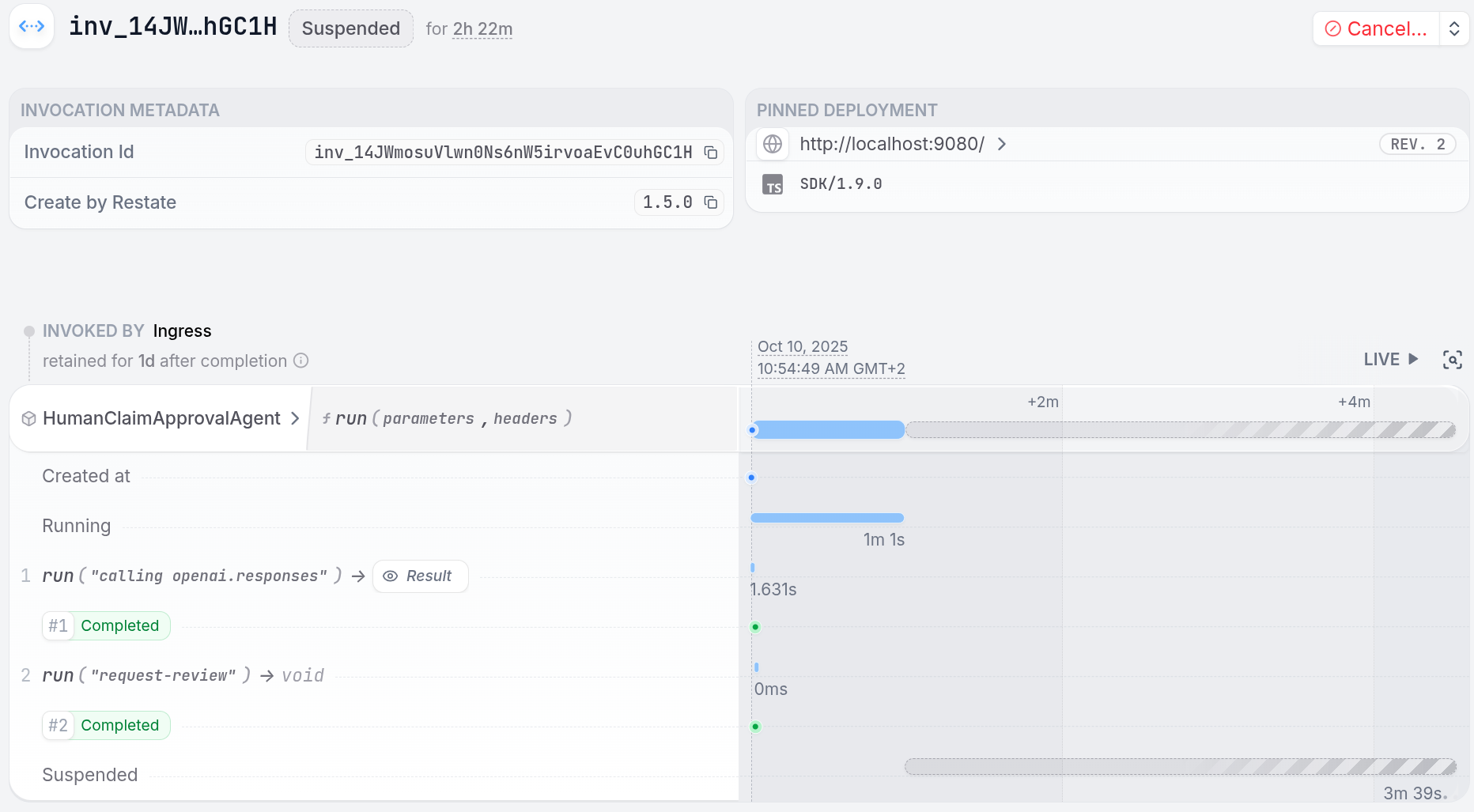
npm install --global @restatedev/restate-server@latest @restatedev/restate@latest
restate-server
restate example typescript-vercel-ai-tour-of-agents && cd typescript-vercel-ai-tour-of-agents
npm install
export OPENAI_API_KEY=sk-...
npx tsx ./src/human-approval-agent.ts
restate deployments register http://localhost:9080 --force --yes # dev only: overrides previous registrations
curl with the send verb to start the claim asynchronously, without waiting for the result:curl localhost:8080/restate/send/HumanClaimApprovalAgent/run \
--json '{"prompt": "Process my hospital bill of 3000USD for a broken leg."}'
curl localhost:8080/restate/awakeables/sign_1M28aqY6ZfuwBmRnmyP/resolve --json 'true'
human_approval_agent.py
@durable_function_tool
async def human_approval(claim: InsuranceClaim) -> str:
    """Ask for human approval for high-value claims."""

    # Create an awakeable for human approval
    approval_id, approval_promise = restate_context().awakeable(type_hint=str)

    # Request human review
    await restate_context().run_typed(
        "Request review", request_human_review, claim=claim, awakeable_id=approval_id
    )

    # Wait for human approval
    return await approval_promise
Try out human approval
Try out human approval
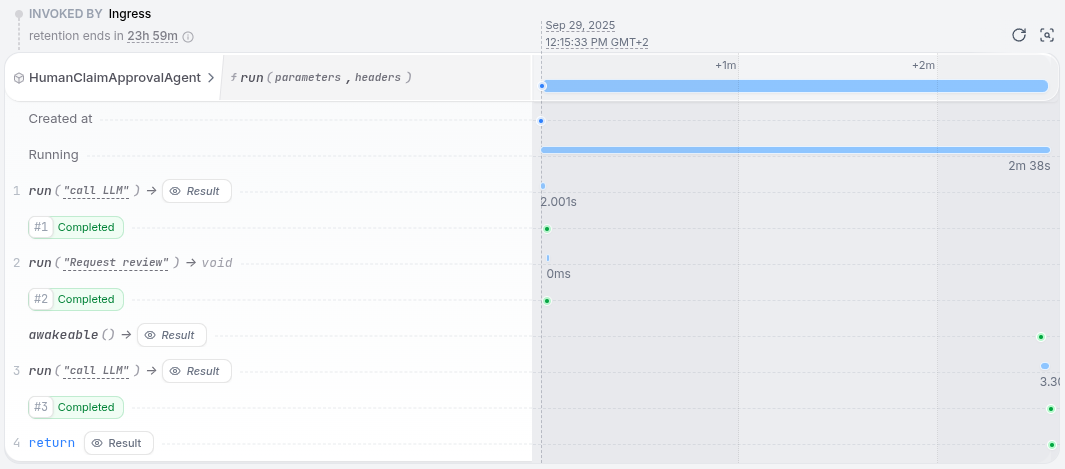
Install Restate and launch it:Get the example:Export your OpenAI API key and run the agent:Register the agents with Restate:Use You can restart the service to see how Restate continues waiting for the approval.If you wait for more than a minute, the invocation will get suspended.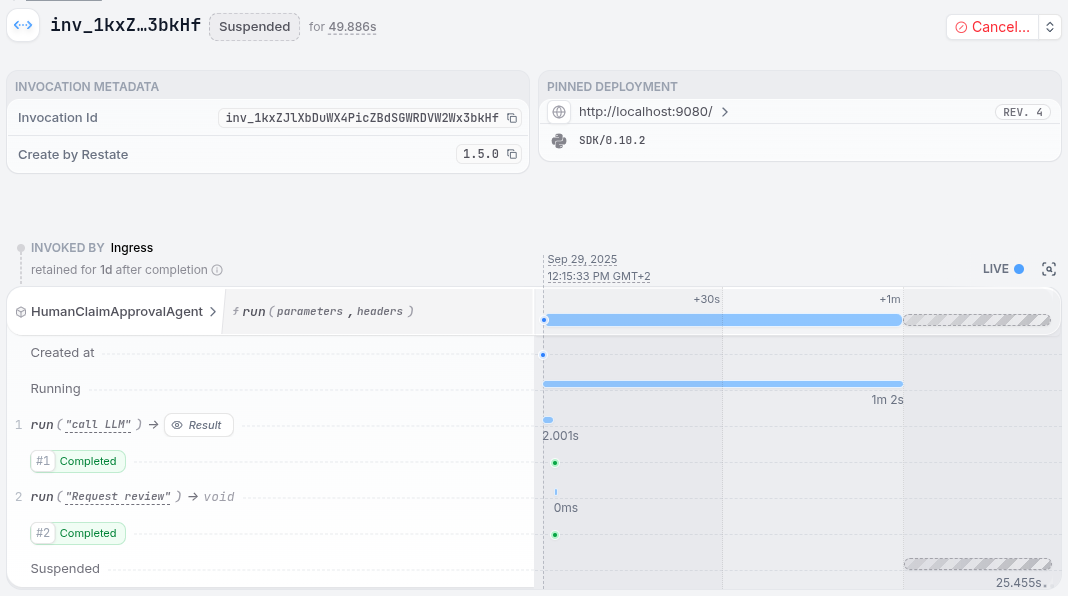
restate-server
restate example python-openai-agents-tour-of-agents && cd python-openai-agents-tour-of-agents
export OPENAI_API_KEY=sk-...
uv run app/human_approval_agent.py
restate deployments register http://localhost:9080 --force --yes # dev only: overrides previous registrations
curl with the send verb to start the claim asynchronously, without waiting for the result:curl localhost:8080/restate/send/HumanClaimApprovalAgent/run \
--json '{"message": "Process my hospital bill of 3000USD for a broken leg."}'
curl localhost:8080/restate/awakeables/sign_1M28aqY6ZfuwBmRnmyP/resolve --json 'true'
human_approval_agent.py
async def human_approval(claim: InsuranceClaim) -> str:
    """Ask for human approval for high-value claims."""
    # Create an awakeable for human approval
    approval_id, approval_promise = restate_context().awakeable(type_hint=str)

    # Request human review
    await restate_context().run_typed(
        "Request review",
        request_review,
        claim=claim,
        awakeable_id=approval_id,
    )

    # Wait for human approval
    return await approval_promise
Try out human approval
Try out human approval
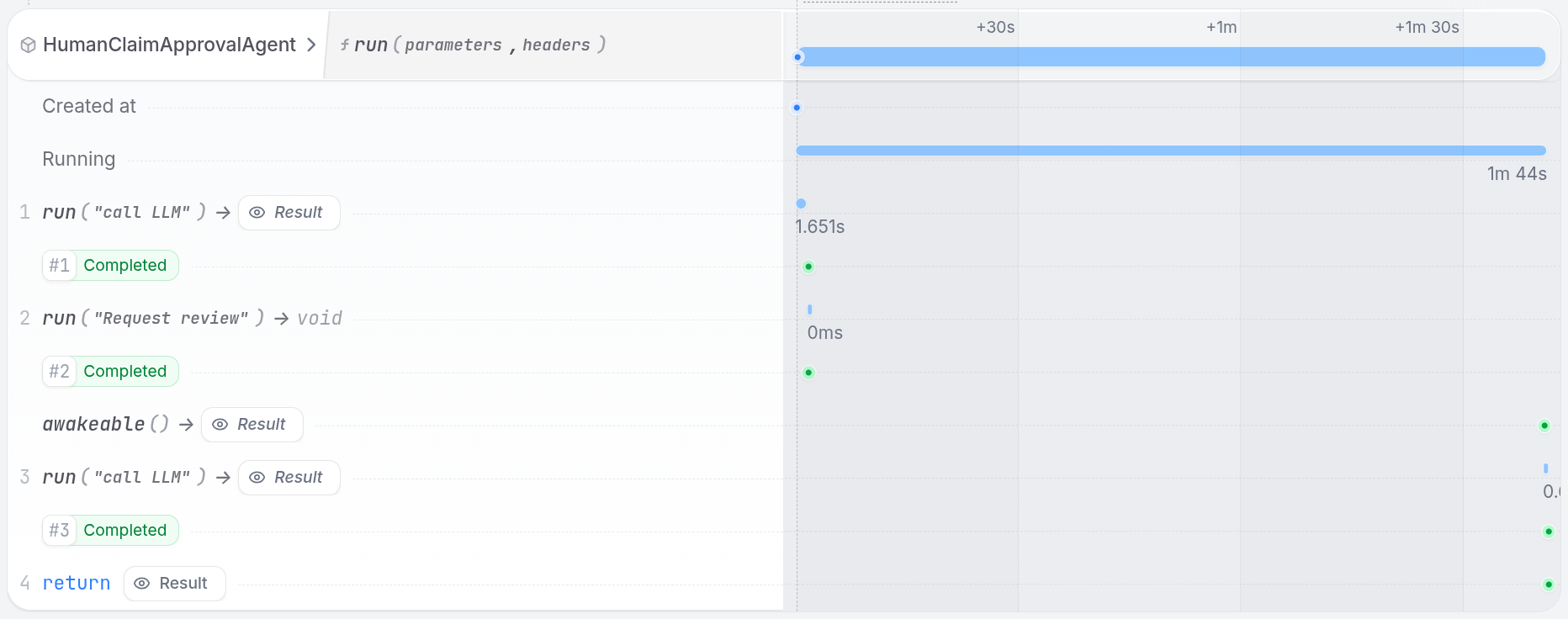
Install Restate and launch it:Get the example:Export your Google API key and run the agent:Register the agents with Restate:Use You can restart the service to see how Restate continues waiting for the approval.If you wait for more than a minute, the invocation will get suspended.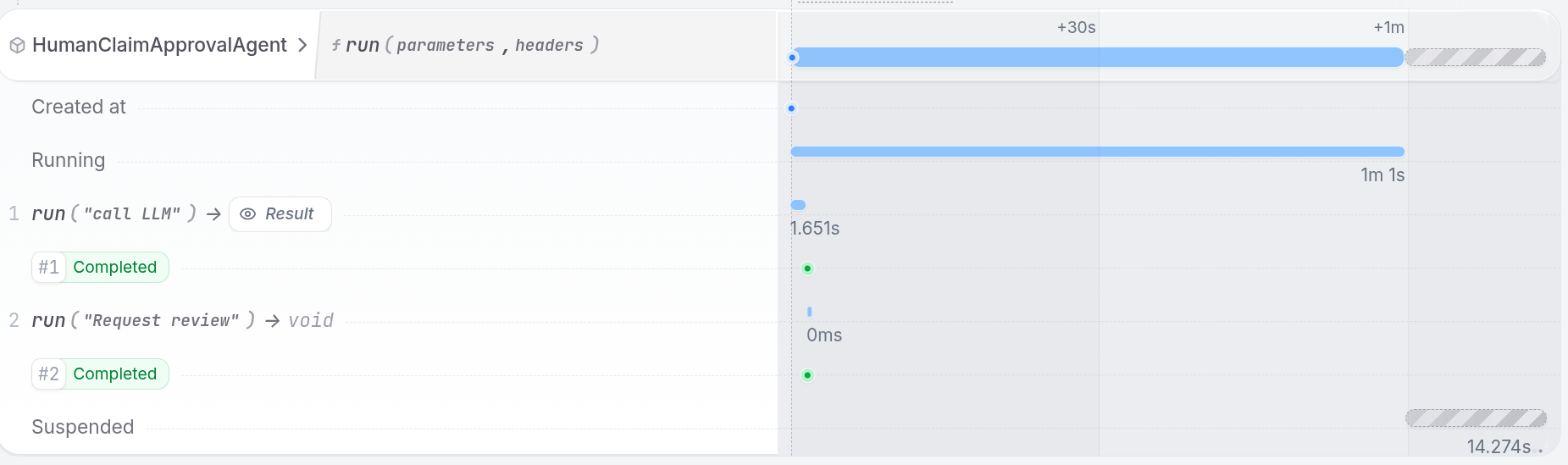
restate-server
restate example python-google-adk-tour-of-agents && cd python-google-adk-tour-of-agents
export GOOGLE_API_KEY=your-api-key
uv run app/human_approval_agent.py
restate deployments register http://localhost:9080 --force --yes # dev only: overrides previous registrations
curl with the send verb to start the claim asynchronously, without waiting for the result:curl localhost:8080/restate/send/HumanClaimApprovalAgent/user-123/run \
--json '{"message": "Process my hospital bill of 3000USD for a broken leg.", "session_id": "session-123"}'
curl localhost:8080/restate/awakeables/sign_1M28aqY6ZfuwBmRnmyP/resolve --json 'true'
human_approval_agent.py
@agent.tool
async def human_approval(_run_ctx: RunContext[None], claim: InsuranceClaim) -> str:
    """Ask for human approval for high-value claims."""

    # Create an awakeable for human approval
    approval_id, approval_promise = restate_context().awakeable(type_hint=str)

    # Request human review
    await restate_context().run_typed(
        "Request review", request_human_review, claim=claim, awakeable_id=approval_id
    )

    # Wait for human approval
    return await approval_promise
Try out human approval
Try out human approval
Install Restate and launch it:Get the example:Export your OpenAI API key and run the agent:Register the agents with Restate:Use You can restart the service to see how Restate continues waiting for the approval.If you wait for more than a minute, the invocation will get suspended.
restate-server
restate example python-pydantic-ai-tour-of-agents && cd python-pydantic-ai-tour-of-agents
export OPENAI_API_KEY=sk-...
uv run app/human_approval_agent.py
restate deployments register http://localhost:9080 --force --yes # dev only: overrides previous registrations
curl with the send verb to start the claim asynchronously, without waiting for the result:curl localhost:8080/restate/send/HumanClaimApprovalAgent/run \
--json '{"message": "Process my hospital bill of 3000USD for a broken leg."}'
curl localhost:8080/restate/awakeables/sign_1M28aqY6ZfuwBmRnmyP/resolve --json 'true'
human_approval_agent.py
@tool
async def human_approval(claim: InsuranceClaim) -> str:
    """Ask for human approval for high-value claims."""

    # Create an awakeable that a human can resolve via the Restate API.
    approval_id, approval_promise = restate_context().awakeable(type_hint=str)

    # Notify the reviewer (durable step).
    await restate_context().run_typed(
        "Request review", request_human_review, claim=claim, awakeable_id=approval_id
    )

    # Suspend until resolved.
    return await approval_promise
Try out human approval
Try out human approval
Install Restate and launch it:Get the example:Export your OpenAI API key and run the agent:Register the agents with Restate:Use You can restart the service to see how Restate continues waiting for the approval.If you wait for more than a minute, the invocation will get suspended.
restate-server
restate example python-langchain-tour-of-agents && cd python-langchain-tour-of-agents
export OPENAI_API_KEY=sk-...
uv run app/human_approval_agent.py
restate deployments register http://localhost:9080 --force --yes # dev only: overrides previous registrations
curl with the send verb to start the claim asynchronously, without waiting for the result:curl localhost:8080/restate/send/HumanClaimApprovalAgent/run \
--json '{"message": "Process my hospital bill of 3000USD for a broken leg."}'
curl localhost:8080/restate/awakeables/sign_1M28aqY6ZfuwBmRnmyP/resolve --json 'true'
human-approval-agent.ts
async function run(ctx: Context, { message }: { message: string }) {
  const prompt =
    "You are an insurance claim evaluation agent. Use these rules: " +
    "* if the amount is more than 1000, ask for human approval, " +
    "* if the amount is less than 1000, decide by yourself. " +
    `Evaluate this claim: ${message}`;
  const { text, toolCalls } = await ctx.run(
    "LLM call",
    // Use your preferred LLM SDK here
    async () => llmCall(prompt, tools),
    { maxRetryAttempts: 3 },
  );

  if (toolCalls?.[0]?.toolName === "humanApproval") {
    // Create a recoverable approval promise
    const approval = ctx.awakeable<boolean>();
    await ctx.run("request-review", () =>
      requestClaimReview(message, approval.id),
    );

    // Suspend until reviewer resolves the approval
    // Check the service logs to see how to resolve it over HTTP, e.g.:
    // curl http://localhost:8080/restate/awakeables/sign_.../resolve --json 'true'
    return approval.promise;
  }

  return text;
}
Try out human approval
Try out human approval
Install Restate and launch it:Get the example:Export your API key:Register the services with Restate:Use If you wait for more than a minute, the invocation will get suspended.Simulate approving by executing the curl request that was printed in the service logs, similar to:See in the UI how the workflow resumes and finishes after the approval.
restate-server
restate example typescript-restate-tour-of-agents && cd typescript-restate-tour-of-agents
npm install
export OPENAI_API_KEY=sk-...
npx tsx ./src/human-approval-agent.ts
restate deployments register http://localhost:9080 --force --yes # dev only: overrides previous registrations
curl with the send verb to start the moderation asynchronously:curl localhost:8080/restate/send/HumanClaimApprovalAgent/run \
--json '{"message": "Process my hospital bill of 3000USD for a broken leg."}'
curl localhost:8080/restate/awakeables/sign_1M28aqY6ZfuwBmRnmyP/resolve --json '"approved"'
human_approval_agent.py
# TOOL IMPLEMENTATION
async def request_human_approval(ctx: restate.Context, claim: InsuranceClaim) -> str:
    # Create a recoverable approval promise
    approval_id, approval_promise = ctx.awakeable(type_hint=str)

    await ctx.run_typed(
        "Request review", request_review, claim=claim, approval_id=approval_id
    )

    # Suspend until human resolves the approval
    # Check the service logs to see how to resolve it over HTTP, e.g.:
    # curl http://localhost:8080/restate/awakeables/sign_.../resolve --json '"approved"'
    return await approval_promise


# AGENT SERVICE
claim_approval_agent = restate.Service("HumanClaimApprovalAgent")


@claim_approval_agent.handler()
async def run(ctx: restate.Context, req: ClaimPrompt) -> str | None:
    """Evaluate an insurance claim with optional human approval for high-value claims."""

    # LLM evaluates the claim and decides if human approval is needed
    result = await ctx.run_typed(
        "Evaluate claim",
        llm_call,  # Use your preferred LLM SDK here
        RunOptions(max_attempts=3),
        messages=f"""You are an insurance claim evaluation agent. Use these rules:
        - if the amount is more than 1000, ask for human approval using tools;
        - if the amount is less than 1000, decide by yourself.

        Claim: {req.message}""",
        tools=[
            tool(
                "request_human_approval",
                "Ask for human approval for high-value claims",
                InsuranceClaim.model_json_schema(),
            )
        ],
    )

    # If the LLM requests human approval, suspend until a human resolves it
    if (
        result.tool_calls
        and result.tool_calls[0].function.name == "request_human_approval"
    ):
        claim = InsuranceClaim.model_validate_json(
            result.tool_calls[0].function.arguments
        )
        return await request_human_approval(ctx, claim)

    return result.content
Try out human approval
Try out human approval
Install Restate and launch it:Get the example:Export your API key:Register the services with Restate:Use If you wait for more than a minute, the invocation will get suspended.Simulate approving by executing the curl request that was printed in the service logs, similar to:See in the UI how the workflow resumes and finishes after the approval.
restate-server
restate example python-restate-tour-of-agents && cd python-restate-tour-of-agents
export OPENAI_API_KEY=sk-...
uv run app/human_approval_agent.py
restate deployments register http://localhost:9080 --force --yes # dev only: overrides previous registrations
curl with the send verb to start the claim asynchronously, without waiting for the result:curl localhost:8080/restate/send/HumanClaimApprovalAgent/run \
--json '{"message": "Process my hospital bill of 3000USD for a broken leg."}'
curl localhost:8080/restate/awakeables/sign_1M28aqY6ZfuwBmRnmyP/resolve --json '"approved"'
Why this matters for agents
- No idle resources: The agent suspends while waiting. On serverless infrastructure, you pay nothing during the wait.
- Survives restarts: Even if the process or infrastructure changes, the agent resumes when the approval arrives.
- Composable: Combine with tool calls, multi-step workflows, and other patterns. The approval is just another durable step.
Adding timeouts
Add a timeout to prevent approval steps from hanging indefinitely. Restate persists both the timer and the approval promise, so if the service crashes or is restarted, it will continue waiting with the correct remaining time.- Vercel AI
- OpenAI Agents
- Google ADK
- Pydantic AI
- LangChain
- Restate TS
- Restate Py
human-approval-agent-with-timeout.ts
const approval = ctx.awakeable<boolean>();
await ctx.run("request-review", () =>
  requestHumanReview(claim, approval.id),
);
try {
  // At most 3 hours, to reach our SLA
  const approved = await approval.promise.orTimeout({ hours: 3 });
  return { approved };
} catch (e) {
  if (e instanceof TimeoutError) {
    return {
      approved: false,
      reason: "Approval timed out - Evaluate with AI",
    };
  }
  throw e;
}
Try out timeouts
Try out timeouts
Start the timeout agent (stop any previously running agent first):Register the agents with Restate:Send a request to the service:Restart the service and check in the UI how the process will block for the remaining time without starting over.You can also lower the timeout to a few seconds to see how the timeout path is taken.
npx tsx ./src/human-approval-agent-with-timeout.ts
restate deployments register http://localhost:9080 --force --yes # dev only: overrides previous registrations
curl localhost:8080/restate/send/HumanClaimApprovalWithTimeoutsAgent/run \
--json '{"prompt": "Process my hospital bill of 3000USD for a broken leg."}'
human_approval_agent_with_timeout.py
@durable_function_tool
async def human_approval(claim: InsuranceClaim) -> str:
    """Ask for human approval for high-value claims."""
    # Create an awakeable for human approval
    approval_id, approval_promise = restate_context().awakeable(type_hint=bool)

    # Request human review
    await restate_context().run_typed(
        "Request review", request_human_review, claim=claim, awakeable_id=approval_id
    )

    # Wait for human approval for at most 3 hours to reach our SLA
    match await restate.select(
        approval=approval_promise,
        timeout=restate_context().sleep(timedelta(hours=3)),
    ):
        case ["approval", approved]:
            return "Approved" if approved else "Rejected"
        case _:
            return "Approval timed out - Evaluate with AI"
Try out timeouts
Try out timeouts
Start the timeout agent (stop any previously running agent first):Register the agents with Restate:Send a request to the service:Restart the service and check in the UI how the process will block for the remaining time without starting over.You can also lower the timeout to a few seconds to see how the timeout path is taken.
uv run app/human_approval_agent_with_timeout.py
restate deployments register http://localhost:9080 --force --yes # dev only: overrides previous registrations
curl localhost:8080/restate/send/HumanClaimApprovalWithTimeoutsAgent/run \
--json '{"message": "Process my hospital bill of 3000USD for a broken leg."}'
human_approval_agent_with_timeout.py
async def human_approval(claim: InsuranceClaim) -> str:
    """Ask for human approval for high-value claims."""
    # Create an awakeable for human approval
    approval_id, approval_promise = restate_context().awakeable(type_hint=str)

    # Request human review
    await restate_context().run_typed(
        "Request review",
        request_review,
        claim=claim,
        awakeable_id=approval_id,
    )

    # Wait for human approval for at most 3 hours to reach our SLA
    match await restate.select(
        approval=approval_promise,
        timeout=restate_context().sleep(timedelta(hours=3)),
    ):
        case ["approval", approved]:
            return "Approved" if approved else "Rejected"
        case _:
            return "Approval timed out - Evaluate with AI"
Try out timeouts
Try out timeouts
Start the timeout agent (stop any previously running agent first):Register the agents with Restate:Send a request to the service:Restart the service and check in the UI how the process will block for the remaining time without starting over.You can also lower the timeout to a few seconds to see how the timeout path is taken.
uv run app/human_approval_agent_with_timeout.py
restate deployments register http://localhost:9080 --force --yes # dev only: overrides previous registrations
curl localhost:8080/restate/send/HumanClaimApprovalWithTimeoutsAgent/user-123/run \
--json '{"message": "Process my hospital bill of 3000USD for a broken leg.", "session_id": "session-123"}'
Use
restate.select to race the approval promise against a sleep timer:human_approval_agent_with_timeout.py
@agent.tool
async def human_approval(_run_ctx: RunContext[None], claim: InsuranceClaim) -> str:
    """Ask for human approval for high-value claims."""

    # Create an awakeable for human approval
    approval_id, approval_promise = restate_context().awakeable(type_hint=bool)

    # Request human review
    await restate_context().run_typed(
        "Request review", request_human_review, claim=claim, awakeable_id=approval_id
    )

    # Wait for human approval for at most 3 hours to reach our SLA
    match await restate.select(
        approval=approval_promise,
        timeout=restate_context().sleep(timedelta(hours=3)),
    ):
        case ["approval", approved]:
            return "Approved" if approved else "Rejected"
        case _:
            return "Approval timed out - Evaluate with AI"
Try out timeouts
Try out timeouts
Start the timeout agent (stop any previously running agent first):Register the agents with Restate:Send a request to the service:Restart the service and check in the UI how the process will block for the remaining time without starting over.You can also lower the timeout to a few seconds to see how the timeout path is taken.
uv run app/human_approval_agent_with_timeout.py
restate deployments register http://localhost:9080 --force --yes # dev only: overrides previous registrations
curl localhost:8080/restate/send/HumanClaimApprovalWithTimeoutsAgent/run \
--json '{"message": "Process my hospital bill of 3000USD for a broken leg."}'
Use
restate.select to race the approval promise against a sleep timer:human_approval_agent_with_timeout.py
@tool
async def human_approval(claim: InsuranceClaim) -> str:
    """Ask for human approval for high-value claims."""
    approval_id, approval_promise = restate_context().awakeable(type_hint=bool)

    await restate_context().run_typed(
        "Request review", request_human_review, claim=claim, awakeable_id=approval_id
    )

    # Wait at most 3 hours for a human reply.
    match await restate.select(
        approval=approval_promise,
        timeout=restate_context().sleep(timedelta(hours=3)),
    ):
        case ["approval", approved]:
            return "Approved" if approved else "Rejected"
        case _:
            return "Approval timed out - Evaluate with AI"
Try out timeouts
Try out timeouts
Start the timeout agent (stop any previously running agent first):Register the agents with Restate:Send a request to the service:Restart the service and check in the UI how the process will block for the remaining time without starting over.You can also lower the timeout to a few seconds to see how the timeout path is taken.
uv run app/human_approval_agent_with_timeout.py
restate deployments register http://localhost:9080 --force --yes # dev only: overrides previous registrations
curl localhost:8080/restate/send/HumanClaimApprovalWithTimeoutsAgent/run \
--json '{"message": "Process my hospital bill of 3000USD for a broken leg."}'
Use
orTimeout on the approval promise:const approval = ctx.awakeable<string>();
await ctx.run("Ask review", () => notifyModerator(message, approval.id));
try {
// At most 3 hours, to reach our SLA
const result = await approval.promise.orTimeout({ hours: 3 });
return result;
} catch (e) {
if (e instanceof TimeoutError) {
return "Approval timed out - Evaluate with AI";
}
throw e;
}
Try out timeouts
Try out timeouts
Start the timeout agent (stop any previously running agent first):Register the agents with Restate:Send a request to the service:Restart the service and check in the UI how the process will block for the remaining time without starting over.You can also lower the timeout to a few seconds to see how the timeout path is taken.
npx tsx ./src/human-approval-agent-with-timeout.ts
restate deployments register http://localhost:9080 --force --yes # dev only: overrides previous registrations
curl localhost:8080/restate/send/HumanClaimApprovalWithTimeoutsAgent/run \
--json '{"prompt": "Process my hospital bill of 3000USD for a broken leg."}'
human_approval_agent_with_timeout.py
async def request_human_approval(ctx: restate.Context, claim: InsuranceClaim) -> str:
    # Create a recoverable approval promise
    approval_id, approval_promise = ctx.awakeable(type_hint=str)

    await ctx.run_typed(
        "Request review", request_review, claim=claim, approval_id=approval_id
    )

    # Suspend until human resolves the approval or until the timeout hits
    # Check the service logs to see how to resolve it over HTTP, e.g.:
    # curl http://localhost:8080/restate/awakeables/sign_.../resolve --json '"approved"'
    match await restate.select(
        approval=approval_promise,
        timeout=ctx.sleep(timedelta(hours=3)),
    ):
        case ["approval", approved]:
            return approved
        case _:
            return "Approval timed out - Evaluate with AI"
Try out timeouts
Try out timeouts
Start the timeout agent (stop any previously running agent first):Register the services with Restate:Send a request to the service:Restart the service and check in the UI how the process will block for the remaining time without starting over.You can also lower the timeout to a few seconds to see how the timeout path is taken.
uv run app/human_approval_agent_with_timeout.py
restate deployments register http://localhost:9080 --force --yes # dev only: overrides previous registrations
curl localhost:8080/restate/send/HumanClaimApprovalWithTimeoutsAgent/run \
--json '{"message": "Process my hospital bill of 3000USD for a broken leg."}'