Implement compensation and rollback mechanisms for agents that need to undo partial work when failures occur. When agents perform multiple actions and something goes wrong, you need to systematically undo the changes to maintain consistency.
This pattern is also called sagas in the context of microservices. See the guide.

How does Restate help?

Restate provides durable execution for both the main workflow and compensation actions:
  • Guaranteed compensation: If the main workflow fails, compensation handlers are reliably executed
  • No state management: No manual state tracking or extra infra required
  • Observability: Track both forward progress and rollback operations in the Restate UI
  • Works with any AI SDK and any programming language supported by Restate

Example

Track the rollback actions as you go, let the agent raise terminal tool errors, and execute the rollback actions in reverse order. Here is an example of a travel booking agent that first reserves a hotel, flight and car, and then either confirms them or rolls back if any step fails with a terminal error (e.g. car type not available). We let tools add rollback actions to the list for each booking step the do. The run handler catches any terminal errors and runs all the rollback actions.
const book = async (ctx: restate.Context, { bookingId, prompt }: { bookingId: string, prompt: string }) => {
  const on_rollback: { (): restate.RestatePromise<any> }[] = [];

  const model = wrapLanguageModel({
    model: openai("gpt-4o"),
    middleware: durableCalls(ctx, { maxRetryAttempts: 3 }),
  });

  try {
    const { text } = await generateText({
      model,
      system: `Book a complete travel package with the requirements in the prompt.
        Use tools to first book the hotel, then the flight.`,
      prompt,
      tools: {
        bookHotel: tool({
          description: "Book a hotel reservation",
          inputSchema: HotelBookingSchema,
          execute: async (req: HotelBooking) => {
            on_rollback.push(() =>
              ctx.run("cancel-hotel", () => cancelHotel(bookingId)),
            );
            return ctx.run("book-hotel", () => reserveHotel(bookingId, req));
          },
        }),
        bookFlight: tool({
          description: "Book a flight",
          inputSchema: FlightBookingSchema,
          execute: async (req: FlightBooking) => {
            on_rollback.push(() =>
              ctx.run("cancel-flight", () => cancelFlight(bookingId)),
            );
            return ctx.run("book-flight", () => reserveFlight(bookingId, req));
          },
        }),
        // ... similar for car rental ...
      },
      stopWhen: [stepCountIs(10)],
      onStepFinish: rethrowTerminalToolError,
      providerOptions: { openai: { parallelToolCalls: false } },
    });
    return text;
  } catch (error) {
    console.log("Error occurred, rolling back all bookings...");
    for (const rollback of on_rollback.reverse()) {
      await rollback();
    }
    throw error;
  }
};
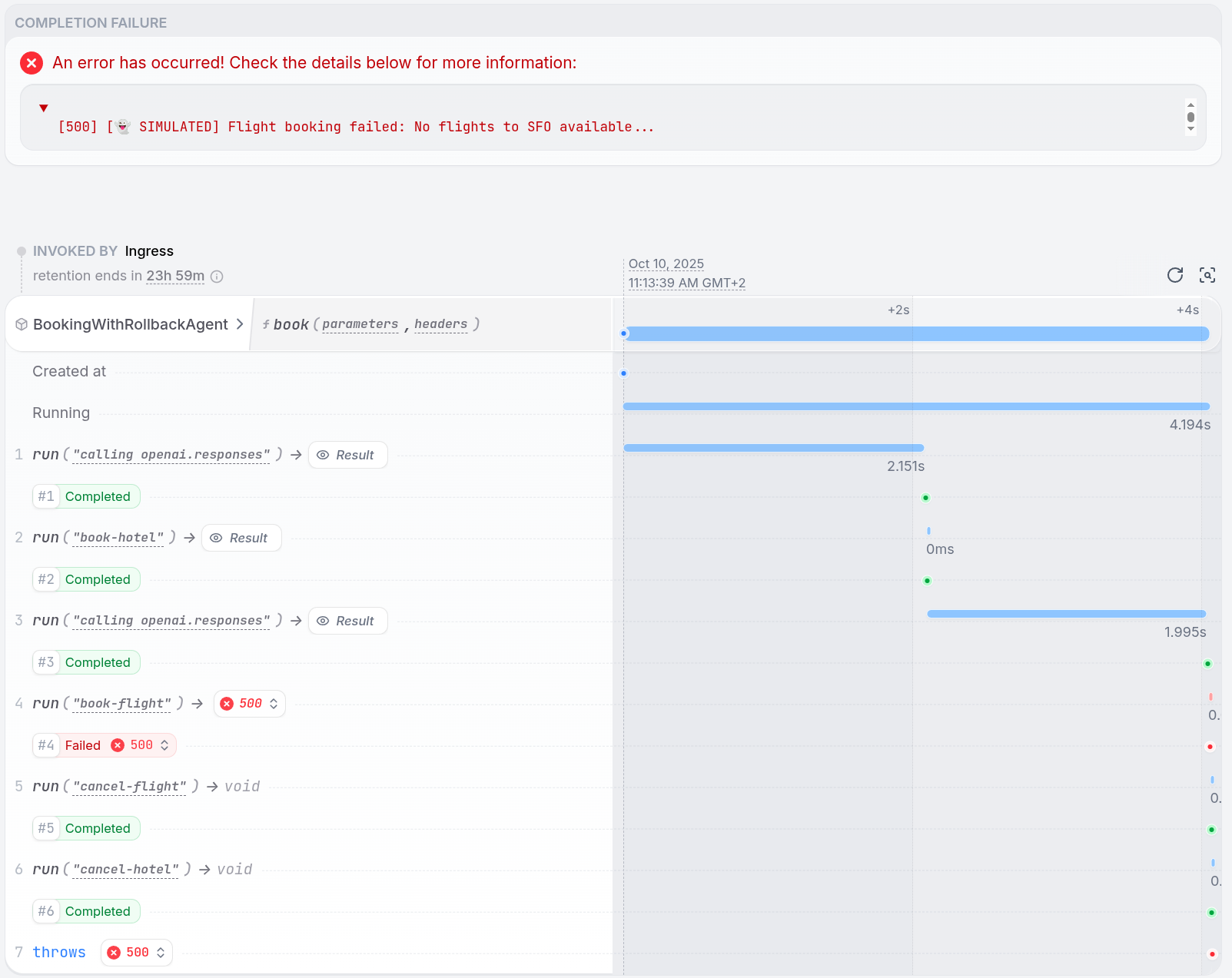
View on GitHub: TS / Python Compensation actions should be idempotent since they may be retried. Design them to safely handle cases where the resource to be cleaned up no longer exists. Have a look at the sagas guide for more information. The Restate UI shows both the forward execution and rollback operations when failures occur:
Invocation overview
This pattern is implementable with any of our SDKs and any AI SDK. If you need help with a specific SDK, please reach out to us via Discord or Slack.
1

Requirements

  • AI SDK of your choice (e.g., OpenAI, LangChain, Pydantic AI, LiteLLM, etc.) to make LLM calls.
  • API key for your model provider.
2

Download the example

git clone [email protected]:restatedev/ai-examples.git
cd ai-examples/vercel-ai/tour-of-agents
npm install
3

Start the Restate Server

restate-server
4

Start the Service

Export the API key of your model provider as an environment variable and then start the agent. For example, for OpenAI:
export OPENAI_API_KEY=your_openai_api_key
npm run dev
5

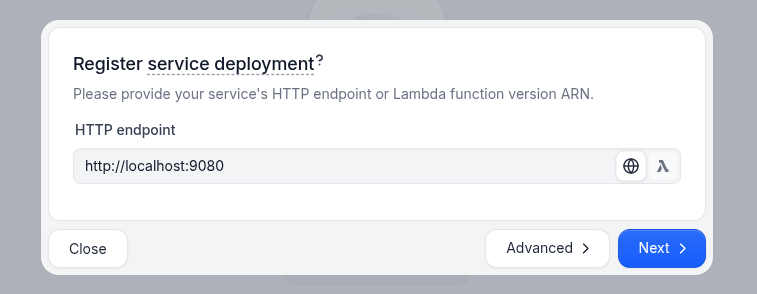
Register the services

Service Registration
6

Send a request

In the UI (http://localhost:9070), click on the book handler of the BookingWithRollbackAgent to open the playground and send a default request:
{
    "bookingId": "booking_123",
    "prompt": "I need to book a business trip to San Francisco from March 15-17. Flying from JFK, need a hotel downtown for 1 guest."
}
7

Check the Restate UI

You can see in the Invocations Tab how the workflow executes forward steps, encounters a failure, then executes compensation actions in reverse order:
Invocation overview