

How it works
A Virtual Object is a Restate service type where each instance is identified by a key. State stored in a Virtual Object:- Survives crashes and restarts: No external database needed
- Is isolated per key: Each session has its own state
- Has concurrency control: Only one write handler runs at a time per key, preventing race conditions
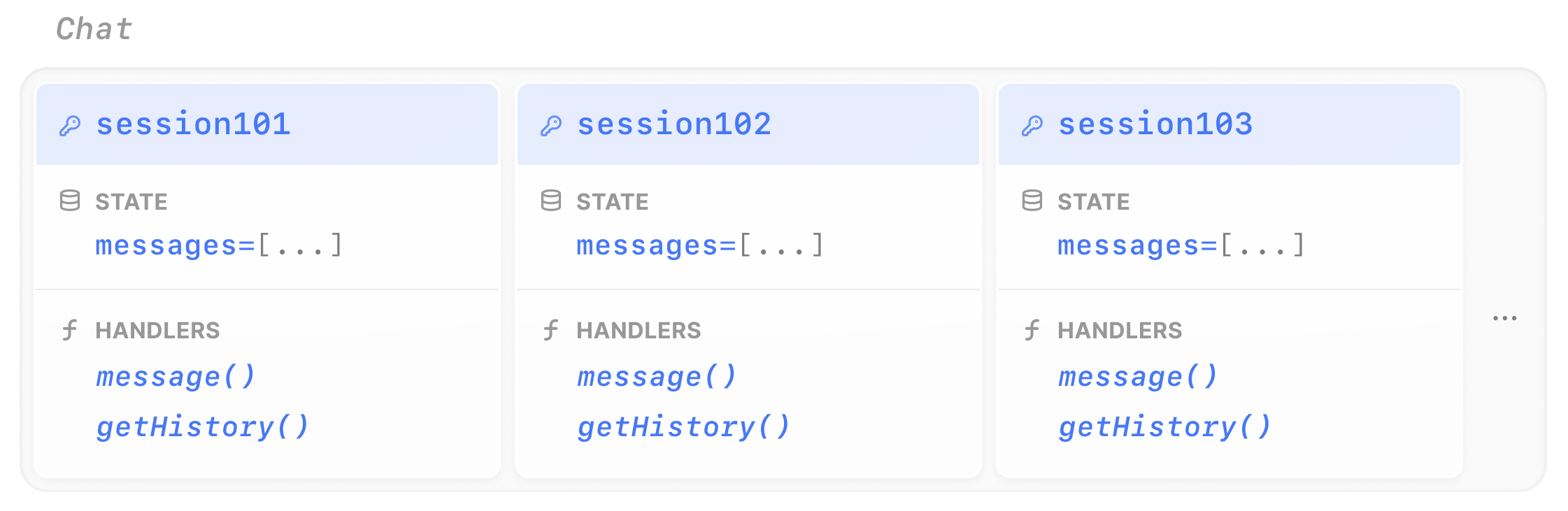
Example: a chat session
 Vercel AI
 OpenAI Agents
- Google ADK
- Pydantic AI
- LangChain
- Restate TS
- Restate Py
To turn your agent into a stateful session, you need two changes compared to a regular durable agent:
- Define a Virtual Object: use
restate.object()instead ofrestate.service(). This gives each session key its own isolated state. - Manage conversation history using the object’s K/V store: use
ctx.get()andctx.set()to read and write the message history.
chat-agent.ts
const chatAgent = restate.object({
  name: "Chat",
  handlers: {
    message: restate.createObjectHandler(
      { input: schema(ChatMessageSchema) },
      async (ctx: restate.ObjectContext, { message }: { message: string }) => {
        const model = wrapLanguageModel({
          model: openai("gpt-5.4"),
          middleware: durableCalls(ctx, { maxRetryAttempts: 3 }),
        });

        // Retrieve the state
        const messages =
          (await ctx.get<ModelMessage[]>("messages", superJson)) ?? [];
        messages.push({ role: "user", content: message });

        const res = await generateText({
          model,
          system: "You are a helpful assistant.",
          messages,
        });

        // Update the state
        ctx.set("messages", [...messages, ...res.response.messages], superJson);
        return { answer: res.text };
      },
    ),
    // Shared handler to retrieve the history
    getHistory: shared(async (ctx: restate.ObjectSharedContext) =>
      ctx.get<ModelMessage[]>("messages", superJson),
    ),
  },
});
Try out Virtual Objects
Try out Virtual Objects
Install Restate and launch it:Get the example:Export your OpenAI API key and run the agent:Register the agents with Restate:Ask the agent to do some task. Specify the Virtual Object ID in the URL, for example for Continue the conversation with the same session ID. The agent remembers previous context:Send a message to a different session. It starts a completely separate conversation:
npm install --global @restatedev/restate-server@latest @restatedev/restate@latest
restate-server
restate example typescript-vercel-ai-tour-of-agents && cd typescript-vercel-ai-tour-of-agents
npm install
export OPENAI_API_KEY=sk-...
npx tsx ./src/chat-agent.ts
restate deployments register http://localhost:9080 --force --yes # dev only: overrides previous registrations
session123:curl localhost:8080/restate/call/Chat/session123/message \
--json '{"message": "make a poem about durable execution"}'
curl localhost:8080/restate/call/Chat/session123/message \
--json '{"message": "shorten it to 2 lines"}'
curl localhost:8080/restate/call/Chat/session456/message \
--json '{"message": "what are the benefits of durable execution?"}'
To turn your agent into a stateful session, you need two changes compared to a regular durable agent:
- Define a Virtual Object: use
restate.VirtualObject()instead ofrestate.Service(). This gives each session key its own isolated state. - Enable
use_restate_sessiononDurableRunner.run(): setuse_restate_session=Trueso the conversation history is automatically persisted in Restate’s K/V store.
chat_agent.py
chat = VirtualObject("Chat")


@chat.handler()
async def message(_ctx: ObjectContext, req: ChatMessage) -> dict:
    # Set use_restate_session=True to store the session in Restate's key-value store
    # Make sure you use a VirtualObject to enable this feature
    result = await DurableRunner.run(
        Agent(name="Assistant", instructions="You are a helpful assistant."),
        req.message,
        use_restate_session=True,
    )
    return result.final_output


@chat.handler(kind="shared")
async def get_history(ctx: restate.ObjectSharedContext):
    return await ctx.get("messages", type_hint=list[dict]) or []
Try out Virtual Objects
Try out Virtual Objects
Install Restate and launch it:Get the example:Export your OpenAI API key and run the agent:Register the agents with Restate:Ask the agent to do some task. Specify the Virtual Object ID in the URL, for example for Continue the conversation with the same session ID. The agent remembers previous context:Go to the state tab of the UI to view the conversation history.Send a message to a different session. It starts a completely separate conversation:
restate-server
restate example python-openai-agents-tour-of-agents && cd python-openai-agents-tour-of-agents
export OPENAI_API_KEY=sk-...
uv run app/chat_agent.py
restate deployments register http://localhost:9080 --force --yes # dev only: overrides previous registrations
session123:curl localhost:8080/restate/call/Chat/session123/message \
--json '{"message": "Make a poem about durable execution."}'
curl localhost:8080/restate/call/Chat/session123/message \
--json '{"message": "Shorten it to 2 lines."}'
curl localhost:8080/restate/call/Chat/session456/message \
--json '{"message": "What are the benefits of durable execution?"}'
To turn your agent into a stateful session, you need two changes compared to a regular durable agent:
- Define a Virtual Object: use
restate.VirtualObject()instead ofrestate.Service(). This gives each session key its own isolated state. - Use
RestateSessionServiceas the session service for the Runner: this stores the ADK session data (conversation history, agent state) in Restate’s K/V store. The object key (viactx.key()) is used as the user identifier.
chat_agent.py
agent = Agent(
    model="gemini-2.5-flash",
    name="assistant",
    instruction="You are a helpful assistant. Be concise and helpful.",
)
app = App(name=APP_NAME, root_agent=agent, plugins=[RestatePlugin()])
runner = Runner(app=app, session_service=RestateSessionService())

chat = restate.VirtualObject("Chat")


@chat.handler()
async def message(ctx: restate.ObjectContext, req: ChatMessage) -> str | None:
    events = runner.run_async(
        user_id=ctx.key(),
        session_id=req.session_id,
        new_message=Content(role="user", parts=[Part.from_text(text=req.message)]),
    )
    return await parse_agent_response(events)


@chat.handler(kind="shared")
async def get_history(ctx: restate.ObjectSharedContext, session_id: str):
    return await ctx.get(f"session_store::{session_id}", type_hint=list[dict]) or []
Try out Virtual Objects
Try out Virtual Objects
Install Restate and launch it:Get the example:Export your Google API key and run the agent:Register the agents with Restate:Ask the agent to do some task. Specify the Virtual Object ID in the URL, for example for Continue the conversation with the same user and session ID. The agent remembers previous context:Go to the state tab of the UI to view the conversation history.Send a message to a different user. It starts a completely separate conversation:
restate-server
restate example python-google-adk-tour-of-agents && cd python-google-adk-tour-of-agents
export GOOGLE_API_KEY=your-api-key
uv run app/chat_agent.py
restate deployments register http://localhost:9080 --force --yes # dev only: overrides previous registrations
session123:curl localhost:8080/restate/call/Chat/user123/message \
--json '{"message": "Make a poem about durable execution.", "session_id": "session-123"}'
curl localhost:8080/restate/call/Chat/user123/message \
--json '{"message": "Shorten it to 2 lines.", "session_id": "session-123"}'
curl localhost:8080/restate/call/Chat/user456/message \
--json '{"message": "What are the benefits of durable execution?", "session_id": "session-567"}'
To turn your agent into a stateful session, you need two changes compared to a regular durable agent:
- Define a Virtual Object: use
restate.VirtualObject()instead ofrestate.Service(). This gives each session key its own isolated state. - Manage conversation history using the object’s K/V store: use
ctx.get()andctx.set()to read and write the message history.
chat_agent.py
agent = Agent(
    "openai:gpt-5.4",
    system_prompt="You are a helpful assistant.",
)
restate_agent = RestateAgent(agent)

chat = VirtualObject("Chat")


@chat.handler()
async def message(ctx: ObjectContext, req: ChatMessage) -> str:
    # Load message history from Restate's durable key-value store
    history = await ctx.get("messages", serde=MessageSerde())

    result = await restate_agent.run(req.message, message_history=history)

    # Store updated history back in Restate state
    ctx.set("messages", result.all_messages(), serde=MessageSerde())
    return result.output


@chat.handler(kind="shared")
async def get_history(ctx: restate.ObjectSharedContext) -> dict:
    return await ctx.get("messages", type_hint=dict) or {}
Try out Virtual Objects
Try out Virtual Objects
Install Restate and launch it:Get the example:Export your OpenAI API key and run the agent:Register the agents with Restate:Ask the agent to do some task. Specify the Virtual Object ID in the URL, for example for Continue the conversation with the same session ID. The agent remembers previous context:Go to the state tab of the UI to view the conversation history.Send a message to a different session. It starts a completely separate conversation:
restate-server
restate example python-pydantic-ai-tour-of-agents && cd python-pydantic-ai-tour-of-agents
export OPENAI_API_KEY=sk-...
uv run app/chat_agent.py
restate deployments register http://localhost:9080 --force --yes # dev only: overrides previous registrations
session123:curl localhost:8080/restate/call/Chat/session123/message \
--json '{"message": "Make a poem about durable execution."}'
curl localhost:8080/restate/call/Chat/session123/message \
--json '{"message": "Shorten it to 2 lines."}'
curl localhost:8080/restate/call/Chat/session456/message \
--json '{"message": "What are the benefits of durable execution?"}'
To turn your agent into a stateful session, you need two changes compared to a regular durable agent:
- Define a Virtual Object: use
restate.VirtualObject()instead ofrestate.Service(). This gives each session key its own isolated state. - Manage conversation history using the object’s K/V store: use
ctx.get()andctx.set()to read and write the message history.
chat_agent.py
chat = restate.VirtualObject("Chat")

agent = create_agent(
    model=init_chat_model("openai:gpt-5.4"),
    system_prompt="You are a helpful assistant.",
    middleware=[RestateMiddleware()],
)


@chat.handler()
async def message(ctx: restate.ObjectContext, req: ChatMessage) -> str:
    history = await ctx.get("messages", type_hint=ChatHistory) or ChatHistory()
    history.messages.append(HumanMessage(content=req.message))

    result = await agent.ainvoke({"messages": history.messages})

    ctx.set("messages", ChatHistory(messages=result["messages"]))
    return result["messages"][-1].content


@chat.handler(kind="shared")
async def get_history(ctx: restate.ObjectSharedContext) -> ChatHistory:
    return await ctx.get("messages", type_hint=ChatHistory) or ChatHistory()
Try out Virtual Objects
Try out Virtual Objects
Install Restate and launch it:Get the example:Export your OpenAI API key and run the agent:Register the agents with Restate:Ask the agent to do some task. Specify the Virtual Object ID in the URL, for example for Continue the conversation with the same session ID. The agent remembers previous context:Go to the state tab of the UI to view the conversation history.Send a message to a different session. It starts a completely separate conversation:
restate-server
restate example python-langchain-tour-of-agents && cd python-langchain-tour-of-agents
export OPENAI_API_KEY=sk-...
uv run app/chat_agent.py
restate deployments register http://localhost:9080 --force --yes # dev only: overrides previous registrations
session123:curl localhost:8080/restate/call/Chat/session123/message \
--json '{"message": "Make a poem about durable execution."}'
curl localhost:8080/restate/call/Chat/session123/message \
--json '{"message": "Shorten it to 2 lines."}'
curl localhost:8080/restate/call/Chat/session456/message \
--json '{"message": "What are the benefits of durable execution?"}'
To turn your agent into a stateful session, you need two changes compared to a regular durable agent:
- Define a Virtual Object: use
restate.object()instead ofrestate.service(). This gives each session key its own isolated state. - Manage conversation history using the object’s K/V store: use
ctx.get()andctx.set()to read and write the message history.
chat-agent.ts
/**
 * Long-lived, Stateful Chat Sessions
 *
 * Maintains conversation state across multiple requests using Restate's persistent memory.
 * Sessions survive failures and can be resumed at any time.
 */
import * as restate from "@restatedev/restate-sdk";
import { ObjectContext } from "@restatedev/restate-sdk";
import llmCall from "./utils/llm";
import { zodPrompt } from "./utils/utils";
import { ModelMessage } from "@ai-sdk/provider-utils";

const chatAgent = restate.object({
  name: "Chat",
  handlers: {
    message: restate.createObjectHandler(
      { input: zodPrompt("Write a poem about Durable Execution") },
      async (ctx: ObjectContext, { message }: { message: string }) => {
        const messages = (await ctx.get<Array<ModelMessage>>("memory")) ?? [];
        messages.push({ role: "user", content: message });

        // Use your preferred LLM SDK here
        const result = await ctx.run("LLM call", async () => llmCall(messages));

        messages.push({ role: "assistant", content: result.text });
        ctx.set("memory", messages);

        return result.text;
      },
    ),
    getHistory: restate.createObjectSharedHandler(
      async (ctx: restate.ObjectSharedContext) =>
        ctx.get<Array<ModelMessage>>("memory"),
    ),
  },
});

restate.serve({ services: [chatAgent], port: 9080 });
Try out Virtual Objects
Try out Virtual Objects
Install Restate and launch it:Get the example:Export your API key:Register the services with Restate:Ask the agent to do some task. Specify the Virtual Object ID in the URL, for example for Continue the conversation with the same session ID. The agent remembers previous context:Send a message to a different session. It starts a completely separate conversation:
restate-server
restate example typescript-restate-tour-of-agents && cd typescript-restate-tour-of-agents
npm install
export OPENAI_API_KEY=sk-...
npx tsx ./src/chat-agent.ts
restate deployments register http://localhost:9080 --force --yes # dev only: overrides previous registrations
session123:curl localhost:8080/restate/call/Chat/session123/message \
--json '{"message": "make a poem about durable execution"}'
curl localhost:8080/restate/call/Chat/session123/message \
--json '{"message": "shorten it to 2 lines"}'
curl localhost:8080/restate/call/Chat/session456/message \
--json '{"message": "what are the benefits of durable execution?"}'
To turn your agent into a stateful session, you need two changes compared to a regular durable agent:
- Define a Virtual Object: use
restate.VirtualObject()instead ofrestate.Service(). This gives each session key its own isolated state. - Manage conversation history using the object’s K/V store: use
ctx.get()andctx.set()to read and write the message history.
chat_agent.py
chat = restate.VirtualObject("Chat")


@chat.handler()
async def message(ctx: restate.ObjectContext, msg: ChatMessage) -> str | None:
    """A long-lived stateful chat session that allows for ongoing conversation."""

    # Retrieve conversation memory from Restate
    messages = await ctx.get("memory", type_hint=list[dict]) or []
    messages.append({"role": "user", "content": msg.message})

    result = await ctx.run_typed(
        "LLM call",
        llm_call,  # Use your preferred LLM SDK here
        RunOptions(max_attempts=3),
        messages=messages,
    )

    # Update conversation memory in Restate
    messages.append({"role": "assistant", "content": result.content})
    ctx.set("memory", messages)

    return result.content


@chat.handler(kind="shared")
async def get_history(ctx: restate.ObjectSharedContext):
    return await ctx.get("memory", type_hint=list[dict]) or []
Try out Virtual Objects
Try out Virtual Objects
Install Restate and launch it:Get the example:Export your API key:Register the services with Restate:Ask the agent to do some task. Specify the Virtual Object ID in the URL, for example for Continue the conversation with the same session ID. The agent remembers previous context:Send a message to a different session. It starts a completely separate conversation:
restate-server
restate example python-restate-tour-of-agents && cd python-restate-tour-of-agents
export OPENAI_API_KEY=sk-...
uv run app/chat_agent.py
restate deployments register http://localhost:9080 --force --yes # dev only: overrides previous registrations
session123:curl localhost:8080/restate/call/Chat/session123/message \
--json '{"message": "make a poem about durable execution"}'
curl localhost:8080/restate/call/Chat/session123/message \
--json '{"message": "shorten it to 2 lines"}'
curl localhost:8080/restate/call/Chat/session456/message \
--json '{"message": "what are the benefits of durable execution?"}'
- Vercel AI
- OpenAI Agents
- Google ADK
- Pydantic AI
- LangChain
- Restate TS
- Restate Py
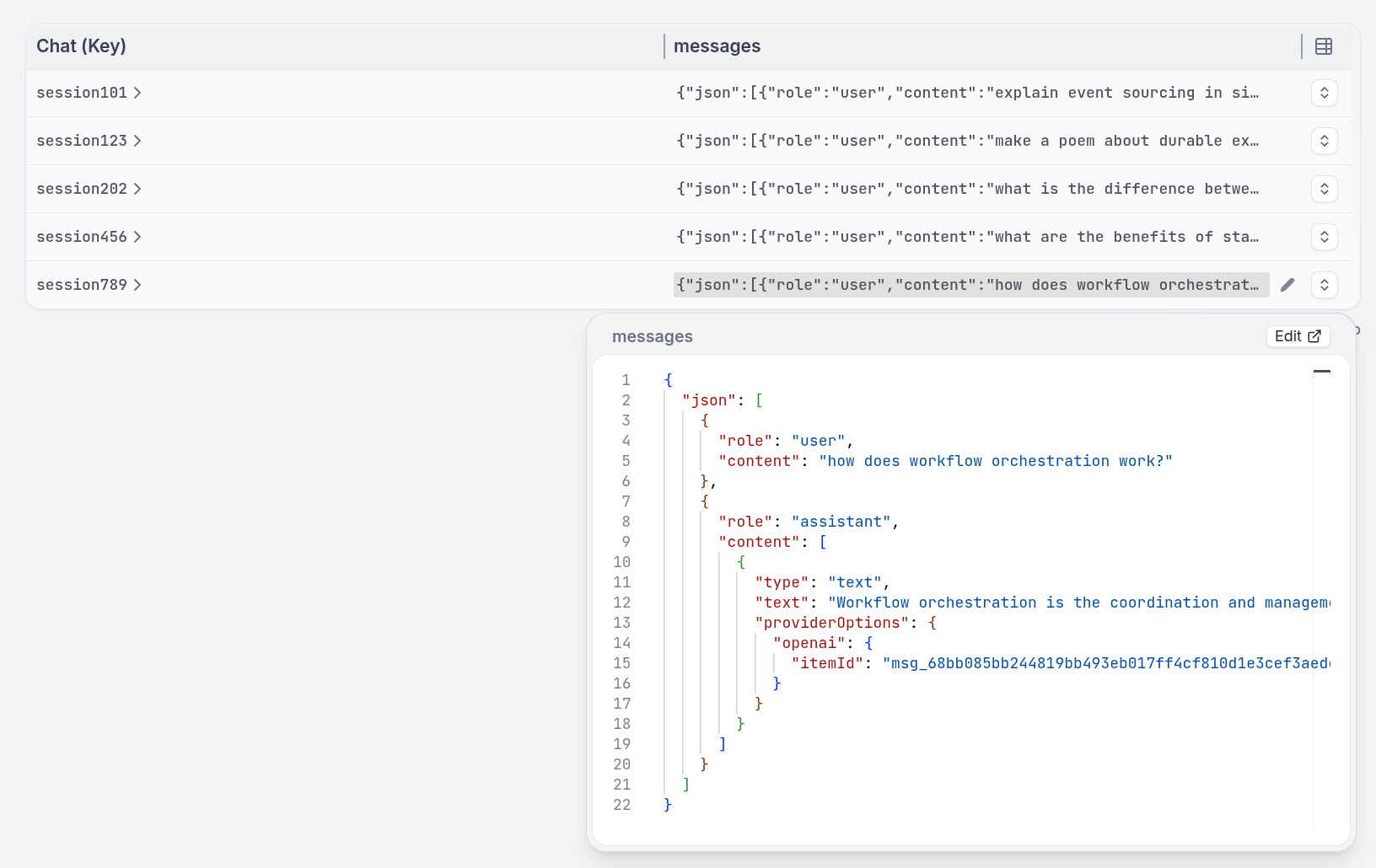
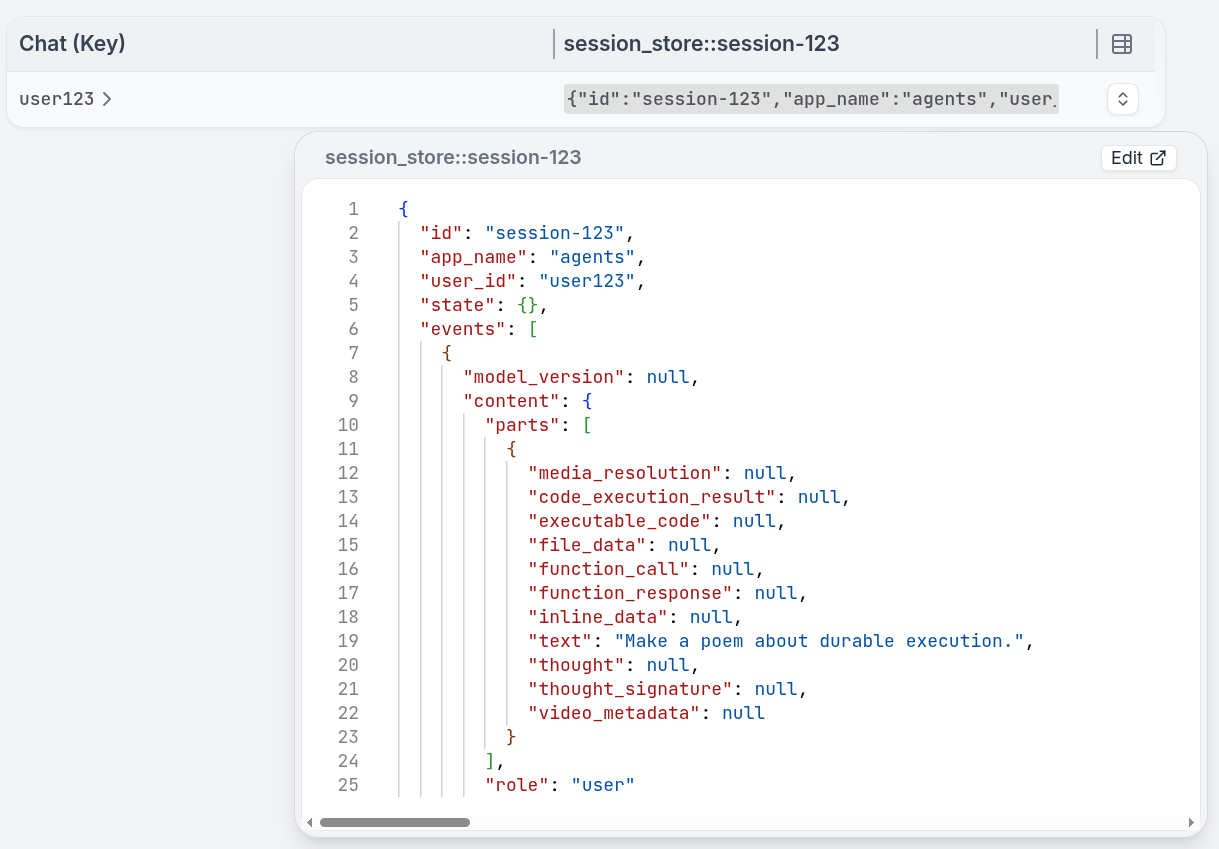
This pattern is complementary to AI memory solutions like mem0 or graffiti. You can use Virtual Objects to enforce session concurrency and queueing while storing the agent’s memory in specialized memory systems.
Built-in concurrency control
Restate queues concurrent requests to the same session key. They are processed sequentially, preventing race conditions on shared state. This works similar to a task queue per session, but without needing to set up any external queue infrastructure.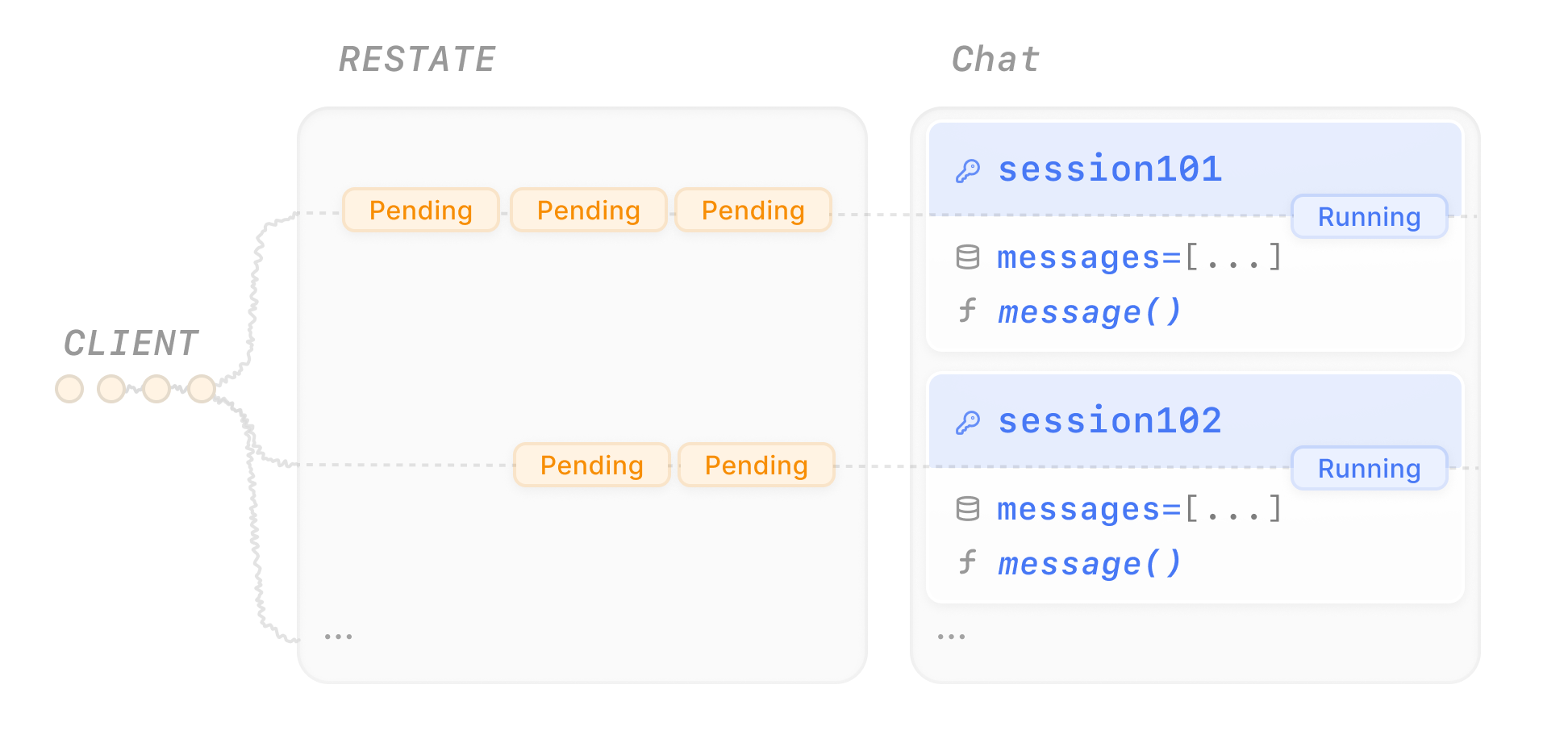
- Vercel AI
- OpenAI Agents
- Google ADK
- Pydantic AI
- LangChain
- Restate TS
- Restate Py
Try out queuing
Try out queuing
Send several messages concurrently to different chat sessions:The UI shows how Restate queues the requests per session to ensure consistency: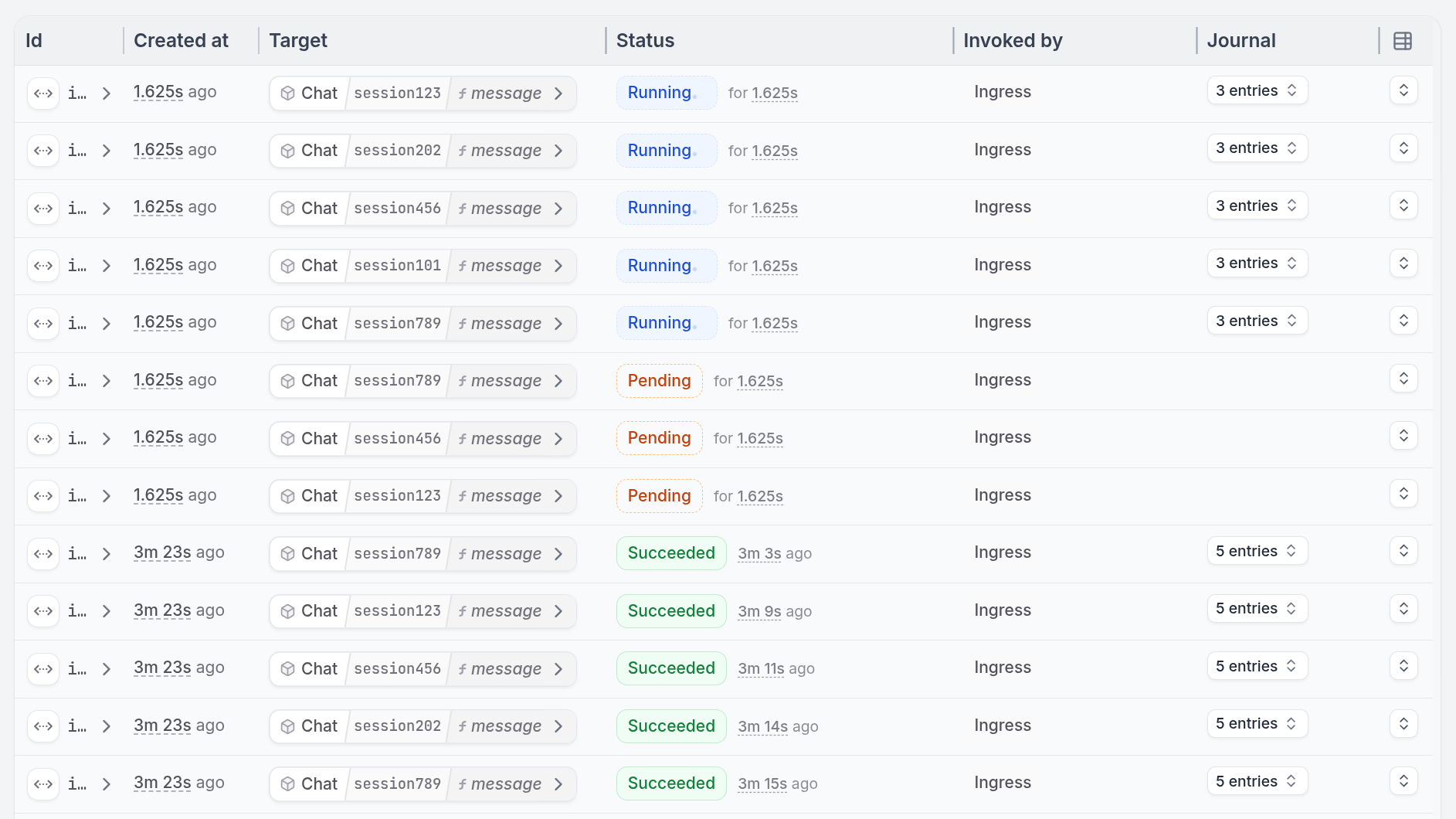
curl localhost:8080/restate/send/Chat/session123/message --json '{"message": "make a poem about durable execution"}' &
curl localhost:8080/restate/send/Chat/session456/message --json '{"message": "what are the benefits of durable execution?"}' &
curl localhost:8080/restate/send/Chat/session789/message --json '{"message": "how does workflow orchestration work?"}' &
curl localhost:8080/restate/send/Chat/session123/message --json '{"message": "can you make it rhyme better?"}' &
curl localhost:8080/restate/send/Chat/session456/message --json '{"message": "what about fault tolerance in distributed systems?"}' &
curl localhost:8080/restate/send/Chat/session789/message --json '{"message": "give me a practical example"}' &
curl localhost:8080/restate/send/Chat/session101/message --json '{"message": "explain event sourcing in simple terms"}' &
curl localhost:8080/restate/send/Chat/session202/message --json '{"message": "what is the difference between async and sync processing?"}'
Try out queuing
Try out queuing
Send several messages concurrently to different chat sessions:The UI shows how Restate queues the requests per session to ensure consistency: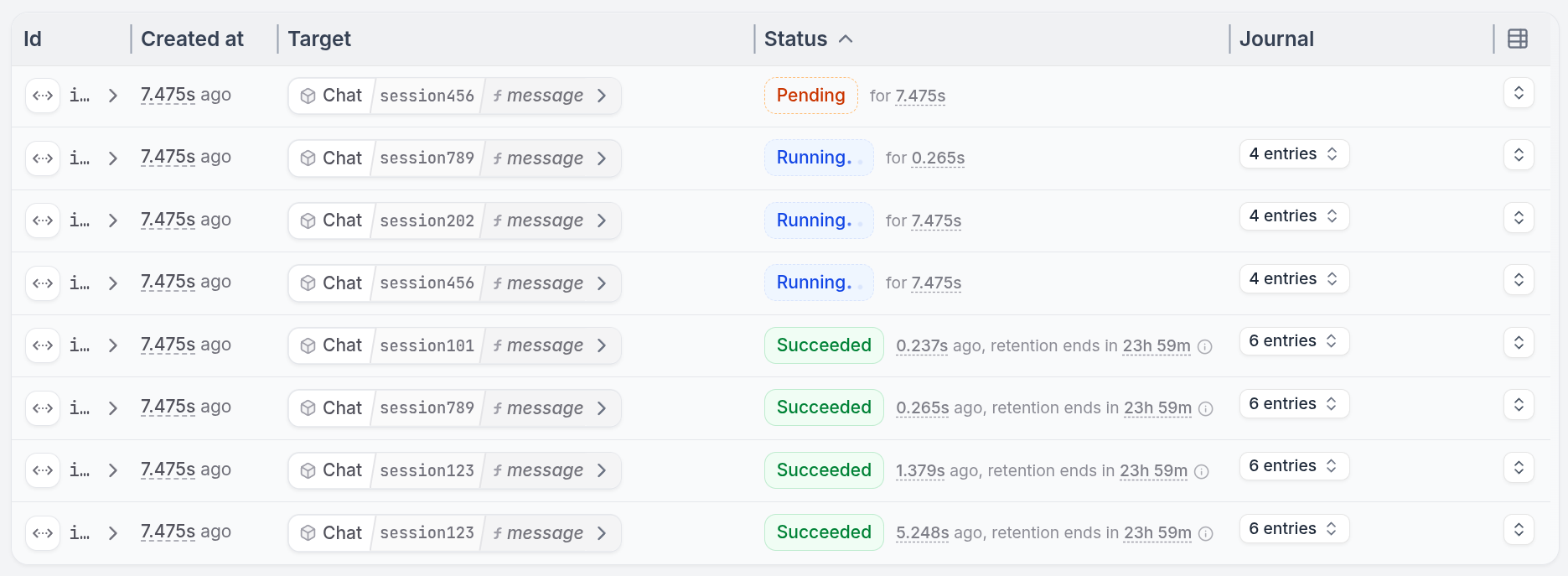
curl localhost:8080/restate/send/Chat/session123/message --json '{"message": "make a poem about durable execution"}' &
curl localhost:8080/restate/send/Chat/session456/message --json '{"message": "what are the benefits of durable execution?"}' &
curl localhost:8080/restate/send/Chat/session789/message --json '{"message": "how does workflow orchestration work?"}' &
curl localhost:8080/restate/send/Chat/session123/message --json '{"message": "can you make it rhyme better?"}' &
curl localhost:8080/restate/send/Chat/session456/message --json '{"message": "what about fault tolerance in distributed systems?"}' &
curl localhost:8080/restate/send/Chat/session789/message --json '{"message": "give me a practical example"}' &
curl localhost:8080/restate/send/Chat/session101/message --json '{"message": "explain event sourcing in simple terms"}' &
curl localhost:8080/restate/send/Chat/session202/message --json '{"message": "what is the difference between async and sync processing?"}'
Try out queuing
Try out queuing
Send several messages concurrently to different users:The UI shows how Restate queues the requests per session to ensure consistency: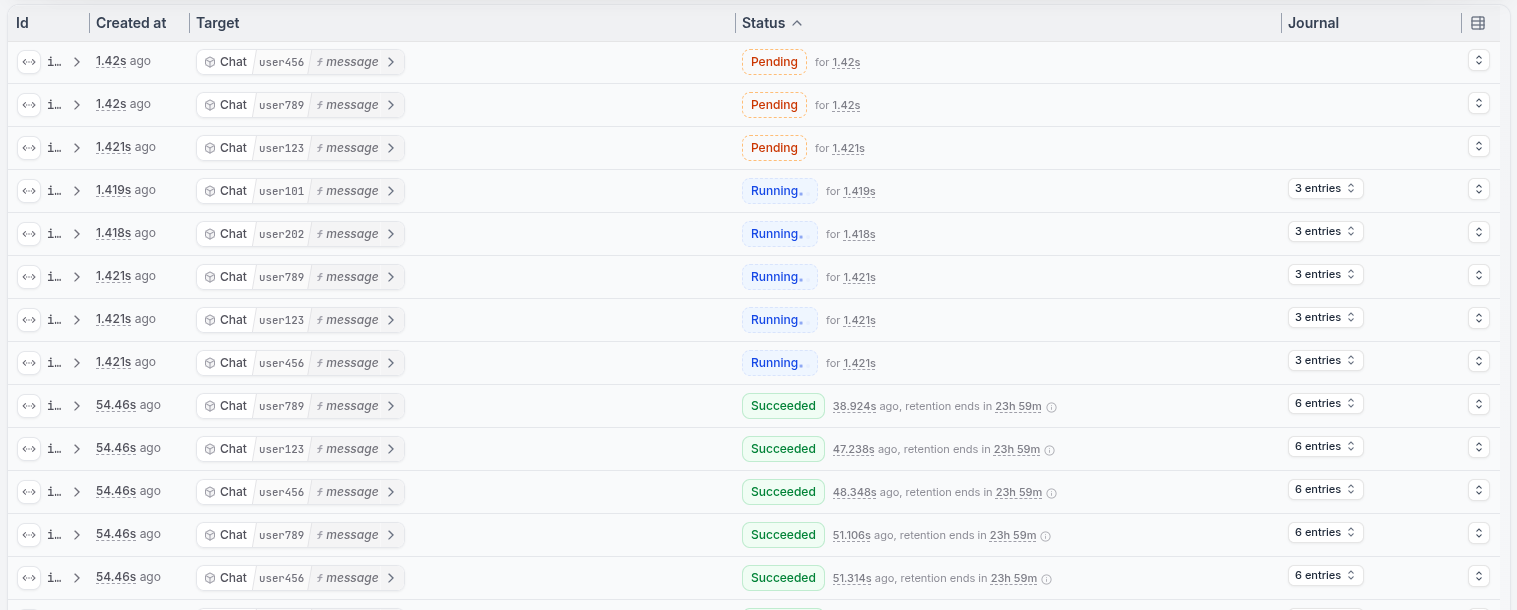
curl localhost:8080/restate/send/Chat/user123/message --json '{"message": "make a poem about durable execution", "session_id": "session-123"}' &
curl localhost:8080/restate/send/Chat/user456/message --json '{"message": "what are the benefits of durable execution?", "session_id": "session-567"}' &
curl localhost:8080/restate/send/Chat/user789/message --json '{"message": "how does workflow orchestration work?", "session_id": "session-999"}' &
curl localhost:8080/restate/send/Chat/user123/message --json '{"message": "can you make it rhyme better?", "session_id": "session-123"}' &
curl localhost:8080/restate/send/Chat/user456/message --json '{"message": "what about fault tolerance in distributed systems?", "session_id": "session-567"}' &
curl localhost:8080/restate/send/Chat/user789/message --json '{"message": "give me a practical example", "session_id": "session-999"}' &
curl localhost:8080/restate/send/Chat/user101/message --json '{"message": "explain event sourcing in simple terms", "session_id": "session-123"}' &
curl localhost:8080/restate/send/Chat/user202/message --json '{"message": "what is the difference between async and sync processing?", "session_id": "session-123"}'
Try out queuing
Try out queuing
Send several messages concurrently to different chat sessions:The UI shows how Restate queues the requests per session to ensure consistency:
curl localhost:8080/restate/send/Chat/session123/message --json '{"message": "make a poem about durable execution"}' &
curl localhost:8080/restate/send/Chat/session456/message --json '{"message": "what are the benefits of durable execution?"}' &
curl localhost:8080/restate/send/Chat/session789/message --json '{"message": "how does workflow orchestration work?"}' &
curl localhost:8080/restate/send/Chat/session123/message --json '{"message": "can you make it rhyme better?"}' &
curl localhost:8080/restate/send/Chat/session456/message --json '{"message": "what about fault tolerance in distributed systems?"}' &
curl localhost:8080/restate/send/Chat/session789/message --json '{"message": "give me a practical example"}' &
curl localhost:8080/restate/send/Chat/session101/message --json '{"message": "explain event sourcing in simple terms"}' &
curl localhost:8080/restate/send/Chat/session202/message --json '{"message": "what is the difference between async and sync processing?"}'
Try out queuing
Try out queuing
Send several messages concurrently to different chat sessions:The UI shows how Restate queues the requests per session to ensure consistency:
curl localhost:8080/restate/send/Chat/session123/message --json '{"message": "make a poem about durable execution"}' &
curl localhost:8080/restate/send/Chat/session456/message --json '{"message": "what are the benefits of durable execution?"}' &
curl localhost:8080/restate/send/Chat/session789/message --json '{"message": "how does workflow orchestration work?"}' &
curl localhost:8080/restate/send/Chat/session123/message --json '{"message": "can you make it rhyme better?"}' &
curl localhost:8080/restate/send/Chat/session456/message --json '{"message": "what about fault tolerance in distributed systems?"}' &
curl localhost:8080/restate/send/Chat/session789/message --json '{"message": "give me a practical example"}' &
curl localhost:8080/restate/send/Chat/session101/message --json '{"message": "explain event sourcing in simple terms"}' &
curl localhost:8080/restate/send/Chat/session202/message --json '{"message": "what is the difference between async and sync processing?"}'
Try out queuing
Try out queuing
Send several messages concurrently to different chat sessions:The UI shows how Restate queues the requests per session to ensure consistency:
curl localhost:8080/restate/send/Chat/session123/message --json '{"message": "make a poem about durable execution"}' &
curl localhost:8080/restate/send/Chat/session456/message --json '{"message": "what are the benefits of durable execution?"}' &
curl localhost:8080/restate/send/Chat/session789/message --json '{"message": "how does workflow orchestration work?"}' &
curl localhost:8080/restate/send/Chat/session123/message --json '{"message": "can you make it rhyme better?"}' &
curl localhost:8080/restate/send/Chat/session456/message --json '{"message": "what about fault tolerance in distributed systems?"}' &
curl localhost:8080/restate/send/Chat/session789/message --json '{"message": "give me a practical example"}' &
curl localhost:8080/restate/send/Chat/session101/message --json '{"message": "explain event sourcing in simple terms"}' &
curl localhost:8080/restate/send/Chat/session202/message --json '{"message": "what is the difference between async and sync processing?"}'
Try out queuing
Try out queuing
Send several messages concurrently to different chat sessions:The UI shows how Restate queues the requests per session to ensure consistency:
curl localhost:8080/restate/send/Chat/session123/message --json '{"message": "make a poem about durable execution"}' &
curl localhost:8080/restate/send/Chat/session456/message --json '{"message": "what are the benefits of durable execution?"}' &
curl localhost:8080/restate/send/Chat/session789/message --json '{"message": "how does workflow orchestration work?"}' &
curl localhost:8080/restate/send/Chat/session123/message --json '{"message": "can you make it rhyme better?"}' &
curl localhost:8080/restate/send/Chat/session456/message --json '{"message": "what about fault tolerance in distributed systems?"}' &
curl localhost:8080/restate/send/Chat/session789/message --json '{"message": "give me a practical example"}' &
curl localhost:8080/restate/send/Chat/session101/message --json '{"message": "explain event sourcing in simple terms"}' &
curl localhost:8080/restate/send/Chat/session202/message --json '{"message": "what is the difference between async and sync processing?"}'
Concurrently retrieving state
The state you store in Virtual Objects lives forever. To resume a session, simply send a new message to the same Virtual Object key.- Vercel AI
- OpenAI Agents
- Google ADK
- Pydantic AI
- LangChain
- Restate TS
- Restate Py
To retrieve state, view the UI’s state tab or add a handler that reads it. Have a look at the
getHistory handler in the example above.Call the handler to get the conversation history:curl localhost:8080/restate/call/Chat/session123/getHistory
To retrieve state, view the UI’s state tab or add a handler that reads it. Have a look at the
get_history handler in the example above.Call the handler to get the conversation history:curl localhost:8080/restate/call/Chat/session123/get_history
To retrieve state, view the UI’s state tab or add a handler that reads it. Have a look at the
get_history handler in the example above.Call the handler to get the conversation history:curl localhost:8080/restate/call/Chat/user123/get_history --json '"session-123"'
To retrieve state, view the UI’s state tab or add a handler that reads it. Have a look at the
get_history handler in the example above.Call the handler to get the conversation history:curl localhost:8080/restate/call/Chat/session123/get_history
To retrieve state, view the UI’s state tab or add a handler that reads it. Have a look at the
get_history handler in the example above.Call the handler to get the conversation history:curl localhost:8080/restate/call/Chat/session123/get_history
To retrieve state, view the UI’s state tab or add a handler that reads it. Have a look at the
getHistory handler in the example above.Call the handler to get the conversation history:curl localhost:8080/restate/call/Chat/session123/getHistory
To retrieve state, view the UI’s state tab or add as handler that reads it. Have a look at the
get_history handler in the example above.Call the handler to get the conversation history:curl localhost:8080/restate/call/Chat/session123/get_history
message handler.