

Logfire Documentation
Learn more about Logfire’s observability and Pydantic AI integration.
Instrumentation setup
Initialize Logfire and instrument Pydantic AI withRestateTracerProvider to correlate AI spans with Restate’s execution journal:
__main__.py
Run the example
Run the example
Prerequisites: Logfire account and token, OpenAI API key, Restate installed.Get the example:Add your API keys to an Start the agent service:Start Restate:Or the US equivalent tracing endpoint.Go to the Restate UI at
.env file:http://localhost:9070, register the service at http://localhost:9080, click on the handler to go to the playground, and send the default request.What you see in Logfire
Once you send a request, you can inspect the trace in Logfire. You see the agentic steps (LLM calls, tool invocations) alongside regular workflow steps (e.g. currency conversion, reimbursement), with inputs, outputs, model configuration, and token usage for each LLM call. Restate manages the execution, starts the parent span, and exports the full journal as OpenTelemetry traces. Pydantic AI attaches AI-specific spans and metadata under Restate’s parent span.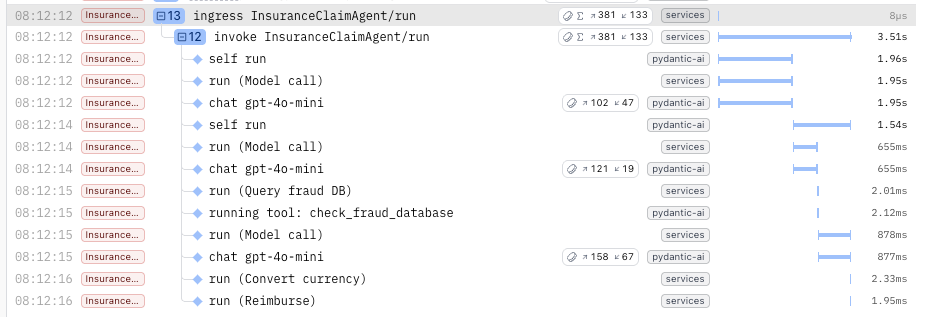
Restate’s Tracer Provider flattens the Logfire spans to make them appear consistently structured with the Restate spans in the UI.
We are working on a next iteration of the integration which will respect the Logfire span nesting and puts the Restate spans at the right depths inside them.