


Building with an AI coding agent?
Agent Reference Architecture
 Vercel AI
 OpenAI Agents
- Google ADK
- Pydantic AI
- LangChain
- Restate TS
- Restate Py
Install Restate Server & CLI
- Homebrew
- Download binaries
- npm
- Docker
brew install restatedev/tap/restate-server restatedev/tap/restate
restate-server
BIN=/usr/local/bin && RESTATE_PLATFORM=x86_64-apple-darwin && \
curl -L --remote-name-all https://restate.gateway.scarf.sh/latest/restate-{server,cli}-$RESTATE_PLATFORM.tar.xz && \
tar -xvf restate-server-$RESTATE_PLATFORM.tar.xz --strip-components=1 restate-server-$RESTATE_PLATFORM/restate-server && \
tar -xvf restate-cli-$RESTATE_PLATFORM.tar.xz --strip-components=1 restate-cli-$RESTATE_PLATFORM/restate && \
chmod +x restate restate-server && \
sudo mv restate $BIN && \
sudo mv restate-server $BIN
BIN=/usr/local/bin && RESTATE_PLATFORM=aarch64-apple-darwin && \
curl -L --remote-name-all https://restate.gateway.scarf.sh/latest/restate-{server,cli}-$RESTATE_PLATFORM.tar.xz && \
tar -xvf restate-server-$RESTATE_PLATFORM.tar.xz --strip-components=1 restate-server-$RESTATE_PLATFORM/restate-server && \
tar -xvf restate-cli-$RESTATE_PLATFORM.tar.xz --strip-components=1 restate-cli-$RESTATE_PLATFORM/restate && \
chmod +x restate restate-server && \
sudo mv restate $BIN && \
sudo mv restate-server $BIN
BIN=$HOME/.local/bin && RESTATE_PLATFORM=x86_64-unknown-linux-musl && \
curl -L --remote-name-all https://restate.gateway.scarf.sh/latest/restate-{server,cli}-$RESTATE_PLATFORM.tar.xz && \
tar -xvf restate-server-$RESTATE_PLATFORM.tar.xz --strip-components=1 restate-server-$RESTATE_PLATFORM/restate-server && \
tar -xvf restate-cli-$RESTATE_PLATFORM.tar.xz --strip-components=1 restate-cli-$RESTATE_PLATFORM/restate && \
chmod +x restate restate-server && \
mv restate $BIN && \
mv restate-server $BIN
BIN=$HOME/.local/bin && RESTATE_PLATFORM=aarch64-unknown-linux-musl && \
curl -L --remote-name-all https://restate.gateway.scarf.sh/latest/restate-{server,cli}-$RESTATE_PLATFORM.tar.xz && \
tar -xvf restate-server-$RESTATE_PLATFORM.tar.xz --strip-components=1 restate-server-$RESTATE_PLATFORM/restate-server && \
tar -xvf restate-cli-$RESTATE_PLATFORM.tar.xz --strip-components=1 restate-cli-$RESTATE_PLATFORM/restate && \
chmod +x restate restate-server && \
mv restate $BIN && \
mv restate-server $BIN
restate-server
npm install --global @restatedev/restate-server@latest @restatedev/restate@latest
restate-server
docker run --name restate_dev --rm \
-p 8080:8080 -p 9070:9070 -p 9071:9071 \
--add-host=host.docker.internal:host-gateway \
docker.restate.dev/restatedev/restate:latest
docker run -it --network=host \
docker.restate.dev/restatedev/restate-cli:latest \
invocations ls
invocations ls with any CLI subcommand.http://localhost:9070) after starting the Restate Server.Get the AI Agent template
restate example typescript-vercel-ai-template && cd typescript-vercel-ai-template
npm install
Run the AI Agent service
export OPENAI_API_KEY=your_openai_api_key_here
npm run dev
Register the service
http://localhost:9080), so Restate can discover and register the services and handlers behind this endpoint.
You can do this via the UI (http://localhost:9070):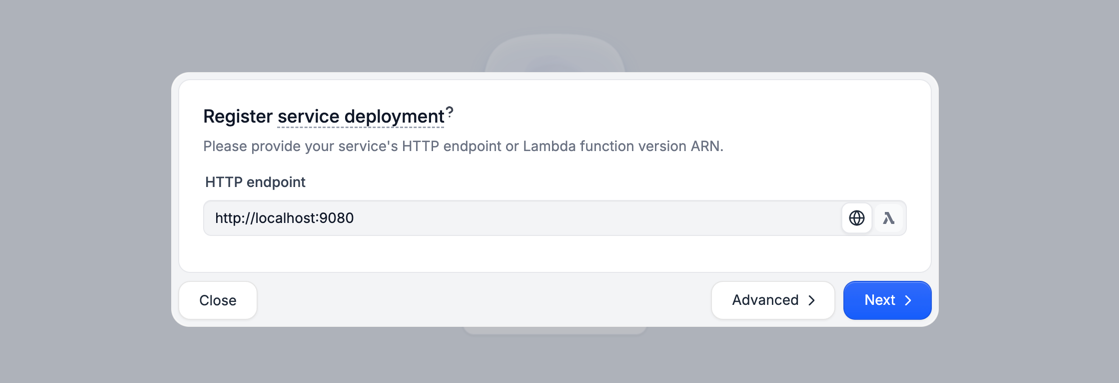
http://host.docker.internal:9080 instead of http://localhost:9080.Restate Cloud
Restate Cloud
Send weather requests to the AI Agent
http://localhost:9070, click on your service and then on playground.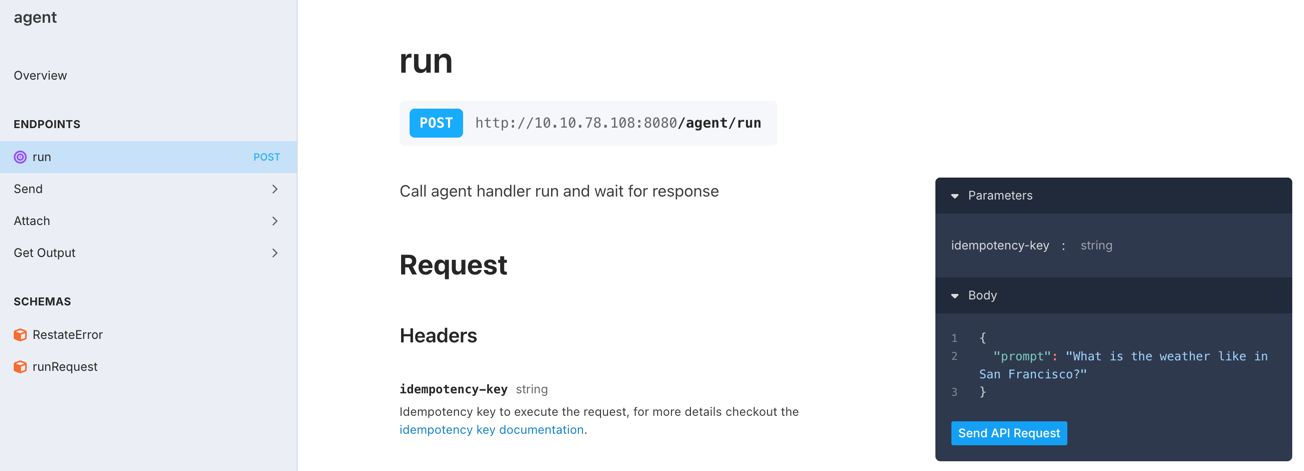
curl:curl localhost:8080/restate/call/agent/run --json '{"prompt": "What is the weather in San Francisco?"}'
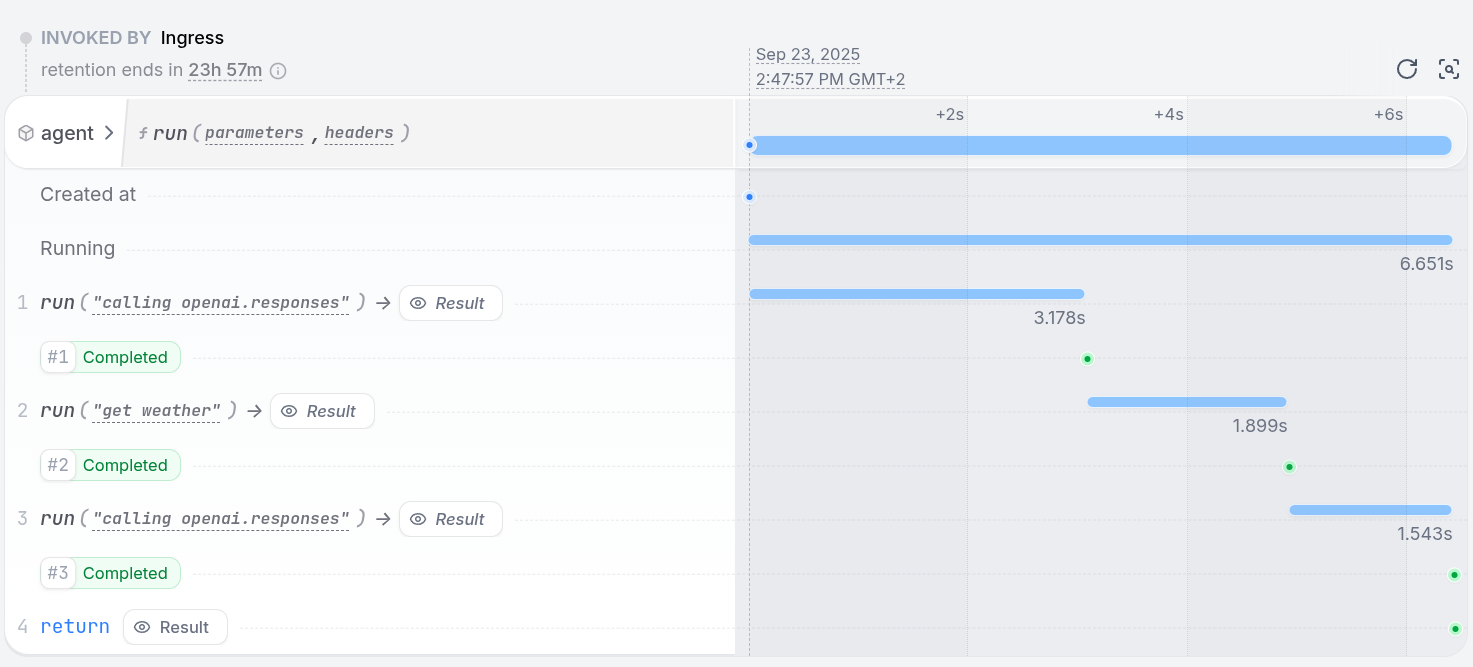
The weather in San Francisco is currently 23°C and sunny..Congratulations, you just ran a Durable AI Agent!
durableCalls middleware to persist LLM responses and using Restate Context actions (e.g. ctx.run) to make the tool executions resilient:import * as restate from "@restatedev/restate-sdk";
import { durableCalls } from "@restatedev/vercel-ai-middleware";
import { openai } from "@ai-sdk/openai";
import { generateText, stepCountIs, tool, wrapLanguageModel } from "ai";
import { z } from "zod";
// TOOL
async function getWeather(ctx: restate.Context, city: string) {
// Do durable steps using the Restate context
return ctx.run(`get weather ${city}`, () => {
// Simulate calling the weather API
return {temperature: 23, description: `Sunny and warm.`}
})
}
// AGENT
const run = async (ctx: restate.Context, { prompt }: { prompt: string }) => {
const model = wrapLanguageModel({
model: openai("gpt-5.4"),
// Persist LLM responses
middleware: durableCalls(ctx, { maxRetryAttempts: 3 }),
});
const { text } = await generateText({
model,
system: "You are a helpful agent that provides weather updates.",
prompt,
tools: {
getWeather: tool({
description: "Get the current weather for a given city.",
inputSchema: z.object({ city: z.string() }),
execute: async ({ city }) => getWeather(ctx, city),
}),
},
stopWhen: [stepCountIs(5)],
providerOptions: { openai: { parallelToolCalls: false } },
});
return text;
};
// AGENT SERVICE
const agent = restate.service({
name: "agent",
handlers: {
run: restate.createServiceHandler({
input: restate.serde.schema(z.object({
prompt: z.string().default("What's the weather in San Francisco?"),
})),
}, run),
},
});
restate.serve({ services: [agent] });
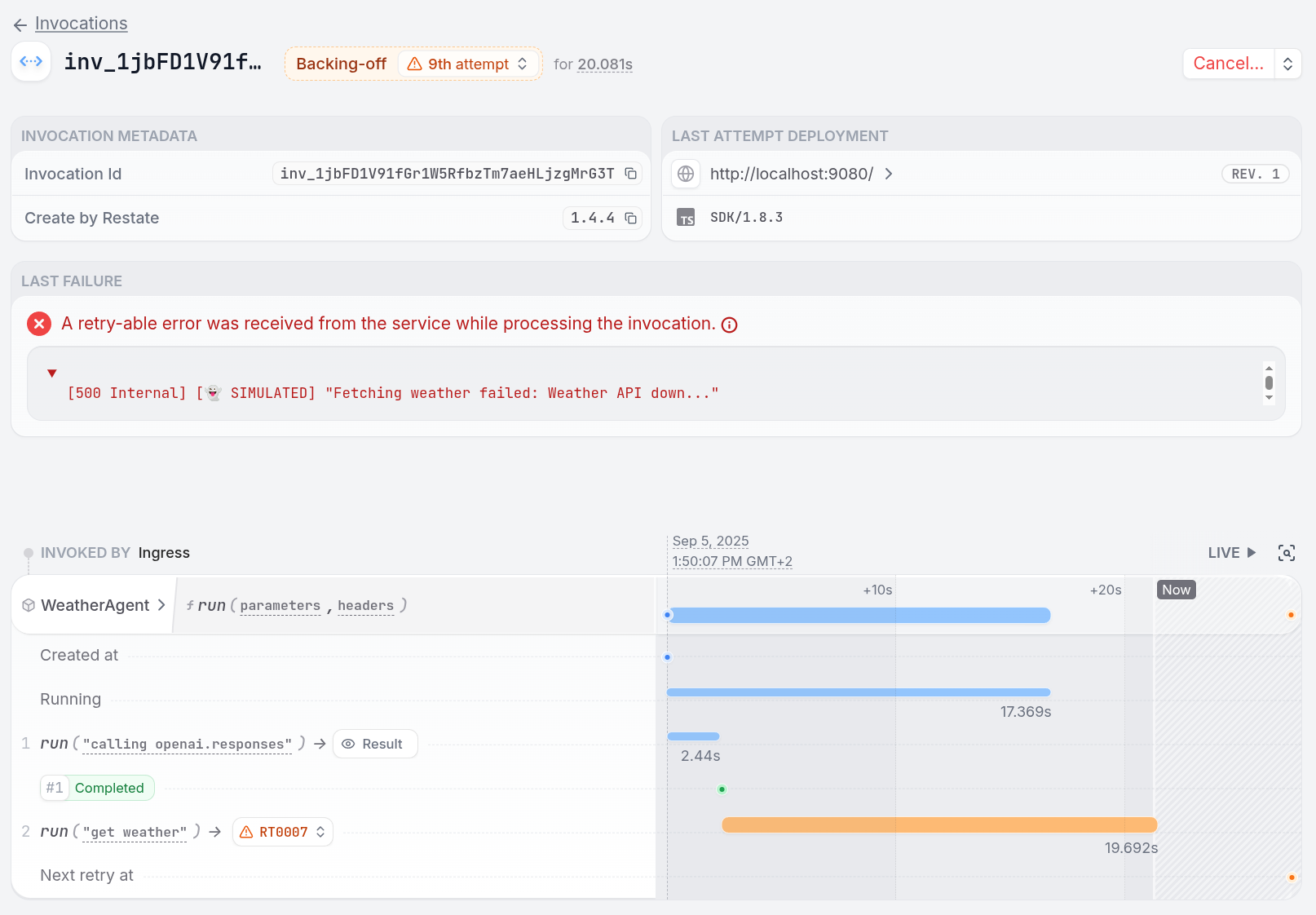
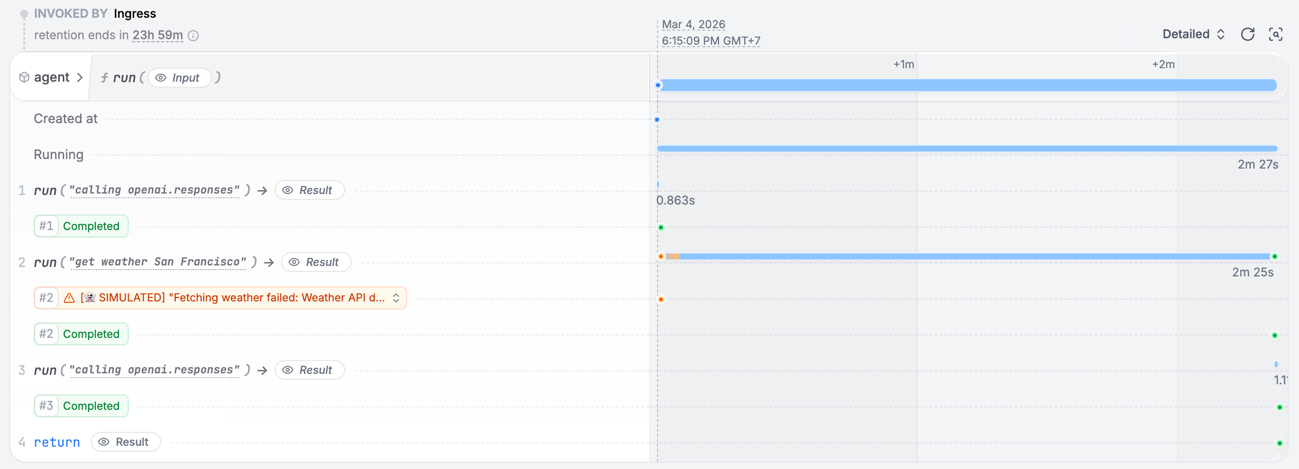
See how a failing tool call is retried
See how a failing tool call is retried
get_weather function:throw new Error(`[👻 SIMULATED] "Fetching weather failed: Weather API down..."`);
Install Restate Server & CLI
- Homebrew
- Download binaries
- npm
- Docker
brew install restatedev/tap/restate-server restatedev/tap/restate
restate-server
BIN=/usr/local/bin && RESTATE_PLATFORM=x86_64-apple-darwin && \
curl -L --remote-name-all https://restate.gateway.scarf.sh/latest/restate-{server,cli}-$RESTATE_PLATFORM.tar.xz && \
tar -xvf restate-server-$RESTATE_PLATFORM.tar.xz --strip-components=1 restate-server-$RESTATE_PLATFORM/restate-server && \
tar -xvf restate-cli-$RESTATE_PLATFORM.tar.xz --strip-components=1 restate-cli-$RESTATE_PLATFORM/restate && \
chmod +x restate restate-server && \
sudo mv restate $BIN && \
sudo mv restate-server $BIN
BIN=/usr/local/bin && RESTATE_PLATFORM=aarch64-apple-darwin && \
curl -L --remote-name-all https://restate.gateway.scarf.sh/latest/restate-{server,cli}-$RESTATE_PLATFORM.tar.xz && \
tar -xvf restate-server-$RESTATE_PLATFORM.tar.xz --strip-components=1 restate-server-$RESTATE_PLATFORM/restate-server && \
tar -xvf restate-cli-$RESTATE_PLATFORM.tar.xz --strip-components=1 restate-cli-$RESTATE_PLATFORM/restate && \
chmod +x restate restate-server && \
sudo mv restate $BIN && \
sudo mv restate-server $BIN
BIN=$HOME/.local/bin && RESTATE_PLATFORM=x86_64-unknown-linux-musl && \
curl -L --remote-name-all https://restate.gateway.scarf.sh/latest/restate-{server,cli}-$RESTATE_PLATFORM.tar.xz && \
tar -xvf restate-server-$RESTATE_PLATFORM.tar.xz --strip-components=1 restate-server-$RESTATE_PLATFORM/restate-server && \
tar -xvf restate-cli-$RESTATE_PLATFORM.tar.xz --strip-components=1 restate-cli-$RESTATE_PLATFORM/restate && \
chmod +x restate restate-server && \
mv restate $BIN && \
mv restate-server $BIN
BIN=$HOME/.local/bin && RESTATE_PLATFORM=aarch64-unknown-linux-musl && \
curl -L --remote-name-all https://restate.gateway.scarf.sh/latest/restate-{server,cli}-$RESTATE_PLATFORM.tar.xz && \
tar -xvf restate-server-$RESTATE_PLATFORM.tar.xz --strip-components=1 restate-server-$RESTATE_PLATFORM/restate-server && \
tar -xvf restate-cli-$RESTATE_PLATFORM.tar.xz --strip-components=1 restate-cli-$RESTATE_PLATFORM/restate && \
chmod +x restate restate-server && \
mv restate $BIN && \
mv restate-server $BIN
restate-server
npm install --global @restatedev/restate-server@latest @restatedev/restate@latest
restate-server
docker run --name restate_dev --rm \
-p 8080:8080 -p 9070:9070 -p 9071:9071 \
--add-host=host.docker.internal:host-gateway \
docker.restate.dev/restatedev/restate:latest
docker run -it --network=host \
docker.restate.dev/restatedev/restate-cli:latest \
invocations ls
invocations ls with any CLI subcommand.http://localhost:9070) after starting the Restate Server.Get the AI Agent template
restate example python-openai-agents-template && cd python-openai-agents-template
Run the AI Agent service
export OPENAI_API_KEY=your_openai_api_key_here
uv run .
Register the agent service
http://localhost:9080), so Restate can discover and register the services and handlers behind this endpoint.
You can do this via the UI (http://localhost:9070):http://host.docker.internal:9080 instead of http://localhost:9080.Restate Cloud
Restate Cloud
Send weather requests to the AI Agent
http://localhost:9070, click on your service and then on playground.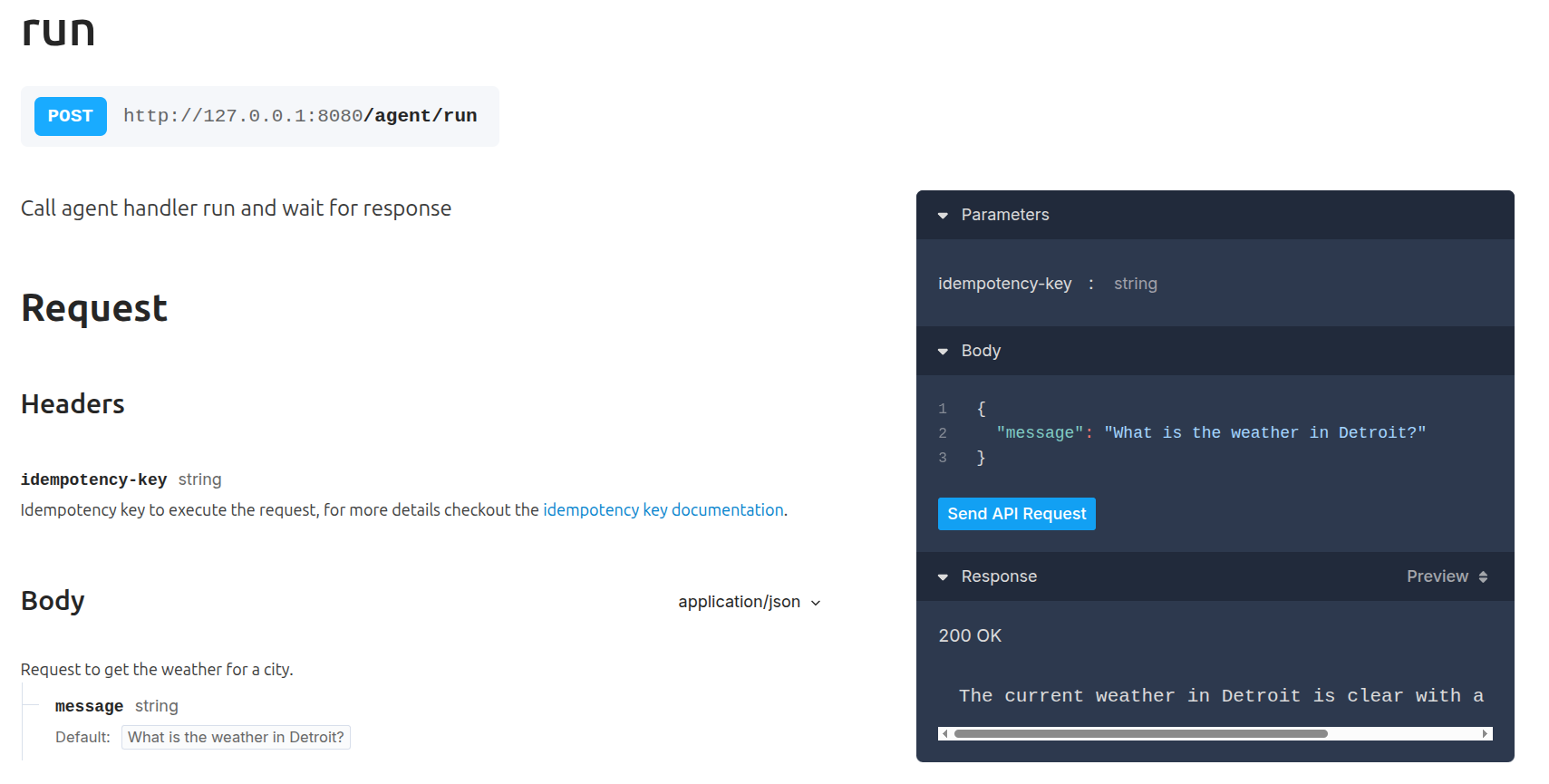
curl:curl localhost:8080/restate/call/agent/run --json '{"message": "What is the weather in San Francisco?"}'
The weather in San Francisco is sunny and 23°C.Congratulations, you just ran a Durable AI Agent!
DurableRunner to persist LLM responses, and by using Restate Context actions (e.g. restate_context().run_typed) to make the tool executions resilient:import restate
from agents import Agent
from pydantic import BaseModel
from restate.ext.openai import restate_context, DurableRunner, durable_function_tool
class WeatherPrompt(BaseModel):
message: str = "What is the weather in San Francisco?"
# TOOL
@durable_function_tool
async def get_weather(city: str) -> dict:
"""Get the current weather for a given city."""
# Do durable steps using the Restate context
async def call_weather_api(city: str) -> dict:
return {"temperature": 23, "description": "Sunny and warm."}
return await restate_context().run_typed(
f"Get weather {city}", call_weather_api, city=city
)
# AGENT
weather_agent = Agent(
name="WeatherAgent",
instructions="You are a helpful agent that provides weather updates.",
tools=[get_weather],
)
# AGENT SERVICE
agent_service = restate.Service("agent")
@agent_service.handler()
async def run(_ctx: restate.Context, req: WeatherPrompt) -> str:
# Runner that persists the agent execution for recoverability
result = await DurableRunner.run(weather_agent, req.message)
return result.final_output
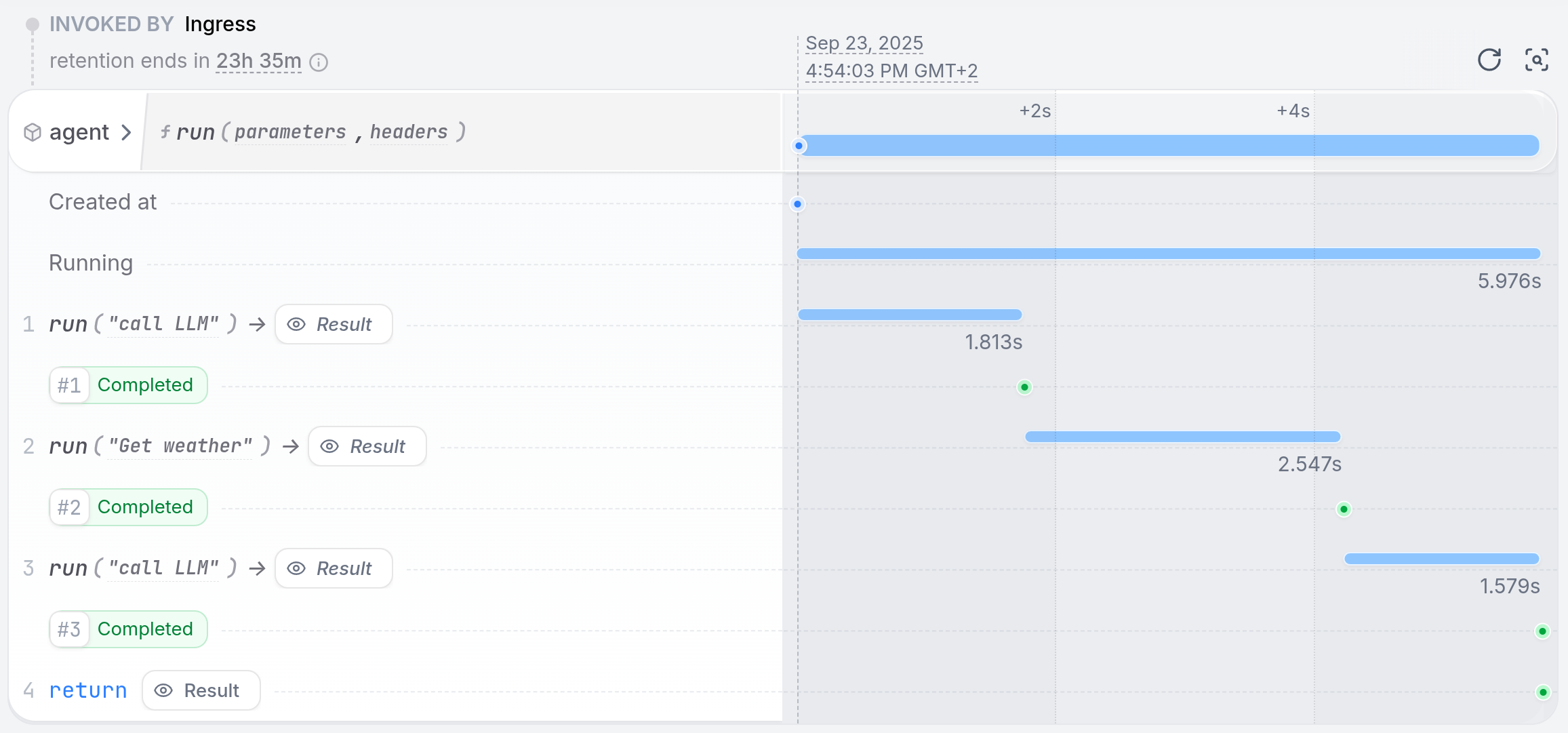
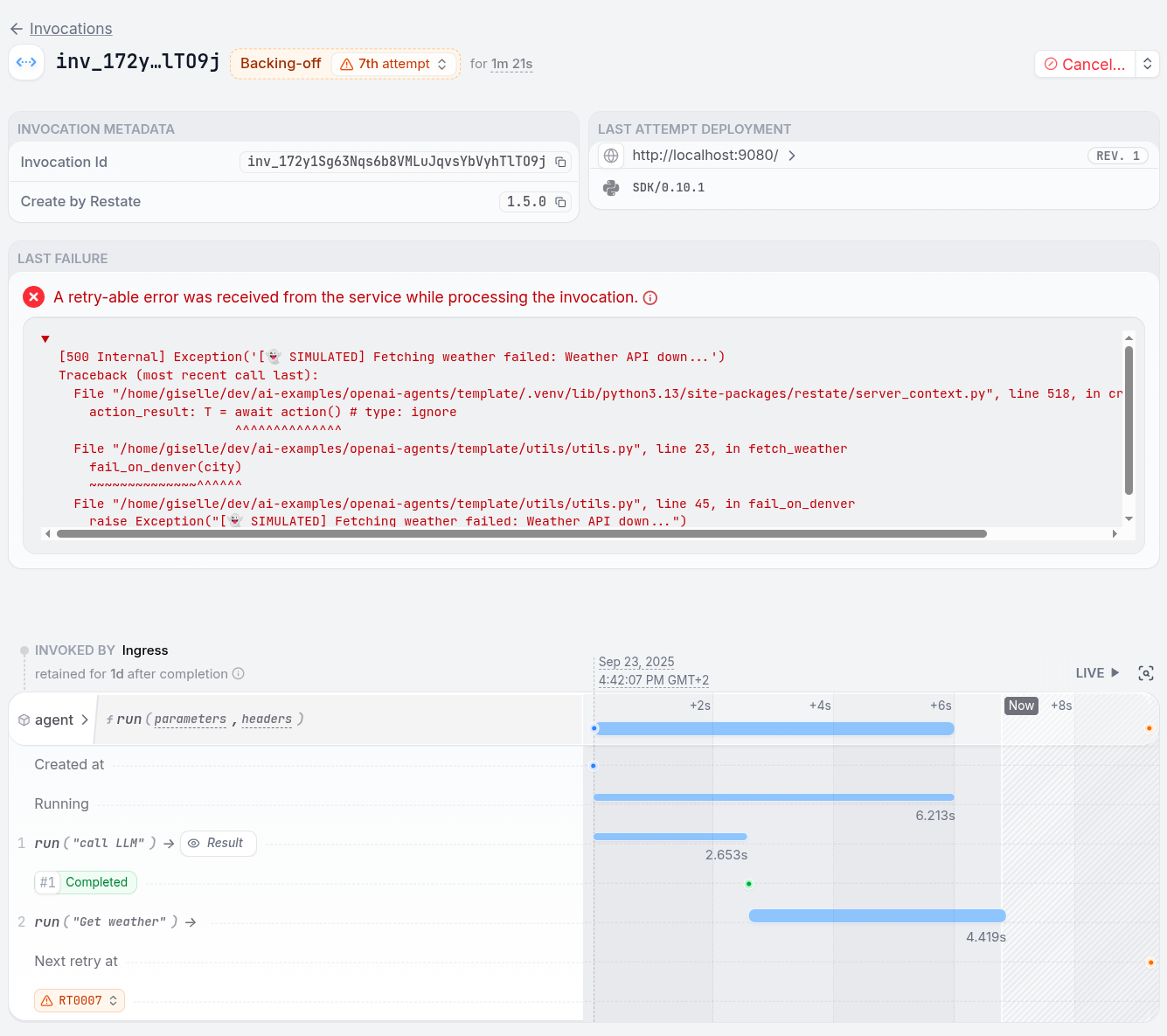
See how a failing tool call is retried
See how a failing tool call is retried
get_weather function:raise Exception("[👻 SIMULATED] Fetching weather failed: Weather API down...")
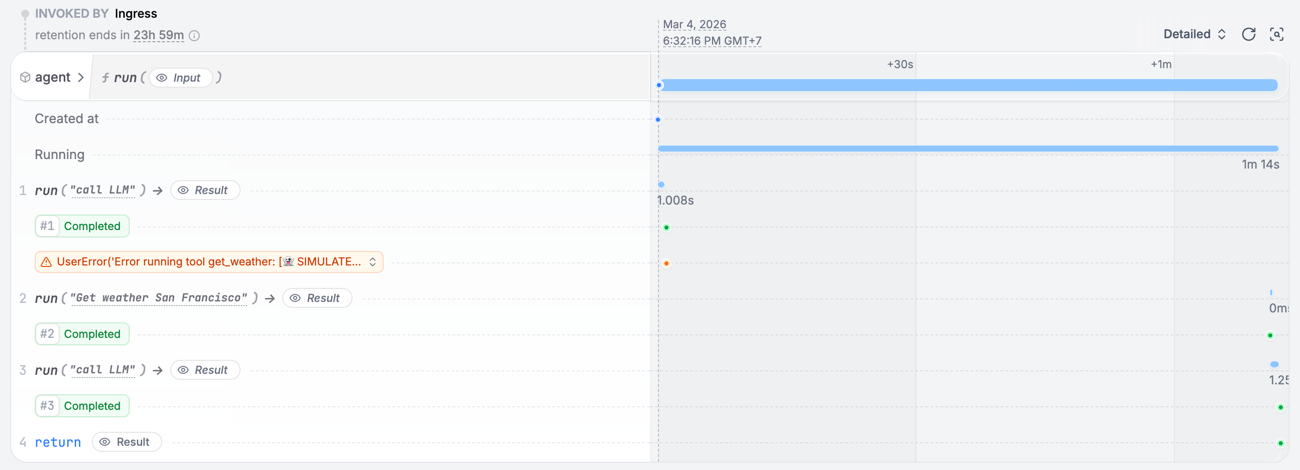
- Python >= v3.12
- uv
- Google API key (get one at Google AI Studio)
Install Restate Server & CLI
- Homebrew
- Download binaries
- npm
- Docker
brew install restatedev/tap/restate-server restatedev/tap/restate
restate-server
BIN=/usr/local/bin && RESTATE_PLATFORM=x86_64-apple-darwin && \
curl -L --remote-name-all https://restate.gateway.scarf.sh/latest/restate-{server,cli}-$RESTATE_PLATFORM.tar.xz && \
tar -xvf restate-server-$RESTATE_PLATFORM.tar.xz --strip-components=1 restate-server-$RESTATE_PLATFORM/restate-server && \
tar -xvf restate-cli-$RESTATE_PLATFORM.tar.xz --strip-components=1 restate-cli-$RESTATE_PLATFORM/restate && \
chmod +x restate restate-server && \
sudo mv restate $BIN && \
sudo mv restate-server $BIN
BIN=/usr/local/bin && RESTATE_PLATFORM=aarch64-apple-darwin && \
curl -L --remote-name-all https://restate.gateway.scarf.sh/latest/restate-{server,cli}-$RESTATE_PLATFORM.tar.xz && \
tar -xvf restate-server-$RESTATE_PLATFORM.tar.xz --strip-components=1 restate-server-$RESTATE_PLATFORM/restate-server && \
tar -xvf restate-cli-$RESTATE_PLATFORM.tar.xz --strip-components=1 restate-cli-$RESTATE_PLATFORM/restate && \
chmod +x restate restate-server && \
sudo mv restate $BIN && \
sudo mv restate-server $BIN
BIN=$HOME/.local/bin && RESTATE_PLATFORM=x86_64-unknown-linux-musl && \
curl -L --remote-name-all https://restate.gateway.scarf.sh/latest/restate-{server,cli}-$RESTATE_PLATFORM.tar.xz && \
tar -xvf restate-server-$RESTATE_PLATFORM.tar.xz --strip-components=1 restate-server-$RESTATE_PLATFORM/restate-server && \
tar -xvf restate-cli-$RESTATE_PLATFORM.tar.xz --strip-components=1 restate-cli-$RESTATE_PLATFORM/restate && \
chmod +x restate restate-server && \
mv restate $BIN && \
mv restate-server $BIN
BIN=$HOME/.local/bin && RESTATE_PLATFORM=aarch64-unknown-linux-musl && \
curl -L --remote-name-all https://restate.gateway.scarf.sh/latest/restate-{server,cli}-$RESTATE_PLATFORM.tar.xz && \
tar -xvf restate-server-$RESTATE_PLATFORM.tar.xz --strip-components=1 restate-server-$RESTATE_PLATFORM/restate-server && \
tar -xvf restate-cli-$RESTATE_PLATFORM.tar.xz --strip-components=1 restate-cli-$RESTATE_PLATFORM/restate && \
chmod +x restate restate-server && \
mv restate $BIN && \
mv restate-server $BIN
restate-server
npm install --global @restatedev/restate-server@latest @restatedev/restate@latest
restate-server
docker run --name restate_dev --rm \
-p 8080:8080 -p 9070:9070 -p 9071:9071 \
--add-host=host.docker.internal:host-gateway \
docker.restate.dev/restatedev/restate:latest
docker run -it --network=host \
docker.restate.dev/restatedev/restate-cli:latest \
invocations ls
invocations ls with any CLI subcommand.http://localhost:9070) after starting the Restate Server.Get the AI Agent template
restate example python-google-adk-template && cd python-google-adk-template
Run the AI Agent service
export GOOGLE_API_KEY=your_google_api_key_here
uv run .
Register the agent service
http://localhost:9080), so Restate can discover and register the services and handlers behind this endpoint.
You can do this via the UI (http://localhost:9070):http://host.docker.internal:9080 instead of http://localhost:9080.Restate Cloud
Restate Cloud
Send weather requests to the AI Agent
http://localhost:9070, click on your service and then on playground.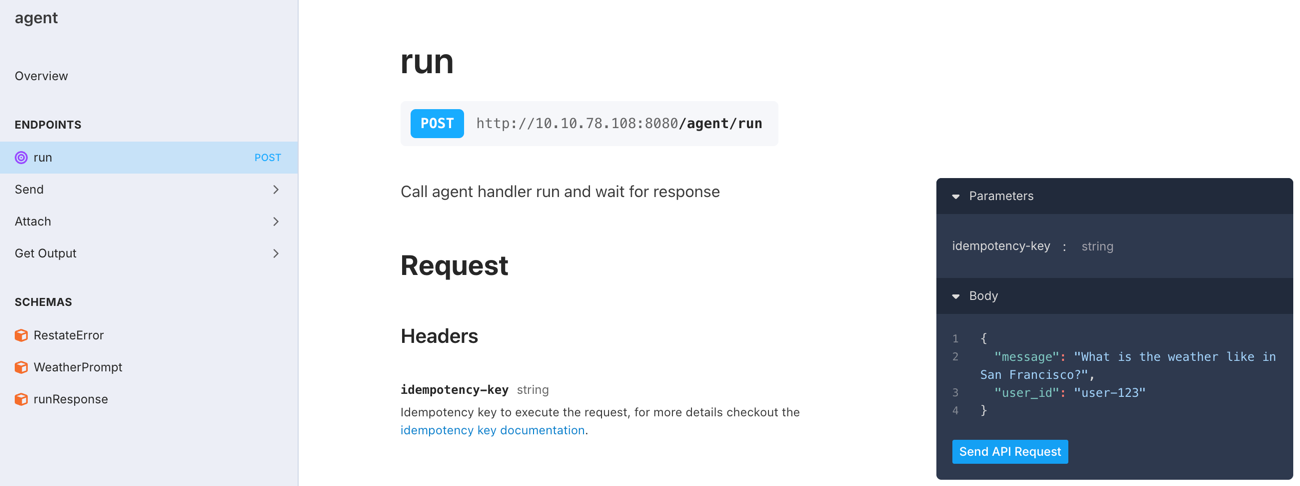
curl:curl localhost:8080/restate/call/agent/run --json '{
"message": "What is the weather like in San Francisco?",
"user_id": "user-123"
}'
The weather in San Francisco is currently 23°C and sunny.Congratulations, you just ran a Durable AI Agent!
RestatePlugin to the Google ADK App for durable model calls, and by using Restate Context actions (e.g. restate_context().run_typed) to make the tool executions resilient:import restate
from restate.ext.adk import RestatePlugin, restate_context
from google.adk import Runner
from google.adk.apps import App
from google.adk.sessions import InMemorySessionService
from google.genai.types import Content, Part
from google.adk.agents.llm_agent import Agent
from pydantic import BaseModel
class WeatherPrompt(BaseModel):
user_id: str = "user-123"
message: str = "What is the weather like in San Francisco?"
# TOOL
async def get_weather(city: str) -> dict:
"""Get the current weather for a given city."""
# Do durable steps using the Restate context
async def call_weather_api(city: str) -> dict:
return {"temperature": 23, "description": "Sunny and warm."}
return await restate_context().run_typed(
f"Get weather {city}", call_weather_api, city=city
)
# AGENT
# Specify your agent in the default ADK way
agent = Agent(
model="gemini-2.5-flash",
name="weather_agent",
instruction="You are a helpful agent that provides weather updates.",
tools=[get_weather],
)
APP_NAME = "agents"
app = App(name=APP_NAME, root_agent=agent, plugins=[RestatePlugin()])
session_service = InMemorySessionService()
# AGENT SERVICE + HANDLER
agent_service = restate.Service("agent")
@agent_service.handler()
async def run(ctx: restate.Context, req: WeatherPrompt) -> str | None:
# Start new session
session_id = str(ctx.uuid())
session = await session_service.get_session(
app_name=APP_NAME, user_id=req.user_id, session_id=session_id
)
if not session:
await session_service.create_session(
app_name=APP_NAME, user_id=req.user_id, session_id=session_id
)
# Run the durable agent
runner = Runner(app=app, session_service=session_service)
events = runner.run_async(
user_id=req.user_id,
session_id=session_id,
new_message=Content(role="user", parts=[Part.from_text(text=req.message)]),
)
final_response = None
async for event in events:
if event.is_final_response() and event.content and event.content.parts:
if event.content.parts[0].text:
final_response = event.content.parts[0].text
return final_response
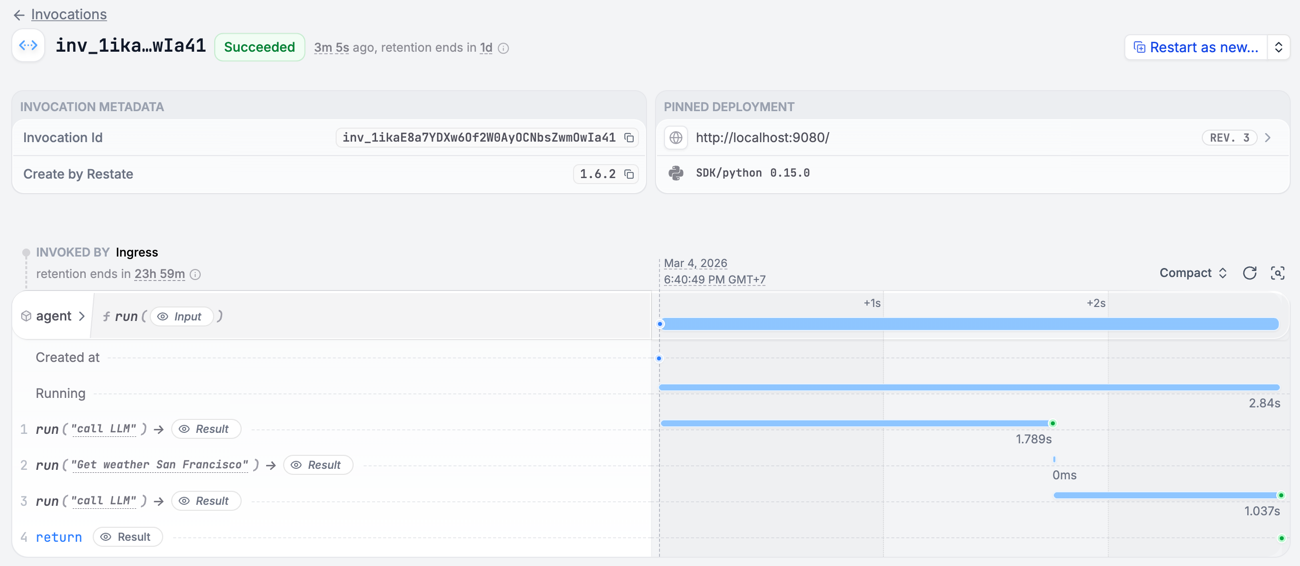
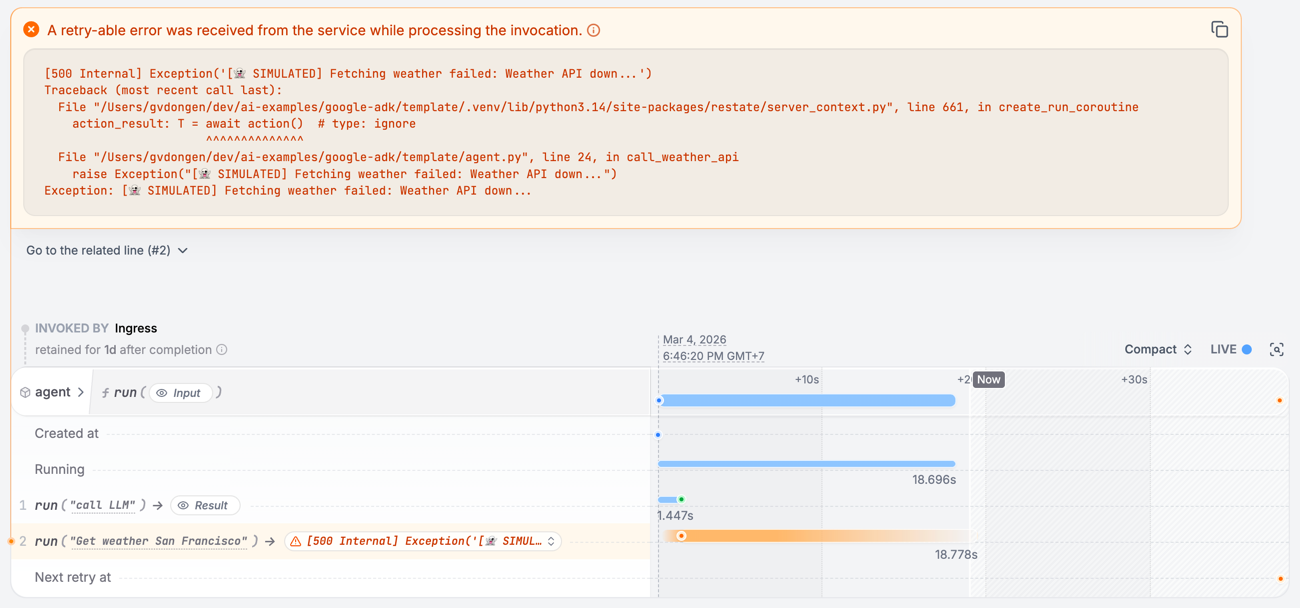
See how a failing tool call is retried
See how a failing tool call is retried
get_weather function:raise Exception("[👻 SIMULATED] Fetching weather failed: Weather API down...")
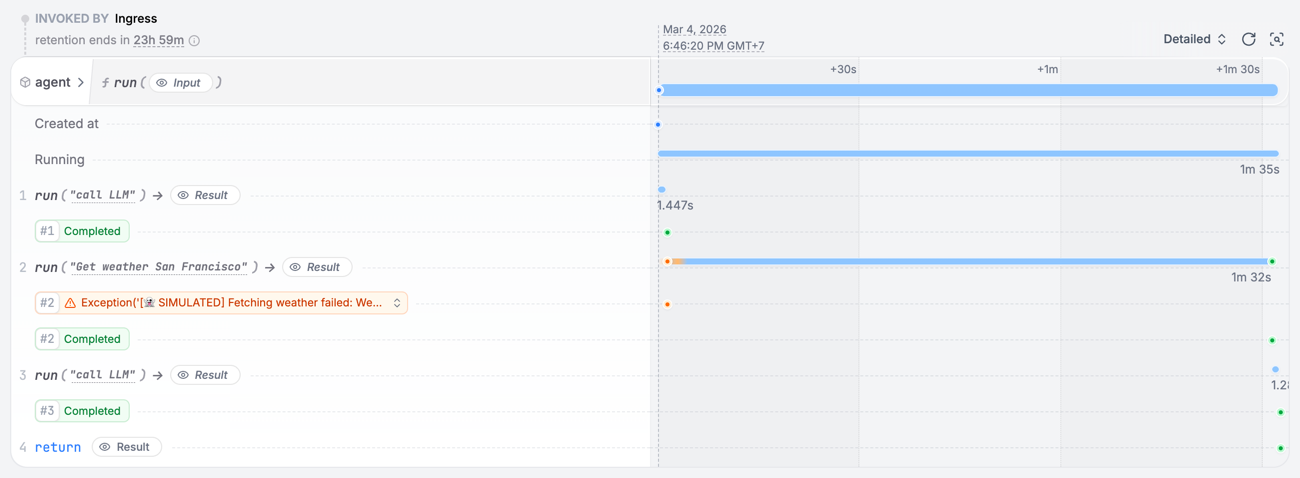
Install Restate Server & CLI
- Homebrew
- Download binaries
- npm
- Docker
brew install restatedev/tap/restate-server restatedev/tap/restate
restate-server
BIN=/usr/local/bin && RESTATE_PLATFORM=x86_64-apple-darwin && \
curl -L --remote-name-all https://restate.gateway.scarf.sh/latest/restate-{server,cli}-$RESTATE_PLATFORM.tar.xz && \
tar -xvf restate-server-$RESTATE_PLATFORM.tar.xz --strip-components=1 restate-server-$RESTATE_PLATFORM/restate-server && \
tar -xvf restate-cli-$RESTATE_PLATFORM.tar.xz --strip-components=1 restate-cli-$RESTATE_PLATFORM/restate && \
chmod +x restate restate-server && \
sudo mv restate $BIN && \
sudo mv restate-server $BIN
BIN=/usr/local/bin && RESTATE_PLATFORM=aarch64-apple-darwin && \
curl -L --remote-name-all https://restate.gateway.scarf.sh/latest/restate-{server,cli}-$RESTATE_PLATFORM.tar.xz && \
tar -xvf restate-server-$RESTATE_PLATFORM.tar.xz --strip-components=1 restate-server-$RESTATE_PLATFORM/restate-server && \
tar -xvf restate-cli-$RESTATE_PLATFORM.tar.xz --strip-components=1 restate-cli-$RESTATE_PLATFORM/restate && \
chmod +x restate restate-server && \
sudo mv restate $BIN && \
sudo mv restate-server $BIN
BIN=$HOME/.local/bin && RESTATE_PLATFORM=x86_64-unknown-linux-musl && \
curl -L --remote-name-all https://restate.gateway.scarf.sh/latest/restate-{server,cli}-$RESTATE_PLATFORM.tar.xz && \
tar -xvf restate-server-$RESTATE_PLATFORM.tar.xz --strip-components=1 restate-server-$RESTATE_PLATFORM/restate-server && \
tar -xvf restate-cli-$RESTATE_PLATFORM.tar.xz --strip-components=1 restate-cli-$RESTATE_PLATFORM/restate && \
chmod +x restate restate-server && \
mv restate $BIN && \
mv restate-server $BIN
BIN=$HOME/.local/bin && RESTATE_PLATFORM=aarch64-unknown-linux-musl && \
curl -L --remote-name-all https://restate.gateway.scarf.sh/latest/restate-{server,cli}-$RESTATE_PLATFORM.tar.xz && \
tar -xvf restate-server-$RESTATE_PLATFORM.tar.xz --strip-components=1 restate-server-$RESTATE_PLATFORM/restate-server && \
tar -xvf restate-cli-$RESTATE_PLATFORM.tar.xz --strip-components=1 restate-cli-$RESTATE_PLATFORM/restate && \
chmod +x restate restate-server && \
mv restate $BIN && \
mv restate-server $BIN
restate-server
npm install --global @restatedev/restate-server@latest @restatedev/restate@latest
restate-server
docker run --name restate_dev --rm \
-p 8080:8080 -p 9070:9070 -p 9071:9071 \
--add-host=host.docker.internal:host-gateway \
docker.restate.dev/restatedev/restate:latest
docker run -it --network=host \
docker.restate.dev/restatedev/restate-cli:latest \
invocations ls
invocations ls with any CLI subcommand.http://localhost:9070) after starting the Restate Server.Get the AI Agent template
restate example python-pydantic-ai-template && cd python-pydantic-ai-template
Run the AI Agent service
export OPENAI_API_KEY=your_openai_api_key_here
uv run .
Register the agent service
http://localhost:9080), so Restate can discover and register the services and handlers behind this endpoint.
You can do this via the UI (http://localhost:9070):http://host.docker.internal:9080 instead of http://localhost:9080.Restate Cloud
Restate Cloud
Send weather requests to the AI Agent
http://localhost:9070, click on your service and then on playground.curl:curl localhost:8080/restate/call/agent/run --json '{"message": "What is the weather in San Francisco?"}'
The weather in San Francisco is sunny and 23°C.Congratulations, you just ran a Durable AI Agent!
RestateAgent wrapper to persist LLM responses, and by using Restate Context actions (e.g. restate_context().run_typed) to make the tool executions resilient:import restate
from pydantic import BaseModel
from pydantic_ai import Agent, RunContext
from restate.ext.pydantic import RestateAgent, restate_context
class WeatherPrompt(BaseModel):
message: str = "What is the weather in San Francisco?"
# AGENT
weather_agent = Agent(
"openai:gpt-5.4",
system_prompt="You are a helpful agent that provides weather updates.",
)
@weather_agent.tool()
async def get_weather(_run_ctx: RunContext[None], city: str) -> dict:
"""Get the current weather for a given city."""
# Do durable steps using the Restate context
async def call_weather_api(city: str) -> dict:
return {"temperature": 23, "description": "Sunny and warm."}
return await restate_context().run_typed(
f"Get weather {city}", call_weather_api, city=city
)
# AGENT SERVICE
restate_agent = RestateAgent(weather_agent)
agent_service = restate.Service("agent")
@agent_service.handler()
async def run(_ctx: restate.Context, req: WeatherPrompt) -> str:
result = await restate_agent.run(req.message)
return result.output
See how a failing tool call is retried
See how a failing tool call is retried
get_weather function:raise Exception("[👻 SIMULATED] Fetching weather failed: Weather API down...")
Install Restate Server & CLI
- Homebrew
- Download binaries
- npm
- Docker
brew install restatedev/tap/restate-server restatedev/tap/restate
restate-server
BIN=/usr/local/bin && RESTATE_PLATFORM=x86_64-apple-darwin && \
curl -L --remote-name-all https://restate.gateway.scarf.sh/latest/restate-{server,cli}-$RESTATE_PLATFORM.tar.xz && \
tar -xvf restate-server-$RESTATE_PLATFORM.tar.xz --strip-components=1 restate-server-$RESTATE_PLATFORM/restate-server && \
tar -xvf restate-cli-$RESTATE_PLATFORM.tar.xz --strip-components=1 restate-cli-$RESTATE_PLATFORM/restate && \
chmod +x restate restate-server && \
sudo mv restate $BIN && \
sudo mv restate-server $BIN
BIN=/usr/local/bin && RESTATE_PLATFORM=aarch64-apple-darwin && \
curl -L --remote-name-all https://restate.gateway.scarf.sh/latest/restate-{server,cli}-$RESTATE_PLATFORM.tar.xz && \
tar -xvf restate-server-$RESTATE_PLATFORM.tar.xz --strip-components=1 restate-server-$RESTATE_PLATFORM/restate-server && \
tar -xvf restate-cli-$RESTATE_PLATFORM.tar.xz --strip-components=1 restate-cli-$RESTATE_PLATFORM/restate && \
chmod +x restate restate-server && \
sudo mv restate $BIN && \
sudo mv restate-server $BIN
BIN=$HOME/.local/bin && RESTATE_PLATFORM=x86_64-unknown-linux-musl && \
curl -L --remote-name-all https://restate.gateway.scarf.sh/latest/restate-{server,cli}-$RESTATE_PLATFORM.tar.xz && \
tar -xvf restate-server-$RESTATE_PLATFORM.tar.xz --strip-components=1 restate-server-$RESTATE_PLATFORM/restate-server && \
tar -xvf restate-cli-$RESTATE_PLATFORM.tar.xz --strip-components=1 restate-cli-$RESTATE_PLATFORM/restate && \
chmod +x restate restate-server && \
mv restate $BIN && \
mv restate-server $BIN
BIN=$HOME/.local/bin && RESTATE_PLATFORM=aarch64-unknown-linux-musl && \
curl -L --remote-name-all https://restate.gateway.scarf.sh/latest/restate-{server,cli}-$RESTATE_PLATFORM.tar.xz && \
tar -xvf restate-server-$RESTATE_PLATFORM.tar.xz --strip-components=1 restate-server-$RESTATE_PLATFORM/restate-server && \
tar -xvf restate-cli-$RESTATE_PLATFORM.tar.xz --strip-components=1 restate-cli-$RESTATE_PLATFORM/restate && \
chmod +x restate restate-server && \
mv restate $BIN && \
mv restate-server $BIN
restate-server
npm install --global @restatedev/restate-server@latest @restatedev/restate@latest
restate-server
docker run --name restate_dev --rm \
-p 8080:8080 -p 9070:9070 -p 9071:9071 \
--add-host=host.docker.internal:host-gateway \
docker.restate.dev/restatedev/restate:latest
docker run -it --network=host \
docker.restate.dev/restatedev/restate-cli:latest \
invocations ls
invocations ls with any CLI subcommand.http://localhost:9070) after starting the Restate Server.Get the AI Agent template
restate example python-langchain-template && cd python-langchain-template
Run the AI Agent service
export OPENAI_API_KEY=your_openai_api_key_here
uv run .
Register the agent service
http://localhost:9080), so Restate can discover and register the services and handlers behind this endpoint.
You can do this via the UI (http://localhost:9070):http://host.docker.internal:9080 instead of http://localhost:9080.Restate Cloud
Restate Cloud
Send weather requests to the AI Agent
http://localhost:9070, click on your service and then on playground.Or invoke via curl:curl localhost:8080/restate/call/agent/run --json '{"message": "What is the weather in San Francisco?"}'
The weather in San Francisco is sunny and 23°C.Congratulations, you just ran a Durable AI Agent!
RestateMiddleware to the LangChain agent so every LLM call is journaled, and by using Restate Context actions (e.g. restate_context().run_typed) inside tools to make side effects durable:import restate
from langchain.agents import create_agent
from langchain_core.messages import AnyMessage
from langchain_core.tools import tool
from langchain.chat_models import init_chat_model
from pydantic import BaseModel
from restate.ext.langchain import RestateMiddleware, restate_context
class WeatherPrompt(BaseModel):
message: str = "What is the weather in San Francisco?"
# TOOL
@tool
async def get_weather(city: str) -> dict:
"""Get the current weather for a given city."""
async def call_weather_api() -> dict:
return {"temperature": 23, "description": "Sunny and warm."}
# Durable step: results are journaled, so on retry we replay the value
# rather than re-hitting the API.
return await restate_context().run_typed(f"Get weather {city}", call_weather_api)
# AGENT
weather_agent = create_agent(
model=init_chat_model("openai:gpt-5.4"),
tools=[get_weather],
system_prompt="You are a helpful agent that provides weather updates.",
middleware=[RestateMiddleware()],
)
# AGENT SERVICE
agent_service = restate.Service("agent")
@agent_service.handler()
async def run(_ctx: restate.Context, req: WeatherPrompt) -> str:
result = await weather_agent.ainvoke(
{"messages": [{"role": "user", "content": req.message}]}
)
return result["messages"][-1].content
See how a failing tool call is retried
See how a failing tool call is retried
get_weather function:raise Exception("[👻 SIMULATED] Fetching weather failed: Weather API down...")
Install Restate Server & CLI
- Homebrew
- Download binaries
- npm
- Docker
brew install restatedev/tap/restate-server restatedev/tap/restate
restate-server
BIN=/usr/local/bin && RESTATE_PLATFORM=x86_64-apple-darwin && \
curl -L --remote-name-all https://restate.gateway.scarf.sh/latest/restate-{server,cli}-$RESTATE_PLATFORM.tar.xz && \
tar -xvf restate-server-$RESTATE_PLATFORM.tar.xz --strip-components=1 restate-server-$RESTATE_PLATFORM/restate-server && \
tar -xvf restate-cli-$RESTATE_PLATFORM.tar.xz --strip-components=1 restate-cli-$RESTATE_PLATFORM/restate && \
chmod +x restate restate-server && \
sudo mv restate $BIN && \
sudo mv restate-server $BIN
BIN=/usr/local/bin && RESTATE_PLATFORM=aarch64-apple-darwin && \
curl -L --remote-name-all https://restate.gateway.scarf.sh/latest/restate-{server,cli}-$RESTATE_PLATFORM.tar.xz && \
tar -xvf restate-server-$RESTATE_PLATFORM.tar.xz --strip-components=1 restate-server-$RESTATE_PLATFORM/restate-server && \
tar -xvf restate-cli-$RESTATE_PLATFORM.tar.xz --strip-components=1 restate-cli-$RESTATE_PLATFORM/restate && \
chmod +x restate restate-server && \
sudo mv restate $BIN && \
sudo mv restate-server $BIN
BIN=$HOME/.local/bin && RESTATE_PLATFORM=x86_64-unknown-linux-musl && \
curl -L --remote-name-all https://restate.gateway.scarf.sh/latest/restate-{server,cli}-$RESTATE_PLATFORM.tar.xz && \
tar -xvf restate-server-$RESTATE_PLATFORM.tar.xz --strip-components=1 restate-server-$RESTATE_PLATFORM/restate-server && \
tar -xvf restate-cli-$RESTATE_PLATFORM.tar.xz --strip-components=1 restate-cli-$RESTATE_PLATFORM/restate && \
chmod +x restate restate-server && \
mv restate $BIN && \
mv restate-server $BIN
BIN=$HOME/.local/bin && RESTATE_PLATFORM=aarch64-unknown-linux-musl && \
curl -L --remote-name-all https://restate.gateway.scarf.sh/latest/restate-{server,cli}-$RESTATE_PLATFORM.tar.xz && \
tar -xvf restate-server-$RESTATE_PLATFORM.tar.xz --strip-components=1 restate-server-$RESTATE_PLATFORM/restate-server && \
tar -xvf restate-cli-$RESTATE_PLATFORM.tar.xz --strip-components=1 restate-cli-$RESTATE_PLATFORM/restate && \
chmod +x restate restate-server && \
mv restate $BIN && \
mv restate-server $BIN
restate-server
npm install --global @restatedev/restate-server@latest @restatedev/restate@latest
restate-server
docker run --name restate_dev --rm \
-p 8080:8080 -p 9070:9070 -p 9071:9071 \
--add-host=host.docker.internal:host-gateway \
docker.restate.dev/restatedev/restate:latest
docker run -it --network=host \
docker.restate.dev/restatedev/restate-cli:latest \
invocations ls
invocations ls with any CLI subcommand.http://localhost:9070) after starting the Restate Server.Get the AI Agent template
restate example typescript-restate-agent-template && cd typescript-restate-agent-template
npm install
Run the AI Agent service
export OPENAI_API_KEY=your_openai_api_key_here
npm run dev
Register the service
http://localhost:9080), so Restate can discover and register the services and handlers behind this endpoint.
You can do this via the UI (http://localhost:9070):http://host.docker.internal:9080 instead of http://localhost:9080.Restate Cloud
Restate Cloud
Send weather requests to the AI Agent
http://localhost:9070, click on your service and then on playground.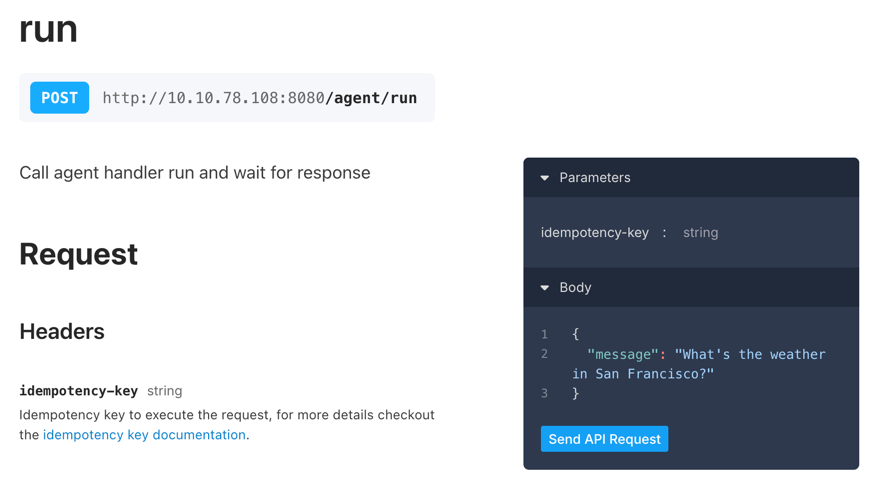
curl:curl localhost:8080/restate/call/agent/run --json '{"message": "What is the weather in San Francisco?"}'
The weather in San Francisco is currently 23°C and sunny.Congratulations, you just ran a Durable AI Agent!
ctx.run, so responses are not re-fetched and side effects are not duplicated on recovery:import * as restate from "@restatedev/restate-sdk";
import { tool } from "ai";
import { ModelMessage } from "ai";
import { callLLM, InputMessage, toolResult } from "./utils/utils";
import { z } from "zod";
const schema = restate.serde.schema;
// TOOL DEFINITIONS
const tools = {
getWeather: tool({
description: "Get current weather for a city",
inputSchema: z.object({
city: z.string().describe("The city to get weather for"),
}),
}),
// add more tools here
};
// TOOL IMPLEMENTATION
async function getWeather(ctx: restate.Context, city: string) {
return ctx.run(`get weather ${city}`, () => {
// Simulate calling a remote API
return { temperature: 23, description: "Sunny" };
});
}
// AGENT
const run = async (ctx: restate.Context, { message }: { message: string }) => {
const messages: ModelMessage[] = [
{ role: "system", content: "You are a helpful weather assistant." },
{ role: "user", content: message },
];
// Durable agent loop - Restate journals each step and recovers on failure
while (true) {
// 1. LLM call - journaled so it won't re-execute on recovery
// Use your preferred LLM SDK here
const result = await ctx.run(
"LLM call",
async () => await callLLM(messages, tools),
{ maxRetryAttempts: 3 },
);
messages.push(...result.messages);
// If the LLM returned a final answer, we're done
if (result.finishReason !== "tool-calls") return result.text;
// 2. Execute each tool call durably
for (const { toolName, toolCallId, input } of result.toolCalls) {
let output;
switch (toolName) {
case "getWeather":
output = await getWeather(ctx, (input as { city: string }).city);
break;
// add more tool calls here
default:
output = `Tool not found: ${toolName}`;
}
messages.push(toolResult(toolCallId, toolName, output));
}
}
};
// AGENT SERVICE
const agentService = restate.service({
name: "agent",
handlers: {
run: restate.createServiceHandler({ input: schema(InputMessage) }, run),
},
});
restate.serve({ services: [agentService], port: 9080 });
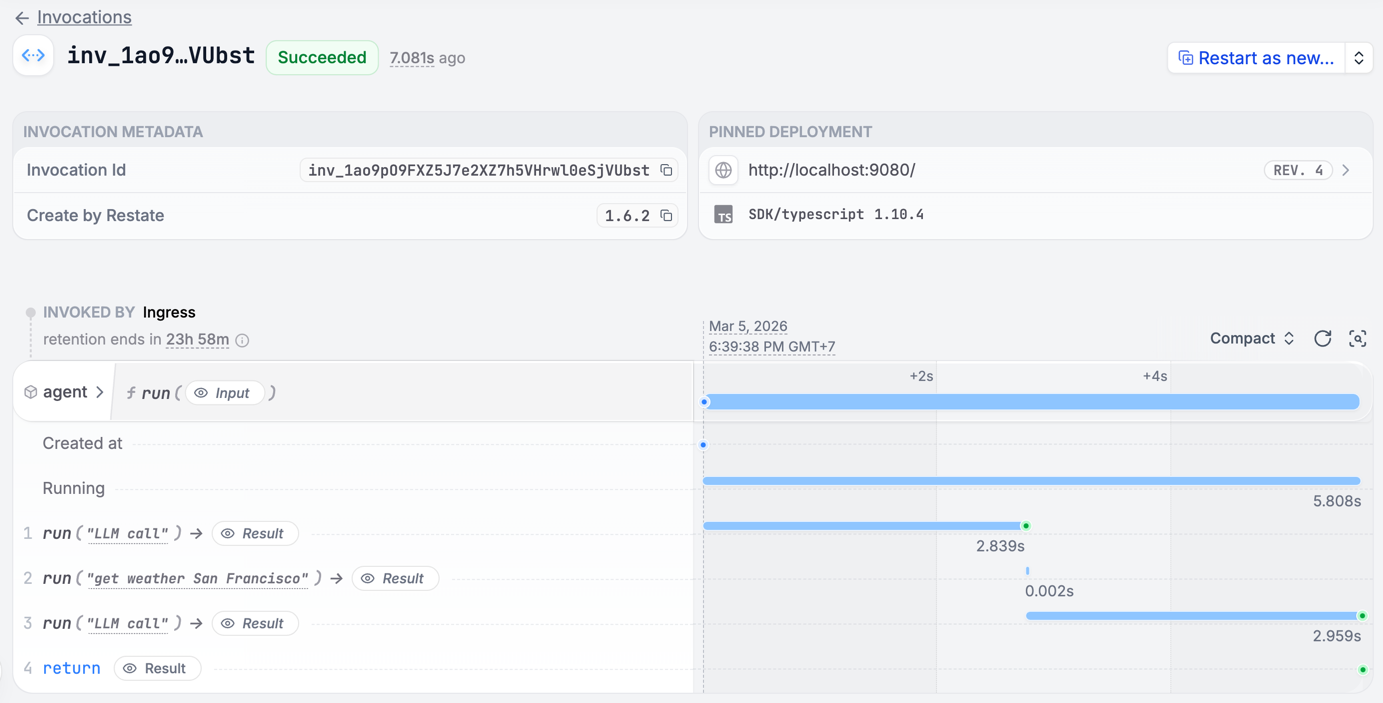
See how a failing tool call is retried
See how a failing tool call is retried
get_weather function:throw new Error(`[👻 SIMULATED] "Fetching weather failed: Weather API down..."`);
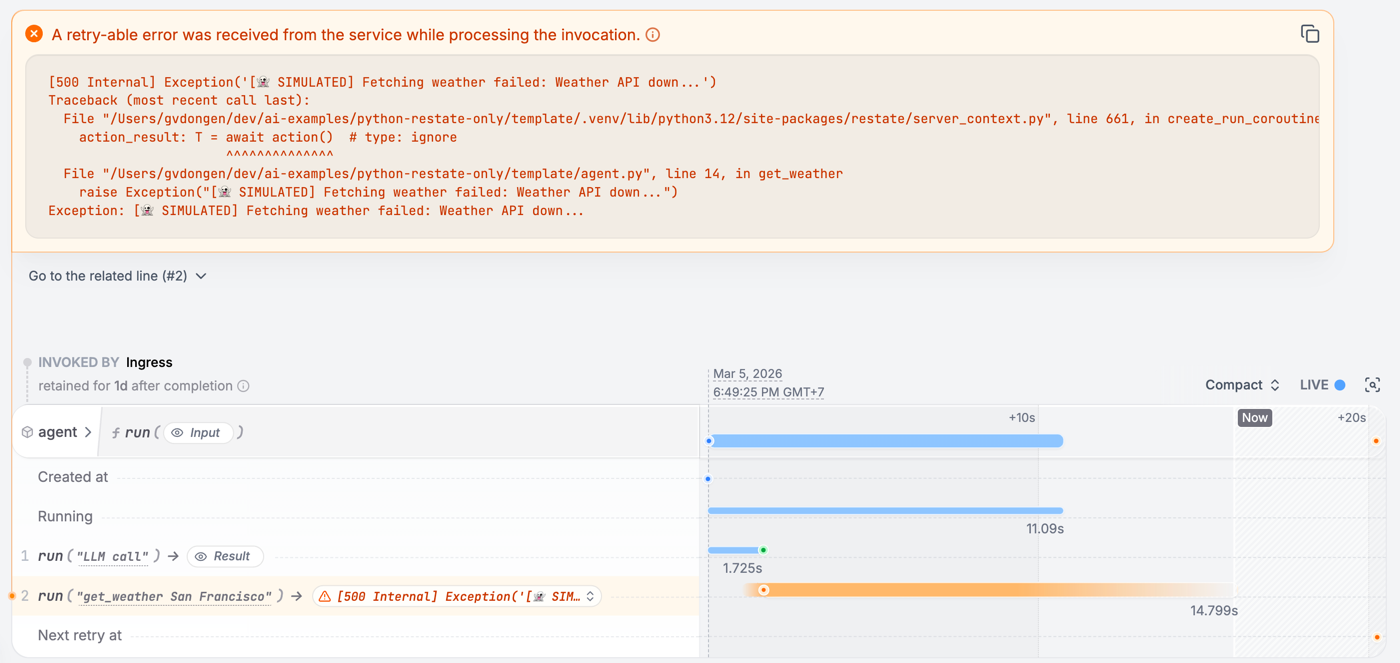
Install Restate Server & CLI
- Homebrew
- Download binaries
- npm
- Docker
brew install restatedev/tap/restate-server restatedev/tap/restate
restate-server
BIN=/usr/local/bin && RESTATE_PLATFORM=x86_64-apple-darwin && \
curl -L --remote-name-all https://restate.gateway.scarf.sh/latest/restate-{server,cli}-$RESTATE_PLATFORM.tar.xz && \
tar -xvf restate-server-$RESTATE_PLATFORM.tar.xz --strip-components=1 restate-server-$RESTATE_PLATFORM/restate-server && \
tar -xvf restate-cli-$RESTATE_PLATFORM.tar.xz --strip-components=1 restate-cli-$RESTATE_PLATFORM/restate && \
chmod +x restate restate-server && \
sudo mv restate $BIN && \
sudo mv restate-server $BIN
BIN=/usr/local/bin && RESTATE_PLATFORM=aarch64-apple-darwin && \
curl -L --remote-name-all https://restate.gateway.scarf.sh/latest/restate-{server,cli}-$RESTATE_PLATFORM.tar.xz && \
tar -xvf restate-server-$RESTATE_PLATFORM.tar.xz --strip-components=1 restate-server-$RESTATE_PLATFORM/restate-server && \
tar -xvf restate-cli-$RESTATE_PLATFORM.tar.xz --strip-components=1 restate-cli-$RESTATE_PLATFORM/restate && \
chmod +x restate restate-server && \
sudo mv restate $BIN && \
sudo mv restate-server $BIN
BIN=$HOME/.local/bin && RESTATE_PLATFORM=x86_64-unknown-linux-musl && \
curl -L --remote-name-all https://restate.gateway.scarf.sh/latest/restate-{server,cli}-$RESTATE_PLATFORM.tar.xz && \
tar -xvf restate-server-$RESTATE_PLATFORM.tar.xz --strip-components=1 restate-server-$RESTATE_PLATFORM/restate-server && \
tar -xvf restate-cli-$RESTATE_PLATFORM.tar.xz --strip-components=1 restate-cli-$RESTATE_PLATFORM/restate && \
chmod +x restate restate-server && \
mv restate $BIN && \
mv restate-server $BIN
BIN=$HOME/.local/bin && RESTATE_PLATFORM=aarch64-unknown-linux-musl && \
curl -L --remote-name-all https://restate.gateway.scarf.sh/latest/restate-{server,cli}-$RESTATE_PLATFORM.tar.xz && \
tar -xvf restate-server-$RESTATE_PLATFORM.tar.xz --strip-components=1 restate-server-$RESTATE_PLATFORM/restate-server && \
tar -xvf restate-cli-$RESTATE_PLATFORM.tar.xz --strip-components=1 restate-cli-$RESTATE_PLATFORM/restate && \
chmod +x restate restate-server && \
mv restate $BIN && \
mv restate-server $BIN
restate-server
npm install --global @restatedev/restate-server@latest @restatedev/restate@latest
restate-server
docker run --name restate_dev --rm \
-p 8080:8080 -p 9070:9070 -p 9071:9071 \
--add-host=host.docker.internal:host-gateway \
docker.restate.dev/restatedev/restate:latest
docker run -it --network=host \
docker.restate.dev/restatedev/restate-cli:latest \
invocations ls
invocations ls with any CLI subcommand.http://localhost:9070) after starting the Restate Server.Get the AI Agent template
restate example python-restate-agent-template && cd python-restate-agent-template
Run the AI Agent service
export OPENAI_API_KEY=your_openai_api_key_here
uv run .
Register the agent service
http://localhost:9080), so Restate can discover and register the services and handlers behind this endpoint.
You can do this via the UI (http://localhost:9070):http://host.docker.internal:9080 instead of http://localhost:9080.Restate Cloud
Restate Cloud
Send weather requests to the AI Agent
http://localhost:9070, click on your service and then on playground.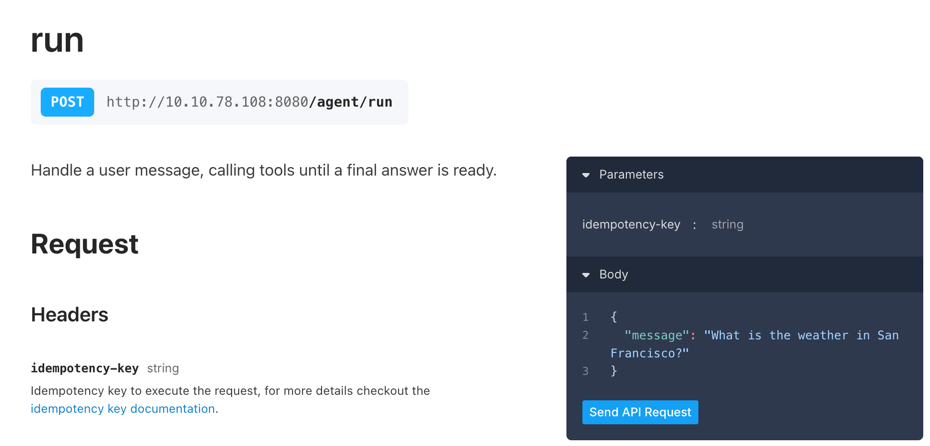
curl:curl localhost:8080/restate/call/agent/chat --json '{"message": "What is the weather in San Francisco?"}'
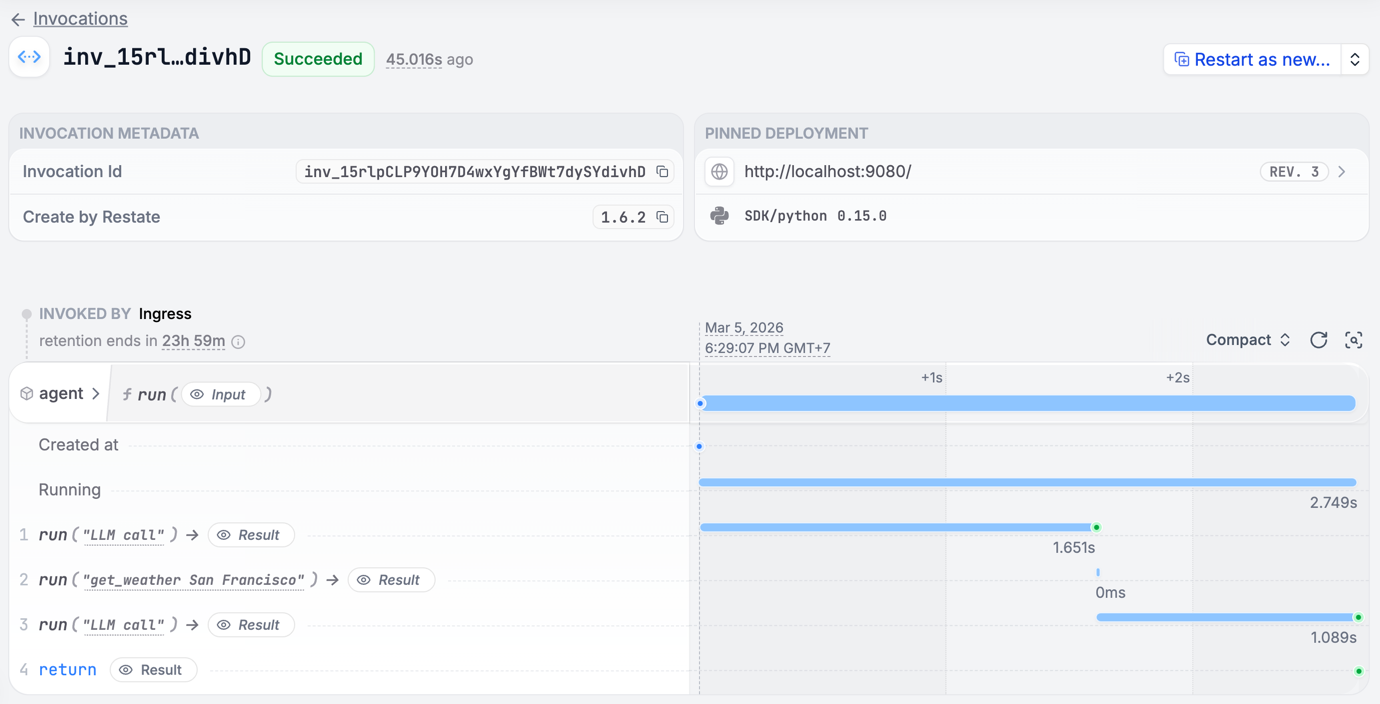
The weather in San Francisco is currently 23°C and sunny.Congratulations, you just ran a Durable AI Agent!
ctx.run/ctx.run_typed, so responses are not re-fetched and side effects are not duplicated on recovery:import json
import restate
from pydantic import BaseModel
from litellm import acompletion
from litellm.types.utils import Message
class WeatherPrompt(BaseModel):
message: str = "What is the weather in San Francisco?"
# TOOL IMPLEMENTATION
async def get_weather(city: str) -> str:
return json.dumps({"temperature": 23, "condition": "Sunny"})
# TOOL DEFINITIONS
TOOLS = [
{
"type": "function",
"function": {
"name": "get_weather",
"description": "Get the current weather for a city",
"parameters": {
"type": "object",
"properties": {
"city": {"type": "string", "description": "The city name"}
},
"required": ["city"],
},
},
}
]
# AGENT SERVICE
agent_service = restate.Service("agent")
@agent_service.handler()
async def run(ctx: restate.Context, message: WeatherPrompt) -> str | None:
"""Handle a user message, calling tools until a final answer is ready."""
messages = [
{"role": "system", "content": "You are a helpful weather assistant."},
{"role": "user", "content": message.message},
]
while True:
# Call the LLM
async def call_llm() -> Message:
resp = await acompletion(
model="gpt-5.4", messages=messages, tools=TOOLS
)
return resp.choices[0].message
response = await ctx.run("LLM call", call_llm)
messages.append(response.model_dump())
if not response.tool_calls:
return response.content
for tool_call in response.tool_calls:
city = json.loads(tool_call.function.arguments).get("city", "")
result = await ctx.run_typed(f"get_weather {city}", get_weather, city=city)
messages.append(
{"role": "tool", "tool_call_id": tool_call.id, "content": result}
)
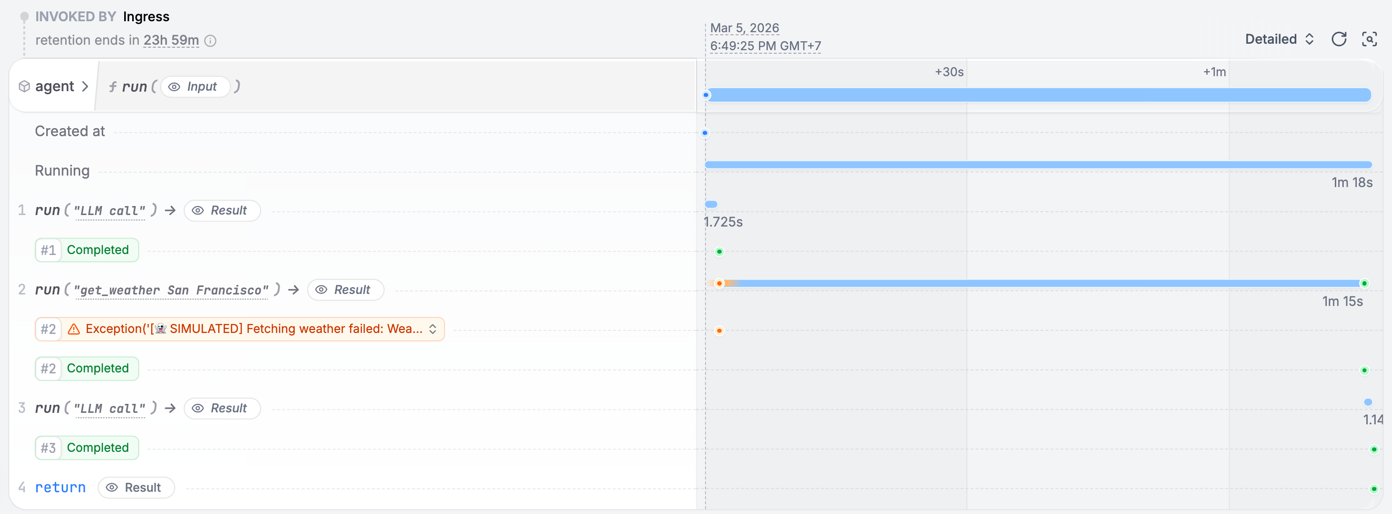
See how a failing tool call is retried
See how a failing tool call is retried
get_weather function:raise Exception("[👻 SIMULATED] Fetching weather failed: Weather API down...")